Home Blog Page 1935

TI OMAP5432 Dev Kit Boasts Linux and Android Support

Texas Instruments (TI) introduced a development kit for embedded designs based on its OMAP5432 SOC (system-on-chip), which integrates dual 1.5GHz ARM Cortex-A15 MPCore CPUs. The OMAP5432 EVP (evaluation module) targets high performance, graphically oriented, low power embedded applications such as human-machine interfaces, portable data terminals, digital signage, and medical monitoring devices. The OMAP5432 EVM’s 5 […]

Read more at LinuxGizmos

Set Up Your Own Git Mirror with New Grokmirror Tool

We know a few things about Git here at the Linux Foundation — after all, we employ Linus Torvalds, who is unquestionably the father of Git. This same Linus once famously said, back in 1996: “Only wimps make backups: real men just upload their important stuff on ftp, and let the rest of the world mirror it.” If you’re cringing, he did add a smiley face after that — but he was only half-joking, and Git in itself is proof that his views did not change much in the 10 years that separated that quote and the birth of Git.

Konstantin Ryabitsev sysadminThat’s what is so awesome about Git — it’s distributed. Every time someone clones a repository, not only do they get the latest source code, but also the entire history of the project. Every commit, every branch, every tag — everything. As long as someone somewhere in the world has a functioning clone of a git repository, they have in their hands a full, tamper-evident backup of the entire thing, from start to finish. If tomorrow the entirety of Github’s infrastructure is suddenly sucked into a black hole, it will certainly inconvenience a lot of people, but all software projects hosted on Github will survive.

However, despite the fact that Git repositories do not require centralized infrastructure, it is handy to have some place that is considered the “golden master” for the latest and greatest code. For example, git.kernel.org is known to be such a golden master for Linux kernel development; android.googlesource.com is the same for Android development, etc. It makes sense; while it’s true that anyone can host a Git repository on a random server in their basement, doing that for large projects will quickly become problematic.

This piggie had RAM

Take linux.git, for example. Did you know that whenever someone issues a fresh “git clone” against linux.git, git-daemon eats up 1.5GB of RAM on the server and then sends out 750MB of data? If 20 people decide to clone linux.git at the same time, that’s 30GB of RAM and 15GB of traffic. Unless you own a few datacentres with your own fibre links, or have the money to put things into the cloud (or both), you’ll realize that it would be really nice if you could spread the load around. In other words, you’ll want to set up a few mirrors.

On the surface, mirroring with Git is really easy. You just do “git clone –mirror” on the remote system and after it’s done, you have a full mirror of the repository. However, that’s just the easy first step. The real difficulty is keeping that mirror updated so it receives the commits from the master on a regular basis. You could set up a cron job that would do “git remote update” every 5 minutes, and for one or two repositories that would be just fine. However, if you are attempting to mirror hundreds and hundreds of repositories, not only will that cronjob not finish in 5 minutes, but the administrator of the master server will want to have a few sharp words with you.

More importantly, there is no way to discover when new repositories are added on the master, so there will always be intervention required to add new repositories and delete obsolete ones.

Yes, master

What you really need is a way for the master to let the mirrors know “hey, the following repositories have been updated — download the latest updates now.” Projects like gitolite solve this by setting up a pre-arranged trusted framework of masters and slaves, with the master issuing “git push –mirror” to each slave. This generally works great, but has the following important disadvantages: 

  • The master-slave setup must be centrally managed. There is no way for someone who just wants a mirror for their school or geographical area to set one up without arranging a trusted relationship with the administrators running the master.

  • If a slave is down temporarily, it will miss all the updates pushed out by the master. The mirror admins will need to remember to do a full “git remote update” in each repository to pull in all the latest changes (assuming their remote origin is set right), or the master admins will need to issue a “gitolite mirror push” to it, or there must be a trusted agreement between the slaves and the master that would allow slave administrators to connect to the master via ssh and request a mirror push.

  • Chaining replication is tricky. For example, if you want to mirror from master to public-slave-1, and then from public-slave-1 to internal-slave-2, setting that up is non-trivial.

Basically, gitolite mirroring is well-suited for replicating Git repositories between a cluster of trusted systems and comes up short when the goal is to offer Git repository mirroring to anyone who wants it.

Grokmirror

We really needed something that would allow anyone in the world to quickly and efficiently mirror our Git repositories. The Linux Kernel is considered the most successful software project of all time, and this is largely due to the fact that its source is available to anyone interested in participating. The tool we developed, which we called Grokmirror (because “grok” is a mirror of “korg”) makes it easy to reproduce all of kernel.org repositories and keep them up-to-date — easy not just for us, but also for everyone who is interested in running such a mirror on their end. All you have to do is install “grok-pull” on your system and point it to the kernel.org manifest file.

Grokmirror is not just limited to kernel.org, of course — we invite all other projects that are hosting large collections of Git repositories (KDE, Gnome, Fedora), to start providing their own grokmirror manifests. It requires a little bit more work on the master side, but once it’s done, you should be able to offer hassle-free mirroring to anyone who is interested without any extra work required from the master mirror administrators.

Here are some of the features offered by grokmirror: 

  • Manifest.js.gz is a static file, so http setup is very simple.

  • Clients only download the new manifest if it’s newer than theirs.

  • Clients only pull Git repositories that have actually changed.

  • Grok-pull efficiently handles shared repositories to save space.

  • Grok-pull can keep track of as few or as many repositories as you want.

  • Grok-fsck can be set up to routinely check your Git mirrors for any corruption.

You can get Grokmirror both from git.kernel.org and from GitHub

ARM Rising, AMD Falling, Intel Steady, Says Report

AMD has taken the brunt of the slowdown of x86 PCs and the rise of ARM-based mobile devices, according to IC Insights, which estimates the chipmaker fell 21 percent to fourth place in 2012 global microprocessor sales. Intel dropped 1 percent in the rankings while Samsung’s and Apple’s Samsung-built processors combined for the greatest growth, […]

Read more at LinuxGizmos

Linux Ranks Among Top Skills for Big Data Jobs

Hortonworks’ open source Apache Hadoop framework sits firmly at the center of the Big Data trend, so it only makes sense that Hadoop skills are among those most sought after by hiring managers in search of Big Data talent.

It’s not just Hadoop skills they’re looking for, however. In fact, it’s Hadoop plus an assortment of other, related skills that many recruiters are hoping to find, according to a new report from IT careers site Dice, which analyzed the searches conducted by hiring managers using its new Open Web sourcing tool.

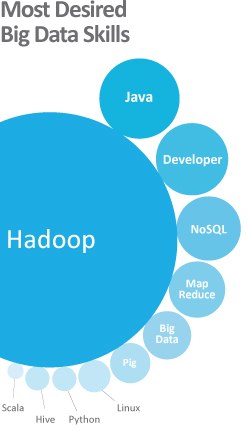
hadoop-skills-graphic“Hadoop may have been named after a stuffed toy elephant, but it’s not child’s play to recruiters and hiring managers looking for ‘Big Data’ talent,” wrote Howard Lee, chief architect of Dice’s Open Web, in a “Mad Skills” report on Monday. “It’s big game, but not the only game hiring managers are searching to meet their recruiting needs.”

Some 4.4 million IT jobs are expected to be created globally by 2015 to support Big Data, Gartner predicts.

‘More Than $100,000’

Java is by far the most commonly sought skill paired with Hadoop, which makes perfect sense given that Hadoop itself is Java-based. Next in line among specific skills, however, is NoSQL, Dice reported, adding that “professionals with Hadoop and NoSQL experience pulled in more than $100,000 on average” in a recent Dice Salary Survey.

Following down the list from there are MapReduce, Pig and Linux as well as Python, Hive and Scala.

“Since the inception of Hadoop, it has been optimized to run primarily on the Linux operating system,” Dice’s Lee told Linux.com. “Although more recently supporting Windows, familiarity with Linux is a major plus in getting Hadoop up and running.”

In fact, “Linux has been a major element of many of the largest deployments of big data platforms and is often the first operating system supported with new big data software releases,” he added. “System administrators need to understand the technical challenges involved, and learn how to optimize their Linux environments for processing massive data sets.”

‘Very Complementary’

Indeed, “it makes sense that Linux expertise and experience is in high demand around Big Data,” agreed Jay Lyman, senior analyst for enterprise software at 451 Research.

“Many, if not most, of today’s database, data clustering, data management and data analysis technologies and tools are open source, including MySQL, PostgreSQL and NoSQL databases, Memcached, Cassandra and of course, Hadoop,” Lyman told Linux.com. “There are technical reasons in source code and flexibility and also cultural reasons in collaboration and openness that make Linux skills very complementary to leveraging these Big Data technologies.”

Atom-Based Samsung Galaxy Tab 3 10.1 Rumors Abound

Leaked benchmarks purport to show a widely rumored Samsung Galaxy Tab 3 10.1 tablet running Android 4.2.2 at record rates on Intel’s new Clover Trail+ architecture Atom Z2560 SOC (system-on-chip). Meanwhile, Intel released a set of host development tools called Beacon Mountain for developing Android apps on both x86 and ARM platforms. Intel’s “Medfield” generation […]

Read more at LinuxGizmos

IBM’s Watson Now A Customer Service Agent, Coming To Smartphones Soon

IBM’s question-answering Watson supercomputer is building quite the résumé. First it won a much-publicized showdownagainst the two greatest Jeopardy! champions of all time, then it went to medical school and emerged as a budding oncologist. Now Watson has a new job–as a customer-service agent with the mostest. The help desk is a bit of a step down from fighting cancer, but IBM is nothing if not pragmatic. U.S. organizations spend $112 billion on call center labor and software, yet half of the 270 billion customer-service calls go unresolved each year, presenting a fairly sizable opening for an enhanced cognitive computer. Let’s face it: Rare is the occasion when you a) reach a live person and b) they know what they’re talking about. Why not give silicon a chance?

Read more at Forbes.

How to Support Your App on Older Android Devices

As with any API that is under active development, sometimes as an Android developer you’ll come across a really neat feature which, it turns out, doesn’t exist in earlier versions of the API and isn’t backwards-compatible. There are a couple of ways to deal with this. One is simply to insist that users must have a given version, and to limit your app to that version. However, that can also limit the reach of your app – there are still plenty of people out there using older versions of Android. Another option, for certain features, is to make use of the Android Support Library.
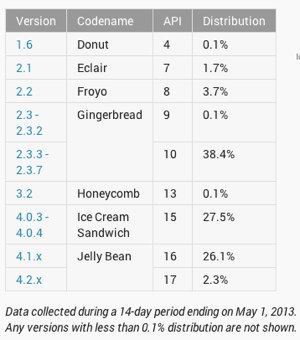
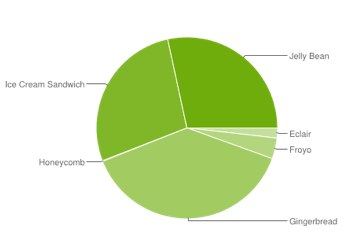
Android versions use statisticsThe Android Support Library provides support in earlier API levels for a certain set of features introduced in later API levels. So even if ShinyFeature is only available for API 11, if it’s part of the Support Library, you may be able to use it and still have your app run on older devices. (What exactly will happen on the older devices will vary depending on how the feature is supported; it’s important to test it before release on as many devices and API levels as you can.) The Support Library doesn’t cover all newer features; some 3.x features just can’t be run on 2.x devices at all. But for those that it works for, it’s a neat way of extending the reach of your app without giving up on awesome newer features.

In general, it acts as a gateway: when you import and use one of the android.support.* packages, the interpreter will look at the actual API of the device it’s running on. It will then use native built-in code if possible (if the API of your device is high enough that the feature exists in core code), or the Support Library if necessary. (There are a couple of exceptions to this; for example, the AsyncTaskLoader support class. If it matters to you, check the support class docs, and, again, test thoroughly.)
Android versions pie chart

Of course, there is a cost to this. Because the library isn’t part of core code, you have to bundle it with your app; automatically increasing the size of your app by a couple of megabytes. Clearly, if every app does this, users, especially on older devices, will run low on space. So do make sure that your app will otherwise work well on older devices, and that you wouldn’t be better off writing a different version specifically targeting earlier levels of the API.

There are two levels of the Support Library: v4 and v13. v4 provides support for features introduced after API v4 (Android 1.6), and v13 provides support for features introduced after API level 13 (Android 3.2). Unsurprisingly, v4 is at present much more extensive than v13.

Using the Support Library in a project

First, you’ll need to download the Support Library via the SDK Manager (accessed either via Eclipse or via the command line). Now open your Android project and create a libsdirectory at the top level of the project directory. Find your SDK directory, and locate the JAR file for the support library you want, e.g.

[sdk-dir]/extras/android/support/v4/android-support-v4.jar

Copy this into the libs directory of your project. Finally, edit your project’s AndroidManifest.xml to set the minimum and maximum SDK versions correctly:

<uses-sdk android:minSdkVersion="4" android:targetSdkVersion="17" />

The target should be the latest release (currently 17, at time of writing), and the minimum should be 4; or if you’re using other features that don’t exist in the Support Library or in API level 4, set the minimum to whatever is appropriate for your project.

When actually using the code, you must make certain that you’re implementing the correct class; the one from the support library, not the one from the main API. Check your import statements carefully and make sure that you don’t accidentally double up when you don’t want to:

import android.support.v4.app.SearchViewCompat; // use this line... 
import android.widget.SearchView;  // not this line!

Here’s an example using the code from the last tutorial, replacing GestureDetector with GestureDetectorCompat:

import android.view.GestureDetector; 
    // still need this for MyExampleGestureListener 
import android.support.v4.view.GestureDetectorCompat;
public class GestureExampleView extends SurfaceView  
                                implements SurfaceHolder.Callback {
	
  // private class variables
  private GestureDetectorCompat detector;
  public GestureExampleView(Context context) {
    // see previous tutorial for rest of method
    detector = new GestureDetectorCompat(context, new MyExampleGestureListener());
  }
  // rest of methods as before
  
  class MyExampleGestureListener 
      extends GestureDetector.SimpleOnGestureListener {
    // This is as before; still using GestureDetector.SimpleOnGestureListener
  }
}

Compile and run and it should work smoothly just as before; but now if you find an older device it should work on that too!

Notable classes in the Support Library

Currently, one of the most popular uses of the Support Library is to use Fragments with older versions of Android. Fragments allow you to create UI component modules which manage their own layout and lifecycle, which you can then swap in and out of your app, allowing you to create a multi-pane, dynamic UI. Fragments also make it easy to reuse components and to set them up differently in different contexts (eg phone handset vs tablet).

SearchViewCompat is also handy, allowing you to use the very useful SearchView introduced in API level 11.

ActionBar is not supported by the Support Library, but using MenuCompat allows you to specify items to be used in the ActionBar when it is available.

Watch this space for later tutorials on Fragments and the ActionBar.

Dell Changes Up OpenStack Cloud Plans

In a major announcement from Dell yesterday, the company announced that its public cloud ecosystem and strategy will be centered on partners Joyent, ScaleMatrix and ZeroLag, and will emphasize recent acquisition Enstratius. The announcement represents one of the biggest snubs to the open source OpenStack platorm yet, as Dell had previously announced that its whole cloud strategy would be built around OpenStack.

According to Dell’s announcement:

“Dell is launching the Dell Cloud Partner Program to deliver public cloud Infrastructure as a Service (IaaS) through an ecosystem of partners. Acting as a single-source supplier, Dell will offer customers a choice of vendors and technology, freedom from lock-in to a single platform or pricing model and a central point of solution integration and control. Sales of Dell’s current in-house multi-tenant public cloud IaaS will be discontinued in the U.S. in favor of best-in-class partner offerings.”

 
Read more at Ostatic

Raspberry Pis Chained Together Provide Massive Computing Muscle

As we’ve covered before, when it comes to the top open source stories of the last 12 months, it’s clear that one of the biggest is the proliferation of tiny, inexpensive Linux-based computers at some of the smallest form factors ever seen. The Linux-based Raspberry Pi, priced at $25 and $35, leads the pack among these devices.

But in a new twist on what Raspberry Pi devices are capable of, they’re being chained together to form supercomputers and powerful clusters. If it sounds like a joke, you may be surprised at the enormous computing power these lash-ups are capable of. They may even have the power to democratize supercomputing-level data crunching at very low price points.

 
Read more at Ostatic

Distribution Release: ZevenOS 3.1 “Neptune”

Leszek Lesner has announced the release of ZevenOS 3.1 “Neptune” edition, a Debian-based desktop Linux distribution for 64-bit computers featuring the latest version of the KDE desktop environment: “The Neptune team is proud to announce the release of Neptune 3.1. We worked hard and spend a lot of….

Read more at DistroWatch