
Enterprise and data integration have been on front burners for years. But a changing business landscape demands a redoubling of efforts.
Read more at Enterprise Open Source Toolkit

Last week, I attended my first OpenStack Summit as part of a team from Red Hat helping to launch a new community distribution of the popular open source infrastructure as a service (IaaS) project.
Matthew Butler has announced the release of Ubuntu GNOME 13.04, an official Ubuntu project featuring the vanilla GNOME 3.6 desktop environment: “The Ubuntu GNOME team is proud to announce our first release as an official Ubuntu derivative – Ubuntu GNOME 13.04. Ubuntu GNOME aims to bring a mostly….
Kaj Ailomaa has announced the release of Ubuntu Studio 13.04, a specialist distribution dedicated to media creation and featuring a large collection of multimedia software: “A new release of Ubuntu Studio is out. This release marks a turning point as it will only be supported for 9 months…..
PCLinuxOS was born as a set of RPMs for Mandrake Linux. Remember Mandrake Linux? It was one of the first distros to aim for ease-of-use and user-friendliness with nice tools for system administration, a slick graphical installer, and a full complement of drivers and multimedia codecs. My first Linux was Red Hat 5, but Mandrake (initially based on Red Hat) was the first distro that gave me video acceleration and good video quality, and didn’t choke on my fancy Promise Ultra66 IDE controller. That’s right, 66 screaming megabytes per second transfer speed, which was double the poky 33MB/s of the onboard controllers of that era. Our modern SATA buses deliver gigabytes per second, but back then megabytes were enough, and we liked it that way.
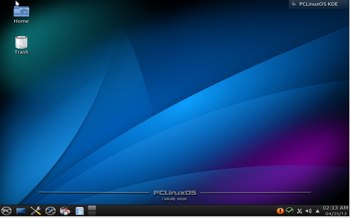 Mandrake changed its name to Mandriva when they were sued by Hearst Corp. for trademark infringement on their Mandrake the Magician comic book character. Yeah whatever, and rolleyes. Meanwhile, Texstar’s RPMs evolved into a fork of Mandrake 9.2, and it is now an independent distribution, though it retains a number of Mandriva elements such as drakconf (the system Control Panel), and a similar appearance. The founder of PCLinuxOS is Bill Reynolds, who is better-known as Texstar. If memory serves me, PCLinuxOS became popular around 2009, and has maintained a steady popularity ever since, with its own legions of devoted fans.
PCLinuxOS aims to please, and to provide a smooth out-of-the-box experience with everything working and easy to maintain. Every release has been more polished with a better user interface, and the latest release, 2013.04, is impressively sleek and well-organized. I’m partial to the Control Center (see image, below), which contains a useful set of system configuration tools that help you through the complete process of setting up new services. For example, when you go to the Sharing tab and click the Configure Web Server button, it gives you the option to launch the installer and install Apache. Then it runs a wizard to set up a basic Web server. PCLinuxOS sets up a clean separation between system administration and desktop configuration. I prefer a standalone control panel, rather than dealing with the various configuration tools that come with the different desktop environments, because it’s consistent and I can actually find things.
Some other nice conveniences are “Open a console as administrator”, which opens a root xterm, a services manager, a Network Sharing tab for setting up NFS, Samba, and WebDav shares, and a Windows documents and settings importer. It includes msec, the Mandriva Linux Security package, which manipulates the standard Linux permissions to harden your system. There are six prefab security levels, and you can tweak it with either the nice graphical configurator, or from the command line.
The Control Center also includes both a simple and advanced firewall configurator, name services, and hardware configs, including an actual video configurator with actual resolution and screen settings that you can change. If you’re used to Ubuntu and its derivatives and their limited set of graphical configurations, this is a whole new feast of configuration tools.
PCLinuxOS comes in various editions. MiniME is a stripped-down 550MB image that fits on a live CD. You can run and install it from the CD or a USB stick. (Many Linux distros include unetbootin, which is a super-nice graphical tool for creating bootable USB sticks from .iso images.) MiniME comes with PCLinuxOS’s nicely-customized KDE4 implementation, a full set of system and KDE administration tools, multimedia necessities, and the usual other necessities such as a terminal, file manager, and Web browser. The idea with MiniME is to start with the basics, and then you add just what you want.
The KDE full version is a 1661MB image that includes a large set of applications such as LibreOffice, GIMP, Skype, Virtualbox, Okular, digiKam, Inkscape, Choqok, FileZilla, GoogleEarth, rdesktop, Bleachbit, extra drivers, and, as they say, much more.
Full Monty is a 4GB beast that bundles a boatload more applications, and the KDE desktop defaults to Activities. If you’re not familiar with KDE Activities, take a look at KDE4 Activities for Fast Efficient Workflow . Activities give you great flexibility to arbitrarily combine widgets and documents, so you can customize each Activity for different workflows. So you could have a development activity, a waste-time-on-the-Web activitiy, an image editing activity… Each activity saves its state, so you can close it, and then 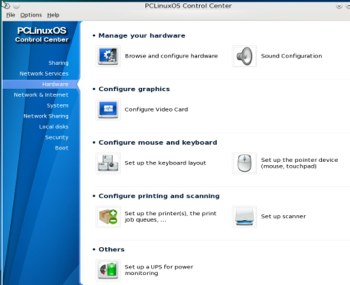 come back and pick up where you left off.
PCLinuxOS is primarily a KDE distro, and I think their KDE implementation is one of the best because it is slimmed-down and well-organized, and less resource-hungry than the stock KDE installation. You also get LXDE and XFCE, which are also nicely setup.
Installation of any Linux distro is pretty routine, but we might as well take a quick look at the PCLinuxOS installer. Again, I give points for good organization and streamlining. Unlike certain projects that believe simplicity means removing functionality, the PCLinuxOS installer offers an automatic, custom, and expert installation. The custom option starts with the same setup as the automatic option, and it is completely editable. Pretty much all distros offer these same options, but PCLinuxOS arranges them in a logical flow, and they’re all exposed so you know they are there.
Some other nice installation options are GRUB or LILO, and remote or local login. The user setup is the traditional separate root and unprivileged user. When the installation is completed and the new system boots, you are greeted with a big warning that PCLinuxOS is a rolling release and should be updated regularly, and displays a Web page with instructions. This is no big deal, just do what it says every couple of days and you’ll be fine. It’s literally a couple of clicks so it’s not a big chore, and you could even set up a cron job to do it.
Every Linux user should read PCLinuxOS Magazine, because it is a beautiful production full of great articles.
PCLinuxOS is a dependable, high-quality distro that is a pleasure to use. Two thumbs up.