
Home Blog Page 1966

PCLinuxOS “So Cool Ice Cubes are Jealous”

PCLinuxOS was born as a set of RPMs for Mandrake Linux. Remember Mandrake Linux? It was one of the first distros to aim for ease-of-use and user-friendliness with nice tools for system administration, a slick graphical installer, and a full complement of drivers and multimedia codecs. My first Linux was Red Hat 5, but Mandrake (initially based on Red Hat) was the first distro that gave me video acceleration and good video quality, and didn’t choke on my fancy Promise Ultra66 IDE controller. That’s right, 66 screaming megabytes per second transfer speed, which was double the poky 33MB/s of the onboard controllers of that era. Our modern SATA buses deliver gigabytes per second, but back then megabytes were enough, and we liked it that way.
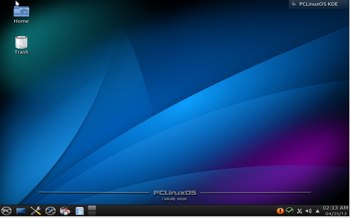
PCLinuxOS desktopMandrake changed its name to Mandriva when they were sued by Hearst Corp. for trademark infringement on their Mandrake the Magician comic book character. Yeah whatever, and rolleyes. Meanwhile, Texstar’s RPMs evolved into a fork of Mandrake 9.2, and it is now an independent distribution, though it retains a number of Mandriva elements such as drakconf (the system Control Panel), and a similar appearance. The founder of PCLinuxOS is Bill Reynolds, who is better-known as Texstar. If memory serves me, PCLinuxOS became popular around 2009, and has maintained a steady popularity ever since, with its own legions of devoted fans.

Favorite Features

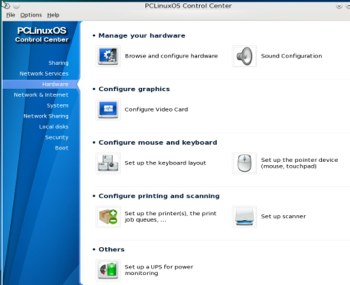
PCLinuxOS aims to please, and to provide a smooth out-of-the-box experience with everything working and easy to maintain. Every release has been more polished with a better user interface, and the latest release, 2013.04, is impressively sleek and well-organized. I’m partial to the Control Center (see image, below), which contains a useful set of system configuration tools that help you through the complete process of setting up new services. For example, when you go to the Sharing tab and click the Configure Web Server button, it gives you the option to launch the installer and install Apache. Then it runs a wizard to set up a basic Web server. PCLinuxOS sets up a clean separation between system administration and desktop configuration. I prefer a standalone control panel, rather than dealing with the various configuration tools that come with the different desktop environments, because it’s consistent and I can actually find things.

Some other nice conveniences are “Open a console as administrator”, which opens a root xterm, a services manager, a Network Sharing tab for setting up NFS, Samba, and WebDav shares, and a Windows documents and settings importer. It includes msec, the Mandriva Linux Security package, which manipulates the standard Linux permissions to harden your system. There are six prefab security levels, and you can tweak it with either the nice graphical configurator, or from the command line.

The Control Center also includes both a simple and advanced firewall configurator, name services, and hardware configs, including an actual video configurator with actual resolution and screen settings that you can change. If you’re used to Ubuntu and its derivatives and their limited set of graphical configurations, this is a whole new feast of configuration tools.

MiniME, Full Monty, KDE Full Version

PCLinuxOS comes in various editions. MiniME is a stripped-down 550MB image that fits on a live CD. You can run and install it from the CD or a USB stick. (Many Linux distros include unetbootin, which is a super-nice graphical tool for creating bootable USB sticks from .iso images.) MiniME comes with PCLinuxOS’s nicely-customized KDE4 implementation, a full set of system and KDE administration tools, multimedia necessities, and the usual other necessities such as a terminal, file manager, and Web browser. The idea with MiniME is to start with the basics, and then you add just what you want.

The KDE full version is a 1661MB image that includes a large set of applications such as LibreOffice, GIMP, Skype, Virtualbox, Okular, digiKam, Inkscape, Choqok, FileZilla, GoogleEarth, rdesktop, Bleachbit, extra drivers, and, as they say, much more.

Full Monty is a 4GB beast that bundles a boatload more applications, and the KDE desktop defaults to Activities. If you’re not familiar with KDE Activities, take a look at KDE4 Activities for Fast Efficient Workflow . Activities give you great flexibility to arbitrarily combine widgets and documents, so you can customize each Activity for different workflows. So you could have a development activity, a waste-time-on-the-Web activitiy, an image editing activity… Each activity saves its state, so you can close it, and then PCLinuxOS control centercome back and pick up where you left off.
Not Just KDE

PCLinuxOS is primarily a KDE distro, and I think their KDE implementation is one of the best because it is slimmed-down and well-organized, and less resource-hungry than the stock KDE installation. You also get LXDE and XFCE, which are also nicely setup.

Installer

Installation of any Linux distro is pretty routine, but we might as well take a quick look at the PCLinuxOS installer. Again, I give points for good organization and streamlining. Unlike certain projects that believe simplicity means removing functionality, the PCLinuxOS installer offers an automatic, custom, and expert installation. The custom option starts with the same setup as the automatic option, and it is completely editable. Pretty much all distros offer these same options, but PCLinuxOS arranges them in a logical flow, and they’re all exposed so you know they are there.

Some other nice installation options are GRUB or LILO, and remote or local login. The user setup is the traditional separate root and unprivileged user. When the installation is completed and the new system boots, you are greeted with a big warning that PCLinuxOS is a rolling release and should be updated regularly, and displays a Web page with instructions. This is no big deal, just do what it says every couple of days and you’ll be fine. It’s literally a couple of clicks so it’s not a big chore, and you could even set up a cron job to do it.

PCLinuxOS Magazine

Every Linux user should read PCLinuxOS Magazine, because it is a beautiful production full of great articles.

PCLinuxOS is a dependable, high-quality distro that is a pleasure to use. Two thumbs up.

IBM Makes Push for Open Source Virtualization with KVM

IBM is not at all new to virtualization, but with its shift last month to an open source cloud architecture, the company has put a fresh effort into boosting market share for KVM, the open source Linux “Kernel-based Virtual Machine” for x86 servers.

In the past five months, IBM has opened the KVM Center of Excellence labs in Beijing and announced a second location in New York aimed at spurring enterprise adoption of KVM. IDC in February released the white paper “KVM: Open Virtualization Becomes Enterprise Grade,” co-sponsored by IBM and Red Hat. And in May IBM will lead a full day of sessions as part of the KVM End Users Technical Summit at the Linux Foundation’s Enterprise End User Summit in New York.

Mike Day, IBM“We want KVM to be a big enough presence in the market to keep prices low and affect the way other vendors do business,” said Mike Day, an IBM engineer focusing on virtualization and Linux.  It doesn’t need to be a major player to help balance out the market, he added. Fifteen percent market share is their target.
Targeting High-Performance Workloads

Virtualization is strategic to all of IBM’s businesses, not the least of which is cloud computing. IBM uses Linux and KVM across most of its cloud products for both economic and performance reasons, Day said.

“With Linux and KVM, all the features we provide (in our hardware) are exploited,” Day said, “usually on the first day we ship the platform.”

Their KVM benchmarks push competitors Microsoft and VMware to more quickly develop the same capabilities, which allow their software to fully exploit IBM’s System X and Pure Systems platforms, Day said.

“If the virtualization layers don’t exploit the hardware then all of our hardware engineering is really wasted,” he said.

IBM also aims to push KVM into other workloads beyond the most common use for IBM customers, which is server consolidation. In particular, KVM holds an advantage for running high-performance workloads, such as trading applications, because of its direct access to low-latency improvements to the Linux kernel, Day said.  

The VFIO user-space drivers, for example, have been a big help for boosting performance in virtualized workloads, he said. They make it easier to load drivers directly in a guest.

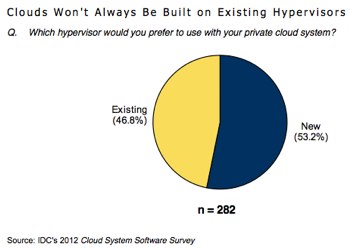
As virtualization evolves into cloud to increase flexibility, competing hypervisors are also given new opportunities.

One of the biggest challenges to greater KVM adoption will be appealing to users with fewer in-house IT resources or less experience running Linux and KVM. The hypervisor needs better configuration defaults, Day said, not only for ease of setup and maintenance, but to avoid outages that make the news and give cloud services a bad name.

“When services go down it’s usually an operator error, “ Day said. “That means you need to make the interface foolproof and that’s really hard to do.”

IBM’s KVM User Council

IBM is the second largest contributor to KVM code behind Red Hat, with a team focused on scalability and performance issues. At the End User Summit in May, its KVM experts will lead panel discussions and presentations on KVM use cases and the technical roadmap for KVM.

The company will also form a KVM users council that will allow customers and vendors to exchange information about using KVM, as well as communicate directly with developers and distributors.

The Enterprise End User Summit will take place May 14-15 at the New York Stock Exchange in New York, NY. Request an invitation to attend.

Ubuntu 13.04 Boosts Graphics Performance to Prepare for Phones, Tablets

Ubuntu 13.04.

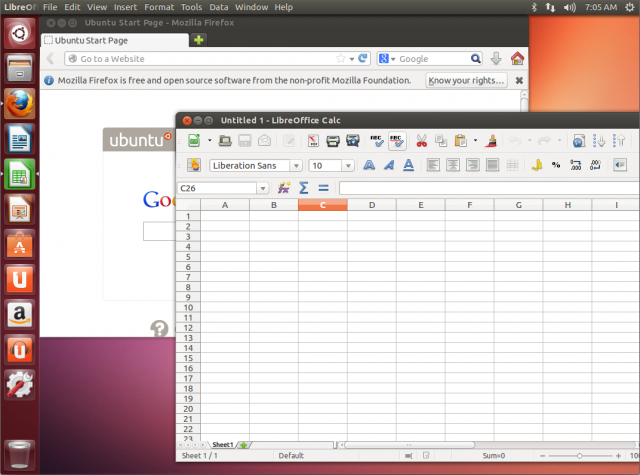
The stable release of Ubuntu 13.04 became available for download today, with Canonical promising performance and graphical improvements to help prepare the operating system for convergence across PCs, phones, and tablets.

“Performance on lightweight systems was a core focus for this cycle, as a prelude to Ubuntu’s release on a range of mobile form factors,” Canonical said in an announcement today. “As a result 13.04 delivers significantly faster response times in casual use, and a reduced memory footprint that benefits all users.”

Named “Raring Ringtail,”—the prelude to Saucy Salamander—Ubuntu 13.04 is the midway point in the OS’s two-year development cycle. Ubuntu 12.04, the more stable, Long Term Support edition that is supported for five years, was released one year ago. Security updates are only promised for 9 months for interim releases like 13.04. Support windows for interim releases were recently cut from 18 months to 9 months to reduce the number of versions Ubuntu developers must support and let them focus on bigger and better things.

Read 11 remaining paragraphs | Comments

Read more at Ars Technica

Distribution Release: Edubuntu 13.04

Stéphane Graber has announced the release of Edubuntu 13.04, an easy-to-use distribution targeted at schools, communities and non-profit organisations: “The Edubuntu team is pleased to announce the release of Edubuntu 13.04 (code name Raring Ringtail). This release will be supported for 9 months, it is intended for enthusiasts….

Read more at DistroWatch

Jim Zemlin at TEDx: What We’ve Learned from Linus Torvalds


Linux Foundation Executive Director Jim Zemlin is likely one of a handful of people in the world who has had a front row seat to the largest collaborative development effort in the history of computing, Linux. He understands that speed of innovation and quality of software development is dictated by forward thinkers who are working in collaboration.

That is why he was recently invited to speak at TEDx about what the technology industry has learned from Linux, and specifically its creator Linus Torvalds, and how some of those lessons can be applied to a variety of efforts and projects across geographies and disciplines. 


Linux has been pretty successful and the TEDx audience was eager to learn how it has achieved such success and how they could apply some of the Linux community’s best practices to their own work. In true Zemlin style, the lessons seemed a little surprising at first but as he elaborated, the audience soon understood how Linux has become the largest shared technology resource known to man. It runs the Internet, our smartphones, televisions, the world’s high performance computing systems and eight out of 10 of the world’s stock exchanges. It’s literally the foundation for our global economy, he explained.

He attributes the success of Linux during his talk to four primary principles:


Don’t Dream Big


Zemlin quotes poet David Frost in his first point about not dreaming big: “Don’t aim for success if that’s what you want. Do what you love and believe in and it will follow.” This is exactly what Linus Torvalds did when he put his Linux operating system on the Internet in 1991 and said he didn’t think it would be much, just something he was doing for fun. 


Give It All Away

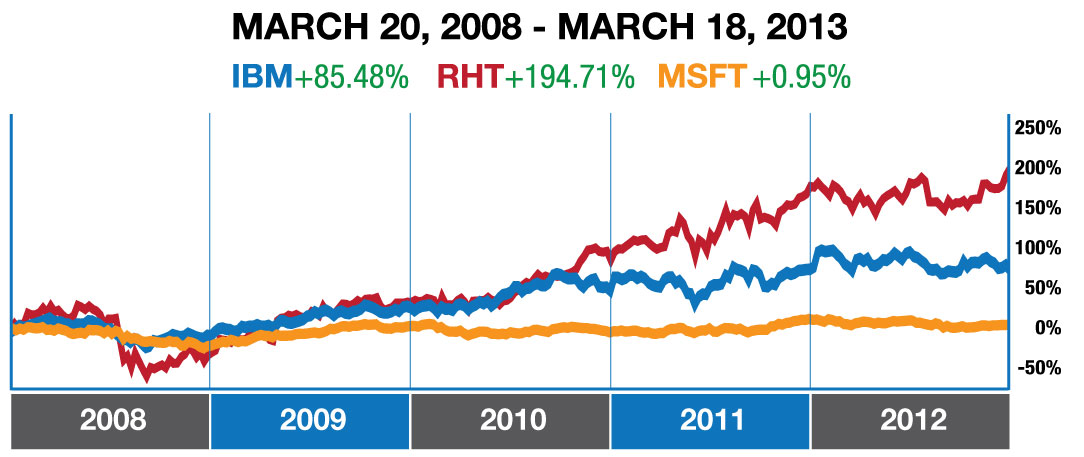
Zemlin also makes an important point about how companies make money from software that is given away. By giving Linux away, Linus Torvalds and the entire Linux community have created more value than anyone could have imagined. Linux today is estimated to be worth more than $10B. IBM and Red Hat continue to see increasing shareholder value, while companies using largely closed development models have seen little return to their shareholders.

stock comps

Zemlin says that even Apple gets the value of Linux and open source software. Inside every iPhone and iPad, there is free software. He says,” Apple knows something that many people don’t. When you stand on the shoulders of giants you can innovate at higher levels.”


Don’t Have a Plan

He goes on to explain that the plan for Linux is there is no plan and shares with the TEDx audience how self-forming communities result in faster, better collaboration. Seven changes are made to Linux every hour, 24 hours a day, because people are self-motivated and care about what they’re working on. 


Don’t Be Nice

His last point is perhaps the most entertaining and provocative. Zemlin talks here about the value of flame wars, defending ideas and ridiculing code. The result? Better software. He cites a UC Berkeley study that found groups that are encouraged to debate rigorously and defend their ideas, opposed to traditional brainstorming where every idea is a good idea, come up with better ideas.


I don’t want to spoil the ending so I’ll just say that he makes the argument that the future is one where you can enrich yourself while at the same time enriching others. Check out the 18-minute talk here and share. If this TEDx Talk inspires you, let the TED team know and help us spread the word about Linux.

https://www.youtube.com/watch?v=7XTHdcmjenI?rel=0″ allowfullscreen=”true” frameborder=”0″ width=”425

Mandriva Business Server Gets New Apps and Security Fixes

Paris the 15th of April 2013: Mandriva S.A. has released a host of security fixes as well as new addons for its server platform, Mandriva Business Server.

Fully integrated with Mandriva Business Server, the Mandriva Proxy-Cache is based on the Squid proxy project and allows the filtering by white and black lists, as well as on an user basis. Specially packaged for the Mandriva Business Server, Mandriva Proxy can be purchased on Mandriva ServicePlace and will install on top of Mandriva Business Server in just a few clicks. Mandriva has also released a dedicated ssh management addon that lets administrators handle their users’ ssh keys in an elegant and straightforward way. It is available free of charge on the ServicePlace.

Kubuntu 13.04 Released, Experience KDE on Top of Ubuntu Base

Good news for KDE fans, Kubuntu 13.04 is now available for free download.

Read more at Muktware

Have Linux Distros Gotten Too Tubby?

The size of Linux’s waistline has long been the focus of recurring attention here in the Linux blogosphere, even drawing occasional criticism from Linus Torvalds himself. Recently, however, a fresh weight-related complaint was made — not about the kernel itself, but about today’s Linux distros. “Linux fatware? These distros need to slim down” was the title of the InfoWorld piece that got the conversational ball rolling, and it’s sparked quite a lively discourse.

Read more at LinuxInsider

Ubuntu 13.04: No Privacy Controls as Promised, But Hey – Photo Search!

A lot of stuff’s missing, but the tweaks make a difference, honest

First the bad news: most of the big new features planned for Ubuntu 13.04, or Raring Ringtail, haven’t made it – they’ve been pushed back to 13.10, in October. Despite this, the Ringtail is actually rather good.…

Read more at The Register

Open Source Beginnings, From Classroom to Career

What I've learned the open source way

During my second year at Shreemati Nathibai Damodar Thackersey (SNDT) Women’s University, the first of its kind in India as well as in South-East Asia, I attended a workshop on Python and Orca by Krishnakant Mane. My classmates and I were novices to free and open source software (FOSS) and astonished when we saw a visually impaired person using a computer with the same ease as we did.

I was aware of Linux and had learned the basics of Unix as a freshman, but I had never used Ubuntu, which I thought might be command driven. It had a great interface and there was a lot of new technology for us to learn. That day not only was our class introduced to a new world of open source, but so was the university as a whole. 

read more

Read more at OpenSource.com