The ARM architecture offers impressive processing per watt of power. Because of this lean power draw, ARM is widely used in mobile phones and tablets. Recently ARM-based machines have been making a splash as low-power servers and desktop machines as well, with offerings such as the Raspberry Pi.
There are many products that let you run Linux on ARM and aren’t targeted at the mobile market. At the lower price point there is the Raspberry Pi, giving you a single sub-gigahertz CPU with 256 MB of RAM. If you are after something more plug-and-play, the MK802 offers a slightly faster CPU with 1GB of RAM in a very small form factor. The Cubieboard is priced between the Raspberry Pi and the MK802. The Cubieboard has a similar CPU to the MK802 but includes on-board SATA and is physically a raw board like the Raspberry Pi.
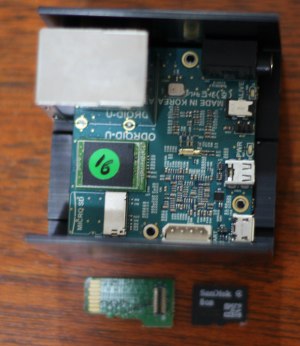 The more you look into the options for running a low-power Linux machine, the more products you will uncover. The target of this article is the ODROID-U2, which is an extremely small form factor, ARM-based computer that packs enough grunt to replace a modest desktop.
ODROID-U2 Hardware Specs
The ODROID-U2 CPU provides 4 cores running at 1.7 GHz, 2 GB of RAM, a Mali400 GPU, and retails for less than $100. Because the core chip for the ODROID-U2 is used on high-end cell phones, the U2 board is physically smaller than a credit card. The bulk of the unit is a large heat sink which extends down beyond the USB 2 ports and network connector. The ODROID-U2 comes with some USB 2 ports, a 10/100 wired network connection, and micro HDMI port. You can either boot from a micro SD card or use an eMMC card if you want better IO performance. More on the boot process shortly.
The four fast cores and RAM of the ODROID-U2 allow you to do things like monitor IP cameras, which because of the real-time element are not possible to do with slower hardware. If, however, a slower CPU and lower RAM are OK for your application you might like to choose a more economical product toward the Raspberry Pi end of the spectrum.
ODROID-U2 vs. Linux Desktop
If you have setup Linux on a traditional desktop or server machine running on Intel or AMD CPUs you might be wondering what differences to expect when setting up Linux on your new ARM hardware. The first major difference is that you don’t install Linux like you would on a desktop, instead you usually copy (using a command like dd) a premade image to an SDCard or other flash memory and then boot from that card.
The second major difference is that you might not get any console output until the boot has finished and your desktop environment offers you a graphical login. If your system doesn’t manage to bring up the network and start the SSH daemon, the quickest fix is likely to mount the SDCard on a desktop machine and revert your recent changes. Backups make tinkering with the boot process a less painful experience.
On computers like the ODROID-U2, changing the screen resolution can also be a matter of setting parameters specific to your hardware and rebooting it. You might also find that various parts of the system report you are running on battery power instead of being plugged into AC power and other little paper cuts.
How to Set Up Linux on ODROID-U2
Getting up and running on the ODROID-U2 both the SD card and eMMC options work in a very similar way. So I’ll refer to the SD card or eMMC as the boot device. To get up and running first you connect the boot device to a USB port on a Linux machine and copy the Linux installation you wish to use to the boot device. If you are using the eMMC card as your boot device then you will also have been supplied with a daughterboard which lets you connect the eMMC to a little IC header. At one end of the daughterboard is a USB connector to connect to the desktop machine. Once you’ve copied the Linux distribution image to the boot device you can attach the boot device to the ODROID-U2 and power it on.
For my ODROID-U2 I used the Linaro Ubuntu 12.11 image. By default this starts up at 720p resolution, to get 1080p you have to copy the boot-hdmi1080.scr file to overwrite the boot.scr file on the FAT boot partition of the SDCard. If you have sshed into the ODROID-U2 running the above Linaro Ubuntu image you can use the below commands to change your screen resolution. With the closed source Mail400 graphics card drivers installed I can install and run KDE4 on the ODROID-U2 and window compositing works well.
cd /media/boot
cp boot-hdmi1080.scr boot.scr
reboot
The ODROID-U2 idles at about 4.7 watts. For each CPU core to run at 100 percent adds less than a watt to the total. Running glxgears needs about one watt of additional power and gives about 90-100 FPS. The biggest drawback I have with the ODROID-U2 is the current lack of support for the XVideo extension. Without XVideo you can not resize video playback in hardware, which is a huge drawback for watching 720p conference videos on a 1080p display. This is a real shame given how well the four cores of the ODROID-U2 can decode video files ready for display. But it’s early days for this hardware.
See part 2 in this series, O-Droid U2: Benchmarking the ARM Beast, for a more in-depth exploration of the performance of the ODROID-U2, including web benchmarks to see how the ODROID-U2 stacks up against a modern desktop beast for surfing.



 For many years now, some of the more creative work in the field of robotics has been driven by open source efforts. Open source robotics platforms have flourished, and they have mostly focused on humanoid robots