Home Blog Page 2081

7 Top Linux Trends of 2012

There’s no denying that 2012 has been a momentous year for Linux, and the Linux Foundation’s recent video entitled “What a Year for Linux” does a nice job of highlighting several of the more significant events.

Of course, like any other year, the one now drawing to a close has been more than simply a collection of individual successes for Linux. Rather, such events tend to be indicative of larger trends that collectively make up the big picture.

Ready for a few examples? Here are seven key trends I think defined this past year of Linux computing.

1. Tiny, Cheap PCs

Anyone trying to keep track of the flurry of diminutive and inexpensive Linux-powered PCs that eRaspi Colour Rmerged over this past year would have to be forgiven if they emerged from the effort feeling downright dizzy. The Raspberry Pi is certainly the most widely publicized such effort, but there have been many others that came to light as well, including the Cotton Candy, the MK802, and the Mele A1000, to name just a few. Computing power is becoming ever less expensive not just for enthusiasts and children–for whom the Raspberry Pi was originally designed–but also for the underprivileged. If that’s not a major step towards bridging the Digital Divide, I don’t know what is.

2. Linux Preloaded

If the march of the tiny PCs has been dizzying for the casual observer, so, too, has the number of PC options appearing on the market with Linux preloaded. It used to be that Linux was almost always installed by the user on a PC originally sold with Windows. 

Today, that can no longer be assumed thanks to exciting new offerings from specialists such as System76 as well as general makers like Asus and Dell. An added benefit: If this trend continues, we may finally get some more accurate figures for Linux usage on the desktop.

3. Mobile, Cloud, and HPC Dominance

It may no longer be any secret that Linux already dominates the mobile space–via Android–as well as the cloud and high performance computing, but it’s still worth pointing out. There’s no end in sight to Linux’s strength in these areas.

4. The Secure Boot Challenge

Lest the picture get too rosy for Linux, however, the past year has also been notable for the prominence of the Secure Boot problem. For those who missed it, hardware featuring Microsoft’s new Windows 8 comes with Secure Boot enabled in the Unified Extensible Firmware Interface (UEFI), meaning that only operating systems with an appropriate digital signature can boot. Ubuntu, Fedora, SUSE Linux, the Free Software Foundation and the Linux Foundation are all among the groups that have spoken out and/or proposed a solution to this problem.

5. GNOME 2’s Enduring Appeal

The past year or two have seen the rise of mobile-style desktop environments including not just Ubuntu’s Unity and GNOME 3 but also Microsoft’s Windows 8 Modern UI, formerly known as Metro. Some users have adapted easily to these new interfaces; others have not.

It’s been fascinating to watch the rise of Linux desktop alternatives that emulate the old, beloved GNOME 2, including not just the MATE and Cinnamon desktops but also distros such as SolusOS. Just recently, of course, the GNOME project itself announced that GNOME 2 is coming back. It definitely seems fair to say that GNOME 2 reigns supreme in desktop Linux users’ hearts.

6. Commercial Growing Pains

It’s also been an interesting year for understanding Linux and profitability. Early on we saw Red Hat hit $1 billion in revenues, of course, making it plain for all to see that Linux can be a way to make a living. At the same time, however, Ubuntu maker Canonical has had something of a struggle as it has tried to take advantage of revenue opportunities such as by integrating Amazon search results into searches via the Unity Dash. Particularly with community-focused distributions, this uneasy relationship with the financial side of Linux promises to continue.

7. Linux: The Next Gaming Platform?

Last but certainly not least, a trend many would surely name as the most significant of all for Linux is its growing acceptance by gaming vendors. Valve is finally embracing Linux for its Steam gaming platform, and other gaming companies are starting to do the same. Where games go, so, too, do countless PC users.

Yes, it’s been quite a year for Linux. I can’t wait to see what next year brings.

Women in computing: An interview with Leslie Hawthorn on the Grace Hopper Conference

open here

I sat down with Leslie Hawthorn, Community Manager at Red Hat, and chatted with her about the 2012 Grace Hopper Celebration of Women in Computing conference that was held in Baltimore, Maryland this year. She confided that the theme, Are we there yet?, is a reference to the idea that while women have made many strides for equality in terms of equal pay, equal work, and so on, the group still feels like women in tech have a long way to go.

The idea behind the Grace Hopper conference is to provide a gathering place for women in technology to be able to network, knowledge share, and enhance their technical skill sets; with the general conclusion being that we are going to get there, through mutual support and collaboration…Read more at OpenSource.com

New Video: Introduction to Dream Studio

I’ve just posted a new video outlining the Unity desktop for new users. While this video is directed toward Dream Studio users, it’s equally as helpful to new users of Ubuntu (and, of course, Dream Studio for Ubuntu).

Read more at Dream Studio

Burnin’ for You….A Developer’s Nightmare

The Linuxsphere is a wonderful and odd place.  It’s a realm where completely unique things can be created and shared for nothing but the author’s time.  Tens of millions of code lines have been written and freely shared by thousands of people.

Thousands.

Sometimes they are complete apps that make our lives easier, and sometimes they are simple scripts that work to correct a system call or device.

Regardless of what they are, most of these lines of code are given freely, with little expectation of recompense or recognition.  They make all of our lives easier.

But the spotlight does find some people, regardless of whether they want it or not.

Ikey Doherty is one such person. Ikey is the author of the Linux Distro, SolusOS…Read more at Blog of Helios

Raspberry Pi now has an app store (and yes, it has games)

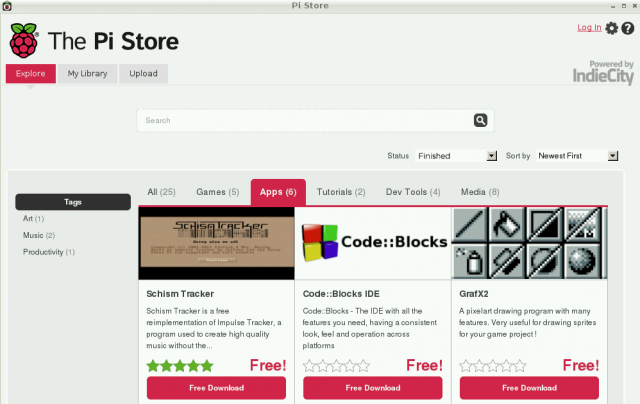
In this day and age, all major platforms must have an app store. And thus today, the Raspberry Pi Foundation unveiled the Pi Store to act as the one-stop shop for users of the tiny computer.

The Pi Store, built in collaboration with IndieCity and Velocix, runs as an X application on the Debian-based Raspbian operating system (no word yet on whether the Pi Store will come to more OSes). Raspbian is the recommended operating system for those just starting out with the Pi, and the latest version has the Pi Store built-in. If you’re already running Raspbian, you can add the Pi Store with this command: sudo apt-get update && sudo apt-get install pistore.

“At launch, we have 23 free titles in the store, ranging from utilities like LibreOffice and [VoIP application] Asterisk to classic games like Freeciv and OpenTTD and Raspberry Pi exclusive Iridium Rising,” the announcement said. …Read more at Ars Technica

The Perfect SpamSnake – Ubuntu Jeos 12.04 LTS Precise Pangolin

This tutorial shows how to set up an Ubuntu Jeos based server as a spamfilter in Gateway mode. In the end, you will have a SpamSnake Gateway which will relay clean emails to your MTA. You will also be able to view your incoming queue, train your SpamSnake and carry out a few more advanced operations via Baruwa.

I cannot offer any guarantees that this will work for you, the same way it’s working for me.

I will use the following software:
• Web Server: Nginx v1.1.19/Uwsgi v1.0.3
• Database Server: MySQL v5.5.28
• Mail Server: Postfix v2.9.3
• Caching DNS Server: Dnsmasq 2.59
• Filter: MailScanner v4.84.5-3
• Frontend: Baruwa v1.1.2-4sn

Credit goes to the guys at HowToForge and the developers of MailScanner, Baruwa, Clamav, Nginx/Uwsgi, Mysql, Postfix, Spamassassin, Razor/Pyzor/DCC and Firehol…Read more at HowtoForge

Enlightenment E17 Is Being Released This Friday

Everything is set for the long-awaited Enlightenment E17 v1.0 release to happen this Friday, 21 December.

We have known since last month that the Enlightenment camp has been plotting to do their release at the end of the Mayan calendar. It’s still on for having this release out after the window manager was in development for more than the past ten years…Read more at Phoronix

EU Commissioner Kroes articulates benefits of open source and open standards

European Commission

In a well done video, released in mid-December, Neelie Kroes, the European Commission’s Vice President for the Digital Agenda, articulates the benefits of open source software and open standards.

Her remarks are especially potent, given not only her leadership in her current role, but having also served as Commissioner in charge of EU competition/antitrust policy where she oversaw the European Union Microsoft competition case.

In her remarks, she identifies the downside of relying on proprietary standards, which cost the European economy “several hundred million Euros per year” and damages competition…Read more at OpenSource.com

Careers in Linux: Technical Writing

If you have ever worked as a technical writer, you probably have an image of what writing documentation for free software would be like. You might imagine the writer as a lone figure in a corporate department, using proprietary software, and chasing down developers to plead for information, much like most technical writers anywhere. But while you might find a few positions like that, the chances are that every one of these pre-conceptions would be wrong in practice.

Tools of the Trade

True, you might find yourself working in a typical corporate structure, although a non-profit is just as likely. Yet, even if you do, you may find that your connections extend far beyond the company that pays your salary. Although you may be working from a home office, your interactions might be wider than ever. You may find yourself cooperating with volunteers, perhaps even with employees of rival companies in a software project, or involved in a documentation project like FLOSS Manuals (https://flossmanuals.net/). You may also be hearing directly from the users of your manuals and help files about how usable they are.

http://upload.wikimedia.org/wikipedia/commons/thumb/f/f8/Quill-Nuvola.svg/200px-Quill-Nuvola.svg.png

Quite simply, the boundaries of your work are likely to be more flexible than in the typical IT environment. Not that this is a bad thing — if nothing else, if you are just beginning a career in technical writing, it means that you can gain valuable experience and some samples for your portfolio by volunteering for a project. But the atmosphere is likely to be different from what you were told to expect in the class room or by your peers in other tech-writing gigs.

For another thing, your software experience will probably only be useful so far as you can extract general expectations about what features to expect. As Jean Hollis Weber, a member of ODF Authors, a project that documents Apache OpenOffice and LibreOffice (http://www.odfauthors.org/openoffice.org/) explains:

“Tools used in open source projects are typically different from those used in commercial situations. Tools are genrally open source: big name tech-writing packages (FrameMaker, Microsoft Office, AuthorIt, Visio, Photoshop, and others) are replaced by LibreOffice, Scribus, GIMP, Inkscape, Docbook, and others, or documentation is entirely online, typically wiki-based. You may be required to do screen captures from a Linux platform.”

You may also need to learn the basics of version control, so that your work in progress can join that of the rest of a project’s.

Who Owns Your Work?

These expectations are the norm because, as the Free Software Foundation expresses it, those involved believe strongly that “Documentation for free software should be free documentation, so that people can redistribute it and improve it along with the software it describes (https://www.gnu.org/licenses/).”

Which brings up another point that needs emphasising: in most tech-writing positions, your work is owned by the company. By contrast, your work for free software is “free” — that is, licensed to encourage other people to use and change it. As a writer, you will save yourself endless confusion and wasted outrage over imaginary mis-uses if you learn as soon as possible whether your work will be released under the GNU Free Documentation License (https://www.gnu.org/copyleft/fdl.html), Creative Commons Attribution – Sharealike (https://creativecommons.org/licenses/by-sa/3.0/us/), or some other free license.

File:Parchment.jpg

For that matter, your work will be easier if you understand — or, better yet, sympathize with — free (https://en.wikipedia.org/wiki/Free_software) and open source (https://en.wikipedia.org/wiki/Open-source_software software). Even those who are paid for their efforts routinely have some degree of idealism about them, as well as a conviction that they are doing something that many people could use.

If you treat your work as just a way to earn a pay cheque, then not only will you have little sense of why the software you are documenting exists, but you are also likely to have frequent clashes of temperament. You will almost certainly be unhappy about your involvement with free software.

Where a Writer Fits

However, these adjustments of expectations are only the beginning. The attitudes of mainstream IT often leak into free software, but in many cases you will find them vying with a very different set of assumptions about how a writer should work and interact with those around them.

One of the first assumptions that you should discard is that a writer’s role is simply to write, or at best record what so-called subject matter experts tell them. Most projects are too small for anyone to specialize, which means that you will be expected to be your own expert.

Just as importantly, many in free software believe they are in a meritocracy, where people are judged by their competence. Although the belief is questionable, it is so widely held that a writer who is unable to learn quickly and relies on others instead risks being regarded as a dead weight rather than an asset.

As Tony Chung, a member of the Techwr-l list (http://www.techwr-l.com/) told me, “Open source developers tend to respect others like themselves. They frown heavily on noobs who don’t dig first [and] ask questions later.” Or, as Anne Gentle, a writer from Rackspace, advises in a blog entry, “Become as technical as possible.” (http://justwriteclick.com/2012/09/13/career-focus-community-documentation/) Nobody in a project will expect you to be an expert from the start, but they will expect you to get up to speed quickly and as much as possible by your own tinkering.

In addition, like everyone else, writers will be expected to get involved in the rest of the project. Because writers may be the first outside the programming team to see an application, they are frequently encouraged to file bug reports.

For the same reason, Techwr-l member Robert Fekete points out, writers are often called upon to become usability testers:

“when thinking about features, developers think code-wise — that is, how to implement it, which code libraries and classes to use, and so on, and tend to neglect the aspect, ‘how will the user use it?’ How will they want to use it [and] in what scenarios? Is it easy to start using the feature, or do you need to configure things at five different places that do not even seem to related? Are the names of the options meaningful to the user, or just obscure abbreviated function names?”

Of course, writers can fill the same role in any job, but usability is still a relatively new concern in free software, so the role can be even more important than in the average tech-writing job.

Other roles that writers often fill in a free software project including marketing, maintaining the web site, helping users on a mailing list, and moderating or participating on the developers’ mailing list — and, most of all, participating in peer review and submitting their own work for general criticism. Little could be further from the usual image of a writer working in isolation or a small group of fellow writers and adding the results at the last minute before a product ships.

Demands and returns

Undoubtedly, free software demands more of technical writers than most proprietary companies. Part of the reason is that documentation has only become a major concern in free software in the last six or seven years, so that the role of writers is still being defined. Another is that experienced writers are rare in many projects, and there are always more things to do than people to do them.

However, the trade off is that competent tech-writers often have the opportunity to define their jobs in free software. The scenarios in textbooks that never seem to be implemented in practice, such as being a user advocate, or documenting from the start of development, can sometimes exist in free software.

In fact, Adam Hyde, the main contact for FLOSS Manuals, suggests that there is still opportunity for technical writers to take a leading role in free software:

“Free software projects have a lot to learn from the people who document software. Documentation is at one of the frontiers of collaborative production. Free documentation embodies the principles of free as in libre in its choice of toolset, licensing, and collaboration. Free documentation is more open than programming, because there is less technocratic gate keeping going on. Free documentation is one of the most open writing practices around, and often more free than free software.”

Such potential may not be for everyone. But technical writers who prefer their work with a dash of idealism and opportunity should consider specializing in free software Writing free software documentation, they can learn in a month what would take them a year in other tech-writing gigs — providing they can check their assumptions at the door.

Bruce Byfield was a technical writing consultant for nine years. During that time, he worked for over 60 different clients, ranging from single person startups to IBM and Intel.

Image credits:
Fountain pen — public domain, courtesy Wikimedia Commons

Parchment — public domain, courtesy Wikimedia Commons

The 5 Most Important Linux Projects of 2012

Mageia Linux

Mandrake Linux was my best early experience with Linux, way back in the last millennium, back when literal floppy disks roamed the Earth and 4 megabytes of RAM was riches. Back then you could buy boxed sets of Red Hat Linux in stores, and Red Hat was popular as a desktop Linux. Red Hat had good printed manuals, but it had one difficulty: it did not support as much hardware as Mandrake, and I had a lot of trouble getting 3D acceleration on my video card. Red Hat didn’t support my fancy Promise 66 IDE controller, so I had to connect my hard drive directly to the poky old 33Mhz controller on the motherboard. It didn’t like my sound card either.
Mageia

So I tried Mandrake, which was originally forked from Red Hat, and it was a revelation. It recognized all of my hardware, and before I knew it I was playing Tux Racer in utter happiness, with full graphics acceleration and sound.

Mandrake has had many ups and downs since those golden early years. Mandrake lost a trademark lawsuit with King Features Syndicate — King Features was all worked up that Mandrake Linux infringed on their comic character Mandrake the Magician. So Mandrake became Mandriva, which is a combination of Mandrake and Conectiva. Conectiva was a Brazilian-based Linux company that Mandrake acquired.

There is too much more Mandriva drama to recount here, so let’s cut to the chase, and that is Mageia forked from Mandriva in 2010. “Mageia” is a Greek work for “magic”, so haha King Syndicate. Mageia has all the Mandrake/Mandriva goodness of old, is polished and well-supported, and has one of the best KDE4 implementations. It has excellent graphical system administration tools, supports KDE4, GNOME3, XFCE, LXDE, E17, Fluxbox, OpenBox, IceWM…in short, Mageia takes the same kitchen-sink approach as Mandrake, and gives you everything Linux has to offer. There is also a nice server version with advanced tools like Puppet, a high availability stack, MariaDB, NoSQL servers, multiple HTTP servers, multiple mail servers…even the server edition has it all.

BtrFS

BtrFS, the advanced Linux filesystem, finally found its way into some production systems this year. SUSE Enterprise Linux is big on BtrFS, and offers enterprise support for it in the latest SLES release.

What makes BtrFS such a big deal? It is designed for large-scale operations, which aren’t just big businesses with giant storage servers, but even home users are accumulating terabytes of stored data. BtrFS handles giant volumes and giant files, and just as importantly, it has good administration tools. Some of the features it supports are:

  • Storage pools, for allocating storage volumes dynamically and efficiently. BtrFS pools can span multiple hard disks. (Replaces LVM)
  • Built-in RAID
  • Copy-on-write– live data are never overwritten, but rather written to a new block before committing the write and changing the pointers.
  • The background scrub process finds and fixes errors on live filesystems
  • Seed new filesystems: Start with a readonly filesystem that is a template for seeding new filesystems. The original is never changed, and changes are written to the new filesystems.

Snapshots, rollbacks, efficient incremental backups, maximum file and volume size of 16 EiB…BtrFS is a true next-generation filesystem. The BTRFS Fun page on Funtoo is a great howto for BtrFS beginners.

Raspberry Pi

I must agree with my colleague Katherine Noyes, who calls Raspberry Pi one of the top innovations of the year. Raspberry Pi is a credit-card sized single-board computer that costs $35. Plug in a keyboard, TV or DVI/HDMI monitor, and an SD card with a supported Linux installed (Raspbian is recommended), and you have a little PC all ready to go to work.
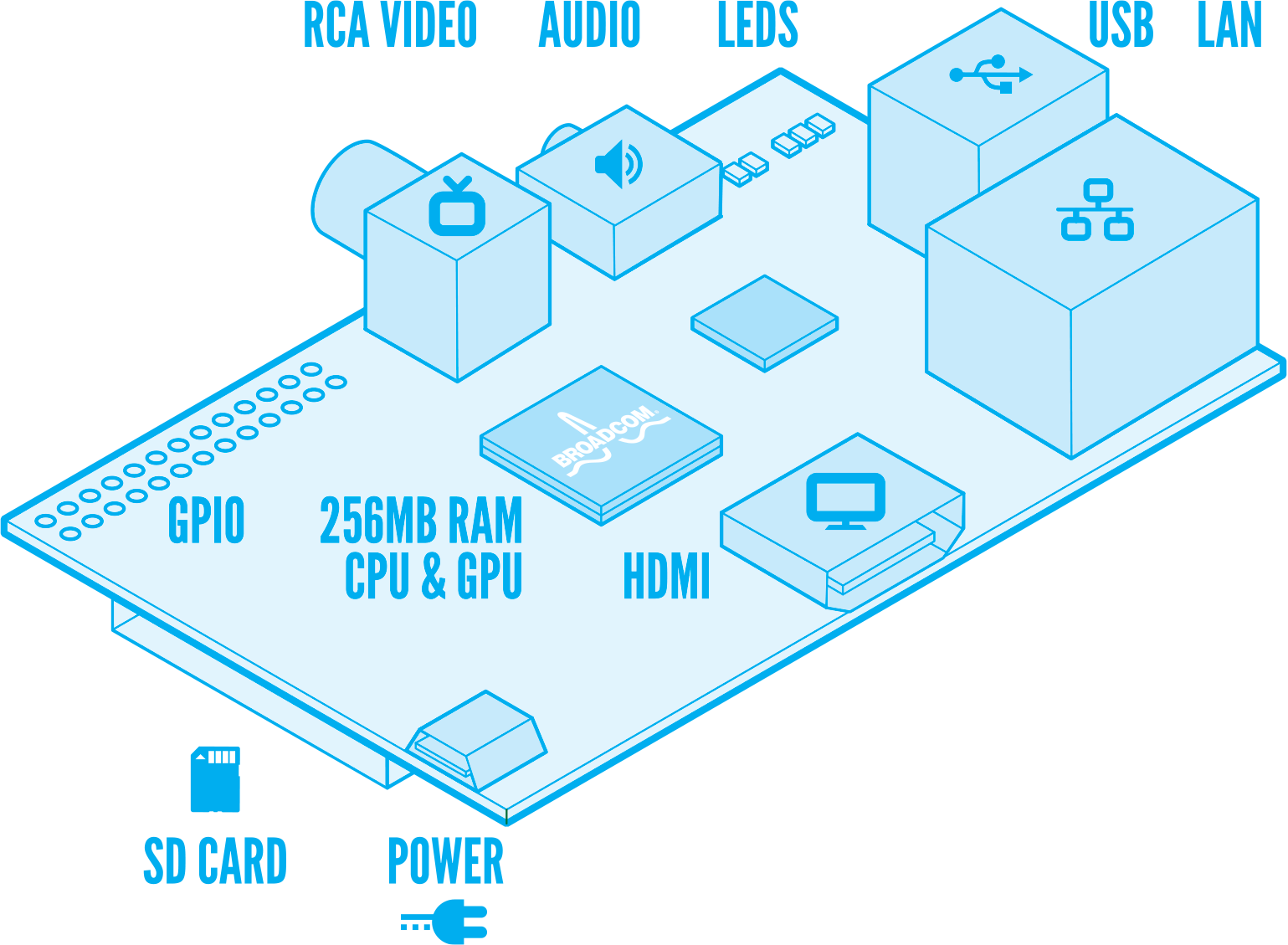
Raspberry Pi was originally conceived as an educational computer for kids, and as it evolved into its final design it became irresistible to adults as well. It’s a sobering lesson in the chronic roadblock of Free software: open hardware, or the lack thereof. It took three years and a lot of work with hardware manufacturers to bring it to market, and it’s still not a completely open device. It relies on closed Broadcom firmware, and the closed ARM platform.

And yet it has a unique advantage — it is available now, and it has already inspired a large community of hackers, authors, users, and creative types of all kinds putting it to work and learning. Today’s enthusiasts are tomorrow’s computer scientists, and the more bridges to Linux and FOSS the better.

Debian Linux

It is fun to play with the steady stream of new things that are birthed every day in Linux-land. New distros! New desktops! New desktop wars! New filesystems, science, art, security, games, programming languages, all this newfangled mobile stuff– it’s a never-ending feast.

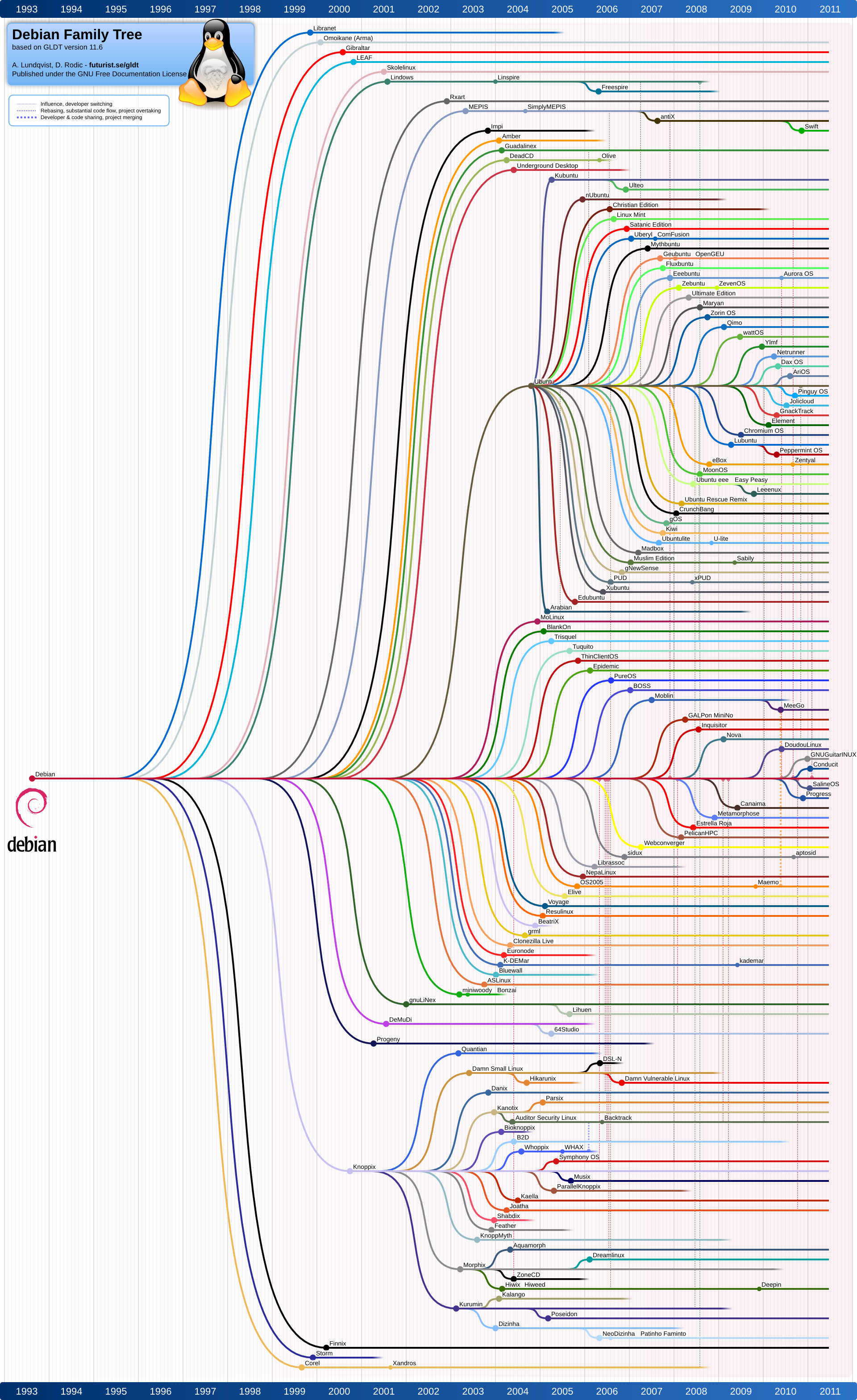
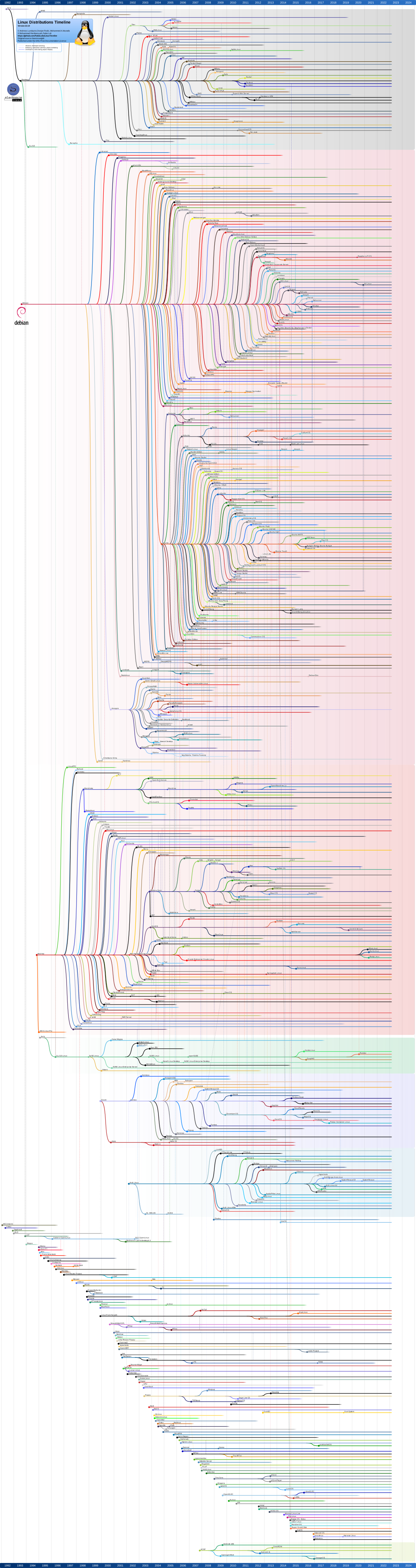
And yet the bedrock of all of this is not discarded and re-invented every time somebody gets bored, but continues on a steady path of iteration and improvement. Debian is one of the two fundamental Linux distributions from which most others are born. Ubuntu, Mint, Mepis, Knoppix, DouDou, aptosid, Raspbian, Crunchbang, Damn Small Linux, and Dream Studio are just a few. If you look at the Debian family tree you see that Ubuntu and Knoppix have been influential and inspired many descendants.
http://www.debian.org/Pics/spacefun.png

Debian was the first to have a dependency-resolving package manager, apt-get. Dependency conflicts are rare in these here modern times, but back in the olden days knowing how to untangle dependency conflicts was a necessary skill. Debian’s system for satisfying the needs of users who want just Free software on their systems, and users who need some proprietary software ingenious and still the best: Free and non-free are sorted into separate repositories, so it’s dead easy to control what goes on your system. Kernels and packages are typically not modified very much, and so they track their sources closely. Debian is huge; it supports more hardware architectures and packages than any other distribution.

The Debian community is a long-running experiment in pure democracy, though some call it anarchy. Whatever you call it, its development and release methodologies are formal and disciplined, it has a constitution, elected officers, and formal procedures for making decisions. Everyone is an unpaid volunteer, and Debian is always available for free. It’s a first-rate distribution known for stability and reliability.

Red Hat

Red Hat is the other foundational Linux distribution, and the wonderful Wikipedia supplies us with a complete Linux family tree. Red Hat occupies an opposite niche from Debian: it is a commercial enterprise distro. Red Hat the company has been a major financial supporter of Linux from their inception, paying developer salaries and funding a considerable amount of development. They have purchased several proprietary software companies over the years, for one example Qumranet, and opened the code. Qumranet became the KVM open-source hypervisor.
Once upon a time in the last millennium you could buy boxed sets of Red Hat Linux in stores, and download free .iso images. Then the company changed direction to focus on the enterprise. Red Hat 9 was their last retail desktop, the name changed to Red Hat Enterprise Linux, and they went to more conservative release cycle. Fedora Linux replaced Red Hat Linux as their community release, with shorter release cycles and newer, even bleeding-edge, packages and technologies.

Red Hat is committed to Free software, and so you can get the source code for free. It is packaged in source RPMs rather than a nice easy .iso, so the easiest way to get RHEL for free is to download CentOS, Scientific Linux, or one of the other RHEL clones that package the SRPMs for you.

As you can see in the family tree, the bulk of creative energy these days is in the Debian and Ubuntu branches, while there are fewer Red Hat and Fedora offshoots.

Honorable mentions go to Slackware, Gentoo, and Arch Linux, which are all foundational distros with their own descendants. All three are first-rate distros with hordes of equally-excellent children, and a lot of active development.

What Else?

There are literally hundreds of important and useful Linux projects to choose from. Linux Mint is a beautiful polished distro with one of the best Xfce implementations. Automotive Linux is red-hot, the Humble THQ Bundle raked in over $5 million from eager Linux gamers , Valve Software is rolling out games to Linux,  the Linux kernel continues its amazing success as the ultimate general-purpose operating system kernel of all time, the wealth of high-quality multimedia and artistic programs continues to grow, big distributed science and research projects, supercomputing, mobile, and everything in between. Doubtless you find readers have your own ideas about what the most important Linux projects are, so please share them in the comments.

==========

Edit: What about Android? My thoughts on Android are similar to my colleague Joe Brockmeier’s, in The 10 Most Important Open Source Projects of 2011. It’s not very open, and it’s not intended to be hackable, so projects like CyanogenMod emerge as a workaround to its closed nature. Contrast this with Raspberry Pi, which has some closed hardware components, but it designed to be as open and hackable as possible.