Home Blog Page 2088

The Cortex-A15 Continues Running Strong On Linux

Over the past several weeks of running the Samsung Chromebook with its Exynos 5 Dual SoC that is comprised of an ARM Cortex-A15 dual-core processor, I’ve grown quite fond of this latest ARM processor.

In the compiler benchmarks and extensively comparing it to the NVIDIA Tegra 3 and Intel x86 CPUs, the ARM Cortex-A15 has held its grown and competed very well. The A15 blows away the older Cortex-A9s and ARM’s claims that it’s 40% faster core-for-core clock-for-clock than the A9 is not just marketing fluff.

The Exynos 5 Dual is clocked at 1.7GHz with two cores while I’m quite looking forward to NVIDIA’s Tegra 4 “Wayne” that will be quad-core up to 2.0GHz…Read more at Phoronix

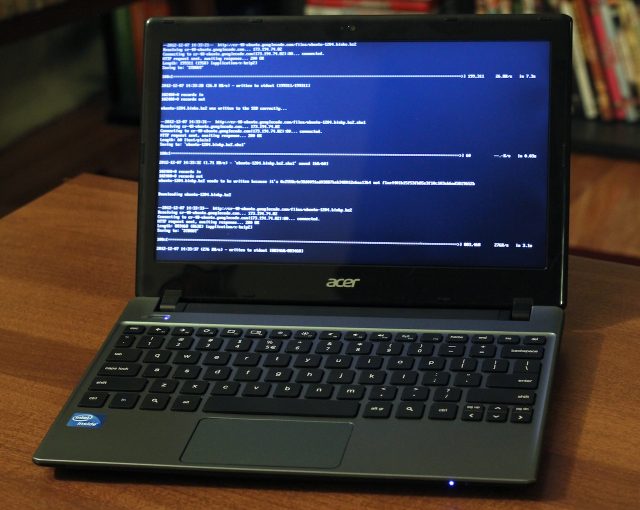
How to install Ubuntu on Acer’s $199 C7 Chromebook

With our handy guide, you too can make the C7 Chromebook do stuff it wasn’t meant to do!
Andrew Cunningham

Maybe you think the price of Acer’s new $199 C7 Chromebook is appealing and that the hardware doesn’t look bad, but you’re a little worried about using Chrome OS to get your work done. Or maybe you’re looking for a small, cheap laptop to run Ubuntu, and you’re not really interested in buying a computer running a Windows license you’ll never use. If either of those sentences describe you and you aren’t afraid of the command line, it’s actually pretty easy to convert the cheapest Chromebook yet into a nice little Linux laptop.

Because Chromebooks use a special BIOS and bootloader that is distinct from the ones used in standard Windows laptops, you can’t use them to boot just any operating system. This is where ChrUbuntu comes in—it’s a version of Ubuntu 12.04 LTS modified to work with Chrome OS hardware. Once it’s installed you should be able to use the C7 to do just about everything you could do with a standard laptop running Ubuntu, and the Chrome OS partition is left on the disk so you can still boot into it and use it if you’re so inclined.

These instructions should technically work with any Chromebook, but of all the ones on sale today, the C7 is perhaps best-suited to run alternate operating systems. It comes with a roomy (if slow) hard drive out of the box, and can easily be upgraded with more RAM and an SSD to speed it up. The recent Samsung Chromebooks, by comparison, take a less…Read more at Ars Technica

10 Conferences To Attend If You Are Looking To Meet Developers

ux-shite-thumb-600x450-38304

The events world is getting really stale, but it is showing a new spring of innovation that in many respects mirrors the enterprise and its own paradox of sluggishness and fresh perspectives.

The big trade events and user conferences do have their merit. They provide an opportunity to get the user perspective and insights into the byzantine labyrinth of legacy software suites that so many customers still depend on. But the well spring of innovation is best discovered at events that focus on developers. These are mid-to-small-sized events that give you the chance to talk to developers and learn what is happening on the front lines of technology development.

We are coming to the end of the year so hopefully you can plan ahead to attend at least one of the 10 events below. This is not a definitive list — I am sure there are several others that have merit. Please use the comments to add ones you would recommend attending.

Defrag/Blur/Glue: Expect to meet developers creating SDKs for brain-controlled apps, pioneers of emerging programming languages and the world’s leading experts on all things APIs…Read more at TechCrunch

Richard M Stallman Joins EFF, Calls Ubuntu A Spyware

Richard M Stallman, the fearless leader of the free software movement has raised some serious concerns about the inclusion of online search in Ubuntu. Stallman is not the only one who is disturbed by this move, the Electric Frontier Foundation also criticized Ubuntu calling it a “data leak” and a “violation” of privacy.

Stallman writes:

Ubuntu, a widely used and influential GNU/Linux distribution, has installed surveillance code. When the user searches her own local files for a string using the Ubuntu desktop, Ubuntu sends that string to one of Canonical‘s servers. (Canonical is the company that develops Ubuntu.)

Stallman compares this with the ‘surveillance’ practice he learned about Windows…Read more at Muktware

Even The FCC Thinks Airplane Electronic Rules Are Bogus

American Airlines

Air travel would be a profoundly dangerous practice if any kid who turned on a Game Boy during takeoff could bring a multimillion dollar jetliner to its fiery doom. The Federal Aviation Administration, which mandates that nice airline stewards must pester you to turn off your electronics, has reluctantly agreed to review the electronics policy in light of increased press attention.

Now, Federal Communications Commission Chairman Julius Genachowski has decided to increase the public pressure in a diplomatically worded letter to the FAA that calls to “enable greater use of tablets, e-readers, and other….Read more at TechCrunch

Watch Tim Cook in His First TV Interview Since Becoming Apple CEO

Click here to read Watch Tim Cook in His First TV Interview Since Becoming Apple CEOIt’s been about a year since Tim Cook took the helm at Apple, and he has apparently decided now is a good time to start talking to people. Brian Williams got first dibs, interviewing Cook earlier tonight on NBC’s Rock Center. It was a pretty standard issue CEO interview—laden with vague answers and lofty corporate sayings. But there were some pretty clear hints at a certain fabled future Apple product…Read more at Gizmodo

GNOME Legacy Mode Begins to Take Shape

gnomeA few weeks back GNOME developers announced that GNOME 3.8 would no longer include the fallback mode. When users roared up, developers found a way to co-exist peacefully with them – a fallback-like mode made mostly of specialized extensions. Matthias Clasen blogged today of some of the progress of what he now dubs GNOME Legacy.

First up, Clasen explains that the mechanism for adding external modes into the login screen, which will allow additional modes like Legacy to be a choice. In fact, Clasen says, ” The upshot is that we now have a ‘GNOME Legacy’ session appear in the session chooser in the login screen.”

Clasen also said that the minimize and maximize buttons are back…Read more at Ostatic


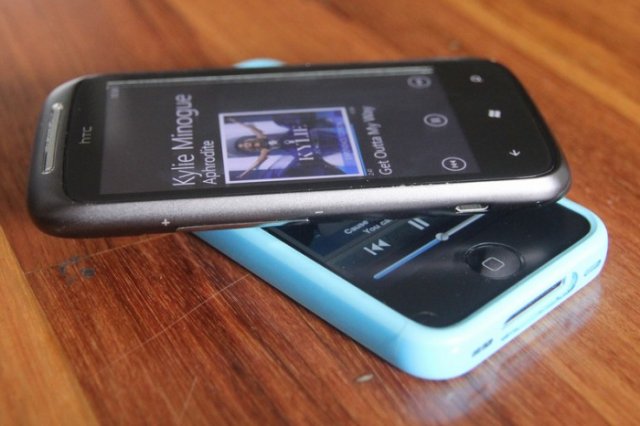
Apple-HTC settlement unsealed: No “cloned products,” no helping trolls

 In advance of today’s Apple v. Samsung hearing, Samsung filed a key document it fought hard to acquire—Apple’s recent patent settlement with HTC.

The 143-page settlement [PDF] is heavily redacted, and no financial terms are revealed. Still, certain parts of the document are revelatory. The document outlines an arbitration process that Apple can initiate if it believes HTC has created a “Cloned Product” that apes Apple’s too closely. It gives specific examples of similarities that would be acceptable and others that would be verboten. “Pinch to zoom” is OK; “slide to unlock” is OK, but only if it looks different. As the agreement lays out (p. 33):

A specific graphical slider animation used in an APPLE Mobile Communication Device at the bottom of a display screen to implement a ‘slide to unlock’ feature could qualify as a Distinctive Apple User Experience; however a different animation (for example a bubble slider)…Read more at ArsTechnica

Google ends small business’ free ride on Google Apps

Google will start charging small businesses to use its Google Apps productivity suite as the company mines previously free services for new revenue streams.

Businesses with 10 or fewer employees will now be charged $50 a year — the same rate paid by larger businesses to use the Web-based tools, which include e-mail, word processor, spreadsheet and presentation graphics tools.

The move will allow the Web giant to focus on the quality of the business user’s experience, Google explained today in a company blog post.

“When we launched the premium business version we kept our free…Read more at CNET News

SUSE Linux Says Btrfs is Ready to Rock

The advanced Butter/Better/B-tree Filesystem, Btrfs, is still labeled as experimental in the Btrfs Wiki and on Oracle’s Btrfs page, though the Oracle page looks outdated. Btrfs is an advanced copy-on-write filesystem with a lot of great capabilities: snapshotting and rollbacks, checksumming of data and metadata, RAID, volumes and subvolumes, online defragmentation, compression, and online filesystem check and repair. Snapshots are always interesting to me; they’re not backups, but a fast way to restore a system to a previous state. With Btrfs users can manage their own snapshots in their home directories. Btrfs supports filesystems up to 16 EiB in size, and files up to 16 EiB as well. (Which may be almost enough to store all the cute kitten photos on the Internet.)

SUSE's Geeko Samurai

Most distros include Btrfs, and Btrfs has been included in mainline Linux kernels since the 2.6.29 kernel.  To use it just install the user-space tools. So what’s the story, is it ready for prime time or not?

Btrfs is Ready

Matthias Eckermann, senior product manager at SUSE Enterprise Linux, says that Btrfs is ready for production systems, and as of SUSE Linux Enterprise 11 SP2 Btrfs is officially supported, along with Ext3, ReiserFS, XFS and OCFS2 (Oracle cluster filesystem for Linux).

The idea behind supporting multiple filesystems is to enable customers to choose different filesystems for different workloads. The installation default is good old tried-and-true Ext3. In the release notes SUSE recommends XFS for data, and Btrfs for root filesystems.

SUSE is a major Btrfs contributor, and as Mr. Eckermann explains their development strategy is three-fold: First, stability. Then functionality, and then performance. Patches are rigorously tested, and only those that meet SUSE standards are accepted. SLES uses the 3.0.10 kernel, with backports and patches.

SUSE does not support all Btrfs functionality yet. For example, multi-volume handling and RAID, and compression are not yet supported, though they will be.  fsck.btrfs in on the future support roadmap. The scrub command is supported, and you can use it to perform online filesystem check and repair. It runs continually as a background process, and you can also run it manually.

SUSE’s nice Btrfs snapshot management tool is called Snapper, and SUSE even provides pre-built Snapper binaries for other distros like CentOS, Debian, Ubuntu, Fedora, and Red Hat.

A notable omission is Ext4; read-only functionality is supported for migrating to a different filesystem. Full read-write support is available with the ext4-writeable KMPkernel module from the SLES11-Extras repository, but it is not supported.

You can migrate from Ext2/3/4 to Btrfs, and you can also migrate back from Btrfs, with one exception: any new data added to Btrfs after conversion will not survive conversion back to Ext2/3/4.

OpenSUSE Has Btrfs

OpenSUSE, the community SUSE edition, gets Btrfs as well, and is more aggressive in pushing out new Btrfs patches. OpenSUSE is free of cost, and SLES has a free 60-day download, so you can test both without spending any money. So is Btrfs ready for production systems? SUSE Linux says yes.

Image credits:

Geeko Samurai courtesy Novell

Green and blue SUSE geckos courtesy Wikimedia Commons, GNU Lesser General Public License