Home Blog Page 2124

Kernel Prepatch 3.7-rc4

The 37-rc4 prepatch has been released. Linus says: “Perhaps notable just because of the noise it caused in certain circles, there’s the ext4 bitmap journaling fix for the issue that caused such a ruckus. It’s a tiny patch and despite all the noise about it you couldn’t actually trigger the problem unless you were doing crazy things with special mount options.

Read more at LWN

Samsung Confirms 30 Million+ Sales Of Flagship Galaxy SIII Smartphone Globally In ~Five Months, 3x Faster Sales Rate Than SGSII

The-Samsung-GALAXY-S-III-achieves-30-million_1

Another impressive sales milestone for Samsung. A few days after confirming it’s sold more than three million Galaxy Note II devices in around a month of sales, Samsung has revealed that sales of its flagship smartphone, the Galaxy SIII, have passed 30 million in the roughly five months since the launch of the smartphone.

The sales rate for the SGSIII is roughly 3x the sales rate for the predecessor to the device: the Galaxy SII. During a similar selling period (150 days), Samsung said the Galaxy SII sold 10 million units globally.  This 3x sales rate is also reflected in Galaxy Note II sales vs the original Galaxy Note.


Read more at TechCrunch

Patent Reform: Can Preissuance Submissions Help?

patent reform

While almost no one thinks that the America Invents Act (AIA) will completely solve America’s patent problems, there are a few provisions in the AIA that may be useful tools in limiting and/or preventing bad patents. One of these tools is the newly implemented Preissuance Submission procedure, which went into effect on September 16, 2012. This procedure allows third parties to participate in the patent application process by providing prior art, which can then be used by a patent examiner to determine whether a patent application lacks novelty or is otherwise obvious. The Electronic Frontier Foundation has now seized upon the new procedure to organize a project to identify pending applications related to 3D printing and then seek out relevant prior art for submission.

read more

Read more at OpenSource.com

New IDC White Paper: Skies Are Becoming More Clear for Open Cloud

In a blog a few months ago, David Linthicum claimed that the ‘open cloud’ was getting awfully confusing. He’s right: the early days of a technology shift are a land grab of vendors, consortia, and projects who work to lay their claim of the “best” “only” and “true” part of the technology puzzle. Confusion and obfuscation usually follows.

The Linux Foundation and open source community have been working in 2012 to help reduce that confusion, and we think the skies are becoming a bit clearer. There’s certainly more work to do, but events like CloudOpen and research such as the paper we’re releasing today with IDC are examples of work we hope can facilitate understanding and collaboration.

Today’s paper, “Open Source Cloud System Software,” sponsored by The Linux Foundation, reports on the results of a survey conducted by IDC during August of nearly 300 IT users working at companies with more than 1,000 employees. We released some of the data earlier this year and today share the complete assessment of how users perceive the role of Linux and open source software in the cloud.

Four things are evident based on the survey and IDC assessment:

* Windows and Linux users alike insist on collaborative development for the cloud. Ninety-four percent of respondents (of which there were both Windows and Linux users) said collaboration and a vibrant open source ecosystem are important for cloud adoption.

* Linux and open source software are dominant in the cloud due to cost, customization, full transparency and the collaborative development model. The white paper report elaborates on these factors, which distinctly illustrate what users have come to expect in their software.

* Users are defining what an open cloud means to them. The rise of Linux and open source gave power to users like never before and now they’re the ones defining what really is the open cloud. IT users tell IDC they define an open cloud by the ability to port and access data; the option to run the cloud platform on premise; and a community that allows them to participate in the technology. Users also state that supporting open APIs and running on Linux are among the top five characteristics of an open cloud.

The IDC white paper elaborates on the community aspect by explaining the importance for users for technology sustainability and longevity. The collaborative development model, as evidenced by Linux, provides long-term, stable support and an accelerated rate of development. It’s also extremely effective during the early stages of a technology’s evolution, reducing hardware and software compatibility issues and delivering broad functionality.

* Eighty-six percent of respondents said they will either increase or maintain their current spending on linux and open source software in support of private cloud in the next 12 months. Specifically, forty-seven percent said they would add more Linux and open source during that period.

While there remains an abundance of open cloud technologies, products, projects, vendors and pundits, as David points out, we’re starting to understand more about what users expect. This will help streamline community efforts. And, companies get it, too. Today, we’re announcing HP’s increased investment in Linux with an upgrade to Platinum membership. Citrix is also increasing investment in Linux as it prioritizes collaborative development in the cloud and upgrades its Linux Foundation membership from Silver to Gold. We’re also happy to welcome today four new members who represent different opportunities in the cloud: Cloudscaling, CloudSigma, Cloudsoft and Dreamhost.

I look forward to working with these companies on CloudOpen and on Linux Foundation programs next year.  

Source: IDC White Paper, sponsored by The Linux Foundation, Open Source Cloud System Software, November 2012

Random Linux Commands to Make Google Talk, Fix Wifi, Find Duplicate Files, and More


Did you know you can make Google Translate talk? Preview Unicode characters on the command line? Generate entropy with the ls command? Use md5sum hashes to find duplicate files, regardless of their names? Test speakers? Fix roaming wifi? If you didn’t before, you will after you read this article.

Google’s TTS Translator

I learned about Google’s text-to-speech translator from the wonderful @climagic on Twitter. This is Climagic’s original command that plays a scary laugh for Halloween:

$ wget -q -O- -U Mozilla http://bit.ly/SdwXD1 |mpg123 -q -w - - |play -t wav - -t wav -t alsa pitch -1200

It also works with the command-line mode of VLC, cvlc. This second example shows how to create your own message:

$ wget -q -O- -U Mozilla "http://translate.google.com/translate_tts?q=hello+,+this+is+different+than+the+previous+example&tl=en-uk" |cvlc - |play -t wav - -t wav -t alsa

This relies on the Google text-to-speech translator, which is the engine for the TTS functions on Google Play, Android, and i-Devices. You can play with it in a Web browser at Google Translate by typing some text and then clicking the listen button. But Google translate doesn’t let you play with different voices, which you get by using different locales such as en-US and en-AU. Run locale -a to see what’s installed on your system, and then try them out.

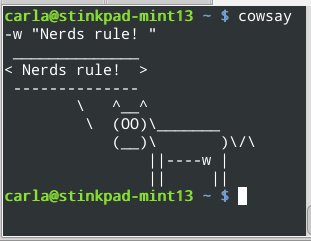
nerdsrule


Google TTS isn’t very well-documented for users, but there is some good developer information at chrome.ttsEngine.

Preview Unicode Characters

This is a quick way to see if your system renders them correctly:

$ echo -e \u2666
♦

That should look like a little diamond. Unicode and locale issues are a chronic sources of fun, especially when you’re writing Linux howto articles for Web publications. Unicode Characters as Named and Numeric HTML Entities is a comprehensive reference.

Unusual Tasks With File Listings

When you create a new GPG key it wants you to wiggle the mouse or pound the keyboard or do something to create enough entropy to create a well-randomized key. There is an easy way, and that is to use the ls command to recursively list every file on your system:

$ ls -R /

Do this in a separate terminal, and then you don’t have to do silly tiring things like wiggling mice. While we’re on the subject of the ls command, you can list multiple directories in a single command by using simple wildcards:

$ sudo ls -l /var/*/*/

You can skip over subdirectories, as this example shows:

$ sudo ls -l /var/.../*/

I’m sure I copied this one from somewhere– It draws a nice ASCII file tree of all subdirectories of the current directory:

$ find . -type d |sed 's:[^-][^/]*/:--:g; s:^-: |:'

Find Duplicate Files

The sure-fire way to find duplicate files is by comparing MD5 hashes. This compares only the first 20 characters of the md5sum, but it still takes a long time. It’s the most accurate method, so I don’t mind the wait:

$ find . -type f -exec md5sum '{}' ';' | sort | uniq --all-repeated=separate -w 20

You can also compare file sizes, which is a little less accurate but a lot faster:

$ find . -type f -printf "%p - %s" | sort -nr -k3 | uniq -D -f1

I use the first method when I start accumulating a lot of sloppy backups, and have too many copies of the same files littering my backup servers.

Quick Speaker Test

When you’re debugging audio problems, use ALSA’s built-in speaker test:

$ speaker-test  -c 5 -l 1 -t wav
speaker-test 1.0.25
Playback device is default
Stream parameters are 48000Hz, S16_LE, 5 channels
WAV file(s)
Rate set to 48000Hz (requested 48000Hz)
Buffer size range from 39 to 419430
Period size range from 12 to 139810
Using max buffer size 419428
Periods = 4
was set period_size = 104857
was set buffer_size = 419428
 0 - Front Left
 1 - Front Right
 2 - Rear Left
 3 - Rear Right
 4 - Center
Time per period = 9.256201

You should hear a pleasant woman’s voice saying “front left, front right” and so on. The -c parameter is how many channels you’re testing, and -l sets how many times you want the test to run.

Sometimes your sound system can get all goobered up, so try restarting ALSA:

$ sudo alsa force-reload

Empty a File

This one deletes the contents of a file without deleting the file:

$ > filename 

Foiling Bad Wifi

On my last few trips out of town I had trouble getting connected, because I couldn’t get DNS. I was getting an IP address and gateway, but still no Internet. So first I ran netstat to find my default gateway:

$ netstat -rn
Kernel IP routing table
Destination Gateway  Genmask       Flags MSS Window  irtt Iface
0.0.0.0     10.0.0.1 0.0.0.0       UG      0 0          0 wlan0
10.0.0.0    0.0.0.0  255.255.255.0 U       0 0          0 wlan0

Then I looked in /etc/resolv.conf to compare. And there was the answer– Network Manager was not updating /etc/resolv.conf. So I manually added 10.0.0.1 to it, and lo! I had Internet.

So what’s up with Network Manager? I confess I have not fully analyzed this yet, but the core issue is Ubuntu, which is the upstream of my Linux Mint 13 installation, has changed how Network Manager manages dynamic DNS updates. You can read all about it at DNS in Ubuntu 12.04. Perhaps Linux Mint changed something, because it should have updated my DNS as I roamed to different networks. At any rate now you know how to make a quick manual workaround, and I’ll cover this in more detail in a future article.

LibreOffice: A Continuing Tale of FOSS Success

There are countless excellent open source software packages available today for virtually every taste and purpose, but it would be difficult to find a better exemplar of open source success than LibreOffice.

Having been born as a fork of OpenOffice.org back in 2010 following widespread community concern over Oracle’s inherited stewardship of that popular package, LibreOffice has gone on to essentially replace its OpenOffice parent as the leading free and open Microsoft Office alternative. 
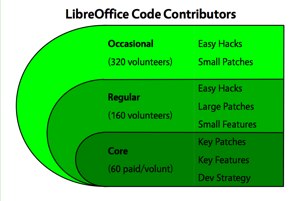
LibreOffice contributorsOpenOffice still exists, to be sure, but it’s LibreOffice that’s now included with most Linux distributions, and it’s LibreOffice that’s being developed most actively.

In many ways, LibreOffice epitomizes the power of open source software.

‘What Many Thought Was Impossible’

The Document Foundation just recently celebrated LibreOffice’s second anniversary, noting that “in just 24 months, we have achieved what many people thought was impossible when the project was launched,” in the words of Thorsten Behrens, SUSE developer and deputy chairman of the Document Foundation Board.

“In just two years we managed to become the third largest free software project focused on the development of a desktop application, with 325 active committers over the last 12 months,” Behrens added, citing Ohloh.net.

In light of this significant milestone, Linux.com spoke recently with Italo Vignoli, director at the Document Foundation, about how far LibreOffice has come as well as what’s still on the way.

The Focus So Far

Italo-Vignoli-LibreOffice“Given the fast time-based release schedule, we seldom have major features, but we frequently have minor improvements, which over time make a major feature,” Vignoli told Linux.com. “In addition, we have focused on several ‘behind the curtains’ features focused on improving the overall quality of the office suite, thanks to a battery of automatic tests which allow us to identify problems before they hit the product.”

LibreOffice development thus far has targeted three main areas, he added:

1. Interoperability

Included in this category are “improvement of OOXML import and export filters in several areas, improvements in VBA macro and form handling, new (Visio, CorelDraw, Publisher) filters or improved (RTF) import filters, and Alfresco and SharePoint integration,” Vignoli explained.

2. Incremental UI Improvements

Some of the notable updates in this area have been user-interface tweaks designed to make the package more attractive and efficient, new templates for the Impress presentation module, and the development of a touch interface for mobile devices, he noted. 

3. Performance and Memory

Numerous optimizations in this area “will eventually make the suite leaner and faster,” Vignoli said.

Release pages for LibreOffice 3.3, 3.4, 3.5 and 3.6 offer more specifics about what has already been added to the productivity suite.
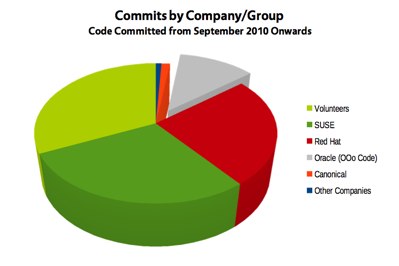
LibreOffice contributor companiesIncluded among the more notable “behind the curtains” features so far, meanwhile, are a global code cleanup, the translation of German comments into English — aiming to make it easier for hackers from all over to work on the code — and a substantial increase in the number of bug fixes.

Coming Soon: Android and Cloud

And what do LibreOffice users have to look forward to? 

Some of the highlights of what’s on the way in LibreOffice 3.7 can already be found in the software’s release notes, but the feature list is not yet frozen, so “this is still wildly incomplete,” Vignoli noted.

Nevertheless, “I personally think that the most interesting new developments will be the cloud version and the Android version, which are already in the works,” he said. “We have demonstrated working prototypes of both.”

‘An Incredibly Efficient Machine’

It’s important to keep in mind that free software projects — in which most developers and contributors are volunteers — tend to lack the specific feature roadmap that a proprietary project might have, “as it is impossible to commit on development schedules when you are working during your personal time,” Vignoli pointed out.

At the same time, however, “the fact that we have been keeping up with our time-based release schedule during the last two years shows that our large developer base — over 540 people at the end of September 2012 — is an incredibly efficient self-governing machine,” he added.

Finally, there’s no denying that positive feedback can help: “All this would be useless if users were not to show their ‘silent’ approval by switching to LibreOffice,” Vignoli concluded, “like the City of Munich and the French government.”


 

Cloud Computing in 2013: A Conversation with Appcore’s CEO

Many hold opinions about what is going to happen in the cloud computing market in the coming year. Brian Patrick Donaghy, CEO of Appcore, offered five things he believes are in store for us in 2013.

Android ‘Jelly Bean’ Usage Share Grows in October, but ‘Ice Cream Sandwich’ Grows Faster

Android 4.1 ‘Jelly Bean’ finally has 3 percent usage share in its sights, but Android 4.0 ‘Ice Cream Sandwich’ continues to gain ground faster, currently powering more than a quarter of Android devices.

Review: Google’s Android OS Might Be Better Suited For Tablets, And The Nexus 10 Is A Shining Example

photo 5

This week, Google announced a new lineup of devices that would be running its Android OS, Jelly Bean version 4.2. Those new devices are a phone, the Nexus 4, and a 10-inch tablet, called the Nexus 10. I’ve had a chance to play with both devices, specifically the Nexus 10, and I was actually surprised with how the device has fit into my daily routine.

First, a little background on what type of devices that I use on a daily basis. I’m an iPhone guy and use an iPhone 5 daily and religiously, but I also carry the latest Galaxy Nexus. I’ve found that iOS still is the better phone operating system for me. However, when the Nexus 7 came out, I found that I used it way more than I ever used my iPad. Perhaps this could be a fluke, or maybe it’s because of the 7-inch form factor.

That’s until I picked up the Nexus 10 and realized that Android OS is, for me, the better “bigger screen” tablet experience. I have a first-generation iPad and never pick it up. In fact, I never use it for more than two hours a week. I’m usually on my computer or on my phone, and never had the need for a “middle” experience from a device. I was pretty sure that I’d never be a tablet person because of this, but alas, Jelly Bean 4.2 on a 10-inch tablet is just that good.


Read more at TechCrunch

On ARM Servers and Portable PCS, Linux Is Growing as a Pre-Loaded Option

When many of us think of Linux, we think of our own roll-your-own deployments of it on our own devices, but there is a fast-growing trend toward powerful companies with commercial interests driving desktop and server systems that run Linux.

Linaro, the not-for-profit engineering organization developing open source software for the ARM architecture, has announced the formation of the Linaro Enterprise Group (LEG) and the addition of AMD, Applied Micro Circuits Corporation, Calxeda, Canonical, Cavium, Facebook, HP, Marvell and Red Hat as Linaro members. The powerful companies will work together on ARM servers that run Linux. Meanwhile, many new desktop systems are arriving with Linux pre-loaded.


Read more at Ostatic