Home Blog Page 2215

What Mobile Tech Companies are Doing Right

The mobile technology space is highly competitive which keeps companies hopping trying to come up with the best way forward. It’s easy to be critical of most companies given their often confusing offerings, but for a refreshing change here are the things the big guys are doing right.

Open Cloud Roundup: Top Headlines Week of Aug. 20

This week’s top open source cloud headlines feature a new OpenStack disribution release from Piston Cloud, an open source virtualization management tool from Convirture, interviews with cloud heavyweights at Intel and Eucalyptus, and new interoperability standards recommendations from the Open Data Center Alliance. And, of course, I’d be remiss to leave out a plug for next week’s CloudOpen conference in San Diego. See you there! 

Piston Cloud Airframe — A Free Starter Package For Building An OpenStack Cloud
TechCrunch 

Piston Cloud will soon release a free OpenStack distribution intended to be an easy way for companies to test the platform without doing too much setup work.

OpenStack is no Linux
ITWorld

Brian Proffitt puts Piston Cloud’s OpenStack distribution release into context with the recent offerings from Red Hat and Rackspace. Taken together, he argues that OpenStack is too commercial to be accurately compared with Linux.

Open-Source Virtualization Management Coming for KVM, Xen and VMware
ZDNet

Convirture’s open source Convirt Enterprise Cloud beta release coming next week will be able to manage multiple virtualization hypervisors.  

4 Questions For Intel About The Open Cloud And The Changing World Of IT (Video)
TechCrunch

Alex Williams interviews Intel’s Das Kamhout about Intel’s cloud strategy and its philosophy behind the open cloud. The open cloud discussion starts about 18 minutes into the video (see video, below).

Open Data Center Alliance (ODCA) Publishes Two New Cloud Usage Models
The Data Center Journal 

This organization of IT leaders has released a suite of requirements for meeting customer demands for interoperability in SaaS and PaaS.

CloudOpen Preview: Defining the Open Cloud Stack
Linux.com

A Q&A with Greg DeKoenigsberg, the vice president of community at Eucalyptus Systems before his opening morning keynote panel this Wednesday, Aug. 29 at CloudOpen.  

https://www.youtube.com/watch?v=-k3x_UvssgQ” frameborder=”0

Enhancing Virtual Terminals with Byobu

The Community Ubuntu Documentation describes Byobu as a “text-based window manager.” The paradox is only apparent because, just as a window manager enhances an X session, Byobu enhances a virtual terminal, making it easy to open new tabs and adding a detailed status line.

Byobu was originally designed for Ubuntu but is now available for RPM distributions and other Unix-like systems. Running on top of GNU Screen or tmux — the choice is yours — the software takes its name from the comparison of its multiple tabs to the Japanese folding screens used as room dividers.

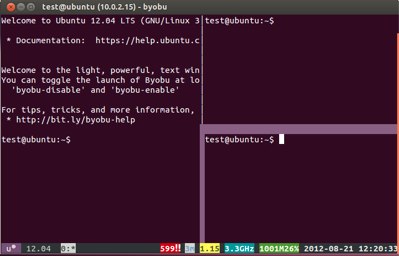
When installed, Byobu adds an item to the desktop menu. However, you can also start it by entering byobu as a command in any virtual console. The application runs most reliably in GNOME Terminal, but you can also run it from KDE Konsole or any other terminal emulator, although occasional hiccups can happen.byobu screen
Status Indicators, Splits and Windows

Byobu’s most obvious feature is the status indicators that are shown along the bottom of the window. If running on top of GNU Screen, Byobu uses two status lines, the top for information about the current session, the bottom for hardware information. By contrast, when Byobu runs on tmux only a single line displays.

Either way, over three dozen status indicators are available, ranging from the current user, host and address to CPU temperature and processors. Notifications for pending crash reports, RAID failures, available package updates and any reboots required after system upgrades are also available. There is even provision for custom indicators.

The other major feature is tabs. Within the currently active session, you can add a split — a new prompt within the same window — by pressing Shift-F2 to split the space horizontally, or Ctrl-F2 to split the space vertically. Alternatively, F2 opens an entirely new window. With additional key bindings you can move between windows or splits in the same window, open and close them. Within each session you can also enter the scrollback history, and copy and paste text using only keystrokes.

Configuration Tools

The list of keyboard shortcuts is lengthy, so you should start your explorations of Byobu by pressing F9 and viewing the help link in the configuration menu. Then select Toggle status notifications to choose the indicators to display at the bottom of the window. You can also use the configuration menu to change the escape sequence and set Byobu to launch at login.

However, Byobu is shifting away from the configuration menu in favor of a suite of utilities. The most useful of these is byobu-select-session, which allows you to set whether Byobu runs on top of of GNU Screen or the default tmux, an adjustment that may help if some features are unavailable under one configuration.

Another useful utility is byobu-status-detail, which gives a detailed report on what is happening with your system. Currently, at least some of these utilities are not officially documented, such as byobu-quiet, which suppresses the top status line, and byobu-silence, which suppresses both status lines, but you can use tab completion to see a list of all utilities.

Other settings are adjustable in the files in the ~/.byobu directory. For these files, you can consult those in /usr/share/byobu for detailed instructions. Using these files, you can change the basic colors in which Byobu displays or the positioning of indicators on the status lines.

Probably the most useful file is ~/.byobu/windows, which contains a list of local and remote windows to open, one entry per line, in the structure described in the screen man page. Otherwise, Byobu is persistent, opening with the windows that displayed the last time it ran.

Byobu could use more up-to-date documentation, and users can easily stumble across combinations of features that don’t work together or even cause crashes. However, if you are the type of user likely to find Byobu useful, you might consider a few quirks a fair trade for the potential power.


5 OSS Up-and-Comers to Watch

From open source management and Web application frameworks to big data and IT provisioning using the DevOps model, ZDNet Asia spotlights some of the hottest open source software entities in these spaces now.

Read more at ZDNet News

CloudOpen Preview: Defining the Open Cloud Stack

Greg DeKoenigsberg is the Vice President of Community at Eucalyptus Systems and is on the opening morning keynote panel this Wednesday, August 29 at CloudOpen. He and his fellow panelists, Mark Hinkle from Citrix and Stefano Maffulli from OpenStack will be helping to define the open cloud stack as the conference gets underway. Greg was able to connect with us briefly this week as he prepares for the trip to San Diego. Here’s what he was able to tell us about the panel and his other thoughts on open cloud.

team-gregdekYou’re on a keynote panel that will explore what is the open cloud. Can you give us a teaser of the position you will take on this definition?

DeKoenigsberg: Sure. The open cloud builds not only on source code, but on the standards and practices of cloud users. And having a cloud is only a small part of the battle; what ultimately matters is the set of applications that run on that cloud. Right now, the majority of people who are building complex cloud applications are using Amazon Web Services to do it. There’s a tremendous amount of expertise in that ecosystem, which means that it’s vital to share the knowledge in that ecosystem as much as possible.

You’re also doing a session about innovation and the open cloud. What will you explore here?

DeKoenigsberg: Innovative software is becoming more and more about scale, especially in open source. Innovators want to know that they can start small and cheap, and then grow to be huge and distributed. Open source has proven to excel in precisely this way, and we will talk about the tools in the open source world that help innovators move down that path.

Why do you think open source and collaboration are essential to cloud computing?

DeKoenigsberg: One could more correctly say that, in this day and age, open source and collaboration are essential to computing. Cloud computing is simply an extension of that.

Where does Eucalyptus see the open cloud space a year from now?

DeKoenigsberg: Larger and stronger deployments of private clouds in production environments, built on open source. More and more legitimate hybrid cloud deployments with enterprise users choosing increasingly to “buy the base and rent the spike.”

What do you say to those critics that say openness is a minor priority in cloud computing?

DeKoenigsberg: Saying that openness is a minor priority is really saying that *choice* is a minor priority. It’s often the case the people who don’t want you to think about choices are the ones who are trying to limit your choices in the first place.

Manjaro Linux: Arch Linux For Newbies

 
Manjaro Linux is a Linux Distribution based on well tested snapshots of the Arch Linux repositories and will be 100% compatible with Arch. We manage our repository with our own developed tool called BoxIt which is designed like git.
Read more at Muktware

OS X 10.8 vs. Ubuntu Linux: A Battle With No Clear Winner

Since Apple released OS X 10.8 “Mountain Lion” last month, there have been tests going on at Phoronix of this latest Apple operating system not only on the Retina MacBook Pro, but other Mac hardware as well. In this article is a comparison of OS X 10.8 versus Ubuntu Linux — when trying out both Ubuntu 12.04 LTS and the latest Ubuntu 12.10 development version.


Read more at Phoronix

Cameras: The New Frontier for Android?

It looks like the next frontier for the Android mobile OS is on cameras. First, Polaroid announced an Android-based digital camera, and now the TechHive beta blog reports that Nikon will release one. According to the blog post: “Nikon’s Coolpix S800C, a pocketable 10X-optical-zoom (25mm to 250mm) camera with Wi-Fi features and a 3.5-inch OLED touchscreen, will be the first major-release camera to run the Android operating system. The S800C’s other core specs include optical image stabilization to bolster its long-zoom lens and 1080p video recording at 30fps.” Now, it remains to be seen if this will actually be the first Android camera to arrive.

As we’ve reported before, Samsung has become the global leader in Android devices, so one would have expected the first Android camera to come from the company. However, Polaroid and Nikon are the first to announce digital cameras based on the mobile operating system.

 
Read more at Ostatic

Interview: Huawei’s John Roese on the Future of Networking

This week the Hot Interconnects conference kicked off with a keynote by John Roese, VP and General Manager of Futurewei, Huawei’s North American R&D organization. After the talk, I got a chance to catch up with Rouse and ask him about the keynote and where Huawei is headed in the HPC space.

insideHPC: At the start of your keynote today, you described Huawei as “the largest company no one has ever heard of” with $32 Billion of telecommunications revenue in 2011. What was your message today for these engineers at the Hot Interconnects Conference?

John Roese: There were a lot of things, but the big message was that with all the things going on out there, whether they be cloud, virtualized services, or mobility, these are all things that we’ve seen before. Given our audience with a lot of deep expertise here, the fundamental point I wanted to make them was the they need to recognize the patterns. We have tried to solve these problems before. We have tried distributed environments. We have gone towards making the network transform itself, successfully, many times.

Through each of these evolutions, we learned lessons. We’ve learned that QoS when it’s overengineered doesn’t work, so make it simple. We’ve learned that no matter what you think about the predictability of the outcome and how the network is supposed to operate, it never really operates that way.

We’ve learned that if you make assumptions about symmetry and how traffic is going to flow or how a surge is going to be used, it usually reverses itself midstream and the water flow comes back at you. It surprises you.

So my number one point was to get these people, who are working on some really important things right now, to pause for a second and remember the lessons that they’ve learned so that we don’t repeat our old mistakes in the Cloud era.

insideHPC: So would you agree with the notion that there are no new problems, just new engineers working on old problems?

John Roese: I totally agree with that. For this audience at least, everyone has been in the industry for 10, 15, or 20 something years, they don’t have that excuse.

insideHPC: Earlier today you mentioned working with the folks at CERN on openlab. What are your thoughts on HPC at Huawei?

So obviously HPC is a technology area that’s used in many industries, whether it be large-scale data processing, research environments, and many different places where you use those techniques. The three main characteristics of an HPC environment are massive distributed compute capacity, massive storage capacity that is, in general, very cost-effective at enormous scales, and a huge amount of bandwidth consumption.

In the Huawei world, we don’t see HPC as a target market that we would building technologies exclusively just for that. Everyone of those things I just described could be applied to 10 other market domains. Let’s just take a look at those three.

For the massive network capacity, whether it be HPC or the backbone of a carrier or the core of a cloud infrastructure, we just launched a whole set of products that are 96 ports of 100 GigE on a single device. Why? Because people want a lot of bandwidth. When we give them a bandwidth step, they use it all.

We’re pretty excited about those types of technologies in the HPC environment. It gives you a low-cost, high-capacity, different bandwidth step and extremely high density in a single platform.


    Read more at insideHPC

    25 Years Later, Microsoft Unveils A Revamped Corporate Logo

    microsoft-new-logo-2012

    Microsoft has a new look. The company just took the wraps off its new corporate branding. Replacing its previous logo is a staunch, four-pane colored window very reminiscent of the grid layout scheme found in Microsoft’s latest products. Microsoft is also spelled in a simple, bond font — mostly likely Segoe.

    The new grid clearly reflects Microsoft’s latest design language started first with the Zune and later adapted by the Xbox 360, Windows Phone and most recently, Windows 8. It’s clean, simple, and also like Windows 8, most people will probably hate it.

    The symbol in the new logo should look familiar. It’s likely the merger of the Microsoft Store logo with Window 8′s.

    The outgoing logo was 25 years old. This new version, Microsoft’s fifth corporate logo in 37 years, is the first to incorporate a symbol alongside Microsoft’s name. Previous editions simply spelled out Microsoft. As noted by the The Seattle Times, this latest version includes a subtle nod to the original 1975-1979 logo by connecting the F and the T.

    Microsoft is attempting to turn the page on its past and move forward into a new chapter. Windows 8 features a radically different design philosophy from previous editions. The Surface tablet shows the company is ready to bust free from the software world. The Xbox 360 is leading the charge against the cable operators. It can be argued that even Windows Phone is something totally new. It’s a timely change for Microsoft’s corporate identity. The new logo more better represents the modern day Microsoft.


    Read more at TechCrunch