Home Blog Page 304

How to Partition and Format a Drive on Linux

On most computer systems, Linux or otherwise, when you plug a USB thumb drive in, you’re alerted that the drive exists. If the drive is already partitioned and formatted to your liking, you just need your computer to list the drive somewhere in your file manager window or on your desktop. It’s a simple requirement and one that the computer generally fulfills.

Sometimes, however, a drive isn’t set up the way you want. For those times, you need to know how to find and prepare a storage device connected to your machine.

What are block devices?

A hard drive is generically referred to as a “block device” because hard drives read and write data in fixed-size blocks. This differentiates a hard drive from anything else you might plug into your computer, like a printer, gamepad, microphone, or camera. The easy way to list the block devices attached to your Linux system is to use the lsblk (list block devices) command:

Read more at OpenSource.com

How to Move Files Using Linux Commands or File Managers

Learn how to move files with Linux commands in this tutorial from our archives.

There are certain tasks that are done so often, users take for granted just how simple they are. But then, you migrate to a new platform and those same simple tasks begin to require a small portion of your brain’s power to complete. One such task is moving files from one location to another. Sure, it’s most often considered one of the more rudimentary actions to be done on a computer. When you move to the Linux platform, however, you may find yourself asking “Now, how do I move files?”

If you’re familiar with Linux, you know there are always many routes to the same success. Moving files is no exception. You can opt for the power of the command line or the simplicity of the GUI – either way, you will get those files moved.

Let’s examine just how you can move those files about. First we’ll examine the command line.

Command line moving

One of the issues so many users, new to Linux, face is the idea of having to use the command line. It can be somewhat daunting at first. Although modern Linux interfaces can help to ensure you rarely have to use this “old school” tool, there is a great deal of power you would be missing if you ignored it all together. The command for moving files is a perfect illustration of this.

The command to move files is mv. It’s very simple and one of the first commands you will learn on the platform. Instead of just listing out the syntax and the usual switches for the command – and then allowing you to do the rest – let’s walk through how you can make use of this tool.

The mv command does one thing – it moves a file from one location to another. This can be somewhat misleading, because mv is also used to rename files. How? Simple. Here’s an example. Say you have the file testfile in /home/jack/ and you want to rename it to testfile2 (while keeping it in the same location). To do this, you would use the mv command like so:

mv /home/jack/testfile /home/jack/testfile2

or, if you’re already within /home/jack:

mv testfile testfile2

The above commands would move /home/jack/testfile to /home/jack/testfile2 – effectively renaming the file. But what if you simply wanted to move the file? Say you want to keep your home directory (in this case /home/jack) free from stray files. You could move that testfile into /home/jack/Documents with the command:

mv /home/jack/testfile /home/jack/Documents/

With the above command, you have relocated the file into a new location, while retaining the original file name.

What if you have a number of files you want to move? Luckily, you don’t have to issue the mv command for every file. You can use wildcards to help you out. Here’s an example:

You have a number of .mp3 files in your ~/Downloads directory (~/ – is an easy way to represent your home directory – in our earlier example, that would be /home/jack/) and you want them in ~/Music. You could quickly move them with a single command, like so:

mv ~/Downloads/*.mp3 ~/Music/

That command would move every file that ended in .mp3 from the Downloads directory, and move them into the Music directory.

Should you want to move a file into the parent directory of the current working directory, there’s an easy way to do that. Say you have the file testfile located in ~/Downloads and you want it in your home directory. If you are currently in the ~/Downloads directory, you can move it up one folder (to ~/) like so:

mv testfile ../

The “../” means to move the folder up one level. If you’re buried deeper, say ~/Downloads/today/, you can still easily move that file with:

mv testfile ../../

Just remember, each “../” represents one level up.

As you can see, moving files from the command line, isn’t difficult at all.

GUI

There are a lot of GUIs available for the Linux platform. On top of that, there are a lot of file managers you can use. The most popular file managers are Nautilus (GNOME) and Dolphin (KDE). Both are very powerful and flexible. I want to illustrate how files are moved using the Nautilus file manager (on the Ubuntu 13.10 distribution, with Unity as the interface).

Nautilus has probably the most efficient means of moving files about. Here’s how it’s done:

  1. Open up the Nautilus file manager.

  2. Locate the file you want to move and right-click said file.

  3. From the pop-up menu (Figure 1) select the “Move To” option.

  4. When the Select Destination window opens, navigate to the new location for the file.

  5. Once you’ve located the destination folder, click Select.
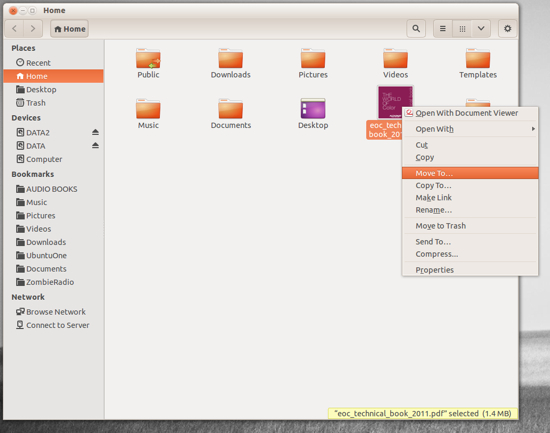
Nautilus screenshot

This context menu also allows you to copy the file to a new location, move the file to the Trash, and more.

If you’re more of a drag and drop kind of person, fear not – Nautilus is ready to serve. Let’s say you have a file in your home directory and you want to drag it to Documents. By default, Nautilus will have a few bookmarks in the left pane of the window. You can drag the file into the Document bookmark without having to open a second Nautilus window. Simply click, hold, and drag the file from the main viewing pane to the Documents bookmark.

If, however, the destination for that file is not listed in your bookmarks (or doesn’t appear in the current main viewing pane), you’ll need to open up a second Nautilus window. Side by side, you can then drag the file from the source folder in the original window to the the destination folder in the second window.

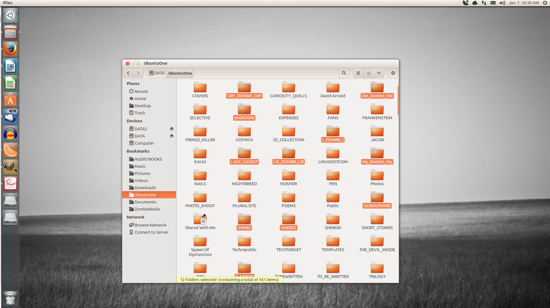
If you need to move multiple files, you’re still in luck. Similar to nearly every modern user interface, you can do multi-select of files by holding down the Ctrl button as you click each file. After you have selected each file (Figure 2), you can either right-click one of the selected files and the choose the Move To option, or just drag and drop them into a new location.
nautilus

The selected files (in this case, folders) will each be highlighted.

Moving files on the Linux desktop is incredibly easy. Either with the command line or your desktop of choice, you have numerous routes to success – all of which are user-friendly and quick to master.


Blockchain as a Catalyst for Good

Blockchain and its ability to “embed trust” can help elevate trust, which right now, is low, according to Sally Eaves, a chief technology officer and strategic advisor to the Forbes Technology Council, speaking at The Linux Foundation’s Open FinTech Forum in New York City.

People’s trust in business, media, government and non-government organizations (NGOs) is at a 17-year low, and businesses are suffering as a result, Eaves said.

Additionally, Eaves said, 87 percent of millennials believe business success should be measured in more than just financial performance. People want jobs with real meaning and purpose, she added.

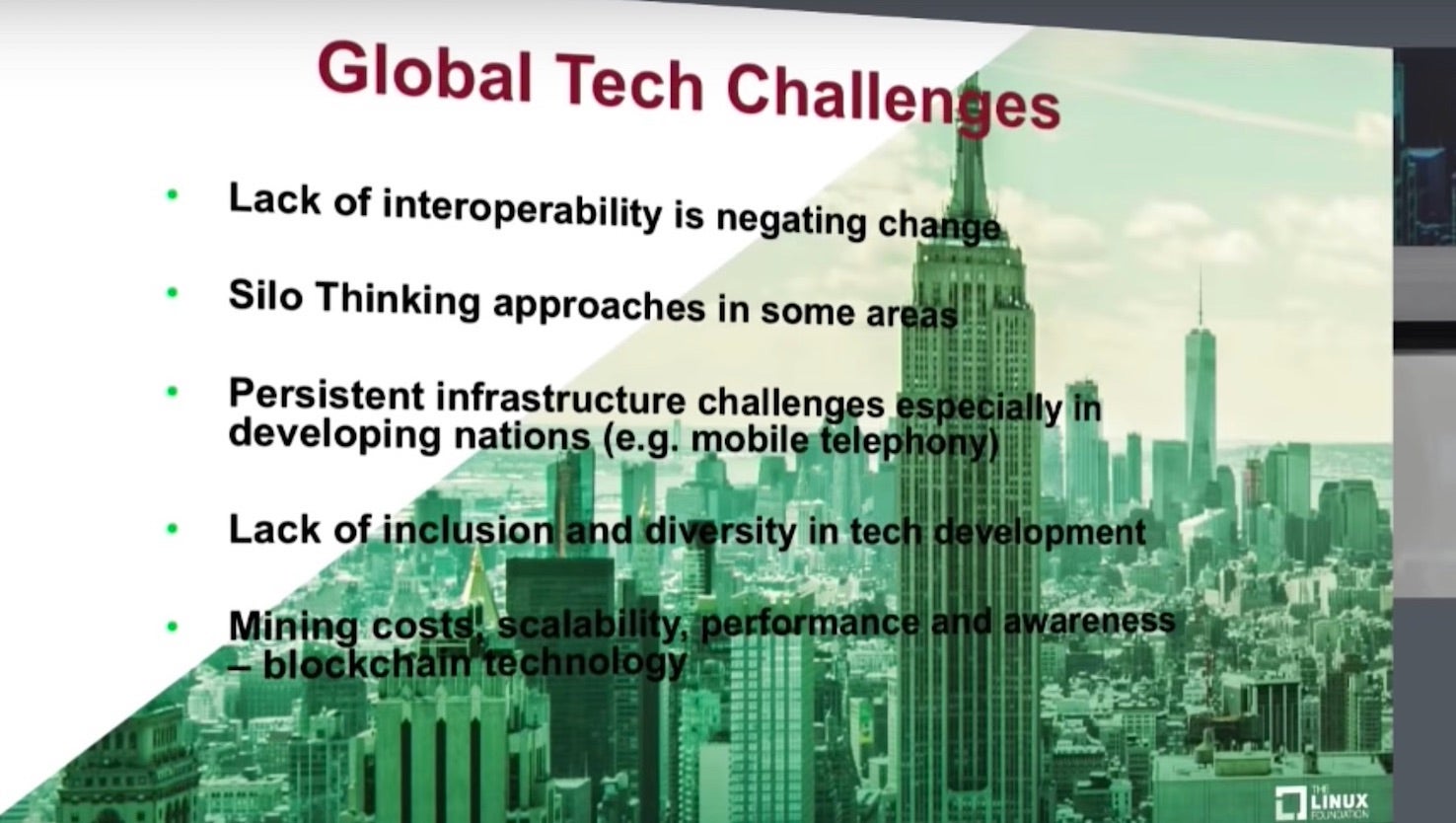
To provide further context, Eaves noted the following urgent global challenges:

  • 1.5 billion people cannot prove their identity (which has massive implications in not just banking but education as well)
  • 2 billion people worldwide do not have a bank account or access to a financial institution
  • Identity fraud is estimated to cost the UK millions of euros annually.

Read more at The Linux Foundation

Slurm Job Scheduling System

In previous articles, I examined some fundamental tools for HPC systems, including pdsh (parallel shells), Lmod environment modules, and shared storage with NFS and SSHFS. One remaining, virtually indispensable tool is a job scheduler.

One of the most critical pieces of software on a shared cluster is the resource manager, commonly called a job scheduler, which allows users to share the system in a very efficient and cost-effective way. The idea is fairly simple: Users write small scripts, commonly called “jobs,” that define what they want to run and the required resources, which they then submit to the resource manager. When the resources are available, the resource manager executes the job script on behalf of the user. Typically this approach is for batch jobs (i.e., jobs that are not interactive), but it can also be used for interactive jobs, for which the resource manager gives you a shell prompt to the node that is running your job.

Some resource managers are commercially supported and some are open source, either with or without a support option. The list of candidates is fairly long, but the one I talk about in this article is Slurm. …The SLUM architecture is very similar to other job schedulers. Each node in the cluster has a daemon running, which in this case is named slurmd. The resources are referred to as nodes. The daemons can communicate in a hierarchical fashion that accommodates fault tolerance. On the Slurm master node, the daemon is slurmctld, which also has failover capability.

Read more at ADMIN magazine

gRPC Load Balancing on Kubernetes without Tears

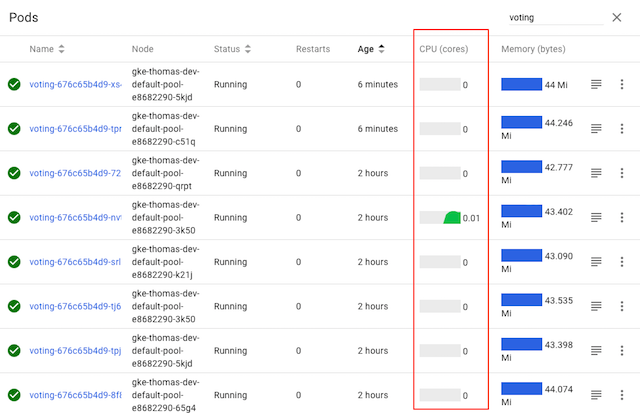
Many new gRPC users are surprised to find that Kubernetes’s default load balancing often doesn’t work out of the box with gRPC. For example, here’s what happens when you take a simple gRPC Node.js microservices app and deploy it on Kubernetes:

While the voting service displayed here has several pods, it’s clear from Kubernetes’s CPU graphs that only one of the pods is actually doing any work—because only one of the pods is receiving any traffic. Why?

In this blog post, we describe why this happens, and how you can easily fix it by adding gRPC load balancing to any Kubernetes app with Linkerd, a CNCF service mesh and service sidecar.

Read more at Kubernetes Blog

How LF Energy Plans to Open Source Energy

We’re running out of time to tackle climate change. Could an open source, distributed approach build the necessary momentum? Executive director of LF Energy tells Techworld about the new initiative which already has some enterprises on board.

The prospects from the UN’s most recent climate report are bleak. There are less than two decades until the point of no return for the planet’s climate, and the leaders of major countries seem to be retracting political willingness to fix the existential threat.

But, the roadblocks might not be as daunting as they first appear. Shuli Goodman, executive director of the newly created LF Energy group, hopes to fundamentally transform the way energy is distributed, reduce waste, and build new models that could be scaled out with an open source framework.

Read more at TechWorld


Introducing ODPi Egeria – The Industry’s First Open Metadata Standard

Organizations looking to better locate, understand, manage and gain value from their data have a new industry standard to leverage. ODPi, a nonprofit Linux Foundation organization focused upon accelerating the open ecosystem of big data solutions, recently announced ODPi Egeria, a new project that supports the free flow of metadata between different technologies and vendor offerings.

Recent data privacy regulations such as GDPR have brought data governance and security concerns to the forefront for enterprises, driving the need for a standard to ensure that data providence and management is clear and consistent—supporting the free flow of metadata between different technologies and vendor offerings. Egeria enables this, as the only open source driven solution designed to set a standard for leveraging metadata in line of business applications, and enabling metadata repositories to federate across the enterprise.

The first release of Egeria focuses on creating a single virtual view of metadata.  It can federate queries across different metadata repositories and has the ability to synchronize metadata between different repositories.  The synchronization protocol controls what is shared, with which repositories and ensures that updates to metadata can be made with integrity.

Read more at OpenDataScience

RISC-V Linux Development in Full Swing

Most Linux users have heard about the open source RISC-V ISA and its potential to challenge proprietary Arm and Intel architectures. Most are probably aware that some RISC-V based CPUs, such as SiFive’s 64-bit Freedom U540 found on its HiFive Unleashed board, are designed to run Linux. What may come as a surprise, however, is how quickly Linux support for RISC-V is evolving.

“This is a good time to port Linux applications to RISC-V,” said Comcast’s Khem Raj at an Embedded Linux Conference Europe presentation last month. “You’ve got everything you need. Most of the software is upstream so you don’t need forks,” he said.

By adopting an upstream first policy, the RISC-V Foundation is accelerating Linux-on-RISC-V development both now and in the future. Early upstreaming helps avoid forked code that needs to be sorted out later. Raj offered specifics on different levels of RISC-V support from the Linux kernel to major Linux distributions, as well as related software from Glibc to U-Boot (see farther below).

The road to RISC-V Linux has also been further accelerated thanks to the enthusiasm of the Linux open source community. Penguinistas see the open source computing architecture as a continuation of the mission of Linux and other open source projects. Since IoT is an early RISC-V target, the interest is particularly keen in the open source Linux SBC community. The open hardware movement recently expanded to desktop PCs with System76’s Ubuntu-driven Thelio system.

Processors remain the biggest exceptions to open hardware. RISC-V is a step in the right direction for CPUs, but RISC-V lacks a spec for graphics, which with the rise of machine vision and edge AI and multimedia applications, is becoming increasingly important in embedded. There’s progress on this front as well, with an emerging project to create an open RISC-V based GPU called Libre RISC-V. More details can be found in this Phoronix story.

SiFive launches new Linux-driven U74 core designs

RISC-V is also seeing new developments on the CPU front. Last week, SiFive, which is closely associated with the UC Berkeley team that developed the architecture, announced a second gen RISC-V CPU core designs called IP 7 Series. IP 7 features the Linux-friendly U74 and U74-MC chips. These quad-core, Cortex-A55 like processors, which should appear in SoCs in 2019, are faster and more power efficient than the U540.

The new U74 chips will support future, up to octa-core, SoC designs that mix and match the U74 cores with its new next-gen MCU chips: the Cortex-M7 like E76 and Cortex-R8 like S76. The U74-MC model even features its own built-in S7 MCU for real-time processing.

Although much of the early RISC-V business has been focused on MCUs, SiFive is not alone in building Linux-driven RISC-V designs. Earlier this summer a Shakti Project backed by the Indian government demonstrated Linux booting on a homegrown 400MHz Shakti RISC-V processor.

A snapshot of Linux support for RISC-V

In his ELC presentation, called “Embedded Linux on RISC-V Architecture — Status Report,” Raj, who is an active contributor to RISC-V, as well as the OpenEmbedded and Yocto projects, revealed the latest updates for RISC-V support in the Linux kernel and related software. The report has a rather short shelf life, admitted Raj: “The software is developing very fast so what I say today may be obsolete tomorrow — we’ve already seen a lot of basic tool, compilers, and toolchain support landing upstream.”

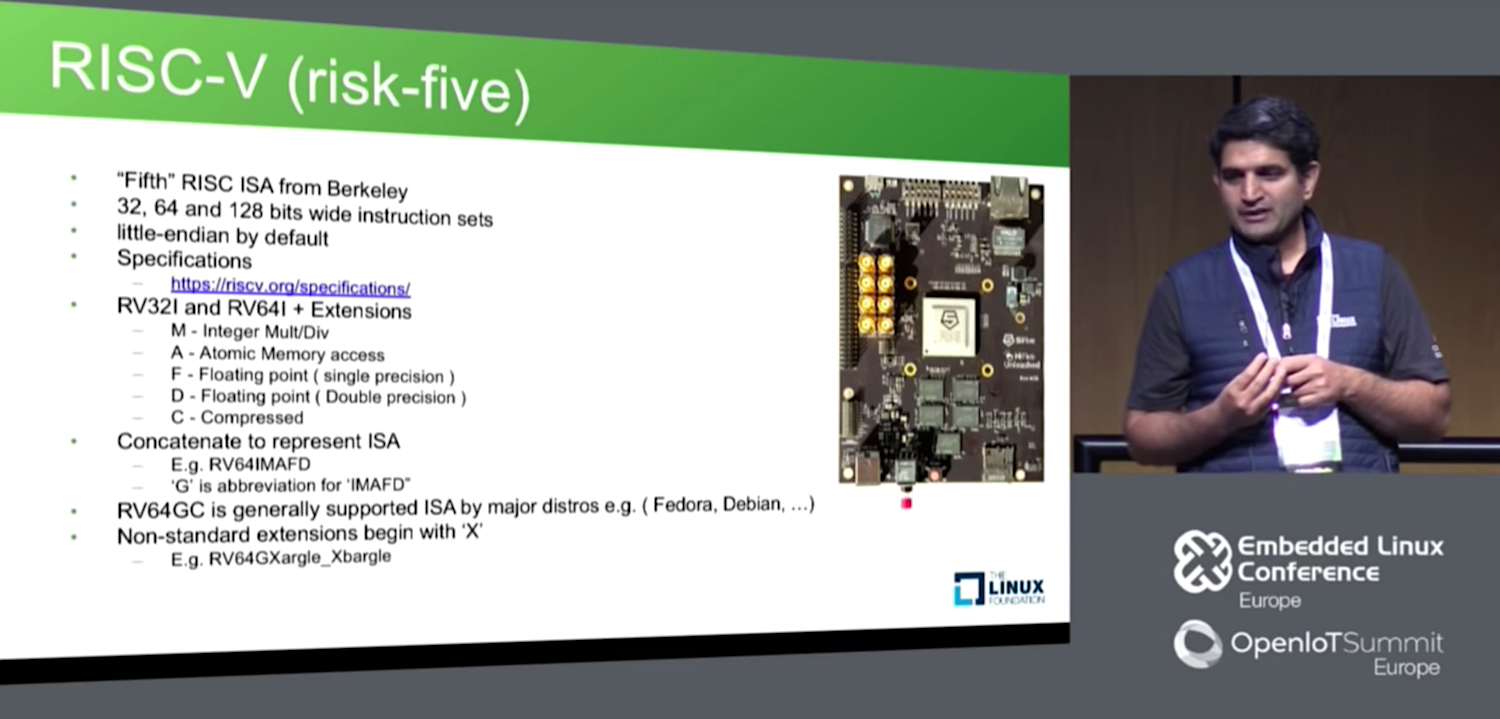
Raj started with a brief overview of RISC-V, explaining how it supports 32-, 64-, and even future 128-bit instruction sets. Attached to these versions are extensions such as integer multiply/divide, atomic memory access, floating point single and double precision, and compressed.  

The initial Linux kernel support adopts the most commonly used profile for Linux: RV64GC (LP64 ABI). The G and the C at the end of the RV64 name stand for general-purpose and compressed, respectively.

The Linux kernel has had a stable ABI (application binary interface) in upstream Linux since release 4.15. According to Raj, the recent 4.19 release added QEMU virt board drivers “thanks to major contributions from UC Berkeley, SiFive, and Andes Technology.”

You can now run many other Linux-related components on a SiFive U540 chip, including binutils 2.28, gcc 7.0, glibc 2.27 and 2.28 (32-bit), and newlib 3.0 (for bare metal bootstrapping). For the moment, gdb 8.2 is available only for bare-metal development.

In terms of bootloaders, Coreboot offered early support, and U-Boot 2018.11 recently added RISC-V virt board support upstream. PK/BBL is now upstream on the RISC-V GitHub page.

OpenEmbedded/Yocto Project OE/Yocto was the first official Linux development platform port, with core support upstreamed with the 2.5 release. Among full-fledged Linux distributions, Fedora is the farthest along. Fedora, which has done a lot of the “initial heavy lifting,” finished its bootstrap back in March, said Raj. In addition, its “Koji build farm is turning out RISC-V RPMs like any other architecture,” he added. Fedora 29 (Rawhide) offers specific support for the RISC-V version of QEMU.

Debian still lacks toolchain for cross-build development on RISC-V, but it’s already possible, said Raj. Buildroot now has a 64-bit RISC-V port and a 32-bit port was recently submitted.

Raj went on to detail RISC-V porting progress for the LLVM compiler and the Musl C library. Farther behind, but in full swing, are ports for OpenOCD UEFI, Grub, V8, Node.js, Rust, and Golang, among others. For the latest details, see the RISC-V software status page, as well as other URLs displayed toward the end of Raj’s ELC video below.

GraphQL Gets Its Own Foundation

Addressing the rapidly growing user base around GraphQL, The Linux Foundation has launched the GraphQL Foundation to build a vendor-neutral community around the query language for APIs (application programming interfaces).

“Through the formation of the GraphQL Foundation, I hope to see GraphQL become industry standard by encouraging contributions from a broader group and creating a shared investment in vendor-neutral events, documentation, tools, and support,” said Lee Byron, co-creator of GraphQL, in a statement.

“GraphQL has redefined how developers work with APIs and client-server interactions,” said Chris Aniszczyk, Linux Foundation vice president of developer relations…

Read more at The New Stack

Introductory Go Programming Tutorial

Maybe you’ve heard of Go. It was first introduced in 2009, but like any new programming language, it took a while for it to mature and stabilize to the point where it became useful for production applications. Nowadays, Go is a well-established language that is used for network and database programming, web development, and writing DevOps tools. It was used to write Docker, Kubernetes, Terraform and Ethereum. Go is accelerating in popularity, with adoption increasing by 76% in 2017, and now there are Go user groups and Go conferences. Whether you want to add to your professional skills, or are just interested in learning a new programming language, you may want to check it out.

Why Go?

Go was created at Google by a team of three programmers: Robert Griesemer, Rob Pike, and Ken Thompson. The team decided to create Go because they were frustrated with C++ and Java, which over the years had become cumbersome and clumsy to work with. They wanted to bring enjoyment and productivity back to programming.

…The idea of Go’s design is to have the best parts of many languages. At first, Go looks a lot like a hybrid of C and Pascal (both of which are successors to Algol 60), but looking closer, you will find ideas taken from many other languages as well.

Go is designed to be a simple compiled language that is easy to use, while allowing concisely-written programs that run efficiently. Go lacks extraneous features, so it’s easy to program fluently, without needing to refer to language documentation while programming. Programming in Go is fast, fun, and productive.

Read more at Jayts.com