Home Blog Page 309

Understanding Linux Links: Part 2

In the first part of this series, we looked at hard links and soft links and discussed some of the various ways that linking can be useful. Linking may seem straightforward, but there are some non-obvious quirks you have to be aware of. That’s what we’ll be looking at here. Consider, for example, at the way we created the link to libblah in the previous article. Notice how we linked from within the destination folder:

cd /usr/local/lib

ln -s /usr/lib/libblah
 

That will work. But this:


cd /usr/lib

ln -s libblah /usr/local/lib

That is, linking from within the original folder to the destination folder, will not work.

The reason for that is that ln will think you are linking from inside /usr/local/lib to /usr/local/lib and will create a linked file from libblah in /usr/local/lib to libblah also in /usr/local/lib. This is because all the link file gets is the name of the file (libblah) but not the path to the file. The end result is a very broken link.

However, this:


cd /usr/lib

ln -s /usr/lib/libblah /usr/local/lib

will work. Then again, it would work regardless of from where you executed the instruction within the filesystem. Using absolute paths, that is, spelling out the whole the path, from root (/) drilling down to to the file or directory itself, is just best practice.

Another thing to note is that, as long as both /usr/lib and /usr/local/lib are on the same partition, making a hard link like this:


cd /usr/lib

ln -s libblah /usr/local/lib

will also work because hard links don’t rely on pointing to a file within the filesystem to work.

Where hard links will not work is if you want to link across partitions. Say you have fileA on partition A and the partition is mounted at /path/to/partitionA/directory. If you want to link fileA to /path/to/partitionB/directory that is on partition B, this will not work:


ln /path/to/partitionA/directory/file /path/to/partitionB/directory

As we saw previously, hard links are entries in a partition table that point to data on the *same partition*. You can’t have an entry in the table of one partition pointing to data on another partition. Your only choice here would be to us a soft link:


ln -s /path/to/partitionA/directory/file /path/to/partitionB/directory

Another thing that soft links can do and hard links cannot is link to whole directories:


ln -s /path/to/some/directory /path/to/some/other/directory

will create a link to /path/to/some/directory within /path/to/some/other/directory without a hitch.

Trying to do the same by hard linking will show you an error saying that you are not allowed to do that. And the reason for that is unending recursiveness: if you have directory B inside directory A, and then you link A inside B, you have situation, because then A contains B within A inside B that incorporates A that encloses B, and so on ad-infinitum.

You can have recursive using soft links, but why would you do that to yourself?

Should I use a hard or a soft link?

In general you can use soft links everywhere and for everything. In fact, there are situations in which you can only use soft links. That said, hard links are slightly more efficient: they take up less space on disk and are faster to access. On most machines you will not notice the difference, though: the difference in space and speed will be negligible given today’s massive and speedy hard disks. However, if you are using Linux on an embedded system with a small storage and a low-powered processor, you may want to give hard links some consideration.

Another reason to use hard links is that a hard link is much more difficult to break. If you have a soft link and you accidentally move or delete the file it is pointing to, your soft link will be broken and point to… nothing. There is no danger of this happening with a hard link, since the hard link points directly to the data on the disk. Indeed, the space on the disk will not be flagged as free until the last hard link pointing to it is erased from the file system.

Soft links, on the other hand can do more than hard links and point to anything, be it file or directory. They can also point to items that are on different partitions. These two things alone often make them the only choice.

Next Time

Now we have covered files and directories and the basic tools to manipulate them, you are ready to move onto the tools that let you explore the directory hierarchy, find data within files, and examine the contents. That’s what we’ll be dealing with in the next installment. See you then!

Learn more about Linux through the free “Introduction to Linux” course from The Linux Foundation and edX.
The State of Hyperledger with Brian Behlendorf

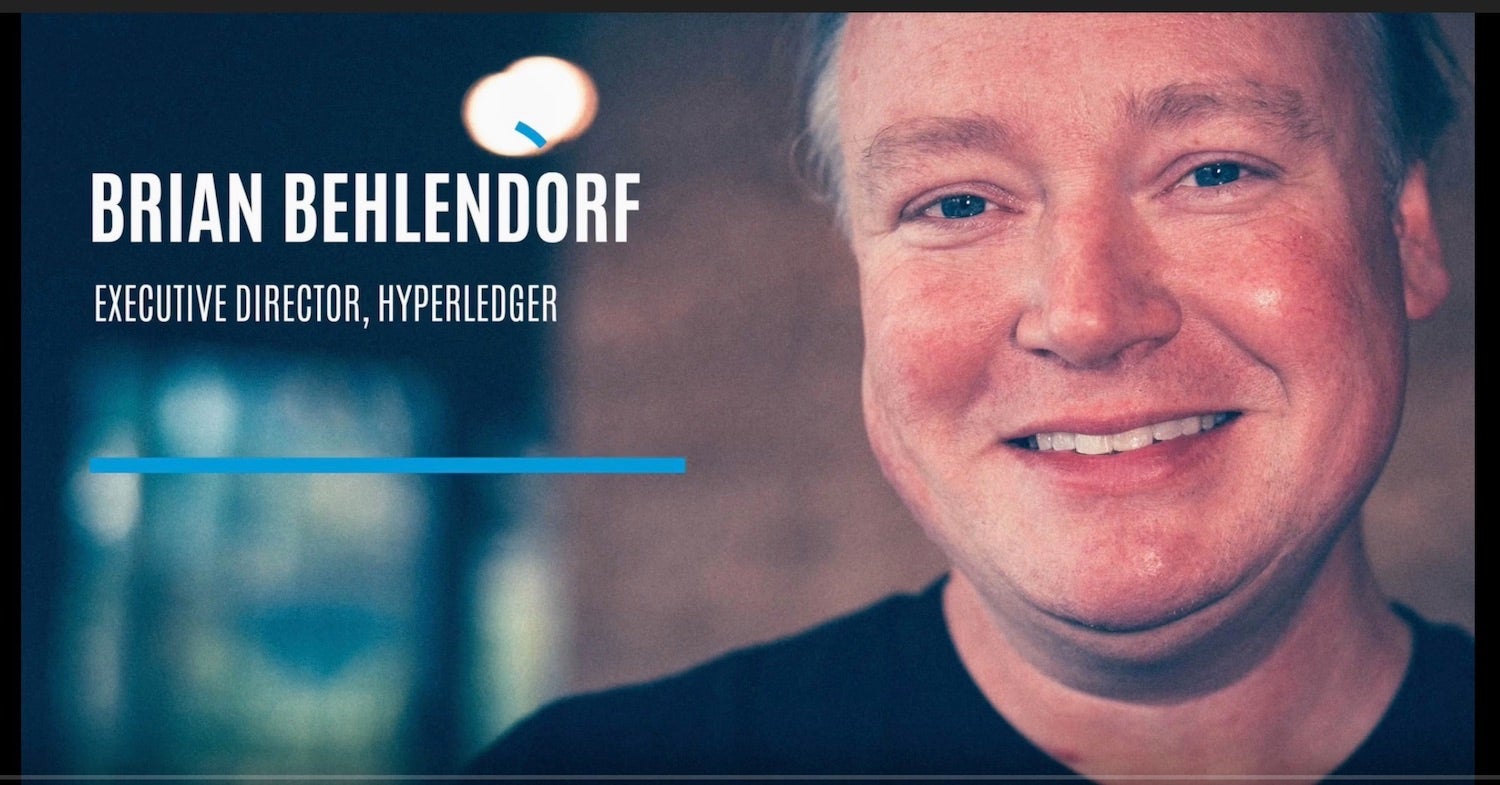
Brian Behlendorf has been heading the Hyperledger project from the early days. We sat down with him at Open Source Summit to get an update on the Hyperledger project.

Hyperledger has grown in a way that mirrors the growth of the blockchain industry. “When we started, all the excitement was around bitcoin,” said Brian Behlendorf,  Executive Director of Hyperledger. Initially, it was more about moving money around. But the industry started to go beyond that and started to see if it “could be used as a way to reestablish how trust works on the Internet and, and try to decentralize a lot of things that today with led to being centralized.”

As the industry has evolved around blockchain so did Hyperledger. “We realized pretty early that we needed to be a home for a lot of different ways to build a blockchain. It wasn’t going to be like the Linux kernel project with one singular architecture,” said Behlendorf.

Read more at The Linux Foundation


Internationalizing the Kernel

At a time when many companies are rushing to internationalize their products and services to appeal to the broadest possible market, the Linux kernel is actively resisting that trend, although it already has taken over the broadest possible marketthe infrastructure of the entire world.

David Howells recently created some sample code for a new kernel library, with some complex English-language error messages that were generated from several sources within the code. Pavel Machek objected that it would be difficult to automate any sort of translations for those messages, and that it would be preferable simply to output an error code and let something in userspace interpret the error at its leisure and translate it if needed.

Ordinarily, I might expect Pavel to be on the winning side of this debate, with Linus Torvalds or some other top developer insisting that support for internationalization was necessary in order to give the best and most useful possible experience to all users. However, Linus had a very different take on the situation:

Read more at Linux Journal

Cloud Native Computing Grows by 200 Percent

Over the last few years the way you moved applications from your data center to the cloud was lift-and-shift, refactor, or migrate to containers. The latter has gotten a kick in the pants as cloud-native techniques such as serverless computing and microservices have joined forces with containers.

Still unsure what I’m talking about? Chris Aniszczyk, executive director of the Open Container Initiative (OCI) and the Cloud Native Computing Foundation (CNCF), explained: “Cloud-native computing uses an open-source software stack to deploy applications as microservices, [each part packaged] into its own container, and dynamically orchestrate those containers to optimize resource utilization.”  

You can find proof this methodology is taking off in the latest CNCF survey. This survey of primarily enterprise or DevOps professionals found that “production usage of CNCF projects has grown more than 200 percent on average since December 2017, and evaluation has jumped 372 percent.”

Read more at DXC 

Secure Apache with Let’s Encrypt on Debian 9

Let’s Encrypt is a certificate authority created by the Internet Security Research Group (ISRG). It provides free SSL certificates via fully automated process designed to eliminate manual certificate creation, validation, installation and renewal.

Certificates issued by Let’s Encrypt are are valid for 90 days from the issue date and trusted by all major browsers today.

This tutorial will guide you through the process of obtaining a free Let’s Encrypt using the certbot tool on Debian 9. We’ll also show how to configure Apache to use the new SSL certificate and enable HTTP/2.

Ensure that you have met the following prerequisites before continuing with this tutorial:

Read more at LInuxize

Linux: Find Out Which Port Number a Process is Listening on

As Linux users, we sometimes need to know which port number a particular process is listening upon. All ports are associated with a process ID or service in an OS. So how do we find that port? This article presents three different methods for you to find which port number a process is listening on.

We have run the commands and procedures described in this article on an Ubuntu 18.04 LTS system.

Method 1: Using the netstat command

Netstat or the network statistics utility is used to view information related to the network connections. This includes information about interface statistics, routing tables and much more. This utility is available on most Linux systems so let us make use of it to view information about which ports certain processes are using on the system.

For using the netstat command, you need to install the net-tools utility if it is already not installed on your system through the following command:

$ sudo apt install net-tools

Read more at Vitux

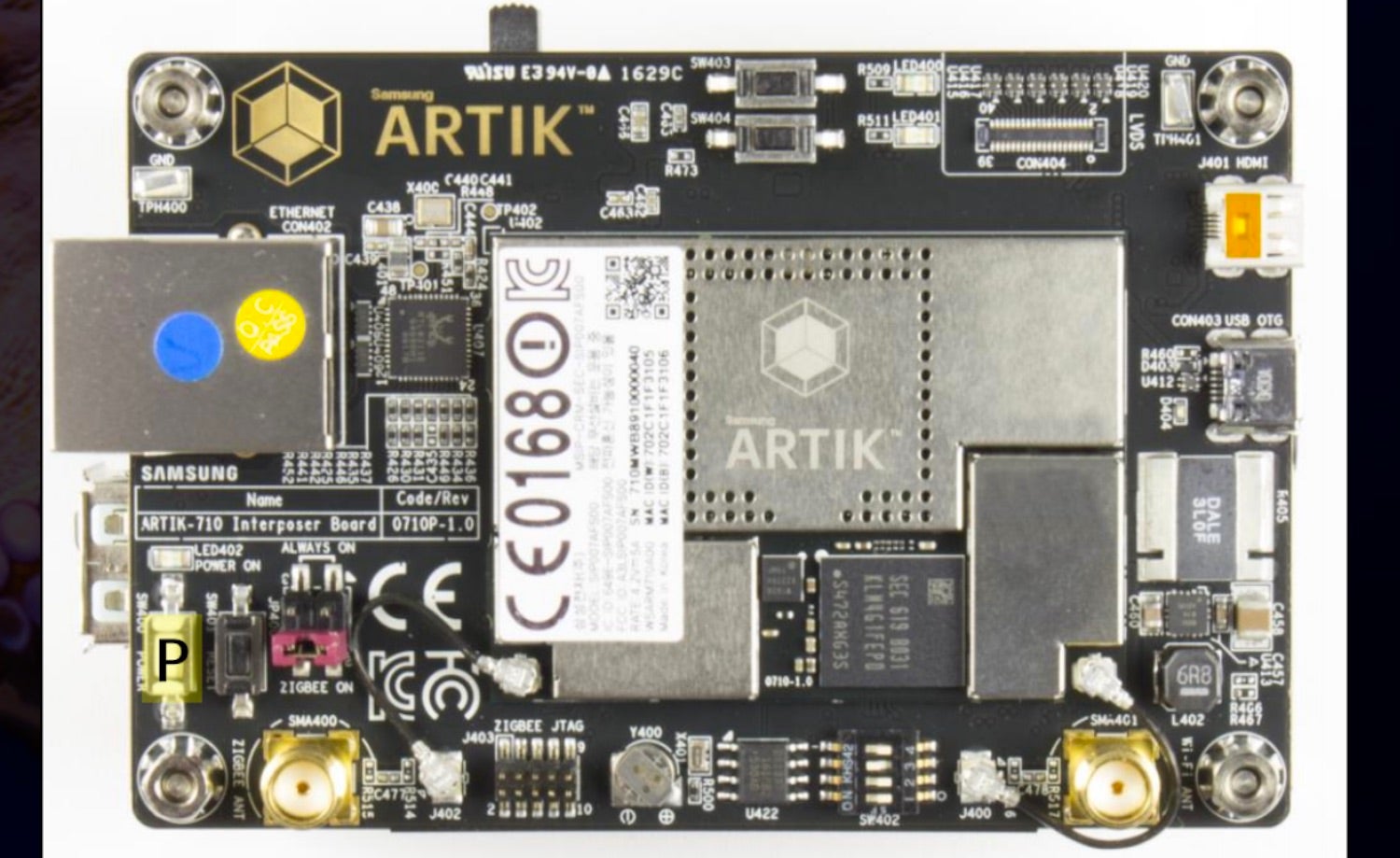
EdgeX Foundry’s First Dev Kit Runs Ubuntu on an Artik Board

The Linux Foundation’s EdgeX Foundry project for developing open source edge computing middleware has released its first developer kit. The Ubuntu-based kit is built around an octa-core Samsung Artik 710 Starter Kit teamed with a GrovePi+ I/O board. Future kits will include an Artik 530 kit, and eventually, a Raspberry Pi/GrovePi+ combination.

At the recent IoT Solutions World Congress, the EdgeX Foundry project also announced nine new members, including Intel, and debuted a Smart Building Automation Use Case Community Demo. The demo showed off the platform’s ability to bring together heterogeneous solution components, including different vendors, connectivity standards, operating systems, and hardware types. 

EdgeX Foundry was announced in 2017, with a goal of developing a standardized, open source interoperability framework for IoT edge computing. In August, the project released a v2 ”California” version of the middleware, which will be succeeded by a “Delhi” release in November. Delhi will provide EdgeX’s first management features, as well as improved security features such as access control and security bootstrapping. It will also offer C and Golang-based Device Service SDKs and a reference GUI.

Based largely on technology created by Dell, EdgeX Foundry is creating and certifying an ecosystem of interoperable, plug-and-play components to create an open source EdgeX stack for IoT edge computing. The cross-platform middleware will mediate between multiple sensor network messaging protocols as well as multiple cloud and analytics platforms.

Dell is one of three Platinum members alongside Analog Devices and Samsung. With the new additions, the membership has reached 70. The new members are Basking Automation, Beijing University of Posts and Telecommunications (BUPT), DATA AHEAD, CertusNet, Intel Corp., Redis Labs, the Federal University of Campina Grande (UFCG) /Embedded Lab, Windmill Enterprise, and ZEDEDA. Previous members include AMD, Canonical, Cloud Foundry, Linaro, Mocana, NetFoundry, and VMware.

EdgeX developer kits

The Artik 710 based EdgeX developer kit is initially available as a community-supported product. Developers independently purchase the kit from Samsung and download the upcoming EdgeX Delhi software from the EdgeX repository on GitHub. Informal, community-based tech support is available via forums like the EdgeX Rocket Chat.

This initial kit, as well as future kits, will also soon be available as part of a commercial track that offers professional support. The commercial kits are designed primarily for EdgeX members but are available to anyone. Commercial options will include “kits based on supported versions of the EdgeX framework itself (neutral to any plug-in value add), kits based on specific IoT platforms, and microservice plug-ins for value-add such as analytics, data orchestration and security,” says the project.

Samsung’s Artik 710 and Artik 530, which will form the basis of an upcoming EdgeX kit, switched their BSPs from Fedora to Ubuntu in Oct. 2017. The Artik 710 module features a 1.4GHz, octa-core, -A53 SoC with a Mali T400 GPU while the Artik 530 has a 1.2GHz, quad-core, -A9 SoC. Both include hardware security elements.

The 49x36mm modules integrate 1GB DDR3 RAM, 4GB eMMC flash, and an Ethernet PHY. They also include dual-band 802.11a/b/g/n (WiFi 4), Bluetooth 4.2, and Zigbee/Thread (802.15.4).

The Artik 710 Developer Kit is a double board set. The Interposer Board provides the Artik 710 plus Gigabit Ethernet, micro-HDMI, and micro-USB OTG ports. There’s also an LVDS interface and antenna connectors. The Platform Board sits under the Interposer board and provides a USB 2.0 host port, SD slot, audio jack, JTAG, 5V DC input, and MIPI-CSI and -DSI connections.

The EdgeX version of the Artik 710 kit also includes the optional Artik Interface II Board, which connects the bundled Seeed GrovePi+ I/O board. The GrovePi+ Starter Kit also provides a dozen Grove sensors and LEDs, plus a backlit LCD, buzzer, relay, and button.

The GrovePi+ Starter Kit is also part of Samsung’s GrovePi+ Starter Kit for Eagleye 530 board, which will form the basis of the upcoming Artik 530 kit. Unlike the Artik 710 kit, the Artik 530 equipped Eagleye 530 is a single board with a Raspberry Pi like layout, footprint, and 40-pin GPIO interface. The Eagleye 530 is further equipped with GbE and HDMI ports, 2x USB 2.0 ports, and micro-USB OTG and power ports. There’s also an SD slot, audio jack, and MIPI-CSI camera interface. Unlike the Artik 710 kit, the Eagleye 530 does not require the Interface II Board to hook up the bundled GrovePi+ board.

The GrovePi+ board will also be available in a future EdgeX kit that runs on the GrovePi+ Starter Kit for Raspberry Pi. Other development kits are also under consideration. Even if Intel had not joined the project, one of them was likely to provide an x86 chip.

“Intel’s involvement in EdgeX Foundry will help drive scale and accessibility of solutions for both our customers and businesses of all sizes,” stated Stacey Shulman, Intel’s chief innovation officer for Retail Solutions.

​Linus Torvalds Talks About Coming Back to Work on Linux

While in Edinburgh, I caught up with Linus Torvalds. He confided his thoughts about returning to Linux, the Code of Conduct, and some software, BPF, which is fundamentally changing how the Linux kernel and user space work together.

Linus Torvalds quietly met with Linux’s top 40 or so developers at the Maintainers’ Summit, held in concert with Open Source Summit Europe in Scotland. Afterward, we spoke about his return to Linux, the adoption of the Linux Code of Conduct (CoC), and how Berkeley Packet Filter (BPF) is changing Linux.

Torvalds stepped away from managing the Linux kernel because he needed to, as he explained it, “change some of my behavior, which had hurt and possibly drove away some people from kernel development.” He wanted to “take time off and get some assistance on how to understand people’s emotions and respond appropriately.”

So, what has he done since then?

Torvalds said, “I expect it to be a continuing process, but for now I have an email filter in place (that might be expanded upon or modified as needed or as I come up with more esoteric swearing — the current filter is really pretty basic). And I have been talking weekly with a professional, although again right now my travel is messing with that schedule.”

Read more at ZDNet

RSS Feed Readers: Getting News the Open Source Way

It’s easy to get news on the Internet these days. In fact, it’s too easy to get news from the Internet to the point that it’s also to easy to get the wrong news. Some have considered RSS feeds obsolete and boring but when it comes to getting news straight from the horse’s mouth, nothing still beats this direct and largely open method. Last time we looked at Wallabag for saving your articles. This time we’re going to take a look at some open source RSS feed readers that give you those articles in the first place.

When it comes to replacing the dearly departed Google Reader and its substitute Feedly with an open source solution, Tiny Tiny RSS is one of the first that always comes out at the top. It prides itself for being, well, tiny and simple to use. Any user just needs a web browser, be it on desktop or mobile.

Read more at OS Journal

How to Set Up Your S3 Bucket with HTTPS in an Hour

Amazon Web Services (AWS) has great resources for issuing and using SSL certificates, but the process of migrating existing resources to HTTPS can be complex — and it can also require many intermediate steps.

But as this tutorial shows, you can get your S3 bucket set up in just an hour or two.

Why is this necessary, anyway?

Reason 1: Google is Forcing the Issue

The big driver for this need is Google, which is phasing support for HTTP connections out of Google Chrome.

Currently, Chrome warns users when they’re accessing a site HTTP, but doesn’t prevent it altogether….

To get started, you’ll need an SSL certificate. On anything but AWS, the best option is Let’s Encrypt SSL certificates, which issues free certificates to all.

Read more at The New Stack