Home Blog Page 337

Open Source Networking Jobs: A Hotbed of Innovation and Opportunities

As global economies move ever closer to a digital future, companies and organizations in every industry vertical are grappling with how to further integrate and deploy technology throughout their business and operations. While Enterprise IT largely led the way, the advantages and lessons learned are now starting to be applied across the board. While the national unemployment rate stands at 4.1%, the overall unemployment rate for tech professionals hit 1.9% in April and the future for open source jobs looks particularly bright. I work in the open source networking space and the innovations and opportunities I’m witnessing are transforming the way the world communicates.

Once a slower moving industry, the networking ecosystem of today — made up of network operators, vendors, systems integrators, and developers — is now embracing open source software and is shifting significantly towards virtualization and software defined networks running on commodity hardware. In fact, nearly 70% of global mobile subscribers are represented by network operator members of LF Networking, an initiative working to harmonize projects that makes up the open networking stack and adjacent technologies.  

Demand for Skills

Developers and sysadmins working in this space are embracing cloud native and DevOps approaches and methods to develop new use cases and tackle the most pressing industry challenges. Focus areas like containers and edge computing are red hot and the demand for developers and sysadmins who can integrate, collaborate, and innovate in this space is exploding.

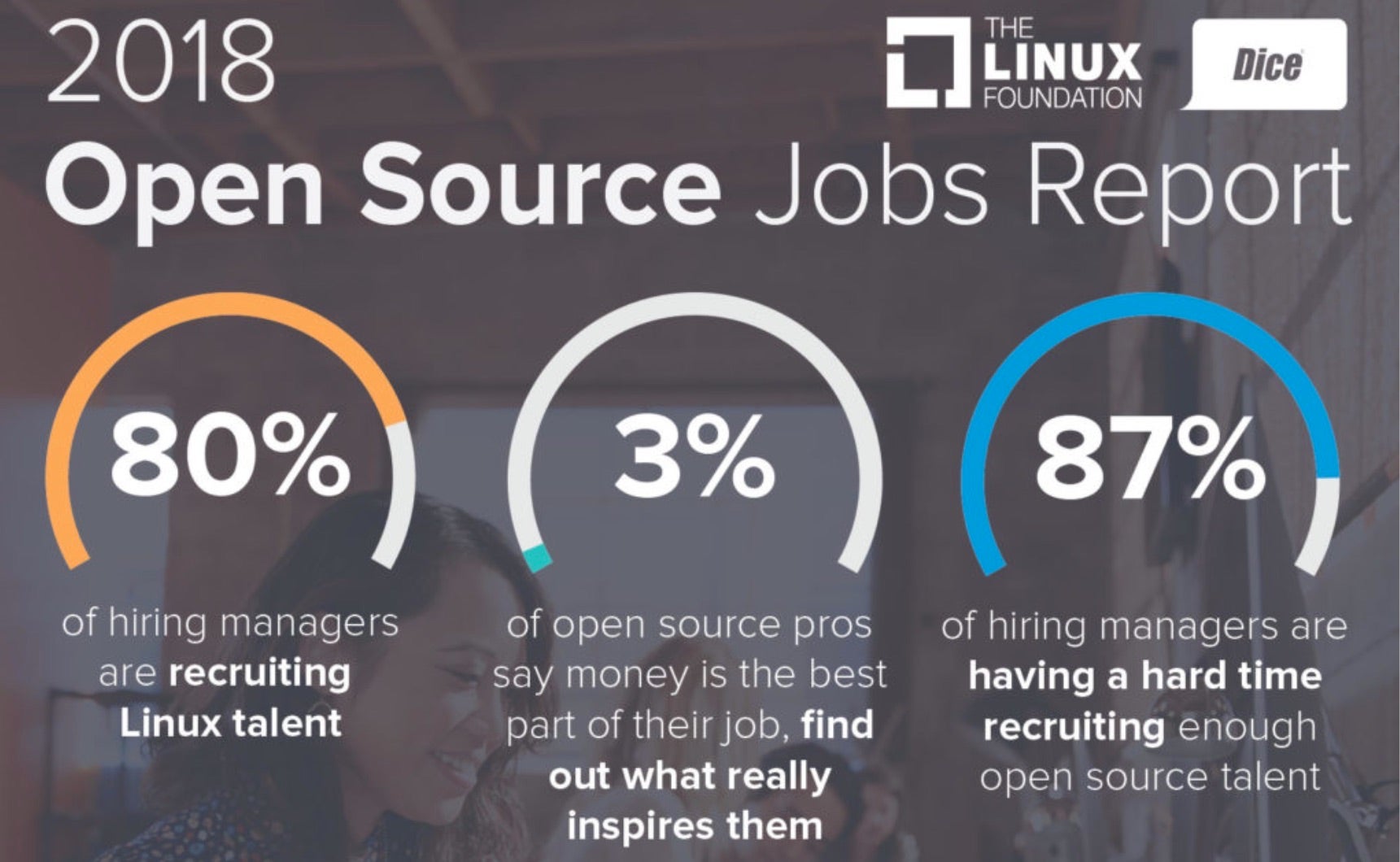
Open source and Linux makes this all possible, and per the recently published 2018 Open Source Jobs Report, fully 80% of hiring managers are looking for people with Linux skills while 46% are looking to recruit in the networking area and a roughly equal equal percentage cite “Networking” as a technology most affecting their hiring decisions.

Developers are the most sought-after position, with 72% of hiring managers looking for them, followed by DevOps skills (59%), engineers (57%) and sysadmins (49%). The report also measures the incredible growth in demand for containers skills which matches what we’re seeing in the networking space with the creation of cloud native virtual functions (CNFs) and the proliferation of Continuous Integration / Continuous Deployment approaches such as the XCI initiative in the OPNFV.

Get Started

The good news for job seekers in that there are plenty of onramps into open source including the free Introduction to Linux course. Multiple certifications are mandatory for the top jobs so I encourage you to explore the range of training opportunities out there. Specific to networking, check out these new training courses in the OPNFV and ONAP projects, as well as this introduction to open source networking technologies.

If you haven’t done so already, download the 2018 Open Source Jobs Report now for more insights and plot your course through the wide world of open source technology to the exciting career that waits for you on the other side!

Download the complete Open Source Jobs Report now and learn more about Linux certification here.

An Interview with Heptio, the Kubernetes Pioneers

I recently spent some time chatting with Craig McLuckie, CEO of the leading Kubernetes solutions provider Heptio. Centered around both developers and system administrators, Heptio’s products and services simplify and scale the Kubernetes ecosystem.

Petros Koutoupis: For all our readers who have yet to hear of the remarkable things Heptio is doing in this space, please start by telling us, who is Craig McLuckie?

Craig McLuckie: I am the CEO and founder of Heptio. My co-founder, Joe Beda, and I were two of the three creators of Kubernetes and previously started the Google Compute Engine, Google’s traditional infrastructure as a service product. He also started the Cloud Native Computing Foundation (CNCF), of which he is a board member.

PK: Why did you start Heptio? What services does Heptio provide?

CL: Since we announced Kubernetes in June 2014, it has garnered a lot of attention from enterprises looking to develop a strategy for running their business applications efficiently in a multi-cloud world.

Perhaps the most interesting trend we saw that motivated us to start Heptio was that enterprises were looking at open-source technology adoption as the best way to create a common platform that spanned on-premises, private cloud, public cloud and edge deployments without fear of vendor lock-in. Kubernetes and the cloud native technology suite represented an incredible opportunity to create a powerful “utility computing platform” spanning every cloud provider and hosting option, that also radically improves developer productivity and resource efficiency.

In order to get the most out of Kubernetes and the broader array of cloud native technologies, we believed a company needed to exist that was committed to helping organizations get closer to the vibrant Kubernetes ecosystem. Heptio offers both consultative services and a commercial subscription product that delivers the deep support and the advanced operational tooling needed to stitch upstream Kubernetes into modern enterprise IT environments.

Read more at Linux Journal

Serverless Testing in Production

The still-maturing ecosystem of serverless means that there is not a range of tools available for specific aspects of application deployment within this infrastructure style. But also, the nature of serverless as an events-driven architecture — where cloud providers or others are responsible for autoscaling and managing the resources necessary for compute — means that in many cases, it is difficult to usefully test for how things will occur in a production environment.

Charity Majors, co-founder and CEO of platform-agnostic DevOps monitoring tool Honeycomb.io, says that this inability to test in development is not unique to serverless. Given the nature of building and deploying distributed applications at scale, there is no possible way to test for every eventuality. While she agrees that the “I don’t test, but when I do, I test in production” meme may be worthy of an eye-roll, she does believe in the concept of “testing in production.”

“When I say ‘test in production,’ I don’t mean not to do best practices first,” explained Majors. “What I mean is, there are unknown unknowns that should be tested by building our systems to be resilient. Some categories of bug can only be noticed when applications at scale. …”

Read more at The New Stack

Three Graphical Clients for Git on Linux

Those that develop on Linux are likely familiar with Git. With good reason. Git is one of the most widely used and recognized version control systems on the planet. And for most, Git use tends to lean heavily on the terminal. After all, much of your development probably occurs at the command line, so why not interact with Git in the same manner?

In some instances, however, having a GUI tool to work with can make your workflow slightly more efficient (at least for those that tend to depend upon a GUI). To that end, what options do you have for Git GUI tools? Fortunately, we found some that are worthy of your time and (in some cases) money. I want to highlight three such Git clients that run on the Linux operating system. Out of these three, you should be able to find one that meets all of your needs.
I am going to assume you understand how Git and repositories like GitHub function, which I covered previously, so I won’t be taking the time for any how-tos with these tools. Instead, this will be an introduction, so you (the developer) know these tools are available for your development tasks.

A word of warning: Not all of these tools are free, and some are released under proprietary licenses. However, they all work quite well on the Linux platform and make interacting with GitHub a breeze.

With that said, let’s look at some outstanding Git GUIs.

SmartGit

SmartGit is a proprietary tool that’s free for non-commercial usage. If you plan on employing SmartGit in a commercial environment, the license cost is $99 USD per year for one license or $5.99 per month. There are other upgrades (such as Distributed Reviews and SmartSynchronize), which are both $15 USD per licence. You can download either the source or a .deb package for installation. I tested SmartGit on Ubuntu 18.04 and it worked without issue.

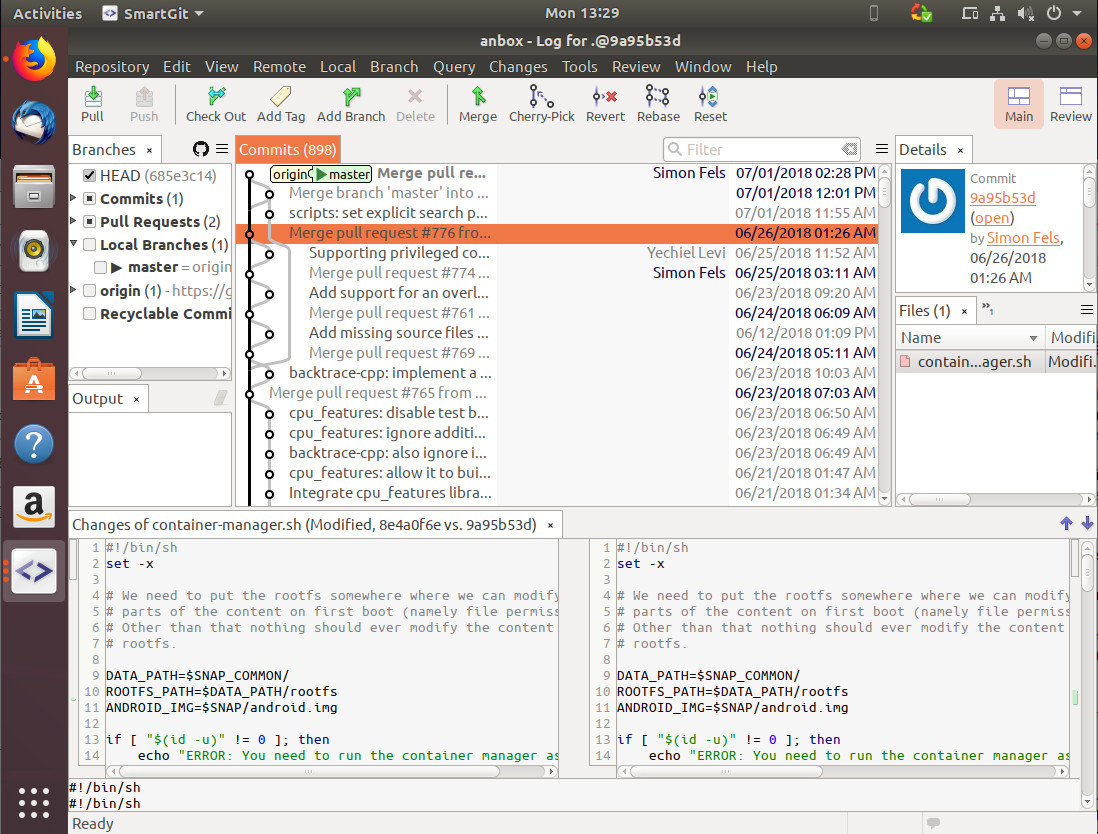
But why would you want to use SmartGit? There are plenty of reasons. First and foremost, SmartGit makes it incredibly easy to integrate with the likes of GitHub and Subversion servers. Instead of spending your valuable time attempting to configure the GUI to work with your remote accounts, SmartGit takes the pain out of that task. The SmartGit GUI (Figure 1) is also very well designed to be uncluttered and intuitive.

Figure 1: The SmartGit UI helps to simplify your workflow.

After installing SmartGit, I had it connected with my personal GitHub account in seconds. The default toolbar makes working with a repository, incredibly simple. Push, pull, check out, merge, add branches, cherry pick, revert, rebase, reset — all of Git’s most popular features are there to use. Outside of supporting most of the standard Git and GitHub functions/features, SmartGit is very stable. At least when using the tool on the Ubuntu desktop, you feel like you’re working with an application that was specifically designed and built for Linux.

SmartGit is probably one of the best tools that makes working with even advanced Git features easy enough for any level of user. To learn more about SmartGit, take a look at the extensive documentation.

GitKraken

GitKraken is another proprietary GUI tool that makes working with both Git and GitHub an experience you won’t regret. Where SmartGit has a very simplified UI, GitKraken has a beautifully designed interface that offers a bit more feature-wise at the ready. There is a free version of GitKraken available (and you can test the full-blown paid version with a 15 day trial period). After the the trial period ends, you can continue using the free version, but for non-commercial use only.

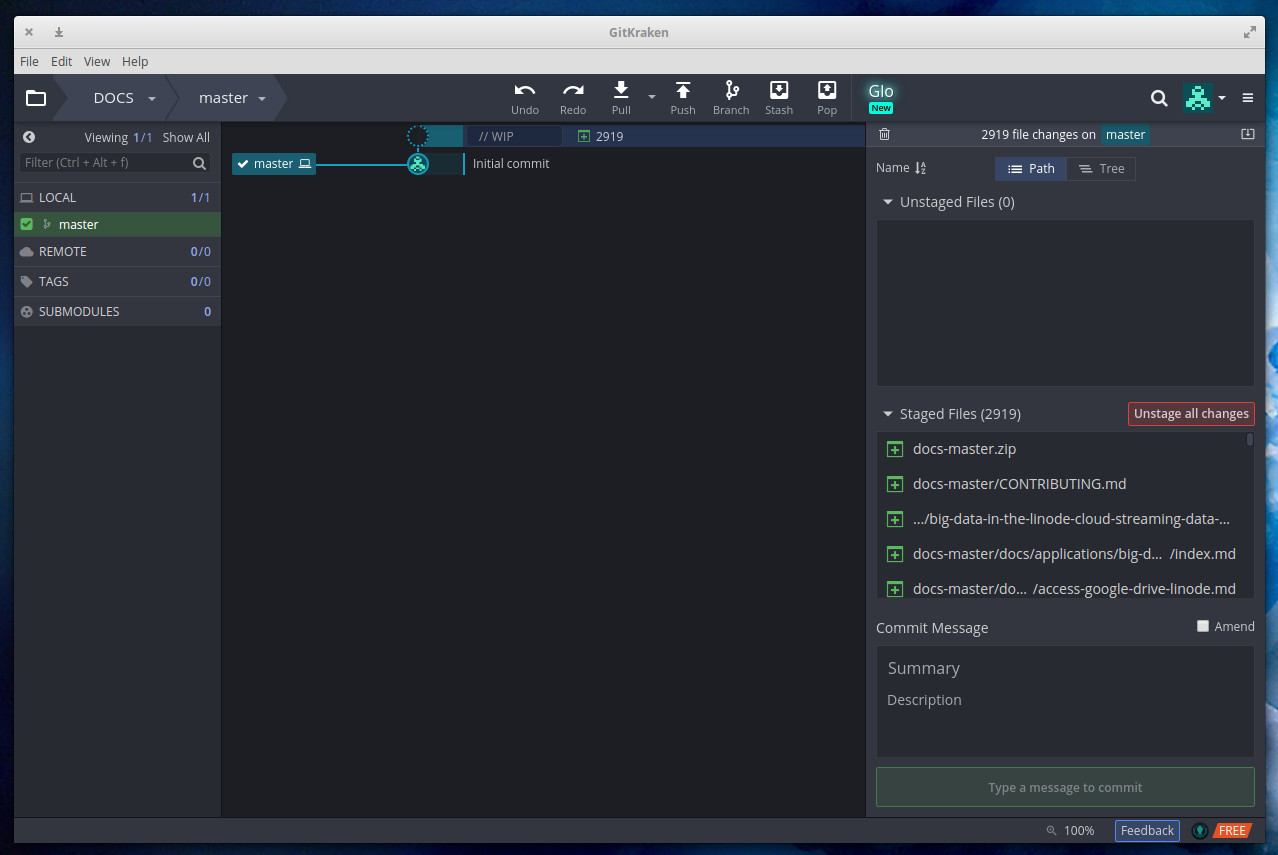
For those who want to get the most out of their development workflow, GitKraken might be the tool to choose. This particular take on the Git GUI features the likes of visual interactions, resizable commit graphs, drag and drop, seamless integration (with GitHub, GitLab, and BitBucket), easy in-app tasks, in-app merge tools, fuzzy finder, gitflow support, 1-click undo & redo, keyboard shortcuts, file history & blame, submodules, light & dark themes, git hooks support, git LFS, and much more. But the one feature that many users will appreciate the most is the incredibly well-designed interface (Figure 2).

Figure 2: The GitKraken interface is tops.

Outside of the amazing interface, one of the things that sets GitKraken above the rest of the competition is how easy it makes working with multiple remote repositories and multiple profiles. The one caveat to using GitKraken (besides it being proprietary) is the cost. If you’re looking at using GitKraken for commercial use, the license costs are:

  • $49 per user per year for individual

  • $39 per user per year for 10+ users

  • $29 per user per year for 100+ users

The Pro accounts allow you to use both the Git Client and the Glo Boards (which is the GitKraken project management tool) commercially. The Glo Boards are an especially interesting feature as they allow you to sync your Glo Board to GitHub Issues. Glo Boards are sharable and include search & filters, issue tracking, markdown support, file attachments, @mentions, card checklists, and more. All of this can be accessed from within the GitKraken GUI.
GitKraken is available for Linux as either an installable .deb file, or source.

Git Cola

Git Cola is our free, open source entry in the list. Unlike both GitKraken and Smart Git, Git Cola is a pretty bare bones, no-nonsense Git client. Git Cola is written in Python with a GTK interface, so no matter what distribution and desktop combination you use, it should integrate seamlessly. And because it’s open source, you should find it in your distribution’s package manager. So installation is nothing more than a matter of opening your distribution’s app store, searching for “Git Cola” and installing. You can also install from the command line like so:

sudo apt install git-cola

Or:

sudo dnf install git-cola

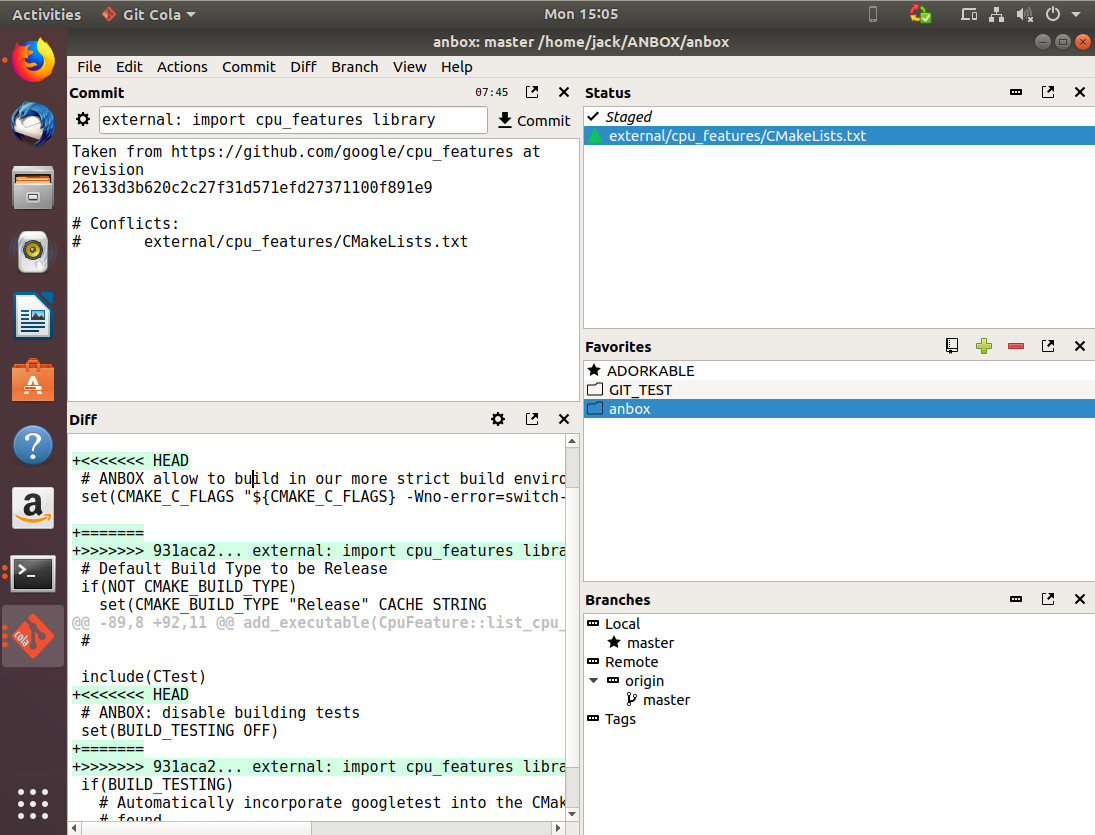
The Git Cola interface is pretty simple (Figure 3). In fact, you won’t find much in the way of too many bells and whistles, as Git Cola is all about the basics.

Figure 3: The Git Cola interface is a much simpler affair.

Because of Git Cola’s return to basics, there will be times when you must interface with the terminal. However, for many Linux users this won’t be a deal breaker (as most are developing within the terminal anyway). Git Cola does include features like:

  • Multiple subcommands

  • Custom window settings

  • Configurable and environment variables

  • Language settings

  • Supports custom GUI settings

  • Keyboard shortcuts

Although Git Cola does support connecting to remote repositories, the integration to the likes of Github isn’t nearly as intuitive as it is on either GitKraken or SmartGit. But if you’re doing most of your work locally, Git Cola is an outstanding tool that won’t get in between you and Git.

Git Cola also comes with an advanced (Directed Acyclic Graph) DAG visualizer, called Git Dag. This tool allows you to get a visual representation of your branches. You start Git Dag either separately from Git Cola or within Git Cola from the View > DAG menu entry. Git DAG is a very powerful tool, which helps to make Git Cola one of the top open source Git GUIs on the market.

There’s more where that came from

There are plenty more Git GUI tools available. However, from these three tools you can do some serious work. Whether you’re looking for a tool with all the bells and whistles (regardless of license) or if you’re a strict GPL user, one of these should fit the bill.

Learn more about Linux through the free “Introduction to Linux” course from The Linux Foundation and edX.

NetSpectre Attack Could Enable Remote CPU Exploitation

Researchers from Graz University in Austria released new research on July 26 detailing how the Spectre CPU speculative execution vulnerability could be used over a remote network.

In a 14-page report, the researchers dubbed their attack method NetSpectre, which can enable an attacker to read arbitrary memory over a network. Spectre is the name that researchers have given to a class of vulnerabilities that enable attackers to exploit the speculative execution feature in modern CPUs. Spectre and the related Meltdown CPU vulnerabilities were first publicly disclosed on Jan. 3.

“Spectre attacks require some form of local code execution on the target system,” the Graz University researchers wrote. “Hence, systems where an attacker cannot run any code at all were, until now, thought to be safe.”

Read more at eWeek

What is Ethereum?

Ethereum is a blockchain protocol that includes a programming language which allows for applications, called contracts, to run within the blockchain. Initially described in a white paper by its creator, Vitalik Buterin in late 2013, Ethereum was created as a platform for the development of decentralized applications that can do more than make simple coin transfers.

How does it work?

Ethereum is a blockchain. In general, a blockchain is a chain of data structures (blocks) that contains information such as account ids, balances, and transaction histories. Blockchains are distributed across a network of computers; the computers are often referred to as nodes.

Cryptography is a major part of blockchain technology. Mathematical encryption algorithms like RSA and ECDSA are used to generate public and private keys that are mathematically coupled. Public keys, or addresses, and private keys allow people to make transactions across the network without involving any personal information like name, address, date of birth, etc. These keys and addresses are often called hashes and are usually a long string on hexadecimal symbols.


1*mjowAqqMPCvO25ptToWrag.png

Example of an RSA generated public key

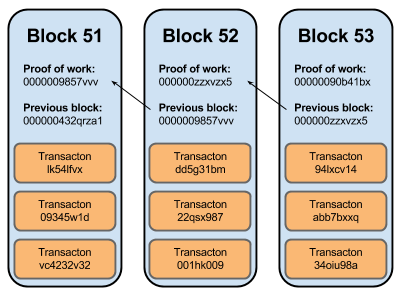
Blockchains have a public ledger that keeps track of all transactions that have occurred since the first, “genesis”, block. A block will include, at least, a hash of the current and previous blocks, and some data. Nodes across the network work to verify transactions and add them to the public ledger. In order for a transaction to be considered legitimate, there must be consensus.

Consensus means that the transaction is considered valid by the majority of the nodes in the network. There are four main algorithms used to achieve consensus among a distributed blockchain network: the byzantine fault tolerance, proof-of-work, proof-of-stake, and delegated proof-of-stake. Chris explains them well in his post.

Attempting to make even the slightest alteration to the data in a block will change the hash of the block and will therefore be noticed by the entire network. This makes blockchains immutable and append-only. A transaction can only be added at the end of the chain, and once a transaction is added to a block there can be no changes made to it.

 
0*q2_wGWrjD_EBgBva.

Source: andrefortuna.org

Accounts

Users of Ethereum control an account that has a cryptographic private key with a corresponding Ethereum address. If Alice, for example, wants to send Bob 1,000 ETH (ETH / Ether is Ethereum’s money). Alice needs Bob’s Ethereum address so she knows where to send it, and then Bob needs to use his private key that corresponds to that address in order to receive the 1,000 ETH.

Ethereum has two types of accounts: accounts that user’s control and contracts (or “smart contracts”). Accounts that user’s control, like Alice and Bob, primarily serve for ETH transfers. Just about every blockchain system has this type of account that can make money transfers. But what makes Ethereum special is the second type of account; a contract.

Contract accounts are controlled by a piece of code (an application) that is run inside the blockchain itself.

“What do you mean, inside the blockchain?”

EVM

Ethereum has a Virtual Machine, called EVM. This is where contracts get executed. EVM includes a stack (~processor), temporary memory (~RAM), storage space for permanent memory (~disk/database), environment variables (~system information, e.g: timestamp), logs, and sub-calls (you can call a contract within a contract).

An example contract might look like this:

if (something happens):
    send 1,000 ETH to Bob (addr: 22982be234)
else if (something else happens):
    send 1,000 ETH to Alice (addr: bbe4203fe)
else:
    don't send any ETH

If a user sends 1,000 ETH to this account (the contract), then the code in this account is the only thing that has power to transfer that ETH. It’s kind of like an escrow. The sender no longer has control over the 1,000 ETH. The digital assets are now under the control of a computer program and will be moved depending on the conditional logic of the contract.

Is it free?

No. The execution of contracts occurs within the blockchain, therefore within the Ethereum Network. Contracts take up storage space, and they require computational power. So Ethereum uses something called gas as a unit of measurement of how much something costs the Network. The price of gas is voted on by the nodes and the fees user’s pay in gas goes to the miners.

Miners

Miners are people using computers to do computations required validate transactions across the network and add new blocks to the chain.

Mining works like this: when a block of transactions is ready to be added to the chain, miners use computer processing power to find hashes that match a specific target. When a miner finds the matching hash, she will be rewarded with ETH and will broadcast the new block across the network. The other nodes verify the matching hash, then if there is consensus, it is added to the chain.

What’s inside a block?

Within an Ethereum block is something called the state and history. The state is a mapping of addresses to account objects. The state of each account object includes:

  • ETH balance
  • nonce **
  • the contract’s source code (if the account is a contract)
  • contract storage (database)

** a nonce is a counter that prevents the account from repeating a transaction over and over resulting perhaps in taking more ETH from a sender than they are supposed to.

Blocks also store history: records of previous transactions and receipts.

State and History and stored in each node (each member of the Ethereum Network). Having each node contain the history of Ethereum transactions and contract code is great for security and immutability, but can be hard to scale. A blockchain cannot process more transactions than a single node can. Because of this, Ethereum limits the number of transactions to 7–15 per second. The protocol has adopted sharding — a technique that essentially breaks up the chain into smaller pieces but still aims to have the same level of security.

Transactions

Every transaction specifies a TO: address. If the TO: is a user-controlled account, and the transaction contains ETH, it is considered a transfer of ETH from account A to account B. If the TO: is a contract, then the code of the contract gets executed. The execution of a contract can result in further transactions, even calls to contracts within a contract, an event known as an inter-transaction.

But contracts don’t always have to be about transferring ETH. Anyone can create an application with any rules by defining it as a contract.

Who is using Ethereum?

Ethereum is currently being used mostly by cryptocurrency traders and investors, but there is a growing community of developers that are building dapps (decentralized applications) on the Ethereum Network.

There are thousands of Ethereum-based projects being developed as we speak. Some more the most popular dapps are games (e.g CryptoKitties and CrptyoTulips).

How is Ethereum different from bitcoin?

Bitcoin is a blockchain technology where users are assigned a private key, linked with a wallet that generates bitcoin addresses where people can send bitcoins to. It’s all about the coins. It’s a way to exchange money in an encrypted, decentralized environment.

Ethereum not only lets users exchange money like bitcoin does, but it also has programming languages that let people build applications (contracts) that are executed within the blockchain.

Bitcoin functions on proof of work as a means of achieving consensus across the network. Whereas Ethereum uses proof of stake.

Ethereum’s creator is public (Vitalik Buterin). Bitcoin’s is unknown (goes by the alias, Satoshi Nakamoto)

Other blockchains that do contracts

There are other blockchain projects that allow the creation of contracts. Here is a brief description of what they are and how they are different than Ethereum:

Neo — faster transaction speeds, inability to fork, less energy use, has two tokens (NEO and GAS), will be quantum resistant.

Icon — uses loopchain to connect blockchain-based communities around the world.

Nem — contract code is stored outside of the blockchain resulting in a lighter and faster network.

Ethereum Classic — a continuation of the original Ethereum blockchain (before it was forked)

Conclusion

Ethereum is a rapidly growing blockchain protocol that allows people to not only transfer assets to each other, but to create decentralized applications that run securely on a distributed network of computers.

Evaluating the Evaluation: A Benchmarking Checklist

A co-worker introduced me to Craig Hanson and Pat Crain’s performance mantras, which neatly summarize much of what we do in performance analysis and tuning. They are:

Performance mantras

  1. Don’t do it
  2. Do it, but don’t do it again
  3. Do it less
  4. Do it later
  5. Do it when they’re not looking
  6. Do it concurrently
  7. Do it cheaper

These have inspired me to summarize another performance activity: evaluating benchmark accuracy. Good benchmarking rewards investment in engineering that actually improves performance, but, unfortunately, poor benchmarking is a lot more common. I have spent a lot of my career refuting bad benchmarks, and have developed such a knack for it that prior employers adopted a rule that no benchmark can be published unless approved by me. Because benchmarking is so important for our industry, I’d like to share with you how I do it.

Read more at Brendan Gregg’s Blog

Ubuntu Linux 18.04.1 LTS Bionic Beaver Available for Download

Ubuntu is one of the most popular desktop Linux-based operating systems in the world, and rightfully so. It’s stable, fast, and offers a very polished user experience. Ubuntu has gotten even better recently too, since Canonical — the company that develops the distribution — switched to GNOME from the much-maligned Unity. Quite frankly, GNOME is the best overall desktop environment, but I digress.

Today, Ubuntu 18.04.1 becomes available. This is the first “point” release of 18.04 LTS Bionic Beaver. It is chock full of fixes and optimizations, which some individuals and organizations have been waiting for before upgrading. You see, while some enthusiasts will install the latest and greatest immediately, others value stability — especially for business — and opt to hold off until many of the bugs are worked out.  If you are a longtime Windows user, think of it like waiting for Microsoft to release a service pack before upgrading — sort of.

“If you’re already running 18.04 LTS, and you have been updating regularly, then you will already have all of these applied and so essentially you’re already running 18.04.1 LTS.

Read more at BetaNews

10+ Top Open-Source Tools for Docker Security

For container security, you’ll find plenty of open-source tools that can help prevent another debacle like the one at Tesla, which suffered a Kubernetes cluster breach. But container security is still tricky, so you need to know which utilities to add to your arsenal.

Sure, there are commercial container security products out there, but open-source projects can take you pretty far. Many focus on auditing, tracking Common Vulnerabilities and Exposures (CVE) databases and benchmarks established by CIS, the National Vulnerability Database, and other bodies. Tools then scan the container image, reveal its contents, and compare the contents against these manifests of known vulnerabilities.

Automating container auditing, as well as using other container security processes, can be a huge boon for enterprises by helping teams catch problems early in the build pipeline.

While there are plenty of open-source container security tools out there, here are the best, most mature ones with the largest user communities.

Read more at Tech Beacon

DARPA Drops $35 Million on “Posh Open Source Hardware” Project

The U.S. Defense Advanced Research Projects Agency (DARPA) announced the first grants for its Electronic Resurgence Initiative (ERI). The initial round, which will expand to $1.5 billion over five years, covers topics ranging from automating EDA to optimizing chips for SDR to improving NVM performance. Of particular interest is a project called POSH, (posh open source hardware), which intends to create a Linux-based platform and ecosystem for designing and verifying open source IP hardware blocks for next-generation system-on-chips.

The first funding recipients were announced at DARPA’s ERI Summit this week in San Francisco. As reported in IEEE Spectrum, the recipients are working out of R&D labs at major U.S. universities and research institutes, as well as companies like Cadence, IBM, Intel, Nvidia, and Qualcomm.

Most of the projects are intended to accelerate the development of complex, highly customized SoCs. ERI is motivated by two trends in chip design. First, as Moore’s Law roadmap slows to a crawl, SoC designers are depending less on CPUs and more on a growing profusion of GPUs, FPGAs, neural chips, and other co-processors, thereby adding to complexity. Second, we’re seeing a greater diversity of applications ranging from cloud-based AI to software defined networking to the Internet of Things. Such divergent applications often require highly divergent mixes of processors, including novel chips like neural net accelerators.

DARPA envisions the tech world moving toward a wider variety of SoCs with different mixes of IP blocks, including highly customized SoCs for specific applications. With today’s semiconductor design tools, however, such a scenario would bog down in spiraling costs and delays. ERI plans to speed things up.

Here are some brief summaries of the projects followed by a closer look at POSH:

  • IDEA — This EDA project is based primarily on work by David White at Cadence, which received $24.1 million of the total IDEA funding. The immediate goal is to create a layout generator that would enable users with even limited electronic design expertise to complete the physical design of electronic hardware such as a single board computer within 24 hours. A larger goal is to enable the automated EDA system to capture the expertise of designers using it.
  • Software Defined Hardware (SDH) — SDH aims to develop hardware and software that can be reconfigured in real time based on the kind of data being processed. The goal is to design chips that can reconfigure their workload in a matter of milliseconds. Stephen Keckler at Nvidia is leading the funding at $22.7 million.
  • Domain-Specific System on Chip (DSSoC) — Like the closely related SDH project, the DSSoC project is inspired by software defined radio (SDR). The project is working with the GNU Radio Foundation to look at the needs of SDR developers as the starting point for developing an ideal SDR SoC.
  • 3DSoC — This semiconductor materials and integration project is based largely on MIT research from Max Shulaker, who received $61 million. FRANC is attempting to grow multiple layers of interconnected circuitry atop a CMOS base to prove that a monolithic 3D system using a more affordable 90nm process can compete with CPUs with more advanced processes.
  • Foundations Required for Novel Compute (FRANC) — FRANC is looking to improve the performance of NVM memories such as embedded MRAM with a goal of enabling “emerging memory-centric computing architectures to overcome the memory bottleneck presented in current von Neumann computing.”

POSH boosts open hardware with verification

The POSH project received over $35 million in funding spread out among a dozen researchers. The biggest grants, ranging from about $6 to $7 million went to Eric Keiter (Sandia National Labs), Alex Rabinovitch (Synopsis), Tony Levi, and Clark Barrett (Stanford and SiFive).

As detailed in a July 18 interview in IEEE Spectrum with DARPA ERI director Bill Chappell, proprietary licensing can slow down development, especially when it comes to building complex, highly customized SoCs. If SoC designers could cherry pick verified, open source hardware blocks with the same ease that software developers can download software from GitHub today, it could significantly reduce development time and cost. In addition, open source can speed and improve hardware testing, which can be time-consuming when limited to engineers working for a single chipmaker.

POSH is not intended as a new open source processor architecture such as RISC-V. DARPA has helped fund RISC-V, and as noted, POSH funding recipient Barrett is part of the leadership team at RISC-V chip leader SiFive.

POSH is defined as “an open source SoC design and verification ecosystem that will enable the cost effective design of ultra-complex SoCs.” In some ways, POSH is the hardware equivalent of projects such as Linaro and Yocto, which verify, package, and update standardized software components for use by open source developers. As Chappell put it in the IEEE interview, POSH intends to “create a foundation of building blocks where we have full understanding and analysis capability as deep as we want to go to understand how these blocks are going to work.”

The ERI funding announcement quotes POSH and IDEA project leader Andreas Olofsson, as saying: “Through POSH, we hope to eliminate the need to start from scratch with every new design, creating a verified foundation to build from while providing deeper assurance to users based on the open source inspection process.”

POSH is focusing primarily on streamlining and unifying the verification process, which along with design, is by far a leading cost of SoC design. Currently, there are very few high-quality, verified hardware IP blocks that are openly available, and it’s difficult to tell those apart from the blocks that aren’t.

You’re not going to bet $100 [million] to $200 million on a block that was maybe built by a university or, even if it was from another industrial location, [if] you don’t really know the quality of it,” Chappell told IEEE Spectrum. “So you have to have a methodology to understand how good something is at a deep level before it’s used.”

According to Chappell, open source hardware is finally starting to take off because of the increasing abstraction of the hardware design. “It gets closer to the software community’s mentality,” he said.
DARPA ERI’s slidedeck (the POSH section starts at page 49) suggests Linux as the foundation for the POSH IP block development and verification platform. It also details the following goals:

  • TA-1: Hardware Assurance Technology — Development of hardware assurance technology appropriate for signoff quality validation of deeply hierarchical analog and digital circuits of unknown origin. Hardware assurance technology would provide increasingly high levels assurance for formal analysis, simulation, and emulation and prototypes.
  • TA-2: Open Source Hardware Technology — Development of design methods, standards, and critical IP components needed to kick-start a viable open source SoC eco-system. IP blocks would include digital blocks such as CPU, GPU, FPGA, media codecs, encryption accelerators, and controllers for memory, Ethernet, PCIe, USB 3.0, MIPI-CSI, HDMI, SATA, CAN, and more. Analog blocks might include PHYs, PLL and DLL, ADCs, DACs, regulators. and monitor circuits.
  • TA-3: Open Source System-On-Chip Demonstration — Demonstration of open source hardware viability through the design of a state of the art open source System-On-Chip.

Join us at Open Source Summit + Embedded Linux Conference Europe in Edinburgh, UK on October 22-24, 2018, for 100+ sessions on Linux, Cloud, Containers, AI, Community, and more.