Home Blog Page 363

Elive Brings Enlightenment to the Linux Desktop

For the longest time, Enlightenment was my Linux desktop of choice. It was incredibly fast, highly configurable, and gorgeous. Since that time, I’ve migrated to desktops that veer toward being simpler, more efficient to work with… but I always consider my years with E16 and E17 with great fondness. Fortunately, at least two outstanding distributions focus on either Enlightenment E17 or a fork of E17. Bodhi Linux is a darling distribution (that I looked at previously) that uses a fork of E17, called Moksha Desktop. The developers of Bodhi have done some remarkable work with Enlightenment, but this article isn’t about Bodhi. Instead, I want to focus on a distribution that uses straight up Enlightenment E17. That distribution of Linux is Elive.

Elive Linux is developed by Samuel F. “Thanatermesis” Baggen, who has done an incredible job of creating this desktop distribution and has done so by relying on the donations of users. This donation-based distribution has frustrated some users (who have grown accustomed to getting their Linux for free). Although Elive is Mr. Baggen’s full-time job, he’ll be releasing version 3.0 for free (to expand the user-base). However, Elive Linux is still a distribution worthy of donation. So if you’re serious about keeping choice alive (especially one that focuses on Enlightenment), consider a donation for the cause.

With that said, let’s take a look at what makes Elive Linux a distribution you might want to make a part of your world.

What is Elive?

For those who are curious, Elive Linux marries Debian with the Enlightenment desktop. But wait, why not just install E17 on Ubuntu and be done with it? Many users don’t want to have to deal with installing such third-party software. On top of that, one of the biggest draws to Elive (besides E17 being a work of art) is that it does a great job of supporting older hardware (thanks to the combination of Debian and Enlightenment). For anyone looking either to support older hardware or to have modern hardware run faster than seems possible (while not sacrificing a gorgeous desktop), Elive is exactly the distribution to choose. Elive also does a great job of simplifying the first steps of using E17, which can be a bit daunting for new users.

Elive was first released on January 24, 2005. It can be installed via a live CD/USB and has a very minimal set of requirements:

  • Beta version: 500 MHz CPU with 256 MB of RAM

  • Stable version: 300 MHz CPU with 128 MB of RAM

  • Older versions: 100 MHz CPU with 64 MB of RAM

Not many modern distributions can top those requirements. But don’t worry, Elive can also be installed on the most modern of hardware. In fact, install Elive on something relatively new and you’ll be amazed at the speed you’ll experience.

Installation

The installation of Elive is as simple as any other modern Linux distributions. You will, however, have to walk through the initial Enlightenment setup, even before reaching the live distribution desktop. This starts with selecting your system default language (Figure 1).
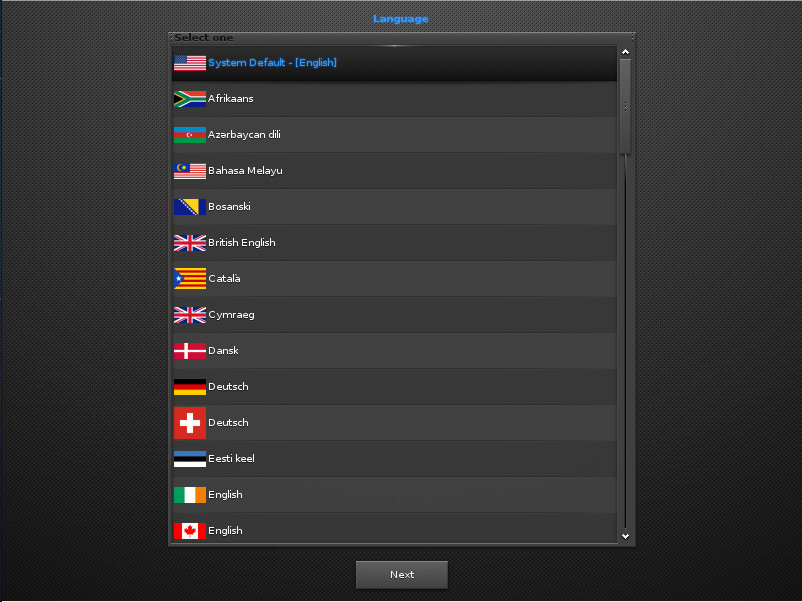
Figure 1: Selecting the default language for your installation.

In the next screen, you’ll select the keyboard and Enlightenment. Once you’ve taken care of that, you’ll find yourself on the live desktop screen (Figure 2), where you can click the Install icon (on the bottom shelf) and begin the actual installation process.
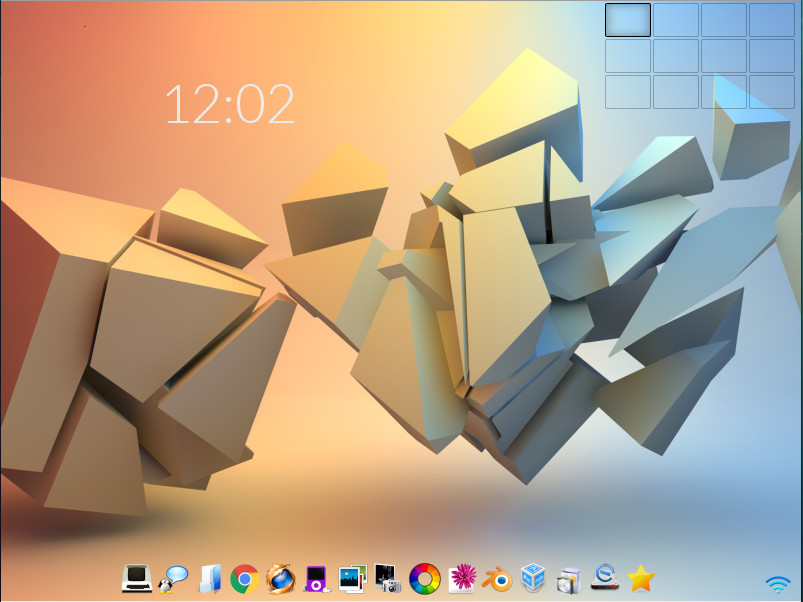
Figure 2: The Elive live desktop.

After clicking the installation icon, you might find that you are prompted for the installer to be upgraded. OK that and a terminal window will open to take care of the process. After that upgrade, there might be other updates required before the installation can begin. Just make sure you allow all of these necessary updates (which depend on the version you have downloaded for installation). Once that completes, the installation of Elive will finally begin. 
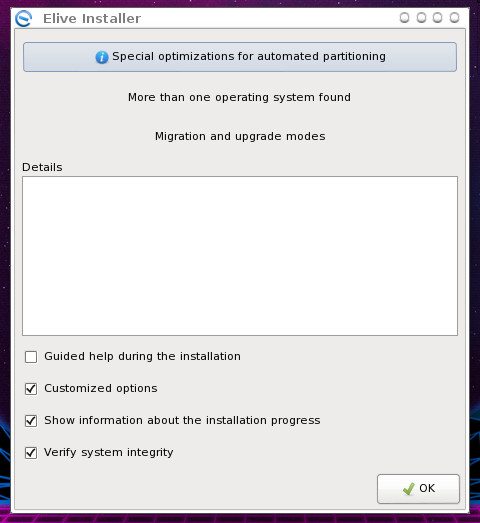
Figure 3: Beginning the Elive installation.

The installer is simple. Click OK from the main window (Figure 3) to begin the process. 

Next, you’ll be prompted to select a hard disk partitioning option. Select Automatic for the easiest installation. After making the selection, click OK. When prompted, click Yes to erase your hard drive, so Elive can be installed. The next prompt (Figure 4), allows you to enable encryption for your disk.
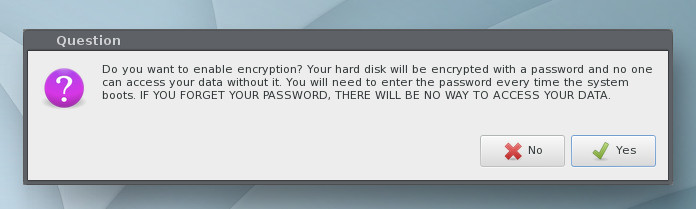
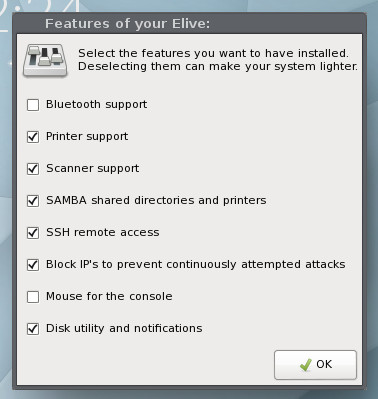
Figure 4: Enabling encryption for Elive.

Figure 5: Select the features for Elive.

If you enable encryption, you’ll be prompted for an encryption password; type and verify that password to continue.

The installation will continue and end at a window allowing you to select features to be included in your desktop (Figure 5).
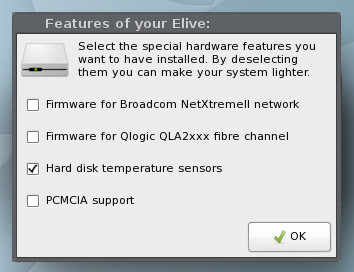
Figure 6: Adding hardware support for Elive.

The next window allows you to select extra hardware support (Figure 6).

Next, you get to determine what third-party software will be added to the installation (Figure 7).
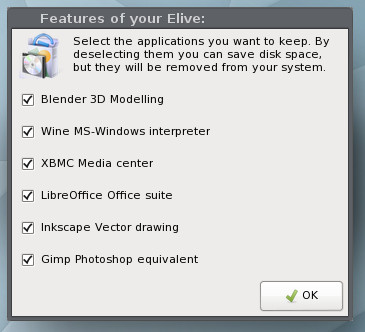
Figure 7: You’ll be presented with two such screens for third-party installation.

Finally, you can dictate what Elive will remove from the system, in order to make it even lighter (Figure 8).

You will then be prompted to create a user for the system and then set up sudo rights for that user. After you create that user, a terminal window will open and the system will be installed. During this installation, you may be prompted to answer Yes or No for a question or two. 
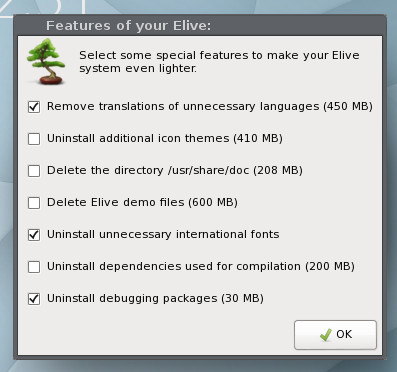
Figure 8: Creating an even lighter Elive installation.

Take the time to read through the questions carefully. During this segment of the installation, you’ll also be prompted to give the computer a hostname, and you will eventually be prompted for a reboot.

Upon reboot, you will be asked to select the services you want enabled on your desktop. Quite a few options are available, so look through them carefully and select only the ones you know you’ll need (Figure 9).
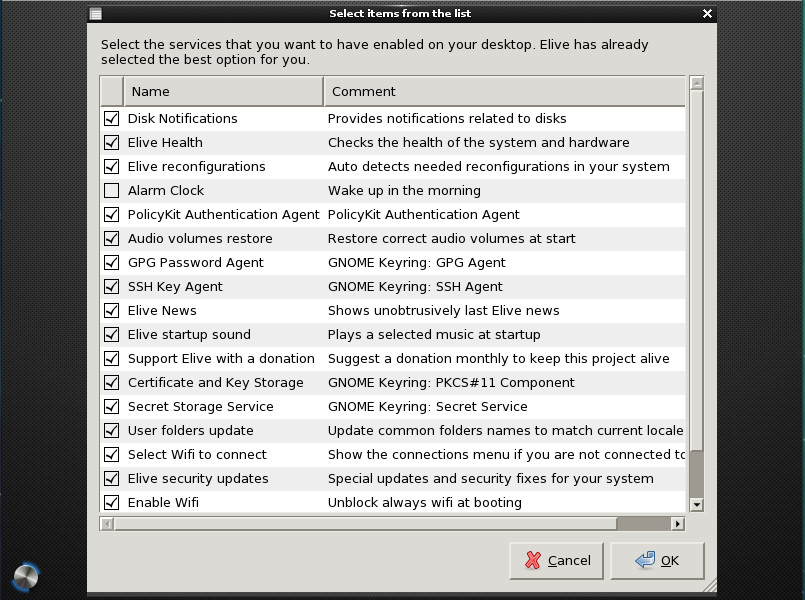
Figure 9: Selecting services to run on the desktop.

One of the nice aspects of Elive is that you don’t have to walk through the E17 first-run wizard, which can be somewhat confusing for new users. Elive makes getting Enlightenment up and running as easy as any desktop environment. On top of that, the default Elive desktop is just as gorgeous as the website proclaims (Figure 10).
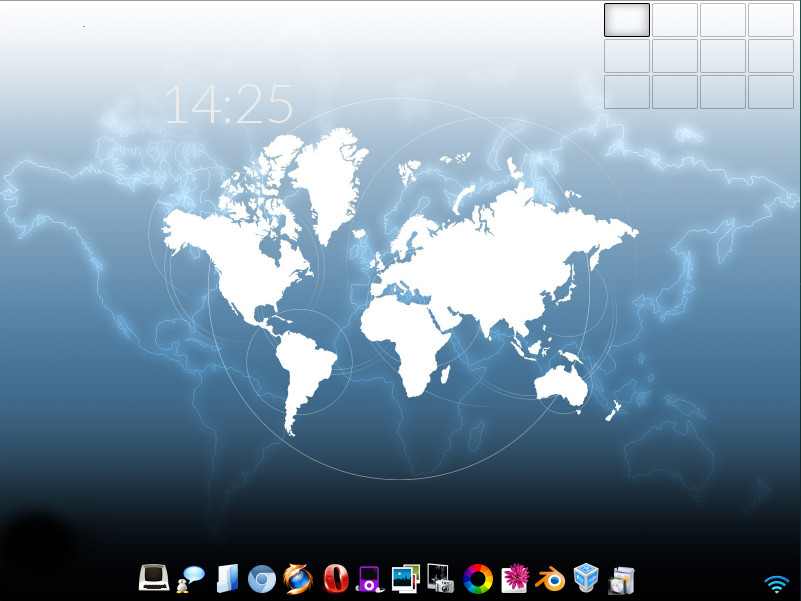
Figure 10: E17 is an elegant desktop option.

Out of the box, Elive includes an outstanding collection of wallpapers and a beautiful default theme (a vast improvement over the standard E17). And, if you include all the third-party applications, you’ll have absolutely everything you need to get your work done … all from within a screaming-fast desktop operating system that is as reliable as any Linux distribution and even more flexible than most.

I will give you a word of warning. Once you start toying with Elive (configuring and theming), making this desktop operating system even more beautiful might well become an obsession.

If you like a lightning fast distribution with a Debian base, you seriously cannot go wrong with Elive.

Learn more about Linux through the free “Introduction to Linux” course from The Linux Foundation and edX.

11 Best Programming Fonts

There are many posts and sites comparing fonts for programming and they are all amazing articles. So why I repeated the same subject here? Since I always found myself lost in dozens of fonts and could not finger out which one was best for me. So today I tried many fonts and picked up the following fonts for you. These fonts are pretty popular and easy to get. And most importantly, all these fonts are FREE!

I ranked the fonts with the following metrics:

  • Whether similar characters are distinguishable, such as 0O1lI
  • Whether the font style (line width, character width / height) is easy to read
  • And my personal preference!

Read more at Medium

Compliance is Not Synonymous With Security

Along with the clear benefits to be gained from upholding the standards enforced by GDPR, PCI DSS, HIPAA, and other regulatory bodies often comes a shift toward a more compliance-centric security approach. But regardless of industry or regulatory body, achieving and maintaining compliance should never be the end goal of any security program. Here’s why:

Compliance does not guarantee security

It’s critical to remember that many—if not most—breaches disclosed in recent years occurred at compliant businesses. This means that PCI compliance, for example, has been unable to prevent numerous retailers, financial services institutions, and web hosting providers from being breached, just as the record-breaking number of healthcare data breaches in 2016 were suffered by HIPAA-compliant organizations.

Compliance standards are not comprehensive

In fact, this trend reinforces how compliance standards should be operationalized and perceived: as thoughtful standards for security that can help inform the foundations of a security program but are by no means sufficient. The most effective security programs view compliance as a relatively small component of a comprehensive security strategy.

Read more at SecurityWeek

Dialing Up Security for Docker Containers

Container systems like Docker are a powerful tool for system administrators, but Docker poses some security issues you won’t face with a conventional virtual machine (VM) environment. For example, containers have direct access to directories such as /proc/dev, or /sys, which increases the risk of intrusion. This article offers some tips on how you can enhance the security of your Docker environment.

Docker Daemon

Under the hood, containers are fundamentally different from VMs. Instead of a hypervisor, Linux containers rely on the various namespace functions that are part of the Linux kernel itself.

Starting a container is nothing more than rolling out an image to the host’s filesystem and creating multiple namespaces. The Docker daemon dockerd is responsible for this process. It is only logical that dockerd is an attack vector in many threat scenarios.

The Docker daemon has several security issues in its default configuration. For example, the daemon communicates with the Docker command-line tool using a Unix socket (Figure 1). If necessary, you can activate an HTTP socket for access via the network.

Read more at ADMIN Magazine

Parrot 4.0 Ethical Hacking Linux Distro Released

Popular hacking Linux distro Parrot Security has upgraded to version 4.0, and comes with all the fixes and updated packages along with many new changes.

“This release includes all the updated packages and bug fixes released since the last version (3.11), and it marks the end of the development and testing process of many new features experimented in the previous releases since Parrot 3.9,” reads the company’s announcement.

Parrot Security OS 4.0 will ship with netinstall images to enable those interested to create their own system with only the bare core and software components they need. Besides this, the company has also released Parrot on Docker templates that allows users to quickly download a Parrot template and instantly spawn unlimited and completely isolated parrot instances on top of any host OS that supports Docker. 

Read more at TechWorm

Learn more in this Parrot Security distro review from Jack Wallen.

How CERN Is Using Linux and Open Source

CERN really needs no introduction. Among other things, the European Organization for Nuclear Research created the World Wide Web and the Large Hadron Collider (LHC), the world’s largest particle accelerator, which was used in discovery of the Higgs boson.  Tim Bell, who is responsible for the organization’s  IT Operating Systems and Infrastructure group, says the goal of his team is “to provide the compute facility for 13,000 physicists around the world to analyze those collisions, understand what the universe is made of and how it works.”

CERN is conducting hardcore science, especially with the LHC, which generates massive amounts of data when it’s operational. “CERN currently stores about 200 petabytes of data, with over 10 petabytes of data coming in each month when the accelerator is running. This certainly produces extreme challenges for the computing infrastructure, regarding storing this large amount of data, as well as the having the capability to process it in a reasonable timeframe. It puts pressure on the networking and storage technologies and the ability to deliver an efficient compute framework,” Bell said.

Tim Bell, CERN

The scale at which LHC operates and the amount of data it generates pose some serious challenges. But CERN is not new to such problems. Founded in 1954, CERN has been around for about 60 years. “We’ve always been facing computing challenges that are difficult problems to solve, but we have been working with open source communities to solve them,” Bell said. “Even in the 90s, when we invented the World Wide Web, we were looking to share this with the rest of humanity in order to be able to benefit from the research done at CERN and open source was the right vehicle to do that.”

Using OpenStack and CentOS

Today, CERN is a heavy user of OpenStack, and Bell is one of the Board Members of the OpenStack Foundation. But CERN predates OpenStack. For several years, they have been using various open source technologies to deliver services through Linux servers.

“Over the past 10 years, we’ve found that rather than taking our problems ourselves, we find upstream open source communities with which we can work, who are facing similar challenges and then we contribute to those projects rather than inventing everything ourselves and then having to maintain it as well,” said Bell.

A good example is Linux itself. CERN used to be a Red Hat Enterprise Linux customer. But, back in 2004, they worked with Fermilab to  build their own Linux distribution called Scientific Linux. Eventually they realized that, because they were not modifying the kernel, there was no point in spending time spinning up their own distribution; so they migrated to CentOS. Because CentOS is a fully open source and community driven project, CERN could collaborate with the project and contribute to how CentOS is built and distributed.

CERN helps CentOS with infrastructure and they also organize CentOS DoJo at CERN where engineers can get together to improve the CentOS packaging.

In addition to OpenStack and CentOS, CERN is a heavy user of other open source projects, including Puppet for configuration management, Grafana and  influxDB for monitoring, and is involved in many more.

“We collaborate with around 170 labs around the world. So every time that we find an improvement in an open source project, other labs can easily take that and use it,” said Bell, “At the same time, we also learn from others. When large scale installations like eBay and Rackspace make changes to improve scalability of solutions, it benefits us and allows us to scale.”

Solving realistic problems

Around 2012, CERN was looking at ways to scale computing for the LHC, but the challenge was people rather than technology. The number of staff that CERN employs is fixed. “We had to find ways in which we can scale the compute without requiring a large number of additional people in order to administer that,” Bell said. “OpenStack provided us with an automated API-driven, software-defined infrastructure.” OpenStack also allowed CERN to look at problems related to the delivery of services and then automate those, without having to scale the staff.

“We’re currently running about 280,000 cores and 7,000 servers across two data centers in Geneva and in Budapest. We are  using software-defined infrastructure to automate everything, which allows us to continue to add additional servers while remaining within the same envelope of staff,” said Bell.

As time progresses, CERN will be dealing with even bigger challenges. Large Hadron Collider has a roadmap out to 2035, including a number of significant upgrades. “We run the accelerator for three to four years and then have a period of 18 months or two years when we upgrade the infrastructure. This maintenance period allows us to also do some computing planning,” said Bell. CERN is also  planning High Luminosity Large Hadron Collider upgrade, which will allow for beams with higher luminosity. The upgrade would mean about 60 times more compute requirement compared to what CERN has today.

“With Moore’s Law, we will maybe get one quarter of the way there, so we have to find ways under which we can be scaling the compute and the storage infrastructure correspondingly  and finding automation and solutions such as OpenStack will help that,” said Bell.

“When we started off the large Hadron collider and looked at how we would deliver the computing, it was clear that we couldn’t put everything into the data center at CERN, so we devised a distributed grid structure, with tier zero at CERN and then a cascading structure around that,” said Bell. “There are around 12 large tier one centers and then 150 small universities and labs around the world. They receive samples at the data from the LHC in order to assist the physicists to understand and analyze the data.”

That structure means CERN is collaborating internationally, with hundreds of countries contributing toward the analysis of that data. It boils down to the fundamental principle that open source is not just about sharing code, it’s about collaboration among people to share knowledge and achieve what no single individual, organization, or company can achieve alone. That’s the Higgs boson of the open source world.

How to Measure the Impact of your Open Source Project

Conventional metrics of open source projects lack the power to predict their impact. The bad news is, there is no significant correlation between open source activity metrics and project impact. The good news? There are paths forward.

Let’s start with some questions: How do you measure the impact of your open source project? What value does your project provide to other projects? How is your project important within an open source ecosystem? Can you predict your project’s impact using open source metrics that you can follow day to day?

If these questions resonate, chances are you care about measuring the impact of your open source project. On Opensource.com, we have already learned about measuring the project’s health, the community manager’s performance, the tools available for measuring, and the right metrics to use—and we understand that not all metrics are to be trusted.

While all these factors are critical in building a comprehensive picture of open source project health, there is more to the story. Indeed, many metrics fail to provide the information we need in a timely fashion. We want to use predictive metrics on a daily basis—metrics that are correlated with, and that act as predictors of, the outcomes and impact metrics that we care about.

Read more at OpenSource.com

Learn more in the OS Guides for the Enterprise from The TODO Group.

​ICANN Makes Last Minute WHOIS Changes to Address GDPR Requirements

The Board of Directors of the Internet Corporation for Assigned Names and Numbers (ICANN) struggled and sweated and with days left came up with a way to make the Domain Name System (DNS) and WHOIS, the master database of who owns what website name, compliant with the European Union (EU)’s General Data Protection Regulation (GDPR).

We’ll see.

It doesn’t appear to me that ICANN’s “Temporary Specification for gTLD Registration Data” will pass muster with the GDPR Article 29 working party, the GDPR enforcement group.

ICANN had wanted a year of grace to address WHOIS’s data privacy problems. They didn’t get it.

ICANN argued, “Unless there is a moratorium, we may no longer be able to … maintain WHOIS. Without resolution of these issues, the WHOIS system will become fragmented … A fragmented WHOIS would no longer employ a common framework for generic top-level domain (gTLD) registration directory services.”

Read more at ZDNet

Speak at Open Source Summit Europe – Submit by July 1

Share your expertise and speak at Open Source Summit Europe in Edinburgh, October 22 – 24, 2018. We are accepting proposals through Sunday, July 1, 2018.

Open Source Summit Europe is the leading technical conference for professional open source. Join developers, sysadmins, DevOps professionals, architects and community members, to collaborate and learn about the latest open source technologies, and to gain a competitive advantage by using innovative open solutions.

As open source continues to evolve, so does the content covered at Open Source Summit. We’re excited to announce all-new tracks and content that make our conference more inclusive and feature a broader range of technologies driving open source innovation today.

Read more at The Linux Foundation

Comprehensive Beginner’s Guide to Jupyter Notebooks for Data Science & Machine Learning

Jupyter Notebooks allow data scientists to create and share their documents, from codes to full blown reports. They help data scientists streamline their work and enable more productivity and easy collaboration. Due to these and several other reasons you will see below, Jupyter Notebooks are one of the most popular tools among data scientists.

In this article, we will introduce you to Jupyter notebooks and deep dive into it’s features and advantages.

By the time you reach the end of the article, you will have a good idea as to why you should leverage it for your machine learning projects and why Jupyter Notebooks are considered better than other standard tools in this domain!

What is a Jupyter Notebook?

Jupyter Notebook is an open-source web application that allows us to create and share codes and documents.

It provides an environment, where you can document your code, run it, look at the outcome, visualize data and see the results without leaving the environment. This makes it a handy tool for performing end to end data science workflows – data cleaning, statistical modeling, building and training machine learning models, visualizing data, and many, many other uses.

Jupyter Notebooks really shine when you are still in the prototyping phase. This is because your code is written in indepedent cells, which are executed individually. 

Read more at Analytics Vidhya