Home Blog Page 399

HardwareCon: The Slope of Enlightenment

Having spent the last 13 years helping over 900 hardware startups (they used to be called inventors) taking innovative, physical products to market, I’ve seen the industry go from one that was dominated by large established companies to the burgeoning hardware revolution that has already brought thousands of startup products to market with new tools and technologies and is just getting started.

Despite the growth of the market, many promising hardware startups shut their doors in 2017 and the IoT hype cycle is wearing off. The industry has been doing some soul searching and ultimately discovered it needed to pivot. I believe we’ve entered a “slope of enlightenment”, discovered that the current model is broken and are realizing that it’s almost impossible for startups to learn all the aspects of a hardware startup business while simultaneously developing and launching an innovative technology in the 2-3 year available window.

With only 3 percent of startups seeing any meaningful exit to date, I believe the path forward for successful hardware innovations will come from startups that create robust business models with value driven solutions (solve real problems) and connect with the right partners who are true experts that uniquely understand hardware.  

Allan Alcorn to Speak at HardwareCon

Four years ago, we saw the chance to provide that educational support and bring the community together to facilitate these critical partnerships. I’m excited to say that HardwareCon continues to grow with a big step up this year by moving to the SJ Convention Center April 19th and 20th.  We’re excited to announce one of the godfathers of the Silicon Valley hardware scene, Allan Alcorn, founding engineer at Atari, inventor of the world’s first popular video game, Pong, and Steve Jobs’ last boss as our keynote speaker to kick things off.  

This year’s conference agenda will feature two full days of keynotes, panels, and workshops focused on the most important topics around building a successful hardware company and will feature key insights from the hardware investment community.  

We’ve just announced a new IoT Summit , presented by Parks Associates, titled Transformation of Consumer Products: Connectivity & IoT. The Summit will address the impact of IoT on the development, design, and monetization of consumer products. This Summit  is designed to help executive level hardware innovators better understand market trends and how to position for growth. The consumer device segment of the hardware market remains one of the most exciting areas for innovation.  

To support this new vision for success, we’re bringing together the world’s thought leaders, entrepreneurs, investors, innovators, and key decision makers across the hardware ecosystem to “Get Deals Done, ” our theme this year.  We chose this theme as it’s evident that if the next generation of startups want to succeed, they will need to have access to and knowledge of the right platforms, software and hardware, investors that share their vision and a complete ecosystem of external service providers who can fill their roles.  Hardware became more global in 2017 with many different models and directions tried and developed. Come be a part of the conversation, meet your future partners, and get deals done.

I’d like to personally invite you to join me at HardwareCon 2018 and right now is the best time to save on tickets as we’re offering our Insider Rate at 25% off the full ticket price.  I look forward to connecting with you there and shaping the future of the next generation of hardware innovation.

Greg Fisher is Founder at HardwareCon.
Keeping Governance Simple and Uncomplicated

I am a firm believer that the way in which we collaborate should be as much of a collaborative product as the output of a community project. Just like an open source project, we should review, iterate, and review the performance of our iterations. We should constantly assess how we can optimize our governance to be as simple and thin as possible. We should build an environment where someone can file a metaphorical or literal pull request with pragmatic ways to optimize how the project is governed. This assures the project is pulling the best insight from members to ensure it is as efficient and as lightweight as possible.

To do this, honestly observe how the governance performs. Is it accomplishing the goals it is designed for? 

Read more at Jono Bacon

What’s New in LLVM

The LLVM compiler framework has gone from being a technological curiosity to a vital piece of the modern software landscape. It is the engine behind the Clang compiler, as well as the compilers for the Rust and Swift languages, and provides a powerful toolkit for creating new languages.

It is also a fairly fast-moving project, with major point revisions announced every six months or so. Version 6.0, released earlier this month, continues LLVM’s ongoing mission to deepen and broaden support for a variety of compilation targets. The update also adds many timely fixes to guard against recently discovered processor-level system attacks.

To ensure that applications built with LLVM can do their part to guard against such attacks, LLVM now offers support for ”retpolines,”

Read more at InfoWorld

Becoming a 10x Developer

So when I first heard the concept of the 10x engineer, I was confused. How could someone be so talented that it overshadows the power of teamwork? In my experience, individual excellence is necessary, but not sufficient, for greatness. Focusing purely on individual achievement misses the larger picture that teams are required to build great software. So I decided to change the definition of a 10x engineer to this: 

A 10x engineer isn’t someone who is 10x better than those around them, but someone who makes those around them 10x better.

Over the years I’ve combined my personal experience with research about building and growing effective teams and turned that into a list of 10 ways to be a better teammate, regardless of position or experience level. While many things on this list are general pieces of advice for how to be a good teammate, there is an emphasis on how to be a good teammate to people from diverse backgrounds.

Read more at Kate Heddleston

What the Data Says About Kubernetes Deployment Patterns

The considerable growth in the Kubernetes market is well documented. It is by far the most widely used orchestration platform, but it’s not the only one, preventing it from receiving full default status. Kubernetes’ acceptance has forced it to mature quite fast and has left the technology community to rapidly innovate. It has helped force a disruption in the market as new and more established vendors now compete in the cloud-native space.

Container technologies prompted the rise and development of the Kubernetesorchestration platform. Today, the largest users of containers are companies with more than 1,000 employees which run their own data centers.

Read more at The New Stack

The Shift to Linux Operating Systems for IoT

IoT devices are considered embedded devices, which in short means a computer attached to something else, whatever that something else might be. This is in contrast with laptops, desktops, and servers, for which the computer in them is the end and not just the means.

While these terms are not formal terms, a common way to distinguish IoT devices from other embedded devices is by the presence of network connectivity. This means that IoT devices can talk to other IoT devices, or to your desktop, or to some server in the cloud.

Some of these devices are low-cost consumer devices (for example light bulbs and light switches for the home) or are very purpose oriented (such as a fridge or oven, or the Amazon dash button). And others, while not as price sensitive or as single-purpose, have been developed by teams with little to no experience in network, which in turn have not taken full advantage of the networking capabilities of these devices.

Read more at IoT for all

Researchers Find 29 Types of USB attacks, Recommend Never Plugging into a USB You Don’t Own

It’s long been known that you should never insert an unknown USB drive to your computer because it could be loaded with malware. However, new research from Ben-Gurion University has exposed 29 types of USB attacks, and extends to your smartphone. It shows that you should never use a USB charger you find lying around or plug into a public USB port. Both can be compromised by attackers, as we talked about with one of the researchers on the project, Ran Yahalom.

“We surveyed 29 attacks, updated last year. New methods of likely developed and published attacks increase that number. The microcontroller, a reprogrammable microcontroller used to impersonate peripherals as well as an actually the firmware update. Academic circles call this ‘bad USB.’ It’s a family of attacks based on reprogramming the firmware.”

Read more at Tech Republic

A Comparison of Three Linux ‘App Stores’

I remember, long, long ago, when installing apps in Linux required downloading and compiling source packages. If you were really lucky, some developer might have packaged the source code into a form that was more easily installable. Without those developers, installing packages could become a dependency nightmare.

But then, package managers like rpm and dpkg began to rise in popularity, followed quickly by the likes of yum and apt. This was an absolute boon to anyone looking to make Linux their operating system of choice. Although dependencies could still be an issue, they weren’t nearly as bad as they once were. In fact, many of these package managers made short shrift of picking up all the dependencies required for installation.

And the Linux world rejoiced! Hooray!

But, with those package managers came a continued requirement of the command line. That, of course, is all fine and good for old hat Linux users. However, there’s a new breed of Linux users who don’t necessarily want to work with the command line. For that user-base, the Linux “app store” was created.

This all started with the Synaptic Package Manager. This graphical front end for apt was first released in 2001 and was a breath of fresh air. Synaptic enabled user to easily search for a piece of software and install it with a few quick clicks. Dependencies would be picked up and everything worked. Even when something didn’t work, Synaptic included the means to fix broken packages—all from a drop-down menu.

Since then, a number of similar tools have arrived on the market, all of which improve on the usability of Synaptic. Although Synaptic is still around (and works quite well), new users demand more modern tools that are even easier to use.  And Linux delivered.

I want to highlight three of the more popular “app stores” to be found on various Linux distributions. In the end, you’ll see that installing applications on Linux, regardless of your distribution, doesn’t have to be a nightmare.

GNOME Software

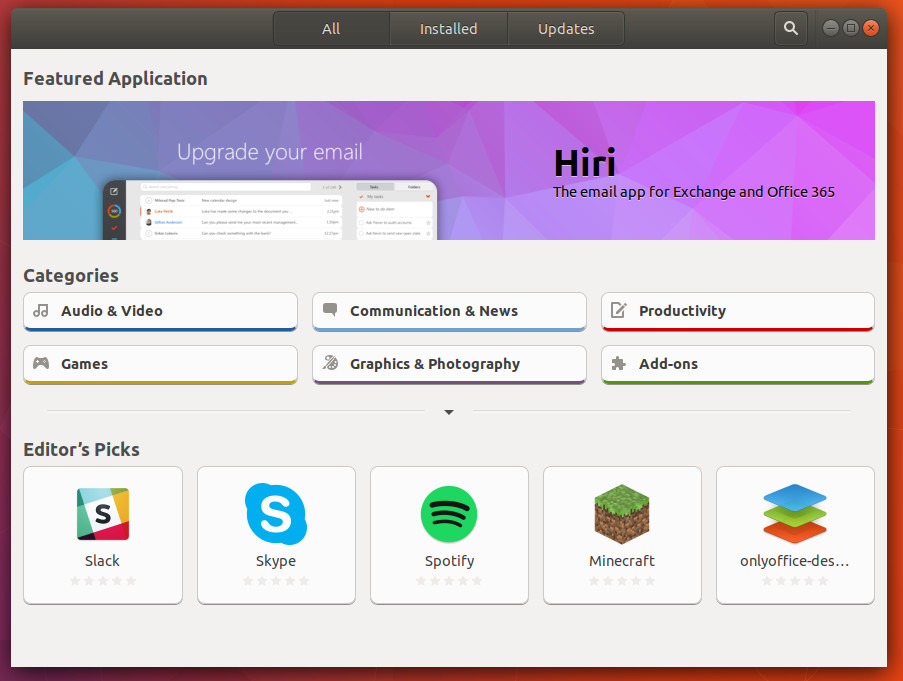
GNOME’s take on the graphical package manager, Software, hit the scene just in time for the Ubuntu Software Center to finally fade into the sunset (which was fortuitous, considering Canonical’s shift from Unity to GNOME). Any distribution that uses GNOME will include GNOME Software. Unlike the now-defunct Ubuntu Software Center, GNOME Software allows users to both install and update apps from within the same interface (Figure 1).

Figure 1: The GNOME Software main window.

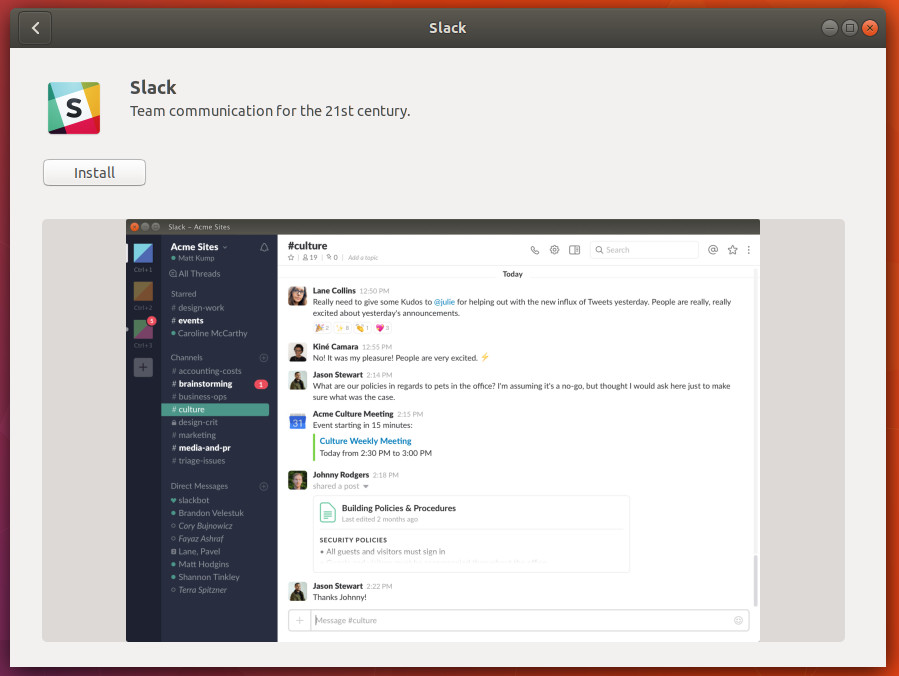
To find a piece of software to install, click the Search button (top left, looking glass icon), type the name of the software you want to install, and wait for the results. When you find a title you want to install, click the Install button (Figure 2) and, when prompted, type your user (sudo) password.

Figure 2: Installing Slack from GNOME Software.

GNOME Software also includes easy to navigate categories, Editor’s Picks, and GNOME add-ons. As a bonus feature, GNOME Software also supports both snaps and flatpak software. Out of the box, GNOME Software on Ubuntu (and derivatives) support snaps. If you’re adventurous, you can add support for flatpak by opening a terminal window and issuing the command sudo apt install gnome-software-plugin-flatpak.

GNOME Software makes it so easy to install software on Linux, any user (regardless of experience level) can install and update apps with zero learning curve.

KDE Discover

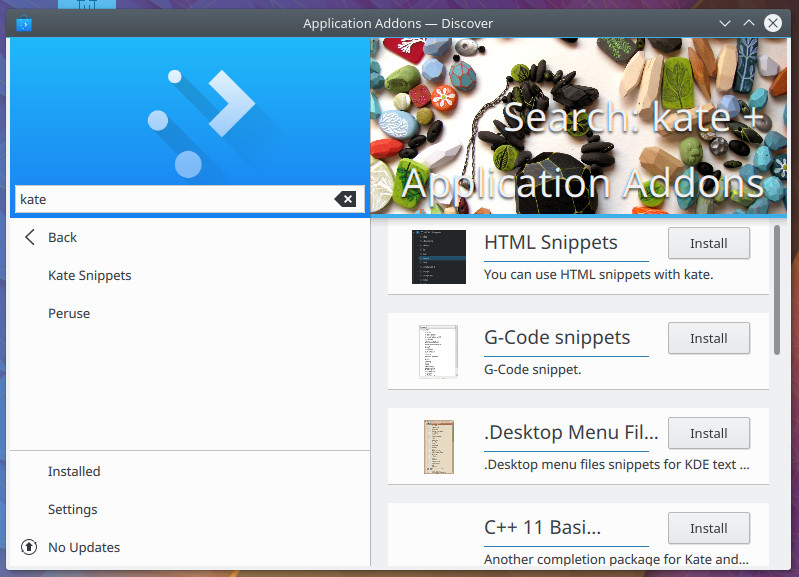
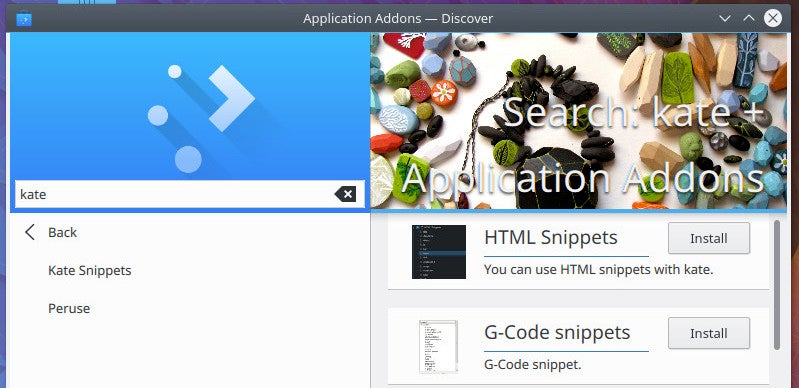
Discover is KDE’s answer to GNOME Software. Although the layout (Figure 3) is slightly different, Discover should feel immediately familiar.

Figure 3: The KDE Discover main window is equally user friendly.

One of the primary differences between Discover and Software is that Discover differentiates between Plasma (the KDE desktop) and application add-ons. Say, for example, you want to find an “extension” for the Kate text editor; click on Application Addons and search “kate” to see all available addons for the application.

The Plasma Addons feature makes it easy for users to search through the available desktop widgets and easily install them.

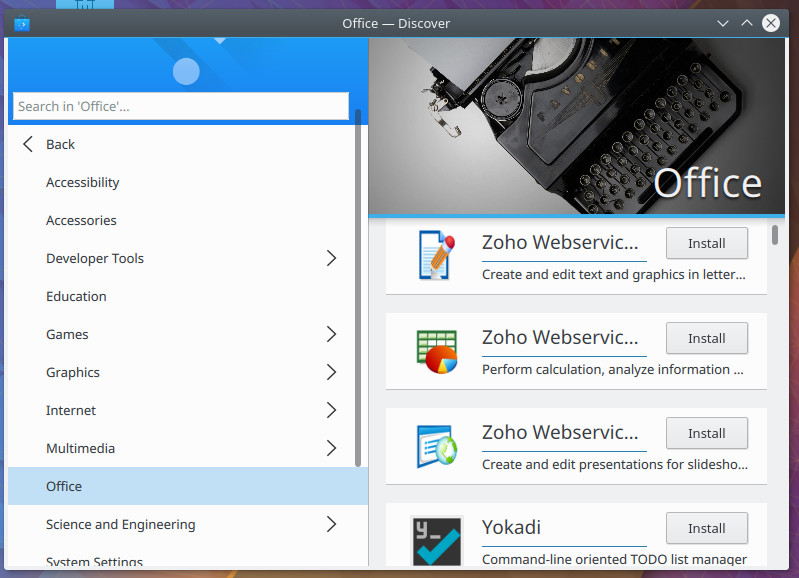
The one downfall of KDE Discover is that applications are listed in a reverse alphabetical order. Click on one of the given categories, from the main page, and you’ll be given a listing of available apps to scroll through, from Z to A (Figure 4).

Figure 4: The KDE Discover app listing.

You will also notice no apparent app rating system. With GNOME Software, it’s not only easy to rate a software title, it’s easy to decide if you want to pass on an app or not (based on a given rating). With KDE Discover, there is no rating system to be found.

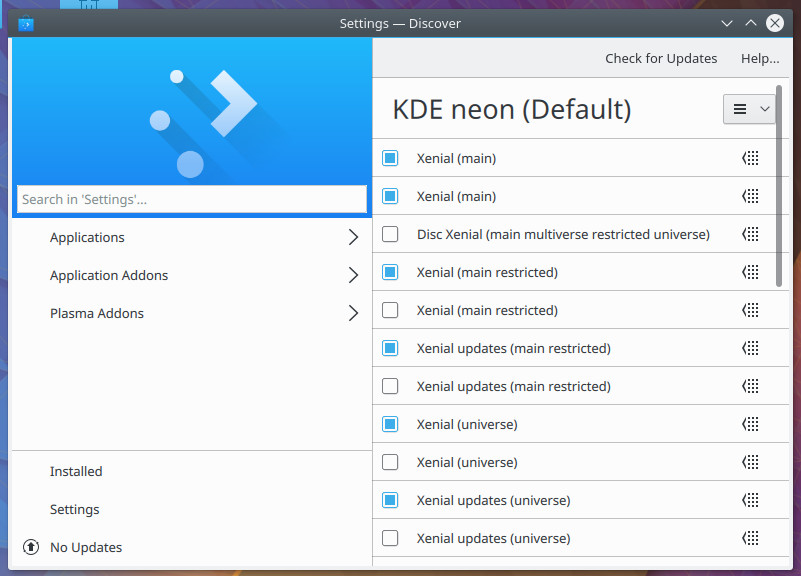
One bonus that Discover adds, is the ability to quickly configure repositories. From the main window, click on Settings, and you can enable/disable any of the included sources (Figure 5). Click the drop-down in the upper right corner, and you can even add new sources.

Figure 5: Enabling, disable, and add sources, all from within Discover.

Pamac

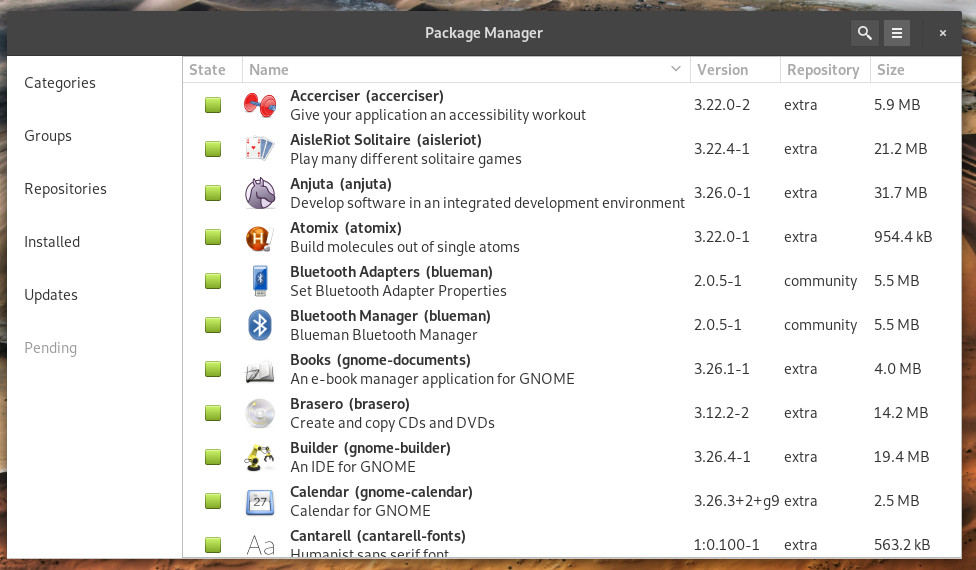
If you’re hoping to soon count yourself among the growing list of Arch Linux users, you’ll be glad to know that the Linux distribution often considered for the more “elite”, also includes a graphical package manager. Pamac does an outstanding job of making installing applications on Arch easy. Although Pamac isn’t quite on the design level of either GNOME Software or KDE Discover, it still does a great job of simplifying the installing and updating of applications. From the Pamac main window (Figure 6), you can either click on the search button, or click a Category or Group to find the software you’re looking to install.

Figure 6: The Pamac main window.

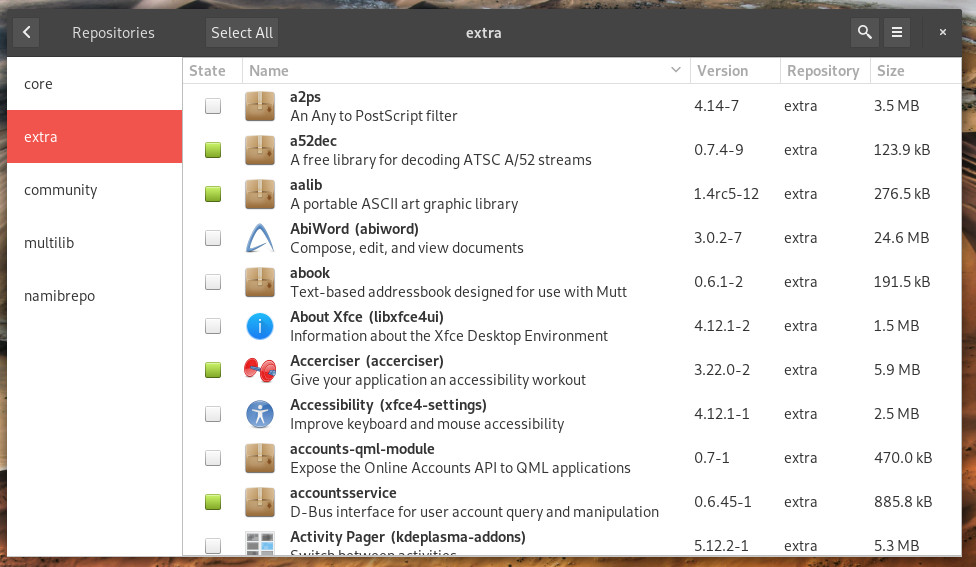
If you can’t find the software you’re looking for, you might need to enable one of the many repositories. Click on the Repository button and then search through the categories (Figure 7) to locate the repository to be added.

Figure 7: Adding new repositories in Pamac.

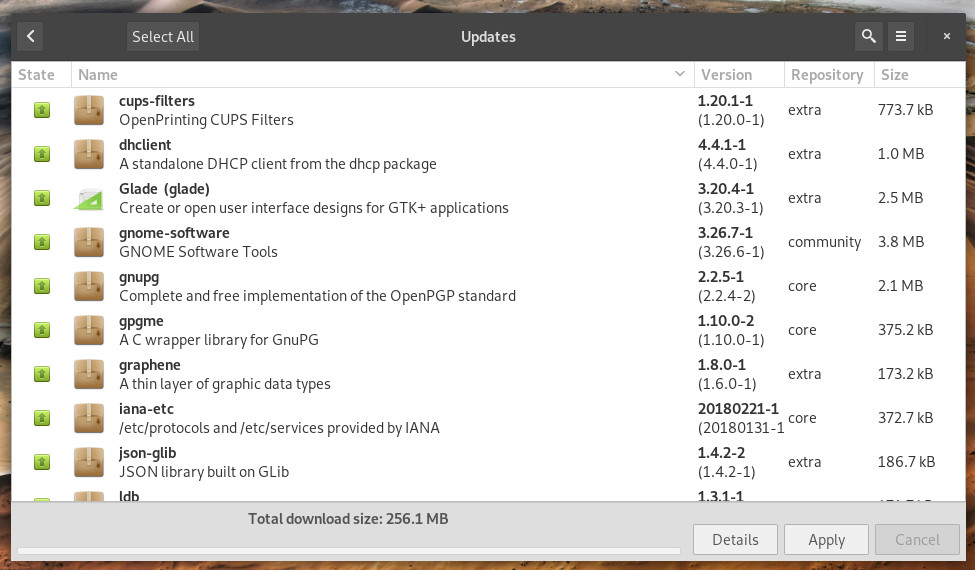
Updates are smoothly handled with Pamac. Click on the Updates button (in the left navigation) and then, in the resulting window (Figure 8), click Apply. All of your Arch updates will be installed.

Figure 8: Updating Arch via Pamac.

More where that came from

I’ve only listed three graphical package managers. That is not to say these three are the only options to be found. Other distributions have their own takes on the package manager GUI. However, these three do an outstanding job of representing just how far installing software on Linux has come, since those early days of only being able to install via source.

Learn more about Linux through the free “Introduction to Linux” course from The Linux Foundation and edX.

Hands-On Learning at Open Networking Summit for Your SDN/NFV Deployments

If you are attending ONS, you know the value of open source projects. You know they are going to play a critical role in your ongoing or upcoming SDN/NFV transformation. Open source projects have become very successful in the enterprise space and they are poised to do the same in the communications service provider (CSP) arena.

That leads to a question—how can you learn more about these projects, determine their value for your specific environment and map out your organization’s next steps? Certainly, you can review online materials on your own. However, if you are like me and learn best when another human being is providing or explaining the material starting with the basics, at an unhurried pace, then the ONAP and OPNFV training sessions offered onsite at Open Networking Summit in Los Angeles are something to consider. These training courses will empower you to integrate open source into your NFV/SDN deployments.

Read more at The Linux Foundation

CLA vs. DCO: What’s the Difference?

In your open source adventures, you may have heard the acronyms CLA and DCO, and you may have said “LOL WTF BBQ?!?” These letters stand for Contributor License Agreement and Developer Certificate of Origin, respectively. Both have a similar intent: To say that the contributor is allowed to make the contribution and that the project has the right to distribute it under its license. With some significant projects moving from CLAs to DCOs (like Chef in late 2016 and GitLab in late 2017), the matter has received more attention lately.

So what are they? The Contributor License Agreement is the older of the two mechanisms and is often used by projects with large institutional backing (either corporate or nonprofit). 

Read more at OpenSource.com