Home Blog Page 406

SecOps Spends Its Days Monitoring

Developers, Security and Operations: DevSecOps. The operations part of the term usually refers to IT operations. However, today narrows in on SecOps, that work in security operations centers (SOCs) and cyber incident response teams (CIRTs). The Cyentia Institute’s survey of 160 of these security analysts shows they face some of the same challenges developers and IT operations teams do. They spend more time on monitoring than any other activity, but they much rather solve problems and “hunt” new threats. SecOps does not like reporting or something called Shift Ops — the actual details of change control and making sure the team doesn’t burn out. Given the shortage of information security professionals, it is concerning that only 45 percent of respondents said their job experience was meeting their expectations.

Cyentia suggests that automation can reduce the time spent on monitoring, letting analysts focus on intrusion prevention and threat intelligence. 

Read more at The New Stack

How Compilers Work

Compilers translate source code into executable programs and libraries. Inside modern compiler suites, a multistage process analyzes the source code, points out errors, generates intermediate code and tables, rearranges a large amount of data, and adapts the code to the target processor.

Below the surface, a black box compiler handles complex processes that require good knowledge of machine theory and formal languages. Given the importance of compilers, it is not surprising that compiler construction is standard curriculum for computer science students. If you have never been to a college-level lecture on compiler theory – or if you went to the lecture but need a refresher course – this article summarizes the basics.

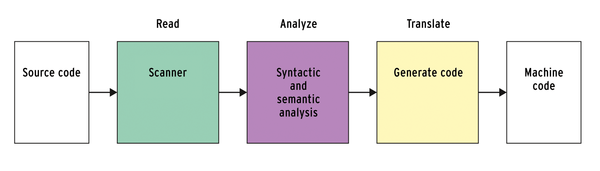
In simple terms, a compiler goes through three steps: It parses the source code, analyzes it, and synthesizes the finished program (Figure 1).

Figure 1: Rough structure of a compiler: parse code, analyze it, and create an executable program.

Read more at Linux Pro Magazine

Conan Package Manager Brings C and C++ to DevOps

Conan, a distributed, open source package and dependency manager, promises to bring C and C++ into devops.

The multiplatform package manager builds and shares native binaries. Conan lets you quickly create builds, port packages, and run them on different operating systems…

While intended for C and C++, Conan can manage builds from source, dependencies, and precompiled binaries for any language. 

Read more at InfoWorld

Why Open Source Could be IBM’s Key to Future Success in the Cloud

Ask most developers what they think of IBM and you’ll get a blank stare in response. “IB-who?” In our brave new cloud world, IBM—once so imperious with CIO golf calendars—is generally an afterthought for developers looking to deploy to the cloud. And yet there remain good reasons to consider Big Blue, especially for enterprises that have significant investments in IBM.

Instead of asking IBM, however, which tends to come up with antiquated answers like “Because we’re rad with Java,” I spoke with Linux Foundation executive director Jim Zemlin, who gave me a more compelling answer: Because IBM has deep experience making open source work in the enterprise.

Read more at Tech Republic

This Week in Open Source News: Documentary Series on Women in Tech to Premiere Next Month, Fake Linux News & More

This week in open source and Linux news: an exciting documentary series by open source communications veteran Jennifer Cloer to premiere in March, Steven J Vaughan-Nichols is fed up with fake Linux vulnerability story, and more! Read on to stay in the open source know!

1) Jennifer Cloer of reTHINKit PR & Wicked Flicks (former VP of Communications at The Linux Foundation) is premiering Episode 1 of her new documentary series about women in tech next month.

‘Chasing Grace’: Docuseries Tracks Women in Tech– The Business Journal 

2) Steven J. Vaughan-Nichols is frustrated by fake news of a security hole that gives attackers complete control over Linux servers.

Bogus Linux Vulnerability Gets Publicity– ZDNet

3) New Linux Foundation project can support carrier availability and performance needs in cloud services optimized for edge computing systems and applications.

The Linux Foundation Opens to the Edge with Akraino Project– SDxCentral

4) The Forbes Tech council explains why companies put money towards FOSS.

Why Pay For Something When It’s Free?– Forbes

5) “Musk is leaving the ethical AI organization he founded only two years ago.”

Elon Musk Steps Down From Open Source AI Group– Vice Motherboard

Plasma Mobile Could Give Life to a Mobile Linux Experience

In the past few years, it’s become clear that, outside of powering Android, Linux on mobile devices has been a resounding failure. Canonical came close, even releasing devices running Ubuntu Touch. Unfortunately, the idea of Scopes was doomed before it touched down on its first piece of hardware and subsequently died a silent death.

The next best hope for mobile Linux comes in the form of the Samsung DeX program. With DeX, users will be able to install an app (Linux On Galaxy—not available yet) on their Samsung devices, which would in turn allow them to run a full-blown Linux distribution. The caveat here is that you’ll be running both Android and Linux at the same time—which is not exactly an efficient use of resources. On top of that, most Linux distributions aren’t designed to run on such small form factors. The good news for DeX is that, when you run Linux on Galaxy and dock your Samsung device to DeX, that Linux OS will be running on your connected monitor—so form factor issues need not apply.

Outside of those two options, a pure Linux on mobile experience doesn’t exist. Or does it?

You may have heard of the Purism Librem 5. It’s a crowdfunded device that promises to finally bring a pure Linux experience to the mobile landscape. This device will be powered by a i.MX8 SoC chip, so it should run most any Linux operating system.

Out of the box, the device will run an encrypted version of PureOS. However, last year Purism and KDE joined together to create a mobile version of the KDE desktop that could run on the Librem 5. Recently ISOs were made available for a beta version of Plasma Mobile and, judging from first glance, they’re onto something that makes perfect sense for a mobile Linux platform. I’ve booted up a live instance of Plasma Mobile to kick the tires a bit.

What I saw seriously impressed me. Let’s take a look.

Testing platform

Before you download the ISO and attempt to fire it up as a VirtualBox VM, you should know that it won’t work well. Because Plasma Mobile uses Wayland (and VirtualBox has yet to play well with that particular X replacement), you’ll find VirtualBox VM a less-than-ideal platform for the beta release. Also know that the Calamares installer doesn’t function well either. In fact, I have yet to get the OS installed on a non-mobile device. And since I don’t own a supported mobile device, I’ve had to run it as a live session on either a laptop or an Antsle antlet VM every time.

What makes Plasma Mobile special?

This could be easily summed up by saying, Plasma Mobile got it all right. Instead of Canonical re-inventing a perfectly functioning wheel, the developers of KDE simply re-tooled the interface such that a full-functioning Linux distribution (complete with all the apps you’ve grown to love and depend upon) could work on a smaller platform. And they did a spectacular job. Even better, they’ve created an interface that any user of a mobile device could instantly feel familiar with.

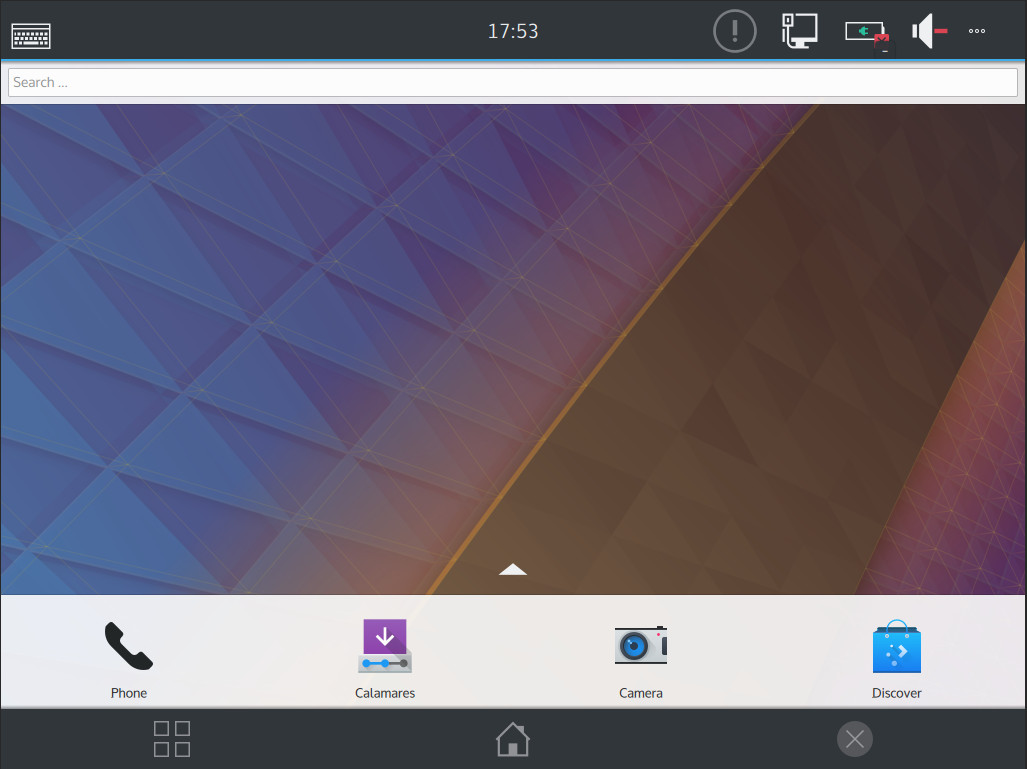
What you have with the Plasma Mobile interface (Figure 1) are the elements common to most Android home screens:

  • Quick Launchers

  • Notification Shade

  • App Drawer

  • Overview button (so you can go back to a previously used app, still running in memory)

  • Home button

Figure 1: The KDE Mobile desktop interface.

Because KDE went this route with the UX, it means there’s zero learning curve. And because this is an actual Linux platform, it takes that user-friendly mobile interface and overlays it onto a system that allows for easy installation and usage of apps like:

  • GIMP

  • LibreOffice

  • Audacity

  • Clementine

  • Dropbox

  • And so much more

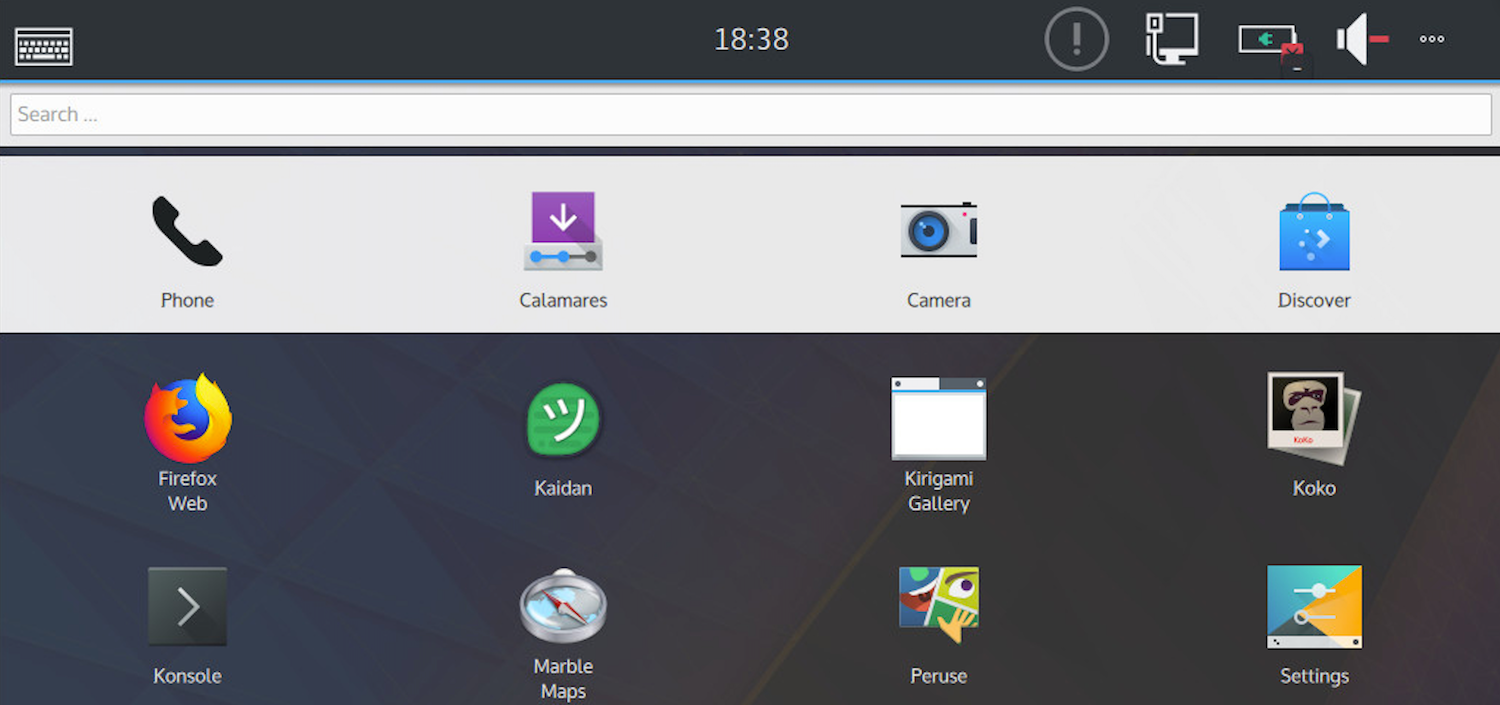
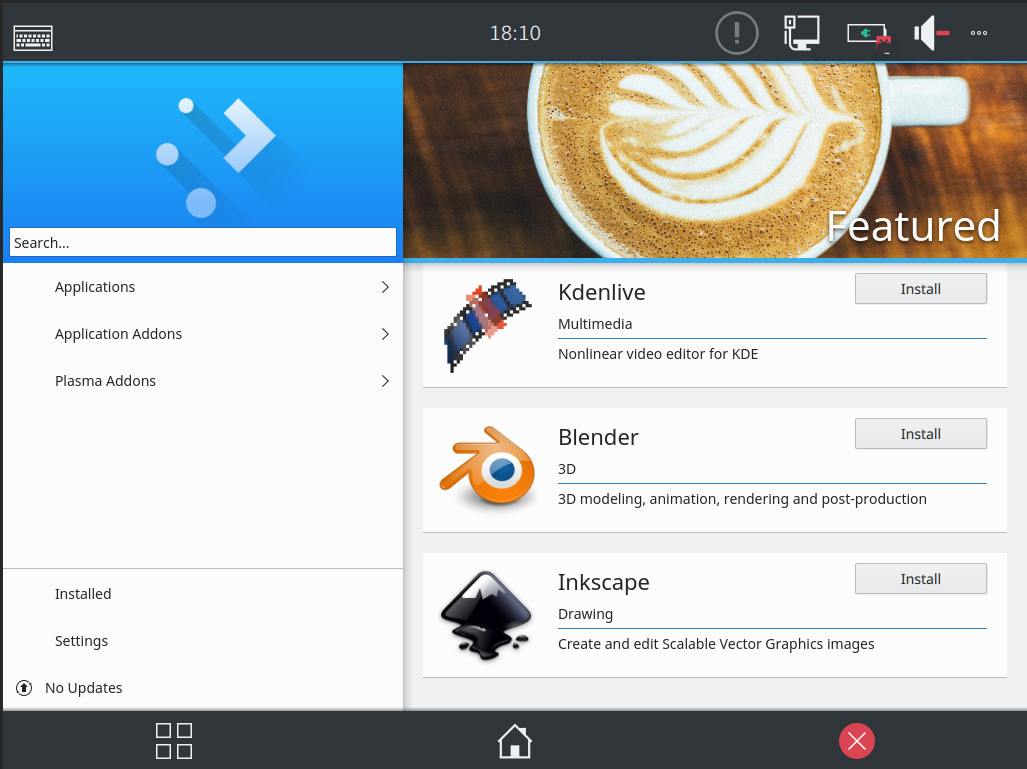
Unfortunately, without being able to install Plasma Mobile, you cannot really kick the tires too much, as the live user doesn’t have permission to install applications. However, once Plasma Mobile is fully installed, the Discover software center will allow you to install a host of applications (Figure 2).

Figure 2: The Discover software center on KDE Mobile.

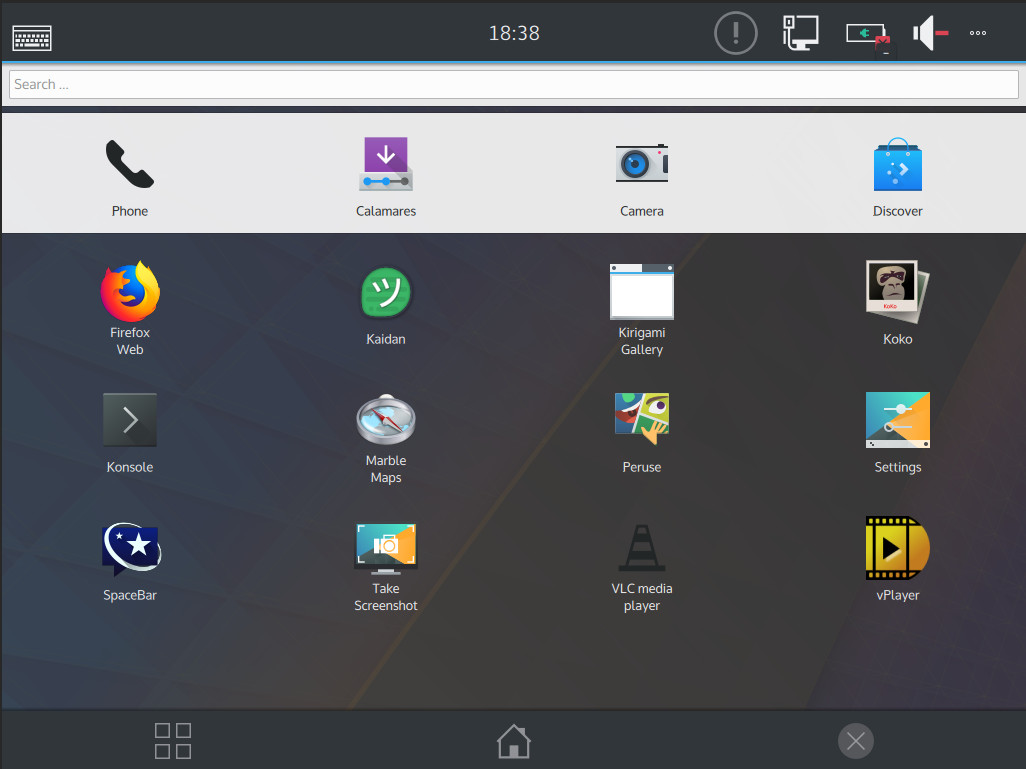
Swipe up (or scroll down—depending on what hardware you’re using) to reveal the app drawer, where you can launch all of your installed applications (Figure 3).

Figure 3: The KDE Mobile app drawer ready to launch applications.

Open up a terminal window and you can take care of standard Linux admin tasks, such as using SSH to log into a remote server. Using apt, you can install all of the developer tools you need to make Plasma Mobile a powerful development platform.

We’re talking serious mobile power—either from a phone or a tablet.

A ways to go

Clearly Plasma Mobile is still way too early in development for it to be of any use to the average user. And because most virtual machine technology doesn’t play well with Wayland, you’re likely to get too frustrated with the current ISO image to thoroughly try it out. However, even without being able to fully install the platform (or get full usage out of it), it’s obvious KDE and Purism are going to have the ideal platform that will put Linux into the hands of mobile users.

If you want to test the waters of Plasma Mobile on an actual mobile device, a handy list of supported hardware can be found here (for PostmarketOS) or here (for Halium). If you happen to be lucky enough to have a device that also includes Wi-Fi support, you’ll find you get more out of testing the environment.

If you do have a supported device, you’ll need to use either PostmarketOS (a touch-optimized, pre-configured Alpine Linux that can be installed on smartphones and other mobile devices) or Halium (an application that creates an minimal Android layer which allows a new interface to interact with the Android kernel). Using Halium further limits the number of supported devices, as it has only been built for select hardware. However, if you’re willing, you can build your own Halium images (documentation for this process is found here). If you want to give PostmarketOS a go, here are the necessary build instructions.

Suffice it to say, Plasma Mobile isn’t nearly ready for mass market. If you’re a Linux enthusiast and want to give it a go, let either PostmarketOS or Halium help you get the operating system up and running on your device. Otherwise, your best bet is to wait it out and hope Purism and KDE succeed in bringing this oustanding mobile take on Linux to the masses.

Learn more about Linux through the free “Introduction to Linux” course from The Linux Foundation and edX.

3 Warning Flags of DevOps Metrics

“Human beings adjust behavior based on the metrics they’re held against.” Choose your metrics carefully.

Metrics. Measurements. Data. Monitoring. Alerting. These are all big topics for DevOps and for cloud-native infrastructure and application development more broadly. In fact, acm Queue, a magazine published by the Association of Computing Machinery, recently devoted an entire issue to the topic.

I’ve argued before that we conflate a lot of things under the “metrics” term, from key performance indicators to critical failure alerts to data that may be vaguely useful someday for something or other. But that’s a topic for another day. What I want to discuss here is how metrics affect behavior.

Read more at OpenSource.com

It’s HTTPS or Bust: How to Secure Your Website

Come July 2018, with the release of Chrome 68, any site not protected with Secure-Socket Layer/Transport Layer Security (SSL/TLS) will be marked with the red-triangle of an insecure site. Unless you secure your site, you can kiss your web traffic goodbye.

To secure your website, you must install an X.509 Digital Certificate, generically called an SSL certificate, on your server. A trusted third party, called a Certificate Authority (CA), guarantees the Digital Certificate’s authenticity with a Digital Signature, so your visitors can be sure they are where they thought they were going.

There are many CAs. Some of the best commercial ones are Network SolutionsEntrust, and Symantec. Prices for certificates from a major provider range from $50 to $500. You can also get a free certificate — that’s every bit of good for most purposes — from the non-profit Internet Security Research Group (ISRG)‘s Let’s Encrypt

Read more at ZDNet

Let’s Encrypt Hits 50 Million Active Certificates and Counting

In yet another milestone on the path to encrypting the web, Let’s Encrypt has now issued over 50 million active certificates. Depending on your definition of “website,” this suggests that Let’s Encrypt is protecting between about 23 million and 66 million websites with HTTPS (more on that below). Whatever the number, it’s growing every day as more and more webmasters and hosting providers use Let’s Encrypt to provide HTTPS on their websites by default.

Let’s Encrypt is a certificate authority, or CA. CAs like Let’s Encrypt are crucial to secure, HTTPS-encrypted browsing. They issue and maintain digital certificates that help web users and their browsers know they’re actually talking to the site they intended to.

One of the things that sets Let’s Encrypt apart is that it issues these certificates for free.

Read more at the EFF

Mentor Embedded Linux Gains Cloud-Based IoT Platform

Mentor announced a “Mentor Embedded IoT Framework” platform that builds on top of Mentor Embedded Linux with cloud-based IoT cloud services ranging from device authentication and provisioning to monitoring and diagnostics.

Mentor’s Mentor Embedded IoT Framework (MEIF) extends its Yocto Project based Mentor Embedded Linux (MEL) and Nucleus RTOS development platforms to provide cloud services for IoT device management. The platform mediates between these platforms and cloud service backends, including Amazon Web Services (AWS), Eclipse IoT, Microsoft Azure, and Siemens MindSphere.

Read more at LinuxGizmos