This week in open source/Linux news, The Linux Foundation announced a restructuring of their networking projects under one umbrella, Slack launches on Linux, and more!
1) The Linux Foundation consolidated its networking project under one umbrella this week.
4) Hyperledger has set in motion plans to give select startups access to some of the benefits accessed only by companies that are officially recognized.”
By design, Linux is a very secure operating system. In fact, after 20 years of usage, I have personally experienced only one instance where a Linux machine was compromised. That instance was a server hit with a rootkit. On the desktop side, I’ve yet to experience an attack of any kind. That doesn’t mean exploits and attacks on the Linux platform don’t exist. They do. One only need consider Heartbleed and Wannacry, to remember that Linux is not invincible.
With the Linux desktop popularity on the rise, you can be sure desktop malware and ransomware attacks will also be on the increase. That means Linux users, who have for years ignored such threats, should begin considering that their platform of choice could get hit.
What do you do?
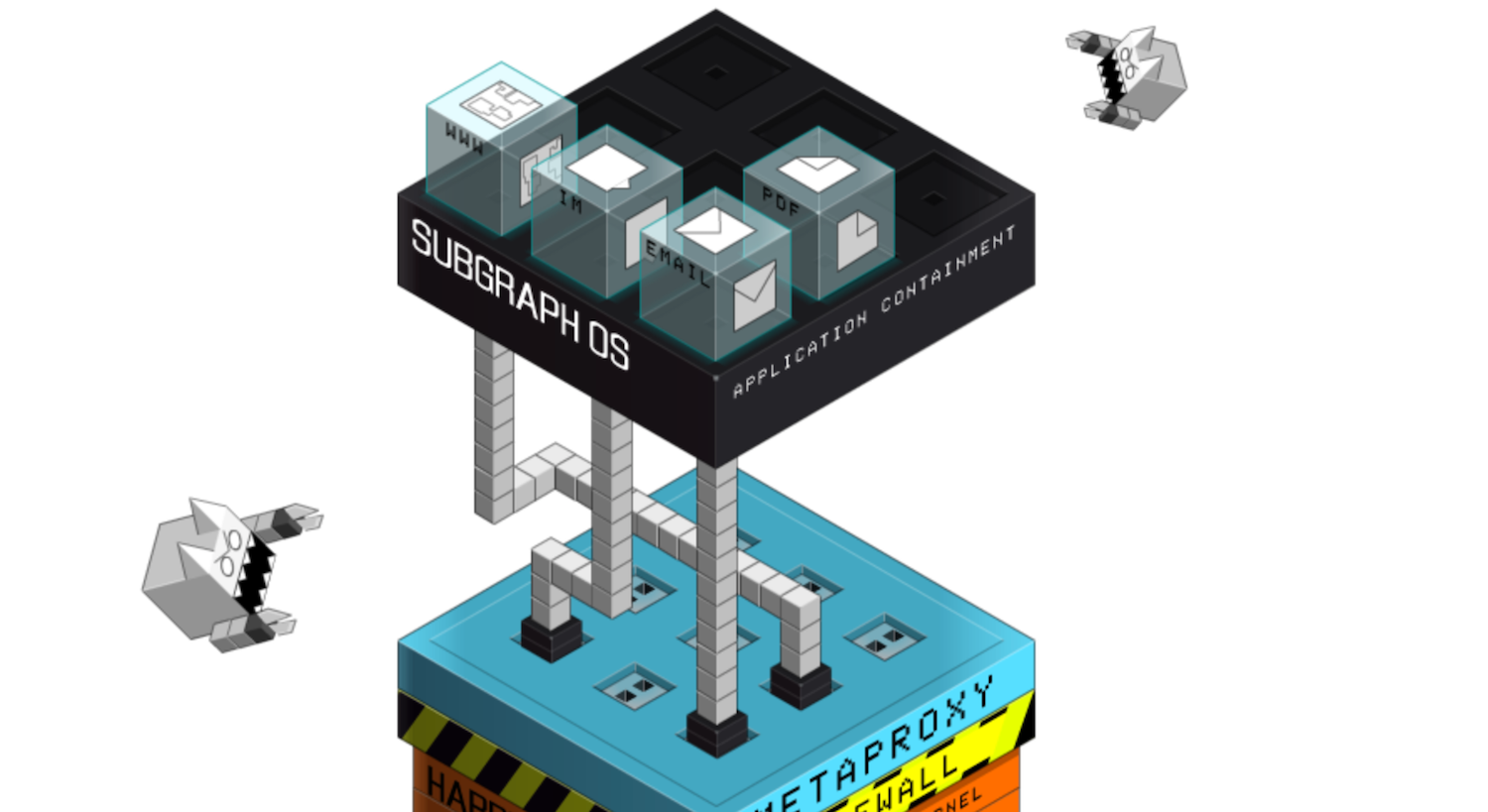
If you’re a Linux desktop user, you might think about adopting a distribution like Subgraph. Subgraph is a desktop computing and communication platform designed to be highly resistant to network-borne exploits and malware/ransomware attacks. But unlike other platforms that might attempt to achieve such lofty goals, Subgraph makes this all possible, while retaining a high-level of user-friendliness. Thanks to the GNOME desktop, Subgraph is incredibly easy to use.
What Subgraph does differently
It all begins at the core of the OS. Subgraph ships with a kernel built with grsecurity/PaX (a system-wide patch for exploit and privilege escalation mitigation), and RAP (designed to prevent code-reuse attacks on the kernel to mitigate against contemporary exploitation techniques). For more information about the Subgraph kernel, check out the Subgraph kernel configs on GitHub.
Subgraph also runs exposed and vulnerable applications within unique environments, known as Oz. Oz is designed to isolate applications from one another and only grant resources to applications that need them. The technologies that make up Oz include:
It is important to remember that Subgraph is in alpha release, so you shouldn’t consider this platform as a daily driver. Because it’s in alpha, there are some interesting hiccups regarding the installation. The first oddity I experienced is that Subgraph cannot be installed as a VirtualBox virtual machine. No matter what you do, it will not work. This is a known bug and, hopefully, the developers will get it worked out.
The second issue is that installing Subgraph by way of a USB device is very tricky. You cannot use tools like Unetbootin or Multiboot USB to create a bootable flash drive. You can use GNOME Disks to create a USB drive, but your best bet is the dd command. Download the ISO image, insert your USB drive into the computer, open a terminal window, and locate the name of the newly inserted USB device (the commandlsblkworks fine for this. Finally, write the ISO image to the USB device with the command:
where XXX is the Subgraph release number and SDX is the name of your USB device.
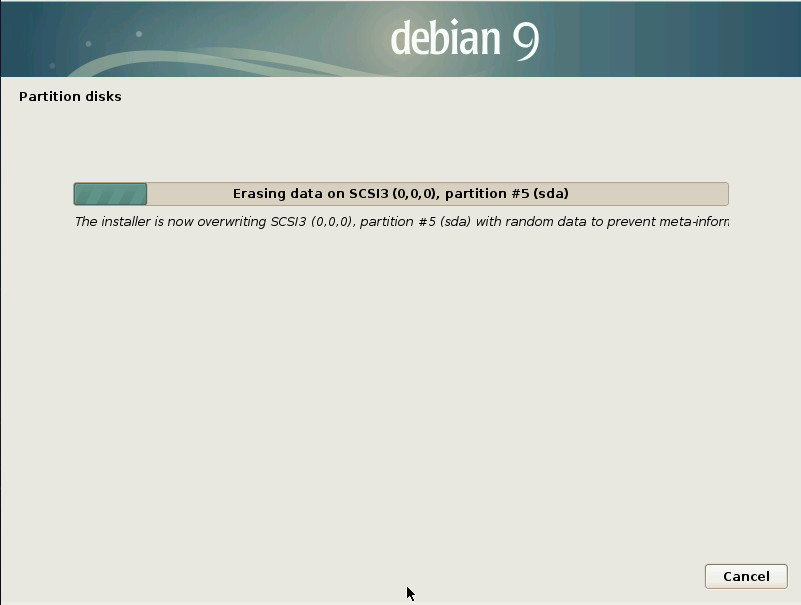
Once the above command completes, you can reboot your machine and install Subgraph. The installation process is fairly straightforward, with a few exceptions. The first is that the installation completely erases the entire drive, before it installs. This is a security measure and cannot be avoided. This process takes quite some time (Figure 1), so let it do its thing and go take care of another task.
Figure 1: The Subgraph installation includes erasing your drive.
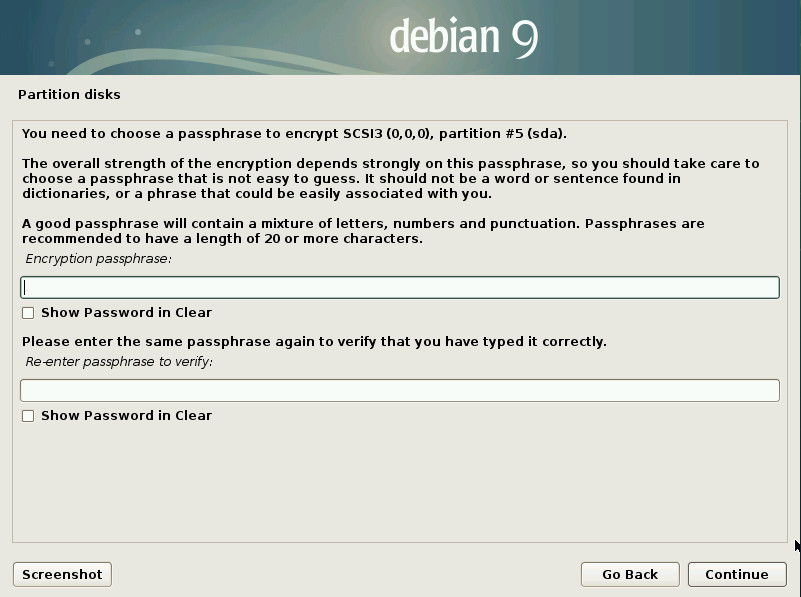
Next, you must create a passphrase for the encryption of the drive (Figure 2).
Figure 2: Creating a disk encryption passphrase.
This passphrase is used when booting your device. If you lose (or forget) the passphrase, you won’t be able to boot into Subgraph. This passphrase is also the first line of defence against anyone who might try to get to your data, should they steal your device… so choose wisely.
The last difference between Subgraph and most other distributions, is that you aren’t given the opportunity to create a username. You do create a user password, which is used for the default user… named user. You can always create a new user (once the OS is installed), either by way of the command line or the GNOME Settings tool.
Once installed, your Subgraph system will reboot and you’ll be prompted for the disk encryption passphrase. Upon successful authentication, Subgraph will boot and land on the GNOME login screen. Login with username user and the password you created during installation.
Usage
There are two important things to remember when using Subgraph. First, as I mentioned earlier, this distribution is in alpha development, so things will go wrong. Second, all applications are run within sandboxes and networking is handled through Tor, so you’re going to experience slower application launches and network connections than you might be used to.
I was surprised to find that Tor Browser (the default—and only installed—browser) wasn’t installed out of the box. Instead, there’s a launcher on the GNOME Dash that will, upon first launch, download the latest version. That’s all fine and good, but the download and install failed on me twice. Had I been working through a regular network connection, this wouldn’t have been such a headache. However, as Subgraph was working through Tor, my network connection was painfully slow, so the download, verification, and install of Tor Browser (a 26.8 MB package) took about 20 minutes. That, of course, isn’t the fault of Subgraph but of the Tor network to which I was connected. Until Tor Browser was up and running, Subgraph was quite limited in what I could actually do. Eventually, Tor Browser downloaded and all worked as expected.
Application sandboxes
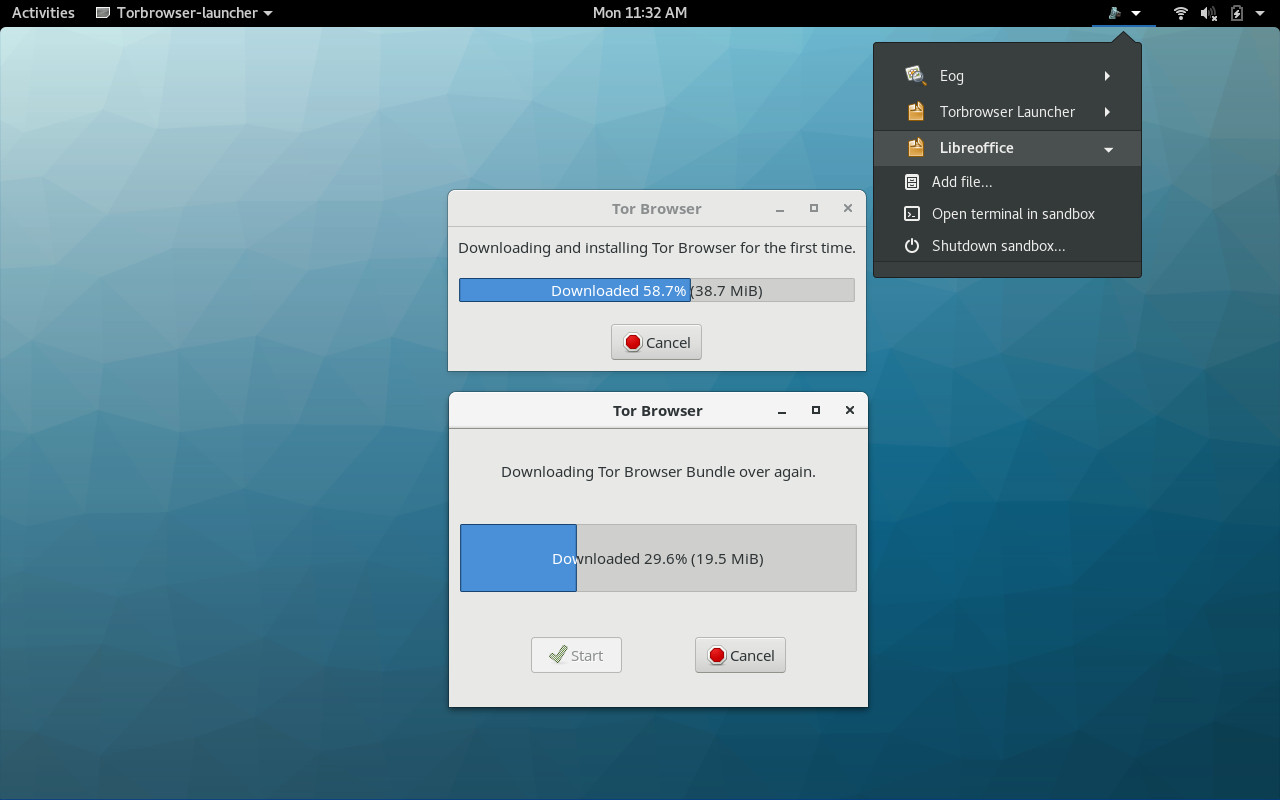
Not every application has to go through the process of downloading a new version upon first launch. In fact, Tor Browser was the only application I encountered that did. When you do open up a new application, it will first start its own sandbox and then open the application in question. Once the application is up and running, you will see a drop-down in the top panel that lists each current application sandbox (Figure 3).
Figure 3: The LibreOffice application sandbox is up and running, while Tor Browser continues to download.
From each application sub-menu, you can add files to that particular sandbox or you can shutdown the sandbox. Shutting down the sandbox effectively closes the application. This is not how you should close the application itself. Instead, close the application as you normally would and then, if you’re done working with the application, you can then manually close the sandbox (through the drop-down). If you have, say, LibreOffice open and you close it by way of closing the sandbox, you run the risk of losing information.
Because each application starts up in its own sandbox, applications don’t open as quickly as they would otherwise. This is the tradeoff you make for using Subgraph and sandboxes. For those looking to get the most out of desktop security, this is a worthwhile exchange.
A very promising distribution
For anyone hoping to gain the most security they can on a desktop computer, Subgraph is one seriously promising distribution. Although it does suffer from many an alpha woe, Subgraph looks like it could make some serious waves on the desktop—especially considering how prevalent malware and ransomware has become. Even better, Subgraph could easily become a security-focused desktop distribution that anyone (regardless of competency) could make use of. Once Subgraph is out of alpha, I predict big things from this unique flavor of Linux.
Learn more about Linux through the free “Introduction to Linux” course from The Linux Foundation and edX.
The Linux Foundation is pleased to welcome LinuxBoot to our family of open source projects and to support the growth of the project community. LinuxBoot looks to improve system boot performance and reliability by replacing some firmware functionality with a Linux kernel and runtime…
LinuxBoot addresses the often slow, often error-prone, obscured code that executes these steps with a Linux kernel. The result is a system that boots in a fraction of the time of a typical system, and with greater reliability.
It’s roughly a year now that we built an intrusion detection system on AWS cloud infrastructure that provides security intelligence across some selected instances using open source technologies.
As more instances were spun, real-time security monitoring became necessary. We wanted the capability to detect when someone attempts an SQL injection, an SSH brute force, a port scan and so on. I forgot; we didn’t even want a ping request to go unnoticed if it was possible to ping any of the instances from the public and finally, centralize security logs from multiple EC2 instances which would then be visualized with Kibana.
Similar to the proliferation of mobile devices in the enterprise several years ago where organizations were feeling the pressure to have a mobile strategy but didn’t know where to start, we’re seeing the same situation with development methodologies. To accelerate development velocity, teams are feeling the pressure to “do DevOps,” and when integrating security, to “do DevSecOps.” But much like during the initial mobile wave, many companies say they’re implementing these methodologies, and might even think they are, but in reality, they’re not. Yet.
First, it’s important to remember that DevOps and DevSecOps are not job titles or roles. They are paradigm shifts in thinking and culture.
Now that you understand what a known vulnerability is, let’s start going through the four steps needed to address them: find, fix, prevent, and respond.
The first step in solving any problem is acknowledging you have one! And so, with vulnerable packages, your first act should be to look for vulnerable packages your application is consuming. This chapter discusses how to test your application, when and how you should run such a test, and the nuances in running the test and interpreting the results.
Taxonomy
Before you start testing, let’s first discuss what you should anticipate seeing in the results.
Tripwire is a popular Linux Intrusion Detection System (IDS) that runs on systems in order to detect if unauthorized filesystem changes occurred over time.
In CentOS and RHEL distributions, tripwire is not a part of official repositories. However, the tripwire package can be installed via Epel repositories.
To begin, first install Epel repositories in CentOS and RHEL system, by issuing the below command.
# yum install epel-release
After you’ve installed Epel repositories, make sure you update the system with the following command.
The schedule is now live for Embedded Linux Conference + OpenIoT Summit North America 2018.
Embedded Linux Conference (ELC) is where the world’s leading engineers and developers gather to learn about the newest embedded technologies, engage in important discussions, collaborate with peers, and gain a competitive advantage with innovative embedded Linux solutions.
OpenIoT Summit is a technical conference for system architects, firmware developers and software developers, helping to advance successful IoT developments and progress the development of industrial IoT solutions.
Sign up for ELC/OpenIoT Summit updates to get the latest information:
Keynote speakers include:
Massimo Banzi, Co-Founder,Arduino Project
Tim Bird, Senior Software Engineer,Sony Electronics
Amber Case, Author and Fellow at Harvard’s Berkman Klein Center
Jonathan Corbet,Author, Kernel Developer and Executive EditorofLWN.net
Philip DesAutels, PhD, Senior Director of IoT,The Linux Foundation
Patricia Florissi, VP & Global CTO for Sales,Dell EMC
Antony Passemard, Product Management Lead – Cloud IoT, Google
Imad Sousou, Vice President, Software and Services Group & General Manager, Intel Open Source Technology Center,Intel Corporation
Kate Stewart, Senior Director of Strategic Programs, The Linux Foundation
Daniel Wilson, Roboticist and Author
Featured Sessions:
What Every Driver Developer Should Know about RT – Julia Cartwright, National Instruments
The Salmon Diet: Up-Streaming Drivers as a Form of Optimization – Gilad Ben-Yossef, Arm
Not Really, but Kind of Real Time Linux – Sandra Capri, Ambient Sensors
An Introduction to Asymmetric Multiprocessing: When this Architecture can be a Game Changer and How to Survive It – Nicola La Gloria & Laura Nao, Kynetics
Using Microservices to Create a Flexible IoT Software Platform – Jim White, Dell
Building an Open Source Stack for IoT Analytics – Fangjin Yang, Imply
Mixed Critical IoT Edge Systems through Virtualization – Michele Paolino, Virtual Open Systems
Join experts from the world’s leading companies and open source projects for 100+ sessions as they present the information needed to lead successful IoT developments, progress the development of IoT solutions, and learn about the newest embedded technologies and innovative embedded Linux solutions.
Early bird pricing closes in 3 days. Register before January 28 and save $300!
How to keep the correct time and keep your computers synchronized without abusing time servers, using NTP and systemd.
What Time is It?
Linux is funky when it comes to telling the time. You might think that the time tells the time, but it doesn’t because it is a timer that measures how long a process runs. To get the time, you run the date command, and to view more than one date, you use cal. Timestamps on files are also a source of confusion as they are typically displayed in two different ways, depending on your distro defaults. This example is from Ubuntu 16.04 LTS:
$ ls -l
drwxrwxr-x 5 carla carla   4096 Mar 27  2017 stuff
drwxrwxr-x 2 carla carla   4096 Dec  8 11:32 things
-rw-rw-r-- 1 carla carla 626052 Nov 21 12:07 fatpdf.pdf
-rw-rw-r-- 1 carla carla   2781 Apr 18  2017 oddlots.txt
Some display the year, some display the time, which makes ordering your files rather a mess. The GNU default is files dated within the last six months display the time instead of the year. I suppose there is a reason for this. If your Linux does this, try ls -l --time-style=long-iso to display the timestamps all the same way, sorted alphabetically. See How to Change the Linux Date and Time: Simple Commands to learn all manner of fascinating ways to manage the time on Linux.
Check Current Settings
NTP, the network time protocol, is the old-fashioned way of keeping correct time on computers. ntpd, the NTP daemon, periodically queries a public time server and adjusts your system time as needed. It’s a simple lightweight protocol that is easy to set up for basic use. Systemd has barged into NTP territory with the systemd-timesyncd.service, which acts as a client to ntpd.
Before messing with NTP, let’s take a minute to check that current time settings are correct.
There are (at least) two timekeepers on your system: system time, which is managed by the Linux kernel, and the hardware clock on your motherboard, which is also called the real-time clock (RTC). When you enter your system BIOS, you see the hardware clock time and you can change its settings. When you install a new Linux, and in some graphical time managers, you are asked if you want your RTC set to the UTC (Coordinated Universal Time) zone. It should be set to UTC, because all time zone and daylight savings time calculations are based on UTC. Use the hwclock command to check:
$ sudo hwclock --debug
hwclock from util-linux 2.27.1
Using the /dev interface to the clock.
Hardware clock is on UTC time
Assuming hardware clock is kept in UTC time.
Waiting for clock tick...
...got clock tick
Time read from Hardware Clock: 2018/01/22 22:14:31
Hw clock time : 2018/01/22 22:14:31 = 1516659271 seconds since 1969
Time since last adjustment is 1516659271 seconds
Calculated Hardware Clock drift is 0.000000 seconds
Mon 22 Jan 2018 02:14:30 PM PST  .202760 seconds
“Hardware clock is kept in UTC time” confirms that your RTC is on UTC, even though it translates the time to your local time. If it were set to local time it would report “Hardware clock is kept in local time.”
You should have a /etc/adjtime file. If you don’t, sync your RTC to system time:
$ sudo hwclock -w
This should generate the file, and the contents should look like this example:
$ cat /etc/adjtime
0.000000 1516661953 0.000000
1516661953
UTC
The new-fangled systemd way is to run timedatectl, which does not need root permissions:
$ timedatectl
      Local time: Mon 2018-01-22 14:17:51 PST
  Universal time: Mon 2018-01-22 22:17:51 UTC
        RTC time: Mon 2018-01-22 22:17:51
       Time zone: America/Los_Angeles (PST, -0800)
 Network time on: yes
NTP synchronized: yes
 RTC in local TZ: no
“RTC in local TZ: no” confirms that it is on UTC time. What if it is on local time? There are, as always, multiple ways to change it. The easy way is with a nice graphical configuration tool, like YaST in openSUSE. You can use timedatectl:
$ timedatectl set-local-rtc 0
Or edit /etc/adjtime, replacing UTC with LOCAL.
systemd-timesyncd Client
Now I’m tired, and we’ve just gotten to the good part. Who knew timekeeping was so complex? We haven’t even scratched the surface; read man 8 hwclock to get an idea of how time is kept on computers.
Systemd provides the systemd-timesyncd.service client, which queries remote time servers and adjusts your system time. Configure your servers in /etc/systemd/timesyncd.conf. Most Linux distributions provide a default configuration that points to time servers that they maintain, like Fedora:
You may enter any other servers you desire, such as your own local NTP server, on the NTP= line in a space-delimited list. (Remember to uncomment this line.) Anything you put on the NTP= line overrides the fallback.
What if you are not using systemd? Then you need only NTP.
Setting up NTP Server and Client
It is a good practice to set up your own LAN NTP server, so that you are not pummeling public NTP servers from all of your computers. On most Linuxes NTP comes in the ntp package, and most of them provide /etc/ntp.conf to configure the service. Consult NTP Pool Time Servers to find the NTP server pool that is appropriate for your region. Then enter 4-5 servers in your /etc/ntp.conf file, with each server on its own line:
driftfile   /var/ntp.drift
logfile     /var/log/ntp.log
server 0.europe.pool.ntp.org
server 1.europe.pool.ntp.org
server 2.europe.pool.ntp.org
server 3.europe.pool.ntp.org
The driftfile tells ntpd where to store the information it needs to quickly synchronize your system clock with the time servers at startup, and your logs should have their own home instead of getting dumped into the syslog. Use your Linux distribution defaults for these files if it provides them.
Now start the daemon; on most Linuxes this is sudo systemctl start ntpd. Let it run for a few minutes, then check its status:
$ ntpq -p
     remote           refid      st t when poll reach   delay   offset  jitter
==============================================================
+dev.smatwebdesi 192.168.194.89   3 u   25   64   37   92.456   -6.395  18.530
*chl.la          127.67.113.92    2 u   23   64   37   75.175    8.820   8.230
+four0.fairy.mat 35.73.197.144    2 u   22   64   37  116.272  -10.033  40.151
-195.21.152.161  195.66.241.2     2 u   27   64   37  107.559    1.822  27.346
I have no idea what any of that means, other than your daemon is talking to the remote time servers, and that is what you want. To permanently enable it, run sudo systemctl enable ntpd. If your Linux doesn’t use systemd then it is your homework to figure out how to run ntpd.
Now you can set up systemd-timesyncd on your other LAN hosts to use your local NTP server, or install NTP on them and enter your local server in their /etc/ntp.conf files.
NTP servers take a beating, and demand continually increases. You can help by running your own public NTP server. Come back next week to learn how.
Learn more about Linux through the free “Introduction to Linux” course from The Linux Foundation and edX.
We asked IT and business leaders to share their tips for bringing out these and other key qualities during interviews. Read on for their unique and interesting interview questions and strategies – and what the responses help them discern about candidates. And if you’re a job seeker: Learn and get ready for these strategies.
“I am a hater of the weird question. I regret using weird questions in the past, because I want people to be comfortable.”
“I like to ask ‘What do you do for fun?’ That accomplishes two things: First, I like to see that there are multiple dimensions to the candidate. It also shows the candidate I am genuinely interested in the whole person.