In an almost unprecedented move, Linus Torvalds has delayed the release of a final build of the Linux Kernel 4.15, instead announcing an unusual ninth release candidate, the first time he had felt he has to do so since 2011.
And you can be fairly sure that Torvalds is not happy with the release because everyone has been busy dealing with the fallout from Meltdown and Spectre, even though the impact on Linux is minimal.
In the previous article, we learned about how to get started with Docker on Linux, macOS, and Windows. In this article, we will get a basic understanding of creating Docker images. There are prebuilt images available on DockerHub that you can use for your own project, and you can publish your own image there.
We are going to use prebuilt images to get the base Linux subsystem, as it’s a lot of work to build one from scratch. You can get Alpine (the official distro used by Docker Editions), Ubuntu, BusyBox, or scratch. In this example, I will use Ubuntu.
Before we start building our images, let’s “containerize” them! By this I just mean creating directories for all of your Docker images so that you can maintain different projects and stages isolated from each other.
$ mkdir dockerprojectscd dockerprojects
Now create a Dockerfile inside the dockerprojects directory using your favorite text editor; I prefer nano, which is also easy for new users.
$ nano Dockerfile
And add this line:
FROM Ubuntu
Save it with Ctrl+Exit then Y.
Now create your new image and provide it with a name (run these commands within the same directory):
$ docker build -t dockp .
(Note the dot at the end of the command.) This should build successfully, so you’ll see:
Sending build context to Docker daemon 2.048kBStep 1/1 : FROM ubuntu---> 2a4cca5ac898Successfully built 2a4cca5ac898Successfully tagged dockp:latest
It’s time to run and test your image:
$ docker run -it Ubuntu
You should see root prompt:
root@c06fcd6af0e8:/#
This means you are literally running bare minimal Ubuntu inside Linux, Windows, or macOS. You can run all native Ubuntu commands and CLI utilities.
Let’s check all the Docker images you have in your directory:
$docker imagesREPOSITORY TAG IMAGE ID CREATED SIZEdockp latest 2a4cca5ac898 1 hour ago 111MBubuntu latest 2a4cca5ac898 1 hour ago 111MBhello-world latest f2a91732366c 8 weeks ago 1.85kB
You can see all three images: dockp, Ubuntu, andhello-world, which I created a few weeks ago when working on the previous articles of this series. Building a whole LAMP stack can be challenging, so we are going create a simple Apache server image with Dockerfile.
Dockerfile is basically a set of instructions to install all the needed packages, configure, and copy files. In this case, it’s Apache and Nginx.
You may also want to create an account on DockerHub and log into your account before building images, in case you are pulling something from DockerHub. To log into DockerHub from the command line, just run:
$ docker login
Enter your username and password and you are logged in.
Next, create a directory for Apache inside the dockerproject:
It will take some time, then you should see successful build like this:
Successfully built e7083fd898c7Successfully tagged ng:latestSwapnil:apache swapnil$
Now let’s run the server:
$ docker run –d apachea189a4db0f7c245dd6c934ef7164f3ddde09e1f3018b5b90350df8be85c8dc98
Eureka. Your container image is running. Check all the running containers:
$ docker psCONTAINER ID IMAGE COMMAND CREATED a189a4db0f7 apache "/usr/sbin/apache2ctl" 10 seconds ago
You can kill the container with the docker killcommand:
$docker kill a189a4db0f7
So, you see the “image” itself is persistent that stays in your directory, but the container runs and goes away. Now you can create as many images as you want and spin and nuke as many containers as you need from those images.
That’s how to create an image and run containers.
To learn more, you can open your web browser and check out the documentation about how to build more complicated Docker images like the whole LAMP stack. Here is aDockerfile file for you to play with. In the next article, I’ll show how to push images to DockerHub.
Learn more about Linux through the free “Introduction to Linux” course from The Linux Foundation and edX.
The Trusted Platform Module on your computer’s motherboard could lead to better security for your Linux system.
The security of any operating system (OS) layer depends on the security of every layer below it. If the CPU can’t be trusted to execute code correctly, there’s no way to run secure software on that CPU. If the bootloader has been tampered with, you cannot trust the kernel that the bootloader boots. Secure Boot allows the firmware to validate a bootloader before executing it, but if the firmware itself has been backdoored, you have no way to verify that Secure Boot functioned correctly.
This problem seems insurmountable: You can only trust the OS to verify that the firmware is untampered with if the firmware itself has not been tampered with. How can you verify the state of a system without having to trust it first?
There are a lot of misconceptions about what open means, when it is the right strategy to apply, and the fundamental tradeoffs that go along with it. It’s very easy to cargo-cult the notion of open — using it in an imprecise or half-baked way that can obscure the real dynamics of an ecosystem, or even lead you in the wrong strategic direction. Here are a few important things to know about openness in the context of ecosystems.
Openness is a spectrum. A thing is not “open” or “closed” — it instead exists upon a spectrum of how open the system is.
On Unix systems, there are several ways to send signals to processes—with a kill command, with a keyboard sequence (like control-C), or through your own program (e.g., using a kill command in C). Signals are also generated by hardware exceptions such as segmentation faults and illegal instructions, timers and child process termination.
But how do you know what signals a process will react to? After all, what a process is programmed to do and able to ignore is another issue.
Any Kubernetes production environment will rely heavily on logs. Using built-in Kubernetes capabilities along with some additional data collection tools, you can easily automate log collection and aggregation for ongoing analysis of your Kubernetes clusters.
At Kenzan, we typically try to separate out platform logging from application logging. This may be done via very different tooling and applications, or even by filtering and tagging within the logs themselves.
Trying to bet on how many new JavaScript frameworks will be released each month, is, the best software engineer’s game in the past 5 years.
Something interesting since last year: The race to the “best ever ever ever framework” in JavaScript slowed down and the focus is more on tools or features around popular frameworks. It’s like a shift between “I like this from A, I don’t like this from B, so I will create C!” and “I did a good job with A, let’s improve this part by creating A+”. I really think 2018 will be the perfect time for learning one Javascript framework for good. At least before the “next big framework” 🙂
GraphQL: I believe that GraphQL could become a standard in 2018. GraphQL brings a new way to query data from server to frontend. You can think of it as a new protocol, a communication standard between client and server. Not only for websites, but also for desktop and mobile apps. This concept of “fetching only what you need” is important and should be at the core of every front and back end development. Reducing the size of every network exchange is crucial, especially for users with slow networks.
React: who doesn’t know React in 2018? React is actually not easy to learn, I see my students challenged by it everyday. But when all concepts of props, state, life cycle, actions, etc… are mastered, it is a very powerful tool. It will remain a strong Javascript framework in 2018…
Vue.js: We witnessed an interesting fight between React and Vue.js last year. Both are powerful, but Vue.js is easier to learn than React. The community around it is starting to grow rapidly and I predict that the industry will continue to adopt it in production.
React Native and Electron: While they are still not at the level of native app languages (iOS, Android and desktop), their performances are really impressive. Two frameworks that will do well for desktop and mobile apps.
Reason: The new way to write React applications; bye bye pure Javascript! It is trendy, but I believe that with the support of Facebook it could become the next standard for writing React applications. We should keep an eye on it and watch how the language evolves in the year to come.
Next and Now: React has a strong ecosystem. Next and Now are proof of it. It is easy to use and makes React projects ready for production. Deploying and distributing React applications at scale can be challenging, mainly for small teams because they are designed to make a developer’s life easier.
Lona : transform Sketch files to UI code: iOS, Android, Web and Web mobile. It’s based on a simple app that can solve a lot of communication issues between Designers and Developers. With Lona, designers can directly integrate and test their creation easily without bothering developers.
Aurelia: is a complete solution to easily creating a simple online presence: web, mobile and desktop. It’s a good tool for any new project or start-up: easy to learn, easy to put in place and good support.
By Guillaume Salva, Full-Stack Software Engineer at Holberton School
When considering Linux, there are so many variables to take into account. What package manager do you wish to use? Do you prefer a modern or old-standard desktop interface? Is ease of use your priority? How flexible do you want your distribution? What task will the distribution serve?
It is that last question which should often be considered first. Is the distribution going to work as a desktop or a server? Will you be doing network or system audits? Or will you be developing? If you’ve spent much time considering Linux, you know that for every task there are several well-suited distributions. This certainly holds true for developers. Even though Linux, by design, is an ideal platform for developers, there are certain distributions that rise above the rest, to serve as great operating systems to serve developers.
I want to share what I consider to be some of the best distributions for your development efforts. Although each of these five distributions can be used for general purpose development (with maybe one exception), they each serve a specific purpose. You may or may not be surprised by the selections.
With that said, let’s get to the choices.
Debian
The Debian distribution winds up on the top of many a Linux list. With good reason. Debian is that distribution from which so many are based. It is this reason why many developers choose Debian. When you develop a piece of software on Debian, chances are very good that package will also work on Ubuntu, Linux Mint, Elementary OS, and a vast collection of other distributions.
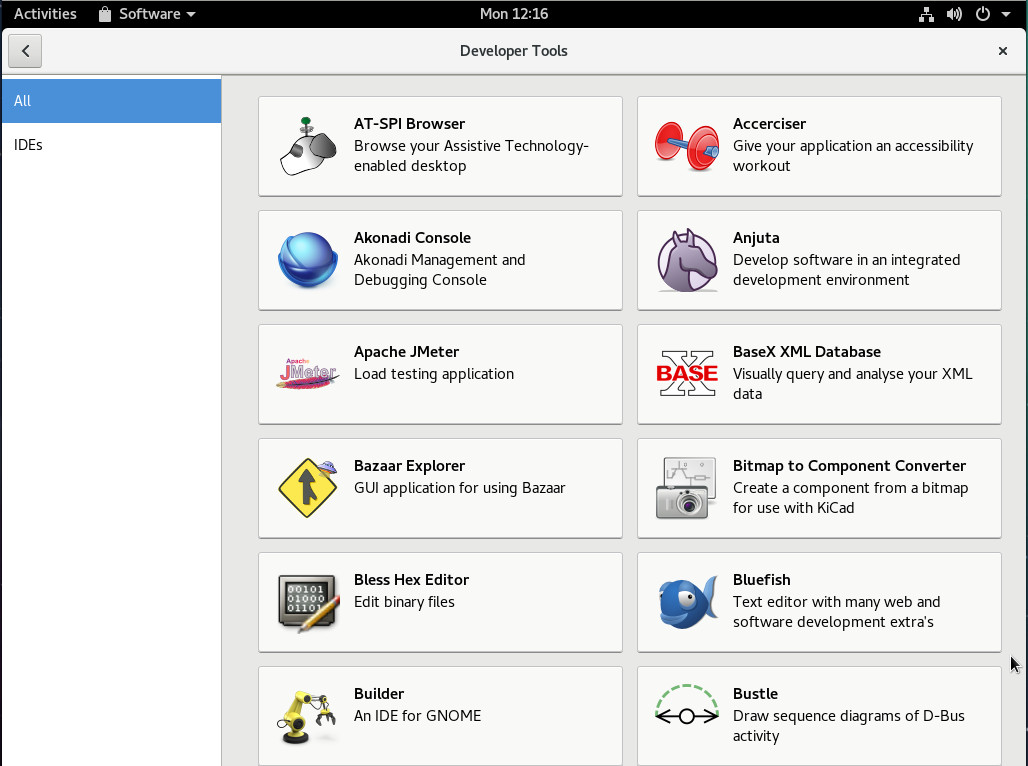
Beyond that obvious answer, Debian also has a very large amount of applications available, by way of the default repositories (Figure 1).
Figure 1: Available applications from the standard Debian repositories.
To make matters even programmer-friendly, those applications (and their dependencies) are simple to install. Take, for instance, the build-essential package (which can be installed on any distribution derived from Debian). This package includes the likes of dkpg-dev, g++, gcc, hurd-dev, libc-dev, and make—all tools necessary for the development process. The build-essential package can be installed with the command sudo apt install build-essential.
There are hundreds of other developer-specific applications available from the standard repositories, tools such as:
Autoconf—configure script builder
Autoproject—creates a source package for a new program
Bison—general purpose parser generator
Bluefish—powerful GUI editor, targeted towards programmers
Geany—lightweight IDE
Kate—powerful text editor
Eclipse—helps builders independently develop tools that integrate with other people’s tools
The list goes on and on.
Debian is also as rock-solid a distribution as you’ll find, so there’s very little concern you’ll lose precious work, by way of the desktop crashing. As a bonus, all programs included with Debian have met the Debian Free Software Guidelines, which adheres to the following “social contract”:
Debian will remain 100% free.
We will give back to the free software community.
We will not hide problems.
Our priorities are our users and free software
Works that do not meet our free software standards are included in a non-free archive.
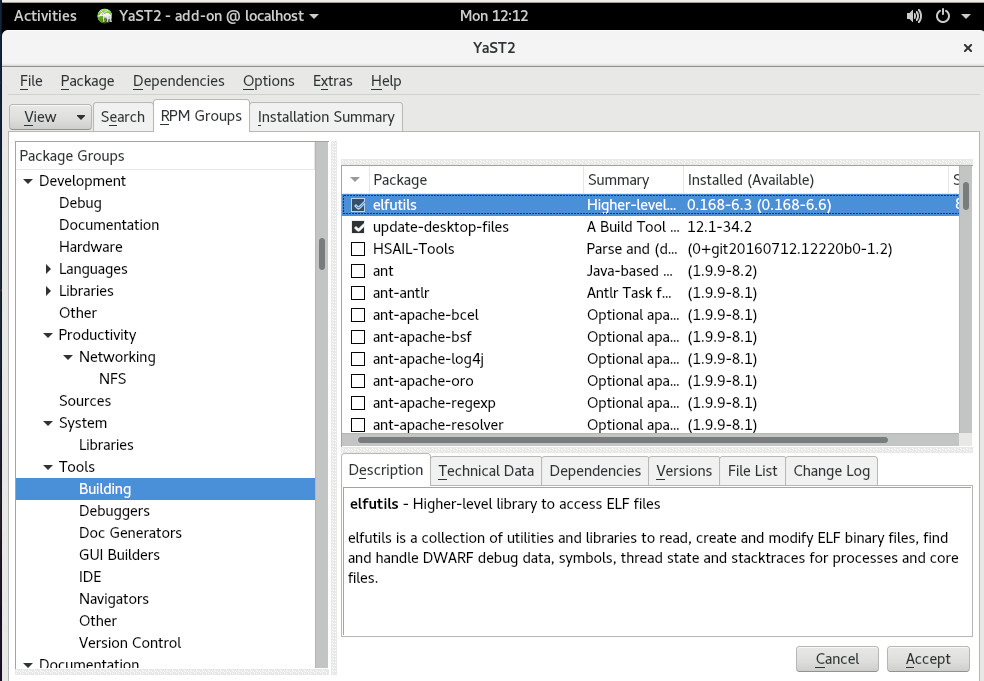
If you’re looking to develop with a cutting-edge, rolling release distribution, openSUSE offers one of the best in Tumbleweed. Not only will you be developing with the most up to date software available, you’ll be doing so with the help of openSUSE’s amazing administrator tools … of which includes YaST. If you’re not familiar with YaST (Yet another Setup Tool), it’s an incredibly powerful piece of software that allows you to manage the whole of the platform, from one convenient location. From within YaST, you can also install using RPM Groups. Open YaST, click on RPM Groups (software grouped together by purpose), and scroll down to the Development section to see the large amount of groups available for installation (Figure 2).
Figure 2: Installing package groups in openSUSE Tumbleweed.
openSUSE also allows you to quickly install all the necessary devtools with the simple click of a weblink. Head over to the rpmdevtools install site and click the link for Tumbleweed. This will automatically add the necessary repository and install rpmdevtools.
By developing with a rolling release distribution, you know you’re working with the most recent releases of installed software.
CentOS
Let’s face it, Red Hat Enterprise Linux (RHEL) is the de facto standard for enterprise businesses. If you’re looking to develop for that particular platform, and you can’t afford a RHEL license, you cannot go wrong with CentOS—which is, effectively, a community version of RHEL. You will find many of the packages found on CentOS to be the same as in RHEL—so once you’re familiar with developing on one, you’ll be fine on the other.
If you’re serious about developing on an enterprise-grade platform, you cannot go wrong starting with CentOS. And because CentOS is a server-specific distribution, you can more easily develop for a web-centric platform. Instead of developing your work and then migrating it to a server (hosted on a different machine), you can easily have CentOS setup to serve as an ideal host for both developing and testing.
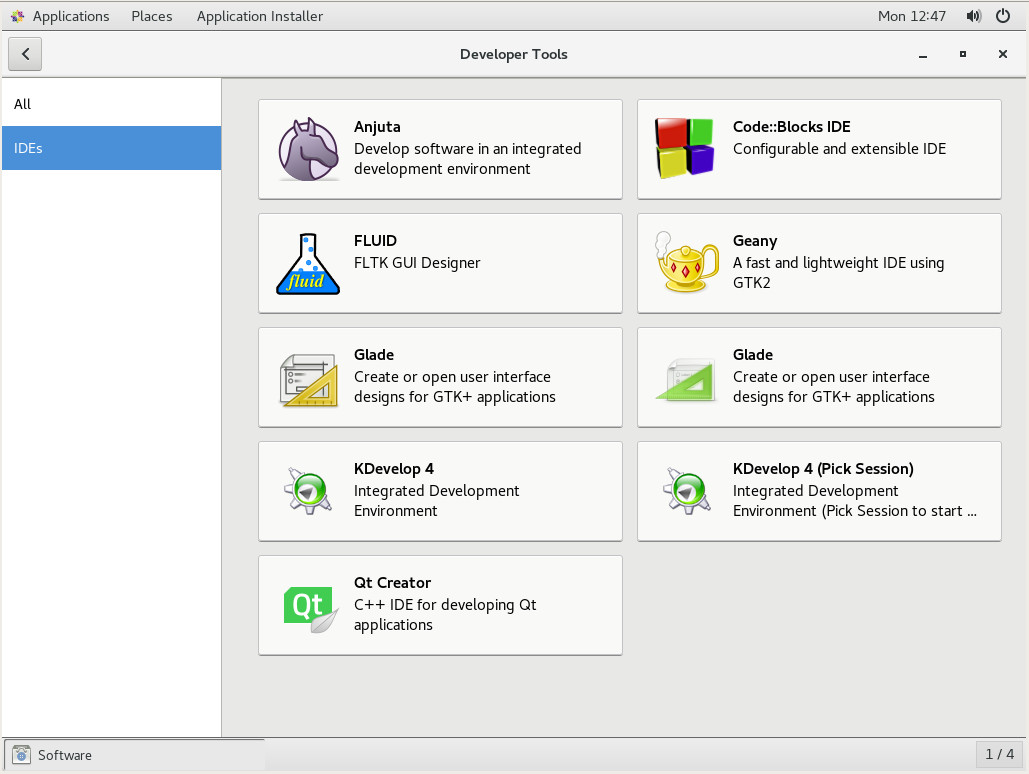
Looking for software to meet your development needs? You only need open up the CentOS Application Installer, where you’ll find a Developer section that includes a dedicated sub-section for Integrated Development Environments (IDEs – Figure 3).
Figure 3: Installing a powerful IDE is simple in CentOS.
CentOS also includes Security Enhanced Linux (SELinux), which makes it easier for you to test your software’s ability to integrate with the same security platform found in RHEL. SELinux can often cause headaches for poorly designed software, so having it at the ready can be a real boon for ensuring your applications work on the likes of RHEL. If you’re not sure where to start with developing on CentOS 7, you can read through the RHEL 7 Developer Guide.
Raspbian
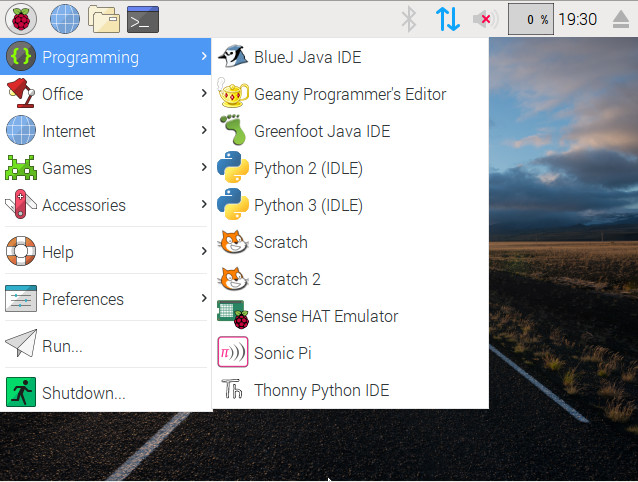
Let’s face it, embedded systems are all the rage. One easy means of working with such systems is via the Raspberry Pi—a tiny footprint computer that has become incredibly powerful and flexible. In fact, the Raspberry Pi has become the hardware used by DIYers all over the planet. Powering those devices is the Raspbian operating system. Raspbian includes tools like BlueJ, Geany, Greenfoot, Sense HAT Emulator, Sonic Pi, and Thonny Python IDE, Python, and Scratch, so you won’t want for the necessary development software. Raspbian also includes a user-friendly desktop UI (Figure 4), to make things even easier.
Figure 4: The Raspbian main menu, showing pre-installed developer software.
For anyone looking to develop for the Raspberry Pi platform, Raspbian is a must have. If you’d like to give Raspbian a go, without the Raspberry Pi hardware, you can always install it as a VirtualBox virtual machine, by way of the ISO image found here.
Pop!_OS
Don’t let the name full you, System76’s Pop!_OS entry into the world of operating systems is serious. And although what System76 has done to this Ubuntu derivative may not be readily obvious, it is something special.
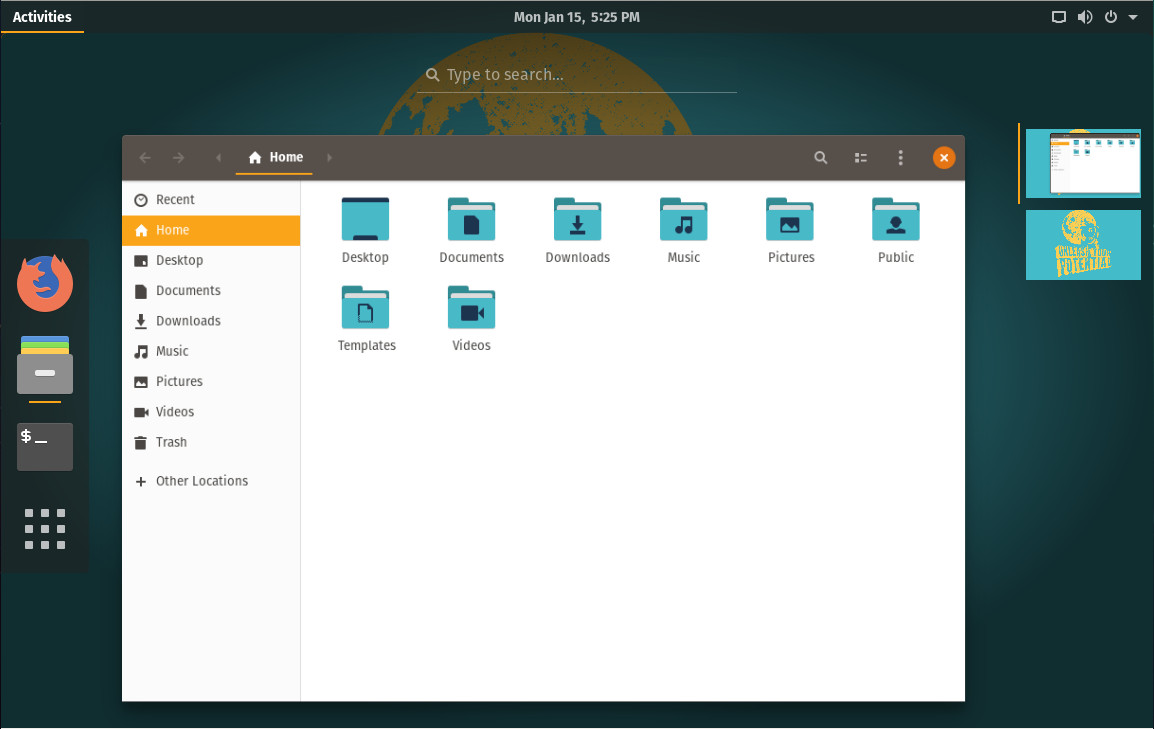
The goal of System76 is to create an operating system specific to the developer, maker, and computer science professional. With a newly-designed GNOME theme, Pop!_OS is beautiful (Figure 5) and as highly functional as you would expect from both the hardware maker and desktop designers.
Figure 5: The Pop!_OS Desktop.
But what makes Pop!_OS special is the fact that it is being developed by a company dedicated to Linux hardware. This means, when you purchase a System76 laptop, desktop, or server, you know the operating system will work seamlessly with the hardware—on a level no other company can offer. I would predict that, with Pop!_OS, System76 will become the Apple of Linux.
Time for work
In their own way, each of these distributions. You have a stable desktop (Debian), a cutting-edge desktop (openSUSE Tumbleweed), a server (CentOS), an embedded platform (Raspbian), and a distribution to seamless meld with hardware (Pop!_OS). With the exception of Raspbian, any one of these distributions would serve as an outstanding development platform. Get one installed and start working on your next project with confidence.
Learn more about Linux through the free “Introduction to Linux” course from The Linux Foundation and edX.
This week in Linux and open source headlines, the city of Barcelona ditches Microsoft in favor of Linux, 3D Printing with open source results in a staggering decrease in price, & more
1) Barcelona picks Linux for “full technological sovereignty.”
5) Starting on Thursday, Slack will be available as a Snap, (an application package that’s available across a range of open-source-based Linux environments.)
Most new internet businesses started in the foreseeable future will leverage Kubernetes (whether they realize it or not). Many old applications are migrating to Kubernetes too.
Before Kubernetes, there was no standardization around a specific distributed systems platform. Just like Linux became the standard server-side operating system for a single node, Kubernetes has become the standard way to orchestrate all of the nodes in your application.
With Kubernetes, distributed systems tools can have network effects.