Home Blog Page 442

Wake up and Shut Down Linux Automatically

Don’t be a watt-waster. If your computers don’t need to be on then shut them down. For convenience and nerd creds, you can configure your Linux computers to wake up and shut down automatically.

Precious Uptimes

Some computers need to be on all the time, which is fine as long as it’s not about satisfying an uptime compulsion. Some people are very proud of their lengthy uptimes, and now that we have kernel hot-patching that leaves only hardware failures requiring shutdowns. I think it’s better to be practical. Save electricity as well as wear on your moving parts, and shut them down when they’re not needed. For example, you can wake up a backup server at a scheduled time, run your backups, and then shut it down until it’s time for the next backup. Or, you can configure your Internet gateway to be on only at certain times. Anything that doesn’t need to be on all the time can be configured to turn on, do a job, and then shut down.

Sleepies

For computers that don’t need to be on all the time, good old cron will shut them down reliably. Use either root’s cron, or /etc/crontab. This example creates a root cron job to shut down every night at 11:15 p.m.

# crontab -e -u root
# m h  dom mon dow   command
15 23 * * * /sbin/shutdown -h now

This example runs only on weekdays.

15 23 * * 1-5 /sbin/shutdown -h now

You can create multiple cronjobs for different days and times. See man 5 cron to learn about all the time and date fields.

You may also use /etc/crontab, which is fast and easy, and everything is in one file. You have to specify the user:

15 23 * * 1-5 root shutdown -h now

Wakies

Auto-wakeups are very cool; most of my SUSE colleagues are in Nuremberg, so I am crawling out of bed at 5 a.m. to have a few hours of overlap with their schedules. My work computer turns itself on at 5:30 a.m., and then all I have to do is drag my coffee and myself to my desk to start work. It might not seem like pressing a power button is a big deal, but at that time of day every little thing looms large.

Waking up your Linux PC can be less reliable than shutting it down, so you may want to try different methods. You can use wakeonlan, RTC wakeups, or your PC’s BIOS to set scheduled wakeups. These all work because, when you power off your computer, it’s not really all the way off; it is in an extremely low-power state and can receive and respond to signals. You need to use the power supply switch to turn it off completely.

BIOS Wakeup

A BIOS wakeup is the most reliable. My system BIOS has an easy-to-use wakeup scheduler (Figure 1). Chances are yours does, too. Easy peasy.
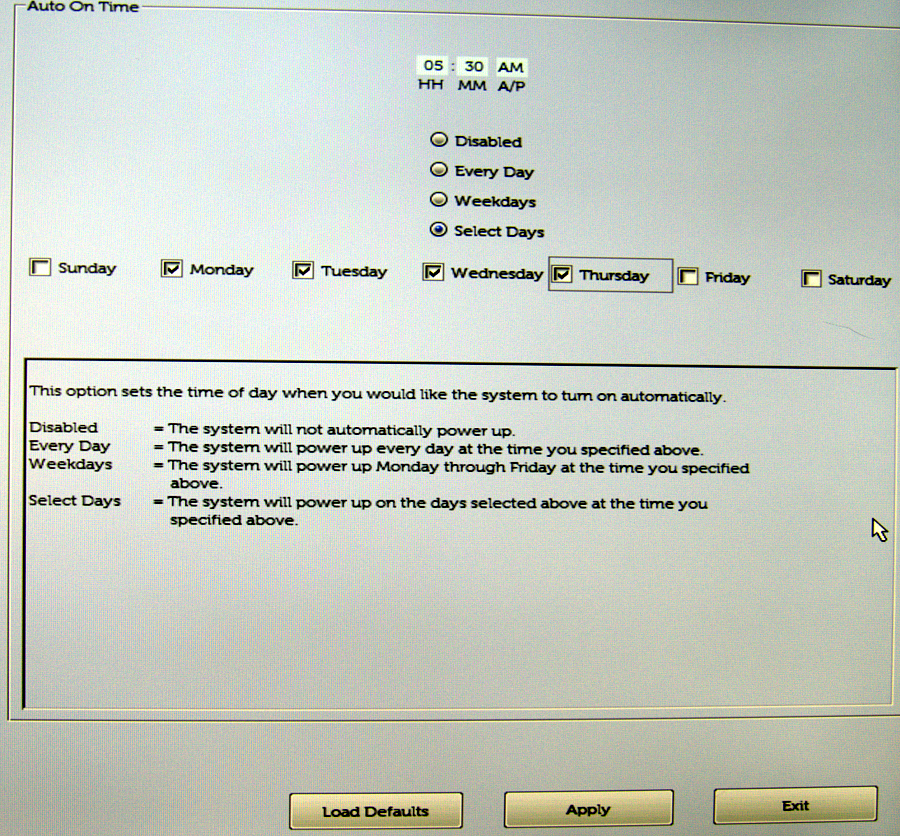
Figure 1: My system BIOS has an easy-to-use wakeup scheduler.

wakeonlan

wakeonlan is the next most reliable method. This requires sending a signal from a second computer to the computer you want to power on. You could use an Arduino or Raspberry Pi to send the wakeup signal, a Linux-based router, or any Linux PC. First, look in your system BIOS to see if wakeonlan is supported — which it should be — and then enable it, as it should be disabled by default.

Then, you’ll need an Ethernet network adapter that supports wakeonlan; wireless adapters won’t work. You’ll need to verify that your Ethernet card supports wakeonlan:

# ethtool eth0 | grep -i wake-on
        Supports Wake-on: pumbg
        Wake-on: g

The Supports Wake-on line tells you what features are supported:

  • d — all wake ups disabled
  • p — wake up on physical activity
  • u — wake up on unicast messages
  • m — wake up on multicast messages
  • b — wake up on broadcast messages
  • a — wake up on ARP messages
  • g — wake up on magic packet
  • s — set the Secure On password for the magic packet

man ethtool is not clear on what the p switch does; it suggests that any signal will cause a wake up. In my testing, however, it doesn’t do that. The one that must be enabled is g -- wake up on magic packet, and the Wake-on line shows that it is already enabled. If it is not enabled, you can use ethtool to enable it, using your own device name, of course:

# ethtool -s eth0 wol g

This may or may not survive a restart, so to make it a sure thing, you can create a root cron job to run the enable command after every restart:

@reboot /usr/bin/ethtool -s eth0 wol g
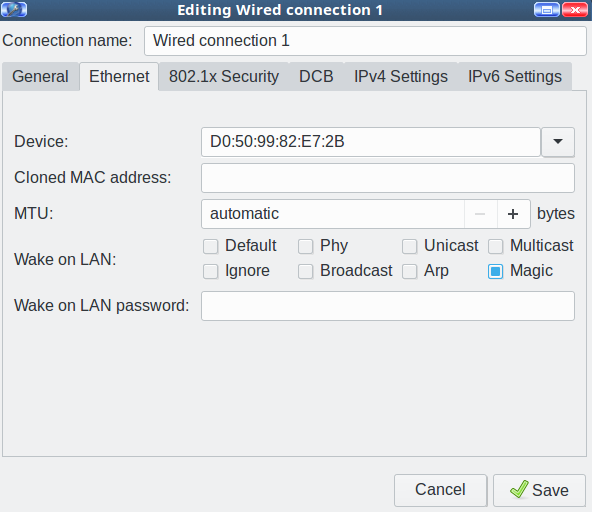
Figure 2: Enable Wake on LAN.

Another option is recent Network Manager versions have a nice little checkbox to enable wakeonlan (Figure 2).

There is a field for setting a password, but if your network interface doesn’t support the Secure On password, it won’t work.

Now you need to configure a second PC to send the wakeup signal. You don’t need root privileges, so create a cron job for your user. You need the MAC address of the network interface on the machine you’re waking up:

30 08 * * * /usr/bin/wakeonlan D0:50:99:82:E7:2B 

RTC Alarm Clock

Using the real-time clock for wakeups is the least reliable method. Check out Wake Up Linux With an RTC Alarm Clock; this is a bit outdated as most distros use systemd now. Come back next week to learn more about updated ways to use RTC wakeups.

Learn more about Linux through the free “Introduction to Linux” course from The Linux Foundation and edX.

From 0 to Kubernetes

Although you hear a lot about containers and Kubernetes these days, there’s a lot of mystery around them. In her Lightning Talk at All Things Open 2017, “From 0 to Kubernetes,” Amy Chen clears up the confusion.

Amy, a software engineer at Rancher Labs, describes containers as baby computers living inside another computer that are suffering an “existential crisis” as they try to figure out their place in the world. Kubernetes is the way all those baby computers are organized.

Read more at OpenSource.com

What OPNFV Makes Possible in Open Source

Over the past several weeks, we have been discussing the Understanding OPNFV book (see links to previous articles below). In this last article in the series, we will look at why you should care about the project and how you can get involved.

OPNFV provides both tangible and intangible benefits to end users. Tangible benefits include those that directly impact business metrics, whereas the intangibles include benefits that speed up the overall NFV transformation journey but are harder to measure. The nature of the OPNFV project, where it primarily focuses on integration and testing of upstream projects and adds carrier-grade features to these upstream projects, can make it difficult to understand these benefits.

To understand this more clearly, let’s go back to the era before OPNFV. 

Read more at The Linux Foundation

The Evolving Developer Advocate Role — A Conversation with Google’s Kim Bannerman

At this year’s Cloud Foundry Summit Europe, the story was about developers as the heroes. They’re the ones who make the platforms. They are akin to the engineers who played such a pivotal role in designing the railroads, or in modern times made the smartphone possible. This means a more important role for developer advocates who, at organizations such as Google, are spending a lot more time with customers. These are the subject matter experts helping developers build out their platforms. They are gathering data to develop feedback loops that flow back into open source communities for ongoing development.

In her interview, Bannerman noted that while many companies have already completed a migration over to the cloud, some have not yet done so, and platforms such as Cloud Foundry are helping them to bridge that gap.

Read more at The New Stack

Docker for Data Science

Docker is a tool that simplifies the installation process for software engineers. Coming from a statistics background I used to care very little about how to install software and would occasionally spend a few days trying to resolve system configuration issues. Enter the god-send Docker almighty.

Think of Docker as a light virtual machine (I apologise to the Docker gurus for using that term). Generally someone writes a *Dockerfile* that builds a *Docker Image* which contains most of the tools and libraries that you need for a project. You can use this as a base and add any other dependencies that are required for your project. Its underlying philosophy is that if it works on my machine it will work on yours.

Read more at Medium

Tech Giants Are Using Open Source Frameworks to Dominate the AI Community

Research plays a crucial role in the AI movement, and tech giants have to do everything in their power to seem viable to the AI community. AI is mostly based on research advances and state-of-the-art technology, which is advancing very quickly. Therefore, there is no business need to make closed infrastructure solutions, because within a few months everything will be totally different.

In such a situation, the only winning strategy for tech giants is to offer open source solutions to attract members of the AI community and eventually become part of the AI community themselves. This is a relatively new model in the tech industry.

Read more at Venture Beat

How to Write a Custom Nagios Check Plugin

Even though Nagios Exchange has thousands of available plugins to freely download, sometimes the status needed to be checked is very specific for your scenario.

Considerations

It is assumed that:

  • You have Nagios installed and running (You can follow this Tutorial if not).
  • You know the basics on Nagios administration.

Nagios server in this example is hosted on 192.168.0.150 and an example client is hosted on IP 192.168.0.200

Read more at HowToForge

2017: A Year of Highs and Lows for Linux and Open Source

Jack Wallen takes a look into the wayback machine to view some of the highlights open source and Linux enjoyed throughout 2017.

Ah, 2017, it was a good year for Linux—one that continued the solidification of the open source platform on so many levels. From the consumer mobile space to supercomputers, Linux dominated certain sectors in a way no other platform could.

Let’s take a look at some of the highlights from the year—both the highs and lows—and hopefully draw a conclusion that 2017 was a banner year for Linux.

Read more at TechRepublic

How to Implement Dijkstra’s Algorithm in JavaScript

I’ve been reading Grokking Algorithms, which I recommend to anyone new to algorithms. It’s basically the introduction I wish I had a few months ago! The examples in the book are written in Python, so I’d like to share a JavaScript version of Dijkstra’s algorithm. This algorithm uses a directed, weighted graph to determine the “cheapest” path to reach a node.

I’ll be breaking each part into a few steps, with some background information. If you’d prefer to just look at the code, here is the link to the gist.

Background: What is a graph?

A graph is an abstract data type used to model a set of connections. For example, say Bob follows Sarah and Lou on Twitter. Sarah follows Lin. Lou follows Lin and Mark. We can represent these connections using a graph.

Read more at HackerNoon

Inside AGL: Familiar Open Source Components Ease Learning Curve

Among the sessions at the recent Embedded Linux Conference Europe (ELCE) 57 of which are available on YouTube — are several reports on the Linux Foundation’s Automotive Grade Linux project. These include an overview from AGL Community Manager Walt Miner showing how AGL’s Unified Code Base (UCB) Linux distribution is expanding from in-vehicle infotainment (IVI) to ADAS. There was even a presentation on using AGL to build a remote-controlled robot (see links below).

Here we look at the “State of AGL: Plumbing and Services,” from Konsulko Group’s CTO Matt Porter and senior staff software engineer Scott Murray. Porter and Murray ran through the components of the current UCB 4.0 “Daring Dab” and detailed major upstream components and API bindings, many of which will be appear in the Electric Eel release due in Jan. 2018.

Despite the automotive focus of the AGL stack, most of the components are already familiar to Linux developers. “It looks a lot like a desktop distro,” Porter told the ELCE attendees in Prague. “All these familiar friends.”

Some of those friends include the underlying Yocto Project “Poky” with OpenEmbedded foundation, which is topped with layers like oe-core, meta-openembedded, and metanetworking. Other components are based on familiar open source software like systemd (application control), Wayland and Weston (graphics), BlueZ (Bluetooth), oFono (telephony), PulseAudio and ALSA (audio), gpsd (location), ConnMan (Internet), and wpa-supplicant (WiFi), among others.

UCB’s application framework is controlled through a WebSocket interface to the API bindings, thereby enabling apps to talk to each other. There’s also a new W3C widget for an alternative application packaging scheme, as well as support for SmartDeviceLink, a technology developed at Ford that automatically syncs up IVI systems with mobile phones. 

AGL UCB’s Wayland/Weston graphics layer is augmented with an “IVI shell” that works with the layer manager. “One of the unique requirements of automotive is the ability to separate aspects of the application in the layers,” said Porter. “For example, in a navigation app, the graphics rendering for the map may be completely different than the engine used for the UI decorations. One engine layers to a surface in Wayland to expose the map while the decorations and controls are handled by another layer.”

For audio, ALSA and PulseAudio are joined by GENIVI AudioManager, which works together with PulseAudio. “We use AudioManager for policy driven audio routing,” explained Porter. “It allows you to write a very complex XML-based policy using a rules engine with audio routing.”

UCB leans primarily on the well-known Smack Project for security, and also incorporates Tizen’s Cynara safe policy-checker service. A Cynara-enabled D-Bus daemon is used to control Cynara security policies.

Porter and Murray went on to explain AGL’s API binding mechanism, which according to Murray “abstracts the UI from its back-end logic so you can replace it with your own custom UI.” You can re-use application logic with different UI implementations, such as moving from the default Qt to HTML5 or a native toolkit. Application binding requests and responses use JSON via HTTP or WebSocket. Binding calls can be made from applications or from other bindings, thereby enabling “stacking” of bindings.

Porter and Murray concluded with a detailed description of each binding. These include upstream bindings currently in various stages of development. The first is a Master binding that manages the application lifecycle, including tasks such as install, uninstall, start, and terminate. Other upstream bindings include the WiFi binding and the BlueZ-based Bluetooth binding, which in the future will be upgraded with Bluetooth PBAP (Phone Book Access Profile). PBAP can connect with contacts databases on your phone, and links to the Telephony binding to replicate caller ID.

The oFono-based Telephony binding also makes calls to the Bluetooth binding for Bluetooth Hands-Free-Profile (HFP) support. In the future, Telephony binding will add support for sent dial tones, call waiting, call forwarding, and voice modem support.

Support for AM/FM radio is not well developed in the Linux world, so for its Radio binding, AGL started by supporting RTL-SDR code for low-end radio dongles. Future plans call for supporting specific automotive tuner devices.

The MediaPlayer binding is in very early development, and is currently limited to GStreamer based audio playback and control. Future plans call for adding playlist controls, as well as one of the most actively sought features among manufacturers: video playback support.

Location bindings include the gpsd based GPS binding, as well as GeoClue and GeoFence. GeoClue, which is built around the GeoClue D-Bus geolocation service, “overlaps a little with GPS, which uses the same location data,” says Porter. GeoClue also gathers location data from WiFi AP databases, 3G/4G tower info, and the GeoIP database sources that are useful “if you’re inside or don’t have a good fix,” he added.

GeoFence depends on the GPS binding, as well. It lets you establish a bounding box, and then track ingress and egress events. GeoFence also tracks “dwell” status, which is determined by arriving at home and staying for 10 minutes. “It then triggers some behavior based on a timeout,” said Porter. Future plans call for a customizable dwell transition time.

While most of these Upstream bindings are well established, there are also Work in Progress (WIP) bindings that are still in the early stages, including CAN, HomeScreen, and WindowManager bindings. Farther out, there are plans to add speech recognition and text-to-speech bindings, as well as a WWAN modem binding.

In conclusion, Porter noted: “Like any open source project, we desperately need more developers.” The Automotive Grade Linux project may seem peripheral to some developers, but it offers a nice mix of familiarity grounded in many widely used open source projects — along with the excitement of expanding into a new and potentially game changing computing form factor: your automobile. AGL has also demonstrated success you can now check out AGL in action in the 2018 Toyota Camry, followed in the coming month by most Toyota and Lexus vehicles sold in North America.

Watch the complete video below:

Sign up for ELC/OpenIoT Summit & Open Source Summit updates to get the latest information: