
Home Blog Page 445

Photon Could Be Your New Favorite Container OS

Containers are all the rage, and with good reason. As discussed previously, containers allow you to quickly and easily deploy new services and applications onto your network, without requiring too much in the way of added system resources. Containers are more cost-effective than using dedicated hardware or virtual machines, and they’re easier to update and reuse.

Best of all, containers love Linux (and vice versa). Without much trouble or time, you can get a Linux server up and running with Docker and deploying containers. But, which Linux distribution is best suited for the deployment of your containers? There are a lot of options. You could go with a standard Ubuntu Server platform (which makes installing Docker and deploying containers incredibly easy), or you could opt for a lighter weight distribution one geared specifically for the purpose of deploying containers.

One such distribution is Photon. This particular platform was created in 2005 by VMware; it includes the Docker daemon and works with container frameworks, such as Mesos and Kubernetes. Photon is optimized to work with VMware vSphere, but it can be used on bare metal, Microsoft Azure, Google Compute Engine, Amazon Elastic Compute Cloud, or VirtualBox.

Photon manages to stay slim by only installing what is absolutely necessary to run the Docker daemon. In the end, the distribution comes in around 300 MB. This is just enough Linux make it all work. The key features to Photon are:

  • Kernel tuned for performance.

  • Kernel is hardened according to the Kernel Self-Protection Project (KSPP).

  • All installed packages are built with hardened security flags.

  • Operating system boots with validated trust.

  • Photon management daemon manages firewall, network, packages, and users on remote Photon OS machines.

  • Support for persistent volumes.

  • Project Lightwave integration.

  • Timely security patches and updates.

Photon can be used via ISO, OVA, Amazon Machine Image, Google Compute Engine image, and Azure VHD. I’ll show you how to install Photon on VirtualBox, using an ISO image. The installation takes about five minutes and, in the end, you’ll have a virtual machine, ready to deploy containers.

Creating the virtual machine

Before you deploy that first container, you have to create the virtual machine and install Photon. To do this, open up VirtualBox and click the New button. Walk through the Create Virtual Machine wizard (giving Photon the necessary resources, based on the usage you predict the container server will need). Once you’ve created the virtual machine, you need to first make a change to the settings. Select the newly created virtual machine (in the left pane of the VirtualBox main window) and then click Settings. In the resulting window, click on Network (from the left navigation).

In the Networking window (Figure 1), you need to change the Attached to drop-down to Bridged Adapter. This will ensure your Photon server is reachable from your network. Once you’ve made that change, click OK.
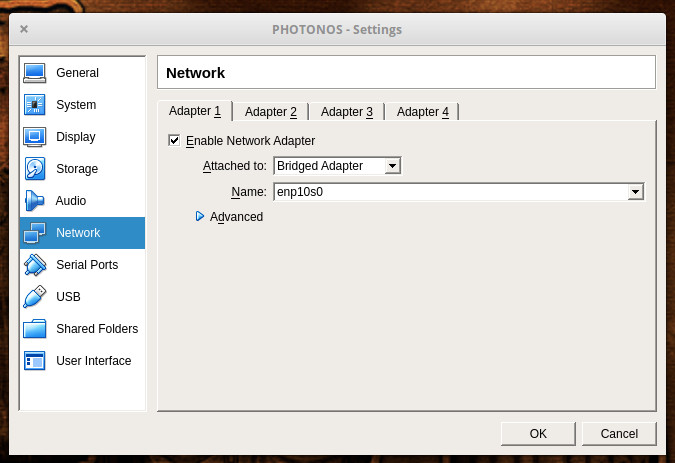
Figure 1: Changing the VirtualBox network settings for Photon.

Select your Photon virtual machine from the left navigation and then click Start. You will be prompted to locate and attach the IOS image. Once you’ve done that, Photon will boot up and prompt you to hit Enter to begin the installation. The installation is ncurses based (there is no GUI), but it’s incredibly simple.

In the next screen (Figure 2), you will be asked if you want to do a Minimal, Full, or OSTree Server. I opted to go the Full route. Select whichever option you require and hit enter.
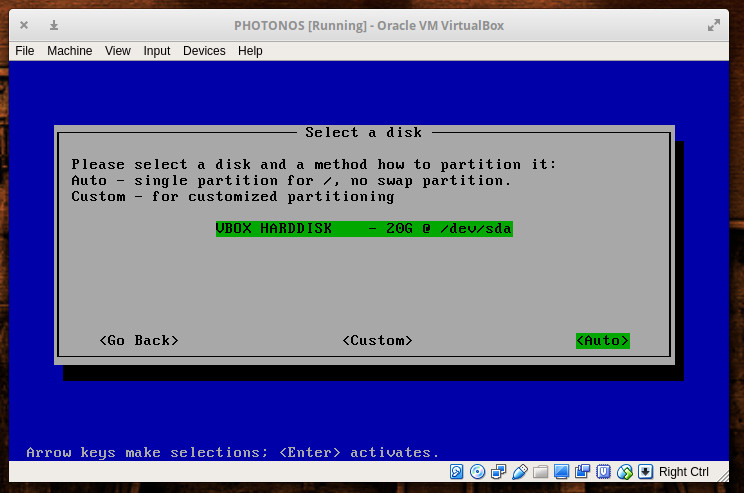
Figure 2: Selecting your installation type.

In the next window, select the disk that will house Photon. Since we’re installing this as a virtual machine, there will be only one disk listed (Figure 3). Tab down to Auto and hit Enter on your keyboard. The installation will then require you to type (and verify) an administrator password. Once you’ve done that, the installation will begin and finish in less than five minutes.
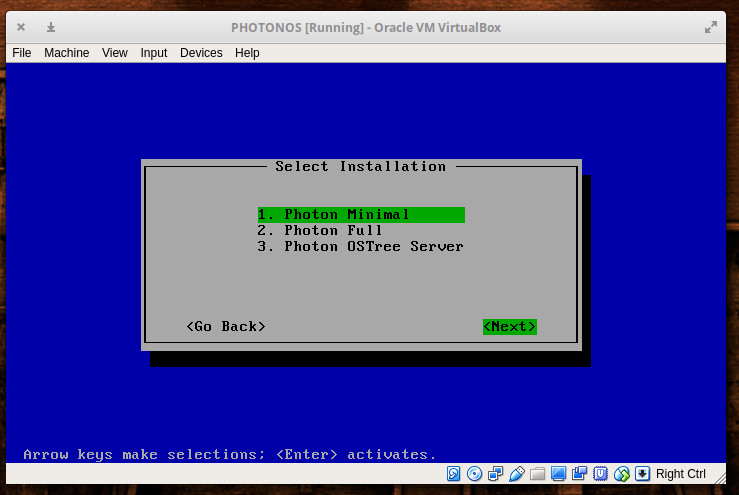
Figure 3: Selecting your hard disk for the Photon installation.

Once the installation completes, reboot the virtual machine and log in with the username root and the password you created during installation. You are ready to start working.

Before you begin using Docker on Photon, you’ll want to upgrade the platform. Photon uses the yum package manager, so login as root and issue the command yum update. If there are any updates available, you’ll be asked to okay the process (Figure 4).
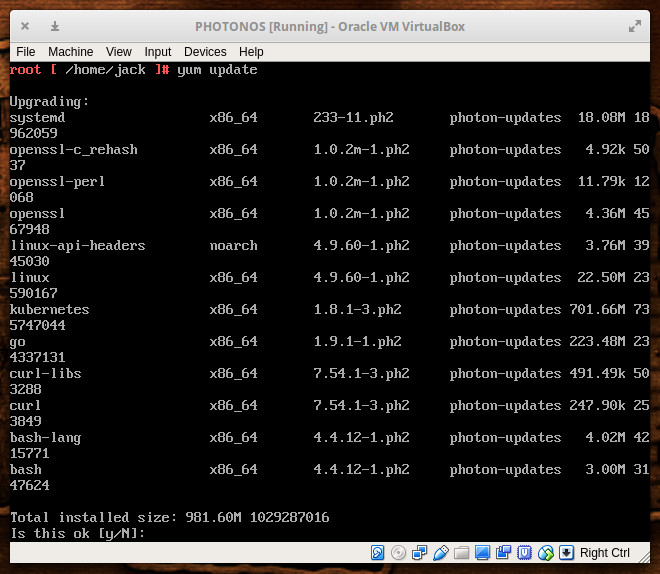
Figure 4: Updating Photon.

Usage

As I mentioned, Photon comes with everything you need to deploy containers or even create a Kubernetes cluster. However, out of the box, there are a few things you’ll need to do. The first thing is to enable the Docker daemon to run at start. To do this, issue the commands:

systemctl start docker

systemctl enable docker

Now we need to create a standard user, so we’re not running the docker command as root. To do this, issue the following commands:

useradd -m USERNAME

passwd USERNAME

Where USERNAME is the name of the user to add.

Next we need to add the new user to the docker group with the command:

usermod -a -G docker USERNAME

Where USERNAME is the name of the user just created.

Log out as the root user and log back in as the newly created user. You can now work with the docker command without having to make use of sudo or switching to the root user. Pull down an image from Docker Hub and start deploying containers.

An outstanding container platform

Photon is, without a doubt, an outstanding platform, geared specifically for containers. Do note that Photon is an open source project, so there is no paid support to be had. If you find yourself having trouble with Photon, hop on over to the Issues tab in the Photon Project’s Github page, where you can read and post about issues. And if you’re interested in forking Photon, you’ll find the source code on the project’s official Github page.

Give Photon a try and see if it doesn’t make deploying Docker containers and/or Kubernetes clusters significantly easier.

Learn more about Linux through the free “Introduction to Linux” course from The Linux Foundation and edX.

TNS Guide: How to Manage Passwords and Keep Your Online Accounts Secure

Massive data breaches over the past several years have shown that you can’t trust online service providers to keep your account information secure. So, if you haven’t done this until now, it’s time to carefully consider what and how you share with such companies, starting with your password.

First off, if you continue to use the same password for multiple accounts across different websites, you’re doing online security wrong. Just head over to HaveIBeenPwned.com and marvel at the list of user databases that have been compromised over the past 10 years.

Go through the descriptions of those breaches and one thing will become clear: It typically takes years before data thefts are discovered by the affected services. During that time the stolen information is sold among cybercriminals who exploit it for profit.

Read more at The New Stack

7 Things to Know About the Changing Security Landscape

If you’re a hacker or a security company, chances are you’ve had a very good year. If you’re one of the enterprises that lost millions because of malware, then not so much.

This year saw dozens of massive data breaches — and 2017 isn’t over yet. It also saw record investments in security startups, with at least 20 in the $40 million and up range. Older IT giants like Cisco and IBM boosted their revenuesfrom newer security businesses as well. With the size and scope of attacks expected to increase exponentially, security spending probably won’t drop anytime soon. Cybersecurity Ventures puts it at a $1 trillion market from 2017 to 2021.

“With an expanding threat landscape, cybersecurity is the No. 1 priority for businesses worldwide,” Cisco CEO Chuck Robbins said on a conference call with investors.

Aside from bigger breaches and more security spending, what should companies expect in the year ahead? 

Read more at SDxCentral

How Do Groups Work on Linux?

Hello! Last week, I thought I knew how users and groups worked on Linux. Here is what I thought:

  1. Every process belongs to a user (like julia)
  2. When a process tries to read a file owned by a group, Linux a) checks if the user julia can access the file, and b) checks which groups julia belongs to, and whether any of those groups owns & can access that file
  3. If either of those is true (or if the ‘any’ bits are set right) then the process can access the file

So, for example, if a process is owned by the julia user and julia is in the awesome group, then the process would be allowed to read this file.

r--r--r-- 1 root awesome     6872 Sep 24 11:09 file.txt

Read more at Julia Evans 

Containers and Kubernetes: What’s Next?

If you want a basic idea of where containers are headed in the near future, follow the money. There’s a lot of it: 451 Research projects that the overall market for containers will hit roughly $2.7 billion in 2020, a 3.5-fold increase from the $762 million spent on container-related technology in 2016.

There’s an obvious fundamental factor behind such big numbers: Rapidly increasing containerization. The parallel trend: As container adoption grows, so will container orchestration adoption.

As recent survey data from The New Stack indicates, container adoption is the most significant catalyst of orchestration adoption: 60 percent of respondents who’ve deployed containers broadly in production report they’re also using Kubernetes widely in production. Another 19 percent of respondents with broad container deployments in production were in the initial stages of broad Kubernetes adoption.

Read more at Enterprisers Project

The Four Stages of DevOps Maturity

Like any new technology, methodology, process or paradigm shift, DevOps transformations go through various stages of maturity. Two years ago I wrote a post called The Four Stages of Cloud Competence and referenced Noel Burch’s four stages of learning to describe how enterprises were adopting (or not adopting) cloud computing.

1. Unconscious Incompetence

Individuals do  not understand or know how to do something and do not necessarily recognize the deficit. They may even deny the usefulness of the skill. Before moving on to the next stage, individuals must recognize their own incompetence, and the value of the new skill. The length of time individuals spend in this stage depends on the strength of their stimulus to learn.

2. Conscious Incompetence

Though individuals do not understand or know how to do something, they do recognize the deficit, as well as the value of a new skill in addressing the deficit. At this stage, making mistakes can be integral to the learning process.

Read more at Forbes

Open Source Cloud Skills and Certification Are Key for SysAdmins

System administrator is one of the most common positions employers are looking to fill among 53 percent of respondents to the 2017 Open Source Jobs Report. Consequently, sysadmins with skills in engineering can command higher salaries, as these positions are among the hardest to fill, the report finds.

Sysadmins are generally responsible for installing, supporting, and maintaining servers or other computer systems, and planning for and responding to service outages and other problems.

Overall, this year’s report finds the skills most in demand are open source cloud (47 percent), application development (44 percent), Big Data (43 percent) and both DevOps and security (42 percent).

The report also finds that 58 percent of hiring managers are planning to hire more open source professionals, and 67 percent say hiring of open source professionals will increase more than in other areas of the business. This represents a two-point increase over last year among employers who said open source hiring would be their top field of recruitment.

At the same time, 89 percent of hiring managers report it is difficult to find open source talent.

Why get certified

The desire for sysadmins is incentivizing hiring managers to offer formal training and/or certifications in the discipline in 53 percent of organizations, compared to 47 percent last year, the Open Source Jobs Report finds.

IT professionals interested in sysadmin positions should consider Linux certifications. Searches on several of the more well-known job posting sites reveal that the CompTIA Linux+ certification is the top certification for entry-level Linux sysadmin, while Red Hat Certified Engineer (RHCE) and Red Hat Certified System Administrator (RHCSA) are the main certifications for higher-level positions.

In 2016, a sysadmin commanded a salary of $79,583, a change of -0.8 percent from the previous year, according to Dice’s 2017 Tech Salary Survey. The systems architect position paid $125,946, a year-over-year change of -4.7 percent. Yet, the survey observes that “Highly skilled technology professionals remain in the most demand, especially those candidates proficient in the technologies needed to support industry transformation and growth.”

When it comes to open source skills, HBase (an open-source distributed database), ranked as one that garners among the highest pay for tech pros in the Dice survey. In the networking and database category, the OpenVMS operating system ranked as another high-paying skill.

The sysadmin role

One of a sysadmin’s responsibilities is to be available 24/7 when a problem occurs. The position calls for a mindset that is about “zero-blame, lean, iterative improvement in process or technology,’’ and one that is open to change, writes Paul English, a board member for the League of Professional System Administrators, a non-profit professional association for the advancement of the practice of system administration, in  opensource.com. He adds that being a sysadmin means “it’s almost a foregone conclusion that you’ll work with open source software like Linux, BSD, and even open source Solaris.”

Today’s sysadmins will more often work with software rather than hardware, and should be prepared to write small scripts, according to English.

Outlook for 2018

Expect to see sysadmins among the tech professionals many employers in North America will be hiring in 2018, according to Robert Half’s 2018 Salary Guide for Technology Professionals. Increasingly, soft skills and leadership qualities are also highly valued.

“Good listening and critical-thinking skills, which are essential to understanding and resolving customers’ issues and concerns, are important for almost any IT role today, but especially for help desk and desktop support professionals,’’ the report states.

This jibes with some of the essential skills needed at various stages of the sysadmin position, including strong analytical skills and an ability to solve problems quickly, according to The Linux Foundation.

Other skills sysadmins should have as they move up the ladder are: interest in structured approaches to system configuration management; experience in resolving security issues; experience with user identity management; ability to communicate in non-technical terms to non-technical people; and ability to modify system to meet new security requirements.

Download the full 2017 Open Source Jobs Report now.

Products Over Projects

Software projects are a popular way of funding and organizing software development. Projects are funded on a case-by-case basis on the basis of benefits projected in a business case. They are organized in the form of one or more temporary teams whose members have durable reporting lines outside the project organization. They are staffed from a “pool of talent” whose members are considered fungible within lines of specialization. And usually, a software project team’s job is to build or enhance some system or application and move on.

However, projects are not the only way of funding and organizing software development. For instance, many companies that sell software as a product or a service do not fund or organize their core product/platform development in the form of projects. Instead, they run product development and support using near-permanent teams for as long as the product is sold in the market. 

“Product-mode” is a way of working. It is a way of funding and organizing software development that differs significantly from the projects way of doing it. The differences are summarized below and elaborated in the rest of the article.

Read more at Martin Fowler

How to Test Website Loading Speed in Linux Terminal

A website response time can have a great impact on user experience, and if you are a web developer, or simply a server administrator who is particularly responsible for organizing the pieces together, then you have to make it a point that users don’t feel frustrated while accessing your site – so there is really “need for speed”.

This guide will show you how to test a website response time from the Linux command line. Here, we will show how to check the time in seconds, it takes:

  • to perform name resolution.
  • for TCP connection to the server.
  • for the file transfer to begin.
  • for the first byte to be transferred.
  • for the complete operation.

Read more at Tecmint

Inspiring the Next Generation of Open Source

The Linux Foundation works through our projects, training and certification programs, events and more to bring people of all backgrounds into open source. We meet a lot of people, but find the drive and enthusiasm of some of our youngest community members to be especially infectious. In the past couple of months, we’ve invited 13-year-old algorithmist and cognitive developer Tanmay Bakshi, 11-year-old hacker and cybersecurity ambassador Reuben Paul, and 15-year-old programmer Keila Banks to speak at Linux Foundation conferences.

In 2014 when he was 12, Zachary Dupont wrote a letter to his hero Linus Torvalds. We arranged for Zach to meet Linus–a visit that helped clinch his love for Linux. This year, Zach came to Open Source Summit in Los Angeles to catch up with Linus and let us know what he’s been up to.

Read more at The Linux Foundation