By George Kiagiadakis, Senior Software Engineer at Collabora.
Earlier this year I worked on a certain GStreamer plugin that is called “ipcpipeline”. This plugin provides elements that make it possible to interconnect GStreamer pipelines that run in different processes. In this blog post I am going to explain how this plugin works and the reason why you might want to use it in your application.
Why ipcpipeline?
In GStreamer, pipelines are meant to be built and run inside a single process. Normally one wouldn’t even think about involving multiple processes for a single pipeline. You can (and should) involve multiple threads, of course, which is easily done using the queue element, in order to do parallel processing. But since you can involve multiple threads, why would you want to involve multiple processes as well?
Splitting part of a pipeline to a different process is useful when there is one or more elements that need to be isolated for security reasons. Imagine the case where you have an application that uses a hardware video decoder and therefore has device access privileges. Also imagine that in the same pipeline you have elements that download and parse video content directly from a network server, like most Video On Demand applications would do. Although I don’t mean to say that GStreamer is not secure, it can be a good idea to think ahead and make it as hard as possible for an attacker to take advantage of potential security flaws. In theory, maybe someone could exploit a bug in the container parser by sending it crafted data from a fake server and then take control of other things by exploiting those device access privileges, or cause a system crash. ipcpipeline could help to prevent that.
How does it work?
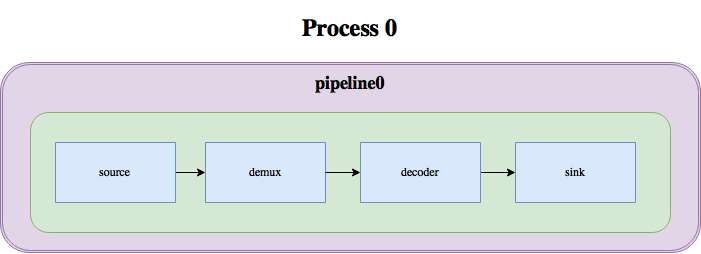
In the – oversimplified – diagram below we can see how the media pipeline in a video player would look like with GStreamer:
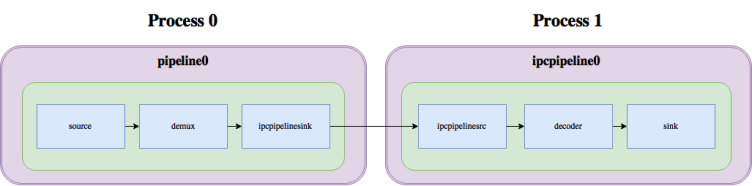
With ipcpipeline, this pipeline can be split into two processes, like this:
As you can see, the split mainly involves 2 elements: ipcpipelinesink, which serves as the sink for the first pipeline, and ipcpipelinesrc, which serves as the source for the second pipeline. These two elements internally talk to each other through a unix pipe or socket, transferring buffers, events, queries and messages over this socket, thus linking the two pipelines together.
This mechanism doesn’t look very special, though. You might be wondering at this point, what is the difference between using ipcpipeline and some other existing mechanism like a pair of fdsink/fdsrc or udpsink/udpsrc or RTP? What is special about these elements is that the two pipelines behave as if they were a single pipeline, with the elements of the second one being part of a GstBin in the first one:
As Michelle Noorali put it in her keynote address at KubeCon Europe in March of this year: the Kubernetesopen source container orchestration engine is still hard for developers. In theory, developers are crazy about Kubernetes and container technologies, because they let them write their application once and then run it anywhere without having to worry about the underlying infrastructure. In reality, however, they still rely on operations in many aspects, which (understandably) dampens their enthusiasm about the disruptive potential of these technologies.
One major downside for developers is that Kubernetes is not able to auto-manage and auto-scale its own machines. As a consequence, operations must get involved every time a worker node is deployed or deleted. Obviously, there are many node deployment solutions, including Terraform, Chef or Puppet, that make ops live much easier.
“How do you run an operating system?” may seem like a simple question, since most of us are accustomed to turning on our computers and seeing our system spin up. However, this common model is only one way of running an operating system. As one of Linux’s greatest strengths is versatility, Linux offers the most methods and environments for running it.
To unleash the full power of Linux, and maybe even find a use for it you hadn’t thought of, consider some less conventional ways of running it — specifically, ones that don’t even require installation on a computer’s hard drive.
We’ll Do It Live!
Live-booting is a surprisingly useful and popular way to get the full Linux experience on the fly. While hard drives are where OSes reside most of the time, they actually can be installed to most major storage media, including CDs, DVDs and USB flash drives.
Recently, while reviewing the FAQ, I came across the question “What’s a Socket?” For those who are not familiar, I shall explain.
In brief, a Unix Socket (technically, the correct name is Unix domain socket, UDS) allows communication between two different processes on either the same machine or different machines in client-server application frameworks. To be more precise, it’s a way of communicating among computers using a standard Unix descriptors file.
Every UNIX systems Input/Output action is executed by writing or reading the descriptor file. A Descriptor file is an open file, which is associated with an integer. It can be a network connection, text file, terminal or something else. It looks and behaves much like a low-level file descriptor. This happens because the commands like read () and write () works with the same way they do with the files and pipes.
The details of your story may vary but for the most, it follows a familiar path. You travel along a default career path until a decision point when you need to shift the trajectory. This typically means obtaining new skills like learning how to become a manager or business skills when to work for yourself. What you really want is to use and deepen your expertise. What you lack is a clear path to move forward along your desired trajectory. And without an objective mentor, you’re more likely to choose an undesirable path, or worse, choose none at all, allow inertia to carry you along.
The longing
You long for the time — and space to continue sharpening those technical talents you worked so hard to acquire. You envision a professional life where instead of atrophying due to lack of use, your mastery deepens. Rote tasks are replaced with constant learning. If you work for yourself, you have support with the business side of your work. Instead of dealing with people problems, you’re able to follow those technical obsessions. You long to feel the rush of solving challenging problems again. Your discoveries have an impact on the companies you work with and your fellow developers. The work day is full of creative challenges you relish. You long to feel valued for your talents and well-honed skills. The learning is continual and interesting. Instead of a plateau, your career has never been better.
This what you long for. But you haven’t found the direct route yet.
3) Arpit Joshipura, General Manager of Networking and Orchestration for The Linux Foundation, tells MEF 17 attendees that ONAP has become “widely accepted.”
Containers are all the rage in IT — with good reason. Containers are lightweight, standalone packages that contain everything needed to run an application (code, libraries, runtime, system settings, and dependencies). Each container is deployed with its own CPU, memory, block I/O, and network resources, all without having to depend upon an individual kernel and operating system. And that is the biggest difference between a container and a virtual machine; whereas a virtual machine is a full-blown operating system platform, running on a host OS, a container is not.
Containers allow you to expand your company offerings (either internal or external) in ways you could not otherwise. For example, you can quickly deploy multiple instances of NGINX (even with multiple stagings — such as development and production). Unlike doing this with Virtual Machines, containers will not put nearly the hit on your system resources.
Docker makes creating, deploying, and managing containers incredibly simple. What’s best is that installing and using Docker is second-nature to the Linux platform.
I’m going to demonstrate how easy it is to install Docker on Linux, as well as walking you through the first steps of working with Docker. I’ll be demonstrating on the Ubuntu 16.04 Server platform, but the process is very similar on most all Linux distributions.
I will assume you already have Ubuntu Server 16.04 up and running and ready to go.
Installation
Since Ubuntu Server 16.04 is sans GUI, the installation and usage of Docker will be handled entirely through the command line. Before you run the installation command, make sure to update apt and then run any necessary upgrades. Do note, if your server’s kernel upgrades, you’ll need to reboot the system. Thus, you might want to plan to do this during a time when a server reboot is acceptable.
To update apt, issue the command:
sudo apt update
Once that completes, upgrade with the command:
sudo apt upgrade
If the kernel upgrades, you’ll want to reboot the server with the command:
sudo reboot
If the kernel doesn’t upgrade, you’re good to install Docker (without having to reboot). The Docker installation command is:
sudo apt install docker.io
If you’re using a different Linux distribution, and you attempt to install (using your distribution’s package manager of choice), only to find out docker.io isn’t available, the package you want to install is called docker. For instance, the installation on Fedora would be:
sudo dnf install docker
If your distribution of choice is CentOS 7, installing docker is best handled via an installation script. First update the platform with the command sudo yum check-update. Once that completes, issue the following command to download and run the necessary script:
curl -fsSL https://get.docker.com/ | sh
Out of the box, the docker command can only be run with admin privileges. Because of security issues, you won’t want to be working with Docker either from the root user or with the help of sudo. To get around this, you need to add your user to the docker group. This is done with the command:
sudo usermod -a -G docker $USER
Once you’ve taken care of that, log out and back in, and you should be good to go. That is, unless your platform is Fedora. When adding a user to the docker group to this distribution, you’ll find the group doesn’t exist. What do you do? You create it first. Here are the commands to take care of this:
For Docker, images serve as the building blocks of your containers. You can pull down a single image (say NGINX) and deploy as many containers as you need from that image. To use images, you must first pull them onto your system. Images are pulled from registries and your Docker installation includes usage of the default Docker Hub — a registry that contains a large amount of contributed images (from official images to user-contributed).
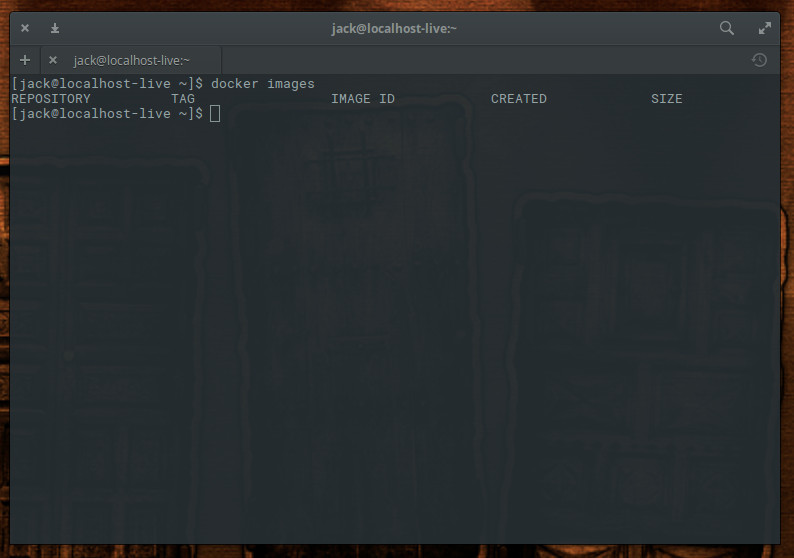
Let’s say you want to pull down an image for the Nginx web server. Before doing so, let’s check to see what images are already to be found on our system. Issue the command docker imagesand you should see that no images are to be found (Figure 1).
Figure 1: No images found yet.
Let’s fix that. We’ll download the Nginx image from Docker Hub with the command:
docker pull nginx
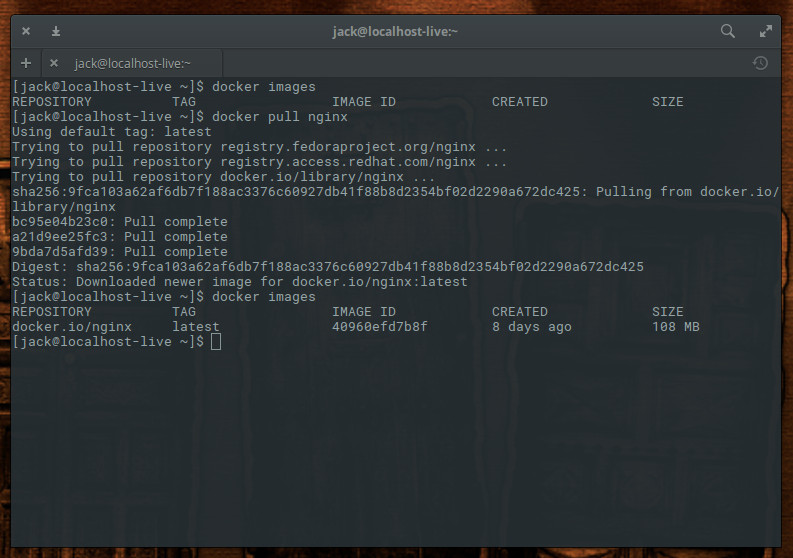
The above command will pull down the latest (official) Nginx image from Docker Hub. If we run the command docker images, we now see the image listed (Figure 2).
Figure 2: The NGINX image has been pulled down.
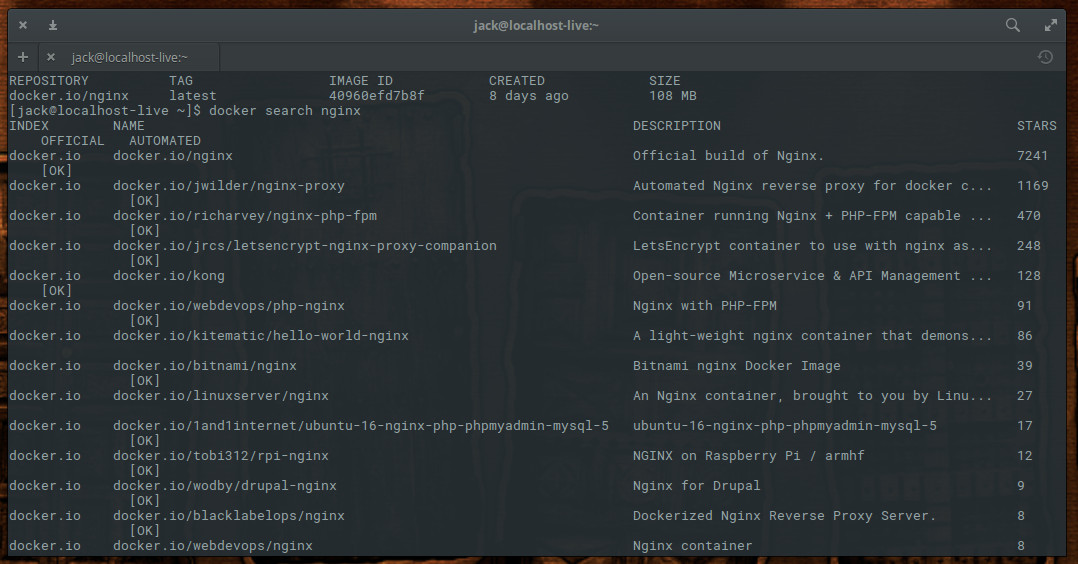
Notice I said “official” Nginx image? You will find there are plenty of unofficial Nginx images to be found on Docker Hub. Many of these unofficial images have been created to serve specific purposes. You can see a list of all Nginx images, found on Docker Hub, with the command
docker search nginx
As you can see (Figure 3), there are Nginx images to be had for numerous purposes (reverse proxy, PHP-FPM-capable, LetsEncrypt, Bitnami, Nginx for Raspberry Pi and Drupal, and much more).
Figure 3: NGINX variant images found on Docker Hub. Say, for example, you want to pull down the Nginx image with reverse proxy functionality built in. That unofficial image is called jwilder/nginx-proxy. To pull that image down, issue the command:
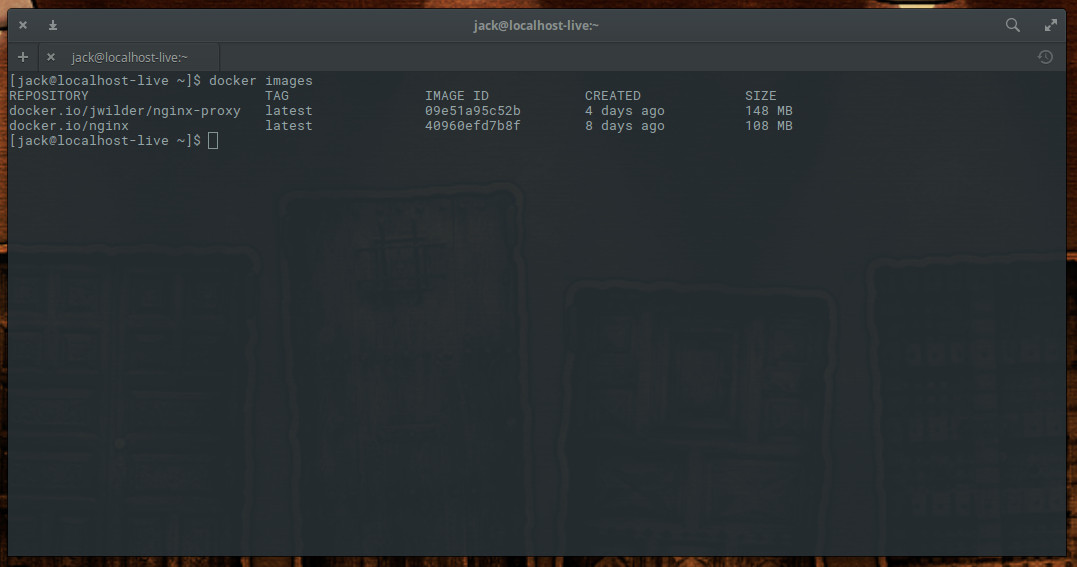
docker pull jwilder/nginx-proxy
Issue the command docker images to see the newly pulled images (Figure 4).
Figure 4: Two different NGINX images, ready to be used.
As a word of caution, I recommend only working with the official images, as you cannot be certain if an unofficial image will contain malicious code.
You now have images, ready to be used for the deploying of containers. When next we visit this topic, we’ll begin the process deploying those containers, based on the Nginx image.
Docker is an incredibly powerful system that can make your job easier and your company more flexible and agile. For more information on what Docker can do, issue the command man docker and read through the man page.
Learn more about Linux through the free “Introduction to Linux” course from The Linux Foundation and edX.
Application threat modeling is a structured approach to identifying ways that an adversary might try to attack an application and then designing mitigations to prevent, detect or reduce the impact of those attacks. The description of an application’s threat model is identified as one of the criteria for the Linux CII Best Practises Silver badge.
Why threat modeling?
It is well established that defense-in-depth is a key principle for network security and the same is true for application security. But although most application developers will intuitively understand this as a concept, it can be hard to put it into practice. After many years and sleepless nights, worrying and fretting about application security, one thing I have learned is that threat modeling is an exceptionally powerful technique for building defense-in-depth into an application design. This is what first attracted me to threat modeling.
Something that we’ve learned at The Linux Foundation over the years is that there is just no substitute for periodic, in-person, face-to-face collaboration around the open source technologies that are rapidly changing our world.
This fall, we decided to take The Linux Foundation networking projects (OpenDaylight, ONAP, OPNFV, and others) on the road to Europe and Japan by working with local site hosts and network operators to host Open Source Networking Days in Paris, Milan, Stockholm, London, Tel Aviv, and Yokohama. This series of one-day events was a valuable opportunity for local ecosystems to meet and collaborate around the latest in open source networking.
Self-driving cars are set to revolutionize transport systems the world over. If the hype is to be believed, entirely autonomous vehicles are about to hit the open road.
The truth is more complex. The most advanced self-driving technologies work only in an extremely limited set of environments and weather conditions. And while most new cars will have some form of driver assistance in the coming years, autonomous cars that drive in all conditions without human oversight are still many years away.
One of the main problems is that it is hard to train vehicles to cope in all situations. And the most challenging situations are often the rarest. There is a huge variety of tricky circumstances that drivers rarely come across: a child running into the road, a vehicle driving on the wrong side of the street, an accident immediately ahead, and so on.