Home Blog Page 468

4 Best Linux Distros for Older Hardware

One of the many great aspects of the Linux operating system is its ability to bring new life to old hardware. This is not only a boon for your bottom line but also an environmentally sound philosophy. Instead of sending that older (still functioning) hardware to the trash heap, give it a second lease on life with the help of Linux. You certainly won’t be doing that with Windows 7, 8, or 10. Linux, on the other hand, offers a good number of options for those wanting to extend the life of their aging machines.

And don’t think these distributions aimed at outdated hardware are short on features. Remember, when that hardware was in its prime, it was capable of running everything you needed. Even though times have changed (and software demands far more power from the supporting hardware), you can still get a full-featured experience from a lightweight distro.

Let’s take a look at four distributions that will make your aging machines relevant again.

Linux Lite

If you’re looking for a distribution that is fully functional, out of the box, Linux Lite might be your ticket. Not only is Linux Lite an ideal distribution for aging hardware, it’s also one of the best distributions for new users. Linux Lite is built upon the latest Ubuntu LTS release and achieves something few other distributions in this category can — it manages to deliver all the tools you need to get your work done. This isn’t a distro that substitutes AbiWord and Gnumeric for LibreOffice (not that there’s anything wrong with those pieces of software).

Linux Lite depends upon the Xfce Desktop Environment (Figure 1) and includes the likes of LibreOffice, Firefox, Thunderbird, VLC, GIMP, GNOME Disks, and much more. With the use of Xfce and the inclusion of a full complement of software, Linux Lite makes for an outstanding distribution for new users, working with old hardware. That’s a serious win-win for businesses who want to save costs by distributing old hardware to temp employees and homes who want to hand down hardware to younger members of the family.
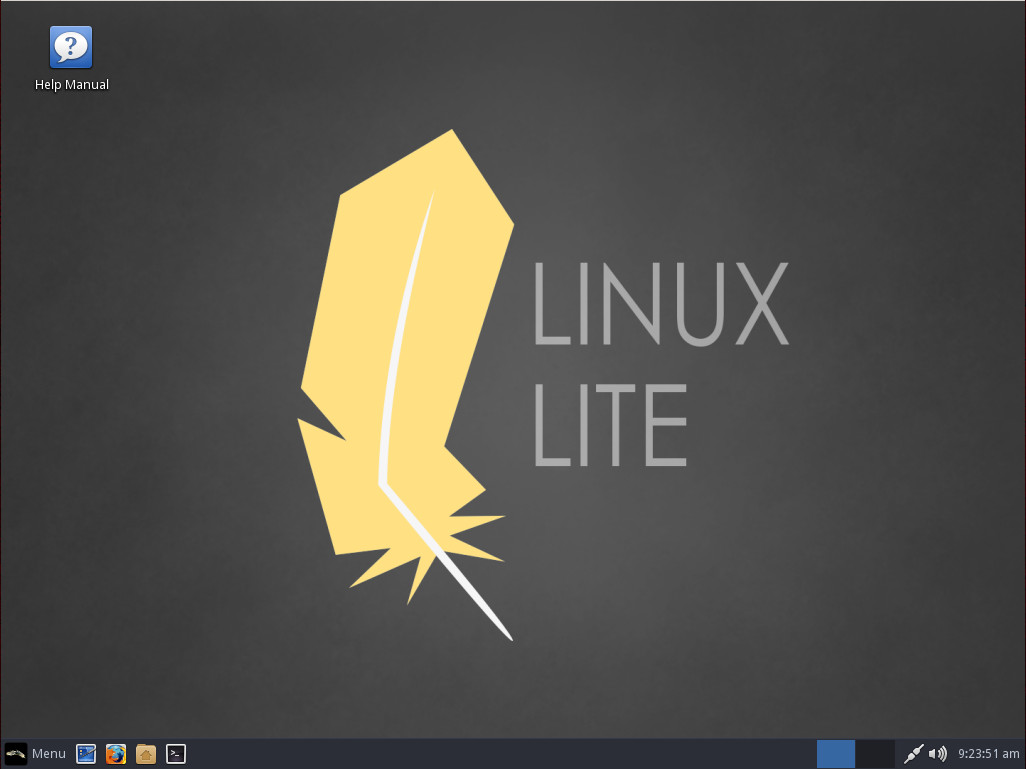
Figure 1: The Linux Lite Xfce desktop.

Don’t let the “Lite” moniker full you; this isn’t some stripped-down operating system. Linux Lite is a full-fledged distribution that just so happens to run well on lesser-powered machines.

The minimum system requirements for Linux Lite are:

  • 700MHz processor

  • 512mb RAM

  • VGA screen 1024×768 resolution

  • DVD drive or USB port (in order to install from the ISO image)

  • At least 5 GB free disk space

Bodhi Linux

Bodhi Linux has always held a special place in my heart. As the Enlightenment desktop was one of the first to pull me away from my beloved AfterStep, it was a breath of fresh air that a distribution was dedicated to keeping that particular desktop relevant. And what a masterful job the developers of Bodhi Linux have done.

Although the Enlightenment desktop isn’t exactly one that will have new users crying to the heavens, “Where have you been all my life?”, it is certainly a fan-favorite for many an old-school Linux user. But don’t think new users will have nothing but trouble with Enlightenment. For standard usage, it’s fairly straightforward. It’s when you want to begin customizing the desktop that you might encounter complexity. But if new users can get into the Enlightenment groove, they will find one of the most flexible desktops available.

Like Linux Lite, Bodhi is built upon the latest Ubuntu LTS release, but makes use of the Moksha Desktop (Figure 2) as its user interface. Moksha is a continuation of the Enlightenment E17 desktop and the Bodhi developers have done an outstanding job of bringing Enlightenment into the modern day (while retaining that which makes Enlightenment special).
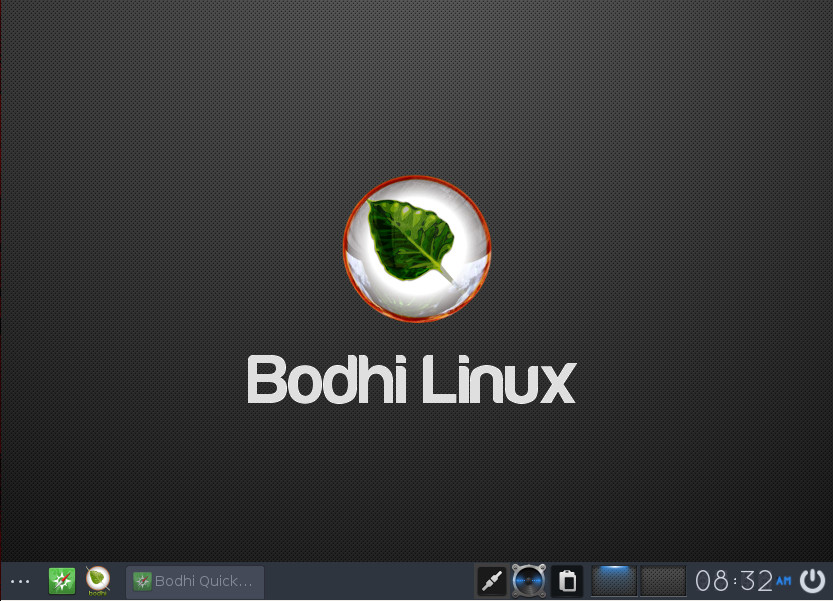
Figure 2: The Moksha desktop in Bodhi Linux is elegant and simple.

The one caveat to Bodhi (besides the learning curve of Moksha) is that, out of the box, it doesn’t include much in the way of user-facing applications. You will find the Midori browser, ePad text editor, ePhoto image viewer, and not much more. Fortunately, Bodhi includes its own app store, called Appcenter, where users can easily install any number of software titles.

The minimum system requirements for Bodhi are:

  • 500mhz processor

  • 256MB of RAM

  • 4GB of drive space

The recommended requirements are:

  • 1.0ghz processor

  • 512MB of RAM

  • 10GB of drive space

Puppy Linux

No list of lightweight Linux distributions would be complete without Puppy Linux. Puppy is unique in that it isn’t a single Linux distribution, but a collection of distributions that share the same guiding principles and built with the same tool (Woof-CE). There are three categories of Puppy Linux:

  • The official Puppy Linux distributions. These are maintained by the Puppy Linux team and are targeted for general purpose.

  • The woof-built Puppy Linux distributions. These are developed to suit specific needs and appearances (while also targeting general purpose).

  • The unofficial derivatives (aka “puplets”). These are remasters, made and maintained by Puppy Linux enthusiasts, that target specific purposes.

Instead of a distribution based only on Ubuntu, Puppy offers releases based on Ubuntu and Slackware.

As you might expect, the tools offered on the Puppy Linux desktop (Figure 3) lean toward the minimal side of things (AbiWord, Gnumeric, mtPaint, Slypheed, Palemoon, etc.). Considering the size of the Puppy Linux ISO comes in at 224 MB, that is understandable. Along with this minimalist take on Linux, Puppy Linux is one of the best at making older hardware feel new again. Puppy Can work with a 333Mhz processor and 256MB of RAM and make it run smooth and fast.

Figure 3: The user-friendly world of Puppy Linux.

According to the Puppy Linux developers, Puppy is “grandpa-friendly certified.”

Lubuntu

If you’re looking for a Ubuntu respin that will give life to that aging PC, Lubuntu is a winner. Lubuntu is part of the Ubuntu family and makes use of the LXDE desktop (Figure 4). This aging PC-friendly distribution includes a selection of lite applications that won’t ever bog down your machine. Like Puppy Linux, Lubuntu is incredibly easy to use and opts for slimmer applications (such as Abiword and Gnumeric). Lubuntu also includes Firefox (for web browsing) as well as Audacious and GNOME-Mplayer for multimedia playback.
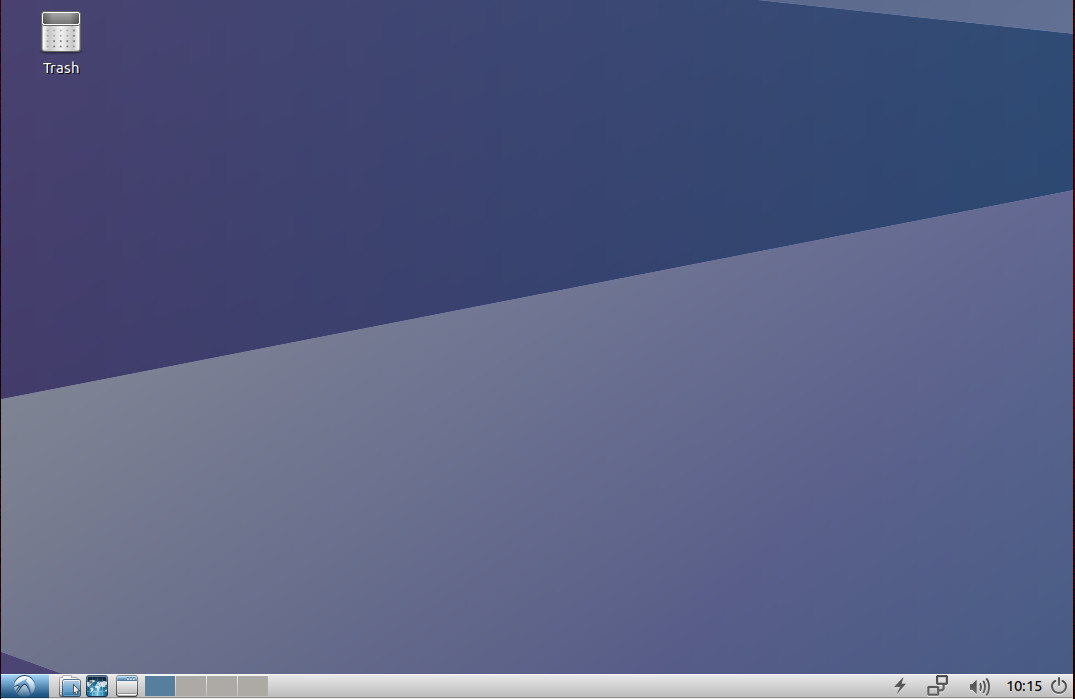
Figure 4: The Lubuntu desktop is clean and simple to use.

Lubuntu is a lightweight distribution, but not nearly as lightweight as, say, Puppy Linux. Lubuntu  can work on computers up to around ten years old. The minimum requirements for this particular desktop Linux are:

  • CPU: Pentium 4 or Pentium M or AMD K8

  • For local applications, Lubuntu can function with 512MB of RAM. For online usage (Youtube, Google+, Google Drive, and Facebook),  1GB of RAM is recommended.

Lubuntu also includes the Synaptic package manager; so if those base applications aren’t enough, you can always install whatever you need. New users will greatly appreciate the simplicity of the desktop.

There is next to zero learning curve involved with LXDE. Combine the ease of LXDE and the inclusion of the lightweight apps, you cannot go wrong with Lubuntu. If you’re concerned you will miss out (using the likes of Abiword), some of these tools are capable of working with more standard formats. Take, for instance, Abiword — this tool can save as .doc, .rtf, .txt, .epub, .pdf, .odt, and more. What’s best about the included apps is that they are lightning fast and reliable. The default software list, included with Lubuntu, offers quite a bit more than your average lightweight Linux distribution. You’ll find:

  • Xfburn

  • Mpv Media Player

  • guvcview

  • Audacious

  • GNOME Mplayer

  • PulseAudio Volume Control

  • AbiWord

  • Gnumeric

  • Firefox

  • Pidgin

  • Sylpheed

  • Transmission

  • Document Viewer

  • mtPaint

  • Simple Scan

  • GNOME Disks

  • PCManFM

  • Leafpad

  • Xpad

If you’re looking for an official Ubuntu flavor, that can breath life into that old hardware, Lubuntu is a great call.

The choice is yours

There are quite a number of other lightweight Linux distributions, but the four I’ve listed here offer the most variety, reliability, and capability, all the while performing like champs on older hardware. Give one of these a shot and see if those old desktops can’t be given new life without too much work.

Learn more about Linux through the free “Introduction to Linux” course from The Linux Foundation and edX.

Double Your Development Velocity without Growing Your Team

The Developer Experience team at SendGrid is a small, but mighty force of two. We attempt to tackle every problem that we can get our hands on. This often means that some items get left behind.  At the outset, we surveyed everything that was going on in our open source libraries and we quickly realized that we needed to find a way to prioritize what we were going to work on. Luckily, our team lives, organizationally, on the Product Management team, and we had just received a gentle nudge and training on the RICE prioritization framework.

On our company blog, I wrote an article about how employing this framework, using a spreadsheet, helped us double our velocity as a team within the first sprint. Our development velocity doubled because the most impactful things for the time spent are not always the biggest things, but the biggest things tend to attract the most attention due to their size.

Read more at The Linux Foundation

Review by Many Eyes Does Not Always Prevent Buggy Code

Writing code is hard. Writing secure code is harder—much harder. And before you get there, you need to think about design and architecture. When you’re writing code to implement security functionality, it’s often based on architectures and designs that have been pored over and examined in detail. They may even reflect standards that have gone through worldwide review processes and are generally considered perfect and unbreakable.*

However good those designs and architectures are, though, there’s something about putting things into actual software that’s, well, special. With the exception of software proven to be mathematically correct,** being able to write software that accurately implements the functionality you’re trying to realize is somewhere between a science and an art. This is no surprise to anyone who’s actually written any software, tried to debug software, or divine software’s correctness by stepping through it; however, it’s not the key point of this article.

Read more at OpenSource.com

What You Need to Know: Kubernetes and Swarm

Kubernetes and Docker Swarm are both popular and well-known container orchestration platforms. You don’t need a container orchestrator to run a container, but they are important for keeping your containers healthy and add enough value to mean you need to know about them.

This blog post introduces the need for an orchestrator then chalks-up the differences at an operational level between these two platforms.

What has orchestration done for you lately?

Even if you are not using Kubernetes or Swarm for your internal projects – it doesn’t mean that you’re not benefitting from their use. For instance ADP who provide iHCM and Payroll in the USA use Docker’s EE product (which is based around Swarm) to run some of their key systems.

Read more at Alex Ellis Blog

Performance Analysis in Linux (Continued): When Performance Really Matters

By Gabriel Krisman Bertazi, Software Engineer at Collabora.

This blog post is based on the talk I gave at the Open Source Summit North America 2017 in Los Angeles. Let me start by thanking my employer Collabora, for sponsoring my trip to LA.

Last time I wrote about Performance Assessment, I discussed how an apparently naive code snippet can hide major performance drawbacks. In that example, the issue was caused by the randomness of the conditional branch direction, triggered by our unsorted vector, which really confused the Branch Predictor inside the processor.

An important thing to mention before we start, is that performance issues arise in many forms and may have several root causes. While in this series I have focused on processor corner-cases, those are in fact a tiny sample of how thing can go wrong for performance. Many other factors matter, particularly well-thought algorithms and good hardware. Without a well-crafted algorithm, there is no compiler optimization or quick hack that can improve the situation.

In this post, I will show one more example of how easy it is to disrupt performance of a modern CPU, and also run a quick discussion on why performance matters – as well as present a few cases where it shouldn’t matter.

If you have any questions, feel free to start a discussion below in the Comments section and I will do my best to follow-up on your question.

CPU Complexity is continuously rising

Every year, new generations of CPUs and GPUs hit the market carrying an always increasing count of transistors inside their enclosures as show by the graph below, depicting the famous Moore’s law. While the metric is not perfect on itself, it is a fair indication of the steady growth of complexity inside of our integrated circuits.

transistor_count.svg.png
Figure 1: © Wgsimon. Licensed under CC-BY-SA 3.0 unported.
Much of this additional complexity in circuitry comes in the form of specialized hardware logic, whose main goal is to explore common patterns in data and code, in order to maximize a specific performance metric, like execution time or power saving. Mechanisms like Data and Instruction caches, prefetch units, processor pipelines and branch predictors are all examples of such hardware. In fact, multiple levels of data and instruction caches are so important for the performance of a system, that they are usually advertised in high caps when a new processor hits the market.

While all these mechanisms are tailored to provide good performance for the common case of programming and common data patterns, there are always cases where an oblivious programmer can end up hitting the corner case of such mechanisms, and not only write code which is unable to benefit from them, but also code which executes way worse than if there were no optimization mechanism at all.

As a general rule, compilers are increasingly great at detecting and modifying code to benefit from the CPU architecture, but there will always be cases where they won’t be able to detect bad patterns and modify the code. In those cases, there is no replacement for a capable programmer who understands how the machine is designed, and who can adjust the algorithm to benefit from its design.

When does performance really matter?

The first reaction of an inexperienced developer after learning about some of the architectural issues that affect performance, might be to start profiling everything he can get his hands on, to obtain the absolute maximum capability of his expensive new hardware. This approach is not only misleading, but an actual waste of time.

In a city that experiences traffic jams every day, there is little point in buying a faster car instead of taking the public bus. In both scenarios, you are going be stuck in the traffic for hours instead of arriving at your destination earlier. The same happens with your programs. Consider an interactive program that performs a task in background while waiting for user input, there is little point in trying to gain a few cycles by optimizing the task, since the entire system is still limited by the human input, which will always be much, much slower than the machine. In a similar sense, there is little point in trying to speed-up the boot time of a machine that almost never reboots, since the reboot time cost will be payed only rarely, when a restart is required.

In a very similar sense, the speed-up you gain by recompiling every single program in your computer with the fastest compiler optimizations possible for your machine, like some people like to do, is completely irrelevant, considering the fact that the machine will spend most of the time in an idle state, waiting for the next user input.

What actually makes a difference, and should be target of every optimization work, are cases where the workload is so intensive that gaining a few extra cycles very often will result in a real increase of the computing done in the long run. This requires, first off all, that the code being optimized is actually in the critical path of performance, which means that that part of the code is actually what is holding the rest of the system back. If that is not the case, the gain will be minimum and the effort will be wasted.

Moving back to the reboot example, in a virtualization environment, where new VMs or containers boxes need to be spawned very fast and very often to respond to new service requests, it makes a lot of sense to optimize reboot time. In that case, every microsecond saved at boot time matters to reduce to overall response of the system.

The corollary of the Ahmdal’s law states just that. It argues that there is little sense in aggressively optimizing a part of the program that executes only a few times, very quickly, instead of optimizing the part that occupies the largest part of the execution time. In another (famous) words, a gain of 10% of time in code that executes 90% of time is much better for the overall performance than a 90% speed up in code that executes only 10% of the time.

ahmdal.png

Continue reading on Collabora’s blog.

Learn more from Gabriel Krisman Bertazi at Open Source Summit Europe, as he presents “Code Detective: How to Investigate Linux Performance Issues” on Monday, October 23.

Red Hat Fills Out its Cloud-Native Storage Package with Block and Object Storage

Red Hat has rolled out Container-Native Storage 3.6 as part of its efforts to offer a comprehensive container stack, following up on the release of the Red Hat OpenShift Container Platform 3.6 in August.

This container storage package is built atop its Gluster Storage technology and integrated with the OpenShift platform.

“The key piece we’re trying to solve with container-native storage is for storage to become invisible eventually. We want developers to have enough control over storage where they’re not waiting for storage admins to carve out storage for their applications. They’re able to request and provision storage dynamically and automatically,” said Irshad Raihan, Red Hat senior manager of product marketing.

Read more at The New Stack

Linux Networking Hardware for Beginners: LAN Hardware

Software is always changing, but hardware not so much. This two-part tour introduces networking hardware, from traditional switches and routers to smartphones and wireless hotspots.

Local Area Network

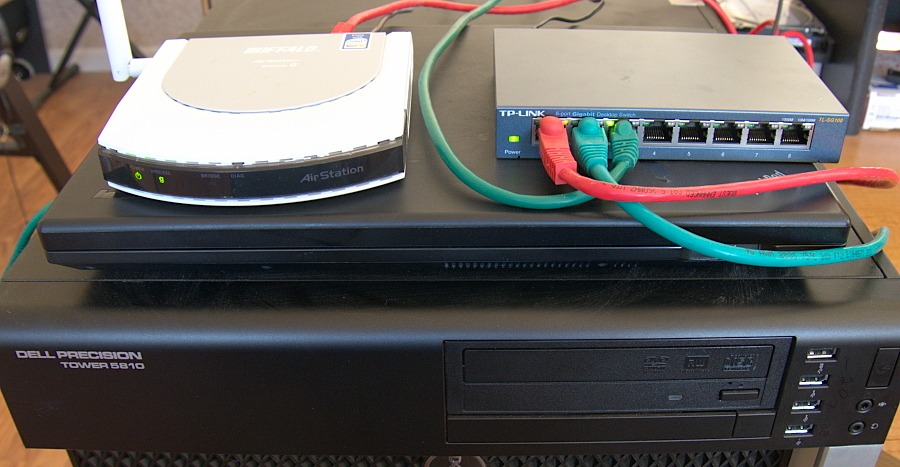
The traditional local area network is connected with an Ethernet switch and Cat cables. The basic components of an Ethernetwork are network interface cards (NICs), cables, and switches. NICs and switches have little status lights that tell you if there is a connection, and the speed of the connection. Each computer needs an NIC, which connects to a switch via an Ethernet cable. Figure 1 shows a simple LAN: two computers connected via a switch, and a wireless access point routed into the wired LAN.

Figure 1: A simple LAN.

Installing cable is a bit of work, and you lose portability, but wired Ethernet has some advantages. It is immune to the types of interference that mess up wireless networks (microwave ovens, cordless phones, wireless speakers, physical barriers), and it is immune to wireless snooping. Even in this glorious year 2017 of the new millennium there are still Linux distributions, and devices like IP surveillance cameras and set-top boxes, that require a wired network connection for the initial setup, even if they also support wi-fi. Any device that has one of those little physical factory-reset switches that you poke with a paperclip has a hard-coded wired Ethernet address.

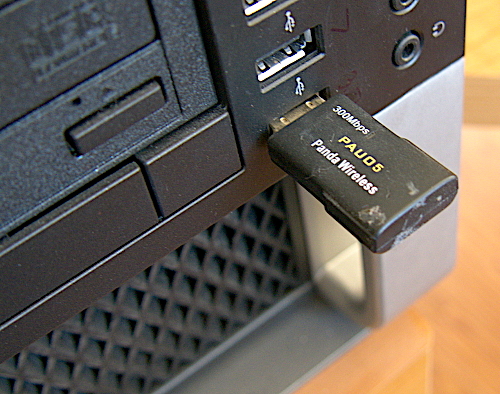
With Linux you can easily manage multiple NICs. My Internet is mobile broadband, so my machines are connected to the Internet through a wireless hotspot, and directly to each other on the separate wired Ethernetwork for fast local communications. My workstations have easy wi-fi thanks to USB wireless interfaces (figure 2).

Figure 2: USB wireless interfaces.

Switches come in “dumb” and managed versions. Dumb switches are dead simple: just plug in, and you’re done. Managed switches are configurable and offer features like power over Ethernet (PoE), controllable port speeds, virtual LANs (VLANs), disable/enable ports, quality of service, and security features.

Ethernet switches route traffic only where it needs to go, between the hosts that are communicating with each other. If you remember the olden days of Ethernet hubs, then you remember that hubs broadcast all traffic to all hosts, and each host had to sort out which packets were meant for it. That is why one definition of a LAN is a collision domain, because hubs generated so much uncontrolled traffic. This also enabled easy snooping on every host connected to the hub. A nice feature on a managed switch is a snooping port, which may be called a monitoring port, a promiscuous port, or a mirroring port, which allows you to monitor all traffic passing through the switch.

Quick Ethernet cheat sheet:

  • Ethernet hardware supports data transfer speeds of 10, 100, 1000, and 10,000 megabits per second.
  • These convert to 1.25, 12.5, 125, and 1,250 megabytes per second.
  • Real-world speeds are half to two-thirds of these values.
  • Network bandwidth is limited by the slowest link, such as a slow hard drive, slow network interface, feeble CPU, congested router, or boggy software.
  • Most computers have built-in Ethernet interfaces.
  • Gigabit (1000 Mb/s) USB Ethernet interfaces are dirt cheap, currently around $25, and require USB 3.0.
  • Ethernet is backwards-compatible, so gigabit devices also support slower speeds.

A single user may not see much benefit from 10 Gigabit Ethernet, but multiple users will. You could use a 10 GigE link as your LAN backbone, and use slower hardware to connect your subnets and individual hosts.

What is Bandwidth?

Bandwidth means several things: latency, throughput, error rate, and jitter. Analogies are tricky, but we can illustrate this with a water pipe. The diameter of the pipe limits the total bandwidth: the larger the pipe, the more water it can deliver. Latency is how long you have to wait for the water to start coming out. Jitter measures how smoothly the water is delivered, or how erratically.

I can’t think of a water analogy for error rate; in computer networking that is how many of your data packets are corrupted. Data transfers require that all packets arrive undamaged because a single bad packet can break an entire data file transfer. The TCP protocol guarantees packet delivery and re-sends corrupted and missing packets, so a high error rate results in slower delivery.

Having large bandwidth doesn’t guarantee that you will enjoy smooth network performance. Netflix, for one example, requires only a minimum of 1.5 Mb/s. High latency, jitter, and error rates are annoying for data transmissions, but they are deadly for streaming media. This is why you can have an Internet account rated at 20-30 Mb/s and still have poor-quality video conferencing, music, and movies.

Ethernet Cables

Ethernet cables are rated in Cats, short for category: Cat 5, 6, 7, and 8. Cat 5 was deprecated in 2001, and it’s unlikely you’ll see it for sale anymore. Cat 5e and 6 support 10/100/1000 Mb/s. Cat 6a and 7 are for 10 Gb/s. (You also have the option of optical fiber cabling for 10 Gb/s, though it is more expensive than copper Cat 6a/7 cables.) Cat cables contain 4 balanced-signal pairs of wires, and each individual wire is made of either several copper strands twisted together, or one solid copper wire. Twisted-pair cables are flexible. Solid-core wires are stiffer and have less transmission loss.

Plenum cables are designed for permanent installations inside the plenum spaces in buildings, dropped ceilings, inside of walls, and underneath floors. Plenum cables are wrapped in special plastics that meet fire safety standards. These cost more than non-plenum, but don’t cheap out because duh, do I have to explain why? Plenum cables should be solid-core rather than twisted pairs.

Patch cables are twisted-pair. Traditionally “patch” meant a short cable, for connecting computers to wall outlets, switches to routers, and for patch panels, though they can be as long as you need, up to about 300 feet for Cat 5e, 6, and 6a. For longer runs you’ll need repeaters.

Come back next week for part 2, where we will learn how to connect networks, and some cool hacks for mobile broadband.

Learn more about Linux through the free “Introduction to Linux” course from The Linux Foundation and edX.

How to Manage Linux Containers with Ansible Container

Imagine this scenario: You invested in Ansible, you wrote plenty of Ansible roles and playbooks that you use to manage your infrastructure, and you are thinking about investing in containers. What should you do? Start writing container image definitions via shell scripts and Dockerfiles? That doesn’t sound right.

Some people from the Ansible development team asked this question and realized that those same Ansible roles and playbooks that people wrote and use daily can also be used to produce container images. But not just that—they can be used to manage the complete lifecycle of containerized projects. From these ideas, the Ansible Container project was born.

Learn more in Tomas Tomecek’s talk, From Dockerfiles to Ansible Container, at Open Source Summit EU, which will be held October 23-26 in Prague

Read more at OpenSource.com

Tagging Docker Images the Right Way

In our consultancy work, we often see companies tagging production images in an ad-hoc manner. Taking a look at their registry, we find a list of images like:

and so on.

There is nothing wrong with using semantic versioning for your software, but using it as the only strategy for tagging your images often results in a manual, error prone process (how do you teach your CI/CD pipeline when to upgrade your versions?)

I’m going to explain you an easy, yet robust, method for tagging your images. Spoiler alerts: use the commit hash as the image tag.

Suppose the HEAD of our Git repository has the hash ff613f07328fa6cb7b87ddf9bf575fa01b0d8e43. We can manually build an image with this hash like so:

Read more at Container Solutions

Node.js is Strong and Growing

As we come into this year’s Node.js Interactive conference it’s a good time to reflect on the State of Node.js, and by any reasonable measure the state of Node.js is very strong. Every day there are more than 8.8 million Node instances online, that number has grown by 800,000 in the last nine months alone. Every week there are more than 3 billion downloads of npm packages. The number of Node.js contributors has grown from 1,100 contributors last year to more than 1,500 contributors today. To date there have been a total of 444 releases, and we have 39,672 stars on Github. This is an enviable position for any technology and a testament to the value of Node.js and the dedication of the Node.js community.  

Growth of Node.js From a User Perspective

We see incredible success with Node.js for front-end, back-end and full stack development. In this year’s Node.js User Survey we got incredible feedback and gained increased understanding of how Node.js is being used. We know that the the biggest use case for Node.js is back-end development, but users are also developing cross-platform and desktop applications, enabling IoT and even powering security apps. This week we are launching our annual survey again to identify trends and track our progress. I highly encourage you to take the survey and share your insights with the rest of the community.  

Read more at The Linux Foundation