The Cloud Native Computing Foundation has seen tremendous growth since it was founded in mid-2015. As a Linux Foundation project, it has grown from 22 member companies at its start to 118 today — a 5X growth rate. And its members now include Alibaba, AWS, Google, IBM, Microsoft, and — as of this week — Oracle.
“This is the first time in the history of open source where we have the top (six) cloud providers in the world sitting at the same foundation table, driving cloud-native forward,” said Chris Aniszczyk, Chief Operating Officer of CNCF.
CNCF was seeded with the Kubernetes project, donated by Google, and quickly added nine more projects including Prometheus, OpenTracing, Fluentd, Linkerd, gRPC, CoreDNS, containerd, rkt, and CNI.
The Cloud Native Computing Foundation continues to gain momentum, signing on as a sponsor one of the most venerable enterprise software companies, Oracle, and adding two more cloud-native projects to its portfolio, the Envoy service mesh and the Jaeger microservice debugging software.
“The last decade was about virtualization, and this decade is about containerization and cloud-native. You containerize, and that allows you to split the app into lots of pieces — microservices — and then you orchestrate all those pieces,” said CNCF Executive Director Dan Kohn. “We think that’s really the biggest trend in computing.”
Back in 2016, the Solus developers announced they were switching their operating system over to a rolling release. Solus 3 marks the third iteration since that announcement and, in such a short time, the Solus platform has come a long way. But for many, Solus 3 would be a first look into this particular take on the Linux operating system. With that in mind, I want to examine what Solus 3 offers that might entice the regular user away from their current operating system. You might be surprised when I say, “There’s plenty.”
This third release of Solus is an actual “release” and not a snapshot. What does that mean? The previous two releases of Solus were snapshots. Solus has actually moved away from the regular snapshot model found in rolling releases. With the standard rolling release, a new snapshot is posted at least every few days; from that snapshot an image can be created such that the difference between an installation and latest updates is never large. However, the developers have opted to use a hybrid approach to the rolling release. According to the Solus 3 release announcement, this offers “feature rich releases with explicit goals and technology enabling, along with the benefits of a curated rolling release operating system.”
Of course, no average user really cares if an operating system is a rolling release or a hybrid. From that particular perspective, what is more important is how well the platform works, how easy it is to use, and what it offers out of the box.
Let’s take a look at those three points to see just how well Solus 3 could serve even a new-to-Linux user.
What Solus 3 offers out of the box
On many levels, this is the most important point for first-time users. Why? Because there are many Linux distributions available that don’t meet the minimum needs, without having to tinker and add extra packages out of the box. This, however, is an area where Solus 3 really shines. Once installed, the average user will have everything they need to get their work done — and then some.
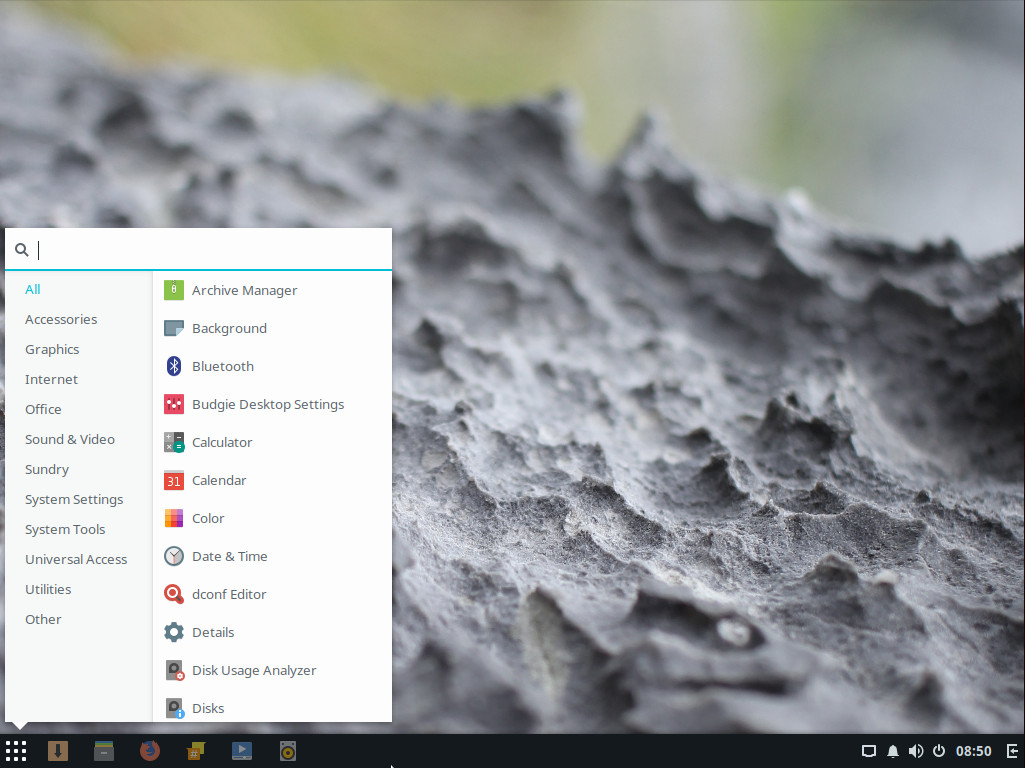
First off, Solus 3 features the Budgie desktop (Figure 1). Anyone that has ever used a PC desktop, since Windows XP, will be instantly at home. The standard features abound:
Task bar
Application menu (with search)
System tray
Notification center
Desktop icons
Figure 1: The Budgie desktop with application menu open.
Once users get beyond the desktop interface, they’ll find all the applications necessary to go about their days:
Firefox web browser (version 55.0.3)
LibreOffice office suite (version 5.4.0.3)
Thunderbird email client with Lightning calendar pre-installed (version 52.3.0)
Rhythmbox audio player (version 3.4.1)
GNOME MPV movie player (version 0.12)
GNOME Calendar (version 3.24.3)
GNOME Files file manager (version 3.24.2)
Do note, the above version numbers reflect a system update upon initial installation.
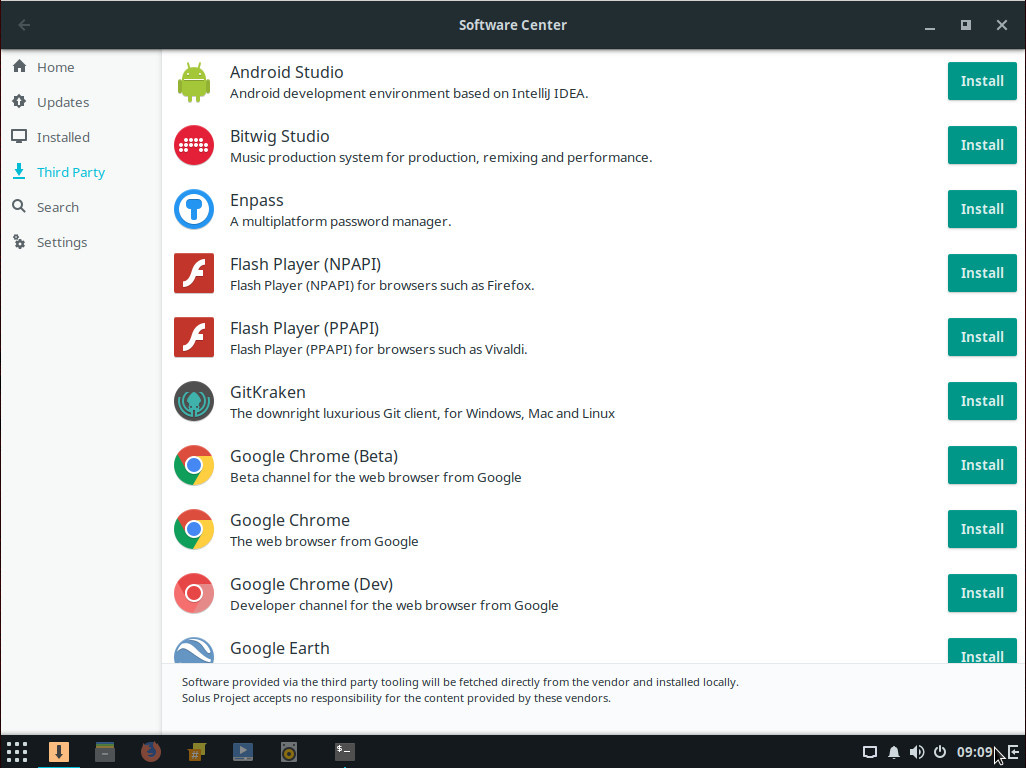
Solus 3 also includes a fairly straightforward Software Center tool — one that has a nifty trick up its sleeve. Unlike many Linux distributions, the Solus Software Center includes a Third Party section that doesn’t require the user to have to install added repositories to add the likes of Android Studio, Google Chrome, Insync, Skype, Spotify, Viber, WPS Office Suite, and more. All you have to to do is open up the Software Center, click Third Party, and find the third-party software you want to install (Figure 2).
Figure 2: Third-party software installation is made simple on Solus.
Beyond the desktop and the included software, Solus 3 offers the user a remarkably pain-free experience, right out of the box.
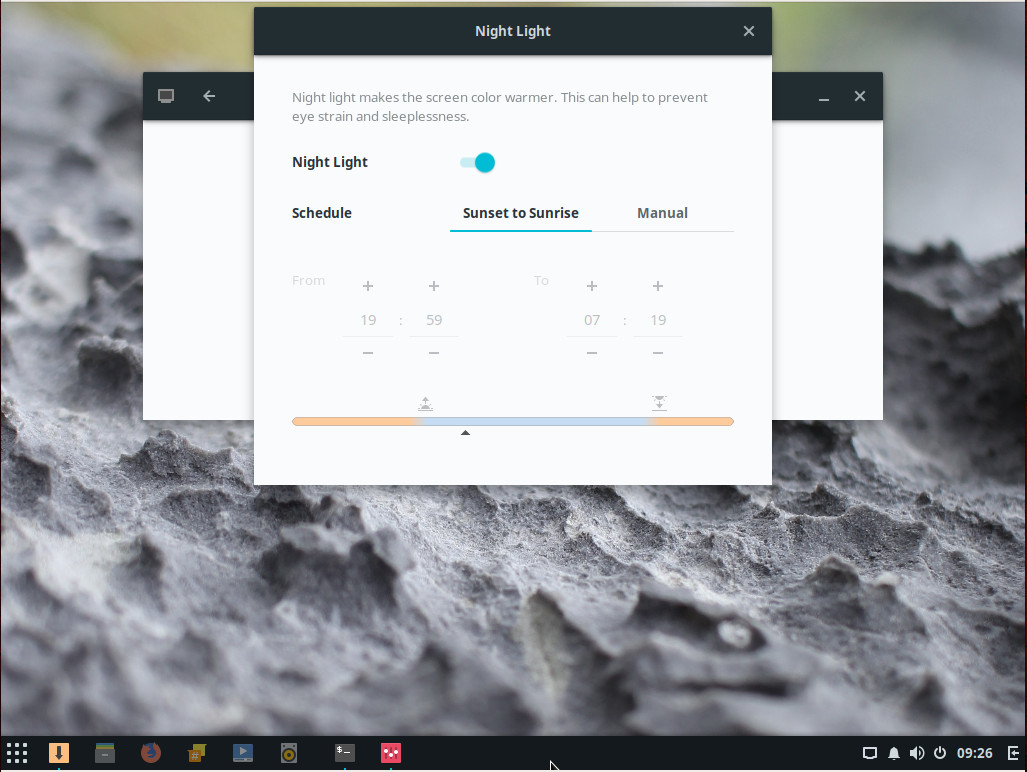
There are also a few small additions that go a long way to making Solus a special platform. Take, for instance, the Night Light feature, a tool that reduces eye strain by taking care of the display’s blue light. From within the Night Light tool, you can even set a schedule to enable/disable the feature (Figure 3).
Figure 3: The Solus Night Light configuration tool.
The only issue I can find with included packages is the missing Samba-GNOME Files integration. Normally, it is possible to right-click a folder within the file manager and enable the sharing of said folder, via Samba. Although Samba is pre-installed, there is no easy way to enable Samba sharing within the default file manager. For those that really need to share out directories with Samba, you’ll have to do it the old-school way … via the terminal.
Solus 3 does make it fairly easy to connect to other shares on your network (by clicking Other Locations in Files and then browsing your local network).
How easy is it to use?
By now, you’ve probably drawn the conclusion that Solus 3 is a new-user dream come true. That conclusion would be spot on. The developers have done an amazing job of ensuring nothing could possibly trip up a new user. And by “nothing,” I do mean nothing. Solus 3 does exactly what a Linux distribution should do — it gets out of the way, so the user can focus on work or social/entertainment distraction. From installation of the operating system, to installation of software, to daily use … the Solus developers have done everything right. I cannot imagine a single user type stumbling over this take on Linux. Period. This is one Linux distribution with barely a single bump in the learning curve.
How well does Solus 3 work?
Considering how “young” Solus is, it is remarkably stable. During my testing phase, I only encountered one issue with the platform—installing the third-party Spotify client (NOTE: Other third-party software installed fine, so this is, most likely, a Spotify issue). Even with that hiccup, a second attempt at installing the Spotify client succeeded. That should tell you how issue-free Solus is. Outside of that (and the Samba issue), I am happy to report that Solus 3 “just works” and does so with grace and ease. To be honest, Solus 3 feels like a much more mature platform than a “3” release should.
Give Solus 3 a try
If you’re looking for a new Linux distribution that will make the transition from any other platform a no-brainer of a task, you cannot go wrong with Solus 3. This hybrid release distribution will make anyone feel right at home on the desktop, look great doing so, and ease away any headache you might have ever experienced with Linux.
Kudos to the Solus developers for releasing a gem of a distribution.
Learn more about Linux through the free “Introduction to Linux” course from The Linux Foundation and edX.
In this post, I discuss some of the challenges of running HPC workloads with Kubernetes, explain how organizations approach these challenges today, and suggest an approach for supporting mixed workloads on a shared Kubernetes cluster.
In Kubernetes, the base unit of scheduling is a Pod: one or more Docker containers scheduled to a cluster host. Kubernetes assumes that workloads are containers. While Kubernetes has the notion of Cron Jobsand Jobs that run to completion, applications deployed on Kubernetes are typically long-running services, like web servers, load balancers or data stores and while they are highly dynamic with pods coming and going, they differ greatly from HPC application patterns.
Traditional HPC applications often exhibit different characteristics:
In financial or engineering simulations, a job may be comprised of tens of thousands of short-running tasks, demanding low-latency and high-throughput scheduling to complete a simulation in an acceptable amount of time.
Automated testing is increasingly important in development, especially for finding security issues, but fuzz testing requires a high level of expertise — and the sheer volume of code developers are working with, from third-party components to open source frameworks and projects, makes it hard to test every line of code. Now, a set of artificial intelligence-powered options like Microsoft’s Security Risk Detection service and Diffblue’s security scanner and test generation tools aim to make these techniques easier, faster and accessible to more developers.
“If you ask developers what the most hated aspect of their job is, it’s testing and debugging,” Diffblue CEO and University of Oxford Professor of Computer Science Daniel Kroening told the New Stack.
The Diffblue tools use generic algorithms to generate possible tests, and reinforcement learning combined with a solver search to make sure that the code it’s giving you is the shortest possible program, which forces the machine learning system to generalize rather than stick to just the examples in its training set.
Linus Torvalds, creator of the Linux kernel, took to the stage at Open Source Summit in Los Angeles. In this keynote presentation, Torvalds joined The Linux Foundation Executive Director Jim Zemlin in conversation about Linux kernel development and how to get young open source developers involved. Here are some highlights of their talk.
On the importance of the Linux kernel and being listed as by Time magazine as #17 on the list of Most Important People of the Century:
I am happy about the fact that I do something meaningful. Everyone wants to do something that matters, that has an impact. I feel like the work is meaningful. At the same time, I work in my home office, in my bathrobe.
On his book —Just for Fun
The premise of the book was that you kind of move on to fun. You have to start with survival. … Once you’re guaranteed survival, and once you’re guaranteed that you have a social connection to the world around you, then you want to get to the point where the most motivating thing in your life is fun.
For me, that fun is a technical challenge. That’s not fun for everybody, but hopefully it is fun for most people in this audience.
On open source adoption in the industry:
It’s very important to have companies involved in open source. … You should not hate those companies that can actually help make your project better. They can bring you all those users, because users to any project are what really matter.
In the kernel community, we’ve come to the realization that it’s not about the small guy against the companies; it’s about collaboration.
On laying the groundwork for participation:
We’re having an easier time working with companies who are not necessarily part of the community. It used to be a huge problem with a lot of tech companies where we had educated technical people who really wanted to collaborate with us, but their companies wouldn’t allow them to work on open source projects.
Companies were worried about their employees being associated with a project that was not their project. And I think the last couple of decades, The Linux Foundation and others have been teaching companies that it ok to participate in the process.
On the time it takes:
People think Linux development is very fast, but I notice over and over that we take forever to do one particular thing. We take years and years of effort. … Quite often, you only see the end result.
On improving security:
The concept of absolute security does not exist.
As a technical person, I’m always very impressed by the people who are attacking our code. … I wish they were on our side. They are so smart, and they could help us. I want to get those people before they turn to the dark side.
On getting the next generation of developers interested in development:
In order to get into the kernel, you have to be interested in the kind of low-level programming that most people are not interested in. I don’t think the kernel will ever be something that you would want to teach in a high school class. It’s fairly esoteric, and you need a certain type of dedication to really even bother to care. … But we get a large percentage of people who are interested in these kinds of low-level problems.
We have thousands of new people every single release. A lot people will only do something small. But from a health perspective, the kernel has more developers than just about any other project out there. So, I’m not worried about that.
We hear a lot about how few women work in tech. The numbers range from 3 percent in open source to 25 percent industry-wide. But frankly, those aren’t the numbers that scare me most. The numbers that scares the hell out me are the ones that underscore how many women are choosing to leave tech.
The latest NCWIT data shows that women leave tech at twice the rate of men, and that number has been increasing since 1991. A Harvard Business Review study found that as many as 50 percent of women working in science, engineering and technology will, over time, leave because of hostile work environments.
As a young, very talented female programmer recently told me: “I don’t want to leave tech but after a year into my first job, I’m considering it.”
Over the last year GitHub has evolved their internal infrastructure that runs the Ruby on Rails application responsible for github.com and api.github.com to run on Kubernetes. The migration began with web and API applications running on Unicorn processes that were deployed onto Puppet-managed bare metal (“metal cloud“) servers, and ended with all web and API requests being served by containers running in Kubernetes clusters deployed onto the metal cloud.
According to the GitHub engineering blog, the basic approach to deploying and running GitHub did not significantly change over the initial eight years of operation. However, GitHub itself changed dramatically, with new features, larger software communities, more GitHubbers on staff, and many more requests per second. As the organisation grew, the existing operational approach began to exhibit new problems: many teams wanted to extract the functionality into smaller services that could run and be deployed independently; and as the number of services increased, the SRE team found they were increasingly performing maintenance, which meant there was little time for enhancing the underlying platform.
In the market for ride sharing services, Uber and Lyft are fierce competitors, the world of open-source however is another story. At the Open Source Summit here on Sept. 13, the Cloud Native Computing Foundation (CNCF) announced that it had accepted two new projects, Envoy from Lyft and Jaeger from Uber.
Envoy is an edge and service proxy that aims to make the network transparent to applications. Jaeger in contrast is a distributed tracing system, that can be used to help find application performance bottlenecks.
“Lyft developed a fancy service mesh/reverse proxy to handle all their traffic to help scale micro-services within Lyft,” Chris Aniszczyk, COO of Cloud Native Computing Foundation, told eWEEK in a video interview.
Developers are continuing to look for more efficient and effective ways to build out applications, and one of the new approaches to this involves serverless applications, which are the future of lightweight, scalable, and performant applications development.
The space of “serverless” is still fairly new and many developers and companies are wanting to go “serverless,” but don’t know how to orchestrate decisions like how to choose the right cloud provider, how to avoid vendor lock in. And, if you do change your mind about the cloud platform, does that mean you have to rewrite your application code?
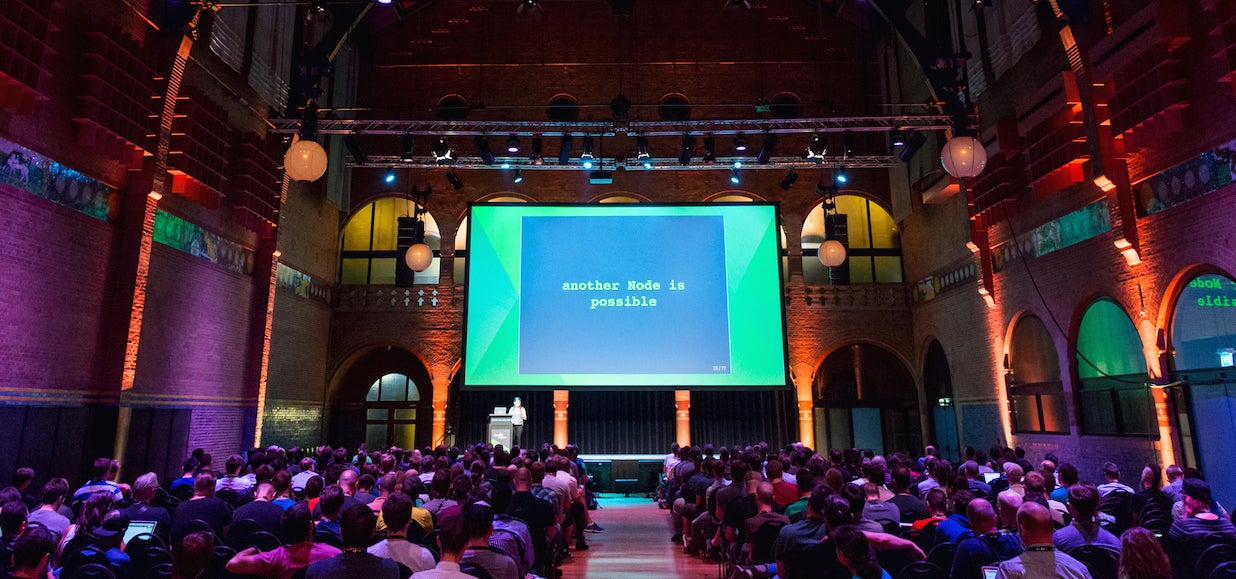
Linda Nichols, cloud enablement leader at Cloudreach, will be talking about this subject extensively at Node.js Interactive happening Oct. 4-6, 2017 in Vancouver, BC, Canada. In preparation for her session, we asked her a few questions about serverless and why it works so well with Node.js.
Interested? Read below and be sure to check out her full session “Break-Up with Your Server, But Don’t Commit to a Cloud Platform” and many other serverless-based topics by registering for Node.js Interactive.
Linux.com: How do you define serverless?
Linda Nichols: My definition of “serverless” has been evolving and changing since I gave my first talk on it a year ago. The ecosystem is moving forward so fast! This is what I’m going with currently:
“Serverless Architecture is an event-driven architecture that uses a back-end system, such as FaaS (Functions-as-a-Service), that is fully managed by a cloud provider.”
Linux.com: Is there a certain environment or type of company that would benefit from serverless architecture?
Nichols: I think serverless architecture is really perfect for companies that need inexpensive tools and prototypes. It’s been really popular in the startup and non-profit communities because serverless applications are faster and easier to develop and nearly free to host — even for extended periods of time.
That said, I think nearly any environment that has access to a cloud provider can benefit from leveraging serverless architecture. It’s not an all-or-nothing architecture; sometimes the best way is a complete re-write of backend services and other times a hybrid system is a great fit.
Linux.com: What are some of the obstacles that folks need to overcome if they want to go “serverless”?
Nichols: If an application is hosted entirely on-premises, then an obstacle can be that initial organizational cloud adoption.
Another obstacle is for applications described as “monoliths” where all of the services are tightly coupled inside of a system. In this case, there needs to be a separate effort to break off some smaller micro or nano services and migrate those to serverless functions. That process can be gradual, so that doesn’t mean a prerequisite is a complete system rewrite.
Linux.com: Why is Node.js a good choice when you are looking to go serverless?
Nichols: My answer here is the same as when someone asks me why I like Node.js in any environment: I think it makes projects more flexible and accessible. Most developers already know at least a little JavaScript because they’ve written web applications, so that gives me a larger pool of people that can work on all parts of my project. If I have a “front-end” development team, then they have the option to work on “back-end” serverless functions. Same for my “back-end” developers that might want to help support a React.js development team.
Linux.com: Your talk for Node.js Interactive is about breaking up servers, but not committing to cloud platform, how can developers go about doing this?
Nichols: Without giving away too much of what’s in my talk, I will say that it largely involves leveraging some of the great tools that have been built to support Serverless architecture.
Linux.com: What are three key takeaways you say a developer must know if they are thinking of going “serverless”? Any must-have tools that they would need in their toolbelt?
Nichols: I think it might be easier for me to say what tools a developer doesn’t have to have to go “serverless.”
FaaS and API Gateway tools create an ecosystem that allows developers to eliminate several of the typical tools and frameworks necessary when creating an application.
It’s also very unlikely that they’ll need to learn a new programming language since all of the major FaaS offerings support Node.js and a list of several other popular languages.
Finally, they don’t need to know how to do container management or other typical “ops” tasks. The cloud platforms take care of that for you.
Learn more about Node.js Interactive and register now.