Home Blog Page 483

3 Cool Linux Service Monitors

The Linux world abounds in monitoring apps of all kinds. We’re going to look at my three favorite service monitors: Apachetop, Monit, and Supervisor. They’re all small and fairly simple to use. apachetop is a simple real-time Apache monitor. Monit monitors and manages any service, and Supervisor is a nice tool for managing persistent scripts and commands without having to write init scripts for them.

Monit

Monit is my favorite, because provides the perfect blend of simplicity and functionality. To quote man monit:

monit is a utility for managing and monitoring processes, files, directories and filesystems on a Unix system. Monit conducts automatic maintenance and repair and can execute meaningful causal actions in error situations. E.g. Monit can start a process if it does not run, restart a process if it does not respond and stop a process if it uses too much resources. You may use Monit to monitor files, directories and filesystems for changes, such as timestamps changes, checksum changes or size changes.

Monit is a good choice when you’re managing just a few machines, and don’t want to hassle with the complexity of something like Nagios or Chef. It works best as a single-host monitor, but it can also monitor remote services, which is useful when local services depend on them, such as database or file servers. The coolest feature is you can monitor any service, and you will see why in the configuration examples.

Let’s start with its simplest usage. Uncomment these lines in /etc/monit/monitrc:

 set daemon 120
 set httpd port 2812 and
     use address localhost  
     allow localhost        
     allow admin:monit      

Start Monit, and then use its command-line status checker:

$ sudo monit
$ sudo monit status
The Monit daemon 5.16 uptime: 9m 

System 'studio.alrac.net'
  status                  Running
  monitoring status       Monitored
  load average            [0.17] [0.23] [0.14]
  cpu                     0.8%us 0.2%sy 0.5%wa
  memory usage            835.7 MB [5.3%]
  swap usage              0 B [0.0%]
  data collected          Mon, 04 Sep 2017 13:04:59

If you see the message “/etc/monit/monitrc:289: Include failed — Success ‘/etc/monit/conf.d/*'” that is a bug, and you can safely ignore it.

Monit has a built-in HTTP server. Open a Web browser to http://localhost:2812. The default login is admin, monit, which is configured in /etc/monit/monitrc. You should see something like Figure 1 (below).
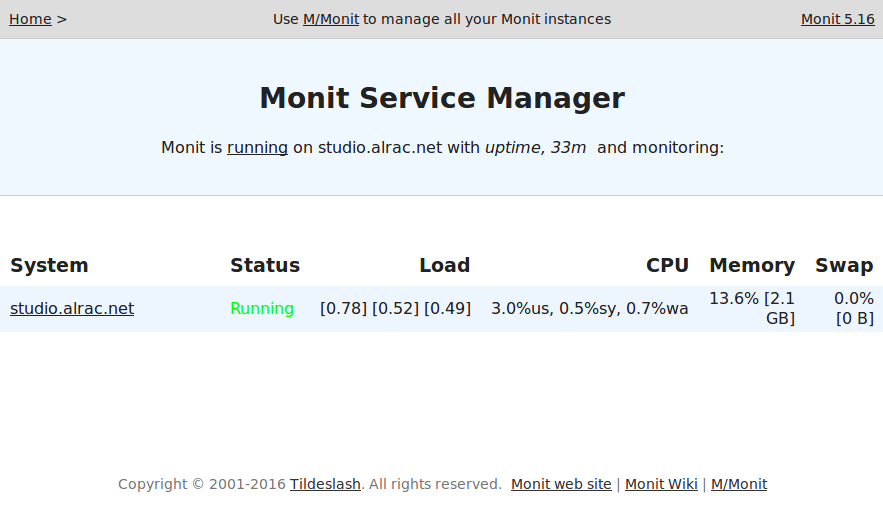
Click on the system name to see more statistics, including memory, CPU, and uptime.

That is fun and easy, and so is adding more services to monitor, like this example for the Apache HTTP server on Ubuntu.

check process apache with pidfile /var/run/apache2/apache2.pid
    start program = "service apache2 start" with timeout 60 seconds
    stop program  = "service apache2 stop"
    if cpu > 80% for 5 cycles then restart
    if totalmem > 200.0 MB for 5 cycles then restart
    if children > 250 then restart
    if loadavg(5min) greater than 10 for 8 cycles then stop
    depends on apache2.conf, apache2
    group server    

Use the appropriate commands for your Linux distribution. Find your PID file with this command:

echo $(. /etc/apache2/envvars && echo $APACHE_PID_FILE)

The various distros package Apache differently. For example, on Centos 7 use systemctl start/stop httpd.

After saving your changes, run the syntax checker, and then reload:

$ sudo monit -t
Control file syntax OK
$ sudo monit reload
Reinitializing monit daemon

This example shows how to monitor key files and alert you to changes. The Apache binary should not change, except when you upgrade.

    check file apache2
    with path /usr/sbin/apache2
    if failed checksum then exec "/watch/dog"
       else if recovered then alert

This example configures email alerting by adding my mailserver:

set mailserver smtp.alrac.net

monitrc includes a default email template, which you can tweak however you like.

man monit is well-written and thorough, and tells you everything you need to know, including command-line operation, reserved keywords, and complete syntax description.

apachetop

apachetop is a simple live monitor for Apache servers. It reads your Apache logs and displays updates in realtime. I use it as a fast easy debugging tool. You can test different URLs and see the results immediately: files requested, hits, and response times.

$ apachetop
last hit: 20:56:39         atop runtime:  0 days, 00:01:00             20:56:56
All:           12 reqs (   0.5/sec)         22.4K (  883.2B/sec)    1913.7B/req
2xx:       6 (50.0%) 3xx:       4 (33.3%) 4xx:     2 (16.7%) 5xx:     0 ( 0.0%)
R ( 30s):      12 reqs (   0.4/sec)         22.4K (  765.5B/sec)    1913.7B/req
2xx:       6 (50.0%) 3xx:       4 (33.3%) 4xx:     2 (16.7%) 5xx:     0 ( 0.0%)

 REQS REQ/S    KB KB/S URL
    5  0.19  17.2  0.7*/
    5  0.19   4.2  0.2 /icons/ubuntu-logo.png
    2  0.08   1.0  0.0 /favicon.ico

You can specify a particular logfile with the -f option, or multiple logfiles like this: apachetop -f logfile1 -f logfile2. Another useful option is -l, which makes all URLs lowercase. If the same URL appears as both uppercase and lowercase it will be counted as two different URLs.

Supervisor

Supervisor is a slick tool for managing scripts and commands that don’t have init scripts. It saves you from having to write your own, and it’s much easier to use than systemd.

On Debian/Ubuntu, Supervisor starts automatically after installation. Verify with ps:

$ ps ax|grep supervisord
 7306 ?        Ss     0:00 /usr/bin/python 
   /usr/bin/supervisord -n -c /etc/supervisor/supervisord.conf

Let’s take our Python hello world script from last week to practice with. Set it up in /etc/supervisor/conf.d/helloworld.conf:

[program:helloworld.py]
command=/bin/helloworld.py
autostart=true
autorestart=true
stderr_logfile=/var/log/hello/err.log
stdout_logfile=/var/log/hello/hello.log

Now Supervisor needs to re-read the conf.d/ directory, and then apply the changes:

$ sudo supervisorctl reread
$ sudo supervisorctl update

Check your new logfiles to verify that it’s running:

$ sudo supervisorctl reread
helloworld.py: available
carla@studio:~$ sudo supervisorctl update
helloworld.py: added process group
carla@studio:~$ tail /var/log/hello/hello.log
Hello World!
Hello World!
Hello World!
Hello World!

See? Easy.

Visit Supervisor for complete and excellent documentation.

Improving Security Through Data Analysis and Visualizations

We’ve all heard the saying that a picture is worth a thousand words. When done properly, visualizing data enables people to see relationships and patterns in their data that they might never see, or alternately would take them a very long time to uncover. Visualizing data also enables humans to process exponentially more data than would ever be possible simply by just looking at the raw numbers.

Ultimately, using effective data visualizations will enable a security analytics program to derive much more value from the data. There’s a term I really love that I believe was coined by Bill Franks, the Chief Analytics Officer of Teradata, which is time to insight (TTI). TTI is a measure of how long it takes to go from raw data to something of value. It is important, especially in security, because in the security realm, insights’ value decreases over time. Effective visualization can dramatically decrease the TTI and thus improve your organization’s response time and increase the value of insights and analytic efforts.

Read more at O’Reilly

How I Learned Go Programming

Go is a relatively new programming language, and nothing makes a developer go crazier than a new programming language, haha! As many new tech inventions, Go was created as an experiment. The goal of its creators was to come up with a language that would resolve bad practices of others while keeping the good things. It was first released in March 2012. Since then Go has attracted many developers from all fields and disciplines.

During the second quarter of this Year, I joined ViVA XD, an In-flight entertainment platform changing the world one trip at a time. We chose Go to build the whole infrastructure. Go was/is still an awesome choice for us in terms of performance, and its fast and simple development process.

In this article, I’ll give a short introduction of the Go language and it would serve as a motivation for further reading.

Read more at Dev.to

The DevSecOps Skills Gap

Few enterprise IT trends have evolved from buzzword to must-have as solidly as DevOps. Virtually everyone agrees that a software development and delivery process that bridges the traditional gap between dev teams and operations professionals is a good thing for the enterprise, an approach that is almost certain to deliver software faster and more reliably.

And yet, the results of a just-published survey(“DevSecOps Global Skills Survey: Trends in training and education within developer and IT operations communities”) suggests that the rush to adopt DevOps practices might be leading enterprises to an insecure place.

Sponsored by application security firm Veracode and DevOps.com, a site dedicated to DevOps education and community building, the survey of IT professionals uncovered the disturbing fact that “developers today lack the formal education and skills they need to produce secure software at DevOps speed.”

Read more at ADT Mag

Changing the World with the Power of Cognitive Computing

In his keynote at Open Source Summit in Los Angeles, Tanmay Bakshi will talk about how he’s using cognitive and cloud computing to change the world through open source initiatives, including “The Cognitive Story,” which is aimed at augmenting and amplifying human capabilities. Through this project, Bakshi is working to decipher brain wave data through AI and neural networks and provide the ability to communicate to those who cannot communicate naturally.

Bakshi is a software and AI/cognitive developer, author, algorithm-ist, TEDx speaker, IBM Champion for Cloud, and Honorary IBM Cloud Advisor. He also hosts the IBM Facebook Live Series called “Watson Made Simple with Tanmay.”

At age 13, Bakshi is on a mission to reach and help at least 100,000 aspiring beginners learn how to code, by sharing his knowledge through his YouTube channel “Tanmay Teaches” and through his books, keynotes, workshops, and seminars. Here, Bakshi shares more about his work and his upcoming keynote.

Linux.com: Can you tell us about how you are involved with open source? What are some projects that you maintain or have founded?

Tanmay Bakshi: I am a huge supporter of open-source code and technology. I have founded open source projects that I actively maintain. One of these projects is AskTanmay, an open source web-based Natural Language Question Answering (NLQA) System, which was one of my very first Watson projects.

I also have a YouTube channel called Tanmay Teaches, where I love to share my knowledge about topics like computing, programming, algorithms, Watson/AI, machine learning, math, and science. When I find something I think the community needs to know about, I create a tutorial, build the entire application, and explain and open source the project on GitHub. To date, I have 144 videos and counting.

Another project I’m closely involved with, which will touch a lot of people’s lives, is “The Cognitive Story.” It’s a project that I’m a part of, and it uses artificial intelligence in a field where I believe it can make the most impact — healthcare. The point of The Cognitive Story is to augment people’s lives using the power of cognitive computing and AI. This is a completely open source project, and anyone is welcome to take help from this project and also contribute to its common cause.

Furthermore, the reason I’m so passionate about open source is that it’s one of the ways through which I can share my knowledge. Lots of people reach out to me with their problems and questions that they have about coding and technology. When a project is open source, nobody needs to “rediscover fire” or “reinvent the wheel” — they’re not spending time rebuilding a base that’s already been built. They’re working on top of the base to create even better software that can benefit the community.

That is the main reason I love Linux, and at Open Source Summit North America, I look forward to connecting with more supporters of open source.

Linux.com: How are you involved with these various projects?

Bakshi: DeepSPADE is one of my most recent AI projects, and I’m very excited about it — the basic point of DeepSPADE is to detect spam on public community websites and automatically report it to the people who can take care of it. It uses a very deep Convolutional Neural Network (CNN) + Gated Recurrent Unit (GRU) model to achieve this. You can find out more about it on a blog that I wrote.

AskTanmay was my very first Watson project, and it’s an NLQA system that can answer natural language questions. It uses a combination of IBM Watson’s NLU and NLC services with BiDAF (Bi-Directional Attention Flow) to understand online resources to answer your questions. This open source code is available on GitHub.

The first chapter in The Cognitive Story (TCS) is to help those with special needs and disabilities. Our very first goal here is to help a quadriplegic girl who lives north of Toronto, and her name is Boo. She’s unable to communicate or express herself in any way — and only her mom can understand the very broad concepts she tries to convey, which is why we’ve given her mom the title of “Intimate Interpreter.” My role in TCS is to implement deep learning systems to understand Boo’s EEG brain waves and decipher them into what she’s trying to communicate. The project is open source and is available on GitHub.

Linux.com: What’s the common theme among these projects?

Bakshi: Whether it be (a) trying to reduce the time it takes to research something, (b) allowing website users to have a better experience, or (c) allowing those who can’t communicate naturally to communicate via AI, the commonality is that I want to share my knowledge through these open source projects. We are at a point in time where conventional computing alone is not able to help us. As an Open Source Community, we need to build and provide tools in the hands of those working in healthcare, security, agriculture, science, education, etc., so that they can do their work better and the entire community can benefit. All these projects use machine learning to make people’s lives easier and better to live.

Linux.com: What is going to be the core focus of your talk at Open Source Summit?

Bakshi: In my talk, I’ll primarily urge everyone to understand the importance of open sourcing AI technology. Since AI is still an evolving technology, yet already such an integral part of our lives, there’s a need to expand this technology at an even more rapid pace through the power of open source – we’re only holding back our own progress by keeping our code to ourselves.

Linux.com: You are also hosting a Birds of a Feather session at OS Summit. Can you tell us a bit about it?

Bakshi: In my BoF talk, I will take a deep-dive into the working of the DeepSPADE system: why it’s structured as it is and the logic behind the model. I’ll also talk about the evolution of the model, and why I chose the CNN+GRU method.

Linux.com: Who should be attending your talk?

Bakshi: I’d recommend my keynote to machine learning beginners/experts, and those who are curious as to how the power of AI and ML can not only change but also augment their lives and amplify their skills. I’d recommend my BoF talk to all those who have used machine learning before, or are machine learning experts, and who are interested in how and why DeepSPADE works.

Check out the full schedule for Open Source Summit here. Linux.com readers save on registration with discount code LINUXRD5Register now!

How Open Source Contributes to Microsoft’s Cloud Strategy

This article was sponsored by Microsoft and written by Linux.com.

Julia Liuson, Corporate Vice President of Developer Tools & Services at Microsoft, says Microsoft’s support for open source is evolving in every dimension. In this interview, ahead of her Open Source Summit North America keynote presentation Open Source & Cloud Application Platform: Our Learnings from a Developer-First Journey Liuson provides an insider view about how open source and the cloud intersect at Microsoft, where, she says, developers are focusing on building and maintaining the best hybrid cloud they can make.

Julia Liuson, Corporate Vice President of Developer Tools & Services at Microsoft
The Open Source Summit conference combines LinuxCon, ContainerCon, CloudOpen, and the new Open Community Conference under one roof. Attendees and presenters alike are gathering in Los Angeles from Sept. 11-14 to explore and discuss Linux, containers, cloud technologies, microservices, and more.

Here are some interesting insights Liuson had to share on how open source contributes to Microsoft’s cloud strategy.

Linux.com: Tell us a little about the early days of open source at Microsoft.

Liuson: I started at Microsoft as a developer 25 years ago. Roughly five years ago, as a developer I needed permission from the powers-that-be to even to look at open source code.  We knew a major change was in progress when an executive vice president sent an email to developers that said there would be no consequences for looking at open source code.  The company encouraged us to go explore. It was a mind-boggling cultural shift.

The journey since has revealed very striking changes. Support for open source is evolving in every dimension. The latest example is the expansion of the Microsoft and Red Hat alliance on simplifying containers. The synergies and innovations are amazing so much so that now open source developers are attracted to working at Microsoft. Just think about that for a moment. What a long way we’ve all come!

Linux.com: Give us some examples of how open source contributes to Microsoft’s cloud strategy.

Liuson: What we’re doing at Microsoft is focusing on building and maintaining the best hybrid cloud we can make. We have open source elements across the entire Azure service. And, Azure can run anything from a developer’s perspective. But we want to always target all possibilities and frameworks, and we want to deliver the tools, editors, and services needed to work with them.

Take our recent announcement about expanding our alliance with Red Hat on containers, for example. Windows Server containers will be natively supported on Red Hat OpenShift, which is an enterprise platform for Docker and Kubernetes. It is also the first container application platform built from the Kubernetes project that supports both Linux and Windows Server container workloads. That is huge because it breaks down silos and simplifies the work in a cloud-native agenda.

Another example, and there are many, is our Visual Studio Code, which is a code editor for building and debugging web and cloud applications. It was launched in April 2015 and now has 2 million monthly active users, and 40 percent of them are non-Windows developers.

It’s a surprise to many people to learn that companies like Google and Facebook use Visual Studio Code and are strong advocates.

There is also strong adoption from the Node.js community. We build on top of Node some people don’t realize that and there are lots of uses for all the popular languages.

Linux.com: What is Microsoft doing to help developers move to or do their work in the cloud, with hybrid clouds, or multi-clouds?

Liuson: We’re aiming to make it easier to build and release code in any cloud environment. We support multiple languages such as Node.js, PHP, Python, and Java, so developers can work in languages they prefer.

We’re also working on making Visual Studio Code tighter and easier than it already is. We’re constantly working on the tools for the latest concepts such as continuous integration and continuous deployment so that they not only carry over to cloud, but can be cloud-native, too.

Linux.com: What is the most striking thing Microsoft is doing in terms of using open source to influence its cloud strategy?

Liuson: We get involved early in open source projects and work hard at making meaningful contributions along the way, because those are very important. We do work hard to earn influence in projects so we can help shape things so that projects work out well for our own customers but for others, too. But beyond that, we are designing projects in the open now with .Net. This lets developers see what we are doing and give us immediate feedback so we can improve and adopt developer suggestions on the fly. We are evolving run time in the cloud so that everything works really well. You can expect to see more open source influences in our culture and products, and especially in all things cloud.

Check out the full schedule for Open Source Summit here. Linux.com readers save on registration with discount code LINUXRD5Register now!

3 Android Apps to Help You Learn Linux

Everyone learns in different ways. For some the best means is by doing, while for others it’s all about reading. No matter your preference, there’s an app for that.

Even for learning the Linux operating system.

That’s right, Linux. If you’re a systems administrator, an understanding of Linux has become unavoidable. To that end, it’s time you start boning up on the platform. If you happen to have an Android device in your pocket, take it out and start learning; because I’m going to introduce you to a collection of apps that will help school you on the open source operating system.

Are you ready?

Read more at Tech Republic

The Forgotten Secret to DevOps Success: Measurement

The enterprise DevOps market is shaping up to be one of the fastest growing markets in technology. According to Gartner it reached $2.3 Billion in 2015, up 21% over 2014. As companies invest more in digital transformation to stay relevant, the need to build their own software to drive growth is paramount.

However, a recent study from Forrester Research and Blueprint paints a confusing picture: While DevOps is anecdotally adding value, 50% of practitioners struggle to link DevOps with positive ROI. How can that be the case when so many believe DevOps is no longer a nice-to-have but a need-to-have in order to stay in business?

Measuring the end-to-end DevOps value stream is the key to delivering value and tracking its ROI. Since IT teams can focus on only a few initiatives at a time, it’s critical to identify existing constraints and focus on the most important work to accelerate your transformation and deliver true business value with DevOps. 

Read more at InformationWeek

Maneuvering Around Run Levels on Linux

On Linux systems, run levels are operational levels that describe the state of the system with respect to what services are available.

One run level is restrictive and used only for maintenance; network connections will not be operational, but admins can log in through a console connection.

Others allow anyone to log in and work, but maybe with some differences in the available services. This post examines how run levels are configured and how you can change the run level interactively or modify what services are available.

Read more at NetworkWorld

Facebook to Open Source LogDevice for Storing Logs from Distributed Data Centers

Facebook is planning to open source LogDevice, the company’s custom-built solution for storing logs collected from distributed data centers. The company made the announcement as part of its Scale conference.

Logs are used to track database events. If a server suffers an outage for any reason, companies need a way to debug, perform security audits and ensure consistency between servers. This is particularly important to Facebook, which holds immense amounts of your content across its massive data centers around the world.

LogDevice is capable of recording data regardless of hardware or network issues. If something breaks, it will simply hand-off the task of collecting logs. And when everything turns back on, LogDevice can restore records at between five and 10 gigabytes per second.

Read more at TechCrunch