Home Blog Page 489

Half a Dozen Clever Linux Command Line Tricks

Some very useful commands for making life on the command line more rewarding.

Working on the Linux command can be a lot of fun, but it can be even more fun when you use commands that take less work on your part or display information in interesting and useful ways. In today’s post, we’re going to look at half a dozen commands that might make your time on the command line more profitable.

watch

The watch command will repeatedly run whatever command you give it and show you the output. By default, it runs the command every two seconds. Each successive running of the command overwrites what it displayed on the previous run, so you’re always looking at the latest data.

Read more at Network World

Cloud Foundry Foundation: A Platform Where Competitors Collaborate

The Linux Foundation is host to more than 100 open source projects, but only a handful are foundations unto themselves. Cloud Foundry Foundation is unique in its standing as a Linux Foundation project: a nonprofit foundation and an open source project that came to the table fully formed. Incepted at VMware in 2010, Cloud Foundry was transferred to Pivotal in 2013 before being open sourced, at which point the Cloud Foundry Foundation was established.

The importance of the Foundation is multifaceted, but its primary significance is it holds all of the intellectual property for Cloud Foundry — and because it is a 501(c)(6), that means the intellectual property can never be transferred back to a for-profit company.

Read more at The Linux Foundation

Teaching Kids Coding, by the Book

Over the past five years, some 40,000 girls have learned to code through the Girls Who Code’s summer camps and afterschool programs. But Ms. Saujani wanted to expand the group’s reach, and was looking for new ways to recruit girls into the tech industry.

For a tech evangelist, her solution was surprisingly retro and analog: books. Girls Who Code is creating a publishing franchise, and plans to release 13 books over the next two years through a multibook deal with Penguin. The titles range from board books and picture books for babies and elementary school children, to nonfiction coding manuals, activity books and journals, and a series of novels featuring girl coders.

This week, the organization is releasing its first two books — an illustrated nonfiction coding manual by Ms. Saujani, and a novel, “The Friendship Code,” which features a group of girls who become friends in an after-school coding club.

Read more at NYTimes

Understanding OPNFV Starts Here

If telecom operators or enterprises were to build their networks from scratch today, they would likely build them as software-defined resources, similar to Google or Facebook’s infrastructure. That’s the premise of Network Functions Virtualization (NFV).

NFV is a once in a generation disruption that will completely transform how networks are built and operated. And, OPNFV is a leading open source NFV project that aims to accelerate the adoption of this technology.

Are you a telecom operator or connected enterprise employee wondering which open source projects might help you with your NFV transformation initiatives? Or a technology vendor attempting to position your products and services in the new NFV world? Or perhaps an engineer, network operator or business leader wanting to progress your career using open source projects (case in point, in 2013 Rackspace stated that network engineers with OpenStack skills made, on average, 13 percent more salary than their counterparts)?  If any of this applies to you, the Understanding OPNFV book is a perfect resource for you.

OPNFV BookIn 11 easy-to-read chapters and over 144 pages, this book (written by Nick Chase from Mirantis and me) covers an entire range of topics from an overview of NFV, NFV transformation, all aspects of the OPNFV project, to VNF onboarding. After reading this book, you will have an excellent high-level understanding of what OPNFV is and how it can help you or your organization. This book is not specifically meant for developers, though it may be useful for background information. If you are a developer looking to get involved in a specific OPNFV project as a contributor, then wiki.opnfv.org is still the best resource for you.

In this blog series, we will give you a flavor of portions of the book — in terms of what’s there and what you might learn.

Let’s start with the first chapter. Chapter 1, no surprise, provides an introduction to NFV. It gives a super-brief overview of NFV in terms of business drivers (the need for differentiated services, cost pressures and need for agility), what NFV is and what benefits you can expect from NFV.              

Briefly, NFV enables complex network functions to be performed on compute nodes in data centers. A network function performed on a compute node is called a Virtualized Network Function (VNF). So that VNFs can behave as a network, NFV also adds the mechanisms to determine how they can be chained together to provide control over traffic within a network.     

Although most people think of it in terms of telecommunications, NFV encompasses a broad set of use cases, from Role Based Access Control (RBAC) based on application or traffic type, to Content Delivery Networks (CDN) that manage content at the edges of the network (where it is often needed), to the more obvious telecom-related use cases such as Evolved Packet Core (EPC) and IP Multimedia System (IMS).        

Additionally, some of the main benefits include increased revenue, improved customer experience, reduced operational expenditure (OPEX), reduced capital expenditures (CAPEX) and freed-up resources for new projects. This section also provides results of a concrete NFV total-cost-of-ownership (TCO) analysis. Treatment of these topics is brief since we assume you will have some NFV background; however, if you are new to NFV, not to worry — the introductory material is adequate to understand the rest of the book.

The chapter concludes with a summary of NFV requirements  security, performance, interoperability, ease-of-operations and some specific requirements such as service assurance and service function chaining. No NFV architecture or technology can be truly successful without meeting these requirements.

After reading this chapter, you will have a good overview of why NFV is important, what NFV is, and what is technically required to make NFV successful. We will look at following chapters in upcoming blog posts.

This book has proven to be our most popular giveaway at industry events and a Chinese version is now under development! But you can download the eBook in PDF right now, or order a printed version on Amazon.

Splitting and Re-Assembling Files in Linux

Linux has several utilities for splitting up files. So why would you want to split your files? One use case is to split a large file into smaller sizes so that it fits on smaller media, like USB sticks. This is also a good trick to transfer files via USB sticks when you’re stuck with FAT32, which has a maximum file size of 4GB, and your files are bigger than that. Another use case is to speed up network file transfers, because parallel transfers of small files are usually faster.

We’ll learn how to use csplit, split, and cat to chop up and then put files back together. These work on any file type: text, image, audio, .iso, you name it.

Split Files With csplit

csplit is one of those funny little commands that has been around forever, and when you discover it you wonder how you ever made it through life without it. csplit divides single files into multiple files. This example demonstrates its simplest invocation, which divides the file foo.txt into three files, split at line numbers 17 and 33:

$ csplit foo.txt 17 33
2591
3889
2359

csplit creates three new files in the current directory, and prints the sizes of your new files in bytes. By default, each new file is named xxnn:

$ ls
xx00
xx01
xx02

You can view the first ten lines of each of your new files all at once with the head command:

$ head xx*

==> xx00 <==
Foo File
by Carla Schroder

Foo text

Foo subheading

More foo text

==> xx01 <==
Foo text

Foo subheading

More foo text

==> xx02 <==
Foo text

Foo subheading

More foo text

What if you want to split a file into several files all containing the same number of lines? Specify the number of lines, and then enclose the number of repetitions in curly braces. This example repeats the split 4 times, and dumps the leftover in the last file:

$ csplit foo.txt 5 {4}
57
1488
249
1866
3798

You may use the asterisk wildcard to tell csplit to repeat your split as many times as possible. Which sounds cool, but it fails if the file does not divide evenly:

$ csplit foo.txt 10 {*}
1545
2115
1848
1901
csplit: '10': line number out of range on repetition 4
1430

The default behavior is to delete the output files on errors. You can foil this with the -k option, which will not remove the output files when there are errors. Another gotcha is every time you run csplit it overwrites the previous files it created, so give your splits new filenames to save them. Use --prefix=prefix to set a different file prefix:

$ csplit -k --prefix=mine foo.txt 5 {*}  
57
1488
249
1866
993
csplit: '5': line number out of range on repetition 9
437

$ ls
mine00
mine01
mine02
mine03 
mine04
mine05

The -n option changes the number of digits used to number your files:

 
$ csplit -n 3 --prefix=mine foo.txt 5 {4}
57
1488
249
1866
1381
3798

$ ls
mine000
mine001
mine002
mine003
mine004
mine005

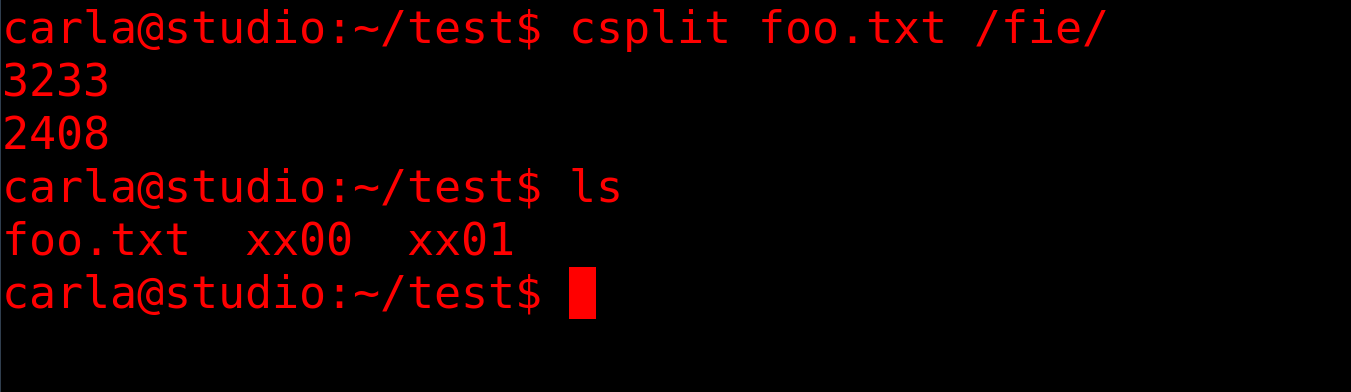
The “c” in csplit is “context”. This means you can split your files based on all manner of arbitrary matches and clever regular expressions. This example splits the file into two parts. The first file ends at the line that precedes the line containing the first occurrence of “fie”, and the second file starts with the line that includes “fie”.

$ csplit foo.txt /fie/ 

Split the file at every occurrence of “fie”:

$ csplit foo.txt /fie/ {*}

Split the file at the first 5 occurrences of “fie”:

$ csplit foo.txt /fie/ {5}

Copy only the content that starts with the line that includes “fie”, and omit everything that comes before it:

$ csplit myfile %fie% 

Splitting Files into Sizes

split is similar to csplit. It splits files into specific sizes, which is fabulous when you’re splitting large files to copy to small media, or for network transfers. The default size is 1000 lines:

$ split foo.mv
$ ls -hl
266K Aug 21 16:58 xaa
267K Aug 21 16:58 xab
315K Aug 21 16:58 xac
[...]

They come out to a similar size, but you can specify any size you want. This example is 20 megabytes:

$ split -b 20M foo.mv

The size abbreviations are K, M, G, T, P, E, Z, Y (powers of 1024), or KB, MB, GB, and so on for powers of 1000.

Choose your own prefix and suffix for the filenames:

$ split -a 3 --numeric-suffixes=9 --additional-suffix=mine foo.mv SB
240K Aug 21 17:44 SB009mine
214K Aug 21 17:44 SB010mine
220K Aug 21 17:44 SB011mine

The -a controls how many numeric digits there are. --numeric-suffixes sets the starting point for numbering. The default prefix is x, and you can set a different prefix by typing it after the filename.

Putting Split Files Together

You probably want to reassemble your files at some point. Good old cat takes care of this:

$ cat SB0* > foo2.txt

The asterisk wildcard in the example will snag any file that starts with SB0, which may not give the results you want. You can make a more exact match with question mark wildcards, using one per character:

$ cat SB0?????? > foo2.txt

As always, consult the relevant and man and info pages for complete command options.

Learn more about Linux through the free “Introduction to Linux” course from The Linux Foundation and edX.

Introducing Kubic: A Community-Driven Container-as-a-Service Platform

MicroOS is SUSE’s modern and slightly different take on cluster computing for containers and microservices. This is what you ought to know about it.

Containers have changed the way IT shops operate. The technology has made it far simpler to deploy applications in nearly any data center or cloud environment, and it’s become popular because it promises to reduce complexity.

At the openSUSE Conference in Nurnberg, Germany, the SUSE Container as a Service (CaaS) Platform team described Kubic, its open-source project being built for the SUSE Linux Enterprise MicroOS. I talked with the team’s leaders to understand the project goals, the problems it’s trying to solve for enterprise customers, Kubic’s relationship with CaaS Platform, and its community engagement plans.

Read more at HPE

Moby Summit at OSS North America

In case you missed it, the next Moby Project Summit will take place on September 14, 2017 in Los Angeles, as part of the Open Source Summit North America. Following the success of the previous editions, we’ll keep the same format which consists of short technical talks / demos in the morning and Birds-of-a-Feather sessions in the afternoon.

We have an excellent line up of speakers in store for you and are excited to share the agenda below. We hope that these sessions inspire you to come participate in the Moby community and register for this Moby summit.

Read more at Moby Project

Why Open Source Should Be the First Choice for Cloud-Native Environments

Let’s take a trip back in time to the 1990s, when proprietary software reigned, but open source was starting to come into its own. What caused this switch, and more importantly, what can we learn from it today as we shift into cloud-native environments?

An infrastructure history lesson

I’ll begin with a highly opinionated, open source view of infrastructure’s history over the past 30 years. In the 1990s, Linux was merely a blip on most organizations’ radar, if they knew anything about it. You had early buy-in from companies that quickly saw the benefits of Linux, mostly as a cheap replacement for proprietary Unix, but the standard way of deploying a server was with a proprietary form of Unix or—increasingly—by using Microsoft Windows NT.

Read more at OpenSource.com

Linux Installation Types: Server Vs. Desktop

I have previously covered obtaining and installing Ubuntu Linux, and this time I will touch on desktop and server installations. Both types of installation address certain needs. The different installs are downloaded separately from Ubuntu. You can choose which one you need from Ubuntu.com/downloads.

Regardless of the installation type, there are some similarities. Both utilize the same kernel and package manager system. The package manager system is a repository of programs that are precompiled to run on almost any Ubuntu system. Programs are grouped into packages and then packages are installed. Packages can be added from the desktop system graphical user interface or from the server system command line.

Read more at Radio

2017 Jobs Report Highlights Demand for Open Source Skills

Dice® and The Linux Foundation have once again partnered to produce the annual Open Source Jobs Report, focusing on all aspects of open source software. The 2017 Open Source Jobs Survey and Report provides an overview of the trends for open source careers, motivation for professionals in the industry, and how employers attract and retain qualified talent.

Key Findings

  • Employers are struggling to hire open source professionals, with 89 percent of hiring managers finding it difficult to find talent.
  • Nearly half (47 percent) of companies are willing to pay for employees to become open source certified — up from 33 percent in 2016.

Read more at The Linux Foundation