
Home Blog Page 490

Splitting and Re-Assembling Files in Linux

Linux has several utilities for splitting up files. So why would you want to split your files? One use case is to split a large file into smaller sizes so that it fits on smaller media, like USB sticks. This is also a good trick to transfer files via USB sticks when you’re stuck with FAT32, which has a maximum file size of 4GB, and your files are bigger than that. Another use case is to speed up network file transfers, because parallel transfers of small files are usually faster.

We’ll learn how to use csplit, split, and cat to chop up and then put files back together. These work on any file type: text, image, audio, .iso, you name it.

Split Files With csplit

csplit is one of those funny little commands that has been around forever, and when you discover it you wonder how you ever made it through life without it. csplit divides single files into multiple files. This example demonstrates its simplest invocation, which divides the file foo.txt into three files, split at line numbers 17 and 33:

$ csplit foo.txt 17 33
2591
3889
2359

csplit creates three new files in the current directory, and prints the sizes of your new files in bytes. By default, each new file is named xxnn:

$ ls
xx00
xx01
xx02

You can view the first ten lines of each of your new files all at once with the head command:

$ head xx*

==> xx00 <==
Foo File
by Carla Schroder

Foo text

Foo subheading

More foo text

==> xx01 <==
Foo text

Foo subheading

More foo text

==> xx02 <==
Foo text

Foo subheading

More foo text

What if you want to split a file into several files all containing the same number of lines? Specify the number of lines, and then enclose the number of repetitions in curly braces. This example repeats the split 4 times, and dumps the leftover in the last file:

$ csplit foo.txt 5 {4}
57
1488
249
1866
3798

You may use the asterisk wildcard to tell csplit to repeat your split as many times as possible. Which sounds cool, but it fails if the file does not divide evenly:

$ csplit foo.txt 10 {*}
1545
2115
1848
1901
csplit: '10': line number out of range on repetition 4
1430

The default behavior is to delete the output files on errors. You can foil this with the -k option, which will not remove the output files when there are errors. Another gotcha is every time you run csplit it overwrites the previous files it created, so give your splits new filenames to save them. Use --prefix=prefix to set a different file prefix:

$ csplit -k --prefix=mine foo.txt 5 {*}  
57
1488
249
1866
993
csplit: '5': line number out of range on repetition 9
437

$ ls
mine00
mine01
mine02
mine03 
mine04
mine05

The -n option changes the number of digits used to number your files:

 
$ csplit -n 3 --prefix=mine foo.txt 5 {4}
57
1488
249
1866
1381
3798

$ ls
mine000
mine001
mine002
mine003
mine004
mine005

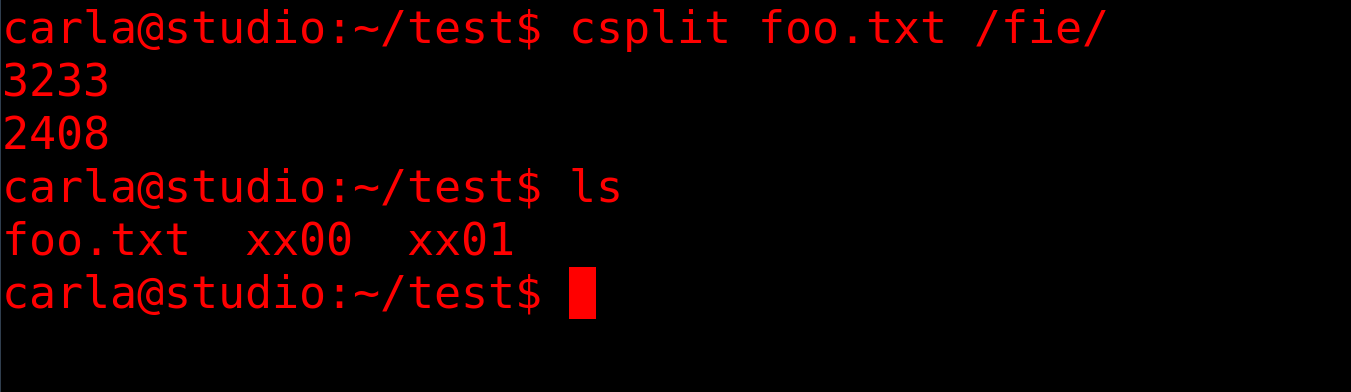
The “c” in csplit is “context”. This means you can split your files based on all manner of arbitrary matches and clever regular expressions. This example splits the file into two parts. The first file ends at the line that precedes the line containing the first occurrence of “fie”, and the second file starts with the line that includes “fie”.

$ csplit foo.txt /fie/ 

Split the file at every occurrence of “fie”:

$ csplit foo.txt /fie/ {*}

Split the file at the first 5 occurrences of “fie”:

$ csplit foo.txt /fie/ {5}

Copy only the content that starts with the line that includes “fie”, and omit everything that comes before it:

$ csplit myfile %fie% 

Splitting Files into Sizes

split is similar to csplit. It splits files into specific sizes, which is fabulous when you’re splitting large files to copy to small media, or for network transfers. The default size is 1000 lines:

$ split foo.mv
$ ls -hl
266K Aug 21 16:58 xaa
267K Aug 21 16:58 xab
315K Aug 21 16:58 xac
[...]

They come out to a similar size, but you can specify any size you want. This example is 20 megabytes:

$ split -b 20M foo.mv

The size abbreviations are K, M, G, T, P, E, Z, Y (powers of 1024), or KB, MB, GB, and so on for powers of 1000.

Choose your own prefix and suffix for the filenames:

$ split -a 3 --numeric-suffixes=9 --additional-suffix=mine foo.mv SB
240K Aug 21 17:44 SB009mine
214K Aug 21 17:44 SB010mine
220K Aug 21 17:44 SB011mine

The -a controls how many numeric digits there are. --numeric-suffixes sets the starting point for numbering. The default prefix is x, and you can set a different prefix by typing it after the filename.

Putting Split Files Together

You probably want to reassemble your files at some point. Good old cat takes care of this:

$ cat SB0* > foo2.txt

The asterisk wildcard in the example will snag any file that starts with SB0, which may not give the results you want. You can make a more exact match with question mark wildcards, using one per character:

$ cat SB0?????? > foo2.txt

As always, consult the relevant and man and info pages for complete command options.

Learn more about Linux through the free “Introduction to Linux” course from The Linux Foundation and edX.

Introducing Kubic: A Community-Driven Container-as-a-Service Platform

MicroOS is SUSE’s modern and slightly different take on cluster computing for containers and microservices. This is what you ought to know about it.

Containers have changed the way IT shops operate. The technology has made it far simpler to deploy applications in nearly any data center or cloud environment, and it’s become popular because it promises to reduce complexity.

At the openSUSE Conference in Nurnberg, Germany, the SUSE Container as a Service (CaaS) Platform team described Kubic, its open-source project being built for the SUSE Linux Enterprise MicroOS. I talked with the team’s leaders to understand the project goals, the problems it’s trying to solve for enterprise customers, Kubic’s relationship with CaaS Platform, and its community engagement plans.

Read more at HPE

Moby Summit at OSS North America

In case you missed it, the next Moby Project Summit will take place on September 14, 2017 in Los Angeles, as part of the Open Source Summit North America. Following the success of the previous editions, we’ll keep the same format which consists of short technical talks / demos in the morning and Birds-of-a-Feather sessions in the afternoon.

We have an excellent line up of speakers in store for you and are excited to share the agenda below. We hope that these sessions inspire you to come participate in the Moby community and register for this Moby summit.

Read more at Moby Project

Why Open Source Should Be the First Choice for Cloud-Native Environments

Let’s take a trip back in time to the 1990s, when proprietary software reigned, but open source was starting to come into its own. What caused this switch, and more importantly, what can we learn from it today as we shift into cloud-native environments?

An infrastructure history lesson

I’ll begin with a highly opinionated, open source view of infrastructure’s history over the past 30 years. In the 1990s, Linux was merely a blip on most organizations’ radar, if they knew anything about it. You had early buy-in from companies that quickly saw the benefits of Linux, mostly as a cheap replacement for proprietary Unix, but the standard way of deploying a server was with a proprietary form of Unix or—increasingly—by using Microsoft Windows NT.

Read more at OpenSource.com

Linux Installation Types: Server Vs. Desktop

I have previously covered obtaining and installing Ubuntu Linux, and this time I will touch on desktop and server installations. Both types of installation address certain needs. The different installs are downloaded separately from Ubuntu. You can choose which one you need from Ubuntu.com/downloads.

Regardless of the installation type, there are some similarities. Both utilize the same kernel and package manager system. The package manager system is a repository of programs that are precompiled to run on almost any Ubuntu system. Programs are grouped into packages and then packages are installed. Packages can be added from the desktop system graphical user interface or from the server system command line.

Read more at Radio

2017 Jobs Report Highlights Demand for Open Source Skills

Dice® and The Linux Foundation have once again partnered to produce the annual Open Source Jobs Report, focusing on all aspects of open source software. The 2017 Open Source Jobs Survey and Report provides an overview of the trends for open source careers, motivation for professionals in the industry, and how employers attract and retain qualified talent.

Key Findings

  • Employers are struggling to hire open source professionals, with 89 percent of hiring managers finding it difficult to find talent.
  • Nearly half (47 percent) of companies are willing to pay for employees to become open source certified — up from 33 percent in 2016.

Read more at The Linux Foundation

When Good Containers Go Bad

Tim Mackey, a technical evangelist for Black Duck Software, engages with technical communities to help them solve application security problems. At Open Source Summit in Los Angeles, Mackey will be delivering a talk titled “A Question of Trust – When Good Containers Go Bad.”

Mackey says that as container adoption increases, the pace of information flow from Ops back to Dev needs to increase, too. If malicious actors have greater access to information or greater resources to create exploits than, for example, a multi-national financial services company, those malicious actors are in the driver’s seat when it comes to security.

In his talk, Mackey will deconstruct some significant vulnerabilities, examine how information flows, and explain when various “organizations” have an information advantage. “I also look at a few issues from the past and how they’re impacting the modern world. The end goal is to increase awareness of the types of issues we face and how to better protect ourselves and build better products moving forward,” said Mackey.

We talked with Mackey to learn more about his talk.

Linux.com: What’s the inspiration behind your talk? What are the areas you will be touching on?

Tim Mackey: Over the past several years we’ve seen major vulnerability after vulnerability disclosed against a variety of open source components. These disclosures have led some to question the role of open source technologies in modern application development. Rather than have a religious debate, I’ve chosen to focus on the attributes which make open source different from closed source commercial products and how information flow is a key challenge for us — particularly when it comes to security.

As part of that effort, I decompose multiple vulnerabilities to show how information flow is biased towards malicious actors. With such a bias, defenders are often at a disadvantage due to both awareness of issues and point in time decisions they make while performing triage. Minimally. this can lead to delays in mitigation, but at the extreme it can lead to a belief that a given vulnerability doesn’t represent a viable attack.

Linux.com: Have there been cases of containers gone bad? Especially when most are hosted on trusted platforms like DockerHub?

Mackey: Containers go bad everyday, and often without warning. This is probably best illustrated by example. Let’s assume we’re working for a very security conscious organization and have governance rules which dictate all applications must pass a static code analysis and have any exposed interfaces fuzzed. We also can assume that our public facing systems are subject to penetration testing and have sophisticated perimeter defenses. In this environment, we create a container image that passes all tests and is then deployed on this trusted platform and scaled out.

Now that our application has been deployed, let’s add to the mix a CVE, which is disclosed say within hours of the release of our application. All containers deployed using this image are now at an increased level of risk of compromise. Quantifying that risk is a challenge for most organizations, but the bigger challenge comes when you need to identify which container images are impacted by the CVE and trigger remediation plans. While there is a desire to trust perimeter defenses, they often need to be reconfigured to block newly malicious traffic and may themselves be vulnerable to the new CVE.

Linux.com: Security as it’s well understood is a process and not a product, so what advice can you give to the DevOps teams to add that process in their workflow?

Mackey: Identification of risk is a crucial component of security, and risk is a function of the composition of a container image. Once you know precisely what the composition of the image is, it becomes possible to identify any potential risks. Most organizations start with traditional application security models focusing on code  they create. The goal is to ensure the risk of what’s created by the organization is minimized, and continual code scans are resource intensive from a tooling and process perspective. This leaves a large gap in containerized environments stemming from the base image and any associated dependencies. Some key questions operations teams need to answer in order to minimize risk include:

  • What security risks might present in that base image, and how often is it updated?

  • If a patch is issued for that base image, what is the risk associated with consuming the patch?

  • How many versions behind tip can a project or component be before it becomes too risky to consume?

  • Given my tooling, how quickly will I be informed of component updates for dependencies which directly impact my containers?

  • Given the structure of a component or project, do malicious actors have an easy way to gain an advantage when it comes to issues raised against the component?

Linux.com: Most platforms come with quite a lot of security features, scanning, and mitigation, do you feel that it’s not enough?

Mackey: Fundamental security measures like SELinux of AppArmour, reduction in system capabilities, strict enforcement of image admission and restrictive network profiles are vital, but not sufficient. DevOps teams are tasked with responding to changing business priorities while balancing risk and operational efficiency. Tools performing container runtime scanning both impose a performance hit to cluster nodes and potentially expose data to scans which can limit their utility.

Mitigation measures are valuable, but without a clear understanding of the complete application environment, mitigation measures are challenged. In the end, operations teams recognize they’re under constant attack, and that malicious actors are both persistent and creative. Part of that creativity is an understanding that an attack vector which wasn’t viable a couple years ago might become viable through changes in application design or deployment systems. A perfect example of this is “Dirty Cow,” which like many race conditions only becomes more exploitable over time due to increases concurrency in modern processors.

Linux.com: Have you seen any lack of practices that make containers / microservices more vulnerable, and can you explain?

Mackey: There are a few items which I see far more often than I’d like, and many fall into the “point in time decision” camp. By way of example, consider a Dockerfile which specifies a version for the base image. Pinning the base image likely solved a problem a developer had, but is also unlikely to be revisited as new versions of the container are created. Over time, security debt builds and eventually that version is so old that APIs have changed and updating the image becomes a serious problem. Flipping the scenario around, the base image could be “latest,” which has its own set of problems. There the version in use could be radically different with each image and have a uncertain number of vulnerabilities. Related to this, the desire to update to the “latest” patch is also problematic when you recognize that a given patch may fix some issues and introduce others.

Another interesting problem can be seen when a container image is “shipped.” Development teams are charged with creating applications and packaging them up. Take a CI process, for example. It should always be configured to fail a build when an application contains known security issues. This ensures vulnerable applications can accidentally become deployed but also imposes a set of trust boundaries requiring us to both shift right and left. Developers on the left need to ensure they’re making correct decisions about the composition of their applications “as deployed.” Operations teams on the right need to ensure they’re both deploying what has been vetted during development, but are also actively monitoring for issues related to what “was deployed.” Only then can the two teams actively close the loop to ensure security issues are attended to as quickly as possible.

Check out the full schedule for Open Source Summit here. Linux.com readers save on registration with discount code LINUXRD5. Register now!

Observability: What’s In A Name?

“Is observability just monitoring with another name?”

“Observability: we changed the word because developers don’t like monitoring.”

There’s been a lot of hilarious snark about this lately. Which is great, who doesn’t love A+ snark? Figured I’d take the time to answer, at least once.

Yes, in practice, the tools and practices for monitoring vs observability will overlap a whole lot … for now. But philosophically there are some subtle distinctions, and these are only going to grow over time.*

Read more at Honeycomb.io

How to Get Started with the Foreman SysAdmin Tool

Foreman offers a powerful set of system management tools, from process automation to security compliance and more. Here’s how to get started.

Is your system management tool robust enough?

As your organization grows, so does your workload—and the IT resources required to manage it. There is no “one-size-fits-all” system management solution, but a centralized, open source tool such as Foreman can help you manage your company’s IT assets by provisioning, maintaining, and updating hosts throughout the complete lifecycle.

Foreman becomes even more powerful when integrated with other open source projects and plugins, and I will discuss these in more detail below. To get started, however, let’s consider key functions of an effective system management tool.

Read more at OpenSource.com

Unlike Oil and Water, Legacy and Cloud Mix Well

For all the hype about moving applications to the cloud and making legacy apps “cloud-native,” those of us in IT have a poorly-kept secret: legacy systems are alive and well – and they’re not going anywhere anytime soon. Though the cloud promises the cost savings and scalability that businesses are eager to adopt, many organizations are not yet ready to let go of existing applications that required massive investments and have become essential to their workflows.

The process of rewriting these often mission-critical apps for the cloud typically ends up being lengthy and expensive, with unexpected problems that vary from company to company. Some of the challenges an organization will face when rewriting applications include:

1. Latency Issues…

Read more at InsideHPC