Home Blog Page 500

Understanding Docker Adoption Patterns

Ilan Rabinovitch, Director of Technical Community at Datadog, will be giving a talk at Open Source Summit NA titled “Docker Adoption Patterns” based on information gathered through Datadog’s research.   

Rabinovitch has years of experience leading infrastructure and reliability engineering teams at companies such as Ooyala and Edmunds.com and is also a co-founder of open source community events such as SCALE, Texas Linux Fest, and DevOpsDay LA. Here, Rabinovitch shares all the reasons why you need to attend his talk.

Linux.com: How are containers affecting us in real life? What kind of companies should care about your talk?

Ilan Rabinovitch: Over the last decade, public cloud providers and virtualization have, through automation, reduced human and financial cost of provisioning or re-provisioning.  Once you could replace instances with an API call, it no longer makes sense to troubleshoot unhealthy hosts, when you can just replace them. Further autoscaling often meant that hosts might only be around long enough to handle a spike in load during peak traffic and be churned out once that load subsided.  Containers have taken that dynamism and turned the dial up to 11. We find that among Datadog’s customers containers are churning 9x or more times a given VM runs on them.

As far as who is adopting them, it’s fairly safe to say everyone. Our study dives into this in more detail, but we find that these are adopted by organizations both large and small.

Linux.com: What gives Datadog a unique perspective into Docker adoption patterns?

Rabinovitch: Datadog has a SaaS provider of monitoring services for applications and infrastructure. As we studied Docker adoption among our customers, we were able to include anonymized data from a sample of over 10,000 companies, and 185 million containers in real-world use. This is the largest single data set on container and orchestrator adoption, which provides us with a unique vantage point on where the industry is today.

Linux.com: Who will benefit from learning about these patterns?

Rabinovitch: While container adoption has skyrocketed over the past few years, it is still early days for adoption and many of the best practices around deployment are still being learned.  As users look to adopt these new technologies, it is helpful to see how their peers and the industry as a whole are adopting them in order to help validate their own approaches.  

Linux.com: Can you tell us some of what you have learned from your studies?

Rabinovitch: We published our last study on Docker Adoption in April 2017 and the bulk of our findings are available in it. As part of my session at OSS Summit, we will be releasing new updated facts and metrics for a study to be released around the same time.   

Linux.com: What kind of technologies do you see getting adopted?

Rabinovitch: Anecdotally, we often hear about mostly stateless applications being in containers.  In our studies we’ve been surprised to regularly find that data-stores and stateful services such as Redis, Postgres, and MySQL are some of the most frequently deployed technologies across our customer base.  

Check out the full schedule for Open Source Summit here. Linux.com readers save on registration with discount code LINUXRD5. Register now!

Tails 3 Offers Easy Anonymity for All

If you’re seriously concerned about privacy, you want to ensure you’re doing all the right things and not leaving behind a trace of what you’ve browsed. There are many reasons for this—some good, some bad. I’d like to focus on the good (naturally). In the past few years, it has become clear that tracking web histories is not a myth. Businesses, governments—anyone with the skills can make use of your browsing history. That is the very reason why technology like Tor has recently gained popularity.

Users want to reclaim their anonymity.

That is where the likes of Tails comes in. Tails lays claim to “Privacy for anyone” and they make good on that claim with tools like:

  • Tor — Tails relies on the Tor anonymity network

  • Tor Browser — A browser that works seamlessly with Tor

  • Onion Circuits — A tool that lists the circuits used by Tor

  • OnionShare  —  Anonymously share files

By using all of the above, on top of a live-only distribution, Tails makes for a very anonymous experience. And because it all works together seamlessly, you don’t have to worry about certain dependent components (e.g., starting Tor before using Tor Browser). In fact, you can fire up Tails, open up Tor Browser and immediately go to the Tor Check site and see that your Tails instance is, in fact, configured to use Tor.

This is privacy at it simplest—with a slight catch.

But wait; what exactly is Tails?

As I mentioned earlier, Tails is a live Linux distribution. What does that mean? It means you don’t install the operating system, you run it on a per-instance basis, use it for as long as you need, and shut it down when you’re done. If you want to use Tails, you burn the ISO (you must use either Firefox or Tor Browser, to download the ISO) onto a USB drive, stick the USB drive into your machine, and boot. Enjoy the privacy of Tails and then, when you’re done, reboot the computer (removing the USB drive). Everything you did within Tails is gone; you have left absolutely no trace. And, if you work with the likes of VirtualBox, you can create a virtual machine with the ISO and have Tails at the ready any time (just remember to shut it down and not save the VM in its running state).

And so, for anyone that is looking to gain as much privacy as they can, Tails is one of the easiest solutions.

What’s new in Tails 3?

Startup and shutdown

Tails 3 brings about some significant changes to the platform. First and foremost, there’s a brand new startup and shutdown experience. When you boot Tails 3, the first thing you will see is the Tails Greeter (Figure 1). In this screen, you can select your Language, Keyboard Layout, and Date/Time formats.
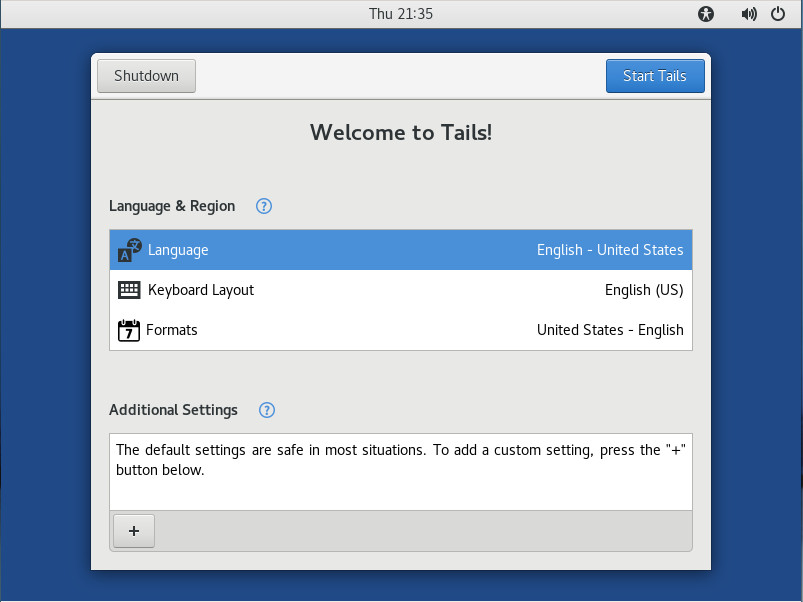
Figure 1: The Tails 3 Greeter.

Click on Additional settings and you can configure an administrator password (which is off by default), MAC address spoofing (on by default), and Network Connection (direct by default). Once you’ve configured Tails how you want it, click the Start Tails button and the default desktop will appear (Figure 2).
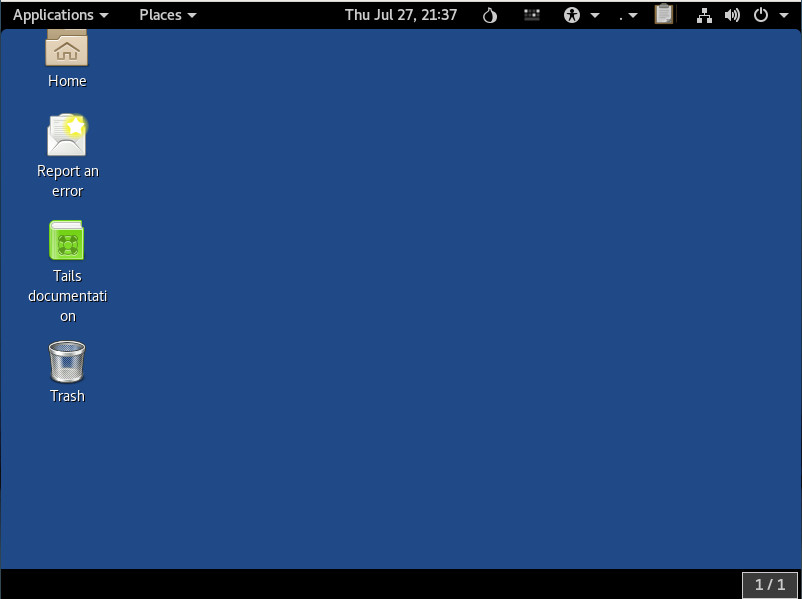
Figure 2: The Tails desktop.

The improved desktop

The desktop is based on GNOME (with a slight tweak or two, by way of extensions) and is quite user-friendly. One of the first things previous users will note is that Tails has opted to go to the dark side, using the darker GNOME theme as the default. Speaking of the desktop, the Tails file manager (GNOME Files) finally includes the built-in ability to compress and extract as well the ability to rename multiple files at the same time. Add to that, Tails makes it easy (by way of GNOME Files) to encrypt, sign, wipe, and share (via OnionShare) files, through a right-click context menu (Figure 3).
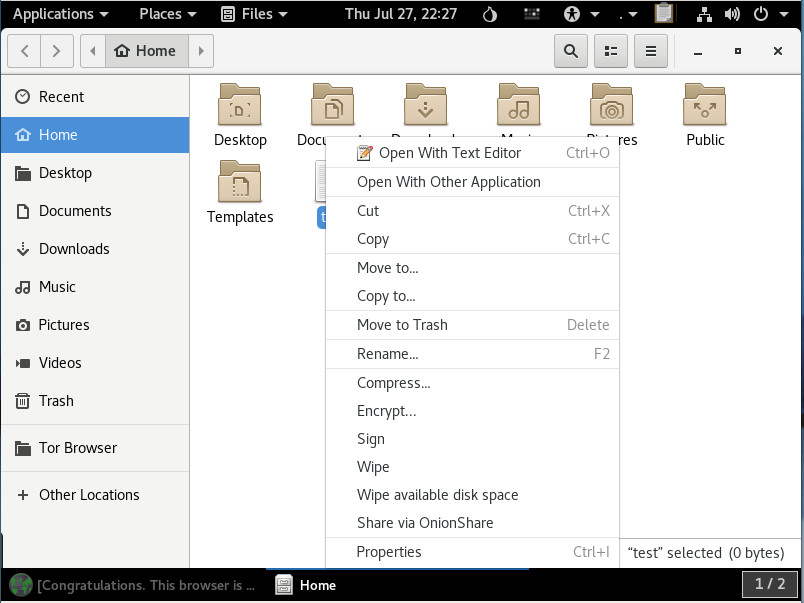
Figure 3: The GNOME Files right-click context menu, as seen through Tails.

No more 32-bit support

That’s right, Tails has opted to leave behind the aging 32-bit hardware support. This was a tough decision on their part, but it was the right move, as there is more security to be found within the 64-bit architecture.

Software updates

A number of the software packages have enjoyed updates. Once you boot up Tails, you’ll find the following release changes:

  • KeePassX from 0.4.3 to 2.0.3

  • LibreOffice from 4.3.3 to 5.2.6

  • Inkscape from 0.48.5 to 0.92.1

  • Audacity from 2.0.6 to 2.1.2

  • Enigmail from 1.8.2 to 1.9.6

  • MAT from 0.5.2 to 0.6.1

  • Dasher from 4.11 to 5.0

  • git from 2.1.4 to 2.11.0

As you can see, many of those titles are nowhere near bleeding edge; but when you’re using a live distribution, such as Tails, you’re not concerned with having the newest of the new. Even so, just because you’re looking for anonymity, doesn’t mean you don’t need to get things done. Tails has plenty of software to help you do just that. You’ll even find titles such as:

  • GIMP

  • Inkscape

  • Scribus

  • Thunderbird

  • Pidgin

  • Pitivi

  • Sound Recorder

  • And much more

In other words, don’t be fooled by the fact that Tails is a live distribution; this is still Linux, so there’s plenty of software to be had.

To read about all the changes that have been made to Tails, check out their official post here.

Amnesia

One thing you should know about tails is that it defaults to the user, amnesia. This particular user is not a member of sudo, so it is not allowed to execute tasks that require administrative permission. You can get around that during the startup. Click Additional settings at the Tails Greeter and then click Administration password. Type and verify the new administrator password and click Add (Figure 4).
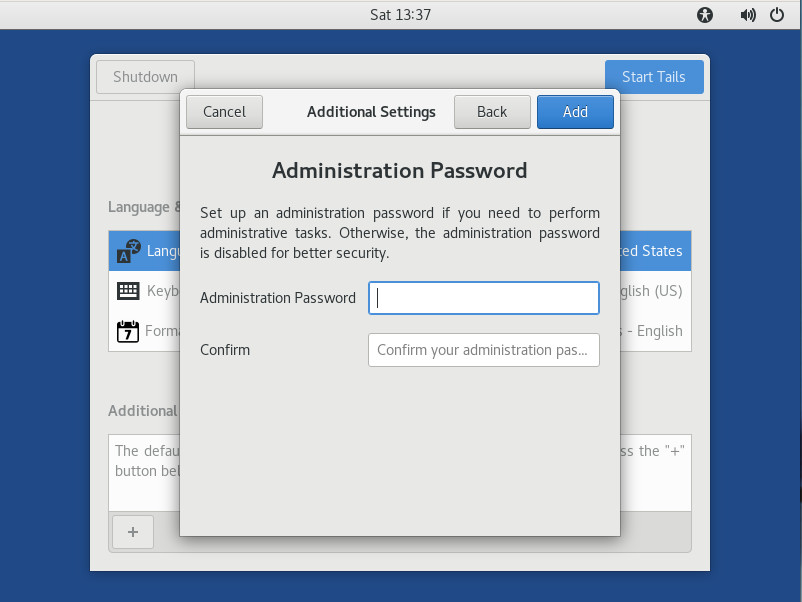
Figure 4: Adding an administrator password.

Once you’ve started Tails with an administrator password in place, the amnesia user can then work with tools like sudo. Do note, as soon as you restart Tails, that administrator password is gone and will have to be reset.

Is Tails right for you?

This question is fairly easily answered. Are you looking for the means by which you can browse and work anonymously, knowing once you shut down every trace of what you were doing will vanish? If that’s you, Tails might well be the perfect fit. Give Tails 3 a spin and enjoy anonymity at its simplest.

Learn more about Linux through the free “Introduction to Linux” course from The Linux Foundation and edX.

Heptio Releases Two New Tools to Make Kubernetes Easier to Manage

Kubernetes, the open-source system for automating the deployment and scaling of containerized applications, does its job really well. It groups an application’s containers into logical units for easy management and discovery, scales all the way from local testing to truly global production, and runs pretty much anywhere.

At the same time, the platform can be intimidating to implement — particularly for new users configuring their first-ever system running on Kubernetes.  Kubernetes is quickly becoming the de facto standard for software container orchestration, but accessing it remains a challenge for anyone who is not a hardcore systems engineer.

Heptio, founded by Kubernetes co-creators Joe Beda and Craig McLuckie, is a company that aims to make the platform more accessible.

Read more at The New Stack

7 Mistakes You’re Probably Making

It can be tough to start a new open source project. You have an awesome idea in your head, but it takes work to turn it into a productive, healthy, engaging community. Sadly (as seems to be the case in practically anything), the same mistakes are made over and over again by new projects.

Here are some of the most common mistakes open source projects make and my recommendations for avoiding them.

1. Chatting instead of shipping

Of the thousands of open source projects that kick off, too many get stuck at the outset because of a bunch of discussions on a Slack channel, mailing list, issue, or elsewhere. The discussions bounce around the house, and the scope often grows more and more lavish to incorporate the many, sundry ideas and considerations.

Read more at OpenSource.com

Site Reliability Engineer: Don’t Fall Victim to the Bias Blind Spot

To ensure websites and applications deliver consistently excellent speed and availability, some organizations are adopting Google’s Site Reliability Engineering (SRE) model. In this model, a Site Reliability Engineer (SRE) – usually someone with both development and IT Ops experience – institutes clear-cut metrics to determine when a website or application is production-ready from a user performance perspective. This helps reduce friction that often exists between the “dev” and “ops” sides of organizations. More specifically, metrics can eliminate the conflict between developers’ desire to “Ship it!” and operations desire to not be paged when they are on-call. If performance thresholds aren’t met, releases cannot move forward.

Sounds simple and straightforward enough, but you’d be surprised at how challenging the SRE role can be, given basic human psychological tendencies. Our desire to see ourselves and our teams in a positive light, and avoid negative consequences that can result in our subconsciously gaming, distorting, and manipulating metrics.

Read more at SDTimes

Difference Between apt vs apt-get Explained

You might be wondering what’s the difference between apt-get and apt? And if they have a similar command structure, what was the need for the new apt command? You might also be thinking if apt is better than apt-get? Should you be using the new apt command or stick with the good old apt-get commands?

Read the full article.

Expand Your API Experience at APIStrat: See the Full Conference Schedule

The newly announced schedule for the API Strategy & Practice Conference (APIStrat) — taking place Oct. 31 to Nov. 2 in Portland, Oregon — includes keynotes, workshops, technical talks, and more focused on the API economy. Jointly hosted by the Open API Initiative and The Linux Foundation, this conference brings together developers, IT teams, business users, and executives to discuss opportunities and challenges in the API space.

The conference program includes the following keynote speakers:

  • Yina Arenas – Microsoft

  • Glenn Block – Auth0

  • Adam Duvander – Zapier

  • Sarah Novotny – Google

APIStrat aims to spark conversations between API providers and API consumers, startups and enterprise, developers, architects, and integrators. The conference session tracks and topics include:

  • Beyond REST

  • Civic

  • Design

  • Hypermedia

  • Machine Learning

  • Management

  • Microservices

  • Protocols

  • SDK & Clients

  • Security

  • Standards & Definitions

  • Success Stories

  • Testing

  • Transformation

  • Usability

View the full lineup of all APIStrat speakers and sessions.

Registration is discounted by $300 through August 31, and academic rates are also available. In addition, applications are being accepted for diversity and need-based scholarships.

Linux.com readers receive an additional $25 off their registration with discount code LINUXRD5. Register now!

DevOps Fundamentals (LFS261) Chapter 1 – Continuous Delivery Overview

The DevOps Fundamentals course is written and presented by John Willis. Watch the sample videos here.

How to Write iptables Rules for IPv6

We US-ians have been sheltered from the exhaustion of IPv4 addresses, but they have run out. IPv6 networks are up and running, so we have no excuses for not being IPv6 literate. Today our scintillating topic is iptables rules for IPv6, because, I am sad to report, our faithful IPv4 iptables rules do not magically work on IPv6 packets, and we must write new rules.

Before we dive in, you might want to review these previous articles for basic iptables concepts and scripts:

Iptables Commands

iptables should be the same on all Linuxes, as it is part of the kernel, but if your chosen Linux distribution does something weird, it’s not my fault. You should have ip6tables, ip6tables-restore, ip6tables-save, ip6tables-apply, and their corresponding man pages. Some Linux distributions install with a ready-made firewall and their own tools for stopping and starting it. You must decide whether to disable your distro configuration, or modify it if it’s based on iptables.

ip6tables operates the same way as iptables. It even supports NAT, network address translation, although I can’t think of a good use case for NAT in IPv6. NAT does masquerading and port forwarding, which has extended the lifespan of the inadequate IPv4 address pool by making a single public IPv4 address serve many hosts in private address spaces. NAT rewrites the private addresses to the single public address, and keeps track of which packets belong to which private addresses. This isn’t necessary in IPv6 because the pool of available addresses is so large we’ll never run out (at least not in my lifetime).

Block All IPv6

Because IPv4 rules do not affect IPv6 packets, theoretically, we are vulnerable to attacks over IPv6. The Internet of Gratuitously Connected Insecure Things (IoGIT, creatively abbreviated to pronounce as “idjit”) is experiencing denial-of-service and SYN flood attacks over IPv6, though it seems to me the bigger threat is snoopy vendors who suck up and exploit our personal data. Even iRobot is joining this abusive game by collecting and selling maps of our homes, from Roomba models 960 and 980. When you can’t even trust your cute robot vacuum cleaner, they have gone too far.

You might think meh, I don’t even need IPv6, so why not block it completely? You can, though this may cause some problems, but you won’t know until you try. Add these lines to /etc/sysctl.conf:

net.ipv6.conf.all.disable_ipv6 = 1
net.ipv6.conf.default.disable_ipv6 = 1

Then load your changes:

$ sudo sysctl -p
net.ipv6.conf.all.disable_ipv6 = 1
net.ipv6.conf.default.disable_ipv6 = 1

Test this by pinging the link local address of your computer from a second computer on your LAN:

$ ping6 -c3 -I eth0 fe80::f07:3c7a:6d69:8d11
PING fe80::f07:3c7a:6d69:8d11(fe80::f07:3c7a:6d69:8d11) 
from fe80::2eef:d5cc:acac:67c wlan0 56 data bytes
--- fe80::2eef:d5cc:acac:67c ping statistics ---
3 packets transmitted, 0 received, 100% packet loss, time 2999s

This shows that it is disabled. When you re-enable IPv6, you must renew the DHCP lease on your interface to get an IPv6 address again.

Listing and Flushing Rules

First, see if you already have any rules:

$ sudo ip6tables -L
Chain INPUT (policy ACCEPT)
target     prot opt source               destination         

Chain FORWARD (policy ACCEPT)
target     prot opt source               destination         

Chain OUTPUT (policy ACCEPT)
target     prot opt source               destination 

This shows there are no existing rules. If you already have some rules, clear them with this command:

$ sudo ip6tables -F

If you already have active firewall scripts, a reboot restores your rules.

Example Host Rules

This is similar to the host firewall example in Building Linux Firewalls With Good Old Iptables: Part 2. The main difference managing ICMP packets; IPv6 relies a lot more on good ole ping, it is a bad idea to completely block ICMP, even though some howtos recommend this, because it is necessary for proper network operations. In this example all ICMP packets are allowed.

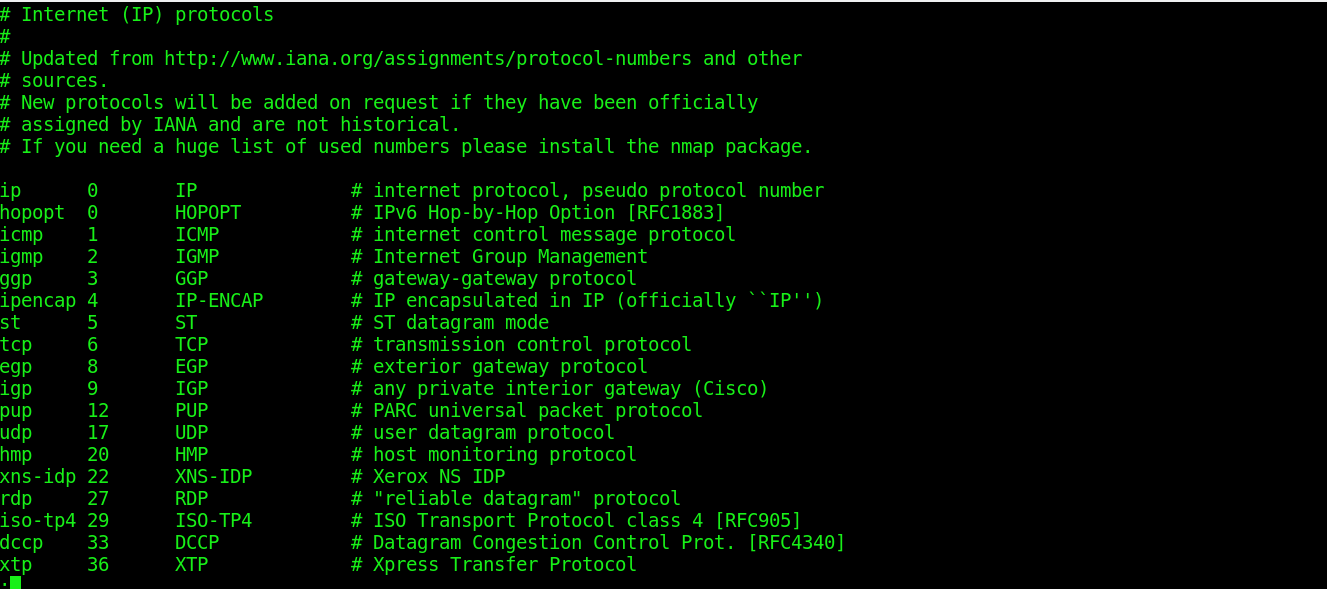
When you’re unsure about protocol names, look in /etc/protocols to find the correct names.

#!/bin/bash

# ip6tables single-host firewall script

# Define your command variables
ipt6="/sbin/ip6tables"

# Flush all rules and delete all chains
# for a clean startup
$ipt6 -F
$ipt6 -X 

# Zero out all counters
$ipt6 -Z

# Default policies: deny all incoming
# Unrestricted outgoing

$ipt6 -P INPUT DROP
$ipt6 -P FORWARD DROP
$ipt6 -P OUTPUT ACCEPT

# Must allow loopback interface
$ipt6 -A INPUT -i lo -j ACCEPT

# Reject connection attempts not initiated from the host
$ipt6 -A INPUT -p tcp --syn -j DROP

# Allow return connections initiated from the host
$ipt6 -A INPUT -m conntrack --ctstate ESTABLISHED,RELATED -j ACCEPT

# Accept all ICMP v6 packets
$ipt6 -A INPUT -p ipv6-icmp -j ACCEPT

# Optional rules to allow other LAN hosts access 
# to services. Delete $ipt6 -A INPUT -p tcp --syn -j DROP

# Allow DHCPv6 from LAN only
$ipt6 -A INPUT -m state --state NEW -m udp -p udp 
-s fe80::/10 --dport 546 -j ACCEPT

# Allow connections from SSH clients
$ipt6 -A INPUT -m state --state NEW -m tcp -p tcp --dport 22 -j ACCEPT

# Allow HTTP and HTTPS traffic 
$ipt6 -A INPUT -m state --state NEW -m tcp -p tcp --dport 80 -j ACCEPT
$ipt6 -A INPUT -m state --state NEW -m tcp -p tcp --dport 443 -j ACCEPT

# Allow access to SMTP, POP3, and IMAP
$ipt -A INPUT -m state --state NEW -p tcp -m multiport 
--dport 25,110,143 -j ACCEPT

There isn’t much in the way of updated official documentation that I can find for ip6tables other than man iptables. If you’re using online man pages make sure they are for your version, iptables --version.

In a future installment, we’ll go into detail on managing ICMP packets, controlling which ones have Internet access, which ones should be LAN-only, rate limiting, and other cool fine-tunings. We’ll also make an Internet gateway and look at rules for restricting source and destination addresses in more details.

Learn more about Linux through the free “Introduction to Linux” course from The Linux Foundation and edX.