Short Bytes: What are your expectations from your Linux-powered machines. A recently conducted Linux laptop survey throws light on various factors such as prices, compatibility issues, GPU, laptop brand, etc. which people take into consideration while buying a Linux laptop. It shows some people are willing to pay more if they get proper support.
A Linux Laptop Survey was conducted by Phoronix which welcomes people to answer a bunch of questions about what things they put first while buying a laptop or does it matter if their machine came pre-loaded with some Linux distribution. The survey received more 30,000 responses in a time span of two weeks which can be taken as a considerable figure to make a conclusion about the general choice of the people.
Network automation does not an automated network make. Today’s network engineers are frequently guilty of two indulgences. First, random acts of automation hacking. Second, pursuing aspirational visions of networking grandeur — complete with their literary adornments like “self-driving” and “intent-driven” — without a plan or a healthy automation practice to take them there.
Can a Middle Way be found, enabling engineers to set achievable goals, while attaining the broader vision of automated networks as code? Taking some inspiration from our software engineering brethren doing DevOps, I believe so.
Sometimes, while working on the command line, you arrive at a point where there’s too much text on the terminal screen, and none of that is relevant to you. So, in order to avoid distraction, you’d want to clear the terminal screen. Those new to the Linux command line may not know that there exists a dedicated command line utility that does this work for you.
In this tutorial, we will be discussing the basics of clear (the tool in question) as well as how to use it. But before we do that, it’s worth sharing that all examples/instructions mentioned in this tutorial have been tested on Ubuntu 16.04LTS.
In an earlier post, we’ve explained CPUTool for limiting and controlling CPU utilization of any process in Linux. It allows a system administrator to interrupt execution of a process (or process group) if the CPU/system load goes beyond a defined threshold. Here, we will learn how to use a similar tool called cpulimit.
Cpulimit is used to restrict the CPU usage of a process in the same way as CPUTool, however, it offers more usage options compared to its counterpart. One important difference is that cpulimit doesn’t manage system load unlike cputool.
This week in Linux and open source, the ‘Big 4″ accounting firms are becoming power players in blockchain, Oracle expands open source container efforts, and more in this weekly digest!
1) The four largest accounting firms in the world are active members of the blockchain revolution– Including Deloitte, which joined the Hyperledger Project.
3) Hyperledger’s Indy “is all about giving identity owners independent control of their personal data and relationships.” Explains Doc Searls in his op-ed about the availability of Linux for all users.
The Linux command line is a tool that every system administrator should get to know. With the power of commands at your fingertips, there’s very little you cannot do. However, along with that power comes the need to remember those commands. When you take into consideration how complicated those commands can get, it’s understandable that some admins have trouble recalling what they have done or need to do at the Bash prompt.
You may have to issue the command:
iptables -A OUTPUT -o eth0 -p tcp -m multiport
  --sports 22,80,443 -m state --state ESTABLISHED -j ACCEPT
Or, maybe you recently secure shelled into a server, but don’t recall the IP address off hand. What do you do? Most Linux admins would immediately tell you to look to your Bash history; and that would be sage advice. By typing the command history, you are presented with the last X amount of command you have run on the system. The X is determined within the ~/.bashrc file, in the line:
HISTSIZE=1000
The history command is, in fact, a great way to see what commands you’ve issued. You can comb through that, find the command you need, copy it, and then paste it back into the prompt. Or, you can, at the command prompt, simply start tapping the up arrow on your keyboard until you land on the command you need.
What if I told you there was a much, much, much easier way? There is, and it’s called fish. Fish is a friendly, interactive shell that can be installed on your Linux machine and features:
Autosuggestions
Scriptability
Man page completions
VGA color
Web-based configuration
Ease of use
I’m going to walk you through the installation and usage of the fish shell; once you’ve started using this handy tool, chances are you’ll never go back to the standard old Linux shell again.
Installation
Fish can be installed on Ubuntu, Debian, Fedora, RHEL, openSUSE, CentOS, Arch Linux, Gentoo Linux, and even mac OS and Windows. I will be demonstrating the installation on Elementary OS, so the installation for your distribution will vary (you can get instructions for all the supported platforms from the fish main page). The installation for Elementary OS (as well as most Debian-based systems) is as follows:
Open up a terminal window
Add the necessary repository with the command sudo apt-add-repository ppa:fish-shell/release-2
Update apt with the command sudo apt-get update
Install fish with the command sudo apt-get install fish
That’s it; fish is now installed and ready to serve.
First steps
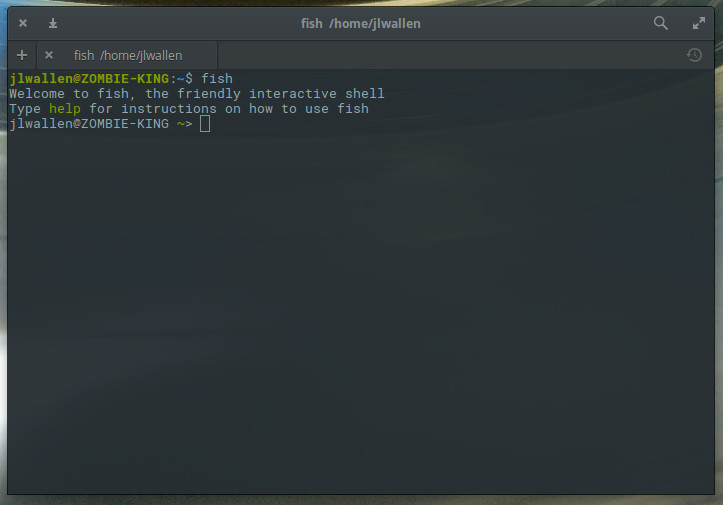
You’re at the Bash prompt, with fish installed, and you have no idea how to make use of it. That’s because you’re still in your bash prompt. To make use of fish, you have to enter the fish prompt. How do you do that? Type the command fish and you will see your prompt change (Figure 1).
Figure 1: Your change may be dramatic or subtle, depending on how you have your Bash prompt configured.
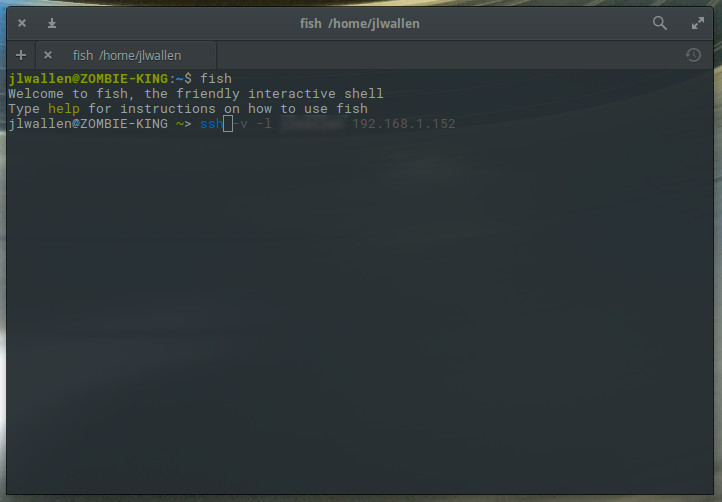
At this point, you’re ready to start using fish. The best way to do this is to start typing a command. You will see that fish does a great job of completing the command, bashed on your history. For example, if I start typing ssh, fish will complete the command with the most recent matching entry from bash history (Figure 2).
Figure 2: Fish makes great use of the Bash history.
If that’s the command you’re looking for, hit the right arrow key to accept and then hit Enter. The one caveat to fish is that, once it makes a suggestion, you cannot scroll through the history of similar commands (which would be a nice feature).
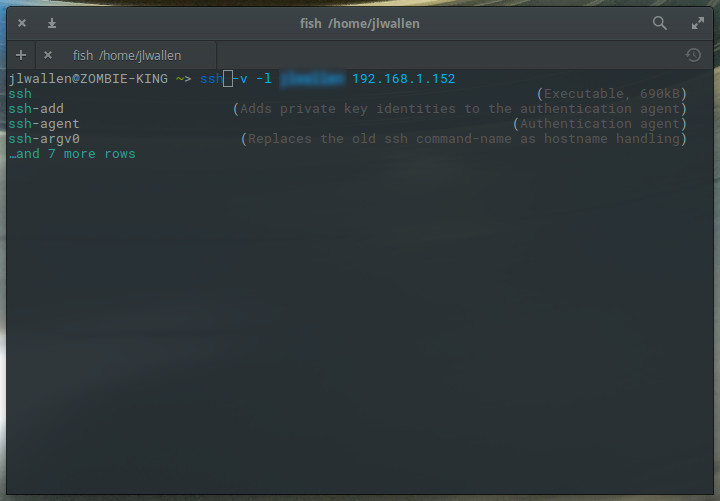
One really cool thing you can do with fish is get suggestions for commands, based on what you type. Say, for instance, there’s an ssh tool you want to use, but you can’t remember the name of the command (but you know it starts with “ssh”). Type ssh and then hit the tab key. Fish will present to you suggestions, one of which might be the command you are looking for (Figure 3).
Figure 3: Fish command suggestions.
There are so many things you can do with fish. To learn them all, your best bet is to walk through the official fish tutorial (which offers up plenty of examples that will empower your fish experience).
Once you’re done with the fish prompt, you can return to bash by typing exit.
Configuring fish
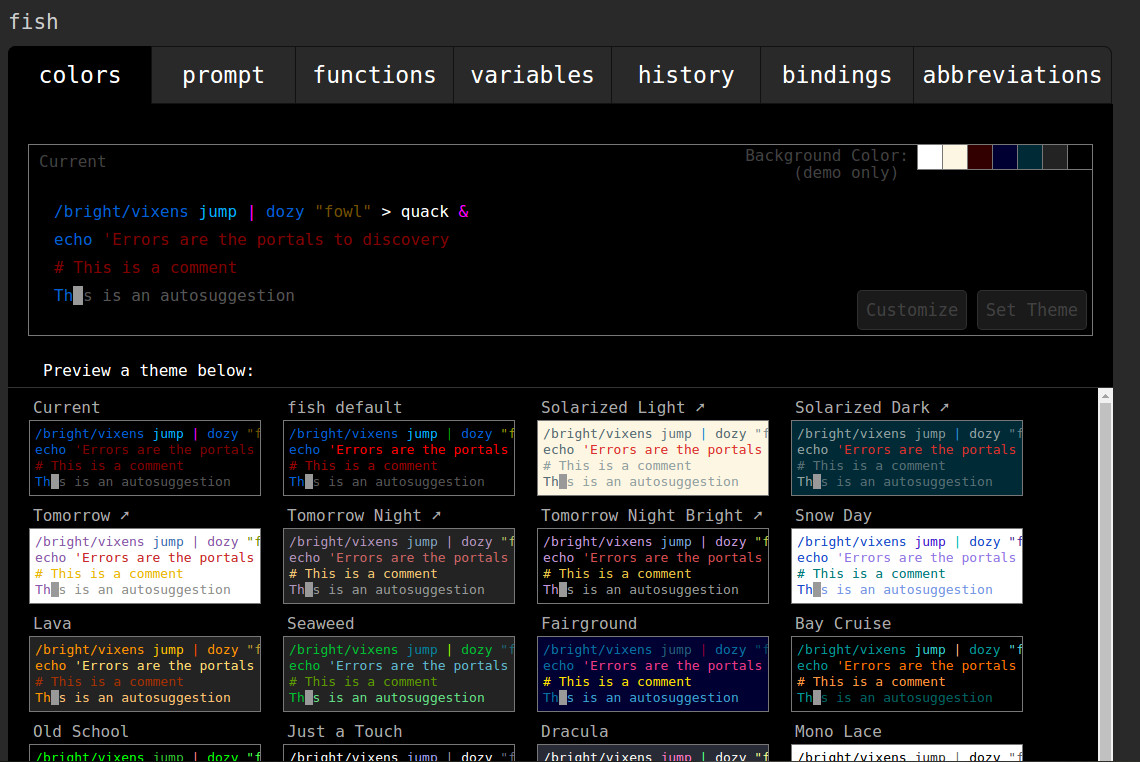
One task you should definitely undertake is the configuration. Out of the box, fish is an incredibly powerful and handy tool to use. However, fish offers plenty of customizations that can be tweaked with the web-based configuration tool. To get to the web interface, enter the fish shell and then type fish_config. Hit Enter on your keyboard and your default browser will open to the fish configuration page (Figure 4).
Figure 4: The fish web-based configuration tool.
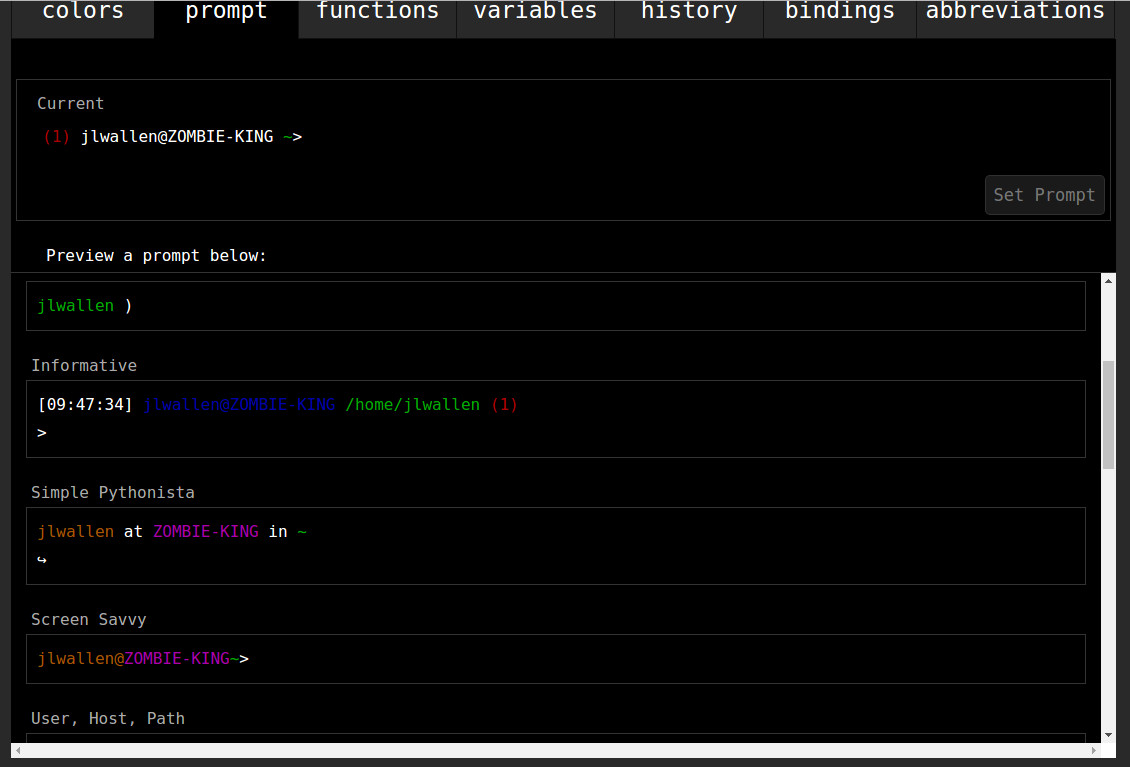
I highly recommend altering your fish prompt so that the differences between it and the standard prompt aren’t so subtle. To do this, click on the prompt tab, scroll down until you find a style that suits you, select that prompt, and then click the Set Prompt button (Figure 5).
Figure 5: Differentiating your fish prompt from your Bash prompt.
Once you’ve made the changes, close the browser window (or tab), go back to your terminal window, and hit Enter. The new prompt configuration will be set and you’re ready to go.
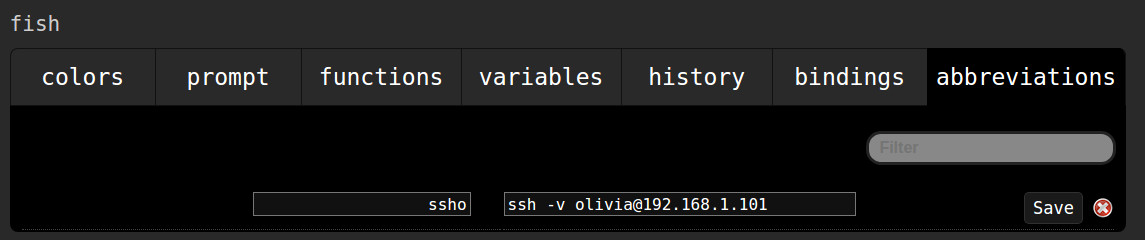
There are quite a lot of other options to be configured within the web-based tool. From here you can also set up abbreviations (aliases) for commands. This can also be done from the fish prompt, but using the web-based interface makes it a bit easier. Say, you regularly ssh to a particular server with the command:
ssh -v olivia@192.168.1.101
With abbreviations, you could shorten that to, say ssho. With this in place, you would only need type ssho(within the fish shell), hit enter, and the full command will run. To create an abbreviation, run the fish_configcommand (from the fish prompt), go to the abbreviations tab in the web-based tool, and then type your abbreviation in the left text area and the full command in the right text area (Figure 6). Hit the Save button and your abbreviation is ready.
Figure 6: Adding a command abbreviation for even more fish efficiency.
Make sure you close the browser window (or tab) and then hit Enter (on your keyboard) back at the fish prompt.
Keep learning
To get the most out of fish, it would behoove you to read through the official fish documentation (just type help at the fish prompt and hit Enter). You’ll be pleasantly surprised at how much this shell can do for you.
Mark my word, the fish prompt will very quickly become a must-have tool to aid you in your daily Linux administrative tasks.
Learn more about Linux through the free “Introduction to Linux” course from The Linux Foundation and edX.
Over the past few years, anecdotal evidence has suggested that security threats to Linux devices are on the rise. Last fall’s Mirai botnet attacks, which turned thousands of Linux devices into a zombie army used to attack infrastructure via Distributed Denial of Service (DDoS), were particularly effective in waking up the Linux community.
Now, we’re seeing quantitative statistics to support the Linux malware trend. On the heels of a WikiLeaks release detailing the CIA’s OutlawCountry and Gyrfalcon hacking tools aimed at Linux, both AV-Test and WatchGuard have released reports claiming that Linux computers are among the fastest growing targets of malware over the past year and a half.
According to AV-Test, MacOS computers saw the largest increase in malware targeting in 2016 with a 370 percent increase, but Linux was close behind with a 300 percent rise from the previous year — triple the number in 2015. WatchGuard’s Internet Security Report, which instead focuses on Q1 2017, claims that Linux malware made up more than 36 percent of the top threats.
A decade ago, Linux was obscure outside the server world, but Tux lovers could at least console themselves with the security of their beloved OS compared to Windows. This helped reinforce the generally true, but somewhat counterintuitive, claim that by inviting anyone to bug check the code, you could build a more secure platform than with a proprietary OS.
A worthy target
The first crack in the Linux armor came in the Android world where many apps revealed themselves to be pestilent. It wasn’t just the app platform — and Android fragmentation — that fueled the increase, however, but Android’s popularity. In recent years, as more and more Linux-based routers, home automation gizmos, and other devices entered the relatively unprotected home scene, hackers have increasingly found Linux to be a worthy target.
The problem is not that Linux is unsafe compared to other platforms. The Linux kernel and other components are regularly updated to meet the latest threats, which are more easily identified thanks to the greater participation afforded by open source. Developers are continually improving system update and integrity protectionmechanisms, and protecting against other emerging security threats.
Although more remains to be done, the main issue is that vendors release routers, consumer electronics, and IoT gear with outdated Linux kernels and either no or limited security protections on top of the Linux stack. IoT vendors rarely offer kernel updates, and if they do, there’s usually no over-the-air (OTA) mechanism. The user must be sufficiently motivated to find out about the update, and then download and install it. In addition, consumers tend to leave their devices unprotected by passwords or else use easily hacked passwords.
CIA’s OutlawCountry and Gyrfalcon exposed
The CIA’s OutlawCountry exploit, which was exposed in a Vault7 release by WikiLeaks on June 30, focuses on Red Hat Embedded Linux (RHEL) and the RHEL-based CentOS in their 6.x versions, which primarily run on servers. On July 6, WikiLeaks added a report detailing the CIA’s Gyrfalcon implant, which targets OpenSSH clients on a wider variety of Linux platforms.
As described in a ZDNet story on OutlawCountry, the mechanism takes advantage of the Red Hat distributions’ aged 64-bit 2.6.32 version of the Linux kernel. Before OutlawCountry can do its work, however, the server must have already been compromised with the infiltration of a malicious module, as well as the acquisition of root privileges. OutlawCountry then redirects outbound traffic to a CIA-controlled server by creating a hidden iptables or netfilter table in the Linux kernel’s networking stack. Red Hat is working on a resolution for OutlawCountry, which was internally documented by the CIA two years ago, and has released a command so users can check for infections.
Earlier this year, WikiLeaks released info on the CIA’s Weeping Angel exploit, which attacks Samsung’s Tizen-based Smart TVs, as well as a CIA Dark Matter project that affects the Mac. A few others are general networking exploits that could affect Linux devices, but most of the 15 CIA exploits detailed in WikiLeaks’ 8,000-plus Vault7 documents target Windows.
According to AV-Test, Windows represented 70 percent of the online threats detected by AV-Test anti-malware security systems in 2016. There was a 15 percent drop in Windows attacks in 2016 as malicious hackers turned their attention to Linux and the Mac. Yet, any relief in the Windows world may be short lived — Windows made up 77 percent of attacks in Q1 2017.
The WannaCry ransomware attacks were the biggest scourge on Windows in 2016, but these have slowed greatly. While ransomware is often the most devastating malware, it represents a very small number of attacks, says AV-Test.
In the Linux world, the Mirai botnet appears to have faded somewhat, but other malware is targeting the same IoT devices. These include the Bashlite malware and the older, but ever resilient, Tsunami backdoor. The overall percentage of Linux or MacOS attacks were not listed, but presumably both make up the bulk of the 24.4 percent of 2016 attacks not represented by Windows or Android.
Android attacks
The Linux numbers do not include Android, which represented 5.65 percent of all malware in 2016. That may not seem like much, but it was double the number of attacks in 2015, says AV-Test.
The most infamous Android malware of the last two years — StageFright — has actually infected very few devices, or so Google claims. However, security firm Check Point reports that a type of Android malware called CopyCat last year infected 14 million devices, despite never making it to Google Play. CopyCat ended up rooting more than half of them, or about eight million devices. Most victims were in Southeast Asia, but 280,000 were in the United States. The CopyCat creators earned about $1.5 million, primarily through ad fraud.
Security threats in general dropped by 14 percent in 2016 compared to the 2015 high water mark. However, that’s still the second highest total since AV-Test started its surveys, and Q1 has shown an uptick. The company estimates that some 640 million malware programs were active in 2016.
The WatchGuard Technologies Internet Security Report, which was based on feedback from 26,500 WatchGuard UTM appliances worldwide, suggests that Linux malware is growing even faster than the AV-Test measurements indicate. Linux was said to be the target of 36 percent of malware detected in the first quarter, with IoT devices and servers receiving the lion’s share of attacks.
Other trends include an increase in attacks on web servers, totaling 82 percent of all network attacks. The report also detected seasonal trends: Most malware hits in Q4, followed by a Q1 slowdown.
It’s probably a good idea for all of us to learn more about security. One angle is covered in this recently updated cryptography overview for newbies from TheBestVPB.com.
By any measure, the rise of open source software as an alternative to the old, proprietary ways has been remarkable. Today, there are tens of millions of libraries hosted at GitHub alone, and the number of major projects is growing rapidly. As of this writing, the Apache Software Foundation hosts over 300 projects, while the Linux Foundation supports over 60. Meanwhile, the more narrowly focused OpenStack Foundation boasts 60,000 members living in more than 180 countries.
So, what could possibly be wrong with this picture?
What’s missing is enough awareness that, while open source software can meet the great majority of user demands, standing alone it can’t meet all of them. Worse yet, too many members of the open source community (business leads as well as developers) have no interest in making use of the most appropriate tools available to close the gap.
Everyone knows that Google is a leader in the open source world. But what is it that makes it a distinct player in the fast-growing developer community? Will Norris, the engineering manager at Google’s Open Source Programs Office, reveals some secrets in an exclusive talk with Jagmeet Singhof OSFY. Edited excerpts…
Q What is the development model for open source technologies at Google?
Open source development at Google is both very diverse and distributed. The larger projects that we release generally have dedicated teams developing and supporting the project, working with their external developer communities and providing internal support to other Googlers. Many of the smaller projects include just one or two engineers working on something experimental or just a fun, side project.
Our MySQL infrastructure is a critical component to GitHub. MySQL serves GitHub.com, GitHub’s API, authentication and more. Every git request touches MySQL in some way. We are tasked with keeping the data available, and maintaining its integrity. Even while our MySQL clusters serve traffic, we need to be able to perform tasks such as heavy duty cleanups, ad-hoc updates, online schema migrations, cluster topology refactoring, pooling and load balancing and more. We have the infrastructure to automate away such operations; in this post we share a few examples of how we build trust in our infrastructure through continuous testing. It is essentially how we sleep well at night.