Home Blog Page 527

Open Source TurtleBot 3 Robot Kit Runs Ubuntu and ROS on Raspberry Pi

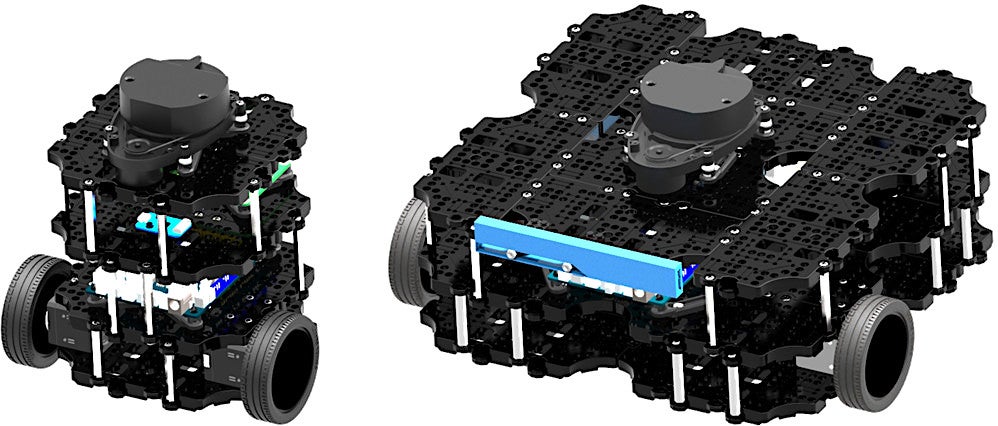
The TurtleBot 2, which Open Robotics calls the “world’s most popular open source robot for education and research,” has long been the de facto development platform for the open source Robot Operating System (ROS). Many TurtleBot developers run ROS from Ubuntu, but Windows is also available on the netbook “brain” nestled inside the two-wheeled bot. The newly shipping TurtleBot 3 replaces the Intel Core based netbook with a choice of two embedded Linux computers running Ubuntu with ROS: the TurtleBot 3 Burger runs Ubuntu on a Raspberry Pi 3 while the larger TurtleBot 3 Waffle instead integrates a more powerful, Atom-based Intel Joule computer-on-module.

The Robotis-built TurtleBot3 is smaller, cheaper, simpler, and more powerful than the TurtleBot 2. The kit design is also “the most affordable robot among the SLAM-able mobile robots equipped with a general 360-degree LiDAR,” says Open Robotics, a subsidiary of Open Source Robotics Foundation (OSRF), which first developed ROS.

SLAM (simultaneous localization and mapping) algorithms work with laser-based LiDAR and other depth-imaging systems to help the robot map an unknown environment while keeping track of its position within it. Both the $549 Burger and the $1,799 Waffle integrate 360-degree HLS-LFCD LDS LiDAR systems, thereby enabling autonomous navigation. The Waffle also provides Intel’s RealSense depth-finding camera as an alternative to LiDAR.

The Raspberry Pi or Intel Joule boards work together with a fully open source OpenCR control board built by Robotis that runs Arduino IDE code on a Cortex-M7 STM32F7 MCU. The board controls sensors including a built-in IMU and optional touch, IR, color, and other sensors. It also controls one of the other major innovations on the TurtleBot 3: the integration of high-end Robotis Dynamixel actuators.

Located in the TurtleBot’s two sprocket wheel joints, the Dyamixels provide velocity control for the wheels, as well as torque or position control for the joints. The Burger’s Dynamixel XL420 supports four operating modes while the Waffle’s Dynamixel XM430 supports six modes, providing even greater flexibility.

The TurtleBot3 is equipped with an 1800mAh battery, and can be remotely operated with a variety of wireless devices, including keyboards, gaming joysticks, and the LEAP Motion controller. The design is highly modular, and Robotis sells optional sensor and chassis components, as well as a variety of Robotis arms and grippers.  

Between the Raspberry Pi and Joule on the one hand and the I/O studded OpenCR control board on the other, there should be plenty of opportunities for hardware hacking with different cameras, sensors, and other gizmos. The TurtleBot3 design ships with 3D CAD files for mechanical parts, as well as schematics, PCB Gerber, and BOM for the OpenCR board.

Although the TurtleBot 3 defaults to Ubuntu 16.04.2 with ROS Kinetic, you can likely use any ROS-compatible Linux distro that runs on the Raspberry Pi or Intel Joule. An Ubuntu Insights announcement of the robot noted that both the Pi and Joule support Ubuntu Core. Conceivably, experienced hackers could also swap out the Pi and Joule for another embedded Linux computer that supports ROS.

Other Pi- and Linux-Based Robots

Most robots that run on the Raspberry Pi are less sophisticated devices that lack LiDAR, such as the mobile GoPiGo and Piborg’s six-wheeled DiddyBorg. Other choices include the open source, Raspberry Pi and Arduino-based FarmBot Genesis farming robot. Some additional Pi-based kits are summarized here, but there are many more designs posted online.

A variety of higher end robots integrate other embedded Linux boards, such as the ambulatory, humanoid Poppy Humanoid, which runs Ubuntu 14.04 on an Odroid XU4. The most famous tuxified humanoid bot these days is the Softbank/Aldeberan Pepper hospitality robot. Linux robots have also entered the industrial space with models like Rethink’s Sawyer manipulation bot.

More information on the TurtleBot 3 may be found in this LinuxGizmos post and IEEE Spectrum hands-on story, as well as the TurtleBot3 shopping page and TurtleBot community site.

Connect with the Linux community at Open Source Summit North America on September 11-13. Linux.com readers can register now with the discount code, LINUXRD5, for 5% off the all-access attendee registration price. Register now to save over $300!
Getting Started with Go

Go is behind some of the web’s most critical systems, which makes learning the language one of the best investments a programmer can make.

Before diving into Go, let’s take a brief detour. Go’s design is generally elegant and pragmatic, but a few of its features make sense only with some historical context.

That history starts with C. In many ways, C is the Latin of programming languages. It inspired JavaScript, Ruby, Python, C++, C#, and Java. A few of those languages are even written in C. It’s easy to spot C’s influence by looking at if/else and control flow statements in any of the aforementioned languages. C was originally Dennis Ritchie and was used to build Unix. From there, C found its way to the heart of Linux, where C has continued to be the language of choice.

Go was created by legends from this Unix and C era. While working at Google, Robert Griesemer, Rob Pike, and Ken Thompson found themselves frustrated by the common pitfalls of C-family languages. As Bjarne Stroustroup, creator of C++ puts it: “C makes it easy to shoot yourself in the foot; C++ makes it harder, but when you do it blows your whole leg off.”

Read more at OpenSource.com

What Network Engineers Should Know About Blockchain

Blockchain enthusiasts claim the technology will do for transactions what the Internet did for communications: essentially upend transactions as we known them.

“Blockchain is going to become everything,” said Brendan Blumer, CEO of Block.one, a company that creates blockchain technologies for businesses. “In my opinion it’s as big as the Internet.”

Blockchain is the distributed ledger technology that became famous, or infamous depending on your view, for powering bitcoin. Bitcoin allows people to exchange currency online without using banks or other middlemen. Bitcoin was the first blockchain application. But the possibilities for using the technology are endless.

Read more at SDxCentral

DevSecOps is Not a Security Panacea

Many development teams view security as an impediment to agility and innovation, but efforts over the past few years have tried to integrate security controls and testing directly into DevOps workflows without sacrificing development speed and deployment flexibility.

Known as DevSecOps, this marriage between security and agile development aims to implement core security tasks like event monitoring, patch management, privilege control and vulnerability assessment directly into DevOps processes. This includes dynamic and static vulnerability testing at all levels of the development cycle, so that major flaws can be discovered early on, before the code makes it into production.

Read more at The New Stack

An Introduction to Kafka Streams

Kafka Streams is a library for building streaming apps that transform input Kafka topics into output Kafka topics. In this article, learn how to implement Kafka Streams.

If you are working on a huge amount of data, you may have heard about Kafka. At a very high level, Kafka is a fault tolerant, distributed publish-subscribe messaging system that is designed for fast processing of data and that has the ability to handle hundreds of thousands of messages.

What Is Stream Processing?

Stream processing is the real-time processing of data continuously, concurrently, and in a record-by-record fashion.

Real-Time Processing

Kafka has many applications, one of which is real-time processing.

Read more at DZone

Linux Chgrp Command for Beginners (5 Examples)

Here at HowtoForge, we recently discussed the chown command which lets users change the owner as well as group of file (or a directory) in Linux. But did you know there exists a dedicated command line utility that you can use when it comes to changing group-related information? The tool in question is chgrp, and in this tutorial, we will be discussing this tool using easy to understand examples.

But before we do that, it’s worth mentioning that all examples and instructions mentioned in this tutorial have been tested on Ubuntu 16.04LTS.

Linux chgrp command

As you’d have already understood by now, if the requirement is to only change the group of a file or directory, then you can use chgrp instead of chown. The tool provides several command line options that you can use in different situations. Here’s the generic syntax of chgrp:

Read more at HowToForge

Commerce Seeks Input On Fighting Botnets

The Commerce Department is asking for public input on what the government should do to combat cyberattacks launched by armies of infected computers.

The request follows a May executive order that directed the Commerce and Homeland Security departments to lead “an open and transparent process” to organize tech companies and other stakeholders to help secure the internet against the automated and distributed attack groups known as botnets.

The botnet section was among the most tendentious portions of the otherwise noncontroversial executive order when it was in draft form. Industry was concerned the government might place additional mandates on businesses.

Read more at NextGov

ODPi Launches Apache Bigtop Grant Fund Program

ODPi, a nonprofit organization accelerating the open ecosystem of big data solutions, today announced Apache™ Bigtop “Test Drive” Grant Program, a new grant funding program designed to increase developer involvement in the Apache Software Foundation (ASF) project. Through the program, ODPi is investing $50,000 to fund developer work with the world’s top Apache and big data developers and architects to expand Bigtop’s functionality and usability.

To apply to participate in the Bigtop “Test Drive” Grant Program, submit proposals here by Friday, July 14 at 11:59pm PST.

Read more at ODPi

To Cloud Native & Beyond: The Journey to Build the Cloud Foundry Certified Developer Exam

By Amar Rao

Creating an exam for complicated technologies is tricky business. Doing it right takes time. It took 12 months of work to create and launch the Cloud Foundry Certified Developer (CFCD) exam. This blog is about that journey.

The exam is meant for developers to demonstrate proficiency in developing cloud-native applications on the Cloud Foundry platform and can be taken anyplace, any time. It is deployed on The Linux Foundation cloud-based exam infrastructure, leveraging the latest tools available. The actual environment through which candidates will access the Cloud Foundry instance is hosted on Swisscom. This project was developed as a collaborative team effort that included Cloud Foundry community subject matter experts (SME), the Linux Foundation and Biarca.

This certification exam is designed as a performance-based test in which the candidate’s proficiency is assessed not by testing knowledge of the subject, but by solving real world tasks encountered on the job. Problems are presented to the candidate that require the candidate to work in a “real” CF environment and deploy and manipulate application code.

Development began in June 2016, following a series of workshops facilitated by Wallace Judd, a psychometrician from Authentic Testing in which Cloud Foundry SME from leading global organizations were assembled to formulate the exam questions with Steve Greenberg of Resilient Scale as a technical advisor and SME. Given that all participants live across the country and are involved in other full-time work, it was a challenge to coordinate this activity — but we worked together to make it happen.

Biarca created the automation for provisioning each question’s setup and configuration to provide the environment in which candidates answer the questions. In addition, an automated grading system had to be developed through which the candidates were assessed and graded. In parallel, Linux Foundation was responsible for doing the end-to-end integration of all the various systems to deploy the exams on their cloud-based exam platform.

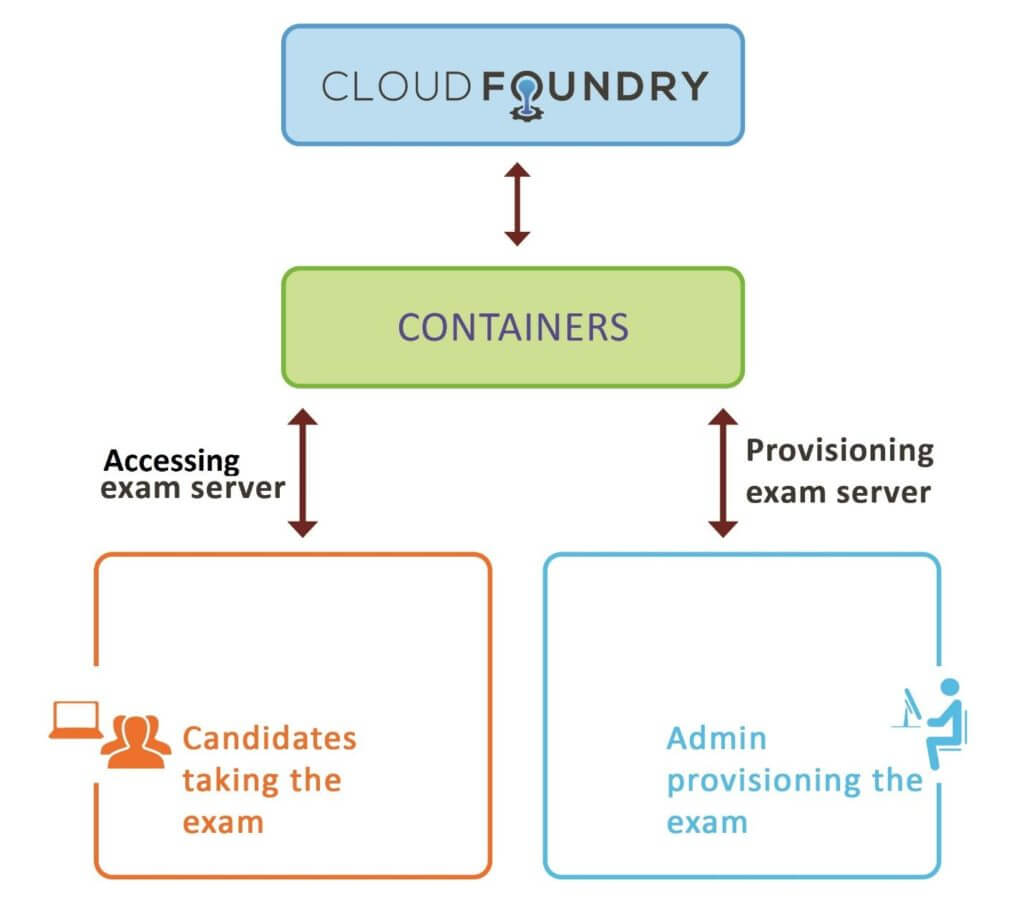
The Cloud Foundry examination process includes exam provisioning, proctoring, grading and result announcement. The exam architecture is shown in the image below:

Fig1: Cloud Foundry Exam Infrastructure

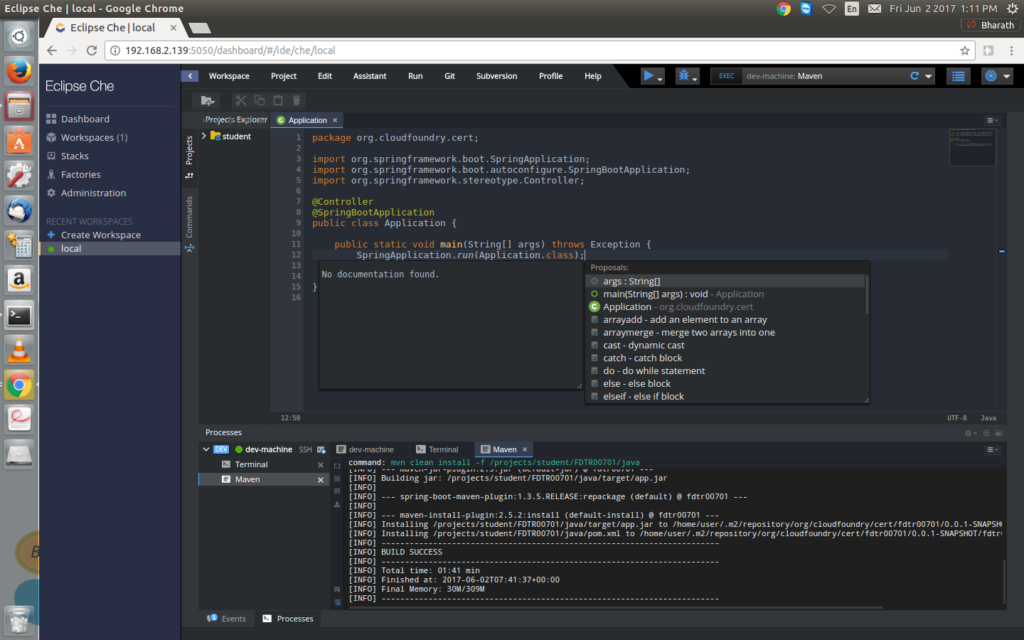
The decision was made to utilize Python in developing automation scripts for question provisioning, configuration and grading to ensure compatibility with the Linux Foundation exam platform. The Biarca team created a Python client library to address some of the unique requirements of administering the CF exam on the LF platform. One of the issues the team had to overcome included setting up Eclipse Che, a browser-based IDE interface, to make it more intuitive and closer to real-life environment for candidates. It was also a requirement to provide multi-language support so candidates can choose their language — be it Java, Node or Ruby. This had never been done before in a performance-based test, but the team rose to the challenge.

Fig2: Eclipse Che project running in the browser

The development team also concentrated on providing an integrated experience for the candidate, designed to let the candidate focus on the question and to deploy the best answer possible without dealing with extraneous issues.

Another important part of the work was to provide a reference answer orchestration, which is required to verify accuracy of the exam setup provisioning and the grading process as a pre-check. Answer orchestration takes place before providing the exam setup to the candidate. The answer scripts are run to answer the individual exam items, and to ensure that the exam setup and grading is working as expected. Developers had to address challenges that included route collisions among the multiple applications being deployed by candidates as part of answering the exam.

The grading software is designed to assess not just the answer, but also the thought process leading up to it. The Cloud Foundry exam includes continuous interaction with a public cloud, and the software design had to consider network failures, non-availability of the cloud platform and more.

The grading scripts had to capture all the raw scores for each item answered by the candidate. These raw scores must then be adjusted to account for different weighting for different items based on complexity, etc. The culmination of this is the final grade, and the publishing of a Pass/Fail.

The development team wrapped up its work by December 2016. The months of January and February 2017 were focused on alpha testing the exam, followed by beta testing in March and April.

The exam is being formally launched at Cloud Foundry Summit Silicon Valley in Santa Clara today June 13. 

This article originally appeared at Cloud Foundry.

It’s the Ecosystem, Stupid

I’ve been writing for a while on topics related to product and supply chain management in the context of open source communities, and I’ve noticed a few consistent themes in my articles and blog posts. Most notable is the call for companies to move from the “not invented here” syndrome to a more externally focused view. After all, if so much innovation is taking place in open source projects, why not take advantage of it to the fullest extent possible? You can see this theme manifested in the following ways:

  • Open source program office and management: This is all about providing structure for creating and implementing open source strategy, including programs and systems to help engineering teams meet legal requirements for participating in external open source communities. This is only valuable if the company places strategic importance on influencing external communities.

Read more at OpenSource.com