Home Blog Page 528

Test-Driven Security With Chef InSpec

Test-driven security is the implementation of tests into the development process, and Chef InSpec is one tool that will help you get started with this process. These security tests are intended to define the security features required for a system to be production ready.

In this post, we will walk through the process of using test-driven security, with proscriptive security tests, using Chef InSpec.

Regression Testing Security

Regression testing is the testing of software to ensure that changes do not break existing behavior. As new features are added or even as bugs are fixed, we want to test that previously existing behavior does not become broken and result in new bugs. To continue ensuring quality as software is developed, regression tests are added. The benefit of these tests lies in the fact that they help to prevent duplicate work and also help to ensure a better user experience.

Read more at ThreatStack

Calçado’s Microservices Prerequisites

When you decide to adopt microservices, you are explicitly moving away from having just one or a few moving pieces to a more complex system. In this new world, the many moving parts act in unpredictable ways as teams and services are created, changed, and destroyed continuously. This system’s ability to change and adapt quickly can provide significant benefits for your organisation, but you need to make sure that some guard rails are in place or your delivery can come to a standstill amidst the neverending change.

These guardrails are the prerequisites we discuss here. It is possible to successfully adopt a new technology without some or all of these in place, but their presence is expected to increase the probability of success and reduce the noise and confusion during the migration process.

Admittedly, the list of prerequisites presented here is long and, depending on your organisation’s culture and infrastructure, might require a massive investment. This upfront cost should be expected, though. A microservices architecture isn’t supposed to be any easier than other styles, and you need to make sure that you assess the Return on Investment before making a decision.

Read more at Phil Calçado

Deploying Minio Cloud Storage to DC/OS

Container orchestration is gaining traction as the default way to deploy applications. Developers are architecting their modern applications from the ground-up to run in containers, which enables faster deployment and more resilience. Even legacy applications are adopting containers in every way they can to access these advantages.

Of the many characteristics that make an application container ready, the way it handles unstructured data is one of the most important. Back in the day, the default way to handle unstructured data was to dump all of it onto the server’s file system, but using the host filesystem doesn’t make any sense for containerized apps. This is because, in an orchestrated environment, a container can be scheduled — or rescheduled — on any of the hosts in a cluster, but data written to a previous host can not be rescheduled with that container.

Read more at DZone

New Software Needed to Support a New Kind of Processor

Analysis of big data that can reveal early signs of an Ebola outbreak or the first traces of a cyberattack require a different kind of processor than has been developed for large-scale scientific studies. Since the data might come from disparate sources — say, medical records and GPS locations in the case of Ebola — they are organized in such a way that conventional computer processors handle them inefficiently.

Now, the U.S. military research organization DARPA has announced a new effort to build a processor for this kind of data — and the software to run on it. A group of computer scientists at the U.S. Department of Energy’s Pacific Northwest National Laboratory will receive $7 million over five years to create a software development kit for big data analysis.

Read more at ACM

How to Load and Unload Kernel Modules in Linux

A kernel module is a program which can loaded into or unloaded from the kernel upon demand, without necessarily recompiling it (the kernel) or rebooting the system, and is intended to enhance the functionality of the kernel.

In general software terms, modules are more or less like plugins to a software such as WordPress. Plugins provide means to extend software functionality, without them, developers would have to build a single massive software with all functionalities integrated in a package. If new functionalities are needed, they would have to be added in new versions of a software.

Read more at Tecmint

Understanding the Basics of Docker Machine

In this series, we’re taking a preview look at the new self-paced Containers for Developers and Quality Assurance (LFS254) training course from The Linux Foundation.

In the first article, we talked about installing Docker and setting up your environment. You’ll need Docker installed to work along with the examples, so be sure to get that out of the way first. The first video below provides a quick overview of terms and concepts you’ll learn.

In this part, we’ll describe how to get started with Docker Machine.

Or, access all the sample videos now!

Docker has a client server-architecture, in which the Client sends the command to the Docker Host, which runs the Docker Daemon. Both the Client and the Docker Host can be in the same machine, or the Client can communicate with any of the Docker Hosts running anywhere, as long as it can reach and access the Docker Daemon.

The Docker Client and the Docker Daemon communicate over REST APIs, even on the same system. One tool that can help you manage Docker Daemons running on different systems from our local workstation is Docker Machine.

If you are using Docker for Mac or Windows, or install Docker Toolbox, then Docker Machine will be available on your workstation automatically. With Docker Machine, we will be deploying an instance on DigitalOcean and installing Docker on that.  For that, we would first create our API key from DigitalOcean, with which we can programmatically deploy an instance on DigitalOcean.

After getting the token, we will be exporting that in an environment variable called “DO_TOKEN”, which we will be using in the “docker-machine” command line, in which we are using the “digitalocean” driver and creating an instance called “dockerhost”.

Docker Machine will then create an instance on DigitalOcean, install Docker on that, and configure the secure access between the Docker Daemon running on the “dockerhost” and our client, which is on our workstation. Next, you can use the “docker-machine env” command with our installed host, “dockerhost”, to find the respective parameters with which you can connect to the remote Docker Daemon from your Docker Client.

With the “eval” command, you can export all the environment variables with respect to your “dockerhost” to your shell. After you export the environment variables, the Docker Client on your workstation will directly connect with the DigitalOcean instance and run the commands there. The videos below provide additional details.

In the next article, we will look at some Docker container operations.

This online course is presented almost entirely on video, and the material is prepared and presented by Neependra Khare (@neependra), Founder and Principal Consultant at CloudYuga, Docker Captain, and author of the Docker Cookbook.

Watch the sample videos here for more details:

Want to learn more? Access all the free sample chapter videos now!

Simplifying Embedded and IoT Development Using Rebuild and Linux Containers

Introduction to Rebuild

Building modern software in a predictable and repeatable way isn’t easy. The overwhelming number of software dependencies and the need to isolate conflicting components presents numerous challenges to the task of managing build environments.

While there are many tools aimed at mitigating this challenge, they all generally utilize two approaches: they either rely on package managers to preserve and replicate package sets, or they use virtual or physical machines with preconfigured environments.

Both of these approaches are flawed. Package managers fail to provide a single environment for components with conflicting build dependencies, and separate machines are heavy and fail to provide a seamless user experience. Rebuild solves these issues by using modern container technologies that offer both isolated environments and ease of use.

Rebuild is perfect for establishing build infrastructures for source code. It allows the user to create and share fast, isolated and immutable build environments. These environments may be used both locally and as a part of continuous integration systems.

The distinctive feature of Rebuild environments is a seamless user experience. When you work with Rebuild, you feel like you’re running “make” on a local machine.

Client Installation

The Rebuild client requires Docker engine 1.9.1 or newer and Ruby 2.0.0 or newer.

Rebuild is available at rubygems.org:

gem install rbld

Testing installation

Run:

rbld help

Quick start

Search for existing environments

Let’s see how we can simplify the usage of embedded toolchains with Rebuild. By default, Rebuild is configured to work with DockerHub as an environment repository and we already have ready-made environments there.

The workflow for Rebuild is as follows: a) search for the needed environment in Environment Repository, b) deploy the environment locally (needs to be done only once for the specific environment version), c) run Rebuild. If needed you can modify, commit and publish modified environments to Registry while simultaneously keeping track of different environment versions.

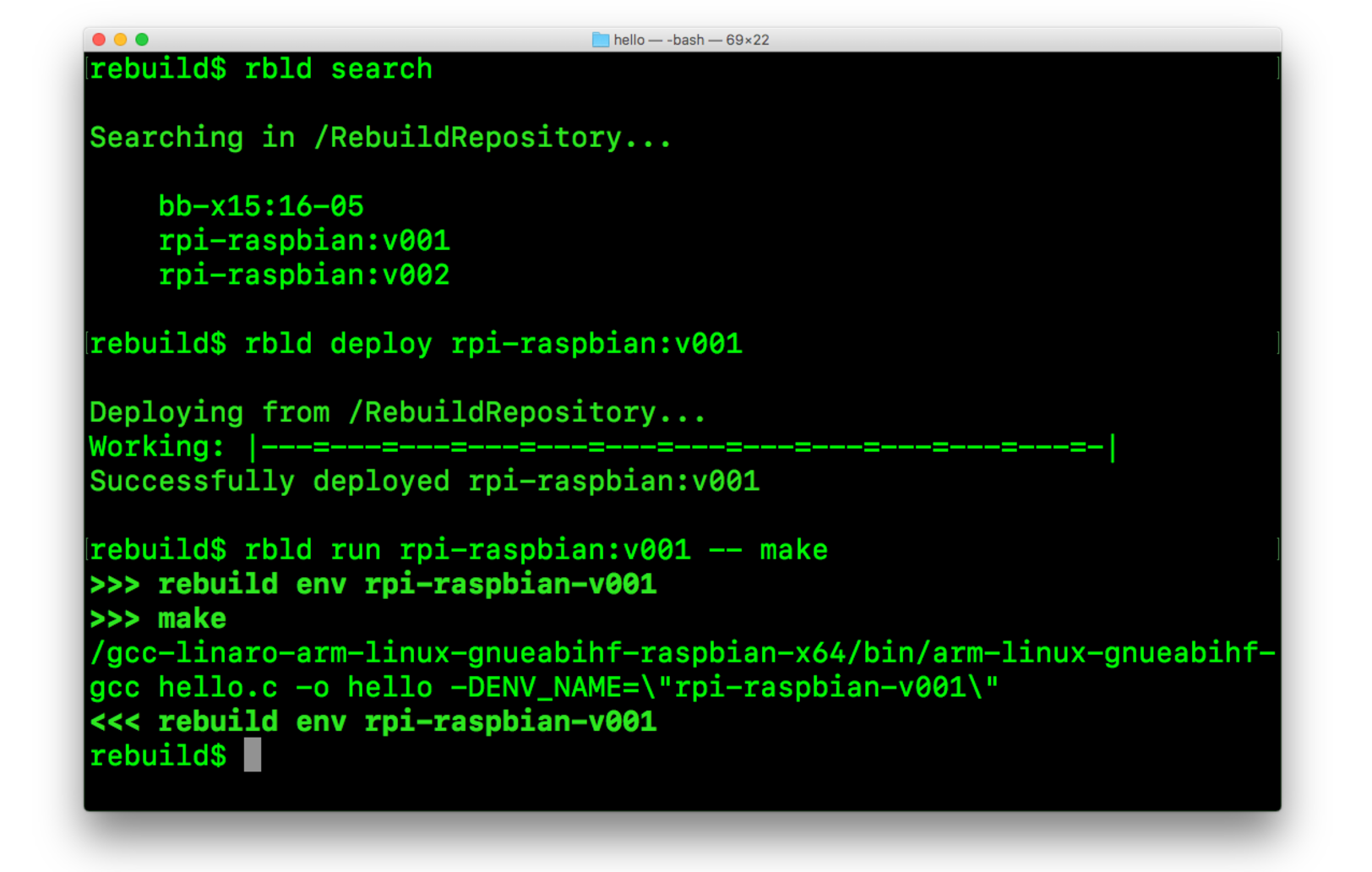
First, we  search for environments by executing this command:

$ rbld search

Searching in /RebuildRepository...


   bb-x15:16-05

   rpi-raspbian:v001

Next, we  deploy the environment to our local machine. To do this, enter the following command:

$ rbld deploy rpi-raspbian:v001


Deploying from /RebuildRepository...

Working: |---=---=---=---=---=---=---=---=---=---=---=---=-|

Successfully deployed rpi-raspbian:v001

And now it is time to use Rebuild to compile your code. Enter the directory with your code and run:

$ rbld run rpi-raspbian:v001 -- make

Of course, you can also use  any other command that you use to build your code.

You can also use your environment in interactive mode. Just run the following:

$ rbld run rpi-raspbian:v001

Then, simply execute the necessary commands from within the environment. Rebuild will take care of the file permission and ownership for the build result that will be located on your local file system.

Explore Rebuild

To learn more about Rebuild, run rbld help or read our GiftHub documentation.

Rebuild commands can be grouped by functionality:

  • Creation and modification of the environments:

    • rbld create – Create a new environment using the base environment or from an archive with a file system

    • rbld modify – Modify the environment

    • rbld commit – Commit modifications to the environment

    • rbld status – Check the status of existing environments

    • rbld checkout – Revert changes made to the environment

  • Managing local environments:

    • rbld list – List local environments

    • rbld rm – Delete local environment

    • rbld save – Save local environment to file

    • rbld load – Load environment from file

  • Working with environment registries:

    • rbld search – Search registry for environments

    • rbld deploy – Deploy environment from registry

    • rbld publish – Publish local environment to registry

  • Running an environment either with a set of commands or in interactive mode:

    • rbld run -- <command to execute> – Run command(s) in the environment

    • rbld run – Use environment in interactive mode

Additional information

Enterprises Need ‘Security 101’ to Keep IoT Devices Safe

Almost half (46 percent) of U.S. firms that use an Internet of Things (IoT) network have been hit by at least one security breach.

This, according to a survey by consulting firm Altman Vilandrie & Company, which said the cost of the breaches represented 13.4 percent of the total revenues for companies with revenues under $5 million annually and tens of millions of dollars for the largest firms. Nearly half of firms with annual revenues above $2 billon estimated the potential cost of one IoT breach at more than $20 million.

Read more at SDxCentral

Real Paths Toward Agile Documentation

In a nutshell, documentation is deemed uncool and old school. Especially on flat agile teams, there’s a lack of ownership of who’s in charge of docs. And, even worse than testing, software documentation is the biggest hot potato in the software development lifecycle. Nobody wants to take responsibility for it.

Most of all, in the rapid world of agile development, documentation gets put off until the last minute and just ends up endlessly on your backlog. Oh, and of course, there’s not enough money to do it right.

But I’m here to advocate that, for the most part, you’re wrong. There always has to be time for documentation because you should always be developing with your users in mind.

Read more at The New Stack

How Open Source Is Advancing the Semantic Web

The Semantic Web, a term coined by World Wide Web (WWW) inventor Sir Tim Berners-Lee, refers to the concept that all the information in all the websites on the internet should be able to interoperate and communicate. That vision, of a web of knowledge that supplies information to anyone who wants it, is continuing to emerge and grow.

In the first generation of the WWW, Web 1.0, most people were consumers of content, and if you had a web presence it was comprised of a series of static pages conveyed in HTML. Websites had guest books and HTML forms, powered by Perl and other server-side scripting languages, that people could fill out. While HTML provides structure and syntax to the web, it doesn’t provide meaning; therefore Web 1.0 couldn’t inject meaning into the vast resources of the WWW.

Read more at OpenSource.com