
Home Blog Page 555

Improve Your Online Security with Tails

The popular image of online dangers is scary bad guys trying to steal our stuff. This image is accurate if you remember to include unfettered corporate interests as the scary bad guys.

Our protections against our good friends the telcos and cable companies have never been strong, and now they’re nearly non-existent. Repealing Broadband Privacy Rules, Congress Sides with the Cable and Telephone Industry sums it up beautifully: “Internet providers will be given new powers to harvest your personal information in extraordinarily creepy ways.” And buy and sell it with no oversight or accountability, and law enforcement will get their hands on it as surely as road apples draw flies.

What can we do about it? I believe that the best solution is legislative. I prefer technical solutions for protecting ourselves from hostile and predatory interests, but there aren’t many, and they’re incomplete. Internet access is a requirement for many routine aspects of our daily lives, and even if you avoid going online you have no knowledge or control of the information the vendors and service providers that you use are collecting and trading, or what people share about you on social media. Stores, electric and gas utilities, healthcare providers, tradespeople, private clubs, non-profit organizations, charitable groups, banks, insurance companies, and on and on. They all collect information about you, and many trade it freely. Of course, it’s not fair to assume that everyone is venal, but even when a vendor has a heart of gold they may be lacking in technical competence.

Don’t hold your breath waiting for meaningful laws to protect us. What can you do? You can secure your online communications and your web surfing to a degree with Tails, the forgetful Linux distribution. We’ll get back to this after a brief rant about “helpful” web browsers.

“Helpful” Web Browsers

The good nerds behind Firefox and Chrome try so hard to help us, and the harder they try the more annoying they become. First there were the nice discreet little color-coded padlocks in the URL bar (Figure 1).
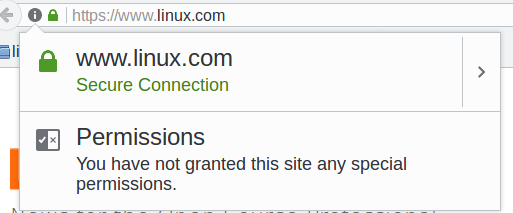
Figure 1: Secure connection.

I like those. They don’t get in the way, and they tell useful information. Useful, that is, if you have any idea what it all means. And even if you do, how do you know you can rely on it? Root certificate authorities have been hacked multiple times, including bigwigs Verisign and Microsoft.

Then Firefox and Chrome got downright hysterical, and make us jump through multiple hoops to enter sites they think are dangerous. Sometimes these warnings are useful, for example when a site is infected with malware, or has been hijacked. Most of the time they’re simply not SSL-enabled, and then we see something like Figure 2.
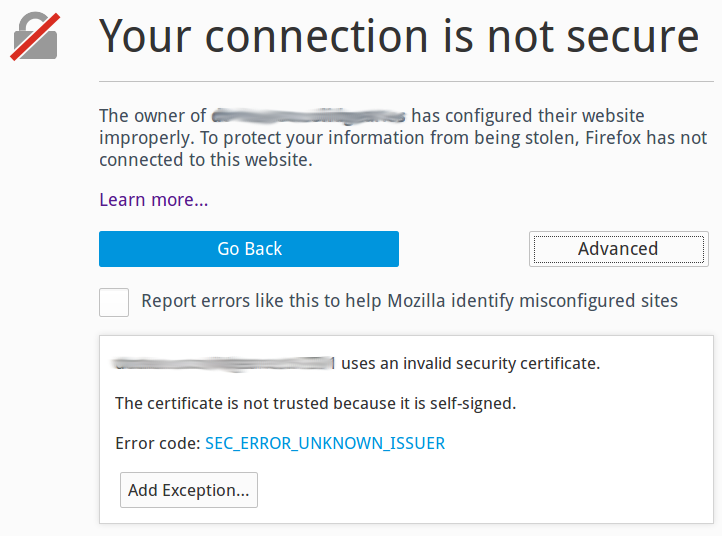
Figure 2: Connection not secure.

I appreciate the effort, but there is already excessive noise in normal computer use, and we are continually swatting away unhelpful notifications and warnings like annoying gnats. Many of these SSL defects are technicalities, like the domain name is not exactly correct. It’s all nutty anyway, because most of us are not security experts and have no idea how to evaluate if these warnings are meaningful.

Hide Yourself With Tails

Tails, the Amnesic Incognito Live System, is a nice live Linux distro that runs from removable media, like a USB stick, SD card, or DVD. Tails bundles a number of privacy tools into a polished Debian-based distro, including Tor (the Onion Router), HTTPS Everywhere, tools for controlling what information the Iceweasel web browser retains, NoScript, and other useful privacy tools.

To use Tails simply boot your Tails media. All the apps bundled in Tails are configured to route your traffic through Tor: email, Web surfing, instant messaging, the works. Tor foils traffic analysis by routing your online sessions through relays all over the world to hide your physical location, and to separate your identity from your online activities. Foiling traffic analysis is a substantial benefit, because marketers and government snoops rely on sophisticated traffic analysis to connect your identity to your online activities. You might have noticed how smartphones apps are especially greedy for your physical location; use the Tails Android app, Orbot. There is not a Tails app for iOS, but there is a Tor app for iOS.

Tor encrypts your session and hides your backtrail inside the Tor network of routers. After it leaves an exit node it’s back to whatever state it was when it left your computer, so if you’re surfing in the clear then it comes out in the clear. Encrypting your online sessions end-to-end is a separate problem, and Tails comes with a full complement of encryption tools: HTTP Everywhere to force SSL on sites that use SSL, OpenPGP for encrypting and digitally signing emails and documents, LUKS for disk encryption, OTR for instant messaging, and Nautilus Wipe for secure file deletion.

Tails leaves no trace; it makes no changes to the host system. When you’re finished reboot and it’s as though you were never there. If you need persistent storage you can copy files to a USB stick, or enable persistent storage on your Tails USB stick or SD card.

The downside of Tails is that Tor is often slow. For us fortunate ones, this is an inconvenience. For many people, it is a small price to pay for a literal life-saver.

Another hurdle is downloading and installing it onto removable media, which is an easy task when you know how. Fortunately the good Tails people have written a top-quality howto that walks you through every step, and provides excellent copy-and-paste commands, so that even a novice should be able to set it up.

Trust?

In preparation for this article, I followed the Tails installation instructions and created a brand-new Tails USB stick. You might notice the same thing I did: It still comes down to trusting unknown people, the Debian maintainers, the maintainers of the Tails downloads, various distro maintainers, the GPG signing keys, the Tails web site… we still have to place our trust in somebody.

Additional Reading

Learn more about Linux through the free “Introduction to Linux” course from The Linux Foundation and edX.

The Future of Big Data: Distilling Less Knowledge Per Bit

Until recently, the word data didn’t require a modifier. But we passed a watershed moment when we started referring to big data. Apparently, that wasn’t a sufficient description for some chunks of data, because people grasped for bolder terms, such as humongous data. Sadly, now, it appears that we have run out of appropriate adjectives. And yet data keeps getting bigger and bigger.

So instead of mentioning data, people have begun waving their hands and talking vaguely about the “cloud.” This seems to be the perfect metaphor—a mystical vapor hanging over Earth, occasionally raining information on the parched recipients below. It is both unknowable and all-knowing. It answers all questions, if only we know how to interpret those answers.

Read more at IEEE Spectrum

Supply Chain Case Study: Canonical and Ubuntu

I love talking about supply chain management in an open source software context, especially as it applies to managing collaborative processes between upstream projects and their downstream products. In the article linked above, I called out a couple of examples of supply chain management: an enterprise OpenStack distribution and a container management product utilizing Kubernetes and Docker for upstream platforms.

What about anti-patterns or things to avoid? There are several we could call out. At the risk of picking on someone I like, I’ll choose Canonical simply because they’ve been in the headlines recently for changes they’ve made to their organization, cutting back on some efforts and laying off some people. As I look at Canonical from a product offering perspective, there’s a lot they got right, which others could benefit from. But they also made many mistakes, some of which could have been avoided. First, the good.

Read more at OSEN

How to Restore Deleted /tmp Directory in Linux

The /tmp directory contains mostly files that are required temporarily, it is used by different programs to create lock files and for temporary storage of data. Many of these files are important for currently running programs and deleting them may result in a system crash.

On all if not most Linux systems, the contents of the /tmp directory are deleted (cleared out) at boot time or at shutdown by the local system. This is a standard procedure for system administration, to reduce the amount of storage space used (typically, on a disk drive).

[[ This is a content summary only. Visit my website for full links, other content, and more! ]]

Read more at Tecmint

How Kubernetes Is Making Contributing Easy

As the program manager of the Kubernetes community at Google, Sarah Novotny has years of experience in open source communities including MySQL and NGINX. Sarah sat down with me at CloudNativeCon in Berlin at the end of March to discuss both the Kubernetes community and open source communities more broadly.

Among the topics we covered in the podcast were the challenges inherent in shifting from a company-led project to a community-led one, principles that can lead to more successful communities, and how to structure decision-making.

Read more at OpenSource.com

Announcing Linkerd 1.0

Today, we’re thrilled to announce Linkerd version 1.0. A little more than one year from our initial launch, Linkerd is part of the Cloud Native Computing Foundation and has a thriving community of contributors and users. Adopters range from startups like Monzo, which is disrupting the UK banking industry, to high scale Internet companies like Paypal, Ticketmaster, and Credit Karma, to companies that have been in business for hundreds of years like Houghton Mifflin Harcourt.

A 1.0 release is a meaningful milestone for any open source project. In our case, it’s a recognition that we’ve hit a stable set of features that our users depend on to handle their most critical production traffic. It also signals a commitment to limiting breaking configuration changes moving forward.

Read more at Buoyant.io

How to Run NGINX as a Docker Container

Using Docker containers makes for an incredibly easy way to roll out apps and services onto your network. With this, you can extend the offerings of your business or quickly test a new server or service. With these apps as containers, it becomes possible to cut down on sysadmin overhead, thanks to no longer having to manage applications through package managers or installing from source. By installing the likes of NGINX as a Docker container, you can simply replace the image when new updates arrive.

But how do you deploy NGINX as a Docker container? Let me walk you through the process. I will demonstrate on Ubuntu 16.04 and will assume you already have docker installed and ready to go.

Read more at Tech Republic

Tales of a Chef Workflow: Cookbook Organization and Maintenance

In this post I want to cover a few small tips and lessons learned from working with Chef for about 5 years now. The last 3 years at DNSimple have helped further shape my personal opinions on organization of Chef cookbooks workflows. What follows is how we do things at DNSimple and not the one and only way to do things with Chef. One of Chef’s greatest strengths is its flexibility, however it can also be a challenge for Chef developers of any skill level.

Naming things

They say the 2 hardest problems in computer science are naming things, cache invalidation, and off by one errors.

Read more at dnsimple

Free Webinar on Starting a Collaborative Open Source Project

Starting a collaborative open source software project involves more than a great idea and the code to get it going. Much of the work involves deciding how you want your community of developers to build and evolve the code. But there’s no need to be intimidated by the process. This upcoming free webinar — from Capital One and The Linux Foundation — will provide the necessary information to get your open source project underway with proven best practices.

In this webinar, The Linux Foundation’s Mike Dolan, VP of Strategic Programs, and Scott Nicholas, Sr. Director of Strategic Programs, will outline important steps to get your project going and keep it on track for success.

You’ll learn how to:

  • Set up your decision making model

  • Understand and clearly document your licensing policy

  • Create a trademark and usage policy that fits your code

  • Successfully contribute to existing open source projects

The “Best Practices for Starting an Open Source Project” webinar will be held Wednesday, May 3, at 2:00 PM Eastern time. Register now!

Mike Dolan is VP of Strategic Programs responsible for Collaborative Projects and Legal Programs at The Linux Foundation. Mr. Dolan has set up and launched dozens of open source and open standards projects covering technology segments including networking, virtualization, cloud, blockchain, Internet of Things, Big Data and analytics, security, containers, storage and embedded devices.

Scott Nicholas is Sr. Director of Strategic Programs for The Linux Foundation. Scott assists in the launch and support of open source projects and contributes to the foundation’s legal programs. Scott has set up numerous collaborative projects across the technology stack. Scott assists in the execution of The Linux Foundation’s annual Legal Summit and other legal programs.

Get a Preview of Apache IoT Projects at Upcoming ApacheCon

The countdown until ApacheCon North America has begun. The blockbuster event will be in Miami this year and runs May 16-18. The Apache community is made up of many niche communities and ApacheCon offers something for all of them.

Here, Roman Shaposhnik, Director of Open Source, Pivotal Inc., who is heading the Apache IoT track at the ApacheCon conference, gave us a sneak peek of what the Apache Internet of Things community can look forward to at the event.

Linux.com: Please give us an overview of the projects the Apache IoT community are working on.

Roman Shaposhnik: There are many projects underway. Including projects such as Apache Mynewt and several that are directly relevant to the embedded space, which is a precursor to the IoT. Those are on the edge, and then there are projects on the data centered side too. So, we’ve got projects on Hadoop, and some on NiFi, an enterprise integration and dataflow automation tool, that is happening on the edge in the data center. Apache gives you end-to-end approach to an IoT architecture. We don’t just stop at the edge, we don’t just stop at the data center. It’s kind of end to end — that’s what’s exciting to me about it.

Linux.com: When many of us think about the IoT, we think about smart devices like the Amazon Echo, but we don’t think about what is behind that. What’s happening on that end?

Shaposhnik: Today the bulk of the projects are on the back end, but with things like Mynewt joining the Apache family, we’re moving towards what is commonly referred to as “Fog” computing, where your edge becomes increasingly more intelligent, and more independent from the data center.

Linux.com: Which talks are you most excited about in your track at ApacheCon?

Shaposhnik:  We had to turn talks down because we didn’t have enough space in our track but the ones that made the cut are simply outstanding. That makes it difficult to choose a few to highlight, so I’ll just mention some that I either took a direct role in organizing or that I, myself, would really love to attend.

I’ll start with two of the keynotes, both from an investment or VC community perspective. Basically, they are VCs explaining to developers what areas they feel will attract investments. That information is super important to an emerging technology like IoT. IoT is a hot market today, but figuring out what part of the market to address is a huge challenge.

One of those talks is a keynote by a friend of mine from Lightspeed Venture Partners. Sudip Chakrabarti is his name, and he will be explaining his experiences. The other one is a keynote organized as a panel of VC partners and investors in the Valley. These two are really super exciting to me.

Besides those talks, there are several Mynewt talks that I’m super excited about. Mynewt is exciting to me because I come from a background with some operating system design. I really love this approach in how they make it all pluggable and modularized. I highly recommend any talk on Mynewt, but everything else is just amazing as well.

There is also Justin McLean, who is driving the Apache IoT community in Australia. He is doing his own presentations and introducing people to different ways of doing IoT on small devices.

Linux.com: The Apache software foundation has a long tradition of being the place where innovation happens in a variety of communities. For example, we started out in the web and web services and then we had a boom of Java standards development kinds of projects. Right now, we’re in the midst of a big data surge. Do you see IoT as the next place that Apache is going to go and go big?

Shaposhnik: That was one reason why I was so happy to bring my VC friends to the conference because right now I see exactly that happening. I think big data has graduated to, I wouldn’t say a full enterprise adoption because there’s still challenges companies are working to iron out the kinks, but I think the investment interest has shifted more towards IoT. Now, that is not to say that big data is somehow unimportant. It is still a very important piece of the overall puzzle, but from an investment, hyper-growth perspective, I think IoT is the big next thing.

Learn first-hand from the largest collection of global Apache communities at ApacheCon 2017 May 16-18 in Miami, Florida. ApacheCon features 120+ sessions including five sub-conferences: Apache: IoT, Apache Traffic Server Control Summit, CloudStack Collaboration Conference, FlexJS Summit and TomcatCon. Secure your spot now! Linux.com readers get $30 off their pass to ApacheCon. Select “attendee” and enter code LINUXRD5. Register now >>