Home Blog Page 573

Linux Block I/O Tracing

Written by Gabriel Krisman Bertazi, Software Engineer at Collabora.

Like starting a car with the hood open, sometimes you need to run your program with certain analysis tools attached to get a full sense of what is going wrong – or right. Be it to debug an issue, or simply to learn how that program works, these probing tools can provide a clear picture of what is going on inside the CPU at a given time.

In kernel space, the challenge of debugging a subsystem is greatly increased. It is not always that you can insert a breakpoint, step through each instruction, print values and de-reference structures to understand the problem, like you would do with GDB in userspace. Sometimes, attaching a debugger may require additional hardware, or you may not be able to stop at a specific region at all, because of the overhead created. Like the rule of not trying to printk() inside the printk code, debugging at early boot time or analyzing very low-level code pose challenges on itself, and more often than not, you may find yourself with a locked system and no meaningful debug data.

With that in mind, the kernel includes a variety of tools to trace general execution, as well as very specialized mechanisms, which allow the user to understand what is happening on specific subsystems. From tracing I/O requests to snooping network packets, these mechanisms provide developers with a deep insight of the system once an unexpected event occurs, allowing them to better understand issues without relying on the very primitive printk() debug method.

So large is the variety of tools specialized to each subsystem, that discussing them all in a single post is counter-productive. The challenges and design choices behind each part of the Linux kernel are so diverse, that we eventually need to focus our efforts on specific subsystems to fully understand the code, instead of looking for a one-size-fits-all kind of tool. In this article, we explore the Linux block I/O subsystem, in a attempt to understand what kind of information is available, and what tools we can use to retrieve them.

iostat

iostat is a tool for monitoring and reporting statistics about the I/O operations happening on the system. It generates a device utilization report in real-time, which includes throughput and latency information split by Reads and Writes, as well as accounting of request sizes. The reports generated by iostat are a fast way to verify if the device is behaving as expected performance-wise, or if a specific kind of operation is misbehaving.

iostat can be configured to run periodically, printing reports at a specific frequency. The first report generated provides the accumulated I/O statistics since the system booted, while each of the subsequent reports will print the operations that occured since the last report.

The tool is packaged in all major distros. In Debian, you can install the sysstat package, which includes iostat and many other tools for I/O monitoring.

sudo apt install sysstat

The output below exemplifies the execution of iostat, which prints a report every two seconds. The first report has the accumulated statistics, while the next has only the delta from the last report. In this case, I started a dd from /dev/sdb at the same time I ran iostat, which explains the sudden increase of Read data in the sdb row.

[krisman@dilma]$ iostat 2
Linux 4.9.0-2-amd64 (dilma)     03/24/2017      _x86_64_        (4 CPU)

avg-cpu:  %user   %nice %system %iowait  %steal   %idle
	   6.50    0.01    1.06    0.08    0.00   92.34

Device:  tps  kB_read/s  kB_wrtn/s  kB_read   kB_wrtn
sda     5.64      35.28     158.58  9309088  41836483
dm-0    9.97      35.07     158.57  9251926  41836180
dm-1    0.98       8.70       3.55  2294873    936692
dm-2    0.16       0.15       0.50    38988    130968
dm-3    8.58      26.21     154.53  6915201  40768520
loop0   0.00       0.01       0.00     2125         0
sdb     0.00       0.16       0.00    42704         0

avg-cpu:  %user   %nice %system %iowait  %steal   %idle
	   3.75    0.00    7.13   20.03    0.00   69.09

Device:  tps  kB_read/s  kB_wrtn/s  kB_read   kB_wrtn
sda     1.00       0.00       6.00        0        12
dm-0    1.50       0.00       6.00        0        12
dm-1    1.50       0.00       6.00        0        12
dm-2    0.00       0.00       0.00        0         0
dm-3    0.00       0.00       0.00        0         0
loop0   0.00       0.00       0.00        0         0
sdb   680.50   43580.00       0.00    87160         0

In the output above, we have two utilization reports. If we left iostat running for longer, we would have reports like these printed every two seconds. The frequency of reports is defined by the number 2 in the command line.

With the default configuration, iostat will print the number of operations per second in the first column (tps), and the rate and total number of Reads and Writes, respectively, in the following columns for each device (rows) in the system. Some more advanced (and interesting) statistics can be obtained using the -x parameter.

In this case, the dd was copying data from sdb into a file in sda, which explains the large number of blocks read in the sdb column. But why the number of read blocks in sdb doesn’t match the data written to sda in the report above?

That’s most likely because the operating system does some caching of Write requests, in order to improve overall system responsiveness. In this case, it notifies dd that the write was completed long before the data is fully commited to the disk. In fact, if we look at reports generated later we will see matching numbers.

As an experiment to confirm this hypothesis, we can force the system to flush pending write requests using the sync() system call at the same time we execute the dd, for instance, by executing the sync command in the command line.

As a result, as show in the report below, once we issue sync calls, the transfer number start to carry a much better correlation between what is being read from sdb and what is being written to sda:

[krisman@dilma]$ iostat 2 /dev/sda /dev/sdb
avg-cpu:  %user   %nice %system %iowait  %steal   %idle
	   4.80    0.00    8.98   20.48    0.00   65.74

Device:   tps  kB_read/s   kB_wrtn/s  kB_read   kB_wrtn
sda     84.00       0.00    33490.00        0     66980
sdb    672.00   43008.00        0.00    86016         0

iostat gives us a good overview of statistics, but it doesn’t really do much on opening the hood of the kernel and showing what is going on. For that, we need other tools.

SCSI logs

Depending on what part of the block I/O stack you are interested in examining, tools will vary. Maybe a filesystem specific or a block layer tracer tool will be more helpful. If you are interested in taking a quick look at the execution and the result of a SCSI command, the SCSI layer exposes a simple logging system that doesn’t require any additional tools. It will trace the execution of SCSI commands and dump the data into dmesg.

The interface is exposed in /proc/sys/dev/scsi/logging_level, and you can simply echo hexadecimal values to enable and disable configuration options. Instead of doing that, and to make the feature discussion simpler, we’ll use the scsi_logging_level script, provided in Debian by the sg3-utils package, which is simply a wrapper around the procfs interface, to configure the logging mechanism.

First, install it using apt:

sudo apt install sg3-utils

One can use the command scsi_logging_level to enable and configure the log level of several tracepoints along the Linux SCSI stack. The example below enables maximum logging for incoming SCSI ioctls and then, after triggering a couple SG_IO commands, uses dmesg to print the kernel log.

[krisman@dilma]$ scsi_logging_level -s --ioctl=7; send_ioctls; dmesg
sd 1:0:0:0: [sda] sd_ioctl: disk=sda, cmd=0x2285

The disk and the cmd field identifies the destination block device and the actual IOCTL submitted. As a slightly more complex example, we can use the –midlevel parameter to track SCSI commands as they flow through the SCSI submission and completion path.

[krisman@dilma]$ scsi_logging_level -s --midlevel=7; dd_something; dmesg
sd 1:0:0:0: [sda] tag#23 Send: scmd 0xffff8aa7a056a080
sd 1:0:0:0: [sda] tag#23 CDB: Read(10) 2800 001d 4680 0000 0800
sd 1:0:0:0: [sda] tag#23 Done: SUCCESS Result: hostbyte=DID_OK driverbyte=DRIVER_OK
sd 1:0:0:0: [sda] tag#23 CDB: Read(10) 2800 001d 4680 0000 0800
sd 1:0:0:0: [sda] tag#23 scsi host busy 1 failed 0
sd 1:0:0:0: Notifying upper driver of completion (result 0)

SCSI logging is useful for tracing I/O requests submitted to SCSI devices, but it obviously cannot handle other kind of devices. It also can’t handle complex filtering options, and the amount of output can be overwhelming.

While SCSI logging gives an insight at the SCSI protocol layer, we can use other tools like blktrace to observe the flow of requests in the block layer.

Blktrace

blktrace explores the Linux kernel tracepoint infrastructure to track requests in-flight through the block I/O stack. It traces everything that goes through to block devices, while observing timing information. It is a great tool to debug I/O devices and the block subsystem, since it logs what happened at each step with each I/O request in the system, but it is also helpful to identify performance issues when issuing specific commands to devices.

Since it traces every request going to the device, an actual trace session can get very large very fast, making it harder to analyze, specially when running stress workloads. The output of blktrace is also read and stored in a binary format, requiring another tool to analyze it. That tool is blkparse, which crawls through a blktrace generated file and prints it in a human readable way.

A trace can be collected for late analysis or the output can be piped directly into blkparse, for a real-time debug session.

The blktrace suite is packaged for major distros. In Debian, for instance, you can install it by doing:

sudo apt install blktrace

Below is an example of the blktrace output, at the same time an sg_inq command is issued in userspace. The sg_inq, which is part of the sg3_utils package, is a simple tool to issue SCSI INQUIRY commands to devices through the SG_IO ioctl. Since this is a non-filesystem request, we only queried PC requests in the blktrace to reduce the noise from other requests that could have been issued at the same time.

The nice part of sg_inq is that it is a very simple tool, which will only issue a single SCSI request, being very easy to trace in the blkparse output. Let’s take a look at the results now:

[root@dilma blkt]$ ./blktrace /dev/sdb -a PC -o - | ./blkparse -i -
8,16  1  1  0.000000000 12285  I R 252 (12 01 00 00 fc 00 ..) [sg_inq]
8,16  1  2  0.000000836 12285  D R 252 (12 01 00 00 fc 00 ..) [sg_inq]
8,16  0  1  0.000199172     3  C R (12 01 00 00 fc 00 ..) [0]

In one terminal, we executed blktrace to trace PC (non-filesystem requests) on the /dev/sdb disk. We pipe the binary output to blkparse, that generates human-readable formatting.

The first column has the Major and Minor number of the device, unequivocally identifying the destination disk. This is followed by the CPU number that executed that function, the sequence number, and a timestamp of the moment it executed. The fifth column has the Process ID of the task that executed the request, and the sixth column has a character describing the action taken, in other words what part of the I/O execution process was logged.

The next fields will describe the type of the request, for instance, whether it was a Read or Write, and then, the payload data, which can be specific to the request executed. In the case above, we did a SCSI Inquiry command, and inside the parenthesis, one can see the CDB data.

In the example above, we can see the flow of the request across the block system. The first line, which has the action I, indicates the moment when the request entered the block layer. Next, the moment when the request was dispatched (D) and completed (C), respectively.

blktrace is the specialized tool that will provide you with the most information about what is happening inside the block layer. It is great for debugging hard problems, but the amount of information it produces can also be overwhelming. For an initial analysis, other tools may be better suited.

BCC tools

The BCC tools are a very flexible set of scripts that use BPF to implement live probepoints in the Linux kernel. You can either implement your own scripts to probe any specific function that interests you, or you can use one of the example scripts that come with the package, some of which are very useful for generic block I/O debugging.

Writing BPF scripts for tracing is a huge topic on itself and, obviously, not specific to block layer debugging. Still, some existing scripts can provide the user with a deep insight of what is happening at several levels of the block I/O stack.

These scripts are part of the IO visor project and they are not yet packaged for Debian, as far as I know. In Debian, you are better off by installing from source, as described here. Be aware that, because of what I believe is a bug in the Debian kernel, you may need to run with the unsigned kernel for now.

Trace

The first of these scripts is trace. It is a simple wrapper to trace the execution of specific functions. In the example below, I quickly caught calls to cache_type_store(), that I triggered writing to the cache_type sysfs file.

root@dilma:/usr/share/bcc/tools# ./trace 'cache_type_store "%s", arg3'
PID    TID    COMM  FUNC             -
29959  29959  tee   cache_type_store write through
29973  29973  tee   cache_type_store writeback

I asked it to print the third argument of cache_type_store which is a buffer (“%s”) that stores the value written to the cache_type file. For a quick understanding, the signature of the function cache_type_store is the as follows:

cache_type_store(struct device *dev, struct device_attribute *attr, const char *buf, size_t count)

Snooping on BIOs and Filesystem operations

Instead of reinventing the wheel and tracing individual functions to track the flow of data, the bcc suite provides scripts to track I/O at specific levels, like at the filesystem or at the block layer.

biosnoop and biotop are tools to track operations at the struct BIO and struct request level. The first one, biosnoop, traces requests in-flight, similarly to blktrace, though it only prints completed requests, instead of tracing them at each step of the block subsystem, like blktrace does. biotop provides a top-like interface, printing the processes that are using the disk and how much I/O each one is issuing, in a very familiar way for top users.

Below is an example output of running biosnoop on an almost idle disk. This tool provides an easy way to log what parts of the disk are being accessed and by whom.

root@dilma:/usr/share/bcc/tools# ./biosnoop
TIME(s)  COMM           PID  DISK  T  SECTOR    BYTES  LAT(ms)
0.000000 dmcrypt_write  224  sda   W  523419576 45056    1.89
0.002782 dmcrypt_write  224  sda   W  523419664 4096     0.06
0.941789 dmcrypt_write  224  sda   W  70282904  4096     1.77
5.000375 dmcrypt_write  224  sda   W  70264440  4096     1.80

At the filesystem level, one can use ext4slower to snoop at slow requests, in a similar way that is done by biosnoop. This tool only prints requests taking longer than a specified threshold. In my case, looks like syncing my Spam folder from Collabora takes a little longer than expected! 😛

root@dilma:/usr/share/bcc/tools# ./ext4slower
Tracing ext4 operations slower than 10 ms
TIME     COMM    PID  T BYTES OFF_KB LAT(ms) FILENAME
22:45:08 mbsync 1067  S 0     0      10.15   :collabora-remote:Spam:

Wrapping up

The goal of this post is to give a sense of what tools are available and what kind of information can be collected from the block layer. Opening the hood and checking out the system at run-time is not always easy. But, like we did when validating the iostat caching hypothesis, it is a great opportunity to learn how things work and how they can be improved.

 

VisionMobile Report Lays Out Developer Salaries by Skill, Software Sector, and Location

Developers earn higher salaries when their software skills are scarce and more complex, according to VisionMobile’s 12th annual report on developer economics released this week.

In 2017, that means skilled cloud and backend developers, as well as those who work in emerging technologies including Internet of Things (IoT), machine learning and augmented/virtual reality (AR/VR) can make more money — tens or sometimes hundreds of times more — than frontend web and mobile developers whose skills have become more commoditized.

“In Western Europe, for example, the median backend developer earns 12% more than the median web developer; a machine learning developer makes 28% more,” according to the report.

This is because in emerging tech markets like AR/VR and IoT, companies that are early adopters will pay top dollar for skilled developers who are scarce. The top 10 percent of salary earners in AR who live in North America earn a median salary of $219,000, compared with $169,000 for the top earning 10 percent of backend developers, according to the report.

Such high salaries are possible, however, only if you’re already a skilled developer. New, unskilled developers interested in emerging tech will have a harder time finding work, and earn less than their counterparts in more commoditized areas, due both to their lack of experience and fewer companies hiring in the early market.

Along with skill level and software sector, developer salaries also vary widely by where they live in the world. A web developer in North America earns a median income of $73,600 USD per year, compared with the same developer in Western Europe whose median income is $35,400 USD. Web developers in South Asia earn $11,700 in South Asia while those in Eastern Europe earn $20,800 per year.

“What’s a developer to do if you want to move up in the world, financially? Invest in your skills. Do difficult work. Improve your English. Look for opportunities internationally. Go for it. You deserve it!” VisionMobile says.

Based on a survey of more than 21,000 developers worldwide, VisionMobile’s “State of the Developer Nation” report includes a wealth of information on developer trends, from tools and programming languages, to career opportunities in AR/VR, web, IoT, data science, and cloud. This year for the first time the report also included developer salary information.  

For more information on developer salaries and other trends, download the full report.

Using the Valgrind Framework to Build a Persistent Memory Error Detector by Krzysztof Czurylo

Krzysztof Czurylo presents a new tool built on Valgrind – Pmemcheck – yet another memory error detector designed specifically to detect problems with Persistent Memory programming.

What Is Kubernetes?

Kubernetes is open source software for automating deployment, scaling, and management of containerized applications. The project is governed by the Cloud Native Computing Foundation, which is hosted by The Linux Foundation. And it’s quickly becoming the Linux of the cloud, says Jim Zemlin, executive director of The Linux Foundation.

Running a container on a laptop is relatively simple. But connecting containers across multiple hosts, scaling them when needed, deploying applications without downtime, and service discovery among several aspects, are really hard challenges. Kubernetes addresses those challenges with a set of primitives and a powerful API.

A key aspect of Kubernetes is that it builds on 15 years of experience at Google, which donated the technology to CNCF in 2015. Google infrastructure started reaching high scale before virtual machines became pervasive in the datacenter, and containers provided a fine-grained solution to pack clusters efficiently.

In this blog series, we introduce you to LFS258: Kubernetes Fundamentals, the Linux Foundation Kubernetes training course. The course is designed for Kubernetes beginners, and will teach students to deploy a containerized application, and how to manipulate resources via the API. You can download the sample chapter now.

The Meaning of Kubernetes

“Kubernetes” means the helmsman, or pilot of the ship. In keeping with the maritime theme of Docker containers, Kubernetes is the pilot of a ship of containers.

Challenges

Containers have seen a huge rejuvenation in the past three years. They provide a great way to package, ship, and run applications. The developer experience has been boosted tremendously thanks to containers. Containers, and Docker specifically, have empowered developers with ease of building container images, and simplicity of sharing images via Docker registries.

However, managing containers at scale and architecting a distributed application based on microservices’ principles is still challenging. You first need a continuous integration pipeline to build your container images, test them, and verify them. Then you need a cluster of machines acting as your base infrastructure on which to run your containers. You also need a system to launch your containers, watch over them when things fail, and self-heal. You must be able to perform rolling updates and rollbacks, and you need a network setup which permits self-discovery of services in a very ephemeral environment.

Kubernetes Architecture

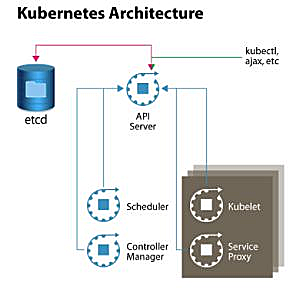
To quickly de-mystify Kubernetes, let’s have a look at Figure 1, which shows a high-level architecture diagram of the system components. In its simplest form, Kubernetes is made of a central manager (aka master) and some worker nodes. (You will learn in the course how to run everything on a single node for testing purposes).

The manager runs an API server, a scheduler, a controller, and a storage system to keep the state of the cluster. Kubernetes exposes an API via the API server so you can communicate with the API using a local client called kubectl, or you can write your own client. The scheduler sees the requests for running containers coming to the API and finds a suitable node to run that container in.

Each node in the cluster runs two processes: a kubelet and a service proxy. The kubelet receives requests to run the containers and watches over them on the local node. The proxy creates and manages networking rules to expose the container on the network.

Figure 1: Kubernetes system components.

In a nutshell, Kubernetes has the following characteristics:

  • It is made of a manager and a set of nodes

  • It has a scheduler to place containers in a cluster

  • It has an API server and a persistence layer with etcd

  • It has a controller to reconcile states

  • It is deployed on VMs or bare-metal machines, in public clouds, or on-premise

  • It is written in Go

How Is Kubernetes Doing?

Since its inception, Kubernetes has seen a terrific pace of innovation and adoption. The community of developers, users, testers, and advocates is continuously growing every day. The software is also moving at an extremely fast pace, which is even putting GitHub to the test. Here are a few numbers:

  • It was open sourced in June 2014

  • It has 1,000+ contributors

  • There are 37k+ commits

  • There have been meetups in over 100 cities worldwide, with over 30,000 participants in 25 countries

  • There are over 8,000 people on Slack

  • There is one major release approximately every three months

To see more interesting numbers about the Kubernetes community, you can check the infographic created by Apprenda.

Who Uses Kubernetes?

Kubernetes is being adopted at a rapid pace. To learn more, you should check out the case studies presented on Kubernetes.io. eBay, box, Pearson, and Wikimedia have all shared their stories. Pokemon Go, the fastest growing mobile game, runs on Google Container Engine (GKE), the Kubernetes service from Google Cloud Platform (GCP).

In this article, we talked about what Kubernetes is, what it does, and took a look at its architecture. Next week in this series, we’ll compare Kubernetes to competing container managers.

Download the sample chapter now.

Kubernetes sample

Meet Your Instructor: Sebastien Goasguen

This blog series is adapted from materials prepared by course instructor Sebastien Goasguen, a 15-year open source veteran. He wrote the O’Reilly Docker Cookbook and, while investigating the Docker ecosystem, he started focusing on Kubernetes. He is the founder of Skippbox, a Kubernetes startup that provides solutions, services, and training for this key cloud-native technology, and Senior Director of Cloud Technologies for Bitnami. He is also a member of the Apache Software Foundation and a member/contributor to the Kubernetes Incubator.

Using the Valgrind Framework to Build a Persistent Memory Error Detector

Persistent Memory was a hot topic at LinuxCon Europe with at least three talks from the team involved in developing the Non-Volatile Memory Library (NVML), including an overview of persistent memory in Linux and extending libstdc++ and libc++ for easier persistent memory programming. In the last talk on this topic from LinuxCon Europe, Krzysztof Czurylo, Software Architect at Intel, goes into detail about using the Valgrind framework to build a persistent memory error detector.

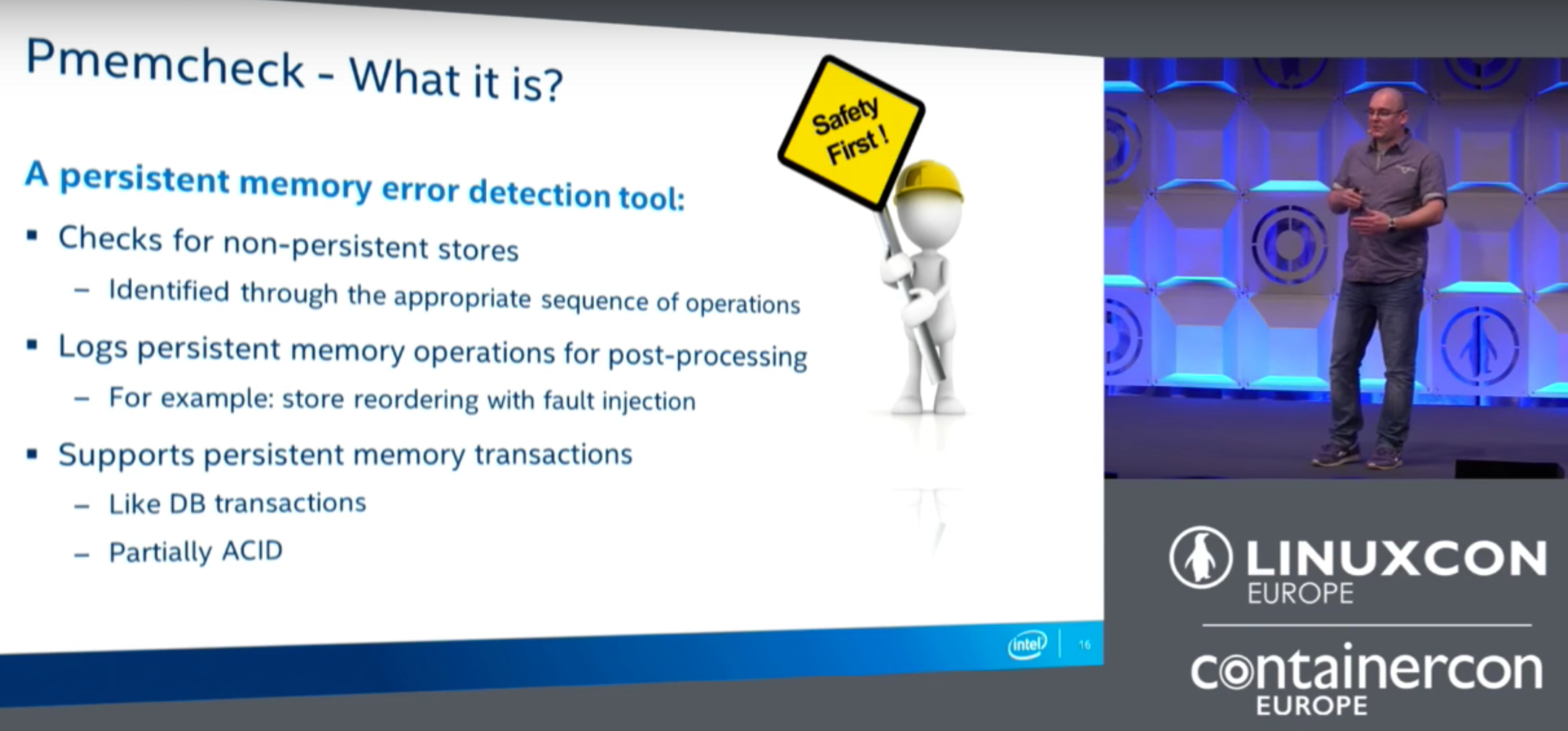
Czurylo started with an overview of persistent memory and the SNIA NVM Programming Model, which was covered in more detail in the blog posts for the other two talks in this series. He quickly moved on to talk about some of the issues and the tools they needed to build to solve them. Specifically, they needed a persistent memory error detection tool that could:

  • Differentiate between volatile and persistent memory regions.
  • Detect stores that were not flushed to persistence.
  • Detect stores that were overwritten before being made persistent.
  • Detect superfluous flushes.
  • Support persistent memory transactions.
  • Simulate failure / flush reordering.

They were thinking about writing some tools from scratch, but Czurylo said that eventually they decided to use Valgrind, which is a popular tool that supports multiple platforms and is already widely used by the community. Valgrind is also feature-rich with low-level instrumentation and good multi-threading support. More specifically, Valgrind already performs a lot of what they needed in a persistent memory error detection tool, since it already tracks changes to memory, so they only needed to write tools that allowed Valgrind to detect whether the order of operations is correct. One nice feature of Valgrind is that it already has a client request mechanism, which allows them to inject specific persistent memory requests or queries into the code. However, there are a couple of downsides. The API isn’t well documented and can be difficult to use, and there are also performance issues where the execution is a couple of times slower when you run your program using this tool. 

The Valgrind pmemcheck tool is still evolving with several new features and other improvements being planned. Future work includes store reordering, ADR support / detection, performance tuning, upstreaming to the Valgrind repositories, and more.

Watch the video of Czurylo’s talk to get all of the details about using the Valgrind pmemcheck tools.

Interested in speaking at Open Source Summit North America on September 11-13? Submit your proposal by May 6, 2017. Submit now>>

Not interested in speaking but want to attend? Linux.com readers can register now with the discount code, LINUXRD5, for 5% off the all-access attendee registration price. Register now to save over $300!

Slaying Monoliths with Docker and Node.js, a Netflix Original by Yunong Xiao, Netflix.com

https://www.youtube.com/watch?v=H_iK7jww_j8?list=PLfMzBWSH11xYaaHMalNKqcEurBH8LstB8

Yunong Xiao, Principal Software Engineer at Netflix, describes scaling challenges the company has encountered and explains how the company delivers content to a global audience on an ever-growing number of platforms.


Modules vs. Microservices

Much has been said about moving from monoliths to microservices. Besides rolling off the tongue nicely, it also seems like a no-brainer to chop up a monolith into microservices. But is this approach really the best choice for your organization? It’s true that there are many drawbacks to maintaining a messy monolithic application. But there is a compelling alternative which is often overlooked: modular application development. In this article, we’ll explore what this alternative entails and show how it relates to building microservices.

Microservices for modularity

“With microservices we can finally have teams work independently”, or “our monolith is too complex, which slows us down.” These expressions are just a few of the many reasons that lead development teams down the path of microservices. Another one is the need for scalability and resilience. What developers collectively seem to be yearning for is a modular approach to system design and development. Modularity in software development can be boiled down into three guiding principles:

Read more at O’Reilly


IEEE Looks Beyond Moore’s Law with IRDS Technology Roadmap

IEEE is taking a lead role in building a comprehensive, end-to-end view of the computing ecosystem, including devices, components, systems, architecture, and software. In May 2016, IEEE announced the formation of the IRDS under the sponsorship of IEEE RC. The historical integration of IEEE RC and the International Technology Roadmap for Semiconductors (ITRS) 2.0 addresses mapping the ecosystem of the new reborn electronics industry. The new beginning of the evolved roadmap—with the migration from ITRS to IRDS—is proceeding seamlessly as all the reports produced by the ITRS 2.0 represent the starting point of IRDS.

While engaging other segments of IEEE in complementary activities to assure alignment and consensus across a range of stakeholders, the IRDS team is developing a 15-year roadmap with a vision to identify key trends related to devices, systems, and other related technologies.

Read more at insideHPC

Using Proprietary Services to Develop Open Source Software

… a lot of open source software is developed on (and with the help of) proprietary services running closed-source code. Countless open source projects are developed on GitHub, or with the help of JIRA for bug tracking, Slack for communications, Google Docs for document authoring and sharing, Trello for status boards. That sounds a bit paradoxical and hypocritical—a bit too much “do what I say, not what I do.” Why is that? If we agree that open source has so many tangible benefits, why are we so willing to forfeit them with the very tooling we use to produce it?

But it’s free!

The argument usually goes like this: Those platforms may be proprietary, they offer great features, and they are provided free of charge to my open source project.

Read more at OpenSource.com

Open Source Project Uses Docker for Serverless Computing

Function as a Service (FaaS) uses Docker and Swarm to create a simple system for running functions in the container, language, and runtime of your choice.

Serverless computing has fast become a staple presence on major clouds, from Amazon to Azure. It’s also inspiring open source projects designed to make the concept of functions as a service useful to individual developers.

FaaS is designed to be more elementary than similar projects, mainly because it emphasizes Unix mechanisms and metaphors as much as the tools of the Docker stack.

Read more at InfoWorld