Home Blog Page 575

Simulate the Internet with Flashback, a New WebDev Test Tool from LinkedIn

The internet is a harsh mistress. Sites go down, change without notice, or even just disappear entirely. The web — are you sitting down? — is not 100 percent reliable. This means that testing a project that has external dependencies, things can fail that aren’t even your bugs. What’s a software testing engineer to do?!uo

Make your own internet, that’s what. Or at least a network layer mocking system to take care of that outbound traffic, so there are no third party downtime network issues or other constraints that break your test. The software engineering team at the LinkedIn social networking service announced in a blog post Friday that they have done just that, building a new internet mocking tool called Flashback to remove that uncontrolled variable from the testing equation.

Read more at The New Stack

An Efficient Approach to Continuous Documentation

An outside observer watching a software developer work on a small feature in a real project would find the process to look less like engineering and more like a contrived scavenger hunt for knowledge new and old.

The problem is that we scatter what we learn and teach to the winds. A quick comment on a pull request transfers knowledge from one head to another, but then falls off the radar. A blog post covers some lesson learned while working on a project, but then never gets touched again after it’s written. A StackOverflow link is passed through Slack, and then disappears into the back scroll.

We can do better. In this article, I will explain how to get started on a more systematic way of cultivating knowledge. It’s something that won’t take you more than a few minutes a day at first, but it’ll pay off in massive volumes.

Read more at O’Reilly

CoreOS Tectonic Now Installs Kubernetes on OpenStack

CoreOS and OpenStack have a somewhat intertwined history, which is why it’s somewhat surprising it took until today for CoreOS’s Tectonic Kubernetes distribution to provide an installer that targets OpenStack cloud deployments.

The founders of CoreOS originally worked at Rackspace, alongside the founders of OpenStack, and CoreOS executives have been a common sight at OpenStack events and even on the keynote stage. In fact, in April 2016, CoreOS CEO Alex Polvi gave a very well-received keynote demo of a project called Stackanetes, which enables Kubernetes to deploy an OpenStack cloud.

Read more at eWeek

The Goal of HP’s Radical The Machine: Reshaping Computing Around Memory

…HPE’s goal with The Machine is to build a large pool of persistent memory that application processors can just access.

“We want all the warm and hot data to reside in a very large in-memory domain,” Wheeler said. “At the software level, we are trying to eliminate a lot of the shuffling of data in and out of storage.”

Removing that kind of overhead will accelerate the processing of enormous datasets that are becoming increasingly common in the fields of big data analytics and machine learning. 

Read more at PCWorld

The Peril in Counting Source Lines on an OSS Project

There seems to be a phase that OSS projects go through where as they mature and gain traction. As they do it becomes increasingly important for vendors to point to their contributions to credibly say they are the ‘xyz’ company. Heptio is one such vendor operating in the OSS space, and this isn’t lost on us. 🙂

It helps during a sales cycle to be able to say “we are the a big contributor to this project, look at the percentage of code and PRs we submitted”. While transparency is important as is recognizing the contributions that key vendors, focus on a single metric in isolation (and LoC in particular) creates a perverse incentive structure. Taken to its extreme it becomes detrimental to project health.

Read more at Heptio

How to Set Up an Environment for Android Apps Automation Testing on Linux

In this day and age mobile app development has become decidedly mainstream. As more and more people do everything from ordering food to paying their bills from their smartphones, the need for creating great applications will not go away anytime soon. However, app development can be a long and arduous process, one that’s subject to all kinds of human errors. To that end, it’s now become fairly commonplace to automate certain test scenarios in order to avoid mistakes and decrease time consumption.

If you’re a budding programmer looking to make the most out of automated tests, you’ll need the following tools for starters:

1. A testing framework that comes with a set of APIs to build UI tests (we recommend Appium)

2. An Android simulator (Genymotion works best)

3. An integrated development environment (IDE)

Once these are in place, we recommend setting up Appium to begin the automation process. Appium uses WebDriver and DesiredCapabilities, and you will need npm, the default package manager for Javascript runtime environment Node.js in order to install it. Installing npm on Linux can be done using brew, the OS package manager for Linux, and requires a bit of coding:

1. First of all – required dependencies. Paste the command below to terminal:

sudo apt-get install build-essential curl git python-setuptools ruby

2. Now install linux brew with ruby. Paste the command below to terminal:

ruby -e “$(curl -fsSL https://raw.githubusercontent.com/Linuxbrew/install/master/install)”

3. Add to your .bashrc or .zshrc:

export PATH=”$HOME/.linuxbrew/bin:$PATH”

export MANPATH=”$HOME/.linuxbrew/share/man:$MANPATH”

export INFOPATH=”$HOME/.linuxbrew/share/info:$INFOPATH”`

4. Now we can install node using linux brew:

brew update

brew install node

brew link node

This procedure will take around 25 minutes. After the successful node installation you can install Appium through: npm install -g appium

Now it’s time to download and set-up Android SDK. This one’s easier, as all you need to do is follow instructions step-by-step and select the necessary packages for your chosen Android versions.

As far as Android Emulators go, we prefer using Genymotion. It’s fast and easy to use and offers a whole lot of functionalities, including GPS support and real-time Wi-Fi connections. In order to get it up and running, you’ll first need to install Virtualbox via the Ubuntu Software Center on your workstation. Then download Genymotion and run the following commands:

chmod a+x ./genymotion-2.7.2-linux_x64


./genymotion-2.7.2-linux_x64


You’ll need a virtual device user ID and password, both of which can be obtained by registering with the Genymotion website. After that, just click start and you’re good to go.

Now it’s time to add an IDE into the mix. If you use Maven be sure to add Selenium, TestNG and Appium to your dependencies. Be sure to also create a folder where your .apk file will be stored.

Finally, for analysis of the application’s UI you should use UIAutomatorviewer. It’s a part of the Android Studio you previously set up and allows you to inspect the UI of an application and examine things like layout hierarchy and the properties associated with the application’s controls. There are many advantages to using UIAutomatorviewer, including its independence of screen resolution and its ability to use external buttons.

That concludes our brief guide on how to set-up an environment for automating Android application testing on Linux. Keep in mind that any app worth its salt needs to be properly tested before hitting the market if it has any chance of competing in the ridiculously crowded app landscape of today, so implementing a successful automation strategy may save you lots of time and money in the process.

Latest Linux Maker Boards Gamble on Diversity

As usual, last week’s Embedded World show in Nuremberg, Germany was primarily focused on commercial embedded single board computers (SBCs), computer-on-modules, and rugged industrial systems for the OEM market. Yet, we also saw a growing number of community-backed maker boards, which, like most of the commercial boards, run Linux. The new crop shows the growing diversity of hacker SBCs, which range from completely open source models to proprietary prototyping boards that nevertheless offer low prices and community services such as forums and open source Linux distributions.

The latest hacker SBCs include:

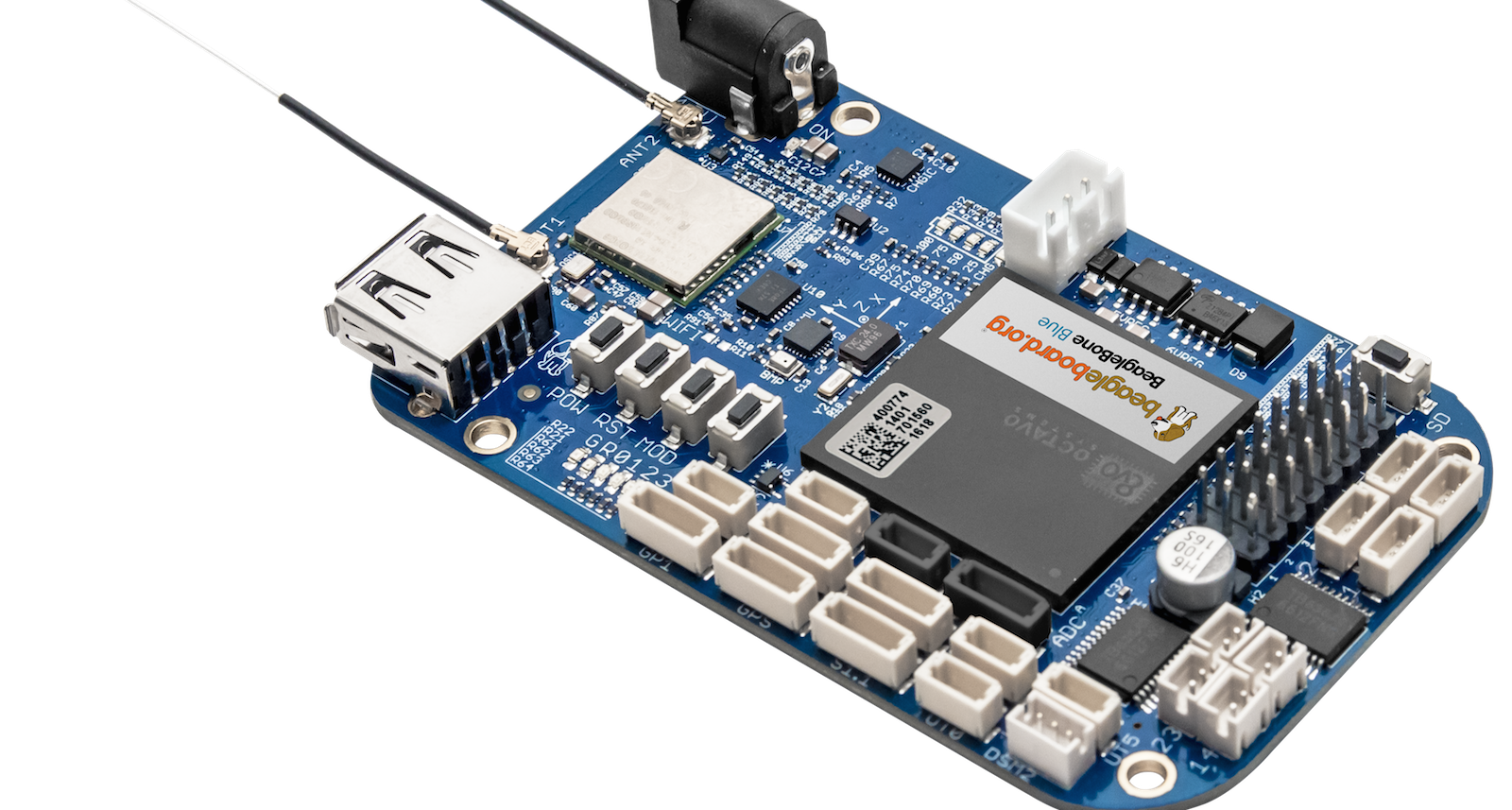
  • BeagleBone Blue — A robotics-focused spin of the BeagleBone Black

  • Chameleon96 — The first FPGA-enabled and first ARMv7 96Boards entry

  • NanoPi Neo2 — A headless, $15 boardlet that is the smallest quad-core ARMv8 SBC yet

  • Up Core — One of the smallest and most ARM-like x86-based hacker boards to date

In recent years, we’ve seen amazing price reductions and performance improvements on community-backed boards, as well as rampant imitation. The prime source of reflection is the Raspberry Pi, which recently spawned a wireless enabled, $10 Raspberry Pi Zero W.  Cumulatively, the Raspberry Pi models are now said to be the third best-selling computer in history, beating out the Commodore 64 with 12.5 million units sold.

Because Raspberry Pi Trading has an exclusive deal with Broadcom on the boards’ BCM2836 and BCM2837 SoCs, there are no absolute clones of the RPi. However, the dimensions, the 40-pin expansion header, and in many cases the port layout and selection are imitated in dozens of SBCs.

None of the four boards covered here offer full RPi expansion compatibility, and they bravely head off in new directions. We’re seeing similar diversity in the latest COM/carrier board combinations. Nvidia’s third-generation, Linux-driven Jetson TX2 module launched earlier this month with a proprietary COM design, but with an open carrier board schematic, thereby enabling third-party participation.

Connect Tech responded with three carriers for the TX2, which features a high-end new Tegra Parker SoC designed for graphics and AI. These include a basic $99 Sprocket, a Spaceley board designed to work with Pixhawk drone autopilots, and a Cogswell carrier aimed at Gigabit Ethernet vision camera (GigE Vision) applications. Auvidea is also working on a carrier, and Connect Tech’s original three TX1-compatible carriers work on the TX2 as well as the TX1.

The new SBCs detailed below offer even more choices. Staking out new territory without RPi add-on compatibility is a risky choice, but so is introducing yet another me-too board that may struggle to differentiate. The following four Linux-friendly boards show some interesting new directions for hacker SBCs beyond DIY media players and home automation prototyping.

BeagleBone Blue

Over the past two years, BeagleBoard.org has worked with a variety of partners to produce certified pseudo-clones of the popular TI Sitara AM335x based BeagleBone Black. These include Seeed’s Grove compatible BeagleBone Green and BeagleBone Green Wireless and its own BeagleBone Black Wireless, which includes a SiP packaged core computer built by Octavo Systems. The new BeagleBone Blue is a robotics-focused collaboration with the University of California San Diego Robotics Lab, which is using the board for robotics education.

Like the BB Black Wireless, the $80 BeagleBone Blue has built-in wireless and an Octavo SiP package that pre-integrates the 1GHz, Cortex-A9 Sitara AM3358, 512MB RAM, and 4GB eMMC flash. The board also adds a battery connector, IMU, barometer, and motor control features like servos, encoder inputs, and motor outputs. While robotics has always been a strength of the BB Black, the BB Blue gives you most of the basic tools without requiring additional cape add-ons.

Chameleon96

Linaro’s open source 96Boards spec was adopted by some of the first 64-bit ARMv8 SBCs, including Arrow’s Qualcomm-backed DragonBoard 410C. Now Arrow has announced the first ARMv7 96Boards entry — and the first FPGA-enabled 96Boards SBC — with the Chameleon96. The SBC runs Debian Linux on a Cyclone V SE SoC from Intel PSG (Programmable Solutions Group), the new post-acquisition name for Intel’s Altera FPGA unit.

The Cyclone V combines dual 800MHz Cortex-A9 cores with a modest FPGA subsystem with 110K LE performance. Among other duties, the FPGA handles the video subsystem, which decodes and encodes 60fps 1080p streams via HDMI and MIPI-CSI interfaces, respectively. By applying FPGA to video, the board enables development of “custom IPU/GPU/VPU solutions,” says Arrow.

The Chameleon96, which like other 96Boards CE SBCs expresses most of its interfaces via 40-pin low- and 60-pin high-speed expansion connectors, is also notable for its integration of SecureRF’s quantum resistant cryptography technology. SecureRF’s Ironwood Key Agreement Protocol and Walnut DSA Digital Signature Algorithm are designed for securing reduced footprint, low-energy IoT devices.

NanoPi Neo2

The NanoPi Neo2 is the third iteration of the minimalist 40x40mm NanoPi Neo designs from FriendlyElec (FriendlyARM), following the NanoPi Neo and wireless-ready NanoPi Neo Air. The Ubuntu Core and Armbian Linux supported Neo2 advances to an ARMv8 quad-core, Cortex-A53 Allwinner H5, making it the world’s smallest 64-bit ARM hacker board. At $15, it’s also one of the most affordable.

The IoT-oriented NanoPi Neo2 is headless, without a real-world display port, so it’s not for your casual weekend hacker. The board offers 512MB of RAM, but storage is dependent on the microSD slot. Coastline ports include Gigabit Ethernet, USB 2.0 host, and micro-USB OTG. Onboard interfaces include an expansion interface that is said to be compatible with the first 24 pins of the Raspberry Pi.

UP Core

Unlike the above three boards, the UP Core is not a fully open source design, but Aaeon is otherwise striving to serve hobbyist makers as well as small-run commercial vendors. For example, the company has opened up the spec for its 100-pin expansion connector so third party developers can create their own boards that extend the SBC’s capabilities.

At 66×56.5mm, this community-backed board is smaller than the similarly quad-core Intel “Cherry Trail” Atom driven UP board. That’s only slightly petite by ARM standards, but the it’s one of the smallest x86 based hacker SBCs around. It will soon launch on Kickstarter for a price starting at $69. Once again, this is nothing special for ARM boards, but it’s cheap compared to most community-backed x86 SBCs.

The UP Core replaces the GbE port with WiFi and Bluetooth, but is otherwise a scaled back version of the original UP board. The SBC supports up to 4GB DDR3L RAM and up to 64GB eMMC, and coastline ports include HDMI and USB 3.0 ports. Additional interfaces include MIPI-CSI, USB 2.0, I2S, and eDP.

Aaeon’s parent company Asus has received even more attention for its quasi-open, maker-oriented Tinker Board. Launched in Europe in January, the $68 SBC runs Debian or Kodi on a quad-core Cortex-A17 Rockchip RK3288. The board features 2GB RAM, GbE, 4K video, and yes, that tried and true RPi-compatible 40-pin connector.

Connect with the Linux community at Open Source Summit North America on September 11-13. Linux.com readers can register now with the discount code, LINUXRD5, for 5% off the all-access attendee registration price. Register now to save over $300!

Vim Shortcuts and Text Searches

In our previous Vim how-to, An Introduction to Vim for Sysadmins, we learned enough about using Vim to bang around in short text files and get something done. Now we’re moving on to some of Vim’s excellent power tools: abbreviations (autotext), mapping hotkeys, and text searches.

Abbreviations

Vim’s abbreviations are glorious custom autotext. You can use these for anything: copyright notices, signatures, page headers, code snippets, anything your heart desires. Create a new abbreviation in command mode, like this example of my new signature:

:ab sig Carla Schroder, angel with a lariat

Switch to insert mode to use your new signature. In my example it is mapped to sig, so I type sig and press Enter. You can make your abbreviations concise and mysterious, or make them a little bit longer and mnemonic, like sig. List your abbreviations in command mode:

:ab
! sig Carla Schroder, angel with a lariat 1,0-1 All

Remove an abbreviation:

:una sig

Remove all abbreviations:

:abclear

When you create abbreviations this way, they are not permanent and will disappear when you close Vim. This is good when you need them only for a particular document and don’t expect to use them again. To save them permanently, put them in your ~/.vimrc. They look exactly the same in ~/.vimrc:

:ab sig Carla Schroder, angel with a lariat

If you use una or :abclear your abbreviations in ~/.vimrc become unavailable until you close Vim, but are not removed from ~/.vimrc, so they will be active when you start Vim again.

What if you want to type your abbreviation’s name, like sig, and not print your abbreviation? No problem, just type sig followed by CTRL+V.

Another use for abbreviations is auto-correcting typos. This corrects teh to the:

:iab teh the

:iab is for insert mode only, :cab for command mode, and :ab operates in both modes.

Run :help abbreviations to learn the many finer points. Leave the help screen with :q.

Fast Markup Tagging

Now we’ll use Vim’s maps to create custom keystrokes for inserting markup tags. These examples insert both opening and closing HTML tags around single words.

:map <F4> <strong><Esc>ea</strong><Esc>a
:map <F5> <em><Esc>ea</em><Esc>a
:map <F6> <del><Esc>ea</del><Esc>a

After creating your keymaps switch to insert mode, place your cursor on the first letter of the word, press the appropriate function key, and poof! Nice HTML tags surrounding your word. So what the heck just happened here? Let’s dissect the first mapping.

:map creates a new keymap that works in insert mode. (:map! works in both command and insert modes.) F4 is the hotkey, and remember to type it out when you create the new mapping rather than pressing the key. <strong> is the opening HTML tag. <Esc> switches to command mode, e navigates to the end of the word and then a appends </strong> after the cursor. Cool, eh? And not so mysterious when you crack the Vim code.

You may map commands to any key combinations you choose. F2-F12 and shifted F2-F12 should be safe. When you use other hotkey combinations think up odd combinations that you are unlikely to use in text, like q-consonant combinations, comma-letter, or F-key-letter or number.

The examples above may not be practical, as they are limited to tagging single words. You can also map single tags, like this:

:map <F4>1 <strong>
:map <F4>2 </strong>

Just like abbreviations, you can preserve your key mappings in ~/.vimrc. Of course you may map any text you like.

Text Search

Vim’s basic text search is fast and easy. In command mode, type /string, replacing string with your own text, and then continue the search forward with lowercase n (next), and search backwards with uppercase n. This matches your search string even when it is inside longer strings, so searching for “is” also finds “this” and “isn’t”.

To find an exact match you have to make it a regular expression, like this:

/<is>

Another way to find an exact word is to place the cursor on a word, enter command mode, and type an asterisk to find more occurrences of that word. Again, use n and N to repeat the search.

The default is a case-sensitive search. Set ignorecase for a case-insensitive search:

:set ignorecase

:set smartcase is a rather slick tool for smart case-sensitive searches. This works only on typed search strings. If you search for /wOrd then it will find only that exact match. If you search for /word then it will find all matches regardless of case.

You can override these settings with c (case insensitive) and C (case sensitive) like this:

/wOrdC
/wordc

One more cool search feature, and that is using Vim’s search history to repeat previous searches. Press / or ? to enter your search history, and navigate it with the arrow keys. You may edit any search in your history, and press the Enter key to use the search.

In our next installment, we’ll take an in-depth look at search-and-replace, and how to perform lovely complex feats of searching and replacing in large and multiple documents.

Learn more about Linux through the free “Introduction to Linux” course from The Linux Foundation and edX.

DevOps Embraces Security Measures to Build Safer Software

Survey finds that devops teams are automating security throughout the software development lifecycle to create better and safer code.

It’s no secret that traditional development and operations teams view security controls as slow and cumbersome, and often look for ways to bypass the requirements in their rush to get software out the door. However, only 28 percent of respondents from organizations with mature devops practices felt that security requirements slowed down software development, Sonatype found in its 2017 DevSecOps Community Survey. In fact, 84 percent of respondents from mature devops organizations viewed application security as a safety measure, not an inhibitor to innovation. 

Read more at InfoWorld

Google Releases Early Developers Preview of Android O

Google this week released a developer preview of Android O, the next version of its mobile operating system the includes several mostly incremental feature upgrades over the currently available version Android N also known as Nougat.  Key among the upgrades are those that are designed to improve battery life, application notifications and the ability for users to store data such as addresses, user names and passwords for auto filling login and other repetitive information.  

The Developer Preview comes with an updated software development kit that developers can use for testing the OS on devices like the Nexus 5X, Nexus 6P and Google Pixel devices. 

Read more at eWeek