
Home Blog Page 576

Latest Linux Maker Boards Gamble on Diversity

As usual, last week’s Embedded World show in Nuremberg, Germany was primarily focused on commercial embedded single board computers (SBCs), computer-on-modules, and rugged industrial systems for the OEM market. Yet, we also saw a growing number of community-backed maker boards, which, like most of the commercial boards, run Linux. The new crop shows the growing diversity of hacker SBCs, which range from completely open source models to proprietary prototyping boards that nevertheless offer low prices and community services such as forums and open source Linux distributions.

The latest hacker SBCs include:

  • BeagleBone Blue — A robotics-focused spin of the BeagleBone Black

  • Chameleon96 — The first FPGA-enabled and first ARMv7 96Boards entry

  • NanoPi Neo2 — A headless, $15 boardlet that is the smallest quad-core ARMv8 SBC yet

  • Up Core — One of the smallest and most ARM-like x86-based hacker boards to date

In recent years, we’ve seen amazing price reductions and performance improvements on community-backed boards, as well as rampant imitation. The prime source of reflection is the Raspberry Pi, which recently spawned a wireless enabled, $10 Raspberry Pi Zero W.  Cumulatively, the Raspberry Pi models are now said to be the third best-selling computer in history, beating out the Commodore 64 with 12.5 million units sold.

Because Raspberry Pi Trading has an exclusive deal with Broadcom on the boards’ BCM2836 and BCM2837 SoCs, there are no absolute clones of the RPi. However, the dimensions, the 40-pin expansion header, and in many cases the port layout and selection are imitated in dozens of SBCs.

None of the four boards covered here offer full RPi expansion compatibility, and they bravely head off in new directions. We’re seeing similar diversity in the latest COM/carrier board combinations. Nvidia’s third-generation, Linux-driven Jetson TX2 module launched earlier this month with a proprietary COM design, but with an open carrier board schematic, thereby enabling third-party participation.

Connect Tech responded with three carriers for the TX2, which features a high-end new Tegra Parker SoC designed for graphics and AI. These include a basic $99 Sprocket, a Spaceley board designed to work with Pixhawk drone autopilots, and a Cogswell carrier aimed at Gigabit Ethernet vision camera (GigE Vision) applications. Auvidea is also working on a carrier, and Connect Tech’s original three TX1-compatible carriers work on the TX2 as well as the TX1.

The new SBCs detailed below offer even more choices. Staking out new territory without RPi add-on compatibility is a risky choice, but so is introducing yet another me-too board that may struggle to differentiate. The following four Linux-friendly boards show some interesting new directions for hacker SBCs beyond DIY media players and home automation prototyping.

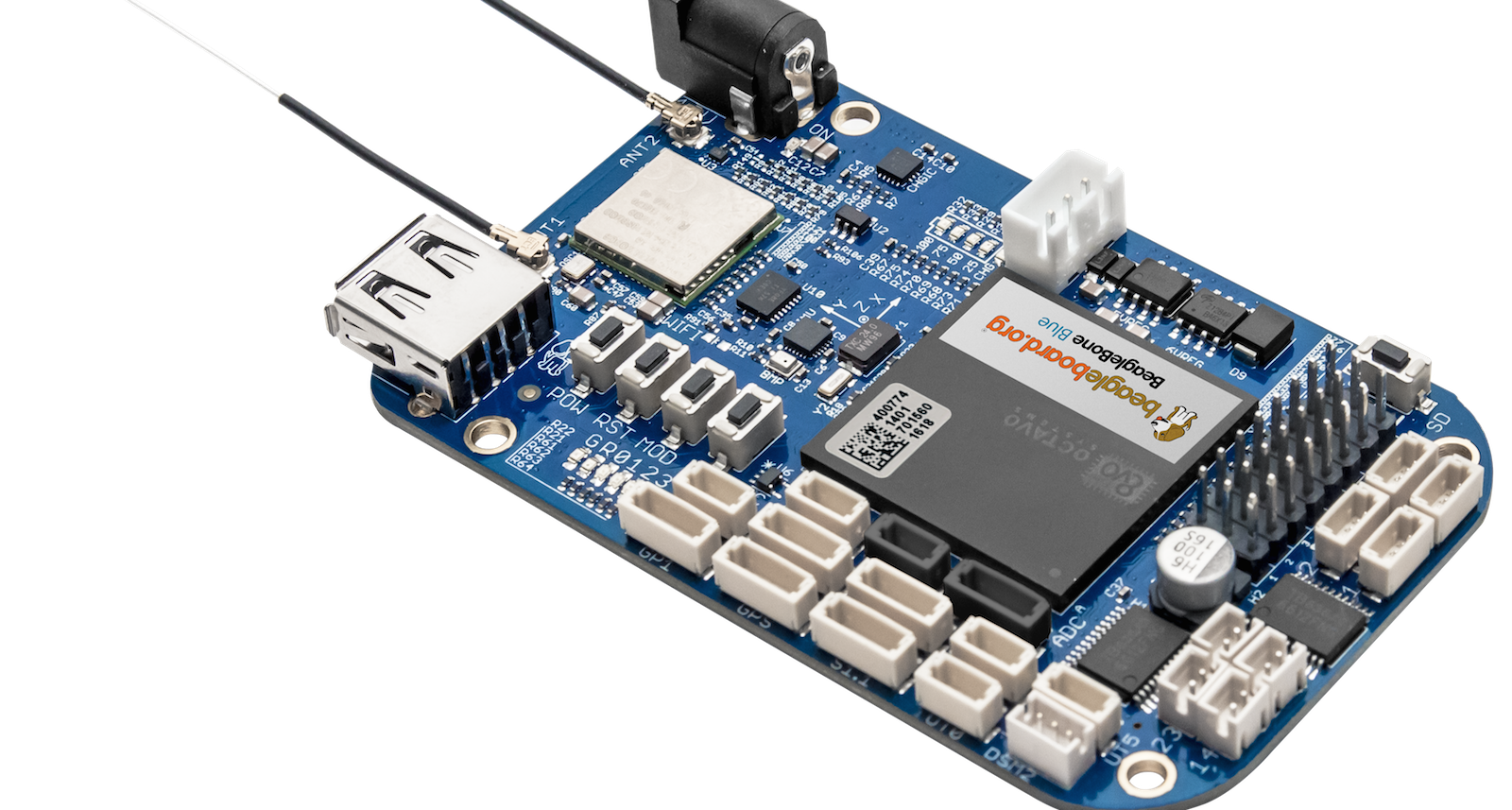
BeagleBone Blue

Over the past two years, BeagleBoard.org has worked with a variety of partners to produce certified pseudo-clones of the popular TI Sitara AM335x based BeagleBone Black. These include Seeed’s Grove compatible BeagleBone Green and BeagleBone Green Wireless and its own BeagleBone Black Wireless, which includes a SiP packaged core computer built by Octavo Systems. The new BeagleBone Blue is a robotics-focused collaboration with the University of California San Diego Robotics Lab, which is using the board for robotics education.

Like the BB Black Wireless, the $80 BeagleBone Blue has built-in wireless and an Octavo SiP package that pre-integrates the 1GHz, Cortex-A9 Sitara AM3358, 512MB RAM, and 4GB eMMC flash. The board also adds a battery connector, IMU, barometer, and motor control features like servos, encoder inputs, and motor outputs. While robotics has always been a strength of the BB Black, the BB Blue gives you most of the basic tools without requiring additional cape add-ons.

Chameleon96

Linaro’s open source 96Boards spec was adopted by some of the first 64-bit ARMv8 SBCs, including Arrow’s Qualcomm-backed DragonBoard 410C. Now Arrow has announced the first ARMv7 96Boards entry — and the first FPGA-enabled 96Boards SBC — with the Chameleon96. The SBC runs Debian Linux on a Cyclone V SE SoC from Intel PSG (Programmable Solutions Group), the new post-acquisition name for Intel’s Altera FPGA unit.

The Cyclone V combines dual 800MHz Cortex-A9 cores with a modest FPGA subsystem with 110K LE performance. Among other duties, the FPGA handles the video subsystem, which decodes and encodes 60fps 1080p streams via HDMI and MIPI-CSI interfaces, respectively. By applying FPGA to video, the board enables development of “custom IPU/GPU/VPU solutions,” says Arrow.

The Chameleon96, which like other 96Boards CE SBCs expresses most of its interfaces via 40-pin low- and 60-pin high-speed expansion connectors, is also notable for its integration of SecureRF’s quantum resistant cryptography technology. SecureRF’s Ironwood Key Agreement Protocol and Walnut DSA Digital Signature Algorithm are designed for securing reduced footprint, low-energy IoT devices.

NanoPi Neo2

The NanoPi Neo2 is the third iteration of the minimalist 40x40mm NanoPi Neo designs from FriendlyElec (FriendlyARM), following the NanoPi Neo and wireless-ready NanoPi Neo Air. The Ubuntu Core and Armbian Linux supported Neo2 advances to an ARMv8 quad-core, Cortex-A53 Allwinner H5, making it the world’s smallest 64-bit ARM hacker board. At $15, it’s also one of the most affordable.

The IoT-oriented NanoPi Neo2 is headless, without a real-world display port, so it’s not for your casual weekend hacker. The board offers 512MB of RAM, but storage is dependent on the microSD slot. Coastline ports include Gigabit Ethernet, USB 2.0 host, and micro-USB OTG. Onboard interfaces include an expansion interface that is said to be compatible with the first 24 pins of the Raspberry Pi.

UP Core

Unlike the above three boards, the UP Core is not a fully open source design, but Aaeon is otherwise striving to serve hobbyist makers as well as small-run commercial vendors. For example, the company has opened up the spec for its 100-pin expansion connector so third party developers can create their own boards that extend the SBC’s capabilities.

At 66×56.5mm, this community-backed board is smaller than the similarly quad-core Intel “Cherry Trail” Atom driven UP board. That’s only slightly petite by ARM standards, but the it’s one of the smallest x86 based hacker SBCs around. It will soon launch on Kickstarter for a price starting at $69. Once again, this is nothing special for ARM boards, but it’s cheap compared to most community-backed x86 SBCs.

The UP Core replaces the GbE port with WiFi and Bluetooth, but is otherwise a scaled back version of the original UP board. The SBC supports up to 4GB DDR3L RAM and up to 64GB eMMC, and coastline ports include HDMI and USB 3.0 ports. Additional interfaces include MIPI-CSI, USB 2.0, I2S, and eDP.

Aaeon’s parent company Asus has received even more attention for its quasi-open, maker-oriented Tinker Board. Launched in Europe in January, the $68 SBC runs Debian or Kodi on a quad-core Cortex-A17 Rockchip RK3288. The board features 2GB RAM, GbE, 4K video, and yes, that tried and true RPi-compatible 40-pin connector.

Connect with the Linux community at Open Source Summit North America on September 11-13. Linux.com readers can register now with the discount code, LINUXRD5, for 5% off the all-access attendee registration price. Register now to save over $300!

Vim Shortcuts and Text Searches

In our previous Vim how-to, An Introduction to Vim for Sysadmins, we learned enough about using Vim to bang around in short text files and get something done. Now we’re moving on to some of Vim’s excellent power tools: abbreviations (autotext), mapping hotkeys, and text searches.

Abbreviations

Vim’s abbreviations are glorious custom autotext. You can use these for anything: copyright notices, signatures, page headers, code snippets, anything your heart desires. Create a new abbreviation in command mode, like this example of my new signature:

:ab sig Carla Schroder, angel with a lariat

Switch to insert mode to use your new signature. In my example it is mapped to sig, so I type sig and press Enter. You can make your abbreviations concise and mysterious, or make them a little bit longer and mnemonic, like sig. List your abbreviations in command mode:

:ab
! sig Carla Schroder, angel with a lariat 1,0-1 All

Remove an abbreviation:

:una sig

Remove all abbreviations:

:abclear

When you create abbreviations this way, they are not permanent and will disappear when you close Vim. This is good when you need them only for a particular document and don’t expect to use them again. To save them permanently, put them in your ~/.vimrc. They look exactly the same in ~/.vimrc:

:ab sig Carla Schroder, angel with a lariat

If you use una or :abclear your abbreviations in ~/.vimrc become unavailable until you close Vim, but are not removed from ~/.vimrc, so they will be active when you start Vim again.

What if you want to type your abbreviation’s name, like sig, and not print your abbreviation? No problem, just type sig followed by CTRL+V.

Another use for abbreviations is auto-correcting typos. This corrects teh to the:

:iab teh the

:iab is for insert mode only, :cab for command mode, and :ab operates in both modes.

Run :help abbreviations to learn the many finer points. Leave the help screen with :q.

Fast Markup Tagging

Now we’ll use Vim’s maps to create custom keystrokes for inserting markup tags. These examples insert both opening and closing HTML tags around single words.

:map <F4> <strong><Esc>ea</strong><Esc>a
:map <F5> <em><Esc>ea</em><Esc>a
:map <F6> <del><Esc>ea</del><Esc>a

After creating your keymaps switch to insert mode, place your cursor on the first letter of the word, press the appropriate function key, and poof! Nice HTML tags surrounding your word. So what the heck just happened here? Let’s dissect the first mapping.

:map creates a new keymap that works in insert mode. (:map! works in both command and insert modes.) F4 is the hotkey, and remember to type it out when you create the new mapping rather than pressing the key. <strong> is the opening HTML tag. <Esc> switches to command mode, e navigates to the end of the word and then a appends </strong> after the cursor. Cool, eh? And not so mysterious when you crack the Vim code.

You may map commands to any key combinations you choose. F2-F12 and shifted F2-F12 should be safe. When you use other hotkey combinations think up odd combinations that you are unlikely to use in text, like q-consonant combinations, comma-letter, or F-key-letter or number.

The examples above may not be practical, as they are limited to tagging single words. You can also map single tags, like this:

:map <F4>1 <strong>
:map <F4>2 </strong>

Just like abbreviations, you can preserve your key mappings in ~/.vimrc. Of course you may map any text you like.

Text Search

Vim’s basic text search is fast and easy. In command mode, type /string, replacing string with your own text, and then continue the search forward with lowercase n (next), and search backwards with uppercase n. This matches your search string even when it is inside longer strings, so searching for “is” also finds “this” and “isn’t”.

To find an exact match you have to make it a regular expression, like this:

/<is>

Another way to find an exact word is to place the cursor on a word, enter command mode, and type an asterisk to find more occurrences of that word. Again, use n and N to repeat the search.

The default is a case-sensitive search. Set ignorecase for a case-insensitive search:

:set ignorecase

:set smartcase is a rather slick tool for smart case-sensitive searches. This works only on typed search strings. If you search for /wOrd then it will find only that exact match. If you search for /word then it will find all matches regardless of case.

You can override these settings with c (case insensitive) and C (case sensitive) like this:

/wOrdC
/wordc

One more cool search feature, and that is using Vim’s search history to repeat previous searches. Press / or ? to enter your search history, and navigate it with the arrow keys. You may edit any search in your history, and press the Enter key to use the search.

In our next installment, we’ll take an in-depth look at search-and-replace, and how to perform lovely complex feats of searching and replacing in large and multiple documents.

Learn more about Linux through the free “Introduction to Linux” course from The Linux Foundation and edX.

DevOps Embraces Security Measures to Build Safer Software

Survey finds that devops teams are automating security throughout the software development lifecycle to create better and safer code.

It’s no secret that traditional development and operations teams view security controls as slow and cumbersome, and often look for ways to bypass the requirements in their rush to get software out the door. However, only 28 percent of respondents from organizations with mature devops practices felt that security requirements slowed down software development, Sonatype found in its 2017 DevSecOps Community Survey. In fact, 84 percent of respondents from mature devops organizations viewed application security as a safety measure, not an inhibitor to innovation. 

Read more at InfoWorld

Google Releases Early Developers Preview of Android O

Google this week released a developer preview of Android O, the next version of its mobile operating system the includes several mostly incremental feature upgrades over the currently available version Android N also known as Nougat.  Key among the upgrades are those that are designed to improve battery life, application notifications and the ability for users to store data such as addresses, user names and passwords for auto filling login and other repetitive information.  

The Developer Preview comes with an updated software development kit that developers can use for testing the OS on devices like the Nexus 5X, Nexus 6P and Google Pixel devices. 

Read more at eWeek

How a Small Team Keeps Twitter’s Fail Whale at Bay

Ian Downes is engineering manager for the compute platform team at Twitter. His team of about 10 engineers and a few other staffers buoys a platform providing container infrastructure to much of the stateless services powering twitter.com and its advertising business. Downes spoke recently at Container World on “Twitter’s Micro Services Architecture: Operational & Technical Challenges.”

When people talk about containerization, he says, it’s often about how it can enable scale and disruption, but that doesn’t interest Downes much.

“What I’m more interested in are scaleable operations — independent of what scale you’re at,” he says.

Read more at OpenStack Superuser

Netflix Launches Support for Firefox on Linux

Linux users have a new option if they want to watch Netflix — the streaming service is now compatible with Firefox for the platform. Before this, only Google Chrome could play videos from the website outright. There was even a time when users had to make sure they’re using a version of Chrome with the required Encrypted Media Extension (EME) support. 

Read more at Engadget

Thou Shalt Not Depend on Me: Analysing the Use of Outdated JavaScript Libraries on the Web

Thou shalt not depend on me: analysing the use of outdated JavaScript libraries on the web Lauinger et al., NDSS 2017

Just based on the paper title alone, if you had to guess what the situation is with outdated JavaScript libraries on the web, you’d probably guess it was pretty bad. It turns out it’s very bad indeed, and we’ve created a huge mess with nowhere near enough attention being paid to the issue. The first step towards better solutions is recognising that we have a problem, and Lauinger et al., do a tremendous job in that regard.

In this paper, we conduct the first comprehensive study of client-side JavaScript library usage and the resulting security implications across the Web. Using data from over 133K websites, we show that 37% of them include at least one library with a known vulnerability; the time lag behind the newest release of a library is measured in the order of years.

Read more at Morning Paper

Persistent Memory Extensions to libstdc++/libc++ by Tomasz Kapela, Intel

https://www.youtube.com/watch?v=uvirBdDE6Fk?list=PLbzoR-pLrL6ovByiWK-8ALCkZoCQAK-i_

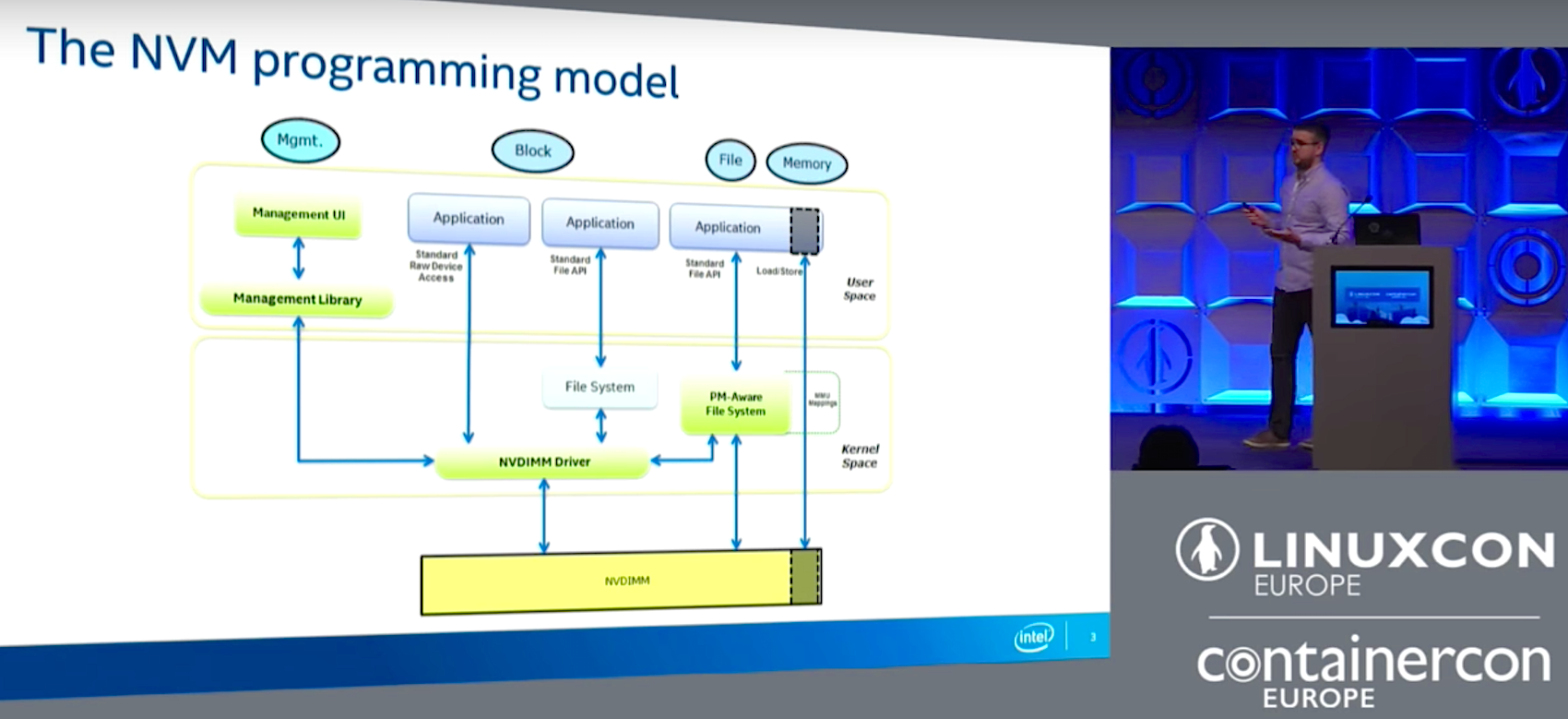
Tomasz Kapela of Intel describes the Non-Volatile Memory programming model created by the Storage Networking Industry Association at LinuxCon Europe.


Easier Persistent Memory Programming with Extensions to libstdc++ and libc++

Persistent memory, unlike volatile memory, retains its contents even if the server has a power failure. However, as Tomasz Kapela, Software Engineer at Intel, points out during his LinuxCon Europe 2016 talk, persistent memory is hard to achieve. Since persistent memory programming is non-trivial, they have been focused on making it easier for the end user and for applications to use persistent memory correctly. 

Kapela starts off by describing the Non-Volatile Memory (NVM) programming model created by the Storage Networking Industry Association (SNIA), which is an organization focused on standards for storage and networking. The NVM programming model basically describes using a persistent memory device that allows you to mmap a file to your virtual memory inside of the process where you can do loads and stores and flushes onto the memory device without really involving the kernel of the file system. 

As part of the NVML team, they have a set of open source libraries designed to work on Linux and tackle the problem of persistent memory programming. The libraries include:

  • libpmem: The basic library, flush to persistence
  • libvmem: Volatile Memory Allocator
  • libvmmalloc: Transparent use of libvmem
  • libpmemblk: Persistent memory carved into blocks
  • libpmemlog: Log file (append-mostly)
  • libpmemobj: Transactional Object Store

To address some of the pain points and limitations of using C for persistent memory, Kapela discussed how they are using C++ to develop persistent memory extensions to libstdc++ and libc++. He talked in detail about how they are encapsulating type info into a smart pointer, and making life easier with RAII and lambdas for transactions. With the increase in container usage, they are also working on a proof of concept for persistent memory containers. 

Watch the video of Kapela’s entire talk to get all of the details about the persistent memory extensions to libstdc++ and libc++.

https://www.youtube.com/watch?v=uvirBdDE6Fk?list=PLbzoR-pLrL6ovByiWK-8ALCkZoCQAK-i_

Interested in speaking at Open Source Summit North America on September 11-13? Submit your proposal by May 6, 2017. Submit now>>

Not interested in speaking but want to attend? Linux.com readers can register now with the discount code, LINUXRD5, for 5% off the all-access attendee registration price. Register now to save over $300!
6 Hot Internet of Things (IoT) Security Technologies

 Last October, Internet service provider Dyn came under an attack that disrupted access to popular websites. The cybercriminals who initiated the attack managed to commandeer a large number of internet-connected devices (mostly DVRs and cameras) to serve as their helpers. As a result, cybersecurity expert Bruce Schneier has called for government regulation of the IoT, concluding that both IoT manufacturers and their customers don’t care about the security of the 8.4 billion internet-connected devices in current use.

Whether because of government regulation or good old-fashioned self-interest, we can expect increased investment in IoT security technologies. In its recently-released TechRadar report for security and risk professionals, Forrester Research discusses the outlook for the 13 most relevant and important IoT security technologies, warning that “there is no single, magic security bullet that can easily fix all IoT security issues.”

Read more at Forbes