Home Blog Page 579

The Intel Edison: Linux Maker Machine in a Matchbox

The Intel Edison is a physically tiny computer that draws a small amount of power and breaks out plenty of connections to allow it to interact with other electronics. It begs to be the brain of your next electronics tinkering project, with all the basics in a tiny package and an easy way to connect other things you might need.

The Intel Edison measures about 1×1.5 inches but packs a dual core Atom CPU, 1GB of RAM, 4GB of storage, dual band WiFi-n, and Bluetooth (Figure 1). On the bottom of the machine is a small rectangular connector that breaks out GPIO pins, TWI, SPI, and other goodies and allows the Edison to get its power from somewhere. The Edison costs about $50, plus whatever base board you plan to power the Edison from.

Figure 1: Intel Edison board.

Although the little header on the bottom of the Edison helps keep things tiny, it is not the easiest thing to deal with when prototyping. SparkFun Electronics has created a collection of small break out boards for the Edison, called “Blocks” (Figure 2). Each block provides a specific feature such as an accelerometer, battery, or screen. Most blocks have an input header on one side and an output header on the other side so you can quickly stack blocks together to build a working creation. One example block that has no output is the OLED screen, because if you stacked another block above the screen you wouldn’t be able to see it anymore.

Figure 2: Blocks.

Unlike platforms such as Arduino which operate their GPIO and other pins at 5 or 3.3 volts, the Edison runs them at 1.8v. So you might need to do some voltage level shifting if you need to talk to higher voltage components from the Edison. Note that there is no HDMI or composite video on the Edison. It is fairly straightforward to connect a small screen and drive it from the Edison using SPI if you need that sort of thing.

Getting Started

The Edison does not come with an easy way to directly power it up. You have to connect the Edison using its small header to something that can offer it power. In this series, I will be using the SparkFun base block to power the Edison.

The console is a great place to start to see if the Edison is up and running. Connect the micro USB labeled console on the Base Block breakout to your desktop Linux machine and check dmesg to see something like the below to discover where the console is. The Base Block has power, TX, and RX LEDs on board so you can get some feedback from the hardware if things are working. If things go as they should, you will be presented with a root console to the Edison. There is no default password, you should just get right onto the console.

$ dmesg|tail
...
FTDI USB Serial Device converter now attached to ttyUSB0
$ screen /dev/ttyUSB0 115200
Poky (Yocto Project Reference Distro) 1.7.2 edison ttyMFD2

edison login: root
root@edison:~# df -h
/dev/root                 1.4G    446.4M    913.5M  33% /
...
/dev/mmcblk0p10           1.3G      2.0M      1.3G   0% /home

root@edison:~# cat /etc/release 
EDISON-3.0
Copyright Intel 2015

The 4GB of on chip storage is broken up to allow a generous file system in the home directory and a good amount of space for the Edison itself to use for the Yocto Linux installation and applications in /usr. You can also switch over to running Debian on the Edison fairly easily.

It is always a good idea to make sure you are running the newest version of the firmware for a product. There are many ways to update the Yocto Linux image on the Edison, but the Intel Edison Setup wizard is a good starting point (Figure 3).

Figure 3: Intel Edison configuration.

The Intel Edison Setup wizard can be used for many useful things such as updating the Linux distribution on the Edison, setting the root password, and connecting the Edison to WiFi.

$ tar xzvf Intel_Edison_Setup_Lin_2016.2.002.tar.gz
$ cd Intel_Edison_Setup_Lin_2016.2.002
$ ./install_GUI.sh
...
$ su -l
# ./install_GUI.sh

The wizard lists supported operating systems as the 64-bit versions of Ubuntu 12.04, 13.04, 14.04, and 15.04. I was using 64-bit Fedora Linux and decided to proceed anyway.

Moving ahead, I found the Edison not detected. So I connected the USB OTG port and nothing changed. Clicking back and next in the GUI showed the versions of the Edison that was connected. So, it seems that the wizard doesn’t poll for a connected Edison, you have to force it to retry. The firmware update download is in the range of 300MB in size. I attempted to update the firmware as a non-root user, which did not work. Running the Intel Edison Setup as root allowed the Yocto image to update. So there must have been some permission issue trying to do the firmware update as a regular user.

After updating the firmware click “Enable Security” to set a hostname for the Edison and set the root password. The last option will let you set up the Edison to connect to your WiFi. Connecting to WiFi is very simple, the Edison will scan for networks and you’ll need to enter your WiFi password to complete the setup. At this stage, you will either have to check your DHCP server records or use the console on the Edison to find out the IP address it was given. Once you know that, you can ssh into the Edison over WiFi.

The Yocto Linux image for Edison was using opkg for package management. This will come in handy as the default image is quite cut down, and you will likely find yourself wanting to install an additional sprinkling of your favourite GNU/Linux software.


root@edison:~# opkg update
root@edison:~# opkg install bonnie++
Installing bonnie++ (1.03e-r0) on root.
Downloading http://iotdk.intel.com/repos/3.5/iotdk/edison/core2-32/bonnie++_1.03e-r0_core2-32.ipk.
Configuring bonnie++.

Performance

One thing that can make or break the experience of Linux on a small machine is the storage speed. Many Raspberry Pi machines limp along on a budget SD card until the card finally gives up. The Edison comes with 4GB of onboard storage and I used Bonnie++ to get an idea of how quickly you can interact with that storage.

The Linux kernel will use RAM to try to cache data so that processes run faster. To test the storage rather than the RAM cache, Bonnie++ tries to use files that are twice the size of your RAM. Unfortunately, the /home partition is only 1.3GB and the Edison has 1GB of RAM, so I couldn’t use filesystem storage twice the RAM size. This means the sequential input performance results shown below are likely incorrect as they would be coming from a RAM cache instead of off flash storage. The block level write performance at almost 19mb/s is quite impressive.


edison:~$ /usr/sbin/bonnie++ -r 256m -n 0 -d . 
Writing with putc()...done
Writing intelligently...done
Rewriting...done
Reading with getc()...done
Reading intelligently...done
start 'em...done...done...done...
Version 1.03e       ------Sequential Output------ --Sequential Input- --Random-
                   -Per Chr- --Block-- -Rewrite- -Per Chr- --Block-- --Seeks--
Machine        Size K/sec %CP K/sec %CP K/sec %CP K/sec %CP K/sec %CP  /sec %CP
edison         512M  7190  92 18602  25 13470   9  9117  99 928874  99 +++++ +++
edison,512M,7190,92,18602,25,13470,9,9117,99,928874,99,+++++,+++,,,,,,,,,,,,,

As shown below, it takes around 5 seconds to create 1000 files in the home directory on the embedded flash storage.

edison:~$ cat ./test.sh
#!/bin/bash

mkdir d
cd ./d/
for i in `seq 1 1000`; 
do
       touch file$i
done
sync

edison:~$ time ./test.sh

real    0m4.928s
user    0m0.230s
sys     0m0.660s

I tried to use the OpenSSL 1.0.1e compile and run that I have used on other machines in the past to test CPU performance. Although this is a very old version of OpenSSL, it is the same version that I have used on many other boards allowing some direct comparison of the hardware performance. Compiling OpenSSL took almost 20 minutes and, unfortunately, did not link a working output executable.

I downloaded the latest sysbench to test the relative performance of the Edison. Testing was done at commit f46298eb66c05c753c152a24072def935104d806. As I was not really interested in database performance I disabled it using the –without-mysql configure option. It is interesting that the Edison is around twice the speed of a Raspberry Pi 2 on CPU tests but is slower in RAM testing.

Machine

CPU

Memory

Intel Core i5 (M 430 @ 2.27GHz)

7,337

31,612,673

Edison

520

1,179,654

Raspberry Pi 2

272

2,518,525

 $ ./configure  --without-mysql  && make
 $ ./src/sysbench cpu run
 $ ./src/sysbench memory run

For a raw test of CPU performance I expanded the Linux kernel file linux-4.9.10.tar.xz on all machines. The Core I5 M430 desktop machine took around 17 seconds, the Edison took 83 seconds, and the Raspberry Pi took 53 seconds. Going the other way and recompressing the Linux kernel tarball using gzip, the Core i5 took around 41 seconds, the Edison needed 3 minutes, and 27 seconds, and the Raspberry Pi 2 took 2 minutes and 52 seconds. Perhaps the compression tests are bound by both memory and CPU so the Edison and Raspberry Pi 2 are closer overall.

Power

Given the small physical size of the Edison, it will fit right into mobile applications running off battery power. I connected only the SparkFun Base Block and provided power via USB to the console port on the base block. Using a USB power meter the Edison used 0.12A with rare peaks to 0.16A during boot. Once booted, things settled at around 0.06A at idle. Both of these readings were at 5.16 volts. So, at idle the Edison used a little over 0.3 watts of power, including the rather bright blue power LED on the base board. Note that the idle reading was taken with Edison connected to WiFi.

Running sysbench cpu with two threads increased power usage up to 0.1 amps, so somewhere over half a watt.

A conservative estimate for a single AAA battery is 0.8 amp hours. Using four AAA to get into the voltage range, you might expect the Edison to run for a few hours at idle or closer to one hour if you are loading the CPU. Using LiPo batteries should give you a smaller lighter footprint with decent runtime on the Edison.

Wrap up, next time around

Although the Raspberry Pi 2 and 3 machines are fairly small, the Edison takes things to a new level with a footprint about 1/6 the size of a Pi. Having onboard storage on the Edison is great, and with WiFi and Bluetooth on board you should have connectivity under control. The stackable blocks take away the fiddly wiring and you can build quite a bit of functionality into the size of a matchbox.

Next time, we will start to dig into what we can do with some of the other SparkFun Blocks and how to use them from Yocto Linux on the Edison.

Learn more about Linux through the free “Introduction to Linux” course from The Linux Foundation and edX.

IBM Unveils Blockchain as a Service Based on Open Source Hyperledger Fabric Technology

IBM unveiled its “Blockchain as a Service” today, which is based on the open source Hyperledger Fabric, version 1.0 from The Linux Foundation.

IBM Blockchain is a public cloud service that customers can use to build secure blockchain networks. The company introduced the idea last year, but this is the first ready-for-primetime implementation built using that technology.

The blockchain is a notion that came into the public consciousness around 2008 as a way to track bitcoin digital-currency transactions.

Read more at TechCrunch

ftrace: Trace your Kernel Functions!

Hello! Today we’re going to talk about a debugging tool we haven’t talked about much before on this blog: ftrace. What could be more exciting than a new debugging tool?!

Better yet, ftrace isn’t new! It’s been around since Linux kernel 2.6, or about 2008. here’s the earliest documentation I found with some quick Gooogling. So you might be able to use it even if you’re debugging an older system!

I’ve known that ftrace exists for about 2.5 years now, but hadn’t gotten around to really learning it yet. I’m supposed to run a workshop tomorrow where I talk about ftrace, so today is the day we talk about it!

Read more at Julia Evans 

MIT-Stanford Project Uses LLVM to Break Big Data Bottlenecks

Written in Rust, Weld can provide orders-of-magnitude speedups to Spark and TensorFlow.

The more cores you can use, the better — especially with big data. But the easier a big data framework is to work with, the harder it is for the resulting pipelines, such as TensorFlow plus Apache Spark, to run in parallel as a single unit.

Researchers from MIT CSAIL, the home of envelope-pushing big data acceleration projects like Milk and Tapir, have paired with the Stanford InfoLab to create a possible solution. Written in the Rust language, Weld generates code for an entire data analysis workflow that runs efficiently in parallel using the LLVM compiler framework.

Read more at InfoWorld

Docker to Donate its Container Runtime, containerd, to the Cloud Native Computing Foundation

Docker plans to donate its containerd container runtime to the Cloud Native Computing Foundation, a nonprofit organization dedicated to organizing a set of open source container-based cloud-native technologies.

In December, Docker released as open source the code for containerd, which provides a runtime environment for Docker containers. By open sourcing this component of the Docker stack, the company wanted to assure users, partners, and other actors in the container ecosystem that the core container component would remain stable, and that the community would have a say in its advancement.

Read more at The New Stack

Best Practices for Value Stream Mapping and DevOps

In a recent Continuous Discussions (#c9d9) video podcast expert panelists discussed Value Stream mapping and DevOps.

Our expert panel included: Andi Mann, Chief Technology Advocate at Splunk; Marc Priolo, Configuration Manager, Urban Science; Mark Dalton, CEO at AutoDeploy; and, our very own Anders Wallgren and Sam Fell.

During the episode, the panelists discussed what is Value Stream Mapping and how it relates to DevOps, best practices for Value Stream Mapping, how it can help scale your DevOps adoption, and more. Continue reading for their best practices and insights.

The Week in Open Source News: Web Titans Influence Data Center Networking, How Blockchain Kickstarts Business & More

This week in open source news, SDxCentral calls The Linux Foundation crucial to the networking evolution, the cloud should be central in kickstarting your business, and more! Read on for more Linux and OSS headlines.

1) “With the importance of open source and SDN, virtual switches, and open software stacks, the Linux Foundation has become highly relevant to the next-gen data center networking evolution.”

Web Titans Have Big Influence on Data Center Networking Efforts– SDxCentral

2) The cloud can help developers achieve great success while keeping costs down. The Register delves into how startups, PaaS, and blockchain factor in.

How the Cloud Can Kickstart Your Business– The Register

3) Karl-Heinz Schneider claims that there are no good reasons to migrate back to Windows, after a back and forth city debate.

Munich IT Chief Slams City’s Decision to Dump Linux For Windows– The Inquirer

4) A dangerous flaw in the kernel allowed attackers to elevate their access rights and crash systems.

Another Years-Old Flaw Fixed in the Linux Kernel– BleepingComputer

5) “Dramatic changes in the use of open source require modifications to organizations’ application security strategies.”

Security in the Age of Open Source– DarkReading

Bruce Schneier on New Security Threats from the Internet of Things

Security expert Bruce Schneier says we’re creating an Internet that senses, thinks, and acts, which is is the classic definition of a robot. “I contend that we’re building a world-sized robot without even realizing it,” he said recently at the Open Source Leadership Summit (OSLS).

In his talk, Schneier explained this idea of a world-sized robot, created out of the Internet, that has no single consciousness, no single goal, and no single creator. You can think of it, he says, as an Internet that affects the world in a direct physical manner. This means Internet security becomes everything security.

And, as the Internet physically affects our world, the threats become greater. “It’s the same computers, it could be the same operating systems, the same apps, the same vulnerability, but there’s a fundamental difference between when your spreadsheet crashes, and you lose your data, and when your car crashes and you lose your life,” Schneier said.

Here, Schneier discusses some of these new threats and how to manage them.

Linux.com: In your talk, you say “the combination of mobile, cloud computing, the Internet of Things, persistent computing, and autonomy are resulting in something different.” What are some of the new threats resulting from this different reality?

Bruce Schneier: The new threats are the same as the old threats, just ratcheted up. Ubiquitous surveillance becomes even more pervasive as more systems can do it. Malicious actions become even more serious when they can be performed autonomously by computer systems.

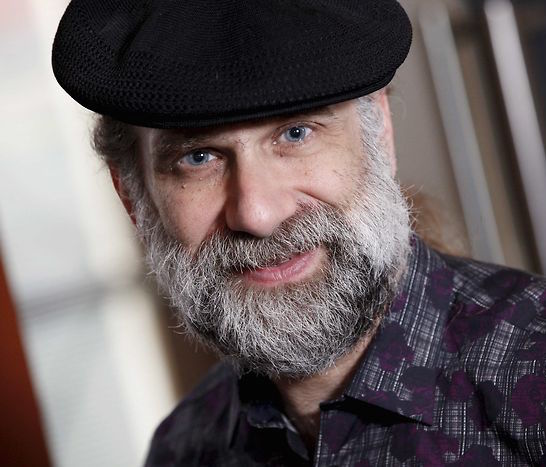
Security technologist Bruce Schneier (Image credit: Lynne Henry)

Our data continues to move even further out of our control, as more processing and storage migrates to the cloud. And our dependence on these systems continues to increase, as we use them for more critical applications and never turn them off. My primary worry, though, is the emergent properties that will arise from these fundamental changes in how we use computers — things we can’t predict or prepare for.

Linux.com: What are some of the new security and privacy risks specifically associated with IoT?

Schneier: The Internet of Things is fundamentally changing how computers get incorporated into our lives. Through the sensors, we’re giving the Internet eyes and ears. Through the actuators, we’re giving the Internet hands and feet. Through the processing — mostly in the cloud — we’re giving the Internet a brain. Together, we’re creating an Internet that senses, thinks, and acts. This is the classic definition of a robot, and I contend that we’re building a world-sized robot without even realizing it.

We have lots of experience with the old security and privacy threats. The new ones revolve around an Internet that can affect the world in a direct physical manner, and can do so autonomously. This is not something we’ve experienced before.

Linux.com: What past lessons are most relevant in managing these new threats?

Schneier: As computers permeate everything, what we know about computer and network security will become relevant to everything. This includes the risks of poorly written software, the inherent dangers that arise from extensible computer systems, the problems of complexity, and the vulnerabilities that arise from interconnections. But most importantly, computer systems fail differently than traditional machines. The auto industry knows all about how traditional cars fail, and has all sorts of metrics to predict rates of failure. Cars with computers can have a completely different failure mode: one where they all work fine, until one day none of them work at all.

Linux.com: What will be most effective in mitigating these threats in the future?

Schneier: There are two parts to any solution: a technical part and a policy part. Many companies are working on technologies to mitigate these threats: secure IoT building blocks, security systems that assume the presence of malicious IoT devices on a network, ways to limit catastrophic effects of vulnerabilities.

I have 20 IoT-security best-practices documents from various organizations. But the primary barriers here are economic; these low-cost devices just don’t have the dedicated security teams and patching/upgrade paths that our phones and computers do. This is why we also need regulation to force IoT companies to take security seriously from the beginning. I know regulation is a dirty word in our industry, but when people start dying, governments will take action. I see it as a choice not between government regulation and no government regulation, but between smart government regulation and stupid government regulation.

Linux.com: What can individuals do to make a difference?

Schneier: At this point, there isn’t much. We can choose to opt out: not buy the Internet-connected thermostat or refrigerator. But this is increasingly hard. Smartphones are essential to being a fully functioning person in the 21st century. New cars come with Internet connections. Everyone is using the cloud. We can try to demand security from the products and services we buy and use, but unless we’re part of a mass movement, we’ll just be ignored. We need to make this a political issue, and demand a policy solution. Without that, corporations will act in their own self-interest to the detriment of us all.

To hear more from Schneier, you can watch the complete keynote below.

https://www.youtube.com/watch?v=8tDU0zcptCY?list=PLbzoR-pLrL6rm2vBxfJAsySspk2FLj4fM

Bruce Schneier is the author of 13 books, as well as the Crypto-Gram newsletter and the Schneier on Security blog. He is also a fellow at the Berkman Klein Center for Internet & Society at Harvard, a Lecturer in Public Policy at the Harvard Kennedy School, a board member of the Electronic Frontier Foundation, an Advisory Board Member of the Electronic Privacy Information Center, and the Chief Technology Officer at IBM Resilient.

NFV vs. VNF: What’s the Difference?

NFV versus VNF: SDN engineer Darien Hirotsu explains the differences between network functions virtualization and virtual network functions. 

Networking professionals sometimes use the terms virtual network functions, or VNF, and network functions virtualization, or NFV, interchangeably, which can be a source of confusion. However, if we refer to the NFV specifications the European Telecommunications Standards Institute, or ETSI, sets forth, it becomes clear the two acronyms have related but distinct meanings.

Read more at TechTarget

Monitoring Google Compute Engine Metrics

This post is part 1 in a 3-part series about monitoring Google Compute Engine (GCE). Part 2 covers the nuts and bolts of collecting GCE metrics, and part 3describes how you can get started collecting metrics from GCE with Datadog. This article describes in detail the resource and performance metrics that can be obtained from GCE.

What is Google Compute Engine?

Google Compute Engine (GCE) is an infrastructure-as-a-service platform that is a core part of the Google Cloud Platform. The fully managed service enables users around the world to spin up virtual machines on demand. It can be compared to services like Amazon’s Elastic Compute Cloud (EC2), or Azure Virtual Machines.

Read more at DataDog