Home Blog Page 593

DoD Launches “Code.mil,” an Experiment in Open Source

The Department of Defense (DoD) has announced the launch of Code.mil, an open source initiative that allows software developers around the world to collaborate on unclassified code written by federal employees in support of DoD projects.

DoD is working with GitHub, an open source platform, to experiment with fostering more collaboration between private sector software developers and federal employees on software projects built within the DoD.

Read more at American Security Today

This Tiny Chip’s ‘Quantum Shot Noise’ Could Revolutionize Mobile and IoT Security

Engineers at South Korea’s SK Telecom have developed a tiny chip that could help secure communications on a myriad of portable electronics and IOT devices.

The chip is just 5 millimeters square—smaller than a fingernail—and is capable of generating mathematically provable random numbers. Such numbers are the basis for highly-secure encryption systems and producing them in such a small package hasn’t been possible until now.

Read more at PCWorld

Stateful Containerized Applications with Kubernetes

Stateless services are applications like web servers, proxies, and application code, which may handle data, but they don’t store it. These are easy to think about in an orchestration context because they are simple to deploy and simple to scale. If traffic goes up, you just add more of them and load-balance. More importantly, they are “immutable”; there is very little difference between the upstream container “image” and the running containers in your infrastructure. This means you can also replace them at any time, with little “switching cost” between one container instance and another.

Read more at OpenSource.com

Linux Security Fundamentals Part 6: Introduction to nmap

Start exploring Linux Security Fundamentals by downloading the free sample chapter today. DOWNLOAD NOW

In last week’s tutorial, we tried out tcpdump and wireshark, two of the most useful tools for troubleshooting what is happening as network traffic is transmitted and received on the system.

nmap is another essential tool for troubleshooting and discovering information about the network and services available in an environment. This is an active tool (in contrast to tcpdump and wireshark) which sends packets to remote systems in order to determine information about the applications running and services offered by those remote systems.

Be sure to inform the network security team as well as obtain written permission from the owners and admins of the systems which you will be scanning with the nmap tool. In many environments, active scanning is considered an intrusion attempt.

The information gleaned from running nmap can provide clues as to whether or not a firewall is active in between your system and the target. nmap also indicates what the target operating system might be, based on fingerprints of the replies received from the target systems. Banners from remote services that are running may also be displayed by the nmap utility.

Set up your system

Access to the Linux Foundation’s lab environment is only possible for those enrolled in the course. However, we’ve created a standalone lab for this tutorial series to run on any single machine or virtual machine which does not need the lab setup to be completed. The best results are obtained by using “bridging” rather than “NAT” in your virtualization manager. Consult the documentation for your virtualization type (i.e., Oracle VirtualBox, VMware Workstation, and others ) to verify or alter the networking connection type.  

Start the exercise

First, let’s install nmap on your Linux machine.

For Red Hat, Fedora and Suse machines:

$ sudo yum install nmap

For Debian and Ubuntu machines:

$ sudo apt-get install nmap  

Next, explore the nmap man page.

$ man nmap

For the best results, run nmap as root or use sudo with the nmap command.

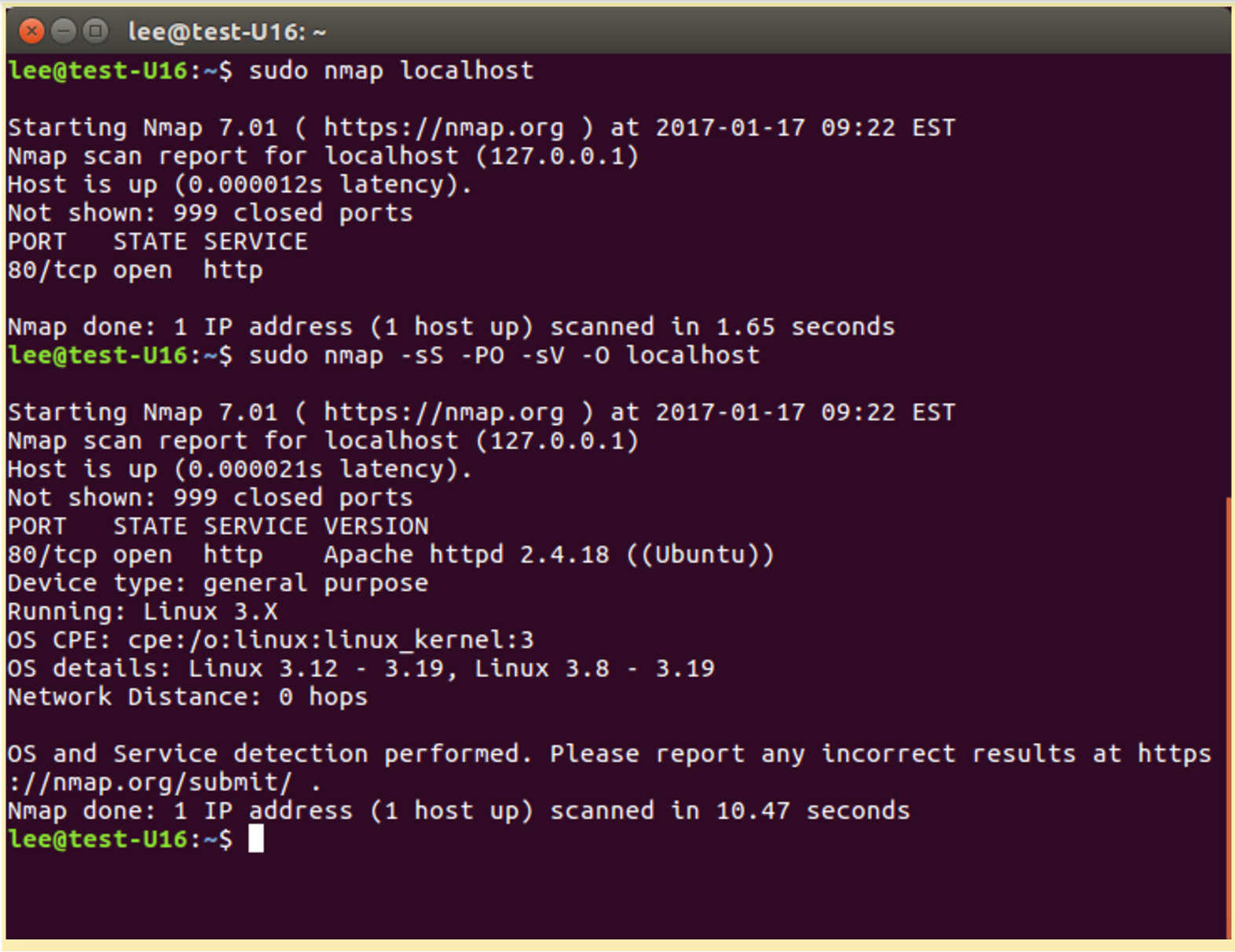
Now, we will run nmap on the localhost:

# nmap localhost 

Increase the information nmap acquires:

# nmap -sS -PO -sV -O localhost

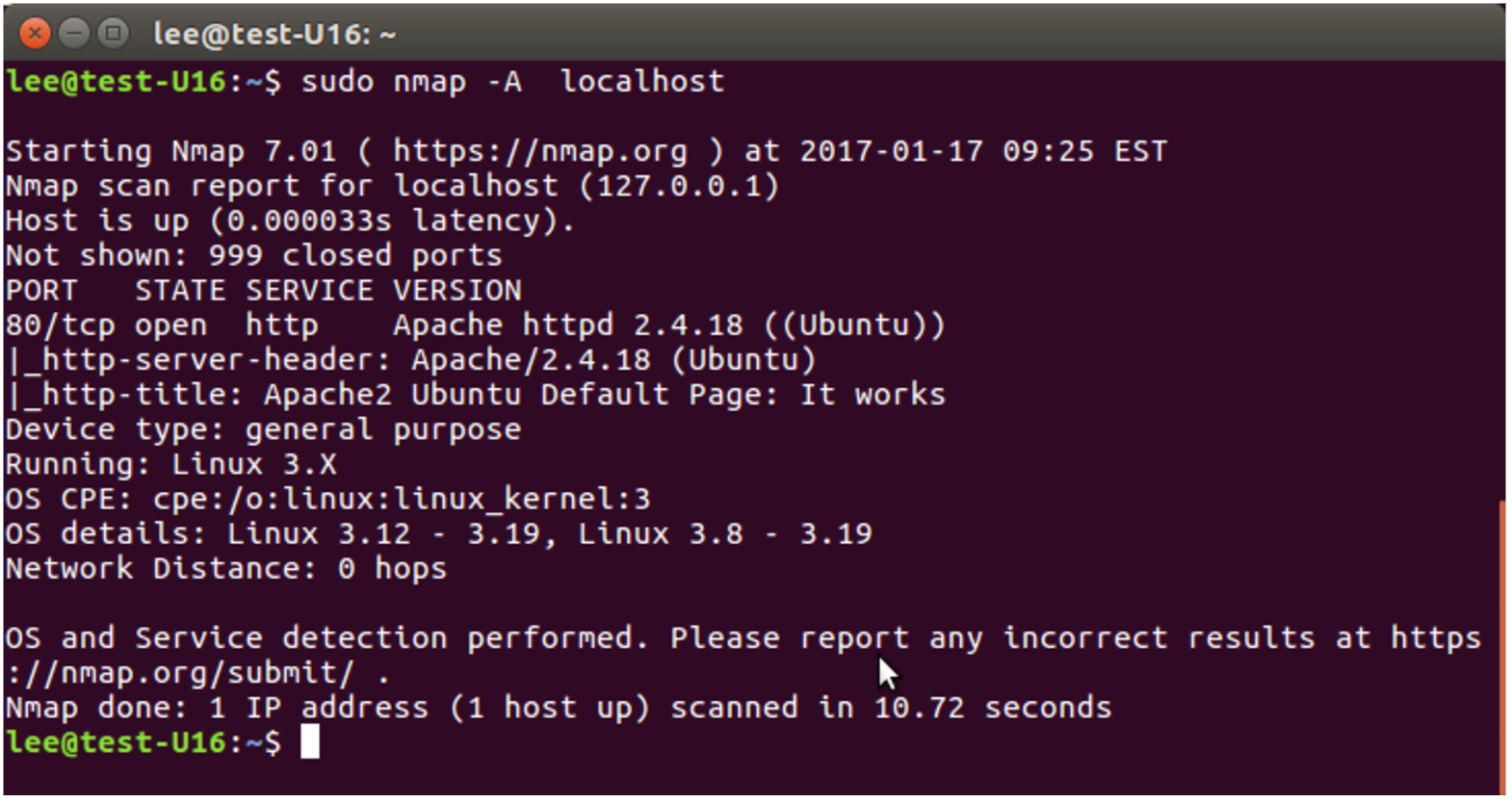
By adding the -A option to the nmap program, we can see the OS fingerprint detection capabilities of nmap:

# nmap -A localhost

A common usage for nmap is to perform a network ping scan; basically, ping all possible IP addresses in a subnet range in order to discover what IP addresses are currently in use. This is also sometimes referred to as network discovery.

# nmap -sP 192.168.0.0/24

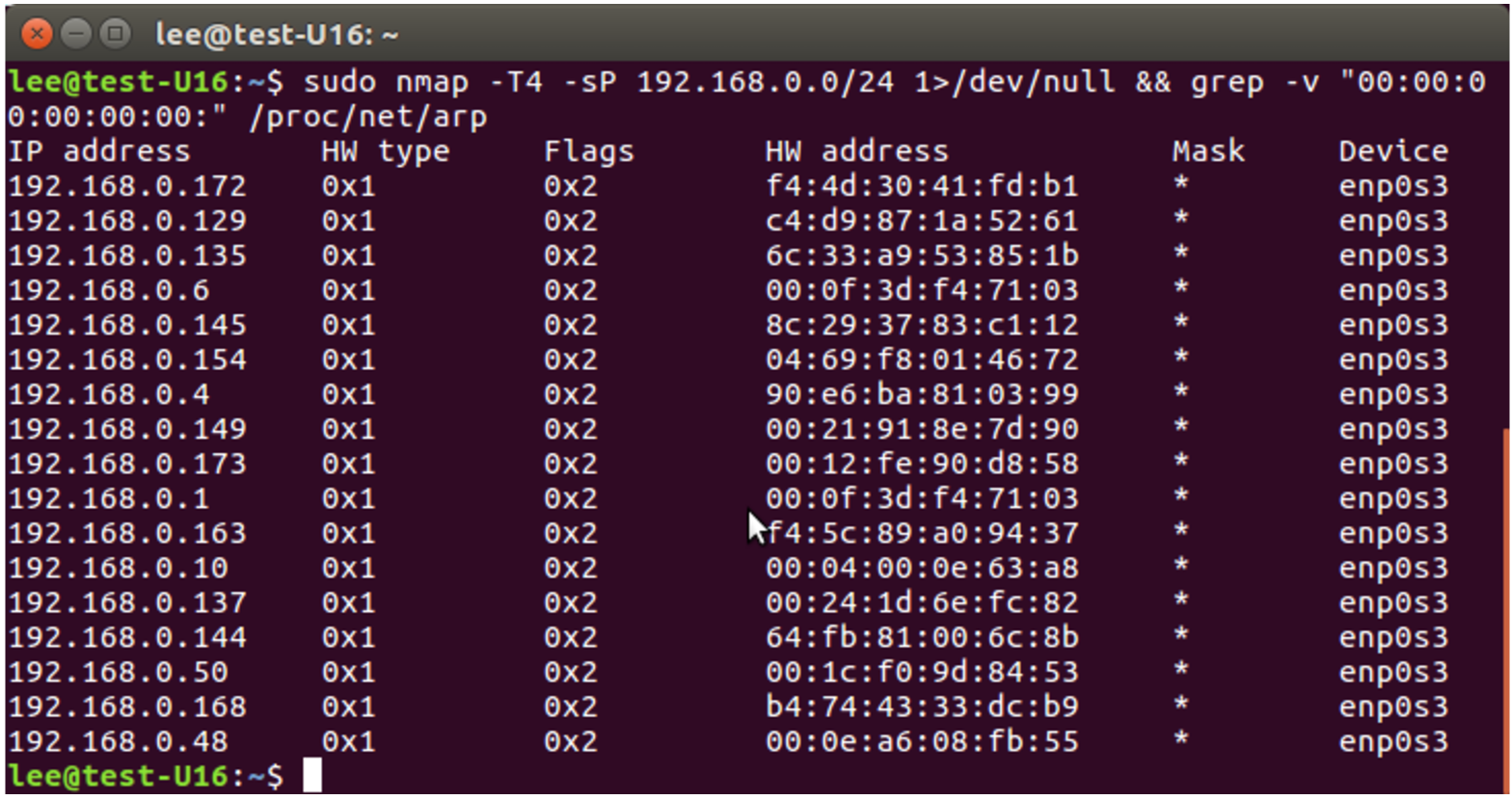
Another interesting nmap command to find all the active IP address on a locally attached network:

#nmap  -T4 -sP 192.168.0.0/24 1>/dev/null  && grep -v “00:00:00:00:00:00” /proc/net/arp 

Addressing for nmap is very flexible DNS names can be used, IP addresses, IP ranges are all acceptable, consult the nam page for additional details.

We cover more uses for this tool later in the course. For now, have fun exploring the tool!

This concludes our six-part series on Linux Security Fundamentals. Download the entire sample chapter for the course or re-visit previous tutorials in this series, below.

Stay one step ahead of malicious hackers with The Linux Foundation’s Linux Security Fundamentals course. Download a sample chapter today!

Read the other articles in the series:

Linux Security Threats: The 7 Classes of Attackers

Linux Security Threats: Attack Sources and Types of Attacks

Linux Security Fundamentals Part 3: Risk Assessment / Trade-offs and Business Considerations

Linux Security Fundamentals: Estimating the Cost of a Cyber Attack

Linux Security Fundamentals Part 5: Introduction to tcpdump and wireshark

Using Open Source to Empower Students in Tanzania

Powering Potential Inc. (PPI) aims to enhance education opportunities for students in Tanzania with the help of the Raspberry Pi and open source technology.

“I believe technology is a vital part of the modern human experience. It enlightens. It ties us together. It broadens our horizons and teaches us what we can be. I believe everyone deserves access to these resources,” says Janice Lathen, Founding Director and President of PPI.

The project’s three main technology goals are:

  • Providing access to offline digital educational resources

  • Providing schools with technology infrastructure (computers and solar power) so that they can offer the national curriculum of Information and Computer Studies

  • Offering technology training

In their efforts to achieve these goals, PPI also promotes the values of cooperation and community. We spoke with Lathen to learn more.

Linux.com: Please tell our readers about the Powering Potential program. What inspired you?

Janice Lathen: I founded Powering Potential Inc. (PPI) in 2006. That was the year I visited Tanzania for the first time. During a photo safari vacation, our driver stopped at a rural school called Banjika Secondary. When I greeted them in Swahili, they responded with incredible warmth and enthusiasm. I was amazed to see how dedicated the Tanzanian children were to their education, in spite of having so little. Textbooks were scarce, and some classes didn’t even have enough desks for all the students. When I got home I started the work of founding Powering Potential.

PPI distributes Raspberry Pi computers and offline digital libraries to rural Tanzanian schools. These resources help them to attain improved educational outcomes and, ideally, to pursue meaningful careers that eventually help raise the country’s standard of living.

Linux.com: What’s the current scope of the organization? How many students do you reach?

Lathen: We have solar-powered Raspberry Pi computer labs deployed in 29 co-ed public secondary schools spread across 11 different districts. These labs serve a combined student body of more than 10,000, which is only a fraction of Tanzania’s school-aged children. We’re always planning our next expansion.

The Tanzanian Ministry of Education has shown interest in our work, and at the request of the Permanent Secretary of the Ministry of Education we submitted a proposal to expand our program to 54 schools in nine districts. Onward and upward!

Linux.com: How are you using the Raspberry Pi? What open source software are you using, and how?

Lathen: We use the Raspberry Pi systems as both clients and servers, and run them off a direct current supply provided by a self-contained solar power system. We use one Raspberry Pi for the offline digital library (RACHEL from World Possible), one Pi for a file server, and one for a Google coder. Our computer lab project also includes the Pi-oneer, which is a Raspberry Pi loaded with the offline digital library attached to a mobile projector.

We run Raspbian on all of our systems, which is a Debian-based open-source OS optimized for the Raspberry Pi. We also use LibreOffice and Scratch, which is great for students to learn basic programming. The teachers at the schools use these resources to teach the national ICT curriculum, which is important since many Tanzanian schools lack the capacity to do this. Many of these chronically underfunded public schools will try to teach computer skills by reading from a textbook. This is like teaching someone to draw without a pencil. It’s as effective as you’d expect. Just recently, however, 3,100 students have enrolled in ICT courses because their school has a Powering Potential computer lab and can now offer the ICT curriculum to their students.

Linux.com: What educational programs do you currently have in place?

Lathen: Our work comprises two programs: Computer Lab (Phase 1 and Phase 2) and the Pi-oneer. The Phase 1 Lab is a small-scale solar-powered lab with five clients and three servers (RACHEL, file server, and Google coder). The Phase 2 installation expands upon Phase 1, adding 15 Raspberry Pi clients and more solar infrastructure. And the Pi-oneer is a Raspberry Pi, loaded with the RACHEL offline digital library, hooked up to a mobile projector.

The RACHEL digital library, provided free of charge by World Possible, has been invaluable. It include Wikipedia articles, videos from Khan Academy, e-books from Project Gutenberg, medical reference books, educational apps, and much more. World Possible is doing amazing work in education development.

Linux.com: How can people get involved?

Lathen: If you appreciate our work, please visit our website and make a donation. That’s the simplest way to make an immediate and measurable difference. If you know of a foundation, corporation or individual donor who would be interested in helping us expand, please connect us. You could also work to spread awareness about the living conditions in developing nations. Talk openly about the problems you see in the world. I believe people are essentially good and when the public sees how things are, they will rally together to make a difference.

Linux.com: What else would you like to share about Powering Potential?

Lathen: As you can tell from our name we are all about empowering the Tanzanians. Toward that end we recently established an independent organization in Tanzania to continue on with our work. We are now thinking about expanding to other countries.

Powering Potential’s mission statement is to “Use technology to enhance education and stimulate the imagination of students in Tanzania, while respecting and incorporating the values of the local culture — especially cooperation over competition, community over the individual, modesty over pride, and spirituality over materiality.” I think Americans could learn a lot from the Tanzanian way of life. They’ve taught me more than I could ever hope to teach them.

Using Mesos Quotas to Control Resource Allocation

Did you know that Apache Mesos supports quotas? It has since version 0.27. In an ideal world, we could fine-tune quotas to manage resources for maximum efficiency, reining in hogs and making sure that services get what they need without going overboard. In the real world, it’s a little more challenging. Should quotas be limits or guarantees? Persistent or dynamic? How granular should quotas be? Why hasn’t Quota seen wider adoption? Alex Rukletsov of Mesosphere answers these questions, and more, at MesosCon Asia 2016.

Mesos provides role quotas. These roles reserve resources for one or more frameworks in a cluster. These resources are not tied to any particular agents, cannot be hijacked by other roles, and are guaranteed to be available, assuming the cluster provides adequate resources. Multiple frameworks can use the same role. Some examples of use cases are:

  • Dividing a cluster between two organizations
  • Ensuring that persistent volumes are available only to frameworks registeried with that role
  • Giving some frameworks higher priority than other frameworks
  • Guaranteed resource allocation

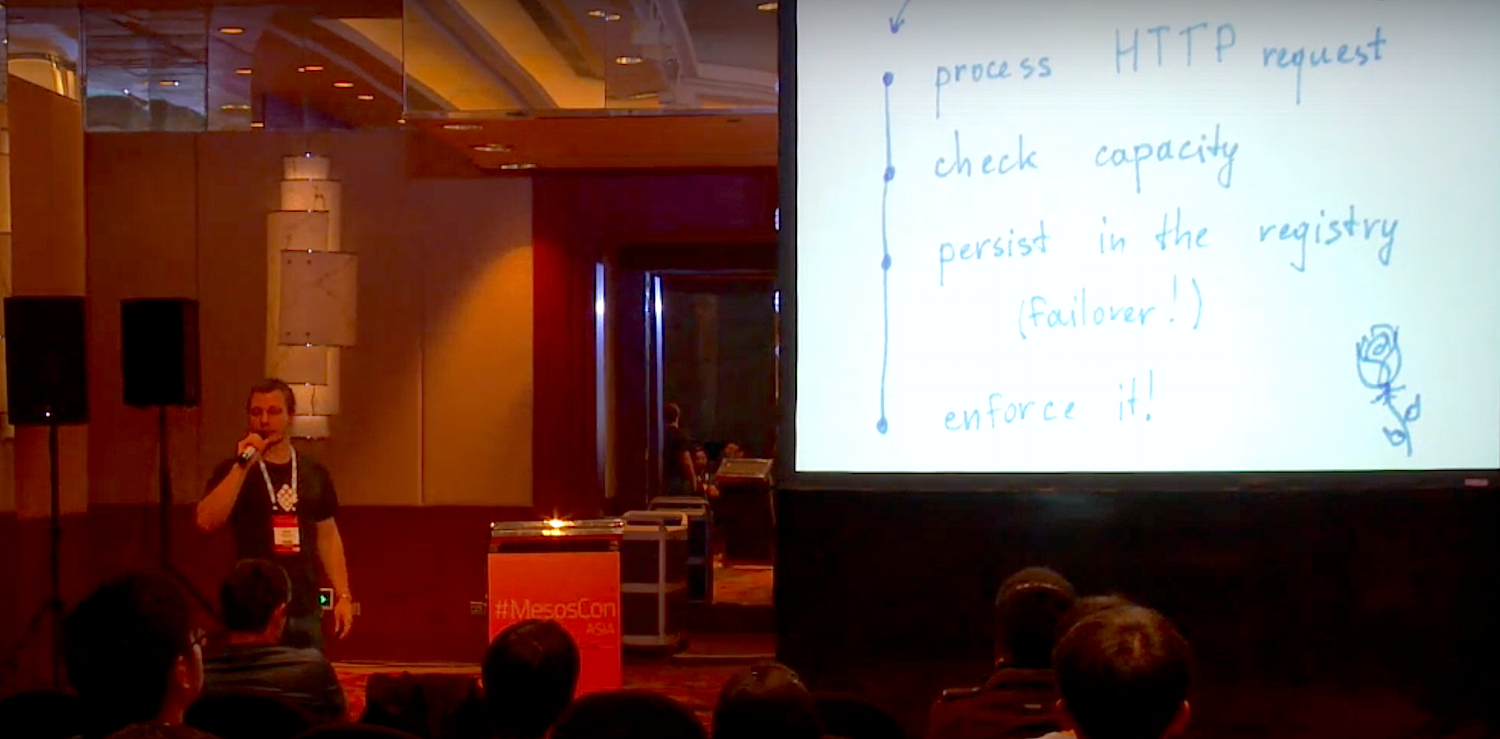
Rukletsov explains how Quota’s builders expected it to work: “A request comes in, and we check the capacity, whether there are enough resources in the cluster to satisfy the request, and we perceive these requests in the registry, and is it necessary for failover, and then we basically exercise the request if we can do it, and everyone is happy.”

But the real world is rarely immediately happy, and Quota has some limitations. “First, resources that we laid away for Quota, they are not offered to other frameworks, which means if you layaway two CPUs in your cluster for future use of that production web application, these resources currently will not be offered to anyone else…Another limitation is that Quota is only on limit, instead of guarantee and delimit.”

When you layaway two CPUs for some future use, it would be nice to let a different framework use them until they are called for, instead of letting them sit idle. But it doesn’t work this way. “This production framework says I now want my two CPUs back”, says Rukletsov, “So you should have the mechanism how to preempt these resources and reuse them and give them back to the production framework. We don’t have this in Mesos now, we’re currently working on that.”

Handling limit vs. guarantee is challenging to implement. Then you need revocable and non-revocable resources. The current status is resources are not easily revocable, and this probably will not change as this already provides limit and guarantee in a single mechanism.

Watch Rukletsov’s talk (below) to learn about common pitfalls, rebalancing, frameworks that hoard resources, how enforcement works, capacity checks, balancing unused resources with leaving enough headroom for transient demands, and much more.

https://www.youtube.com/watch?v=xs6TI_SdL8M?list=PLbzoR-pLrL6pLSHrXSg7IYgzSlkOh132K

Interested in speaking at MesosCon Asia on June 21 – 22? Submit your proposal by March 25, 2017. Submit now>>

Not interested in speaking but want to attend? Linux.com readers can register now with the discount code, LINUXRD5, for 5% off the attendee registration price. Register now to save over $125!

Leveraging Role Quotas to Guarantee and Limit Resource Allocations

https://www.youtube.com/watch?v=xs6TI_SdL8M?list=PLbzoR-pLrL6pLSHrXSg7IYgzSlkOh132K

Learn how to effectively use role quotas in an Apache Mesos-based cluster today and in upcoming releases.

How to Set Up a Linux Server on Amazon AWS

AWS (Amazon Web Services) is one of the leading cloud server providers worldwide. You can set up a server within a minute using the AWS platform. On AWS, you can fine tune many techncal details of your server like the number of CPU’s, Memory and HDD space, type of HDD (SSD which is faster or a classic IDE) and so on. And the best thing about the AWS is that you need to pay only for the services that you have used.

To get started, AWS provides a special account called “Free tier” where you can use the AWS technology free for one year with some minor restrictions like you can use the server only upto 750 Hours a month, when you cross this theshold they will charge you. You can check all the rules related this on aws portal.

Read more at HowtoForge

Linus Torvalds on SHA-1 and Git: ‘The Sky Isn’t Falling’

Yes, SHA-1 has been cracked, but that doesn’t mean your code in Git repositories is in any real danger of being hacked.

The real worry about Google showing SHA-1 encryption is crackable, as pointed out by Peter Gutmann, a cryptography expert at the at the University of Auckland, New Zealand, is “with long-term document signing and certificates“. But, what about the distributed version control system Git code repositories? Linus Torvalds, Linux and Git’s inventor, doesn’t see any real security headaches ahead for you.

Read more at ZDNet

EFF: Half of Web Traffic is Now Encrypted

Half of the web’s traffic is now encrypted, according to a new report from the EFF released this week. The rights organization noted the milestone was attributable to a number of efforts, including recent moves from major tech companies to implement HTTPS on their own properties. Over the years, these efforts have included pushes from Facebook and Twitter, back in 2013 and 2012, respectively, as well as those from other sizable sites like Google, WikipediaBing, Reddit and more.

Many major news organizations have also moved forward (including us!), while efforts like the Let’s Encrypt project have helped pushed others, including WordPress, to take advantage of the technology.

Read more at TechCrunch