Yes, SHA-1 has been cracked, but that doesn’t mean your code in Git repositories is in any real danger of being hacked.
The real worry about Google showing SHA-1 encryption is crackable, as pointed out by Peter Gutmann, a cryptography expert at the at the University of Auckland, New Zealand, is “with long-term document signing and certificates“. But, what about the distributed version control system Git code repositories? Linus Torvalds, Linux and Git’s inventor, doesn’t see any real security headaches ahead for you.
Half of the web’s traffic is now encrypted, according to a new report from the EFF released this week. The rights organization noted the milestone was attributable to a number of efforts, including recent moves from major tech companies to implement HTTPS on their own properties. Over the years, these efforts have included pushes from Facebook and Twitter, back in 2013 and 2012, respectively, as well as those from other sizable sites like Google, Wikipedia, Bing, Reddit and more.
Many major news organizations have also moved forward (including us!), while efforts like the Let’s Encrypt project have helped pushed others, including WordPress, to take advantage of the technology.
The Open Platform for Network Functions Virtualization (OPNFV) is driven more by iterative code releases than by heavyweight up-front standardization efforts.
There are a lot of pieces to the ongoing network transformation going up and down the stack. There’s the shift away from proprietary hardware. There’s the to need to manage complex network configurations. Add subscriber management and a wide range of other necessary functions. Add customer-facing services. All of those pieces need to fit together, integrate with each other, and interoperate.
This was the topic of my conversation with Heather Kirksey, who heads up the Open Platform for Network Functions Virtualization (OPNFV) project when we caught up at the Open Source Leadership Summit in mid-February.
Alpine Linux, a security-focused lightweight distribution of the platform, may get its own Java port. Alpine is popular with the Docker container developers, so a Java port could pave the way to making Java containers very small.
A proposal floated this week on an OpenJDK mailing list calls for porting the JDK (Java Development Kit), including the Java Runtime Environment, Java compiler and APIs, to both the distribution and the musl C standard library, which is supported by Alpine Linux.
On the previous post we’ve talked about sed Linux command and we’ve seen many examples of using it in text processing and how it is good in this, nobody can deny that sed is very handy tool but it has some limitations, sometimes you need a more advanced tool for manipulating data, one that provides a more programming-like environment giving you more control to modify data in a file more robust. This is where awk command comes in.
The awk command or GNU awk specifically because there are many extensions for awk out there takes stream editing one step further than the sed editor by providing a programming language instead of just editor commands. Within the awk programming language, you can do the following
Define variables to store data.
Use arithmetic and string operators to operate on data.
Use structured programming concepts and control flow, such as if-then statements and loops, to add logic to your text processing.
Generate formatted reports
Actually generating formatted reports comes very handy when working with log files contain hundreds or maybe millions of lines and output a readable report that you can benefit from.
In our second conversation of our “I Am A Mainframer” interview series, Jeffrey Frey talks with Emily K. Hugenbruch, OpenStack Cloud Enablement Engineer, z/VM and Software Engineer at IBM about the OpenStack Newton release and her overall career experience as a woman working in the mainframe space.
The conversation is sponsored by the Open Mainframe Project. As a Linux Foundation Project, the Open Mainframe Project is intended to help create a mainframe focus, open-source technical community and to serve as a focal point for the development and use for enterprise Linux and a Mainframe computing environment.
The goal of the project is to excite the Linux community around the use of the mainframe and to foster collaboration across mainframe community and develop and exploit shared Linux tool sets, resources, and services within the mainframe environment. In addition, the project seeks to involve the participation of academic institutions to help assist in creating educational programs aimed at developing the mainframe Linux engineers and developers of tomorrow. …
Jeffrey: Emily what do you think the biggest challenges are for the mainframe going forward. We’ve talked a lot about, you know, what we’re doing here to enable the platform. What do you see as the challenges in front of you?
Emily:I think one of our biggest challenges is really talking about what cloud means, and especially now that we’re getting into container technologies, how a lot of times those container technologies and how they interact with projects like OpenStack are still not very well defined yet. So when you add the in the extra layer of Z systems then that’s an extra challenge of how should these things interact? What do we need to do to make sure that our customers are happy with them, that they like how these things fit together and that it’s easy to put together.
There are a lot of things that you can do if you play around and really hack it but when we’re talking about the mainframe, our customers want something that’s very reliable, very easy, straightforward to put together and very well thought out and backed up by IBM so yeah, there’s a tremendous amount of work to be done with defining that interaction.
The 2017 Open Source Leadership Summit, put on by the Linux Foundation, brought together leaders from the open source community in Lake Tahoe last week to discuss timely open source topics. The topics that came up most throughout the conference included: open source becoming mainstream, future open source business models, security in a time where everything is connected, and a call to action to be active in technology policy.
Open source is becoming a larger focus for major companies, from Toyota to Disney to Walmart. While open source vendors continue to look to the Red Hat model as one of the most successful open source business models to date, entrepreneurs believe there are new models that can surpass this success. As the world becomes ever more connected to the internet, there are general concerns about security, and a call to take action in policymaking. Read on below to learn more about the conversations at the Open Source Leadership Summit.
Open source is mainstream
The number of companies involved in open source projects is growing, and the community includes familiar company names from auto companies, to banking, to healthcare. Open source is not only being adopted by companies of every industry; these companies are also contributing to the projects themselves.
In his opening keynote, Jim Zemlin, executive director of the Linux Foundation, stated that 99.4% of the world’s high performance computing systems run Linux, 64.8% of mobile devices run Linux, and 90% of the stock exchange runs on Linux.
Jim Zemlin giving his keynote at the Open Source Leadership Summit 2017.
Companies such as Toyota, Daimler (DaimlerChrysler), American Express and J.P. Morgan are just some of the companies actively involved with open source standards, including with the Linux Foundation’s work with Blockchain (for the financial industry) and Automotive Grade Linux. Walmart, Capital One and Disney each spoke about their internal open source programs to not only use open source internally, but to contribute to open source as well.
As enterprises adopt open source technologies, many are looking to work alongside a vendor for support. In his keynote, Al Gillen, Vice President, Software Development and Open Source at IDC, shared research about how companies decide to adopt open source software. His report showed that 45% of enterprise companies ranked working with a commercial vendor as a top priority when adopting open source.
Al Gillen presents at the Open Source Leadership Summit 2017.
Security is internet security
Now that our physical space is connected to the internet through the Internet of Things movement, overall security is internet security. Bruce Schneier gave a keynote talking about how those working on the internet are building one large robot that affects the virtual world as well as the physical world.
Schneier cited a Gartner estimate that 5.5 million new end-user devices connect to the internet every day. While devices such as iPhones and Android phones are automatically patched with software and security updates, there are many more devices released each month that do not have security built-in automatically. This is a big problem in a time where hackers are using Internet of Things devices to create botnets to attack and bring down the internet.
CoreOS is a company founded with the mission to secure the internet and that provides software and security patches through self-driving infrastructure. Bruce’s discussion about the growing security challenges of the always-connected age resonates with our mission. CoreOS is a key part of the future to secure the backend of the internet, but like Bruce brought to light, there is more work to be done on the Internet of Things side as well.
Government Policy for the Internet Age
Bruce also begins a call to action for the open source community to take part in crafting policy. The government will write and enforce policy for technology companies on security and privacy, whether we participate or not. He posed the question about how open source will continue to thrive in a time of increasing government regulation, which is why the open source community must be actively involved in conversations about policy. He asks the open source community to take a seat at the table and have a voice in government policy making, rather than being handed policy from the government and reacting after the decisions have been made.
Additionally, William Hurley (also known as Whurley, discussed how the open source community is ideally situated to be involved in civic-minded activities. From bio-hacking to architecture to education to government – the open source community has the capabilities to help our government have the right responses to technology innovation. He left the stage asking the community to get involved so we can help shape the way the world interacts with technology.
The evolving open source business model
In breakout talks, Craig McLuckie, Sarah Novotony and Stephen Walli discussed the future business model for open source companies. No one had the definitive answer to the most successful open source business model of the future – while the open core model with support and services is well received, many think the open source model is ready for disruption. We’re seeing innovative approaches to open source market and we’re looking forward to seeing how they turn out.
Stephen Walli’s presentation underlined the need for vendors to focus on solving customer problems. Stephen’s advice is: those that focus on the customer will have the most successful open source model in the end.
What’s next?
We enjoyed the conversation with the thought leaders at the Open Source Leadership Summit and want to continue these conversations on how we can work together to broaden the open source community, explore new open source business models, strengthen security in an increasingly interconnected world, and become more active participants in creating technology policy.
Continue the conversation at CoreOS Fest on building, running, and securing your infrastructure, May 31-June 1.
This article originally appeared on CoreOS (republished with permission).
This week in open source and Linux news, a talk on diversity in tech sparked a pithy article for The New Stack via Darryl Taft, The Linux Foundation consolidates two projects to form ONAP, and more. Keep reading for a curated look at the top OSS headlines of this past week.
1) “Diversity in Open Source” talk at Open Source Leadership Summit tackled the challenges women and minorities still face in the tech industry. Darryl Taft comments.
If you happen to administer one or more OpenLDAP servers, you know that they can be a challenge to work with. Working with LDAP itself can be a bit tricky; to that end, many opt to go the phpLDAPadmin route (which is an amazing tool for individual servers). However, when you’re managing numerous LDAP servers, you don’t want to have to log in and out of various instances of that tool. If that’s the case, what do you do? There’s one particular piece of software that does an outstanding job of managing multiple LDAP servers: Apache Directory Studio. Apache Directory Studio is part of the Apache Directory project that strives to increase LDAP awareness, comfort and adoption to bring forth what we call the Modern LDAP Renaissance. The project includes:
Apache Directory Server — an extensible and embeddable directory server
Apache LDAP API — an enhanced LDAP API
Apache Mavibot — a Multi Version Concurrency Control (MVCC) BTree
Apache Kerby — a Java Kerberos binding
Apache Fortress — a standards-based Access Management System
And, of course, the Apache Directory Studio, which is a tool intended to be used with any LDAP platform. I am going to walk you through the process of installing Apache Directory Studio as well as how to connect it to a working LDAP instance. I will demonstrating how to connect Apache Directory Studio to an OpenLDAP server on a separate virtual machine. I will assume you already have your OpenLDAP server up and running.
Installing Apache Directory Studio
I will be demonstrating the installation of Apache Directory Studio on an instance of Ubuntu Linux 16.04. If you are using a different distribution, you will have to adjust accordingly.
The first thing you must know is that Apache Directory Studio is a graphical application written in Java. To that end, you must first install the Java JDK8. To do this, follow these steps:
Open up a terminal window
Add the necessary repository with the command sudo add-apt-repository ppa:webupd8team/java
Update apt with the command sudo apt update
Install Java by issuing the command sudo apt install oracle-java8-installer
Accept the license agreement
Set the Java environment variables with the command sudo apt install oracle-java8-set-default
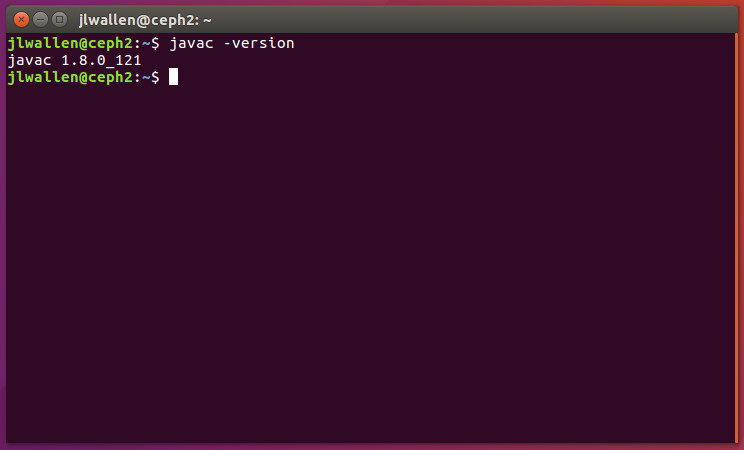
That’s it. You can now test to ensure Java is installed with the command javac -version(Figure 1).
Figure 1: Testing to make sure Java has been installed.
Now you can move on to downloading and running the Apache Directory Studio. There is no actual installation from this point on. Instead, you download the file, unpack it, and run the executable. Because there is no installation process, you will want to save the file in a location that is convenient and offers your user read/write/execution privileges. Here are the steps:
Unpack the downloaded file with the commandtar xvzf ApacheDirectoryStudio-XXX.yyy.tar.gz(where XXX is the release number and yyy is either 32 or 64 bit)
Change into the newly created ApacheDirectoryStudio directory with the command cd ApacheDirectoryStudio
Start the software with the command ./ApacheDirectoryStudio
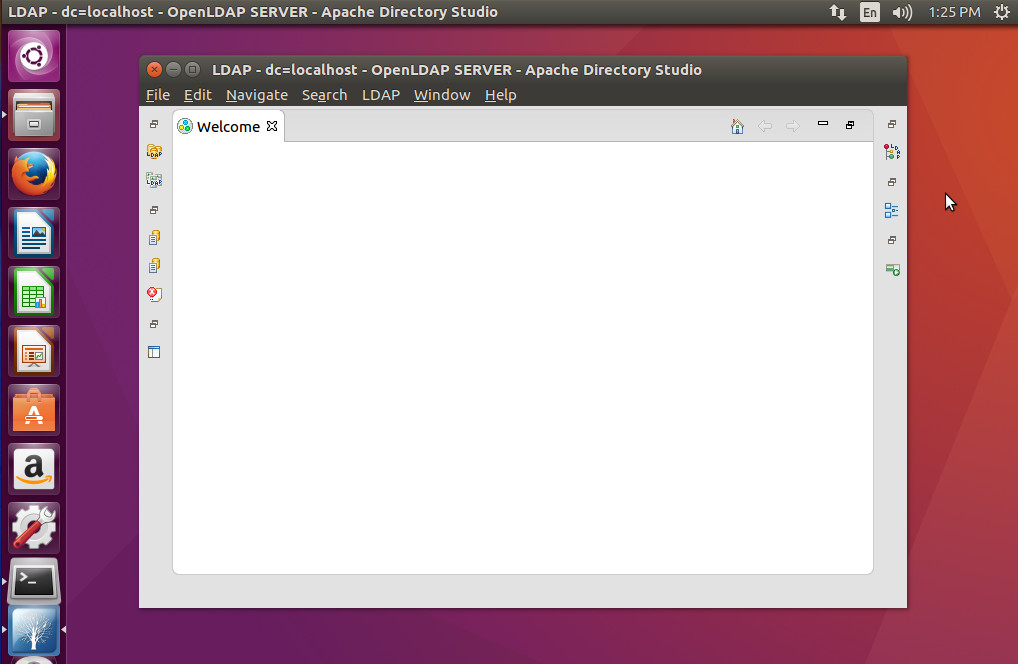
At this point, you should now see the Apache Directory Studio main window (Figure 2).
Figure 2: The Apache Directory Studio main window ready to work.
Connecting to an LDAP server
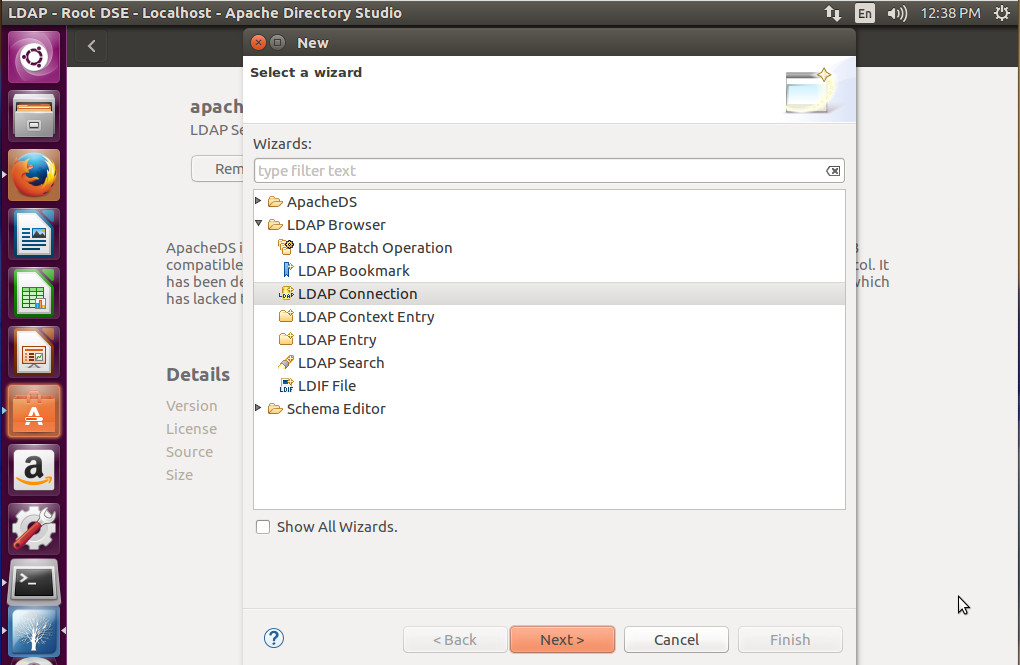
You are now ready to connect Apache Directory Studio to your LDAP server. Click File > New and then select LDAP Connection (Figure 3).
Figure 3: Starting the LDAP Connection wizard.
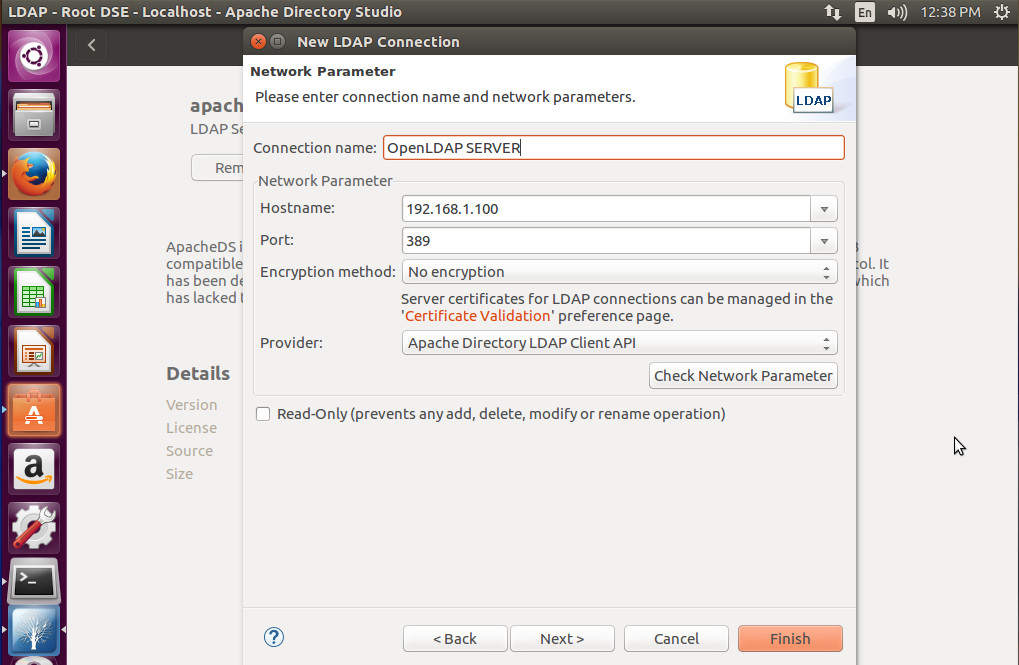
In the next window (Figure 4), you must enter the information for your LDAP server. Give it a name, enter the hostname (or IP address), port number, select the encryption method, and the provider. Once you’ve filled out that information, click Check Network Parameter to make sure everything is working properly.
Figure 4: Setting up your LDAP configuration.
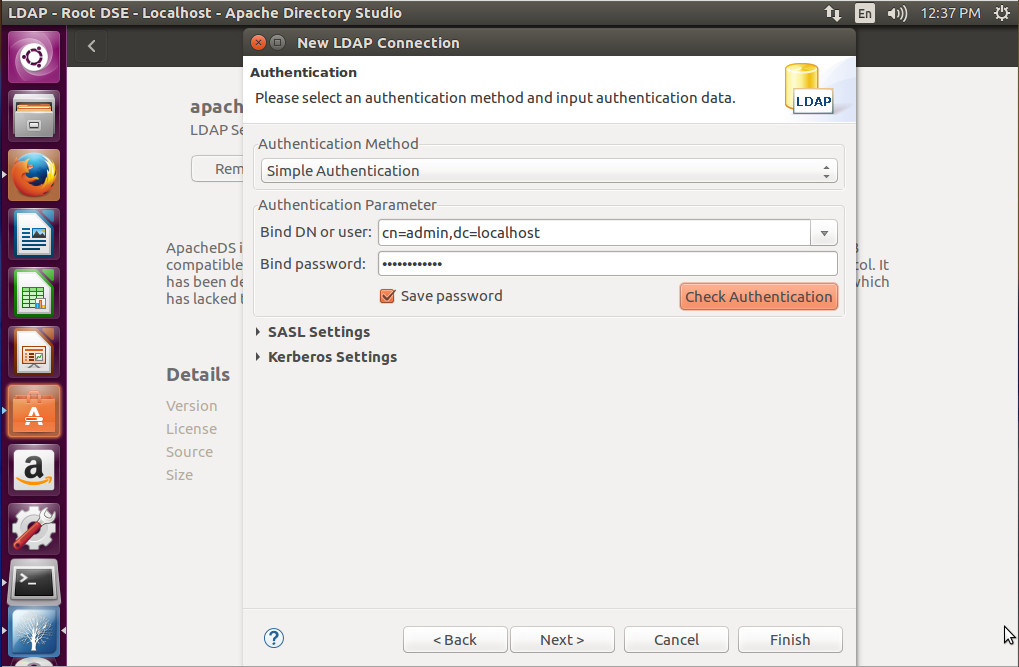
Click Next and you will then be required to fill out the authentication information for your connection (Figure 5). Select the Authentication Method, Bind DN or user, Bind password, and then click Check Authentication.
Figure 5: Filling out the authentication requirements for your LDAP server.
If your LDAP server requires SASL or Kerberos to be configured, expand those options and fill them out. Once you’ve completed this window, click Next.
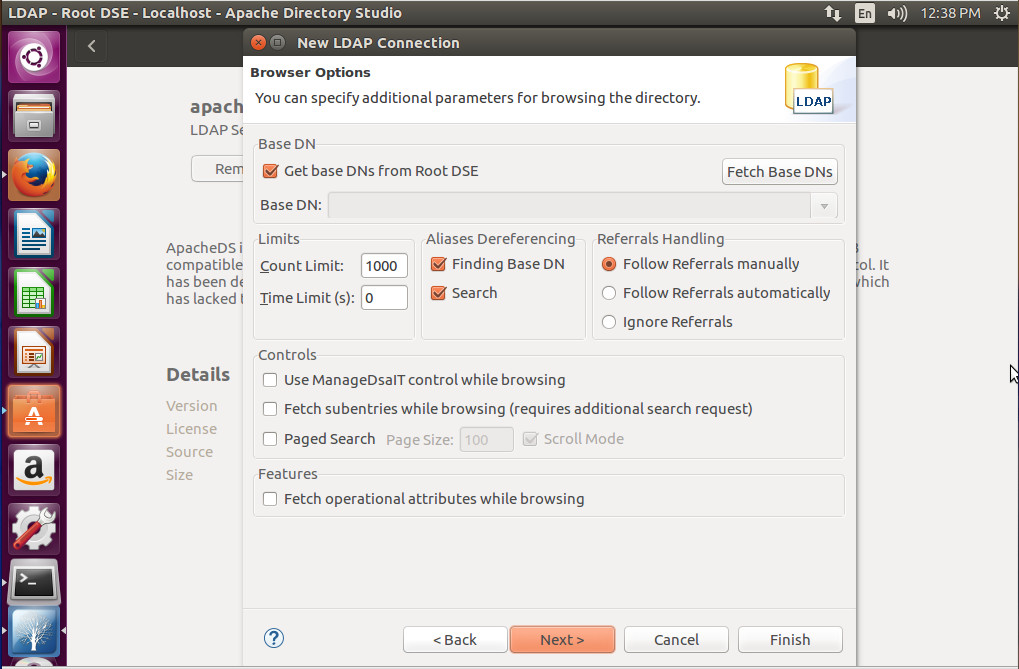
In the next window (Figure 6), you can specify additional parameters for browsing your LDAP directory. As with many of the other options, these will depend upon your needs and how your LDAP server was configured.
Figure 6: Additional options for your LDAP connection.
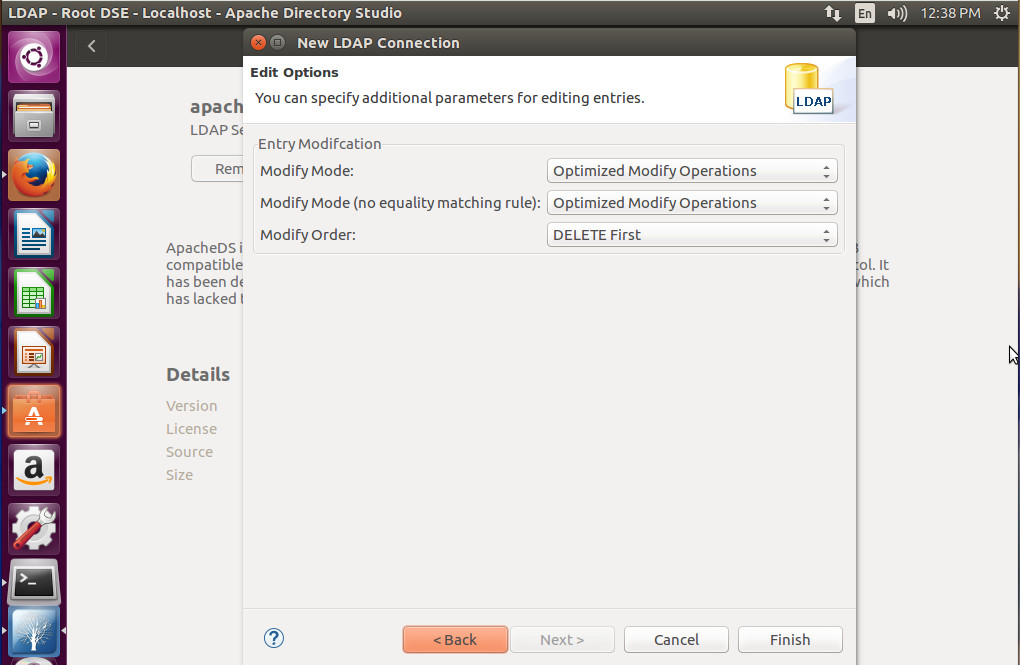
Finally you can specific parameters for editing entries on your LDAP server (Figure 7). Again, this will be determined by your needs and how you’ve setup your LDAP server.
Figure 7: The final window of the connection wizard.
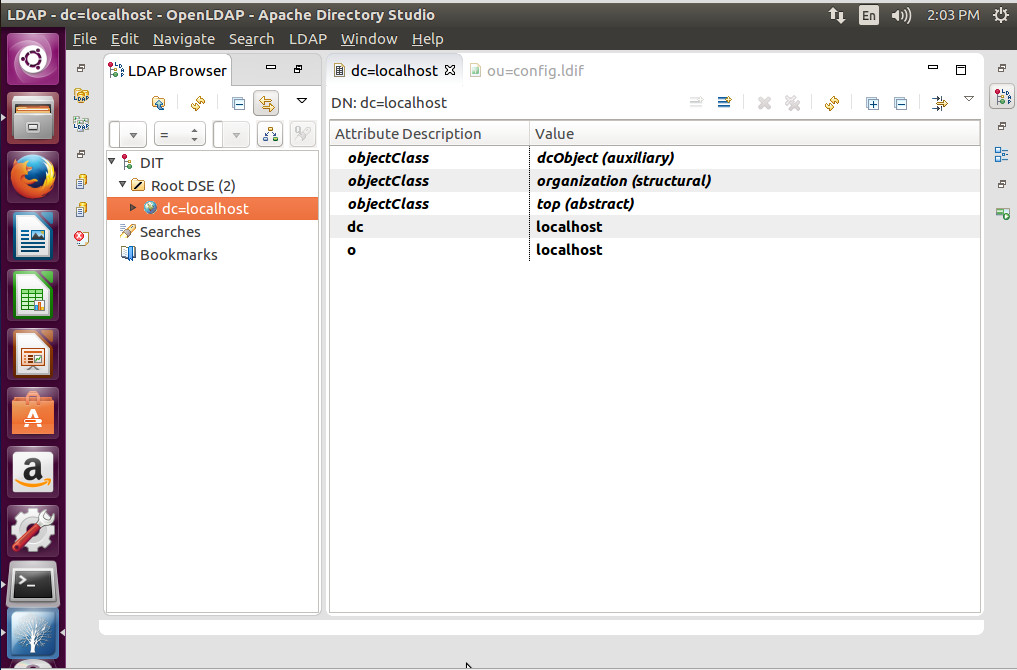
When the LDAP Browser window opens (Figure 8), you can then click on your dc entry and start working with LDAP.
Figure 8: A successful LDAP connection.
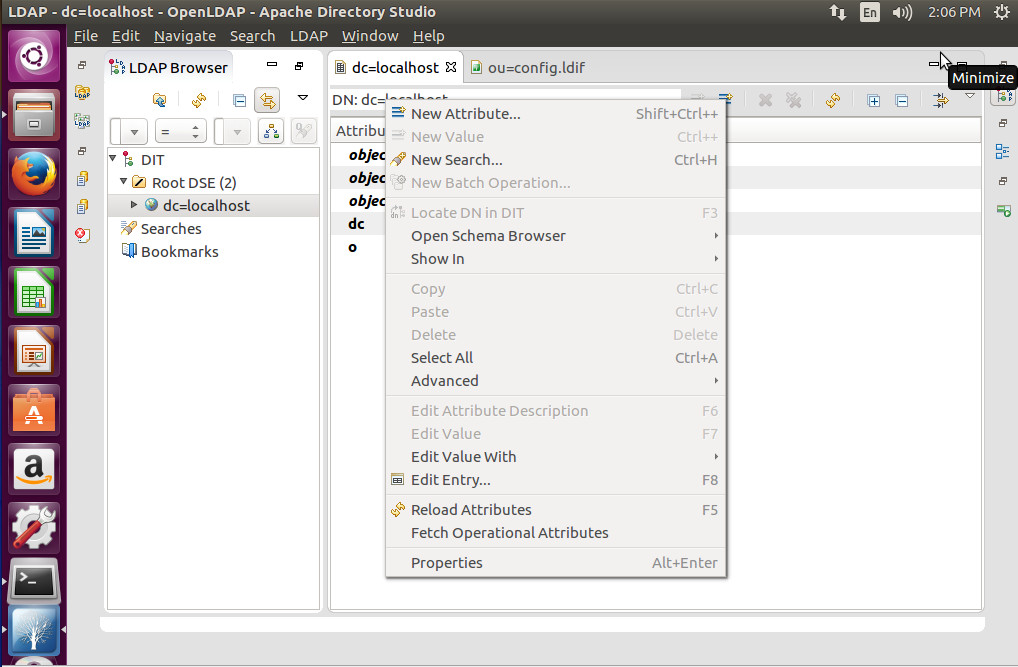
To work with LDAP, you will right-click on the right pane and select the option you want to use (such as creating a new Attribute — Figure 9).
Figure 9: Creating a new Attribute in Apache Directory Studio.
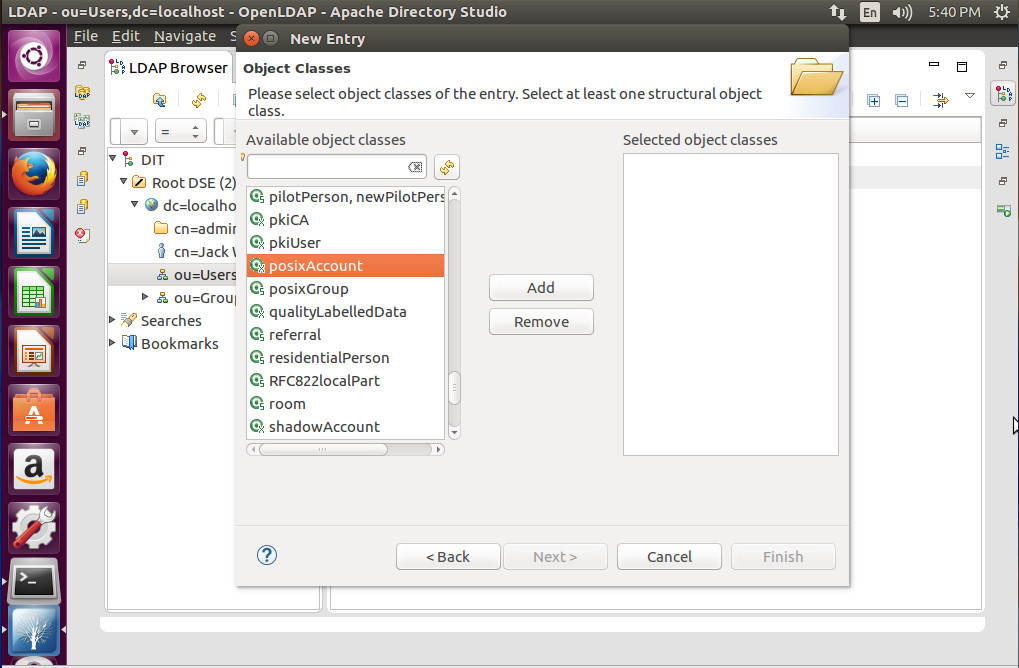
Expand thedc=entry (in the left pane) and you can then start adding Users and Groups. Click on Users and then right-click ou=Users, select New, and you can then create from a long list of available object classes (Figure 10).
Figure 10: Creating a new object with Apache Directory Studio.
There you have it. You’ve successfully, installed, connected, and used the Apache Directory Studio to work with your existing LDAP server. You can now connect Apache Directory Studio to any of your LDAP servers and manage them all from a single point of entry.