Home Blog Page 601

3 Good Command-Line Audio and Graphics Apps for Linux

It is often faster to use command-line apps to play audio files and preview images than to futz around launching and using a graphical application, and you can use them in scripts. Come along to learn about MOC and SoX for playing audio files, and feh for viewing image files from the Linux command line.

MOC, Music on Console

MOC plays audio files from an X terminal, and from a console with no X windows, such as a headless server with no graphical environment. MOC supports most audio file formats including OGG, WAV, FLAC, MIDI, MP4, and MP3. Note that the correct command is mocp and not moc. moc is a Qt command, the Meta Object Compiler, so if you run it you’ll get a “No relevant classes found” error. The simplest use is to start it and name a directory that contains audio files:

$ mocp sounds/ambient/

You’ll see something like Figure 1, a nice Midnight Commander-style two-pane file manager where you can navigate all over your filesystem and find audio files to play. Figure 1 has a playlist in the right pane; add files from the left pane to your playlist by highlighting them and pressing the a key. Press V to save your playlist in the current directory.
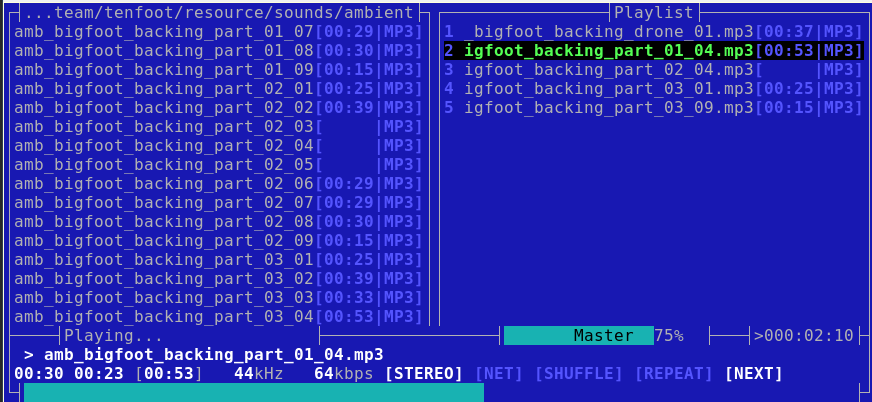
Figure 1: Moc

By default MOC plays all the files in the current directory. Use the Tab key to toggle between the file list and your playlist. Navigate up and down with the arrow keys, and press Enter to select a file to play. These are the basic commands, and note that they are case-sensitive:

  • < and > control the volume level
  • p or spacebar toggle pause/play
  • n plays the next file, b plays the previous file
  • S toggles shuffle
  • Right arrow key seeks forward and Left arrow key seeks backward
  • q detaches from the MOC interface and returns to your prompt, and your audio keeps playing
  • mocp returns to the MOC interface from your command line
  • Q from the MOC interface quits MOC
  • mocp -x from any command prompt closes MOC

MOC commands are different in the MOC interface than on your command line. man moc details the commands that you run on the command line, and press h to see a list of commands in the MOC interface.

Your personal MOC directory is ~/.moc. The example configuration file is in /usr/share/doc/moc/examples/config.example.gz. You can extract and copy this example file to ~/.moc/config, or just copy the bits you want to use. I use the MusicDir option to set my default playlist, and you may set a default directory instead. List your audio directories in the Fastdir options for fast switching:

MusicDir = /home/carla/.moc/list2.m3u

Fastdir1 = /home/carla/tutorials
Fastdir2 = /home/carla/sessions
Fastdir3 = /home/carla/music-for-dull-meetings

Start MOC in your MusicDir with mocp -m, or press m in the MOC interface.

Press Shift+1, Shift+2 and so on to change to your various Fastdirs.

MOC has customizable theming and keymaps; see man mocp and the help in the MOC interface to see many more options and controls.

Play One Audio File with SoX

Good old SoX (Sound eXchange) has been around forever and contains a multitude of capabilities. If MOC has an easy way to play just one file I have not found it, so I use SoX for this. This example shows how to play a single file, and shows how to play a file with whitespace in the filename by enclosing it in quotation marks:

$ play "quake2/music/Sonic Mayhem - Quake II/11.ogg"

Just as I do with image files (see the next section), I use locate and grep to find audio files. Then it’s a quick select > middle-click paste to play the file with SoX.

feh X Terminal Image Viewer

I use feh to quickly preview images. You need to be in graphical session, that is, using an X terminal like GNOME Terminal or Konsole. I have over a thousand images on my main PC, and I rely on locate and grep to find what I want. It’s a lot faster to view the image with feh than to open a graphical app and wander through it until I find my my image. Like the photo of my little cat Molly in Figure 2:

$ locate -i molly|grep rock
/home/carla/Pictures/molly-on-rocks-small.jpeg
$ feh /home/carla/Pictures/molly-on-rocks-small.jpeg

Figure 2: Molly.

You can also open your images in editors like Inkscape and Gimp this way, for example inkscape /home/carla/Pictures/molly-on-rocks-small.jpeg. In feh, right-click on your image to open a menu full of useful options: rotate, set image as background, delete, image size and type, and several others.

Give feh a directory name to launch a slideshow of all images in the directory, and then click on each image to advance to the next image. feh displays them at their native resolutions, so right-click on any image and check Options > Fullscreen to shrink large images to fit your screen. Or pass in options in your command. This example stops the slideshow after displaying all images once, pauses for four seconds on each image, automatically scales large images to fit your screen, and prints the filename on each image:

$ feh --cycle-once -D 4 --scale-down -d  Pictures/2016-april/

Create a montage of all images in a directory with 100-pixel thumbnails:

$ feh --thumbnails  --thumb-height 100 --thumb-width 100 --index-info "%nn%wx%h" Pictures/2016-april/

Use the right-click menu to save your montage in your current directory (not your images directory).

Open all images in the directory in their own windows (don’t do this with a large number of images!):

$ feh -w image/directory

You can enter a list of filenames in a text file, one per line, and then pass this list to feh:

$ feh -f mylist

man feh is quite good; it’s well-organized and clear, and details all of feh’s operations which include keyboard shortcuts, mouse shortcuts, and randomizing background images.

Learn more about Linux through the free “Introduction to Linux” course from The Linux Foundation and edX.
Verified Boot: From ROM to Userspace

Amid growing attacks on Linux devices, the 2016 Embedded Linux Conference demonstrated a renewed focus on security. One well-attended presentation at ELC Europe covered the topic of verified boot schemes. In this talk, Marc Kleine-Budde of Pengutronix revealed the architecture and strategies of a recently developed verified boot scheme for a single-core, Cortex-A9 NXP i.MX6 running on the RIoTboard SBC.

The stack works on most i.MX SoC models, and its structure and most of its components are transferable to other ARM processors. “It’s easy to do this yourself using a number of open source stacks,” said Kleine-Budde, who is also the Linux kernel project’s CAN driver maintainer.

Verified boot is “a complex Linux stack in userspace” designed to detect if any stage of the boot process has been tampered with, he explained. Considering that embedded devices typically lack the advanced security software and physical safeguards found in the server world, it’s one of the most effective — and cost-effective — security strategies available.

“If you can change the bootloader of an embedded system you can have complete control over it,” said Kleine-Budde, “If an attacker wants to root your system, they first try to put in their own bootloader, usually from an unprotected source like SD, USB, or eMMC. For our customers, we wanted to protect the bootloader, kernel, file system, and even read-write data.”

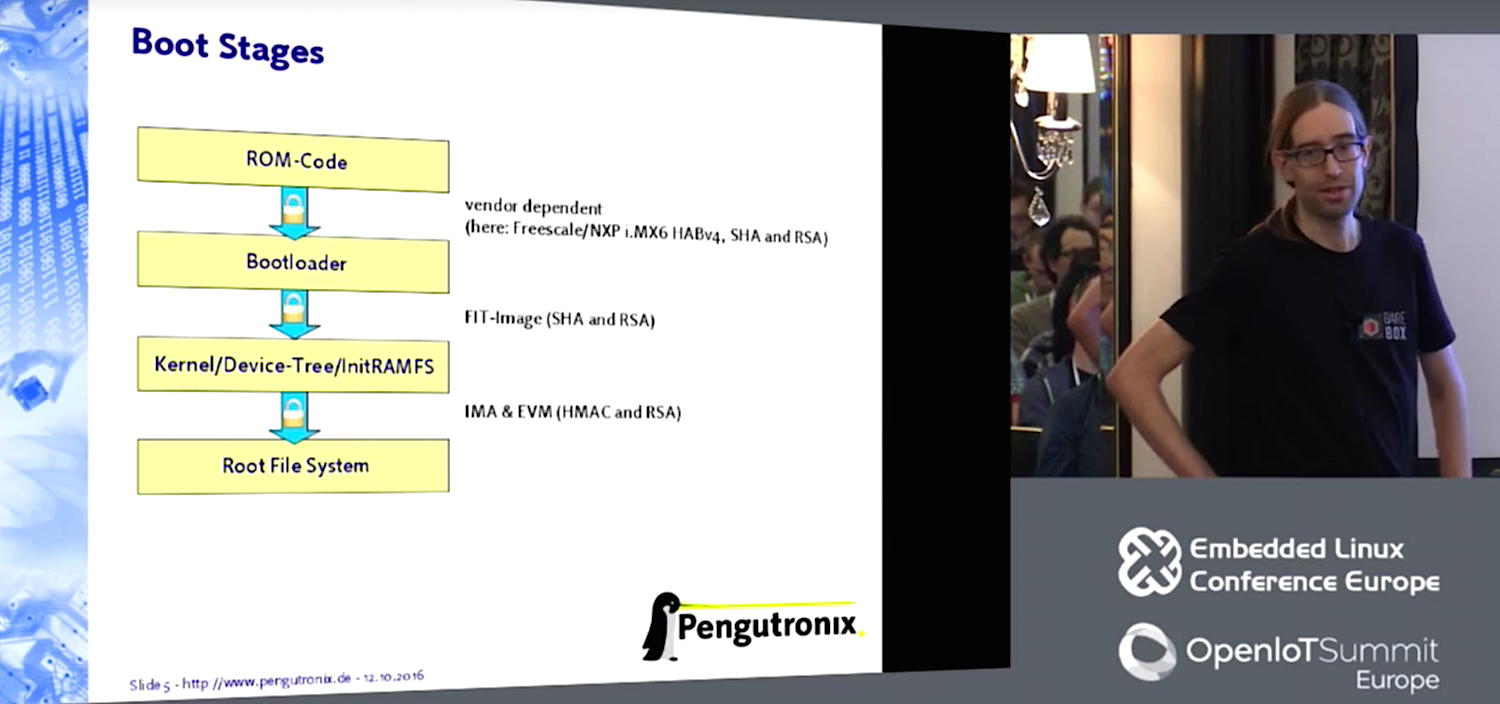
On these ARM systems, ROM code verifies the bootloader before it launches it. On i.MX SoCs this is done by signing the bootloader with a proprietary tool and a public key. The corresponding certificate is burned into the i.MX itself to verify the bootloader. The ROM code decides where to boot from and then passes off to a bootloader, such as U-boot or in this case barebox, which then loads the kernel device trees and root file system.

For the initial ROM stage, the i.MX SoCs use a proprietary extension ROM code called high assurance boot, or short HAB, which in turn taps standard cryptographic SHA and RSA algorithms. Barebox has another key that verifies the image of the kernel and the InitRAMFS (initial RAM file system).

“In the boot process, the ROM code runs first,” said Kleine-Budde. “In production, you burn the fuses into your SoC, which verify the public key that comes with the bootloader. ROM code verifies that the pubkey is correct, and then the pubkey verifies the signature, which goes over the bootloader itself. A second pubkey is used to verify the kernel stage.”

FIT-Image, ext4, and UBIFS

For user space verification, Pengutronix used a FIT-Image, which consists of kernel, device-tree(s), and InitRAMFS. “This is all included in one image, and can be used in several configurations, so you can use one FIT-Image on a variety of boards,” said Kleine-Budde. “If your bootloader knows which board you have, it can pick the right configuration from the FIT-Image, which can be stored on untrusted media.”

The bootloader checks against the bootloader’s public key to see if the FIT-Image configuration is valid. To do this, it checks the signature, and then analyzes three hashes for kernel, device-tree, and InitRAMFS.

Once verified, the kernel then secures each file in the root file system, which must be able to support extended attributes. “We used the ext4 file system with extended attributes,” said Kleine-Budde. “You can use a flash chip or naked NAND chip with UBI and UBIFS, or you can use block media storage such as eMMC.”

To verify the file system, Pengutronix employed the mainline kernel’s IMA (Integrity Measurement Architecture), which uses a hash for every file, thereby indicating if the file has been modified. The content is hashed, and then stored as an extended attribute, in this case security-ima.

“If attackers gain access to this system, they can modify a file, recalculate the hash and write it to the media,” said Kleine-Budde. “To avoid this, we make use of the kernel’s EVM (Extended Verification Module), and create a signature over the extended attributes. This is done on your development PC during image creation. You take a private key, create the root file system, and sign every file and extended attribute. It contains the hash, so you can be sure the file and the checksum have not been modified. The EVM-signature is then verified by the kernel’s public key.”

Protecting read/write storage with a SHA-HMAC Secret

Pengutronix’s customers also wanted to be able to verify read/write media. “For this, we used EVM with SHA-HMAC, a clever way of hashing things that lets you guarantee integrity and authentication,” said Kleine-Budde. HMACs can be verified faster than RSA, thereby reducing boot time, he added.

“With SHA-HMAC, you need a different ’Shared Secret’ for each system because if an attacker opens one system and modifies it, and HMAC gets used, he could transfer a modified file from one system to another,” said Kleine-Budde. “Once the kernel touches every file, it will recalculate the HMAC-based verification and write it down. The attacker cannot recalculate the HMAC unless he has the EVM’s Secret.”

The Secret is generated on the i.MX SoC. “If you have created a properly signed bootloader, you have access to a unique key, which is unique to every individual SoC,” said Kleine-Budde. “The SoC’s fuses contain certification hashes that correspond to the secret key used to sign the bootloader. You can only burn the fuses once, and there’s even a separate fuse that can disallow the burning of other fuses. You sign the bootloader when you build your BSP.”

The unique key is used to encrypt a shared Secret for the EVM, stored on media. “You can decrypt only on the system you used to encrypt it, and only if you have a properly signed bootloader,” said Kleine-Budde. “You then use InitRAMFS to decrypt the blob and obtain access to its EVM-Secret, which is required if you want to do read/write. This checks to see if EVM, IMA, and contents are all correct.”

About 22 minutes into the video, Kleine-Budde answered about 10 minutes of questions about whether the blob was properly secured. Kleine-Budde stuck to his original answer: “The blob is encrypted with a unique key. You cannot decrypt the blob unless you have a unique key.”

He then explained how he used eCryptfs for file system level encryption. “eCryptfsworks works on both NAND and UBIFS,” he said. “Every file in the encrypted file system corresponds to a file in the unencrypted system. File names and content are encrypted, but the directory layout and permissions are clear text. eCryptfs requires a different shared Secret for each system. You do not need IMA/EVM because integrity is provided by GCM and AES within the i.MX crypto engine.”

Finally, Kleine-Budde demonstrated the verified boot process running Linux 4.0.9 with patches on the i.MX6-based RIoTboard. He also passed on some lessons learned for others attempting to create a similar ARM-based trusted boot stack.

“Keep your packages in two configurations: one secure package with production keys and another that people can play with,” said Kleine-Budde. Similarly, one production bootloader and

Kernel/InitRAMFS configuration should reboot upon discovery of attack while another one simply displays a notification. He also noted that the combination of UBIFS with IMA/EVM is sensitive to sudden power loss. This issue is fixed with the upcoming Linux v4.10 release.

Kleine-Budde acknowledged that verified boot extends your boot time, in this case by about 10 percent. The overhead is worth it, however, when you consider the alternative. “There are a lot of Linux targets on the Internet that are attractive for hacking,” said Kleine-Budde.

You can watch the complete presentation below:

https://www.youtube.com/watch?v=lkFKtCh2SaU?list=PLbzoR-pLrL6pRFP6SOywVJWdEHlmQE51q

Embedded Linux Conference + OpenIoT Summit North America will be held on February 21 – 23, 2017 in Portland, Oregon. Check out over 130 sessions on the Linux kernel, embedded development & systems, and the latest on the open Internet of Things.

Linux.com readers can register now with the discount code, LINUXRD5, for 5% off the attendee registration price. Register now>>

What’s the Difference Between NFV Automation and NFV Orchestration?

NFV automation is the ability to transfer manual network configuration to technology; NFV orchestration creates the deployment and automation blueprint.

NFV automation and NFV orchestration have overlapping and interrelated capabilities, which are essential to the deployment of virtual network services. Both automation and orchestration are part of the critical management, automation and orchestration, or MANO, layer. The lack of MANO standards has hindered network functions virtualization deployments by many leading service providers.

Read more at TechTarget

How To Shrink Attack Surfaces with a Hypervisor

A software environment’s attack surface is defined as the sum of points in which an unauthorized user or malicious adversary can enter or extract data. The smaller the attack surface, the better. We recently sat down with Doug Goldstein (https://github.com/cardoe or @doug_goldstein) to discuss how companies can use hypervisors to reduce attack surfaces and why the Xen Project hypervisor is a perfect choice for security-first environments. Doug is a principal software engineer at Star Lab, a company focused on providing software protection and integrity solutions for embedded systems.

Linux.com: Tell us a little bit about what your company does and your area of expertise?

Doug Goldstein: Star Lab is a software security provider dedicated to researching, developing, testing, and delivering embedded security solutions for both commercial and government customers. We address at-rest, boot, and runtime system protections even in the face of successful privilege escalation attacks. Star Lab maintains a Xen-based and security-focused virtualization product called Crucible that targets embedded markets.

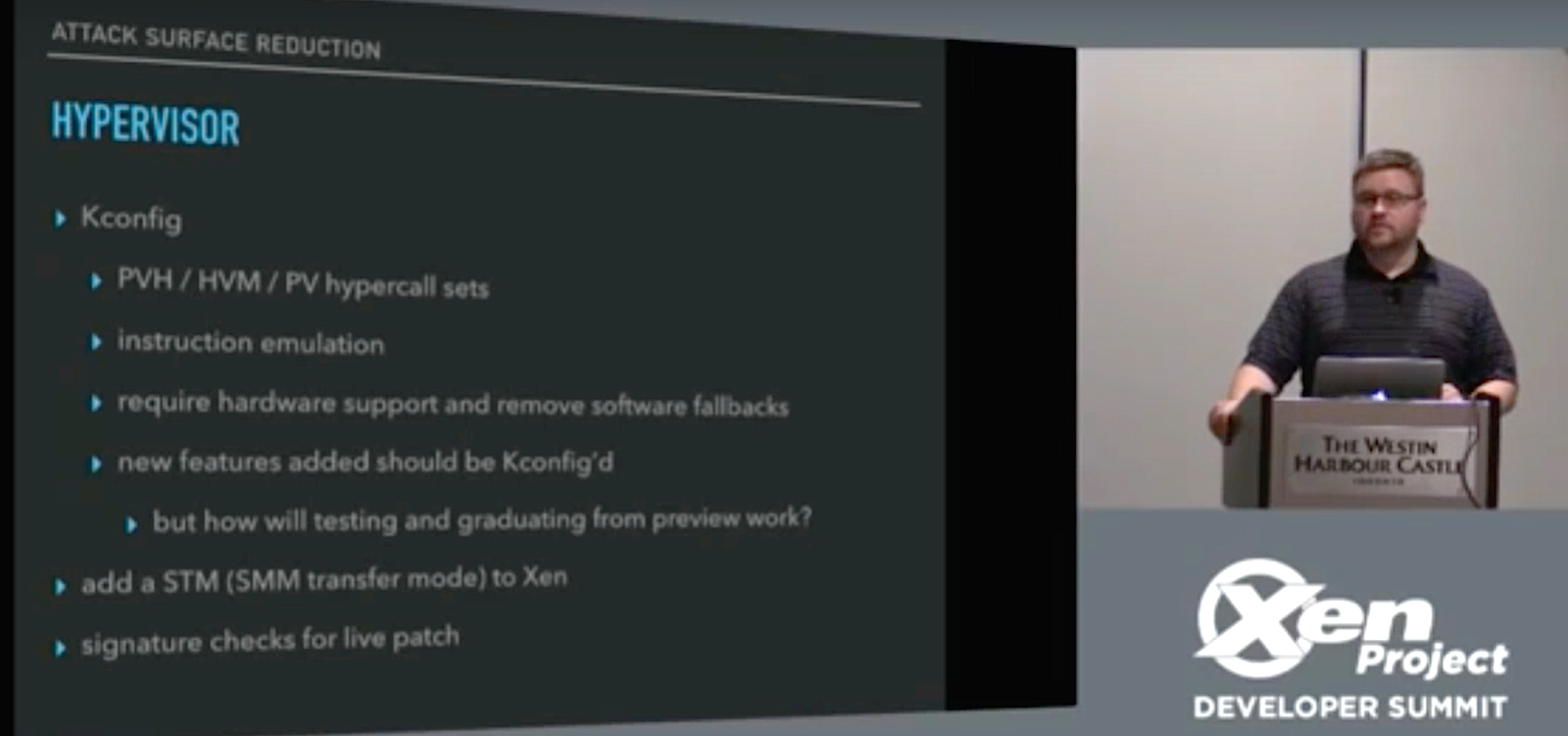
As for me, I’ve been a Gentoo Linux developer for about 15 years, and have been interested in virtualization for some time. I started my foray into virtualization with KVM for test environments, and have contributed back to that community. I’m a contributor for the Xen Project and have worked to make a hypervisor modular at compile time through a project called Kconfig, which was borrowed from the Linux kernel. Kconfig allows developers to create a more lightweight hypervisor, which reduces attack surface and is beneficial in security-first environments, microservice architectures, IoT, and industries with heavy compliance and certification requirements (such as the automotive sector). Kconfig was released as part of Xen Project Hypervisor 4.7.

Recently, my coworkers and I have been looking more closely into IoT security. With an ever-increasing number of connected devices being brought to market, there are more vectors than ever for attackers to get into remote systems and access sensitive dataeven with protective measures such as firewalls in place. For example, someone could attack your laptop through your smart TV. Given the current security landscape, the same types of software protections and system integrity solutions we’ve been creating for the government are now recognized as necessary for consumers and B2B.

Here are a few other technologies that started out in the military, but trickled to the consumer realm, if you like this type of stuff.

Linux.com: When it comes to securing devices, what is the approach that you use?

Goldstein: Using a multi-layered protection and detection approach is the only way to ensure systems stay secure. Many organizations approach security with a network-based intrusion detection system or a firewall and believe that is enough. We believe that security must take a more holistic, proactive approach. If you only have an intrusion detection system, you can only see attacks at a very high level. For example, you might be able see someone attempting to exploit a service, but what if they somehow got valid login credentials? To begin implementing truly secure architectures, you first need to lockdown and control capabilities in the edge systems. This is where the hypervisor comes into play.

A hypervisor is an important  piece in the multi-layered security approach. By separating system components into different VMs, an attacker would have to compromise each VM to modify or access sensitive data, versus compromising one service and having access to all the data. It is also possible to use redundant VMs using technologies like COLO (Course Grain Lock Stepping). This allows two VMs to process the same input and ensure they agree on a valid response, thereby preventing an attacker from permanently modifying the data.

Also, hypervisors can provide multiple levels of privilege so that a service with sensitive data could run as a VM alongside a service with less sensitive information, and they would never be able to see or modify each other’s data. This is one way we are able to reduce costs in government projects that have data at different classification levels. We allow them to use a single system with one or more VMs, instead of two physical systems.

Finally, by using a hypervisor, you can prevent certain classes of persistent attacks because some of these attacks rely on direct access to hardware, flash storage, or BIOS memory. By running services inside constrained VMs, an attacker has no direct access to the system hardware without first defeating the hypervisor.

Linux.com: Why did you choose the Xen Project hypervisor, and how does it differ in terms of security compared to something like KVM?

Goldstein: One of the main reasons why we chose to focus on the Xen Project (and likely why many other security-first projects choose the Xen Project over KVM) is that its architecture allows for strong isolation and privilege separation. This means that the Xen Project hypervisor is able to live separately from the Linux Kernel and the Linux Kernel is able to be separated into less privileged pieces. For example, if there is an attack on the Linux Kernel, it is not going to impact Xen like it impacts KVM.

Another example of this is network card drivers that can be separated into their own driver domains, such as what OpenXT and Qubes do with Xen. The whole idea is, even if an attacker can exploit the driver, the attacker does not gain full access to the hypervisor. This isn’t the case with KVM, where a single kernel or driver compromise can undermine the entire system security posture.  

Linux.com: The Xen Project serves a lot of different use cases. What can you do to make it better serve a security use case?

Goldstein: As mentioned above, Kconfig gives you the ability to make the Xen Project hypervisor more lightweight, thereby eliminating attack surfaces. For example, with Kconfig you can take out some of the migration features that might be essential in cloud environments, but don’t make sense for security-first environments.

Other examples include VM introspection and fine-grained access controls. VM introspection allows you to check the state of your VM in real time without having to run any code inside the VM. This allows you to ensure that no one has modified a critical piece of software running inside the VM. Fine-grained access controls that XSM FLASK provides allow or restrict communications between VMs or between the VM and the hypervisor. This provides a way to reduce the attack surface of the VMs and the hypervisor.

Linux.com: How about containers? How would containers fit into this?

Goldstein: Some of the people that we work with wanted to put containers into their infrastructure because they believed it was more secure. On one hand, it is a little better because the software is carved up into separate containers, making it easier to ship updates without affecting the other software running on the system. In this sense, containers can be good from a security standpoint.

In many cases, however, people don’t actually deliver these updates and fixes. People build up containers, but don’t update the software within the containers. For example, there could be multiple copies of OpenSSL in different containers that are all out of date. In this scenario, even though a system administrator updated packages in a server’s OS, the machine would still have vulnerabilities. Containers without good software management practices can actually reduce the system’s overall security posture.

It might be interesting to note at this point that containers do not address kernel-level attacks. Containers limit the attack surface of an individual service, preventing one service from affecting other services on the machine. However, containers are less secure than virtual machines since the kernel has a much larger attack surface than a hypervisor and is more vulnerable to privilege escalation attackspossibly leading to an escape from the container. The smaller attack surface of the hypervisor decreases the probability that a privilege escalation attack will allow an attacker to break out of a virtual machine and affect other VMs on the system.

Linux.com: Which areas do you think could be improved from a security standpoint currently?

Goldstein: One area I would love to see more interest in, from a Xen Project perspective, is XSM FLASK. It is not the default access control mechanism in the Xen Project hypervisor at present.  Many people within the community recognize the benefits of switching to XSM FLASK, but there is a lot of inertia around the existing model. There are issues in the current model that can be elegantly solved by creating the right policies using XSM FLASK. Focusing on using XSM FLASK and enhancing Xen’s default policy, rather than adding more knobs to the existing access control model, could potentially benefit the entire Xen Project community.

Additionally, a lot of maintainers in the security group have overlapping use cases that specifically focus on cloud hosting environments. It would be great to get more members from the security community to engage the Xen Project and even potentially become maintainers focused on use cases other than cloud-hosted environments. For example, virtualization is a great solution for addressing functional safety, multi-level access, system integrity, and cybersecurity problems in the embedded systems space. This broadening of the community would allow a larger set of use cases to be covered by the Xen Project, in a single open source project, rather than siloed within several separate projects.

If you want to learn more about this topic, check out Doug’s presentation at the Xen Project Developer Summit below:

https://www.youtube.com/watch?v=XOdVBE3-EGw?list=PLYyw7IQjL-zEcw-9M5YWzAwXj9mlOKZnU

Verified Boot: From ROM to Userspace

https://www.youtube.com/watch?v=lkFKtCh2SaU?list=PLbzoR-pLrL6pRFP6SOywVJWdEHlmQE51q

In this talk from Embedded Linux Conference, Marc Kleine-Budde of Pengutronix describes the architecture and strategies of a recently developed verified boot scheme for a single-core, Cortex-A9 NXP i.MX6 running on the RIoTboard SBC.

A Closer Look at Git Rebase

Most of the comments to my recent articles on 3 Git commands I use every day and When to make a Git commit have mentioned using git rebase.

So, let’s talk about git rebase. Jumping right in, I use git rebase for two reasons:

  1. To bring a stale branch up to date.
  2. To change a set of unmerged commits.

Let’s take a closer look at both of these.

Read more at Dev.to

The Basics: Explaining Kubernetes, Mesosphere, and Docker Swarm

The IT world is turning to containers, but to control them you need container management programs. That’s where Kubernetes, Mesosphere, and Docker Swarm step in.

Containers, a lightweight way to virtualize applications, are an important element of any DevOps plan. But how are you going to manage all of those containers? Container orchestration programs—KubernetesMesosphere Marathon, and Docker Swarm—make it possible to manage containers without tearing your hair out.

Before jumping into those, let’s review the basics. Containers, according to 451 Research, are the fastest growing cloud-enabling technology. The reason for their appeal is that they use far fewer system resources than do virtual machines (VMs). After all, a VM runs not merely an operating system, but also a virtual copy of all the hardware that the OS needs to run. In contrast, containers demand just enough operating system and system resources for an application instance to run.

Read more at HPE

A Networking Open Source Innovation Pipeline Can Accelerate Businesses

… To be fair, all enterprise solutions will, by default, create a lock-in as once they are deployed they are very difficult to replace. The benefit of open source is not that it removes lock-in altogether; instead of being wed to single vendor and a single technology, one is connected to a platform / API. While the open source solution may be driven by a single organization, there are a wider range of technology choices underneath.

Two large open source organizations, the Open Networking Foundation and ON.LAB are merging, signaling that they understand the business need for a more fully baked open source solution instead of just projects. The idea that “If we build it, they will come” is stepping aside, being replaced by the realization that “We can build it, but if we don’t make it easy and interoperable, they won’t come.”

Read more at Forbes

Master C++ Programming with Open-Source Books

Books are very personal and subjective possessions. And programming books are no exception. But regardless of their style, focus, or pace, good C++ programming books take the reader on a compelling journey, opening eyes to the capabilities of the language, and showing how it can be used to build just about anything.

I have carefully selected C++ books which all share the virtue of being compelling to read. I recommend 9 books which are released under public copyright licenses. Before doing so, I’ll give a brief introduction to C++.

Read the complete article

How to Install Snap Applications on Ubuntu 14.04 LTS

Ubuntu 16.04LTS was released by Canonical back in April last year. Among some of the key new features it brought, one was a new packaging format dubbed Snap. To refresh, here’s an excerpt from our Ubuntu 16.04 overview tutorial that explains the what and why of Snap:

So, why Snap? Well, this new packaging system is aimed at making package installation
 and maintenance easier. For example, unlike the existing system, wherein it’s on you to
 resolve all version-related conflicts of dependencies for a software being installed, Snaps
 allow developers to put in everything on which their software depends in the package 
itself, effectively making them self-contained and independent of the system on 
which they are being installed.

Read more at HowtoForge