If you’re interested in running a complex Kubernetes system across several different cloud environments, you should check out what Bob Wise and his team at Samsung SDS call “Control Plane Engineering.”
Wise, during his keynote at CloudNativeCon last year, explained the concept of building a system that sits on top of the server nodes to ensure better uptime and performance across multiple clouds, creates a deployment that’s easily scaled by the ClusterOps team, and covers long-running cluster requirements.
“[If you believe] the notion of Kubernetes as a great way to run the same systems on multiple clouds, multiple public clouds, and multiple kinds of private clouds is really important, and if you care about that, you care about control plane engineering,” Wise said.
By focusing on that layer, and sharing configuration and performance information with the Kubernetes community, Wise said larger Kubernetes deployments can become easier and more manageable.
”One of the things we’re trying to foster, trying to build some tooling and make some contribution around is a way for members of the community to grab their cluster configuration, what they have including things like setting of cluster, be able to grab that, dump that, and capture that and export it for sharing, and also to take performance information from that cluster and do the same,” Wise said. “The goal here is, across a wide range of circumstances, to be able to start compare notes across the community.”
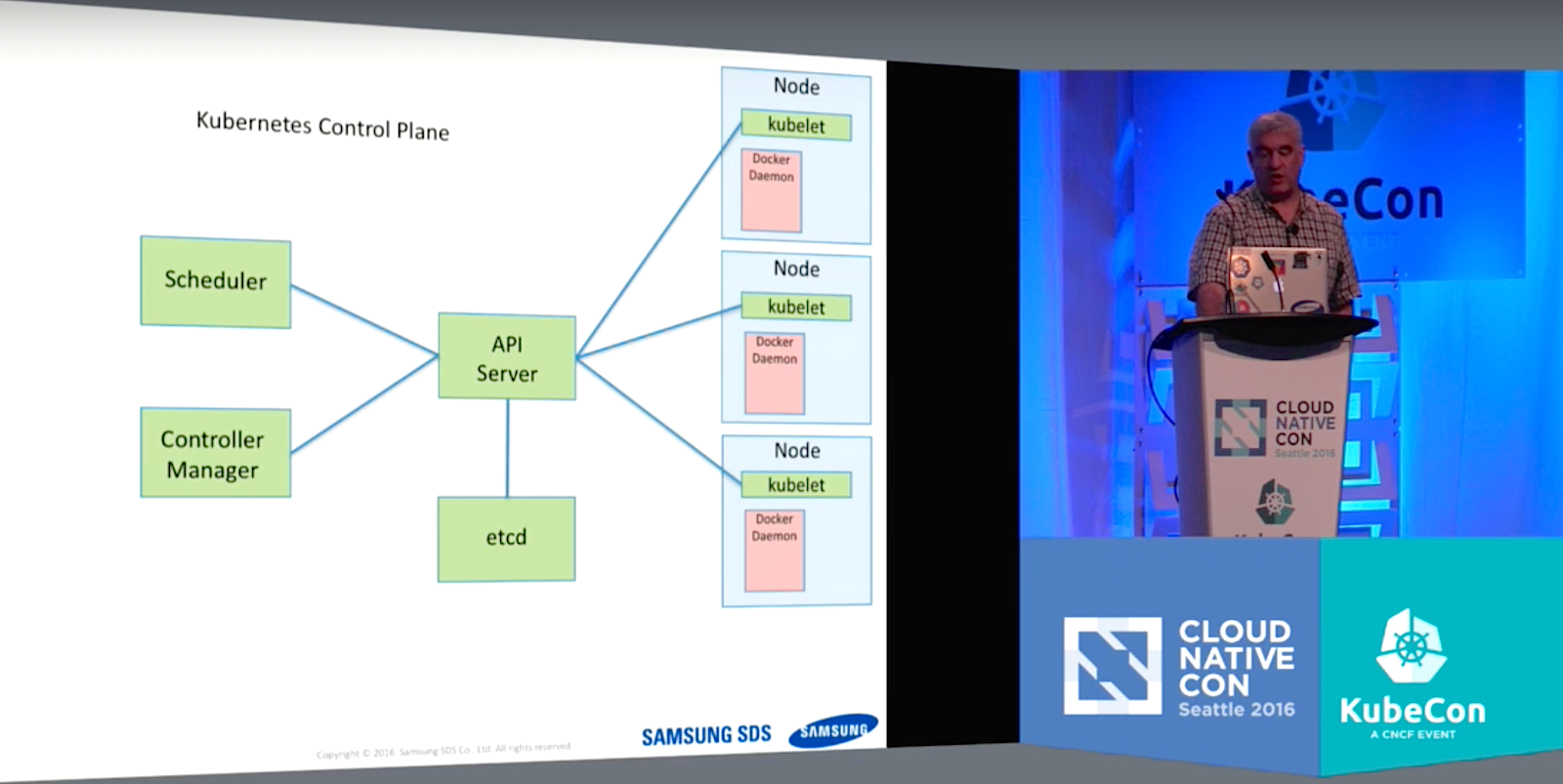
For the work Wise and his team have done, the Control Plane involves four separate parts that sit atop the nodes to make sure things work optimally despite occasional machine failure and broken nodes.
The Control Plane includes:
An API Server on the front end through which all the components interact,
A Scheduler to assign pods to nodes,
The ETCD, a distributed database system where cluster state is maintained, and
A Controller Manager, which is the home for embedded control loops like replica sets, deployments, jobs, etc.
The best way to run the system so that it has some level of allocation automation is through Kubernetes self-hosting, Wise said. But that requires some “tricky bootstrapping” to build it. In the end, it’s worth it if you’re running a large cluster, however.
“The idea here is it’s a system entirely running as Kubernetes objects,” he said. “You have this common operation set. It’s going to make scaling … and HA easier.”
One piece that is perhaps better not to try to build on your own is a load balancer for the API Server, which can get bogged down because it’s a bottleneck into the system. Wise said using a cloud provider’s load balancer is the easiest, and in the end, probably best solution.
“This load balancer, this is a very key part to the overall system performance and availability,” Wise said. “The public cloud providers have put enormous investment into really great solutions here. Use them and to be happy.
“It’s worth the configuration drift that happens between multiple deployments,” Wise continued. “I’d also say again, if you have on premises and you’re trying to do deployments and you already have these load balancers then they work well, they’re pretty simple to configure usually. The configurations that Kubernetes requires for support are not especially complicated. If you have them, use them, be happy but I wouldn’t recommend going and buying those appliances new.”
Watch the complete presentation below:
Want to learn more about Kubernetes? Get unlimited access to the new Kubernetes Fundamentals training course for one year for $199. Sign up now!
Scripting languages (aka Very High-Level Languages or VHLLs), such as Python, PHP, and JavaScript are commonly used in desktop, server, and web development. And, their powerful built-in functionality lets you develop small useful applications with little time and effort, says Paul Sokolovsky, IoT engineer at Linaro. However, using VHLLs for deeply embedded development is a relatively recent twist in IoT.
Paul Sokolovsky, IoT engineer at Linaro
At the upcoming Embedded Linux Conference + OpenIoT Summit, Sokolovsky will discuss the challenges of using VHLLs in embedded development and compare different approaches, based on the examples of MicroPython and JerryScript + Zephyr.js projects. We talked with Sokolovsky to get more information.
Linux.com: Can you please give our readers some background on VHLLs?
Paul Sokolovsky: Very High Level Languages have been a part of the computer science and information technologies landscape for several decades now. Perhaps the first popular scripting language was a Unix shell (sh), although it’s rarely considered a VHLL, but rather a domain-specific language, due to its modest feature set. However, the first truly record-breaker VHLLs were Perl (1987) and Tcl (1988), soon followed by Python (1991), Ruby (1995), PHP (1995), JavaScript (1995), and many others.
The distinctive features of VHLLs are their interpreted nature (from the user’s point of view, there may be sophisticated compilers inside), built-in availability of powerful data types like arbitrary-sized lists and mappings, sizable standard library, and external modules system allowing users to access even larger third-party libraries. All that is coupled with a general easy feel (less typing, no build times, etc.) and an easy learning curve.
Linux.com: What are the benefits of these languages for development?
Sokolovsky: The benefits stem from the features described above. One can start with a scripting language quite easily and learn it quickly. Many VHLLs offer a powerful interactive mode, so you don’t need to read thick manuals to get started but can explore and experiment right away. Powerful built-in functionality allows you to develop small useful applications — scripts — with little time and effort (that’s where the “scripting languages” name came from). Moving to larger applications, vast third-party libraries and an easy-to-use module system make developing them also streamlined and productive.
Linux.com: How does scripting for embedded platforms differ from development for other platforms?
Sokolovsky: With all the exciting capabilities of VHLLs discussed above, there’s an idea — why we can’t enjoy all (or at least some) benefits of them when developing for embedded devices? And by “embedded devices” I mean here not just small Linux systems with 8-32MB of RAM, but deeply embedded systems running on microcontrollers (MCUs) with mere kilobytes of memory. Small, and sometimes really scarce, resources definitely add complexity to this idea. Another issue is device access and interaction. Embedded devices usually don’t have displays and keyboards, but fortunately the answer is known for decades thanks to Unix — just use a terminal connection over a serial (UART). Of course, on a host side, it can be hidden behind a graphical IDE, which some users prefer.
So, with all the differences the embedded devices have, the idea is to provide as familiar a working environment as possible. That’s on one side of the spectrum and, on the other, the idea is to make it as scaled down as possible to accommodate even the smallest of devices. These conflicting aims require embedded VHLLs implementations to be highly configurable, to adjust for the needs of different projects and hardware.
Linux.com: What are the specific challenges of using these languages for IoT? How do you address memory constraints, for example?
Sokolovsky: It’s definitely true that the interpreter consumes scarce hardware resources. But nowadays the most precious resource is the human time. Whether you are an R&D engineer, a maker with only a few hours on weekend, a support engineer overwhelmed with bugs and security issues, or a project manager planning a product — you likely don’t have extra time on your hands. The idea is to deliver the productivity of VHLLs into the hands of embedded engineers.
Nowadays, the state of art is very enabling of this. It’s fair to say that, even of microcontroller units (MCUs), an average now is 16-32KB RAM and 128-256K ROM. That’s just enough to host a core interpreter, a no-nonsense subset of standard library types, some hardware drivers, and a small — but still useful — user application. If you go slightly above the middle line, capabilities raise rapidly — it’s actually a well-known trick from 1970s that using custom bytecode/pcode lets you achieve greater code/feature density than the raw machine code.
There are a lot of challenges on that road, scarcity of RAM being the main one. I write these words on a laptop with 16GB of RAM (and there’re still slowdowns due to swapping), and the 16KB mentioned above is a million times less! And yet, by using carefully chosen algorithms and coding techniques, it’s possible to implement a scripting language that can execute simple applications in that amount of RAM, and fairly complex ones in 128-256K.
There are many technical challenges to address (and which are being successfully addressed), and there wouldn’t be a space to cover them here. Instead, my presentation at OpenIoT Summit will cover experiences and achievements of two embedded scripting languages: MicroPython (Python3 language subset) and Zephyr.js (JavaScript/Node.js subset), both running on top of The Linux Foundation’s Zephyr RTOS, which is expected to do for the IoT industry what Linux did for the mobile and server industries. (The slides will be available afterwards for people who can’t attend OpenIoT Summit.)
Linux.com: Can you give us some examples of applications for which VHLLs are most appropriate? And for which they are inappropriate?
Sokolovsky: Above are many bright prospects for VHLLs, fairly speaking; in embedded, there’s a lot of wishful thinking in that (or hopefully, self-fulfilling prophecy). Where VHLLs in embedded can deliver right now are: rapid prototyping, and educational/maker markets where easy learnability and usage is a must. There are pioneers that use VHLLs in other areas, but generally, it requires more investment into infrastructure and tools. It’s important that such investment be guided by open source principles and be shared, or otherwise it undermines the idea that VHLLs can save their users time and effort.
With that in mind, embedded VHLLs are full-fledged (“Turing complete”) languages suitable for any type of application, subject to hardware constraints. For example, if an MCU is below the thresholds stated above, of a legacy 8-bit micro, good old C is the only choice you can enjoy. Another limit is when you really want to get the most out of the hardware — C or Assembler is the right choice. But, here’s a surprise — the developers of embedded VHLLs thought about that, too, and, for example, MicroPython allows you to combine Python and Assembler in one application.
Where embedded VHLLs excel is configurability and (re)programmability, coupled with flexible connectivity support. That’s exactly what IoT and smart devices are all about, and many IoT applications don’t have to be complex to be useful. Consider, for example, a smart button you can stick anywhere to do any task. But, what if you need to adjust the double-click time? With a scripting language, you can. Maybe you didn’t think about triple-clicks at all, but now find that even four clicks would be useful in some cases. With a scripting language you can change that — easily.
Embedded Linux Conference + OpenIoT Summit North America will be held on February 21 – 23, 2017 in Portland, Oregon. Check out over 130 sessions on the Linux kernel, embedded development & systems, and the latest on the open Internet of Things.
Linux.com readers can register now with the discount code, LINUXRD5, for 5% off the attendee registration price. Register now>>
Large, high-performance and reliable Kubernetes clusters require engineering the control plane components for demands beyond the defaults. This talk covers the relationship between the various components that make up the Kubernetes control plane and how to design and size those components.
Education and communication are two essential building blocks in any open source software compliance program. Both help ensure that employees, as well as others outside the organization, possess a good understanding of the organization’s policies governing the use of open source software.
Employee training serves as a venue to publicize and promote the compliance policy and processes within the organization and to foster a culture of compliance.
While clear and consistent messaging — whether it is internally to your employees or externally toward the developer communities of the open source projects you use in your product/software stack — help explain the company’s goals and concerns around open source.
Compliance Training
The goal of providing open source and compliance training — formally or informally — is to raise awareness of open source policies and strategies and to build a common understanding around the issues and facts of open source licensing. It also addresses the business and legal risks of incorporating open source software in products and/or software portfolios.
Such training can follow a formal or informal format, depending on the organization’s needs.
Formal Training
Depending on the size of the company and the extent to which open source is included in its commercial offerings, the company can mandate that employees working with open source take formal instructor-led courses, possibly culminating in actual exams.
Informal Training
Informal training channels may include any or all of the following:
• Brown bag seminars: Brown bag seminars are usually presentations made during lunchtime by a company employee or an invited speaker. The goal of these seminars is to present and evoke discussions of the various aspects of incorporating open source in a commercial product or an enterprise software portfolio. These sessions can also include discussions of the company’s compliance program, policies, and processes.
• New employee orientation: In some instances, the Compliance Officer presents on the company’s compliance efforts, rules, policies, and processes to new employees as part of employee orientation, supplying new employees with necessary open source management information: who to talk to, what internal website to visit, how to sign-up for open source and compliance training, etc.
Web presence
A website or online portal focused on a company’s open source management program helps tie together employee training with internal and external messaging and make it easily accessible.
Companies use portals in two directions: inwards, inside the company; and outwards, as a window to the world and the open source community. The internal portalhosts the compliance policies, guidelines, documents, training, announcements, and access to mailing lists. The external portaloffers a public platform for the world and the open source community, as well as a venue to post source code of open source packages, acknowledgements, and other disclosures, in fulfillment of license obligations.
We’ve now covered all seven essential elements of an open source management program, from strategy and process, to staffing and tools, and more. In the next few posts we’ll discuss some common challenges to establishing an open source management program and provide some recommendations on how to overcome these challenges.
Get the open source compliance training you need. Take the free “Compliance Basics for Developers” course from The Linux Foundation. Sign up now!
Container security may be a hot topic today, but we’re failing to recognize lessons from the past. As an industry our focus is on the containerization technology itself and how best to secure it, with the underlying logic that if the technology is itself secure, then so too will be the applications hosted.
Unfortunately, the reality is that few datacenter attacks are focused on compromising the container framework. Yes, such attacks do exist, but the priority for malicious actors is mounting an attack on applications and data; increasingly for monetary reasons. According to SAP, more than 80 percent of all cyberattacks are specifically targeting software applications rather than the network.
This reality challenges some long held beliefs that if you protect the edges, in this case the container framework, then magically those less secure applications and deployments will become more secure.
Fed up with the bog-standard Ubuntu, Debian, Fedora and so on? Looking for a distro that reflects your individuality? In this roundup we’ve discovered no less than 13 of the best, oddest and most useful distributions that Linux has to offer.
They include one distro which is the official, sanctioned OS of North Korea, no less, along with a Satanic Edition of Ubuntu (yes, you read that correctly), and also a distro which is so light it will run on a PC from the mid-80s. That ancient 386 in the attic could still be useful, then…
Read on to find out more about each of these interesting distros – and why on earth you’d want to use them.
Deploying openSUSE on Raspberry Pi 3 is not all that complicated, but there are a few tricks that smooth the process. First of all, you have several flavors to choose from. If you plan to use your Raspberry Pi 3 as a regular machine, an openSUSE version with a graphical desktop is your best option. And you can choose between several graphical environments: X11, Enlightenment, Xfce, and LXQT. There is also the JeOS version of openSUSE which provides a bare-bones system ideal for transforming a Raspberry Pi 3 into a headless server. Better still, you can choose between the Leap and Tumbleweed versions of openSUSE.
IBM is embarking on a new era of open source accessibility by releasing tooling, samples and design patterns to help streamline the development of inclusive web and mobile applications.
IBM has released two new projects on the developerWorks/open community, AccProbe and Va11yS, to help alleviate accessibility roadblocks during the agile development process, strengthen the user experience by adhering to industry standards, and reduce costs by ensuring accessibility is done right from the beginning.
According to Black Duck Software’s Future of Open Source Survey 2015, “78 percent of companies run on open source and 88 percent say that they plan to contribute more to open source over the next few years.”
As open source tooling and contributions continue to grow, IBM Accessibility Research is making accessibility more available, easier to deploy, and an integral part of the ecosystem of open technologies. IBM has been contributing accessible open source tools since the early 2000s. In 2005, IBM contributed code to the Mozilla Foundation to ensure the Firefox browser could render accessible rich internet applications (ARIA).
Inspecting and Correcting Accessibility Violations
To help identify and fix accessibility issues during development, IBM released AccProbe, which combines the functionality of numerous accessibility inspection and event management tools into one application to test and correct accessibility violations in rich client applications.
AccProbe is a standalone, Eclipse Rich Client Platform application that provides access to the Microsoft Active Accessibility (MSAA) and IAccessible2 APIs implemented in an application or rendered document, and to the user interface of that application or document. Accessibility APIs, such as IAccessible2, are implemented by browsers or user agents to communicate accessibility information about objects on the screen to assistive technologies, such as screen readers.
AccProbe is unique in that it helps speed and scale the development of accessible rich client applications that implement MSAA and IAccessible2 APIs so users can test and correct violations without requiring the use of screen readers. It also adheres to the standards outlined in the IAccessible2 specification and the W3C Core Accessibility API Mappings ensuring that any application will meet these requirements.
AccProbe also provides:
Event monitoring, such as when the focus changes on a screen and someone tabs to a new area.
Inspection of software applications ensuring the implementation of new interoperability APIs, which align to the requirements outlined in the U.S. Section 508 ICT Refresh.
Verification that textual information is provided through operating system APIs and that forms be accessible for assistive technologies allowing them access to field elements and the ability to submit the form.
Support for 32-bit and 64-bit software applications.
AccProbe is available now and can be downloaded directly from GitHub, or visit the AccProbe project page on IBM developerWorks Open.
https://www.youtube.com/watch?v=VWWsf6YBS74
Plug and Play Accessibility Code Samples and Design Patterns
To help designers, developers, and testers better understand how to implement accessible user interfaces, especially when used with assistive technologies, IBM has created Va11yS(Verified Accessibility Samples), an extensive repository of working code samples. Many of the samples leverage code snippets found in the Techniques for Web Content Accessibility Guidelines (WCAG) 2.0, which demonstrate techniques for HTML5, CSS and WAI-ARIA.
Va11yS is a one-stop shop for working code samples that can be reviewed and easily implemented in solutions allowing for quick adoption of accessibility requirements. IBM has created approximately 200 samples and continues to add to this repository on a weekly basis.
Va11yS samples were developed to help test new tools, experiment with assistive technologies, and even teach the basics of accessibility in other programming languages.
Each code sample lists test results outlining the platform, browser, and assistive technology used for testing to help identify bugs and give developers and testers a reference point in their own testing. Va11yS also invites contributors to easily drop in a new code samples, modify an existing one, or even add their findings to the test results.
Va11yS has the ability to become the largest, single point of accessible samples covering a multitude of languages, libraries, and frameworks, such as HTML, CSS, WAI-ARIA, Angular, React, Swift, and much more.
Va11yS code samples are available now on GitHub, or visit the Va11yS project page on developerWorks Open.
Inclusive Design and Development
Designing and developing with accessibility in mind ensures an application is usable by the widest possible audience and inclusive to everyone. By donating IBM’s best practices in accessibility to the open community, we can correct usability issues early in development and deliver an optimized human experience for everyone.
Moe Kraft — Maureen (Moe) Kraft is a technical consultant and transformation lead for IBM Accessibility where she provides education, training and software development techniques to ensure IBM’s assets and products are accessible to people with disabilities and direction on how to incorporate accessibility into the continuous delivery development model. She is an active member of the W3C WCAG, Boston a11y group and recently began teaching programming to middle and high school girls as a member of Girls Who Code.
What is Open Source Software? Most of us think we already know, but in fact, there are a number of interpretations and nuances to defining Open Source.
This is the first article in a new series that will explain the basics of open source for business advantage and how to achieve it through the discipline of professional open source management. (These materials are excerpted from The Linux Foundation Training course on professional open source management. Download the full sample chapter now.)
Defining “Open Source” in common terms is the first step for any organization that wants to realize, and optimize, the advantages of using open source software (OSS) in their products or services. So let’s start by defining what we mean when we talk about open source.
What we mean when we talk about OSS
When people talk about Open Source, they often use the term in a number of different ways. Open Source can be a piece of software that you download for free from the Internet, a type of software license, a community of developers, or even an ideology of access and participation.
Although these are all aspects of the Open Source phenomenon, there is actually a more precise definition:
Open Source Software (OSS) is software distributed under a license that meets certain criteria:
1. It is available in source code form (without charge or at cost)
2. Open Source may be modified and redistributed without additional permission
3. Finally, other criteria may apply to its use and redistribution.
Official definitions of OSS
The most widely accepted definition for Open Source Software comes from the Open Source Initiative (OSI). The OSI website also lists a number of licenses that have been reviewed and found compliant with the definition, but there are additionally many licenses currently in
circulation that meet these criteria.
The Free Software Foundation, for its part, prefers the term “Free Software” and a much simpler definition, but “Open Source” is compatible with and includes “Free Software.” Sometimes, these terms are combined as “FOSS” – Free and Open Source Software.
What OSS is not
Now, there are also other kinds of downloadable software that are not Open Source, and they must be accounted for. These other types of software include:
● Shareware or Free Trialware, which is downloadable software with commercial terms that actually can involve payments under various circumstances
● There is also any other software that does not allow free re-distribution as part of another program, like, perhaps, one of your organization’s products.
Now that we’ve established what open source software is in common terms, we can move on to the business case for using open source software. Next week, we’ll discuss how and why OSS can be used for business advantage. And in the following articles, we’ll cover more open source basics including the operational challenges and risks for companies using OSS, common open source management techniques, open source licensing, and more.
Organisations across Europe believe that using an Agile methodology for software development can vastly improve the customer experience, while using DevOps can boost revenue from new sources.
A new report commissioned by software company CA said that 67 percent of UK organisations using an Agile methodology saw an improvement in customer experience, while firms using DevOps practices report a 38 percent increase in business growth from new revenue sources.
Other highlights include a 42 percent increase in employee productivity using Agile, while DevOps yields even better results with a 51 percent increase.