
In this talk, Brendan Burns shows how a general purpose programming language (in this case JavaScript) can be used to write programs that compile to a distributed system of containers that is then deployed onto Docker containers.

In the first article in this series, I provided a brief overview of NTP and explained why NTP services are critical to a healthy infrastructure. Now, let’s get our hands dirty and look at some security concerns and important NTP options to lock down your servers.
One nasty attack that recently caused the Internet community to sit up and take note involved what’s called a Reflection Attack. In essence, by spoofing IP addresses, it was possible to ask a third-party machine to respond to an unsuspecting victim with a barrage of unwelcome data. Multiplied by thousands of machines, it was possible to slow down, or even bring to a halt, some of the largest Internet Service Providers’ (ISPs) and enterprises’ infrastructure. These Distributed Denial of Service (DDoS) attacks forced some rapid patching along with some community hand-holding to keep services up and running while hundreds of thousands of machines were patched, reconfigured, or upgraded out of necessity.
This particular attack took advantage of a command referred to as monlist or MON_GETLIST. This command is found in older versions of NTP and allows a machine to query up to the last 600 hosts that have requested the time from that NTP server. Clearly, the monlist functionality is an ideal route to generating a great deal of traffic off of a very small initial request.
Thankfully, newer versions of NTP no longer respect these requests, and it’s relatively easy — if you have access to the file /etc/ntp/conf on your NTP server — to add the following line to disable it:
disable monitor
There’s little doubt that it is a worthwhile pursuit to harden your NTP servers. To what extent you go to however is obviously up to you. If you are using the kernel-based Netfilter’s IPtables then you would allow access to your NTP Servers by punching a hole through your firewall as so:
# iptables -A INPUT -p udp --dport 123 -j ACCEPT

# iptables -A OUTPUT -p udp --sport 123 -j ACCEPT
This configuration is not the best solution by any means as any machine can connect to your NTP servers if you haven’t locked down the relevant NTP configuration. We will look at tightening this up with a little more detail shortly.
Fully understanding all of the configuration options that NTP can offer — including authentication, peering, and monitoring — might be considered a Herculean task, but let’s continue with our overview of the subject matter in hand.
It’s probably helpful to distinguish a little between two common tools. The interactive ntpdc program is a “special” query tool, which can be used to probe an NTP server about its current configuration and additionally make changes to that config.
With a somewhat similar name, the ntpq tool is for standard queries, however, such as looking up any of your upstream machines (like printing a list of peers by typing “peer” for example) from which you are receiving the latest time. It tends to be mostly used to monitor your NTP infrastructure to help you keep an eye on its performance as opposed to making changes and special queries.
Back to IPtables for a moment: if you wanted to allow your NTP client to look up NTP queries from an upstream server, you could use rules such as these:
# iptables -A OUTPUT -p udp --dport 123 -j ACCEPT

# iptables -A INPUT -p udp --sport 123 -j ACCEPT
On your NTP client, you can test which servers you have connected to, like so:
# ntpq -p
The results of which can be seen in the example below:
remote              refid              st t when poll reach   delay   offset    jitter

=====================================================

10.10.10.100    .STEP.          16 u    -  1024    0    0.000    0.000     0.000

clock.ubuntu.   .STEP.          16 u   63 1024   34    0.870   70.168   3.725

time.ntp.orgl     10.1.1.1          3 u   71 1024   37    0.811  -35.751  26.362
As you can see, we’re connecting to three NTP servers for reliability. These are known as our “peers.” The “STEP” entries are “kiss codes” and show that our client has updated (and corrected) its time having connected to the pertinent servers. Under the “st” field, we can see the Stratum number allocated to each server.
It is the NTP daemon, ntpd, option called restrict that offers a way of configuring access controls as to who can set the time on their wristwatches using our server. Be warned that initially at least its syntax may seem a little counterintuitive. If you get lost at any point, thankfully there’s a hillock-sized number of man pages available to you. Simply prepend the man command to any of these manuals on the command line, such as man ntp_mon, to view them:
ntpd, ntp_auth, ntp_mon, ntp_acc, ntp_clock, ntp_misc
Under the manual for ntp_acc, we can see a multitude of restrict options. Along the lines of traditional Access Control Lists (ACLs), the clever ntpd will allow you to grow a list of IP addresses and ranges that you want to permit. To fully harden your NTP infrastructure, however, authentication should be employed, which is a subject for another day.
I mentioned that restrict was a little counterintuitive as far as options go, here is what ntpd expects to see if we want to open up NTP server to our localhost (with IP address “127.0.0.1”). This allows the localhost to have full access without any restrictions and not, as you might think, restrict its access:
restrict 127.0.0.1
The above assists with IPv4 addressing and the IPv6 equivalent would look like this:
restrict -6 ::1
Conversely, when we want to subjugate one or several hosts, we add options to the end of that command, like so:
restrict 10.10.10.0 mask 255.255.255.0 nomodify notrap
The example above deals with 254 hosts on a Class C subnet. Let’s look at some of the many other options available to the restrict option and how they manipulate NTP. It’s worth mentioning that DNS names can also be used instead of IP addresses; however, be warned that poorly maintained domain name services can cause havoc with your NTP infrastructure. In the UK, for example, it’s recommended to configure your NTP servers and clients to look upstream to these DNS names inside the /etc/ntp.conf file:
server 0.uk.pool.ntp.org
server 1.uk.pool.ntp.org
server 2.uk.pool.ntp.org
server 3.uk.pool.ntp.org
You may well ask why. There’s very good reason, as we can see from this DNS lookup, on just the first entry in the list, for public NTP servers available to the United Kingdom:
# host 0.uk.pool.ntp.org


85.119.80.232

178.18.118.13

217.114.59.3

176.126.242.239
In our abbreviated DNS lookup results, even the first DNS name “0.uk.pool.ntp.org” offers the resilience of four unique IP addresses, some of which may also be several machines and be hosted on resilient network links too perhaps.
Next time, I’ll finish up this NTP series with more configuration options for a secure setup.
Chris Binnie is a Technical Consultant with 20 years of Linux experience and a writer for Linux Magazine and Admin Magazine. His new book Linux Server Security: Hack and Defend teaches you how to launch sophisticated attacks, make your servers invisible and crack complex passwords.
Advance your career in Linux System Administration! Check out the Essentials of System Administration course from The Linux Foundation.
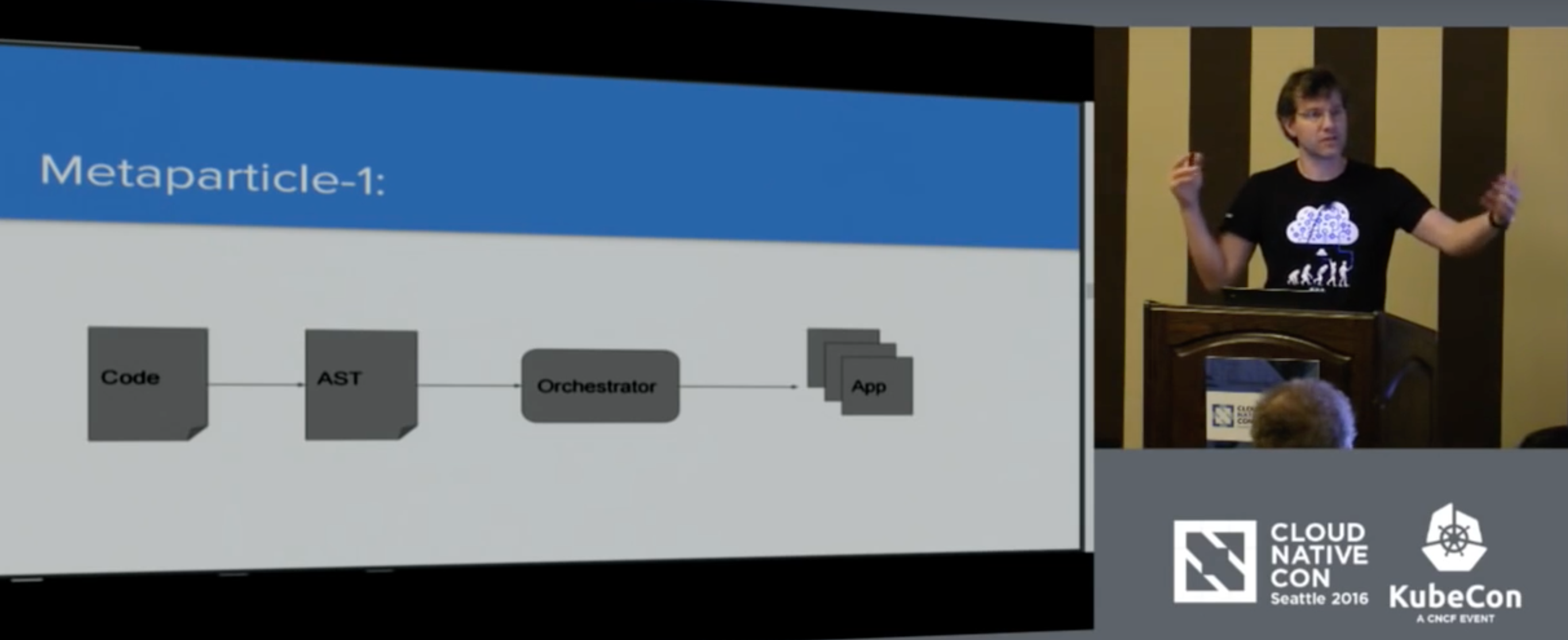
The best way to take some of the difficulty out of distributed systems is to include the creation of infrastructure directly in code, rather than creating separate config files. Brendan Burns, a software engineer at Microsoft, presented his solution to this problem at KubeCon last November.
His project, called Metaparticle, is in its earliest stages, and so far Burns has been the only contributor. But, at its core, it’s the same as the compiler for a classic application.
“The basic idea is just like we had that compiler before for taking the source code and turning it into assembly language that then turns into machine instructions. We have the same kind of idea,” Burns said. “We have code, we turn it into an abstract syntax tree, we feed it into the orchestrator and the app pops out — the distributed app pops out the other side.”
During his presentation and demo, Burns said that as applications evolved into client/server applications, config files were separated from code. He said that “tortuous divorce” has led us to where we are now: creating distributed systems, like those with Kubernetes, has gotten too difficult.
“We’ve decided that abstraction is not worth our time,” Burns said. “It’s not that we can’t do it. It’s not that we’re not smart enough to figure out assembly language. It’s that if we were all still doing assembling language, I don’t think any of us would be in this room.
“Kubernetes literally would not exist if we were all still programming in assembly language and, yet, I think we’re writing our distributed systems in assembly,” Burns continued. “In talking about deploying this set of pods and this service and these pieces, the building blocks that we’re putting together, they’re not concepts. They’re just assembly language instructions. If we’re going to really build our systems and we’re gonna move on from where we are, it has to get easier. So the genesis for a lot of this work was to say, ‘How do we write our systems in code?’”
In his presentation, Burns used Node.js to demonstrate how distributed systems can be created in just a few lines of code. Through Metaparticle, Burns is hoping to make distributed systems easier to create and hoping more programmers will find ways to solve their problems using platforms like Kubernetes.
“We democratized mobile development,” Burns said. “We’ve democratized web development. We haven’t democratized distributed system development, and it’s time that we did.”
Watch the complete presentation below:
Want to learn more about Kubernetes? Pre-order now and save 50% on this new, online, self-paced Kubernetes Fundamentals course from The Linux Foundation. Sign Up Now >>

In the previous article, I showed how to use the grep command, which is great at finding text files that contain a string or pattern. The idea of directly searching in a “grep-like” way is so useful that there are additional commands to let you search right into PDF documents and handle XML files more naturally. Things do not stop there, as you could consider raw network traffic a collection of data that you want to “grep” for information, too.
Packages are available in Debian and Fedora Linux for pdfgrep. For testing, I grabbed version 1.2 of the Open Document Format specification. Running the following command found the matches for “ruby” in the specification. Adding the -H option will print the filename for each match (just as the regular grep does). The -n option is slightly different to regular grep. In regular grep, -n prints the line number that matches; in pdfgrep, the -n option will instead show the page number.
$ pdfgrep ruby OpenDocument-v1.2.pdf
  6.4 <text:ruby
     6.4.2 <text:ruby
     6.4.3 <text:ruby
 17.10 <style:ruby-properties>..................................................................................................
     19.874.30 <text:ruby
     19.874.31 <text:ruby-text>..................................................................................................
 20.303 style:layout-grid-ruby-below......................................................................................... 783
 20.304 style:layout-grid-ruby-height........................................................................................ 783
 20.341 style:ruby
 20.342 style:ruby

$ pdfgrep -Hn ruby OpenDocument-v1.2.pdf
OpenDocument-v1.2.pdf:10:   6.4 <text:ruby
OpenDocument-v1.2.pdf:10:      6.4.2 <text:ruby
OpenDocument-v1.2.pdf:10:      6.4.3 <text:ruby
OpenDocument-v1.2.pdf:26:  17.10 <style:ruby
Many other command-line options in pdfgrep operate like the ones in regular grep. You can use -i to ignore the case when searching, -c to see just the number of times the pattern was found, -C to show a given amount of context around matches, -r/-R to recursively search, –include and –-exclude to limit recursive searches, and -m to stop searching a file after a given number of matches.
Because PDF files can be encrypted, pdfgrep also has the –password option to allow you to provide decryption keys. You might consider the –unac option to be somewhat logically grouped into the -i (case-insensitive) class of options. With this option, accents and ligatures are removed from both the search pattern and the content as it is considered. So the single character æ will be considered as “ae” instead. This makes it simpler to find things when typing at a console. Another interesting option in pdfgrep is -p, which shows the number of matches on a page.
On Fedora Linux, you can dnf install xgrep to get access to the xgrep command. The first thing you might like to do with xgrep is search using -x to look for an XPath expression as shown below.
$ cat sample.xml
<root>
 <sampledata>
   <foo>Foo Text</foo>
   <bar name="barname">Bar text</bar>
 </sampledata>
</root>

$ xgrep -x '//foo[contains(.,"Foo")]' sample.xml
<!--         Start of node set (XPath: //foo[contains(.,"Foo")])                 -->
<!--         Node   0 in node set               -->

   <foo>Foo Text</foo>

<!--         End of node set                    -->

$ xgrep -x '//bar[@name="barname"]' sample.xml
<!--         Start of node set (XPath: //bar[@name="barname"])                 -->
<!--         Node   0 in node set               -->

   <bar name="barname">Bar text</bar>

<!--         End of node set                    -->
The xgrep -s option lets you poke around in XML elements looking for a regular expression. This might work slightly differently from what you expect at the start. The format for the pattern is to pick the element you are interested in and then use one or more subelement/regex/ expressions to limit the matches.
The example below will always print an entire sampledata element, and we limit the search to only those with a bar subelement that matches the ‘Bar’ regular expression. I didn’t find a way to pick off just the bar element, so it seems you are always looking for a specific XML element and limiting the results based on matching the subelements.
$ xgrep -s 'sampledata:bar/Bar/' sample.xml
<!--         Start of node set (Search: sampledata:bar/Bar/)                 -->
<!--         Node   0 in node set               -->

 <sampledata>
   <foo>Foo Text</foo>
   <bar name="barname">Bar text</bar>
 </sampledata>

<!--         End of node set                    -->
As you can see from this example, xgrep is more about finding matching structure in an XML document. As such it doesn’t implement many of the normal grep command line options. There is also no support for file system recursion built into xgrep, so you have to combine with the find command as shown in the previous article if you want to dig around.
The ngrep project provides many of the features of grep but works directly on network traffic instead of files. Just running ngrep with the pattern you are after will sift through network packets until something matching is seen, and then you will get a message showing the network packet that matched and the hosts and ports that were communicating. Unless you have specially set up network permissions, you will likely have to run ngrep as the root user to get full access to raw network traffic.
# ngrep foobar
interface: eth1 (192.168.10.0/255.255.255.0)
filter: ((ip || ip6) || (vlan && (ip || ip6)))
match: foobar
###########...######
T 192.168.10.2:738 -> 192.168.10.77:2049 [AP]
.......2...........foobar..
...
################################################################
464 received, 0 dropped
Note that the pattern is an extended regular expression, not just a string. So you could find many types of foo using for example fooba[rz].
Similar to regular grep, ngrep supports (-i) for case insensitive search, (-w) for whole word matching, (-v) to invert the result, only showing packets that do not match your pattern, and (-n) to match only a given number of packets before exiting.
The ngrep tool also supports options to timestamp the matching packets with -t to print a timestamp when a match occurs, or -T to show the time delta between matches. You can also shut down connections using the -K option to kill TCP connections that match your pattern. If you are looking at low-level packets you might like to use -x to dump the packet as hexadecimal.
A very handy use for ngrep is to ensure that the network communications that you think are secure really have any security to them at all. This can easily be the case with apps on a phone. If you start ngrep with a reasonably rare string like “mysecretsarehere” and then send that same string in the app, you shouldn’t see it being found by ngrep. Just because you can’t see it in ngrep doesn’t mean the app or communication is secure, but at least there is something being done by the app to try to protect your data that is sent over the Internet.
While the name might be a little misleading, mboxgrep can search mbox files and maildir folders. I found that I had to use the -m option to tell mboxgrep that I wanted to look inside a maildir folder instead of a mailbox. The following command will directly search for matching messages in a maildir folder.
$ cd ~/mail/.Software
$ mboxgrep -m maildir "open source program delight" .
The mboxgrep tool has options to search only the header or body of emails, and you can choose between fcntl, flock, or no file locking during the search depending on your needs. mboxgrep can also recurse into your mail, handy if you have many subfolders you would like to search.
The grep tool has been a go-to tool for finding text files for decades. There are now a growing collection of grep-like tools that allow you to use the same syntax to find other matching things. Those things might be specific file formats — like XML and PDF — or you might consider searching network traffic for interesting events.
Learn more about Linux through the free “Introduction to Linux” course from The Linux Foundation and edX.