Home Blog Page 628

Essentials of OpenStack Administration Part 6: Installing DevStack (Lab)

Start exploring Essentials of OpenStack Administration by downloading the free sample chapter today. DOWNLOAD NOW

DevStack is a GitHub-based deployment of OpenStack, provided by OpenStack.org, that allows for easy testing of new features. This tutorial, the last in our series from The Linux Foundation’s Essentials of OpenStack Administration course, will cover how to install and configure DevStack.

While DevStack is easy to deploy, it should not be considered for production use. There may be several configuration choices for new or untested code used by developers, which would not be appropriate for production.

DevStack is meant for developers, and uses a bash shell installation script instead of a package-based installation. The stack.sh script runs as a non-root user. You can change the default values by creating a local.conf file.

Should you make a mistake or want to test a new feature, you can easily unstack, clean, and stack again quickly. This makes learning and experimenting easier than rebuilding the entire system.

Setting up the Lab

One of the difficulties of learning OpenStack is that it’s tricky to install, configure and troubleshoot. And when you mess up your instance it’s usually painful to fix or reinstall it.

That’s why Linux Foundation Training introduced on-demand labs which offer a pre-configured virtual environment. Anyone enrolled in the course can click to open the exercise and then click to open a fully functional OpenStack server environment to run the exercise. If you mess it up, simply reset it. Each session is then available for up to 24 hours. It’s that easy.

Access to the lab environment is only possible for those enrolled in the course. However, you can still try this tutorial by first setting up your own AWS instance with the following specifications:

Deploy an Ubuntu Server 14.04 LTS (HVM), SSD Volume Type – ami-d732f0b7

with a m4.large (2 vcpus, 8GiB ram) instance type, increase the root disk to 20G, and open up all the network ports.

See Amazon’s EC2 documentation for more direction on how to set up an instance.

Verify the System

Once you are able to log into the environment verify some information:

1. To view and run some commands we may need root privilege. Use sudo to become root:

  ubuntu@devstack-cc:~$ sudo -i

2. Verify the Ubuntu user has full sudo access in order to install the software:


    root@devstack-cc:~# grep ubuntu /etc/sudoers.d/*

    /etc/sudoers.d/90-cloud-init-users:# User rules for ubuntu

    /etc/sudoers.d/90-cloud-init-users:ubuntu ALL=(ALL) NOPASSWD:ALL

3. We are using a network attached to eth2 for our cloud connections. You will need the public IP, eth0, to access the OpenStack administrative web page after installing DevStack. From the output find the inet line and make note of the IP Address. In the following example the IP address to write down would be: 166.78.151.57 Your IP address will be different. If you restart the lab the IP address may change.   


 root@devstack-cc:~# ip addr show eth0

    2: eth0: <BROADCAST,MULTICAST,UP,LOWER_UP> mtu 1500 qdisc pfifo_fast state UP group default qlen 1000

        link/ether bc:76:4e:04:b5:9b brd ff:ff:ff:ff:ff:ff

        inet 166.78.151.57/24 brd 166.78.151.255 scope global eth0

           valid_lft forever preferred_lft forever

        inet6 2001:4800:7812:514:be76:4eff:fe04:b59b/64 scope global

           valid_lft forever preferred_lft forever

        inet6 fe80::be76:4eff:fe04:b59b/64 scope link

           valid_lft forever preferred_lft forever


     root@devstack-cc:~# ip addr show eth2

    4: eth2: <BROADCAST,MULTICAST,UP,LOWER_UP> mtu 1500 qdisc pfifo_fast state UP group default qlen 1000

        link/ether bc:76:4e:06:10:32 brd ff:ff:ff:ff:ff:ff

        inet 192.168.97.1/24 brd 192.168.97.255 scope global eth2

           valid_lft forever preferred_lft forever

        inet6 fe80::be76:4eff:fe06:1032/64 scope link

           valid_lft forever preferred_lft forever
Public IP eth0
Internal IP eth2

4. When the previous command finishes return to being the Ubuntu user:


    root@devstack-cc:~# exit

    logout

    ubuntu@devstack-cc:~$

Install the git command and DevStack software

DevStack is not typically considered safe for production, but can be useful for testing and learning. It is easy to configure and reconfigure. While other distributions may be more stable they tend to be difficult to reconfigure, with a fresh installation being the easiest option. DevStack can be rebuilt in place with just a few commands.

DevStack is under active development. What you download could be different from a download made just minutes later. While most updates are benign, there is a chance that a new version could render a system difficult or impossible to use. Never deploy DevStack on an otherwise production machine.

1. Before we can download the software we will need to update the package information and install a version control system command, git.    


    ubuntu@devstack-cc:~$ sudo apt-get update

    <output_omitted>

    ubuntu@devstack-cc:~$ sudo apt-get install git

    <output_omitted>

    After this operation, 21.6 MB of additional disk space will be used.

    Do you want to continue? [Y/n] y

    <output_omitted>

2. Now to retrieve the DevStack software:


    ubuntu@devstack-cc:~$ pwd

    /home/ubuntu

    ubuntu@devstack-cc:~$ git clone https://git.openstack.org/openstack-dev/devstack -b stable/liberty

    Cloning into ’devstack’...

    <output_omitted>

3. The newly installed software can be found in a new sub-directory named devstack. Installation of the script is by a shell script called stack.sh. Take a look at the file:

    ubuntu@devstack-cc:~$ cd devstack

    ubuntu@devstack-cc:~/devstack$ less stack.sh

4. There are several files and scripts to investigate. If you have issues during installation and configuration you can use theunstack.sh and clean.sh script to (usually) return the system to the starting point:

    ubuntu@devstack-cc:~/devstack$ less unstack.sh

    ubuntu@devstack-cc:~/devstack$ less clean.sh

5. We will need to create a configuration file for the installation script. A sample has been provided to review. Use the contents of the file to answer the following question.

    ubuntu@devstack-cc:~/devstack$ less samples/local.conf

6. What is the location of script output logs? _____________

7. There are several test and exercise scripts available, found in sub-directories of the same name. A good, general test is the run_ tests.sh script.

Due to the constantly changing nature of DevStack these tests are not always useful or consistent. You can expect to see errors but be able to use OpenStack without issue. For example missing software should be installed by the upcoming stack.sh script.

Keep the output of the tests and refer back to it as a place to start troubleshooting if you encounter an issue.

    ubuntu@devstack-cc:~/devstack$ ./run_tests.sh

While there are many possible options we will do a simple OpenStack deployment. Create a ~/devstack/local.conf file. Parameters not found in this file will use default values, ask for input at the command line or generate a random value.

Create a local.conf file

1. We will create a basic configuration file. In our labs we use eth2 for inter-node traffic. Use eth2 and it’s IP address when you create the following file.


    ubuntu@devstack-cc:~devstack$ vi local.conf

    [[local|localrc]]

    HOST_IP=192.168.97.1

    FLAT_INTERFACE=eth2

    FIXED_RANGE=10.10.128.0/20 #Range for private IPs

    FIXED_NETWORK_SIZE=4096

    FLOATING_RANGE=192.168.100.128/25 #Range for public IPs

    MULTI_HOST=1

    LOGFILE=/opt/stack/logs/stack.sh.log

    ADMIN_PASSWORD=openstack

    MYSQL_PASSWORD=DB-secret

    RABBIT_PASSWORD=MQ-secret

    SERVICE_PASSWORD=SERVICE-secret

    SERVICE_TOKEN=ALongStringUsuallyHere

    enable_service rabbit mysql key

Install and Configure OpenStack

The following command will generate a lot of output to the terminal window. The stack.sh script will run for 15 to 20 minutes.

1. Start the installation script:


    ubuntu@devstack-cc:~devstack$ ./stack.sh

    <output_omitted>

2. View the directory where various logs have been made. If the logs are not present you may have an issue with the syntax of the local.conf file:


    ubuntu@devstack-cc:~devstack$ ls -l /opt/stack/logs

3. Review the output from the stack.sh script:


    ubuntu@devstack-cc:~devstack$ less /opt/stack/logs/stack.sh.log

DevStack runs under a user account. There used to be a rejoin.sh script can be used to attach to the ongoing screen session after a reboot. DevStack is not meant to be durable, so the script was removed late in the Liberty release. Due to lab environment issues if you reboot the node you may have to start the lab again.

Log into the OpenStack Browser User Interface

The Horizon software produces a web page for management. By logging into this Browser User Interface (BUI) we can configure almost everything in OpenStack. The look and feel may be different than what you see in the book. The project and vendor updates change often.

1. Open a web browser on your local system. Using the output of the ip command, find the IP address of the eth0 interface on your devstack-cc node. Type that IP into your browser URL.


    ubuntu@devstack-cc:~devstack$ ip addr show eth0

    ...

    inet 104.22.81.13

    ...

2. Log into the BUI with a username of admin and a password of openstack.You should be viewing the Overview and Usage Summary page. It should look something like the following:
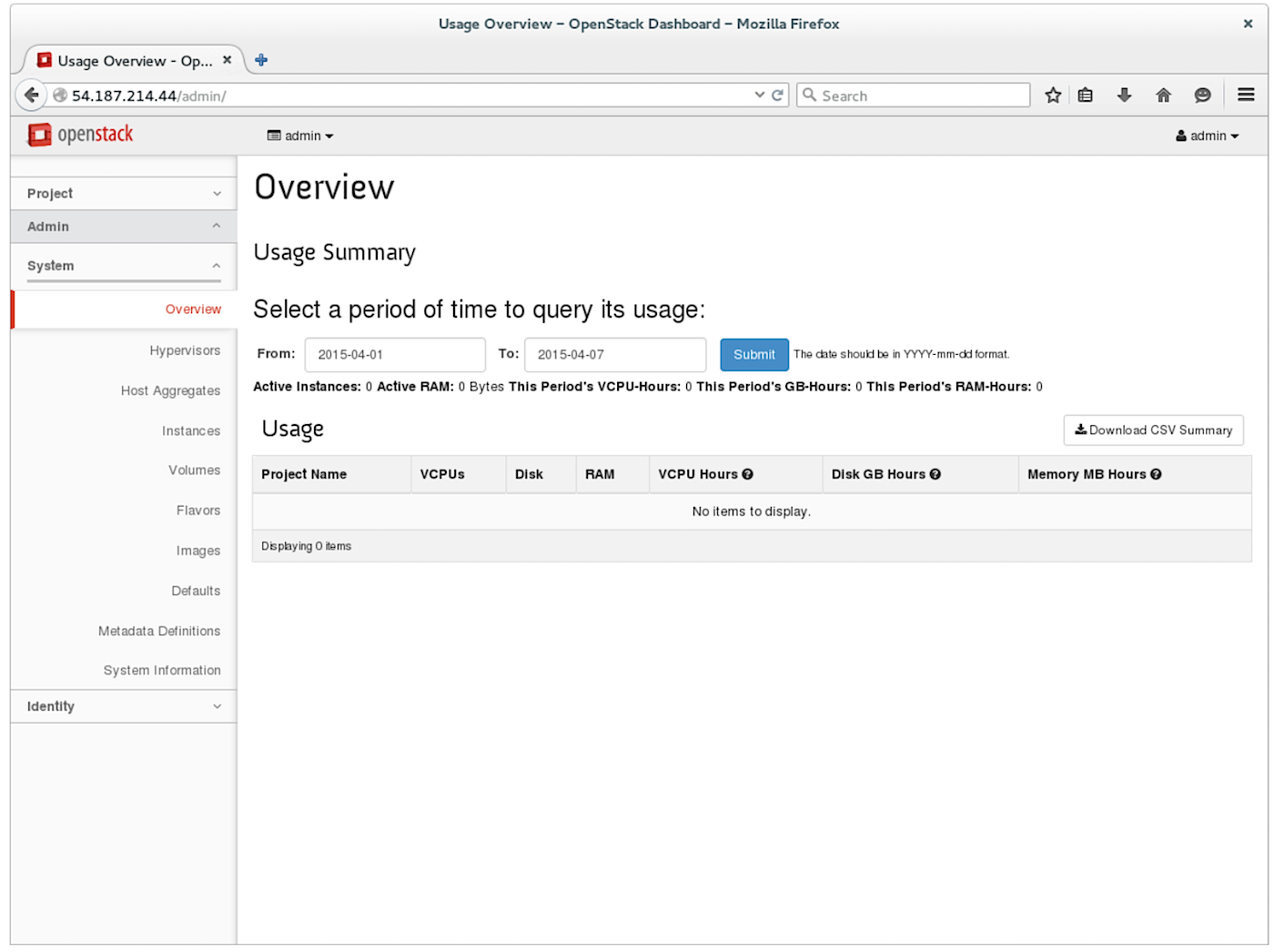
Browser Use Interface

3. Navigate to the System -> Hypervisors page. Use the Hypervisor and Compute Host sub-tabs to answer the following questions. a. How many hypervisors are there?

b. How many VCPUs are used?

c. How many VCPUs total?

d. How many compute hosts are there?

e. What is its state?

4. Navigate to the System -> Instances page.

a. How many instances are there currently?

5. Navigate to the Identity -> Projects page.

a. How many projects exist currently?

6. Navigate through the other tabs and subtabs to become familiar with the BUI.

Solutions

Task 2

6. $DEST/logs/stack.sh.log

Task 5

3. a. 1 b. 0 c. 2 d. 1 e. up

4. a. 0 5. a. 6

The Essentials of OpenStack Administration course teaches you everything you need to know to create and manage private and public clouds with OpenStack. Download a sample chapter today!

Read the other articles in the series:

Essentials of OpenStack Administration Part 1: Cloud Fundamentals

Essentials of OpenStack Administration Part 2: The Problem With Conventional Data Centers

Essentials of OpenStack Administration Part 3: Existing Cloud Solutions

Essentials of OpenStack Administration Part 4: Cloud Design, Software-Defined Networking and Storage

Essentials of OpenStack Administration Part 5: OpenStack Releases and Use Cases
Kubernetes Helps Comcast Re-Engineer Cable TV

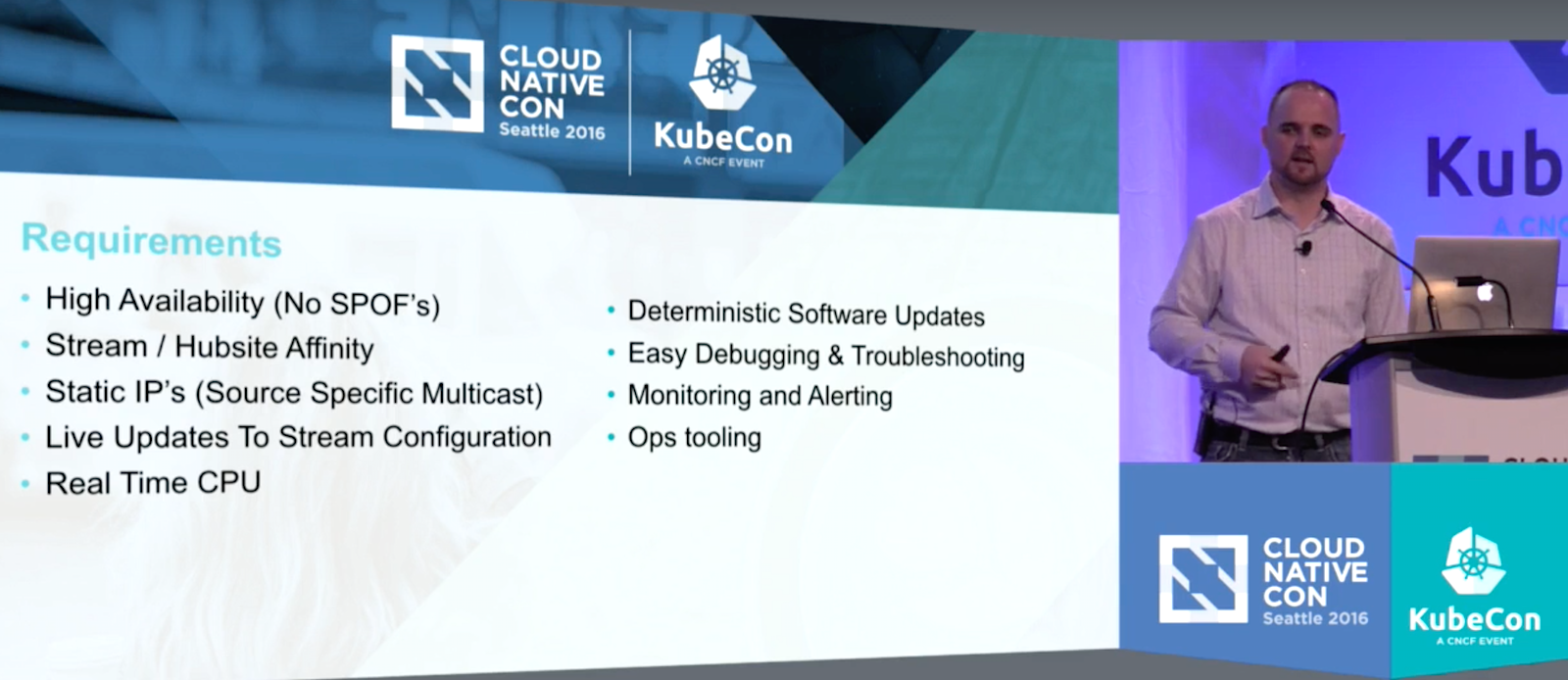
Comcast cable is undergoing a major technical shift. The company is moving away from an always-on transmission of every single channel to every single customer, with the signal converted on either end by a piece of proprietary hardware, which is how cable has worked for decades. The new system is IP-based, on-demand streaming model where channel signal is sent only when requested by the user, explained Erik St. Martin, a systems architect at Comcast, at CloudNativeCon in November.

The change will save an enormous amount of bandwidth for Comcast, improving signal quality and allowing the transmission of several different formats and device-specific tailored signals.  

Simple, right? Turns out, it’s not so simple, especially when you consider the shift must happen while keeping 99.999 percent uptime so customers don’t freak out.

Out of the Box

St. Martin is part of the team building Comcast’s new widely distributed and intensely fault tolerant broadcast system. The list of requirements is daunting, he said, and was difficult to face at the start. Then, he found Kubernetes, and out of the box many of the tricky technical obstacles were addressed.

“Can you imagine trying to design a system like this from scratch? … it’d be a massive effort and it’d have a ton of edge cases,” St. Martin said. “It probably comes as no surprise, standing here talking to you at a Kubernetes conference, the Kubernetes has actually solved most of these problems for us.”

The Kubernetes platform for dealing with applications clusters is very well suited to help Comcast update to an IP-based streaming system, said St. Martin; the system of labels and notations works perfectly for different channel streams thanks to its flexibility and simplicity. Teams tasked with managing streams needn’t worry about hardware; hardware teams needn’t worry about bandwidth.

“This is a huge shift from the way things currently work,” he said. “Today, the video engineering team needs to know about every single one of those [signal transmission and translation] devices. They maintain spreadsheets of these things and log into them by IP address … sometimes it even comes down to physically moving hardware or cables.”

There are still many facets that need to be built through Comcast’s Kubernetes implementation, with plenty of tricky engineering problems to keep everyone up at night. But the Kubernetes platform — and the community — has already made a significant dent in what seemed like an impossible task.

“All in all, these are tiny issues in comparison to the complexity and edge cases of the system we would’ve had to create from scratch,” St. Martin said. “With each release of Kubernetes, there seems to be less work for our own components to do. There’s no doubt that Kubernetes has changed the way we deploy and manage applications.

“Kubernetes can be just as impactful as a framework for building your own applications,” he said. “You can save yourself complexity and development time by leveraging functionality in tools that already exist. We can also create clean abstractions between teams by writing our own resource types and controllers. It’s a beautifully abstracted system. Each component, with a distinct role, making it effortless to replace components or customize them to fit our use cases, and even use cases that are at their surface may not seem particularly suited for Kubernetes.”

Watch the complete video below:

Do you need training to prepare for the upcoming Kubernetes certification? Pre-enroll today to save 50% on Kubernetes Fundamentals (LFS258), a self-paced, online training course from The Linux Foundation. Learn More >>

Keynote: Kubernetes: As Seen On TV by Erik St. Martin, Systems Architect, Comcast

The Kubernetes platform for dealing with applications clusters is very well suited to help Comcast update to an IP-based streaming system, said Erik St. Martin at CloudNativeCon.

Effective Application Security Testing in DevOps Pipelines

Before considering what it means to have application security testing integrated into the DevOps Continuous Integration/Continuous Delivery (CI/CD) pipeline, it is worth asking why it is valuable to integrate application security testing into these pipelines in the first place.  A fundamental tenet of DevOps and the reason for having CI/CD pipelines for software builds is to allow teams to have up-to-the-minute feedback on the status of their development efforts so that they know if a build is ready to push to production. This involves testing quality, performance and other characteristics of the system. And it should include security as well.

By integrating security into the CI/CD pipeline, security vulnerabilities are found quickly and reported to developers in the tools they’re already using. 

Read more at Denim Group

IHS Markit: 70% of Carriers Will Deploy CORD in the Central Office

Seventy percent of respondents to an IHS Markit survey plan to deploy CORD in their central offices — 30 percent by the end of 2017 and an additional 40 percent in 2018 or later. The findings come from IHS Markit’s 2016 Routing, NFV & Packet-Optical Strategies Service Provider Survey.

The Central Office Re-Architected as a Data Center (CORD) combines network functions virtualization (NFV) and software-defined networking (SDN) to bring data center economics and cloud agility to the telco central office. CORD garnered so much attention in 2016 that its originator — On.Lab‘s Open Network Operating System (ONOS) — established CORD as a separate open source entity. And non-telcos have joined the open source group, including Google and Comcast.

Read more at SDxCentral

SUSE Formalizes Container Strategy with a New Linux Distro, MicroOS

The company has been working on a platform called SUSE Container as a Service Platform. SUSE CaaSP puts together SUSE Linux Enterprise MicroOS, a variant of SUSE Linux Enterprise Server optimized for running Linux containers (also in development), and container orchestration software based on Kubernetes.

In an interview, SUSE’s new CTO, Dr. Thomas Di Giacomo told us that there are many customers who are running legacy systems but they want to migrate to modern technologies over time. Today, if you want to start from scratch, you will start with containers. “We want to make sure that companies that have legacy infrastructure and legacy applications can move to modern technologies, where container as a service is offered through that OS itself,” said “Dr. T” (as he is known in SUSE circles). That’s what CaaSP with MicroOS is being designed to do.

Read more at The New Stack

How Stack Overflow Plans to Survive the Next DNS Attack

Let’s talk about DNS. After all, what could go wrong? It’s just cache invalidation and naming things.

tl;dr

This blog post is about how Stack Overflow and the rest of the Stack Exchange network approaches DNS:

  • By bench-marking different DNS providers and how we chose between them
  • By implementing multiple DNS providers
  • By deliberately breaking DNS to measure its impact
  • By validating our assumptions and testing implementations of the DNS standard

The good stuff in this post is in the middle, so feel free to scroll down to “The Dyn Attack” if you want to get straight into the meat and potatoes of this blog post.

Read more at StackExchange

Ubuntu-Based Ultimate Edition 5.0 Gamers Distribution Is Out for Linux Gaming

It’s been almost three months since we last heard something from TheeMahn, the developer of the Ultimate Edition (formerly Ubuntu Ultimate Edition) operating system, a fork of Ubuntu and Linux Mint, but we’ve been tipped by one of our readers about the availability of Ultimate Edition 5.0 Gamers.

The goal of the Ultimate Edition project is to offer users a complete, out-of-the-box Ubuntu-based computer operating system for desktops, which is easy to install or upgrade with the click of a button. It usually ships with 3D effects, support for the latest Wi-Fi and Bluetooth devices, and a huge collection of open-source applications.

There are several editions of Ultimate Edition that are maintained even to this day, and while Ultimate Edition 5.0 shipped last year in September, based on Ubuntu 16.04 LTS (Xenial Xerus), it’s time for the Ultimate Edition Gamers to get a new release. As such, we’d like to tell you all about Ultimate Edition 5.0 Gamers.

Read more at Softpedia

Linus Torvalds, Guy Hoffman, and Imad Sousou to Speak at Embedded Linux Conference Next Month

Linux creator Linus Torvalds will speak at Embedded Linux Conference and OpenIoT Summit again this year, along with renowned robotics expert Guy Hoffman and Intel VP Imad Sousou, The Linux Foundation announced today. These headliners will join session speakers from embedded and IoT industry leaders, including AppDynamics, Free Electrons, IBM, Intel, Micosa, Midokura, The PTR Group, and many others. View the full schedule now.

The co-located conferences, to be held Feb. 21-23 in Portland, Oregon, bring together embedded and application developers, product vendors, kernel and systems developers as well systems architects and firmware developers to learn, share, and advance the technical work required for embedded Linux and the Internet of Things (IoT).

Now in its 12th year, Embedded Linux Conference is the premier vendor-neutral technical conference for companies and developers using Linux in embedded products. While OpenIoT Summit is the first and only IoT event focused on the development of IoT solutions.

Keynote speakers at ELC and OpenIOT 2017 include Guy Hoffman, Cornell professor of mechanical engineering and IDC Media Innovation Lab co-director; Imad Sousou, vice president of the software and services group at Intel Corporation; and Linus Torvalds. Additional keynote speakers will be announced in the coming weeks.

Last year was the first time in the history of ELC that Torvalds, a Linux Foundation fellow, spoke at the event. He was joined on stage by Dirk Hohndel, chief open source officer at VMware, who will conduct a similar on-stage interview again this year. The conversation ranged from IoT, to smart devices, security concerns, and more. You can see a video and summary of the conversation here.

Embedded Linux Conference session highlights include:

  • Making an Amazon Echo Compatible Linux System, Mike Anderson, The PTR Group

  • Transforming New Product Development with Open Hardware, Stephano Cetola, Intel

  • Linux You Can Drive My Car, Walt Miner, The Linux Foundation

  • Embedded Linux Size Reduction Techniques, Michael Opdenacker, Free Electrons

OpenIoT Summit session highlights include:

  • Voice-controlled home automation from scratch using IBM Watson, Docker, IFTTT, and serverless, Kalonji Bankole, IBM

  • Are Device Response Times a Neglected Risk of IoT?, Balwinder Kaur, AppDynamics

  • Enabling the management of constrained devices using the OIC framework, James Pace, Micosa

  • Journey to an Intelligent Industrial IOT Network, Susan Wu, Midokura

Check out the full schedule and register today to save $300. The early bird deadline ends on January 15. One registration provides access to all 130+ sessions and activities at both events. Linux.com readers can register now with the discount code, LINUXRD5, for 5% off the registration price. Register Now!

10 Lessons from 10 Years of Amazon

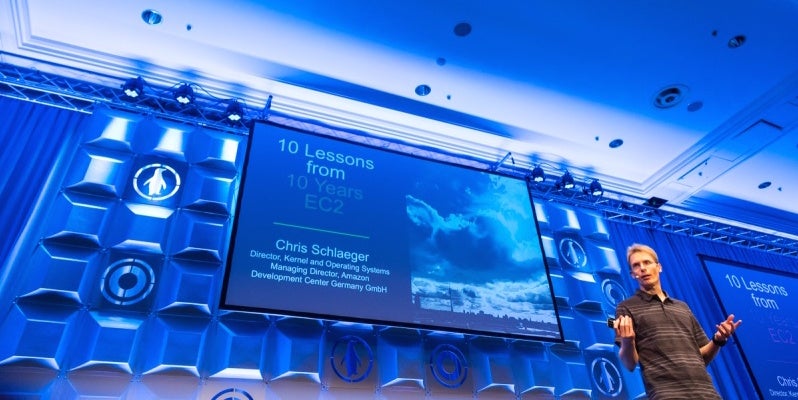
Amazon launched their Simple Storage Service (S3) service about 10 years ago followed shortly by Elastic Compute Cloud (EC2). In the past 10 years, Amazon has learned a few things about running these services. In his keynote at LinuxCon Europe, Chris Schlaeger, Director Kernel and Operating Systems at the Amazon Development Center in Germany, shared 10 lessons from Amazon.
 
1. Build evolvable systems

The cloud is all about scale and being able to get compute power only when you need it and getting rid of it when you don’t need it anymore. Schlaeger says that “the lesson that we learned isn’t to design for a certain scale, you always get it wrong. What you want to do instead is design your system so you can evolve it … over time without the customers or users knowing it.”

2. Expect the unexpected

Hardware has a finite lifespan, so things will fail, but you can design your systems to check for failure, deal with it, isolate failures, and then react to them. “Control the blast radius and raise failure as a natural occurrence of your software and hardware, all the time,” Schlaeger suggests.

3. Primitives, not frameworks

Amazon doesn’t know what every customer wants to do, and they don’t want try to tell customers how to do their work. However, they do want to evolve quickly to follow the needs of their customers, and this agility is something that is much easier to accomplish with primitives rather than frameworks.

4. Automation is key

Schlaeger points out that “if you want to scale up, you need to have some form of automation in place.” If someone can log into your servers and make changes on the fly, then you can’t track what changes have been made over time.

5. APIs are forever

APIs can be tricky because if you want to keep your customers happy, you can’t keep changing your APIs. “You need to be very, very cautious and conscious about the APIs you have and make sure you don’t change them,” Schlaeger says.

6. Know your resource usage

When Amazon first launched S3, they charged for storage space and transactions, so people quickly learned that storing and retrieving tiny thumbnail images for items on eBay was quite cheap. However, the large numbers of API calls generated a big enough load on Amazon’s servers that they had to start including call rates in the pricing model. Understanding all of your costs and building them into your prices is important.

7. Build security in from the ground up

It is important that you get the security involved in the design of a system in addition to the implementation. You should also do regular check-ins as your service evolves over time to make sure that it stays secure. 

8. Encryption is a first class citizen

Schlaeger points out that “the best way you can prove to your customers that the data is safe from access from other parties … is to have them encrypted.” Within AWS, customers can encrypt all of their data and only the customer has access to the keys used to encrypt and decrypt the data. 

9. Importance of the network

This is probably the hardest part to get right, because the network is a shared resource for everybody across all use cases. Various customers have unique and often contradictory requirements for using the network.

10. No gatekeepers

“The more open you are with your platform, … the more success you will have,” Schlaeger says. Amazon doesn’t try to limit what their customers can do beyond what they need to protect the instances or services of other customers.

For more details about each of these 10 lessons, watch the full video below.

Interested in speaking at Open Source Summit North America on September 11 – 13? Submit your proposal by May 6, 2017. Submit now>>

Not interested in speaking but want to attend? Linux.com readers can register now with the discount code, LINUXRD5, for 5% off the all-access attendee registration price. Register now to save over $300!