Home Blog Page 634

In-Memory Computing for HPC

This is the first entry in an insideHPC series that delves into in-memory computing and the designs, hardware and software behind it. This series, compiled in a complete Guide available here,  also covers five ways in-memory computing can save money and improve TCO. 

To achieve high performance, modern computer systems rely on two basic methodologies to scale resources. Each design attempts to bring more processors (cores) and memory to the user.  A scale-up design that allows multiple cores to share a large global pool of memory is the most flexible and allows large data sets to take advantage of full in-memory computing. A scale-out design distributes data sets across the memory on separate host systems in a computing cluster. Although the scale-out cluster often has a lower hardware acquisition cost, the scale-up in-memory system provides a much better total cost of ownership (TCO) based on the following advantages:

Read more at insideHPC
6 C’s of DevOps Adoption

‘DevOps’ is easy when you know your organization can adopt changes easily and have a right attitude to use some tools that make DevOps come true in your organization.

Tools you need to use in every stage of the DevOps cycle, here is my article on ‘How to choose right set of DevOps tools

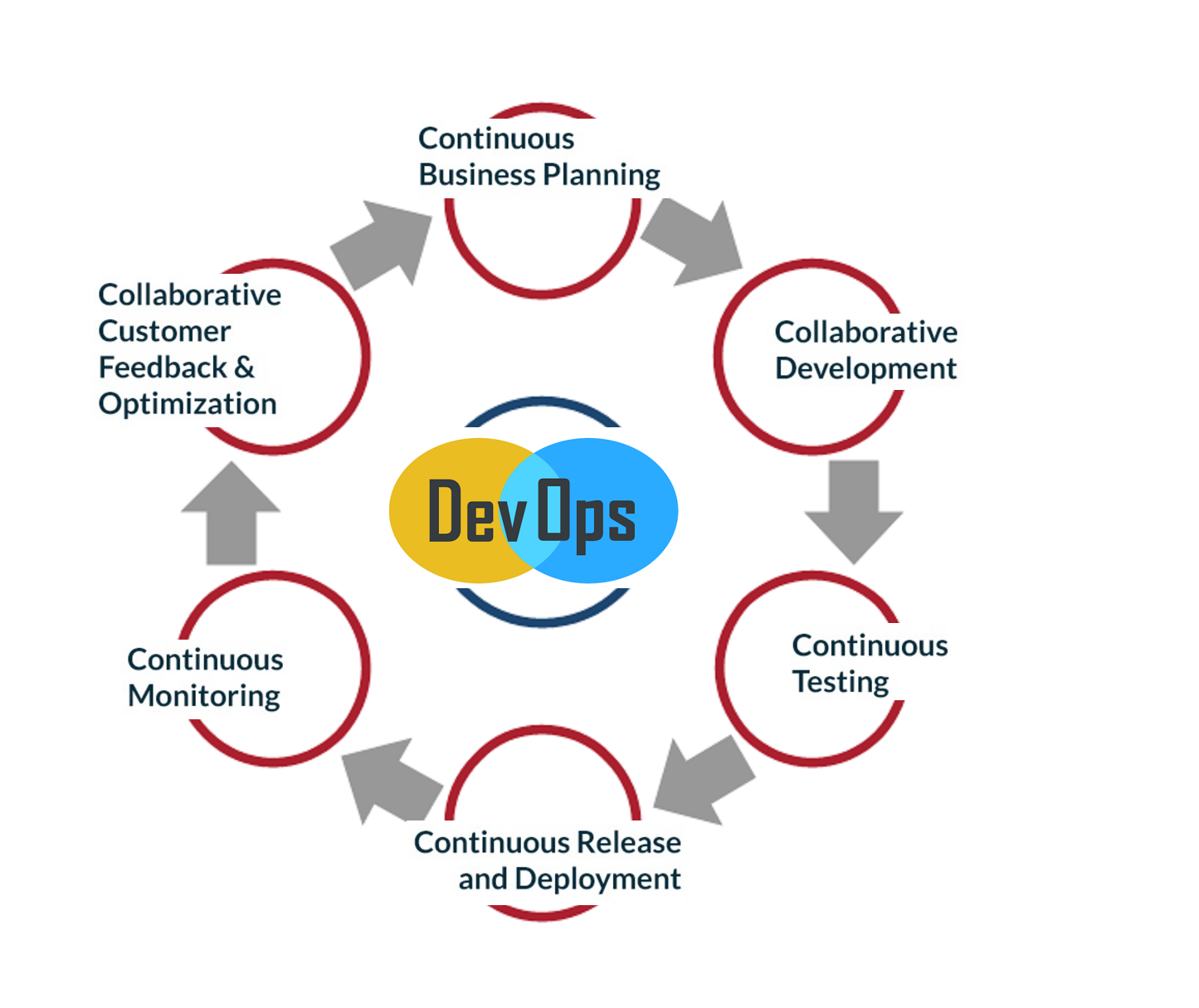
Along with the tools, you need to know the DevOps cycle and here it is,

What are the 6 C’s of DevOps?
1. Continuous business planning: Starts with identifying the skills, outcomes, and resources needed.

2. Collaborative development: Starts with development sketch plan and programming.

3. Continuous testing: Unit and integration testing to help increase the efficiency and speed of the development.

4. Continuous release and deployment: Non-stop CD pipeline to help you implement code reviews and developer check-ins easily.

5. Continuous monitoring: To monitor the changes and address the errors/mistakes spontaneously whenever they happen.

6. Customer feedback and optimization: This allows the immediate response of your customers for your product and its features and helps you modify accordingly.

Taking care of these 6 stages will make you a good DevOps organization. BTW, this is not the must have a model but a more sophisticated model out there. This will give you a fair idea on the tools to use at different stages to make this process more lucrative for a software powered organization. 

CD pipeline, CI tool and Containers make things easy and when you want to practice DevOps, having a microservices architecture makes more sense.

eBay Builds Its Own Tool to Integrate Kubernetes and OpenStack

From Day One of eBay’s cloud journey, the e-commerce company has focused on keeping its developers happy, according to Suneet Nandwani, eBay’s senior director of cloud infrastructure and platforms. That’s led to several challenges and innovations at the company, the latest of which is the development of TessMaster — a management framework to deploy Kubernetes on OpenStack.

With the emergence of Docker, it became clear that containers are “a technology which developers love,” Nandwani told ZDNet.

Read more at ZDNet

How to Continuously Involve Ops Stuff in the Agile Development Cycle (Part #2)

Let’s look at the Agile development process – again focusing on Scrum from the Ops perspective. Let’s review the places where we intervene: in which points in the process do we intervene? How do we help development? How do we help QA? And what about ourselves, Ops? How do we help ourselves? And despite our previous statement, we’ll also say a few words about the mindset. Let’s ask the obvious first question on the way to involvement:

Are Ops part of the Scrum team or not?

We have made the testers part of the team. After all, the whole idea behind Scrum is independently organized multidisciplinary teams. So what will it be? Ops in the team or outside of it?

Read more at AgiloPedia

7 Awesome Open Source Analytics Software For Linux

Web analytics is nothing but the measuring web traffic. It is not limited to measuring web traffic. It includes:

  1. Analysis
  2. Data collection
  3. Reporting of web data for purposes of understanding and optimizing web pages.

Google Analytics is the most widely used cloud-based web analytics service. However, your data is locked into Google Eco-system. If you want 100% data ownership, try the following open source web analytics software to get information about the number of visitors to your website and the number of page views. The information is useful for market research and understanding popularity trends on your website.

Read more at *nixCraft

7 Notable Legal Developments in Open Source in 2016

A number of interesting and notable legal developments in open source took place in 2016. These seven legal news stories stood out:

1. Victory for Google on fair use in Java API case

In 2012 the jury in the first Oracle v. Google trial found that Google’s inclusion of Java core library APIs in Android infringed Oracle’s copyright. The district court overturned the verdict, holding that the APIs as such were not copyrightable (either as individual method declarations or their “structure, sequence and organization” [SSO]). 

Read more at Opensource.com

Linus Torvalds Announces Ridiculously Small Second Linux 4.10 Release Candidate

The first day of 2017 starts off for Linux users with the release of the second RC (Release Candidate) development version of the upcoming Linux 4.10 kernel, as announced by Linus Torvalds himself.

As expected, Linux kernel 4.10 entered development two weeks after the release of Linux kernel 4.9, on Christmas Day (December 25, 2016), but don’t expect to see any major improvements or any other exciting things in RC2, which comes one week after the release of the first RC, because most of the developers were busy partying.

Read more at Softpedia

Node Interactive 2017: Devs Stoked about K8s, Node in Production and Serverless

Tracy Hinds is the education and community manager for the Node.js Foundation. The educational aspect of her job means she oversees training, onboarding, certification, and other educational programs — with a major focus on providing educational resources that help new Node.js users more readily access the platform. The community aspect means she helps plan, organize and produce events where the Node.js crowd gathers to encounter the foundation’s educational initiatives hands-on and in person.

The foundation’s annual conference, Node Interactive North America 2017, is this week in Vancouver, British Columbia, and Hinds is — naturally — one of the organizers. The New Stack caught up with Hinds to hear all about new tracks and offerings, speakers she is particularly excited to encounter, and what we are pretty sure must be the Node.js community’s first ever 5K Fun Run.

What’s new or different about Node Interactive this year?

To start with, we will all be in one place! Last year we had two different events, in two different locations at two different times of the year. Node Interactive North America, in Austin, and Node Interactive EU, in Amsterdam. 

Read more at The New Stack

ZeroPhone — An Open Source, Dirt Cheap, Linux-powered Smartphone Is Here

Short Bytes: ZeroPhone is an open source smartphone that’s powered by Raspberry Pi Zero. It runs on Linux and you can make one for yourself using parts worth $50. One can use it to make calls and SMS, run apps, and pentesting. Soon, phone’s crowdfunding is also expected to go live.

Raspberry Pi is often listed as one of the most accessible and helpful innovations in the computer hardware industry. It has helped children learn programming and allowed the makers to develop powerful and cheap DIY projects. In the past, we have told you about different Raspberry Pi DIYs like a pocket-size Linux computerWi-Fi Drone killertemperature controller, etc.  Recently, I found an interesting project listed on Hackaday. Named ZeroPhone, this smartphone uses a Raspberry Pi Zero. It’s as open source as possible, making it dirt cheap. Fortunately, all the parts are easily available on eBay and Amazon, and they cost about $50.

Read more at FOSSBytes

Quick Tips and Tricks for the Linux CLI

Using a Linux terminal is always difficult, especially at the beginning when everything is new to the user. I remember my first contact with a Linux terminal like it was yesterday. After all, I was interacting with a machine that responded to everything I typed. I started learning the basic commands such as “cd”, “ps” “w” “mkdir” which at the time it was like I entered another world, a digitalized one which I’m just starting to uncover. The excitement I felt back then still hits me when I discover some great combination of commands to ease the server/service administration or configuration.

Linux is an all-present OS in our world. It is an extremely flexible system due to its open source nature which allows anyone to contribute.

Read more at Quick Linux Tips and Tricks