
This presentation will examine the history and current best-practices for deploying flash with Ceph. Future developments in the Ceph platform and their impact on flash deployments will also be described.
In this article, we will review a number of Linux command line utilities that you can use to check disk partitions in Linux.
Monitoring storage device(s) space usage is one of the most important tasks of a SysAdmin, this helps to ensure adequate free space remains on the storage devices for efficient running of your Linux system.
Read the complete article at Tecmint
The following is adapted from Open Source Compliance in the Enterprise by Ibrahim Haddad, PhD.
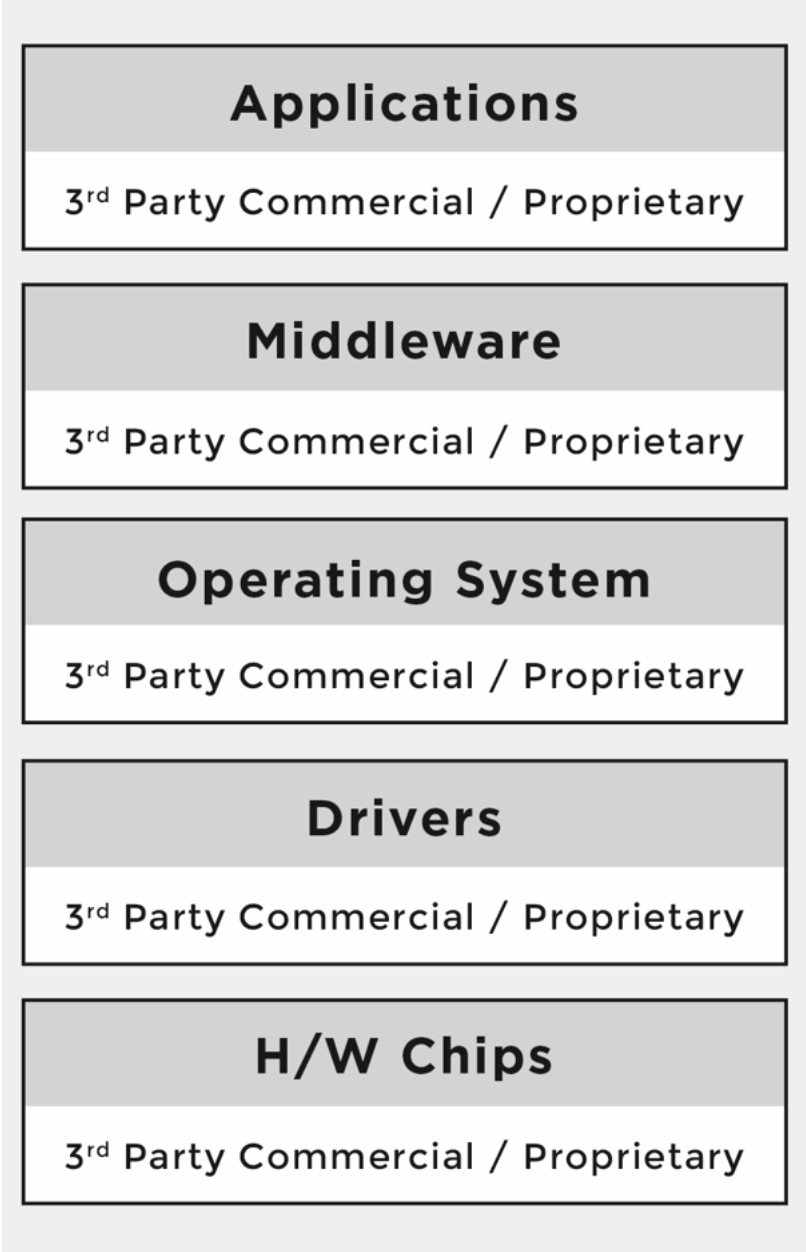
Traditionally, platforms and software stacks were implemented using proprietary software, and consisted of various software building blocks that originated as a result of internal development or via third-party software providers with negotiated licensing terms.
The business environment was predictable and companies mitigated potential risks through license and contract negotiations with the software vendors. It was very easy to know who was the provider for every software component.
Over time, companies started to incorporate open source software into their platforms and software stacks due to the advantages it offers. The reasons varied from product to product, but the common theme across industries was that open source components provided compelling features out of the box, there were meaningful economies to be gained through distributed development that resulted in a faster time-to-market, and they offered a newfound ability to customize the source code. As a result, a new multi- source development model began to emerge.
Under the new model, a product could now have any combination of:
Proprietary code, developed by the company building the product/service
Proprietary code, originally developed by the company under an open source license in the process of integrating and deploying open source components, but was not contributed back to the upstream open source project
Third-party commercial code, developed by third-party software providers and received by the company building the product/service under a commercial license
Open source code, developed by the open source community and received by the company building the product/service under an open source license.
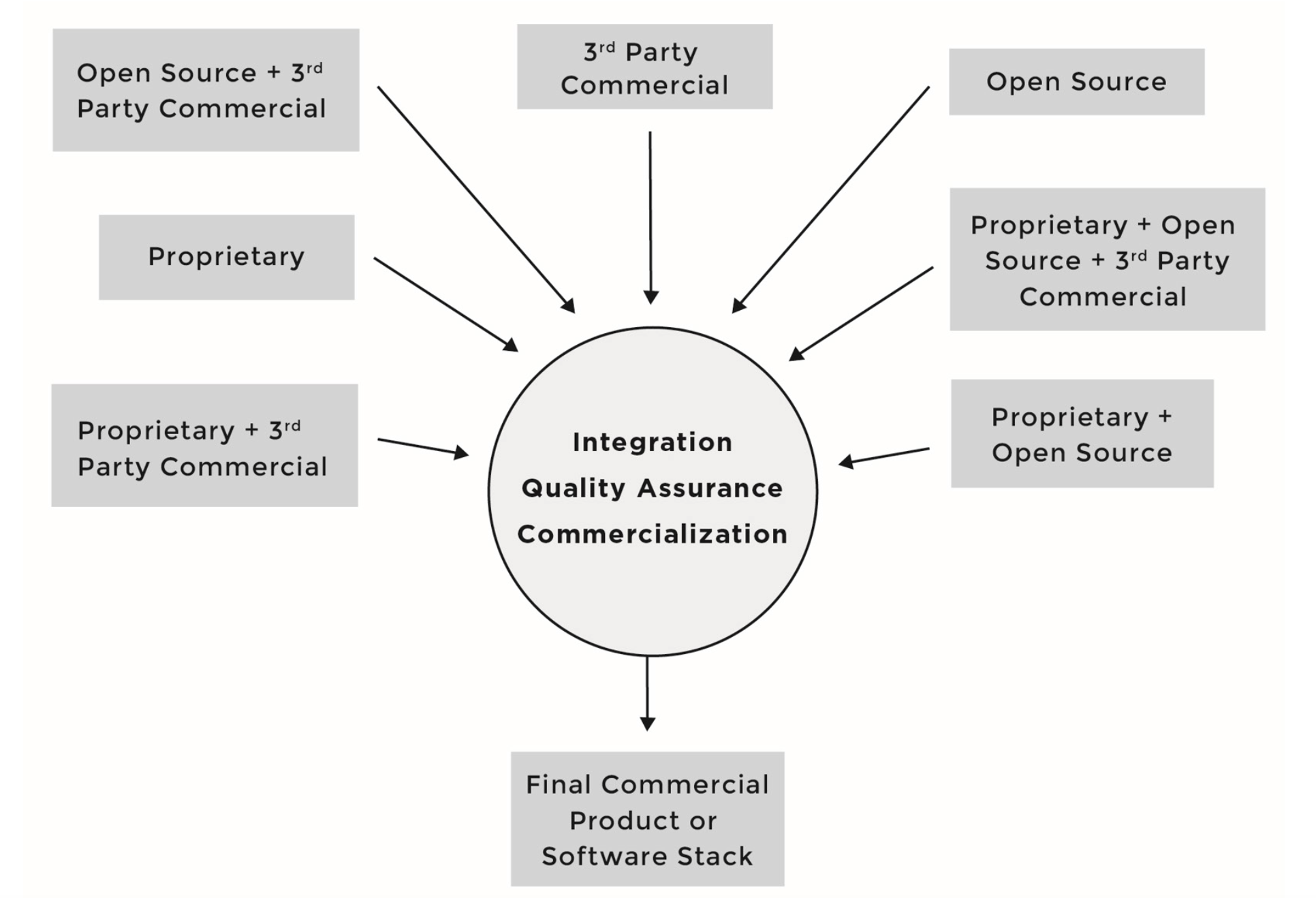
Under this development model, software components can consist of source code originating from any number of different sources and be licensed under different licenses; for instance, software component A can include proprietary source code in addition to third-party proprietary source code, while software component B can include proprietary source code in addition to source code from an open source project.
As the number of open source software components grew in what were once straightforward proprietary software stacks, the business environment diverged from familiar territory and corporate comfort zones.
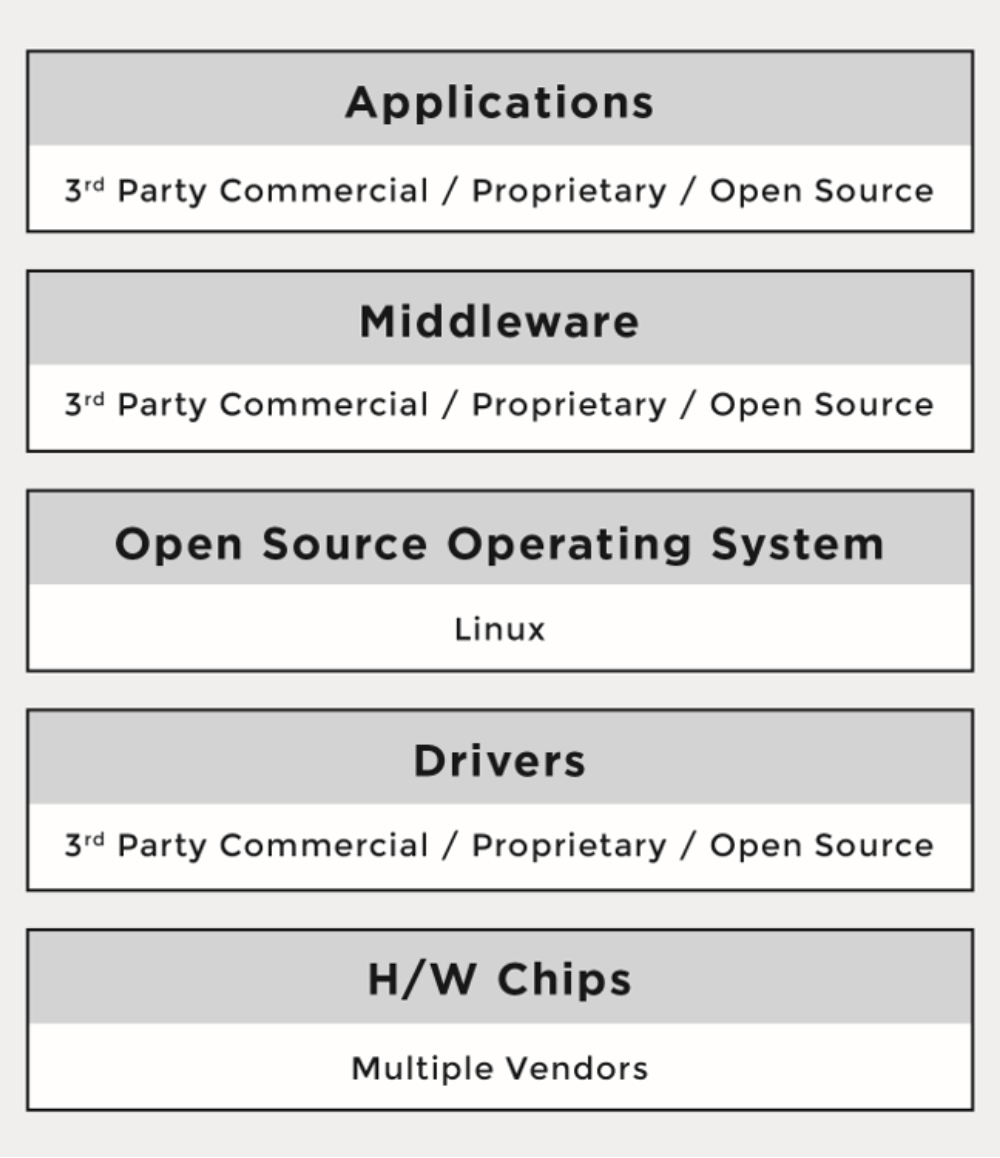
One of the major differences between the proprietary and the multi-source development models has been that the licenses of open source software are not negotiated. There are no contracts to sign with the software providers (i.e., open source developers or projects). Rather, the individuals who initiate the project chose a given open source license, and once a project reaches a certain scale, the licenses are virtually impossible to change.
When using the multi-source development model, companies must understand the implications of tens of different licenses (and combinations of licenses) coming from hundreds or even thousands of licensors or contributors (copyright holders). As a result, the risks that companies previously managed through company-to-company license and agreement negotiations are now managed through robust compliance programs and careful engineering practices.
Part 1 of this series gave an introduction to open source compliance and the business environment behind it. Next week we’ll cover the benefits of open source compliance and the risks that companies face when they fail to comply.
Read the other articles in this series:
An Introduction to Open Source Compliance in the Enterprise
Open Compliance in the Enterprise: Why Have an Open Source Compliance Program?
Open Source Compliance in the Enterprise: Benefits and Risks
3 Common Open Source IP Compliance Failures and How to Avoid Them
4 Common Open Source License Compliance Failures and How to Avoid Them
Top Lessons For Open Source Pros From License Compliance Failures
The 7 Elements of an Open Source Management Program: Strategy and Process
Download the free e-book, Open Source Compliance in the Enterprise, for a complete guide to creating compliance processes and policies for your organization.

In the previous article, we looked at some of the basics of rsyslog — a superfast Syslog tool with some powerful features for log processing. Here, I’ll be taking a detailed look at the main config file. Let’s dive right in.
Something to note — in case this causes you issues in the future — is that although the entries found in our main config file (/etc/rsyslog.conf) are read from the top down, the order in which they are presented does in fact make a difference.
Run this command inside the /etc directory:
# ls rsys*

rsyslog.conf  rsyslog.d/
The main config file is called rsyslog.conf, whereas the rsyslog.d/ is the directory where you save your other configuration files. Looking in the rsyslog.conf file, we use a type of $IncludeConfig statement to pick up any files with the .conf extension that reside in that directory, as follows:
# Include all config files in /etc/rsyslog.d/

$IncludeConfig /etc/rsyslog.d/*.conf
These user-defined configs might include remote logging to a rsyslog server.
You can include an individual file, too, or indeed a whole directory (no matter the file extensions), as follows:
$IncludeConfig /etc/rsyslog.d/chris-binnie-config.conf

$IncludeConfig /etc/rsyslog.d/
What does our main config file look like inside, though? Listing 1 shows that the file includes lots of useful comments and the heart of our rsyslog config in addition. Bear in mind that this file defines local logging in most cases. However if you’re turning your local server into a recipient Syslog server too then you also add config to set that live there too. Note that after each config change you will need to restart the daemon as we will see shortly.
#  /etc/rsyslog.conf    Configuration file for rsyslog.

#

#                       For more information see

#                       /usr/share/doc/rsyslog-doc/html/rsyslog_conf.html


#################

#### MODULES ####

#################


$ModLoad imuxsock # provides support for local system logging

$ModLoad imklog   # provides kernel logging support

#$ModLoad immark  # provides --MARK-- message capability


# provides UDP syslog reception

#$ModLoad imudp

#$UDPServerRun 514


# provides TCP syslog reception

#$ModLoad imtcp

#$InputTCPServerRun 514


###########################

#### GLOBAL DIRECTIVES ####

###########################


#

# Use traditional timestamp format.

# To enable high precision timestamps, comment out the following line.

#

$ActionFileDefaultTemplate RSYSLOG_TraditionalFileFormat


#

# Set the default permissions for all log files.

#

$FileOwner root

$FileGroup adm

$FileCreateMode 0640

$DirCreateMode 0755

$Umask 0022


#

# Where to place spool and state files

#

$WorkDirectory /var/spool/rsyslog


#

# Include all config files in /etc/rsyslog.d/

#

$IncludeConfig /etc/rsyslog.d/*.conf


###############

#### RULES ####

###############


#

# First some standard log files. Log by facility.

#

auth,authpriv.*                 /var/log/auth.log

*.*;auth,authpriv.none     -/var/log/syslog

#cron.*                            /var/log/cron.log

daemon.*                        -/var/log/daemon.log

kern.*                             -/var/log/kern.log

lpr.*                                -/var/log/lpr.log

mail.*                              -/var/log/mail.log

user.*                             -/var/log/user.log


#

# Logging for the mail system. Split it up so that

# it is easy to write scripts to parse these files.

#

mail.info                       -/var/log/mail.info

mail.warn                       -/var/log/mail.warn

mail.err                        /var/log/mail.err


#

# Logging for INN news system.

#

news.crit                       /var/log/news/news.crit

news.err                        /var/log/news/news.err

news.notice                     -/var/log/news/news.notice


#

# Some "catch-all" log files.

#

*.=debug;

       auth,authpriv.none;

       news.none;mail.none     -/var/log/debug

*.=info;*.=notice;*.=warn;

       auth,authpriv.none;

       cron,daemon.none;

       mail,news.none          -/var/log/messages


#

# Emergencies are sent to everybody logged in.

#

*.emerg                         :omusrmsg:*


#

# I like to have messages displayed on the console, but only on a virtual

# console I usually leave idle.

#

#daemon,mail.*;

#       news.=crit;news.=err;news.=notice;

#       *.=debug;*.=info;

#       *.=notice;*.=warn       /dev/tty8


# The named pipe /dev/xconsole is for the `xconsole' utility.  To use it,

# you must invoke `xconsole' with the `-file' option:

#

#    $ xconsole -file /dev/xconsole [...]

#

# NOTE: adjust the list below, or you'll go crazy if you have a reasonably

#      busy site..

#

daemon.*;mail.*;

       news.err;

       *.=debug;*.=info;

       *.=notice;*.=warn       |/dev/xconsole
Listing 1:The default Debian “rsyslog.conf” is shown; other flavors vary, some more than others.
Careful consideration has been programmed into this excellent software. It’s worth noting that there might be subtle config differences between versions so employ lookup differences online to compare notes between the older or newer syntax.
We’ll start by separating our view of rsyslog’s config into three parts. These parts would be any imported modules first of all, our config second and finally our rules.
I’ll begin with a look at using modules. There are several different types of modules, but here’s an example to get you started. Simply think of the Input Modules as a way of collecting information from different sources. Output Modules are essentially how the logs are written, whether to files or a network socket. Another module type, which can be used to filter the received message’s content, is called a Parser Module.
As we can see from the top of the config file in Listing 1, we can load up our default modules as so:
$ModLoad imuxsock # provides support for local system logging

$ModLoad imklog     # provides kernel logging support
The comments are hopefully self-explanatory. The first module allows the dropping of logs to our local disks and if I’m reading the docs correctly the second module picks up events and drops them to “dmesg” after a system boot has completed and kernel logging has been taken over by the Syslog daemon.
The following commented-out line is for the “immark” module, which can be very useful in some circumstances:
#$ModLoad immark # provides --MARK-- message capability
For example, I’ve used it frequently when I’m filling the /var/log/messages file up with several entries a second whilst testing something. In addition to using the functionality in scripts, I like to be able to type a Bash alias super quickly in the file ~/.bashrc during my testing:
alias mes=’/usr/bin/logger xxxxxxxxx’
If you add that alias then you can simply type “mes” at the command prompt, as your user, to add a separator in the “messages” file. If you haven’t altered your .bashrc file in the past, then after changing it you need to do this to refresh it.
# cd ~

# . .bashrc
I’m not sure but I suspect that the –MARK– separators, alluded to in the comment after the module’s config entry, were first introduced to add a line to a log file to show you that Syslog was still running if there has been no logging entries present for a little while.
You could add the markers to your logs every 20 minutes, for example, if your logs are quiet (using this entry
$MarkMessagePeriod 1200
I imagine, too, that it might be useful functionality, if you have rotated your logs in the middle of the night and then need to see that Syslog was still paying attention to the task in hand shortly after that point in time.
We can see the other modules are commented out. I’ll briefly mention modules later, but let’s continue on through our config file in the meantime.
The Global Directives section in Listing 1 is not too alien I hope. Look at this, for example, the top entry:
# Use default timestamp format

$ActionFileDefaultTemplate RSYSLOG_TraditionalFileFormat
Directives start with a dollar sign, as a variable, and then have an associated property. From that entry, you can see that we’re still wearing 1970s flared trousers and opting to go traditional with the format of the our of logging.
The “permissions” entries there probably isn’t too tricky to translate either:
$FileOwner root

$FileGroup adm

$FileCreateMode 0640

$DirCreateMode 0755

$Umask 0022
When rsyslog runs we can alter who owns what and which file-creation mask is used. The working directory and “$IncludeConfig” entries are hopefully easy enough to follow so let’s keep moving forwards. Next time, we’ll get our hands a bit dirtier with some logfile rules and then finish up with some networking considerations.
Chris Binnie is a Technical Consultant with 20 years of Linux experience and a writer for Linux Magazine and Admin Magazine. His new book Linux Server Security: Hack and Defend teaches you how to launch sophisticated attacks, make your servers invisible and crack complex passwords.
Advance your career in system administration! Check out the Essentials of System Administration course from The Linux Foundation.