Home Blog Page 652

Hadoop Introduction – A Comprehensive Guide for Beginners

This tutorial provides thorough introduction of Hadoop. The tutorial covers what is Hadoop, what is the need of Hadoop, why hadoop is most popular, Hadoop Architecture, data flow, Hadoop daemons, different flavours, introduction of Hadoop componenets like hdfs, MapReduce, Yarn, etc.

Hadoop is an open source tool from the ASF – Apache Software Foundation. Open source project means it is freely available and even its source code can be changed as per the requirements. If certain functionality does not fulfill your requirement, you can change it according to your need. Most of Hadoop code is written by Yahoo, IBM, Facebook, Cloudera.

Read more at Data Flair

Writing Your Own Ingest Processor for Elasticsearch

With Elasticsearch 5.0, a new feature called the ingest node was introduced. To quote the official documentation:

You can use ingest node to pre-process documents before the actual indexing takes place. This pre-processing happens by an ingest node that intercepts bulk and index requests, applies the transformations, and then passes the documents back to the index or bulk APIs.

So, by defining a pipeline you can configure the way a document should be transformed before it is being indexed. There are a fair share of processors already shipped with Elasticsearch, but it is also very easy to roll your own.

This blog post will show how to write an ingest processor that extracts URLs from a field and stores them in an array. This array could be used to pre-fetch this data, spider it, or to simply display the URLs connected with a text field in your application.

Read more at DZone

httpstat – A Curl Statistics Tool to Check Website Performance

httpstat is a Python script that reflects curl statistics in a fascinating and well-defined way, it is a single file which is compatible with Python 3 and requires no additional software (dependencies) to be installed on a users system.

It is fundamentally a wrapper of cURL tool, means that you can use several valid cURL options after a URL(s), excluding the options -w-D-o-s, and -S, which are already employed by httpstat.

Read the complete article at Tecmint

An Introduction to Open Source Compliance in the Enterprise

The following is adapted from Open Source Compliance in the Enterprise by Ibrahim Haddad, PhD.

Open source has expanded not only from an idealistic movement led by individuals around software and intellectual property but from one where organizations (e.g., governments, companies, and universities) realize that open source is a key part of their IT strategy and want to participate in its development.  Early success in Linux and other open source technologies has spread to all areas of technology.

More traditional organizations are also taking notice and making open source software a priority and using the software for strategic advantage in their operations.

Use of open source in enterprise IT has roughly doubled since 2010, according to the North Bridge and Black Duck 2016 Future of Open Source Survey:

67 percent of surveyed companies encourage developers to engage in and contribute to open source projects.

65 percent of companies are contributing to open source projects.

One in three companies have a full-time resource dedicated to open source projects.

59 percent of respondents participate in open source projects to gain competitive edge.

As a result, organizations are looking for guidance on how best to participate appropriately in open source communities and to do so in a legal and responsible way. Participants want to share their code and IP, and they need a trusted neutral home for IP assets (trademark, copyright, patents). They also need a framework to pool resources (financial, technical, etc.).

Open source participants need expertise to train them on how to collaborate with their competitors in an effective manner. To that end, The Linux Foundation has published the Open Source Compliance in the Enterprise e-book geared to creating a common understanding on the best ways to create shared value and innovation while adhering to the spirit and legal particulars of open source licensing.

Open source initiatives and projects provide companies and other organizations with a vehicle to accelerate innovation through collaboration with the hundreds and sometimes thousands of communities that represent the developers of the open source software. However, there are important responsibilities accompanying the benefits of teaming with the open source community: Companies must ensure compliance to the obligations that accompany open source licenses.

The 4 Objectives of Open Source Compliance

Open source compliance is the process by which users, integrators, and developers of open source software observe copyright notices and satisfy license obligations for their open source software components. A well-designed open source compliance process should simultaneously ensure compliance with the terms of open source licenses and also help companies protect their own intellectual property and that of third-party suppliers from unintended disclosure and/or other consequences.

Open source compliance helps achieve four main objectives:

• Comply with open source licensing obligations.

• Facilitate effective use of open source in commercial products.

• Comply with third-party software supplier contractual obligations.

• Protect proprietary IP.

In this blog series, we’ll explore the entire process of open source compliance, including a high-level overview of the topic, detailed information on how to establish an open source management program at your organization, and an overview of relevant roles.

In part 2, we’ll cover how software development models have changed and discuss the role of open source compliance under the new multi-source development model.

Read the other articles in the series:

An Introduction to Open Source Compliance in the Enterprise

Open Compliance in the Enterprise: Why Have an Open Source Compliance Program?

Open Source Compliance in the Enterprise: Benefits and Risks

3 Common Open Source IP Compliance Failures and How to Avoid Them

4 Common Open Source License Compliance Failures and How to Avoid Them

Top Lessons For Open Source Pros From License Compliance Failures

The 7 Elements of an Open Source Management Program: Strategy and Process

Download the free e-book, Open Source Compliance in the Enterprise, for a complete guide to creating compliance processes and policies for your organization.


Containers and Virtual Machines: A Dynamic Duo

It’s easy to think of containers and VMs as a binary choice — deciding whether to use a VM or a container (not both) for your use case. In his keynote at LinuxCon Europe, Brandon Philips, CTO at CoreOS, talked about a case study for using VMs and containers together to take advantage of the strengths of both.

CoreOS runs a service called Quay, Quay.IO for the hosted service, which uses a combination of VMs and containers. It’s used by large organizations like JPL, eBay, Hotels.com, and more, but you can also sign up with your GitHub account to try it out yourself. The goal for Quay is to have a system that people can trust, with audit logs and security scanning to provide confidence that only the people who should have access to each container do have access. There are also options to dig into the container image and send notifications if there are potential vulnerabilities within an image.

With Quay.IO, the SaaS product, it was important for it to handle code from many different people with security in place to make sure that each person only has access to their own code. The entire container market is growing rapidly, so at the same time, it also needed to scale as containers continue to take off to avoid rebuilding everything again in 12 months. 

Philips talks about how Quay uses containers and VMs together by essentially putting the resources isolation inside. This allows you to specify exactly how much CPU bandwidth, memory bandwidth, and network bandwidth is available for the virtual machine. “That’s how we use containers and virtual machines together. We use the isolation mechanisms of VMs and the resources isolation of the container.”

While Quay has been around for a while, they are using a new approach to improve both security and performance. Instead of using EC2, they are using virtual machines, containers, and Kubernetes. It’s similar to the previous approach, but with a single KVM instance running inside of a container replacing a single EC2 instance. This gives users faster builds, and CoreOS makes more efficient use of their capital, allowing them to buy better, bigger, and faster machines for the builds. By moving off of EC2 and onto Packet, using a Kubernetes cluster, and other optimizations, they’ve brought long startup times down to about 15 seconds, an 80% improvement.

Philips has a couple of takeaways:

  • For open source projects, Quay is a free hosted service.
  • You can use it with another open source project, Clair, to scan through these container images finding any known vulnerabilities.
  • Join them at their conference in New York City in December to learn more.

For more details about using containers and VMs together, and how they’ve done this with Quay, watch the keynote video below.

https://www.youtube.com/watch?v=gkisj9pOphg?list=PLbzoR-pLrL6ovByiWK-8ALCkZoCQAK-i_

LinuxCon Europe videos

How to Build an Email Server on Ubuntu Linux

In this fast-changing world of containers and microservices it’s comforting that some things don’t change, such as setting up a Linux email server. It’s still a dance of many steps and knitting together several different servers, and once you put it all together it just sits there, all nice and stable, instead of winking in and out of existence like microservices. In this series, we’ll put together a nice reliable configurable mail server with Postfix, Dovecot, and OpenSSL on Ubuntu Linux.

Postfix is a reliable old standby that is easier to configure and use than Sendmail, the original Unix MTA (does anyone still use Sendmail?). Exim is Debian’s default MTA; it is more lightweight than Postfix and super-configurable, so we’ll look at Exim in a future tutorial.

Dovecot and Courier are two popular and excellent IMAP/POP3 servers. Dovecot is more lightweight and easier to configure.

You must secure your email sessions, so we’ll use OpenSSL. OpenSSL also supplies some nice tools for testing your mail server.

For simplicity, we’ll set up a LAN mail server in this series. You should have LAN name services already enabled and working; see Dnsmasq For Easy LAN Name Services for some pointers. Then later, you can adapt a LAN server to an Internet-accessible server by registering your domain name and configuring your firewall accordingly. These are documented everywhere, so please do your homework and be careful.

Terminology

Let’s take a quick look at some terminology, because it is nice when we know what the heck we’re talking about.

  • MTA: Mail transfer agent, a simple mail transfer protocol (SMTP) server such as Postfix, Exim, and Sendmail. SMTP servers talk to each other
  • MUA: Mail user agent, your local mail client such as Evolution, KMail, Claws Mail, or Thunderbird.
  • POP3: Post-office protocol, the simplest protocol for moving messages from an SMTP server to your mail client. A POP server is simple and lightweight; you can serve thousands of users from a single box.
  • IMAP: Interactive message access protocol. Most businesses use IMAP because messages remain on the server, so users don’t have to worry about losing them. IMAP servers require a lot of memory and storage.
  • TLS: Transport socket layer, an evolution of SSL (secure sockets layer), which provides encrypted transport for SASL-authenticated logins.
  • SASL: Simple authentication and security layer, for authenticating users. SASL does the authenticating, then TLS provides the encrypted transport of the authentication data.
  • StartTLS: Also known as opportunistic TLS. StartTLS upgrades your plain text authentication to encrypted authentication if both servers support SSL/TLS. If one of them doesn’t then it remains in cleartext. StartTLS uses the standard unencrypted ports: 25 (SMTP), 110 (POP3), and 143 (IMAP) instead of the standard encrypted ports: 465 (SMTP), 995 (POP3), and 993 (IMAP).

Yes, We Still Have Sendmail

Most Linuxes still have /usr/sbin/sendmail. This is a holdover from the very olden days when Sendmail was the only MTA. On most distros /usr/sbin/sendmail is symlinked to your installed MTA. However your distro handles it, if it’s there, it’s on purpose.

Install Postfix

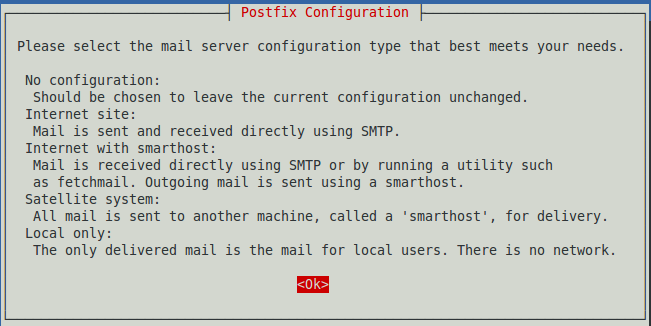
apt-get install postfix takes care of the basic Postfix installation (Figure 1). This opens a wizard that asks what kind of server you want. Select “Internet Site”, even for a LAN server. It will ask for your fully qualified server domain name (e.g., myserver.mydomain.net). On a LAN server, assuming your name services are correctly configured (I keep mentioning this because people keep getting it wrong), you can use just the hostname (e.g., myserver).

Figure 1: Postfix configuration.

Ubuntu will create a configuration file and launch three Postfix daemons: master, qmgr, and pickup. There is no Postfix command or daemon.

$ ps ax
 6494 ? Ss 0:00 /usr/lib/postfix/master
 6497 ? S  0:00 pickup -l -t unix -u -c
 6498 ? S  0:00 qmgr -l -t unix -u 

Use Postfix’s built-in syntax checker to test your configuration files. If it finds no syntax errors, it reports nothing:

$ sudo postfix check
[sudo] password for carla: 

Use netstat to verify that Postfix is listening on port 25:

$ netstat -ant
tcp  0  0 0.0.0.0:25 0.0.0.0:* LISTEN
tcp6 0  0 :::25      :::*      LISTEN

Now let’s fire up trusty old telnet to test:

$ telnet myserver 25
Trying 127.0.1.1...
Connected to myserver.
Escape character is '^]'.
220 myserver ESMTP Postfix (Ubuntu)
EHLO myserver
250-myserver
250-PIPELINING
250-SIZE 10240000
250-VRFY
250-ETRN
250-STARTTLS
250-ENHANCEDSTATUSCODES
250-8BITMIME
250 DSN
^]

telnet> 

Hurrah! We have verified the server name, and that Postfix is listening and responding to requests on port 25, the SMTP port.

Type quit to exit telnet. In the example, the commands that you type to interact with your server are in bold. The output are ESMTP (extended SMTP) 250 status codes.

  • PIPELINING allows multiple commands to flow without having to respond to each one.
  • SIZE tells the maximum message size that the server accepts.
  • VRFY can tell a client if a particular mailbox exists. This is often ignored as it could be a security hole.
  • ETRN is for sites with irregular Internet connectivity. Such a site can use ETRN to request mail delivery from an upstream server, and Postfix can be configured to defer mail delivery to ETRN clients.
  • STARTTLS (see above).
  • ENHANCEDSTATUSCODES, the server supports enhanced status and error codes.
  • 8BITMIME, supports 8-bit MIME, which means the full ASCII character set. Once upon a time the original ASCII was 7 bits.
  • DSN, delivery status notifiction, informs you of delivery errors.

The main Postfix configuration file is /etc/postfix/main.cf. This is created by the installer. See Postfix Configuration Parameters for a complete listing of main.cf parameters. /etc/postfix/postfix-files describes the complete Postfix installation.

Come back next week for installing and testing Dovecot, and sending ourselves some messages.

Read part three of this tutorial series: Building an Email Server on Ubuntu Linux, Part 3

Advance your career in system administration! Check out the Essentials of System Administration course from The Linux Foundation.

Keynote: VM Security and Container Workflows, A Case Study by Brandon Philips, CTO, CoreOS

https://www.youtube.com/watch?v=gkisj9pOphg?list=PLbzoR-pLrL6ovByiWK-8ALCkZoCQAK-i_

There are many great duos: peanut butter & jelly, movies & popcorn, Batman & Robin. Brandon Philips explores a new emerging one: containers and virtual machines. And how this combination will enable new performant multi-tenant systems.
 

Untangling Macros in C

Morse Code made with smoke


As programmers, in our daily office/school life, we are expected to write code following best practice, to comment it wisely, so that when need is to re-read it, well someone can do it. To take a break from all those constraints, we can head to the IOCCC the International Obfuscated C Code Contest.

In this post, we are going to focus on the IOCCC 1986 winner in the Worst abuse of the C preprocessor category. The code was written by James Hague.

Starting from the given source, observing its output, we will explain how it works.

The Code

Here it is in all its obfuscated glory:

#define	DIT	(
#define	DAH	)
#define	__DAH	++
#define DITDAH	*
#define	DAHDIT	for
#define	DIT_DAH	malloc
#define DAH_DIT	gets
#define	_DAHDIT	char
_DAHDIT _DAH_[]="ETIANMSURWDKGOHVFaLaPJBXCYZQb54a3d2f16g7c8a90l?e'b.s;i,d:"
;main			DIT			DAH{_DAHDIT
DITDAH			_DIT,DITDAH		DAH_,DITDAH DIT_,
DITDAH			_DIT_,DITDAH		DIT_DAH DIT
DAH,DITDAH		DAH_DIT DIT		DAH;DAHDIT
DIT _DIT=DIT_DAH	DIT 81			DAH,DIT_=_DIT
__DAH;_DIT==DAH_DIT	DIT _DIT		DAH;__DIT
DIT'n'DAH DAH		DAHDIT DIT		DAH_=_DIT;DITDAH
DAH_;__DIT		DIT			DITDAH
_DIT_?_DAH DIT		DITDAH			DIT_ DAH:'?'DAH,__DIT
DIT' 'DAH,DAH_ __DAH	DAH DAHDIT		DIT
DITDAH			DIT_=2,_DIT_=_DAH_;	DITDAH _DIT_&&DIT
DITDAH _DIT_!=DIT	DITDAH DAH_>='a'?	DITDAH
DAH_&223:DITDAH		DAH_ DAH DAH;		DIT
DITDAH			DIT_ DAH __DAH,_DIT_	__DAH DAH
DITDAH DIT_+=		DIT DITDAH _DIT_>='a'?	DITDAH _DIT_-'a':0
DAH;}_DAH DIT DIT_	DAH{			__DIT DIT
DIT_>3?_DAH		DIT			 DIT_>>1 DAH:''DAH;return
DIT_&1?'-':'.';}__DIT DIT			DIT_ DAH _DAHDIT
DIT_;{DIT void DAH write DIT			1,&DIT_,1 DAH;}

Apart from the particular formatting, what jumps to the eye is the number of “unnecessary” macros and the repetitive use of DIT and DAT variations.

The output

If we compile the code at this point we see many warnings. Among them, two for the implicit declaration of __DIT and _DAH. After that step, we can run the code, and as we provide sequences of ascii characters, it spits out sequences of . and _.

$ ./a.out hello, world

.... . .-.. .-.. --- --..-- .-- --- .-. .-.. -..

It looks like Morse code. And indeed, using an online Morse decoder, it is. It reverses back to HELLO, WORLD

De-Obfuscating

Let’s first try to perform the pre-processor job and replace the macros by their values. After a bit of reformatting, this is what we have:

char _DAH_[]=”ETIANMSURWDKGOHVFaLaPJBXCYZQb54a3d2f16g7c8a90l?e’b.s;i,d:”;
main()
{
char *_DIT, *DAH_, *DIT_, *_DIT_, *malloc (), *gets();
for (_DIT = malloc(81), DIT_=_DIT++; _DIT == gets(_DIT); __DIT(‘n’))
   for (DAH_=_DIT; *DAH_; __DIT(*_DIT_ ? _DAH(*DIT_ ) : ‘?’),__DIT(‘ ‘),DAH_++) 
     for (*DIT_ = 2, _DIT_ = _DAH_; *_DIT_ && (*_DIT_ != (*DAH_ >= ‘a’ ? *DAH_&223 : *DAH_ )); (*DIT_ )++,_DIT_++)
         *DIT_+= (*_DIT_>=’a’ ? *_DIT_ — ‘a’ : 0);
}
_DAH(DIT_)
{ 
__DIT(DIT_> 3 ? _DAH(DIT_>>1) : ‘’);
return DIT_ & 1 ? ‘-’ : ‘.’;
} 
__DIT(DIT_) char DIT_;
{
(void) write (1,&DIT_,1);
}

Slightly better.

We see the three functions we expected: main, _DAH, and __DIT. We also see an external variable __DAH__ , a long string. __DIT looks like the putchar function from the standard library, printing a char at a time. And what about _DAH ?

Dive into _DAH

It is recursive. As long as the argument is a number that takes more than 2 bits to write, it calls the function again, stripping the number from its last bit. The output will be part of the argument printed as and . masking for 1 and 0 , i.e. the number in binary format, and it will return the second leftmost digit. As an example, if we call _DAH(5) , 5 being 101 in binary, it will call _DAH(2) . That is the base case. it prints (nothing) and return 10 & 1 == 0 so . . Then it will print . and return 101 & 1 == 1 so -. If we want to print that we have to call __DIT(_DAH(5)) which outputs .- which actually corresponds to 3 written in binary. _DAH(n) is a rather obfuscated function, which will not print/return n in binary but n — 2 .

The main function

Again with more explicit variables names.

char code[]=”ETIANMSURWDKGOHVFaLaPJBXCYZQb54a3d2f16g7c8a90l?e’b.s;i,d:”;
main ( )
{
char *line, *letter, *value, *code_copy, *malloc ( ),* gets ( );
    for (line = malloc(81), value= line++; line == gets(line); putchar(‘n’))
     {
     for (letter = line; *letter; putchar(*code_copy ? _DAH(*value) : ‘?’), putchar(‘ ‘), letter++)
         {
         for (*value = 2, code_copy = code; *code_copy && (*code_copy != (*letter >= ‘a’ ? *letter & 2
23: *letter)); (*value)++, code_copy++)
             {
              *value += (*code_copy >=’a’ ? *code_copy — ‘a’: 0);
             }
         }
     }
}

The outer loop: Each time the user enters a new line, it creates a buffer, and reads a line from the standard input to the buffer. gets does not check for buffer overflow, so 81 means nothing in the code itself, and I have not found what it means for Morse users. The function either returns the buffer it takes as an argument or NULL in this case, the program will return. This loop also assigns an address to value which it will use in the inner loop. This loop will print a new line after completion of the two inner loops.

The middle loop: it will loop through each letter in the string obtained above. As it moves from one letter to another, it will either print it using _DAH seen above or print a ? and add a space. As we looked at _DAH above, we used integers as arguments. It works fine as letters, ASCII characters like *value to be more precise, and are small integers in C.

The inner loop: it sets the value of *value to 2, and look at the value of the letter at this point. ((*letter >= 'a') ? *letter & 223 : *letter) means if the letter is lower case, use its upper case version. The octal 233 or 10010011 serves as a mask to change the one bit that is different for a lowercase letter than an uppercase. Of course 223 is not the most obvious one 137 would more easily come to mind. Knowing this, we can realize this inner loop will iterate as long as the *letter variable does not have a match in the code string. As it iterates, it will increase *value by 1 and move on to the next letter in code . Interestingly, if at one point in this process, the letter in code is lowercase, the loop will increase *value by some special number.

Going from a letter to its Morse code: globally, the inner loop starts with a *value = 2 and increase it by 1 each time the iteration moves on to the next letter in code until the letter in code is the letter in my line. It will then print *value using _DAH . Let’s see some examples:

  •  *letter = 'E' then *value = 2 and since E is the first letter in code it goes back to the middle loop and calls putchar(*code_copy ? _DAH(*value) : '?')` . Value of *code_copy == 'E' here so expression above becomes putchar(_DAH(2)) As seen above _DAH(2) returns/prints the binary value of 0as ‘.’ and ‘-’. The output of this expression will be . This is indeed the Morse code for E.
  •  *letter = 'I' then to start *value = 2 , since I is the third letter in code the inner loop will exit with *value == 4 . putchar(_DAH(4)) will print out .. , the Morse code for I.

We can observe a pattern, as the order chosen for the letters in code is such that the letters have Morse codes that are equal to the binary values of their index in the code string plus 2. Of course, this is not perfect. Remember the inner loop special cases ? If *code == 'a' , the loop will skip that *value or said otherwise, this *value or index does not map any Morse code. If *code == 'b' , the loop will skip that *value and shift by 'b' — 'a' == 1 , which means from the on, the Morse code for the letters in code will map the value of their index in the string plus 3. An so on, next comes a d which will shift that new mapping by 'd' — 'a' == 3 …This is genius and so hard to figure out.

Conclusion

The insane contest that is the IOCCC produces crazy creative code. Behind the formatting, the dubious but nevertheless relevant variable names and over complications lies a genius idea that maps letters with their Morse code inside a single string. I do not know how challenging it was to come up with it in the first place, but it did require some time, doubts and a few ‘ha ha’ moments to unravel the underlying process. I am so glad I did it, and I feel I acquired new skills in reading others’ code in the process.

Post Scriptum

As an annex, here is a ‘de obfuscated’ code, it compiles with one warning due to the use of gets. I tried to stay close to the original, but making it more readable.

#include <stdio.h>
#include <stdlib.h>

int _DAH(int);

char code[]="ETIANMSURWDKGOHVFaLaPJBXCYZQb54a3d2f16g7c8a90l?e'b.s;i,d:";

int main(void)
{
        char *line, *letter, *code_copy;
        char *gets(char *);
        char value, upper_case;

for (line = malloc(81); gets(line) != NULL; putchar('n'))
        {

for (letter = line; *letter; letter++)
                {
                        code_copy = code;
                        upper_case = (*letter >= 'a' ? *letter - 'a' + 'A' : *letter);
                        value = 2;
                        while (*code_copy && (*code_copy != upper_case))
                        {
                                value += (*code_copy >='a' ? *code_copy - 'a': 0);
                                value++;
                                code_copy++;
                        }
                        putchar(*code_copy ? _DAH(value) : '?');
                        putchar(' ');
                }
        }
}

int _DAH(int letter)
{
        putchar(letter > 3 ?_DAH (letter>>1): '');
        return (letter & 1 ? '-' : '.');
}

This article was contributed by a student at Holberton School and should be used for educational purposes only.

 

The Year in NV Trends for 2016

Is it ever too early for a Year in Review column? Didn’t think so. For this attempt, let’s take a look at the exciting trends in network virtualization (NV), as a mixture of open and proprietary technologies battle to be the cloud networking foundation of the future.

On the competitive front, we took a detailed look at the market in our “Future of Network Virtualization and SDN Controllers Report,” released in September. The market continues to grow, with a dynamic mixture of NV incumbents and startups gaining market traction.

Read more at SDx Central

Syscall Auditing at Scale

If you are are an engineer whose organization uses Linux in production, I have two quick questions for you:

1) How many unique outbound TCP connections have your servers made in the past hour?

2) Which processes and users initiated each of those connections?

If you can answer both of these questions, fantastic! You can skip the rest of this blog post. If you can’t, boy-oh-boy do we have a treat for you! We call it go-audit.

Syscalls are how all software communicates with the Linux kernel. Syscalls are used for things like connecting network sockets, reading files, loading kernel modules, and spawning new processes (and much much much more). 


Read more at Slack Engineering Blog