Home Blog Page 661

4 Reasons Why SSH Connection Fails

As DevOps or IT professionals, people may ask us why they can’t ssh to servers. It happens from time to time. Isn’t right? Not much fun. Just routine work.

Want to ease the pain and burden? Let’s examine common ssh failures together. Next time forward this link to your colleagues, if useful. People may be able to identify the root cause all by themselves, or be efficient in collecting all necessary information, before turning to us.

Why SSH Connection Failed


Original Article: http://dennyzhang.com/ssh_fail

It’s not something fancy or difficult. Just not everyone posses enough information or experience about this. As DevOpsers, we shouldn’t stand in the way for any process. Let’s empower people with a simple and easy guide.

Here are Common SSH Failures sorted by frequency.

1. Our SSH Public Key Is Not Injected To Servers.

SSH by password is very dangerous. Nowadays almost all serious servers will only accept ssh by key file. Here is the process:

  • We generate a ssh key pair. Even better, protect private key with passphrase.
  • Send our ssh public key to the person who manages the servers.
  • He/She will inject our ssh public key their. Usually it’s ~/.ssh/authorized_keys.
  • Then we should be able to ssh.

Here comes the most frequent ssh failure!

denny@laptop:/# ssh root@www.dennyzhang.com
Permission denied (publickey).

This error message may have 2 possible clauses:

  • The private key doesn’t have the privilege to login.

Either public key is not injected correctly or simply it’s missing.

Tips: If your Ops/DevOps are not available, you can try alternatives. Think who else in the team can ssh. In fact anyone who can ssh, is capable to perform the change.

  • Local ssh public key and private key is not correctly paired.

Before connecting, ssh will check whether our public key and private key is correctly paired. If not, it will reject to use the private key silently. Yes, silently!

You may wonder how could this happen? As humans we don’t, but we may have some automation scripts which create the mess. BTW, if we only have a valid private key without public key, it’s fine.

2. Firewall Prevents Us From Connecting

For security concern, people may enforce a strict firewall policy. It means only certain source IP can ssh.

denny@laptop:/# ssh root@www.dennyzhang.com
ssh: connect to host www.dennyzhang.com port 22: Connection refused

# Confirm with telnet. Usually it shall connect in seconds
denny@laptop:/# telnet www.dennyzhang.com
Trying 104.237.149.124...

You may want to fetch help immediately. Just wait a second.

People may have reconfigured sshd to listen on other port. Are you sure it’s port 22? Even better, double check the server ip or dns name.

I know they might be stupid questions. But people make these mistakes sometimes.

Once it’s confirmed, talk to your DevOps. There is another possible reason for this failure: sshd is not up and running. Very rare I would say. But could be. In that case, DevOps/Ops need to take actions immediately.

3. Host Key Check Fails

When you see below warning for the first time, you may get confused. To be simple, it helps us to avoid the attack of man-in-the-middle.

denny@laptop:/# ssh root@www.dennyzhang.com
@@@@@@@@@@@@@@@@@@@@@@@@@@@@@@@@@@@@@@@@@@@@@@@@@@@@@@@@@@@
@       WARNING: POSSIBLE DNS SPOOFING DETECTED!          @
@@@@@@@@@@@@@@@@@@@@@@@@@@@@@@@@@@@@@@@@@@@@@@@@@@@@@@@@@@@
The ECDSA host key for [www.dennyzhang.com]:22 has changed,
and the key for the corresponding IP address [45.33.87.74]:22
is unknown. This could either mean that
DNS SPOOFING is happening or the IP address for the host
and its host key have changed at the same time.
@@@@@@@@@@@@@@@@@@@@@@@@@@@@@@@@@@@@@@@@@@@@@@@@@@@@@@@@@@@
@    WARNING: REMOTE HOST IDENTIFICATION HAS CHANGED!     @
@@@@@@@@@@@@@@@@@@@@@@@@@@@@@@@@@@@@@@@@@@@@@@@@@@@@@@@@@@@
IT IS POSSIBLE THAT SOMEONE IS DOING SOMETHING NASTY!
Someone could be eavesdropping on you right now (man-in-the-middle attack)!
It is also possible that a host key has just been changed.
The fingerprint for the ECDSA key sent by the remote host is
37:df:b3:af:54:a3:57:05:aa:32:65:fc:a8:e7:f9:3a.
Please contact your system administrator.
Add correct host key in /root/.ssh/known_hosts to get rid of this message.
Offending ECDSA key in /root/.ssh/known_hosts:2
  remove with: ssh-keygen -f "/root/.ssh/known_hosts" -R [www.dennyzhang.com]:22
ECDSA host key for [www.dennyzhang.com]:22 has changed and you have requested strict checking.
Host key verification failed.

Each server can have a fingerprint. If the server is re-provisioned or simply a different server, the fingerprint would be different. Once we have successfully login, our laptop will save the server’s fingerprint locally. Next time we login, it will do a comparison first. If the fingerprint doesn’t match, we will see the warning.

If we’re confident it has been re-provisioned recently, we can ignore this warning. Remove the entry from ~/.ssh/known_hosts. Or you can empty the file. Even turn off ssh host key checking for all hosts.[1] Certainly I would not recommend.

4. Your SSH Key File Mode Issues

As a self-protection, the file access of your ssh key file can’t be widely open. The file mode should be either 0600 or 0400.

denny@laptop:/# ssh -i id_rsa root@www.dennyzhang.com
@@@@@@@@@@@@@@@@@@@@@@@@@@@@@@@@@@@@@@@@@@@@@@@@@@@@@@@@@@@
@         WARNING: UNPROTECTED PRIVATE KEY FILE!          @
@@@@@@@@@@@@@@@@@@@@@@@@@@@@@@@@@@@@@@@@@@@@@@@@@@@@@@@@@@@
Permissions 0644 for 'id_rsa' are too open.
It is required that your private key files are NOT accessible by others.
This private key will be ignored.
bad permissions: ignore key: id_rsa
Permission denied (publickey).

Use -v for verbose output: ssh -v $user@$server_ip.

More Reading:

Footnotes:

Google Unleashes its Machine Learning Group

Google Unleashes its Machine Learning Group Google offers GPUs to support the more complex workloads. 

Google announced its Google Cloud Machine Learning Group to be led by two machine-learning experts: Fei-Fei Li and Jia Li. The group will focus on delivering cloud-based machine learning software to businesses.

The new group evolves from Google’s Cloud Machine Learning alpha application it launched in March. 

In conjunction with announcing the new group, Google also introduced the new Google Cloud Jobs API to help people advance their careers.

Read more at SDx Central

Eclipse Che Cloud IDE Joins Docker Revolution

Eclipse Che 5.0 is making accommodations for Docker containers and Language Server Protocol across multiple IDEs. The newest version of the Eclipse Foundation’s cloud-based IDE and workspace server will be available by the end of the year.

The update offers Docker Compose Workspaces, in which a workspace can run multiple developer machines with support for Docker Compose files and standard Dockerfiles. … Che also has been certified for Docker Store, which features enterprise-ready containers. In addition, Docker is joining the Eclipse Foundation and will work directly with Che.

Read more at InfoWorld

How to Install LXD Container Hypervisor on Ubuntu 16.04 LTS Server

LXD is lxc on steroids with strong security on the mind. LXD is not a rewrite of LXC. Under the hood, LXD uses LXC through liblxc and its Go binding. LXD container “hypervisor” runs unmodified Debian/Ubuntu/CentOS/Arch and other Linux operating systems  (“distros”) VM at incredible speed. In this tutorial, you will learn to set up LXD on a Ubuntu Linux server and create your first VM.

Install LXD

Type the following apt-get command:
$ sudo apt install lxd

OR
$ sudo apt-get install lxd

Read more at Nix Craft

How the Blockchain Will Radically Transform the Economy

Say hello to the decentralized economy — the blockchain is about to change everything. In this lucid explainer of the complex (and confusing) technology, Bettina Warburg describes how the blockchain will eliminate the need for centralized institutions like banks or governments to facilitate trade, evolving age-old models of commerce and finance into something far more interesting: a distributed, transparent, autonomous system for exchanging value.

Watch the video at TED.com

SUSE Advances its Open-Source Storage System

Besides announcing its next version of Ceph-powered SUSE Enterprise Storage, SUSE has bought openATTIC, the open-source Ceph and storage management framework.

SES 4, a software-defined storage system, is powered by Ceph. This is a distributed object store and file system. It, in turn, relies on a resilient and scalable storage model (RADOS) using clusters of commodity hardware. Along with the RADOS block device (RBD), and the RADOS object gateway (RGW), Ceph provides a POSIX file-system interface: CephFS. RBD and RGW have long been in use for production workloads but CephFS has been harder to use in the real world.

Read more at ZDNet

The Linux Foundation Issues Free E-Book on Open Source License Compliance Best Practices

The Linux Foundation today released a free e-book, Open Source Compliance in the Enterprise, that serves as a practical guide for organizations on how best to use open source code and participate in open source communities while complying with the spirit and the letter of open source licensing.

Written by Ibrahim Haddad, Ph.D., vice president of R&D and the head of the open source group at Samsung Research America, the new e-book aims to improve understanding of issues related to the licensing, development, and reuse of open source software. Haddad is responsible for overseeing Samsung’s open source strategy and execution, internal and external collaborative R&D projects, and is a former manager at The Linux Foundation.  ​

The book’s nine chapters take readers through the entire process of open source compliance, including an introduction to the topic, a description of how to establish an open source management program at their organization, and an overview of relevant roles. Examples of best practices and compliance checklists are provided to help those responsible for compliance activities create their own processes and policies.

“We frequently hear from organizations contributing to or simply using open source software about the desire to comply, but uncertainty about how best to do so,” said Mike Dolan, VP of strategic programs at The Linux Foundation. “Although it is sometimes viewed as a challenge, with better education on the topic, compliance can be easier for all involved in open source. This ebook, along with other efforts such as our free Compliance Basics for Developers training course, is one way we are working to help close the knowledge gap and make compliance easier for everyone.”

Companies Benefit from Open Source Compliance

As combining and building upon open source software components has become the de facto way for companies to create new products and services, organizations want to know how best to participate in open source communities and how to do so in a legal and responsible way.  

Under this “multi-source development model” software components can consist of source code originating from any number of different sources and be licensed under different licenses. As a result, the risks that companies previously managed through company-to-company license and agreement negotiations are now managed through robust compliance programs and careful engineering practices.

Open source initiatives and projects provide companies and other organizations with a vehicle to accelerate innovation through collaboration. But there are important responsibilities that come with the benefits of teaming with the open source community: Companies must ensure compliance to the obligations that accompany open source licenses.

“Open source compliance is the process by which users, integrators, and developers of open source observe copyright notices and satisfy license obligations for their open source software components,” according to the book.                                                       

It lists several advantages for companies that achieve open source compliance including:

  • A technical advantage, because compliant software portfolios are easier to service, test, upgrade, and maintain

  • In the event of a compliance challenge, having a compliance program can demonstrate an ongoing pattern of acting in good faith

  • Help in preparing a company for possible acquisition, sale, or new product or service release

  • Verifiable compliance in dealing with OEMs and downstream vendors.    

To learn more about the benefits of open source compliance and how to achieve it, download the free e-book today!

Microsoft Steps Up Its Commitment to Open Source

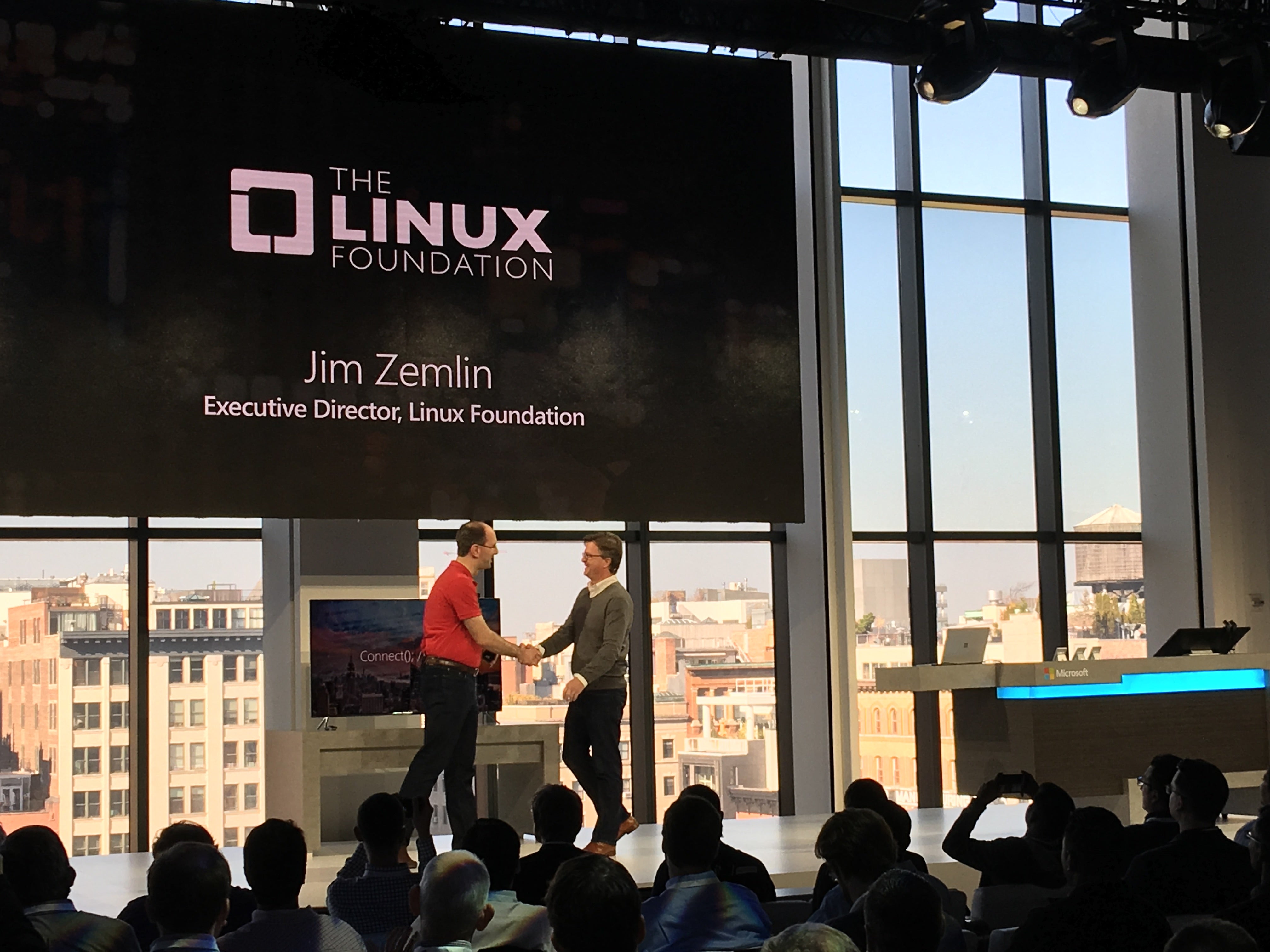
Today The Linux Foundation is announcing that we’ve welcomed Microsoft as a Platinum member. I’m honored to join Scott Guthrie, executive VP of Microsoft’s Cloud and Enterprise Group, at the Connect(); developer event in New York and expect to be able to talk more in the coming months about how we’ll intensify our work together for the benefit of the open source community at large.


Microsoft is already a substantial participant in many open source projects and has been involved in open source communities through partnerships and technology contributions for several years. Around 2011 and 2012, the company contributed a large body of device driver code to enable Linux to run as an enlightened guest on Hyper-V. Microsoft has an engineering team dedicated to Linux kernel work, and since that initial contribution, the team has contributed improvements and new features to the driver code for Hyper-V on a consistent basis.


Over the past two years in particular, we’ve seen that engineering team grow and expand the range of Linux kernel areas it’s working on to include kernel improvements that aren’t specifically related to Microsoft products. The company is also an active member of many Linux Foundation projects, including Node.js Foundation, R Consortium, OpenDaylight, Open API Initiative and Open Container Initiative. In addition, a year ago we worked with Microsoft to release a Linux certification, Microsoft Certified Solutions Associate Linux on Azure.


The open source community has gained tools and other resources as Microsoft has open sourced the .NET Core, contributed OpenJDK, announced Docker support in Windows Server, announced SQL on Linux, added the ability to run native Bash on Ubuntu on Windows, worked with FreeBSD to release an image for Azure, and open sourced Xamarin’s software development kit and PowerShell. The company supports Red Hat, SUSE, Debian and Ubuntu on Azure. Notably, Microsoft is a top open source contributor on GitHub.


The Linux Foundation isn’t the only open source foundation Microsoft has committed to in 2016: in March, the company joined the Eclipse Foundation. A Microsoft employee has served as the Apache Software Foundation’s president for three years.


Linux Foundation membership underscores what Microsoft has demonstrated time and again, which is that the company is evolving and maturing with the technology industry. Open source has become a dominant force in software development–the de facto way to develop infrastructure software–as individuals and companies have realized that they can solve their own technology challenges and help others at the same time.


Membership is an important step for Microsoft, but it’s perhaps bigger news for the open source community, which will benefit from the company’s sustained contributions. I look forward to updating you over time on progress resulting from this relationship.


Monitoring Network Load With nload: Part 1

On a continually changing network, it is often difficult to spot issues because of the amount of noise generated by expected network traffic. Even when communications are seemingly quiet, a packet sniffer will display screeds of noisy data. That data might be otherwise unseen broadcast traffic being sent to all hosts willing to listen and respond on a local network.

Make no mistake, noise on a network link can cause all sorts of headaches, because it can be impossible to identify trends quickly, especially if a host or the network itself is under attack. Packet sniffers will clearly display more traffic for the busiest connections, which ultimately obscures the activities of less busy hosts.

You may have come across the excellent nearly real-time networking monitoring tool, iftop, in the past. It uses ncurses via a console to display a variety of highly useful bar graphs and even accommodates regular expressions. An alternative to iftop is a powerful console-based tool called nload. Such network monitoring tools can really save the day if you need to analyze traffic on your networks in a hurry.

Background

In the past when I’ve been tasked with maintaining critical hosts, I’ve left the likes of iftop and nload running in a console throughout my working day. Spotting real-time spikes is essential if you’re struggling for bandwidth capacity or if you suspect that a specific host might be attacked thanks to historical attempts.

Thankfully, with nearly real-time graphical interfaces — even displayed over a standard console — there’s little eyestrain involved either. During times of heightened stress, such as when a host was being attacked, I’ve used these tools in one window alongside other console windows. That way I can simultaneously show the continually changed output of network-sniffing tools in both a text and a graphical form. I find that by running different filters through each tool and changing them periodically as my field of focus evolves means that digging down into the data that is of most interest is much easier. Ultimately, I end up with a clear picture of who is using the network and, most importantly, for what purpose.

Installation

The nload packages can be found in a number of software repositories. On Debian derivatives, you can use this command to trigger your package manager’s installation process:

# apt-get install nload

On Red Hat derivatives, use this command:

# yum install nload

In the same way that iftop uses the “ncurses” package to output “graphics” to your console without the need of a GUI, the flexible nload switched to using ncurses, too, back in 2001. Your package manager should take care of any dependencies in this regard so there’s no extra package installation work involved.

Look And Feel

Once you have a working installation, all you need to do to run the package is use this command:

# nload

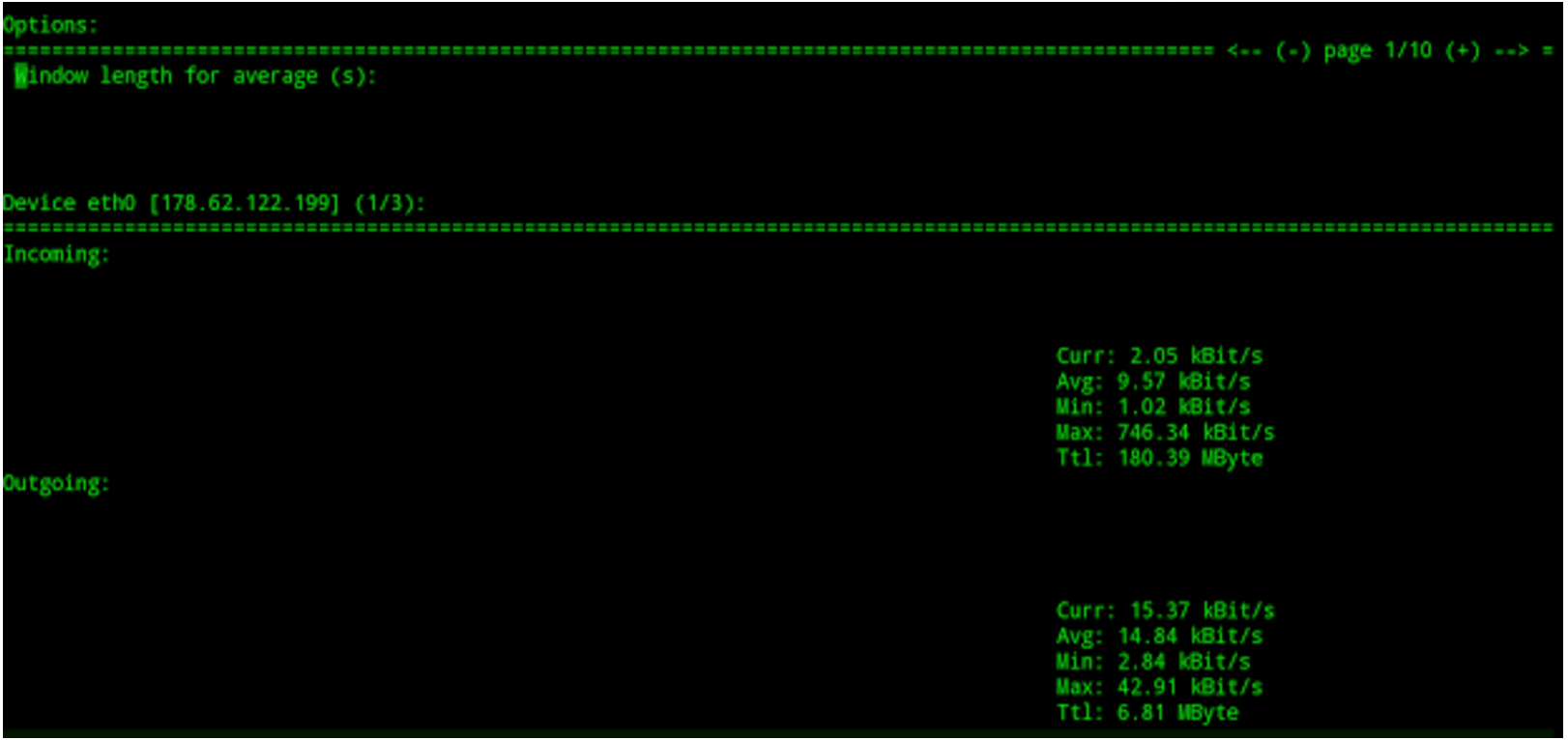
The results of such a command is the simple but useful output as shown in Figure 1.

Figure 1: The load on “eth0” interface using ingress and egress displays.

The ability to split a single console window into two parts, one half for ingress (inbound) traffic and the other for egress (outbound) traffic is clearly of significant use. The clarity you immediately gain is invaluable, especially if you’re trying to diagnose an attack of some description. Also shown in Figure 1, at the top, are the adjustable options to alter your display on the fly, without stopping nload in its tracks.

If we only wanted to focus on one specific network interface, then we could run nload as follows:

# nload eth1

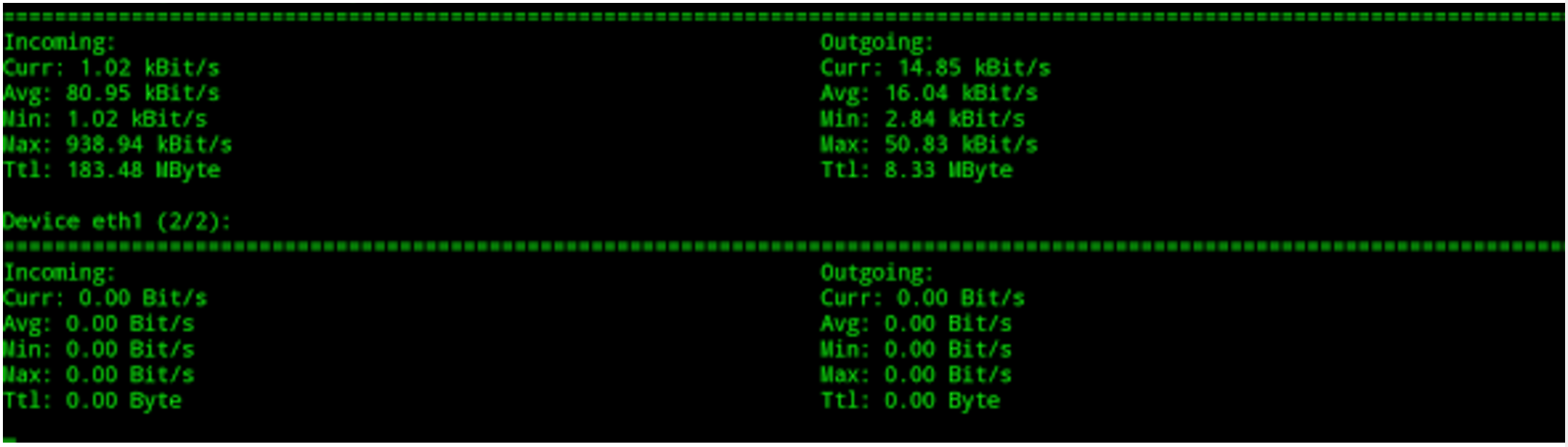
You can, however, add more than one network interface to the same console window for a useful comparison. In this case, we would use the following command:

# nload -m eth0 eth1

As you can see in Figure 2, this can give a useful insight into which of our network interfaces are under the highest load and without squinting at the output of a packet sniffing tool.

Figure 2: More than one network interface displayed at once.

Now that we’ve got an idea of how malleable nload is, let’s look at some of the configurations options available.

Refresh Frequency

Years ago, I remember debating the effectiveness of making your traffic statistics update faster than the default setting. Tools that use Simple Network Monitoring Protocol (SNMP), such as RRDTool and MRTG (and indeed tools that use the “pcap” library, such as iftop), use averages to populate the display you are presented with. In short, a quicker refresh frequency may lower the accuracy of the output from such tools. If you are interested in the intricacies of such a statement, I encourage you to read more about such matters online.

I mention this for good reason. Before we continue, one caveat is that the “screen refresh” frequency is a different animal altogether to the “averages” used during the collection of statistics. When it comes to nload, however, the two are separated for clarity (unlike with other applications). The clever author keeps things simple, which is very welcome.

From what I can tell from the manual, the “-a” option is for changing the period used for measuring “averages,” which (I am guessing) affects the calculations behind the scenes. The refresh frequency, however, is for “screen display,” in terms of tweaking it to suit your display needs as we’ve just mentioned. Both ultimately relate to how the majority of real-time statistics are collected and then displayed between them. In case it causes confusion with nload, the screen refresh period is referred to as the “refresh interval.”

The manual goes to some length to explain that lowering the refresh interval to less than the default 500ms is not that wise. It states: “Specifying refresh intervals shorter than about 100 milliseconds makes traffic calculation very unprecise.”

This confirms my experience with other traffic collection software, too. The sophisticated nload goes on to reassure us with this additional comment: “nload tries to balance this out by doing extra time measurements, but this may not always succeed.”

I couldn’t confirm what its exact effect is on other settings, but within the Options Window (the box seen at the top of Figure 1), there is a “Smoothness of  average” setting, which you may have some success in changing to affect your accuracy. Fear not, following some trial and error, you shouldn’t have too many problems now that you’re armed with the terminology and the difference between the two key adjustable parameters.

Battle Hardening

When I’m learning a new tool, I tend to run a few tests between machines and monitor how the tool reacts at both ends of a connection — to avoid a few headaches. Usually, I would send a small amount of data, stop and start the connection, and then try and saturate the network link (or at least put it under significant levels of stress) and repeat this a few times.

Coupling your new-found knowledge of how a tool will ultimately react to differing scenarios — having tuned the refresh frequency (and potentially the averages used for traffic calculations) to suit your needs — is the best way to battle-harden a tool in my experience.

In the next article, I’ll look at some specific examples of launching nload with various options.

Chris Binnie is a Technical Consultant with 20 years of Linux experience and a writer for Linux Magazine and Admin Magazine. His new book Linux Server Security: Hack and Defend teaches you how to launch sophisticated attacks, make your servers invisible and crack complex passwords.

Advance your career in system administration! Check out the Essentials of System Administration course from The Linux Foundation.

Jennifer Cloer on Working with Linus Torvalds, Open Source and Women in Tech

“I’ve had the opportunity to be at the forefront of some of the most disruptive technologies in the history of computing, it’s an amazing and unique experience,” said Jennifer Cloer, former Director of Communications at the Linux Foundation.

I have known Jennifer Cloer from the very early days, even before the Linux Foundation was formed. She is among the most influential women in the tech world, especially in the open source world. I have been planning to start a series of interviews of those women who made it into CIO’s most influential women in Tech list. When I approached Jennifer, I learned about a development in her career that made this story even more interesting. Cloer is moving out of the Linux Foundation and venturing into a new world of her own.

Read more at CIO.com