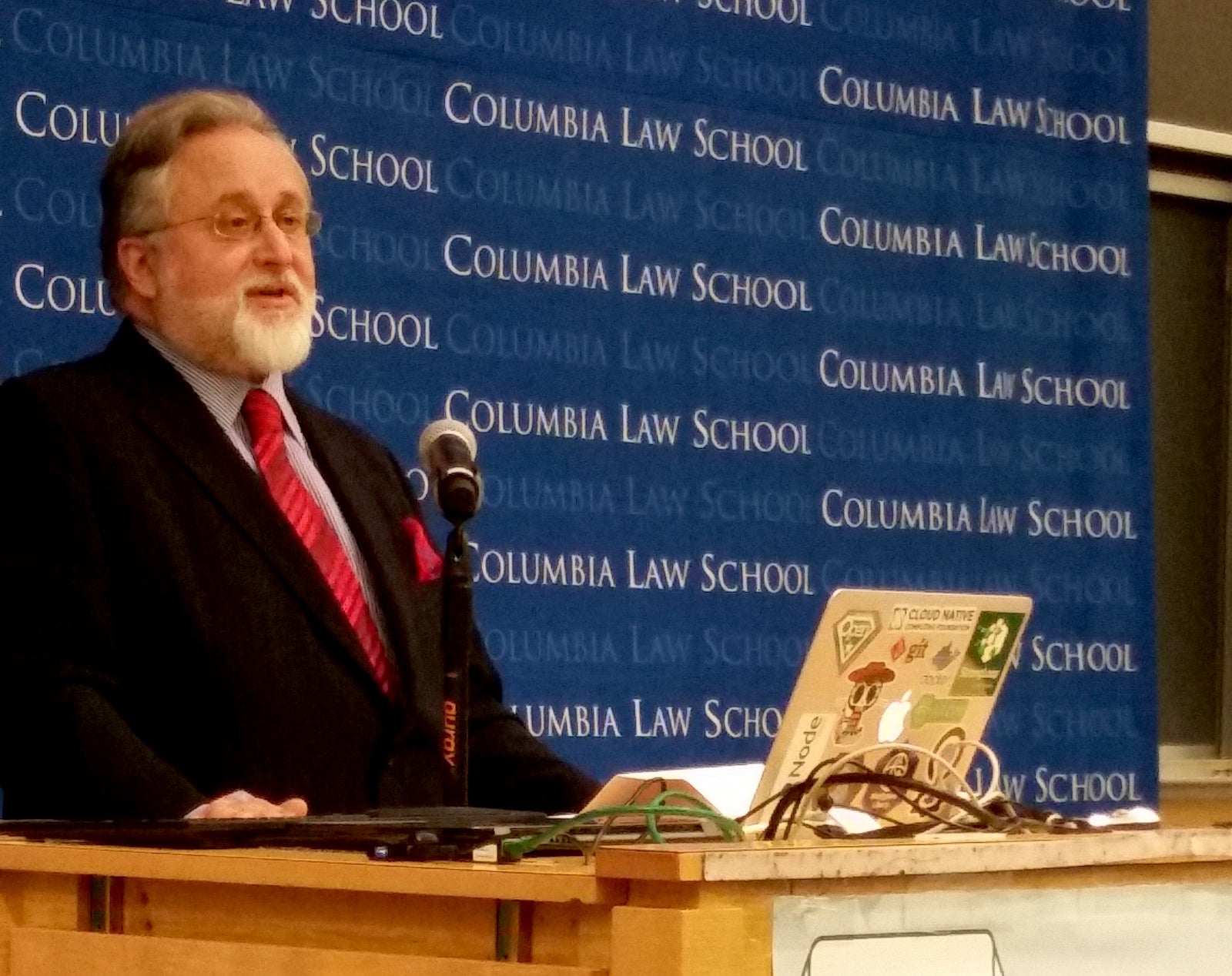
Software Freedom Law Center, the pro-bono law firm led by Eben Moglen, Professor of law at Columbia Law School and the world’s foremost authority on Free and Open Source Software law held its annual fall conference at Columbia Law School, New York on Oct. 28. The full-day program featured technical and legal presentations on Blockchain, FinTech, Automotive FOSS and GPL Compliance by industry and community stalwarts.
The program culminated in remarks by Moglen that highlighted the roles of engagement and education in building effective, ever-lasting communities. While expressing his gratitude to his colleague, friend and comrade Richard M. Stallman, Moglen emphasized the positive message relayed by Greg Kroah-Hartman and Theodore Ts’o –earlier in the day– for creating win-win solutions and spreading users’ freedom.
Here is a video and the transcript of his remarks.
Transcript:
I know that the very worst thing you can do is to assign yourself the speech between the end of the conference and the drinks. The only sensible use for this time is the thanks, which I will of course get to in just a moment. I am going to trench upon your patience just for a little while for some substantive thoughts that this afternoon raised for me.
As you can see, I have had a plan for today, which was a plan about how the law of free software interacts with the technical future. There was a particular point, which was to discuss not just blockchain in itself, but the nature of the coming change in how we think about data that we share. I wanted to point to the software engineering consequences of that change for free software itself.
The other subject that we have been talking about today—which I think is crucial to the combination of ideas we have presented here—is the particular form the discussion about copyright compliance and license violation has now entered. I wanted to talk to you about this subject even before some events I referred to this morning, which have brought it into yet sharper relief for me.
We are not and we never were copyright maximalists. We did not do what we have been doing for the past 30 years to build free software on the basis of the assumption that freedom required us to chase down and punish everybody who ever made a mistake or who even deliberately misused copyrighted software made for sharing.
When I began to work with Richard Stallman in 1993, GPLv2 was 18 months old. And although I had been thinking about what all of this meant for some little while, I was working on making the world safe for public key encryption, so the free software copyright licensing system was something of which I was only dimly aware.
And in the course of the first crypto wars, Richard Stallman contacted me, said he had a problem and could I help him with it. And I said, “Yes. I use emacs every single day, and it will be a very long time before you exhaust your entitlement to free legal help from me.”
So I went and did what he needed done, and then I thought to myself, “this is the most important place for a lawyer to work right now.”
“If I could just sit on Richard Stallman’s email stream and have him send me what he thinks needs a lawyer—because anybody in the world who had a problem that involved freedom and computers knew one email address, and that was rms@gnu.org—pretty soon I could figure out what it was that actually needed doing.”
Very rapidly I realized that what needed doing was getting people to spontaneously comply with law instead of having to fight them each and every time.
Spontaneous compliance is the only conceivable way to run a legal system, I must tell you. The United States is a country with an extraordinary amount—apparently—of complaining about taxes every four years or every two. But every year, Americans pay their taxes, and they don’t do it because they see crowds of people sent to jail. They do it because spontaneous compliance is the way law really works.
The problem of legal engineering which presented itself to me in 1993 and the problem we are still talking about this afternoon is how to ensure spontaneous legal compliance, not how to figure out an adequate degree of coercion which will make an adequate degree of compliance at the other end.
The fundamental problem as it presented itself to me in 1993 is the problem as it still presents itself to me now. Coercion does not work if you have to do so much of it that you can’t afford it. And coercion only works so long as you never lose any fight anywhere, which is why you have to keep equipping your police with bigger and bigger guns and there is always the risk that they will use them.
I did not want then and I do not want now to pretend that the way that we secure compliance with copyright law with respect to free software is by chasing down people and making them comply.
It is important every once in a while to set an example. Therefore it is important every once in a while to declare that you’re in a last- resort situation, and there’s nothing else that you can do but to resort to litigation.
I understand that, at the present time, there are a large number of people who are living in that expanding boundary of free software use and redistribution that we have all been talking about. Given where they work—the particular software they work on, the particular forms of downstream use that are most important to them—they run into infringement situations in this outer boundary area, and they therefore believe that everybody in the world doesn’t get it about free software, and even that everybody in the world is a crook and that everybody in the world is trying to steal free software and make bad use of it.
What I thought was so important about Greg [Kroah-Hartman] and Ted [T’so] and the point that they came here to make today was this: they say that if you are sitting in the middle of the single most commercially valuable free software project in the world, and you have thousands of people helping you to make it, fighting with every single infringing person is not the way to win.
Converting every single person is the way to win. Fighting can only conceivably be valuable if it is on the way to converting people. It cannot possibly stand on its own.
I have some fine clients and wonderful friends in this movement who have been getting rather angry recently. There is a lot of anger in the world, in fact, in politics. Our political movement is not the only one suffering from anger at the moment. But some of my angry friends, dear friends, friends I really care for, have come to the conclusion that they’re on a jihad for free software. And I will say this after decades of work—whatever else will be the drawbacks in other areas of life—the problem in our neighborhood is that jihad does not scale.
What we have been hearing this afternoon from the lawyers I have been friends and colleagues and occasional professional adversaries with over these decades is that in the industrial use of free software scale is what matters. And we on our side in the community of free software makers have to understand that scale is what matters to us too.
The problem with jihad is not that it’s not virtuous or that making people obey the rules is somehow wrong. I like policemen and police forces a lot. But I know that the amount of policing necessary to produce perfect compliance is an amount of policing we can neither afford nor tolerate in the society where we live.
So regrettably, I have to draw some factual conclusions to your attention:
First, if at any time in our long association over the past 23 years—this century, last century, it doesn’t matter: If Richard Stallman and I had gone to court and sued a major global public company on a claim of copyright infringement that was weak enough to be thrown out of court on a motion to dismiss, we would have destroyed the GPL straightaway. If we had shown that we were prepared to risk large on coercion, even against a bad actor in our own judgement—if we had done that without adequate prepa- ration to be sure that we won—we would have lost an example of coercion and nobody would have trusted us again. I did sue people. It’s true.
Greg referred to the way in which when the busybox developers thought they wanted to start suing and I did it for them, the results may not have been the ones they most wanted. That happens with clients all the time, particularly clients who go to court: They get something which is not quite what they wanted. But I thought that it was important then because busybox was being embedded in everything. And in the moment at which we were then living, in which the frontier of use and redistribution was expanding so rapidly, it seemed to me that it was necessary to get people’s attention.
And I thought then, as I think now, that the people whose attention you need to get are the people who don’t pick up the phone when you call them.
We thought that people you can’t contact, people you can’t get to answer the phone, people who will never spontaneously comply—they won’t even answer your mail—may be the right people to make an example of.
But on the night before we filed the busybox cases in 2009, I chased down in Japan at 2:00a.m. the general counsel of one of the organizations we were going to sue the next day—a very large very powerful, very reputable company.
And I said to him, “If you give me your personal assurance that you’re going to fix this problem, tomorrow you will not be sued. I will take your word for it. Nothing more.”
And he said yes, and I said yes. And they were not sued the following day because all we wanted was for people to pay attention and bring their engagement to the party. Even at that level, too much coercion—and we are still arguing about whether that was enough or too much—too much coercion was surely not what I wanted to apply.
Second: If when Scott and Terry and their colleagues at IBM and Hewlett- Packard first began to come to free software, when they first wanted to recommend it and use it and maybe even distribute it themselves or encourage other people to distribute it for them, we had criticized them for not being non-profit virtuous enough, if we had said “we are suspicious of you,” let alone if we had threatened, “one step over the line buster and we will sue you”—everything else that we wanted to do would have become impossible immediately.
If we had not acted as Greg and Ted said that they must act on behalf of the great project that we all love, if we had not welcomed everybody with open arms and made clear that the commercial exploitation of the software was our hope not our fear, we would have achieved absolutely nothing that really mattered to use about freedom.
Third: We spent years scrupulously getting work-for-hire disclaimers from every business and every university that employed or educated a contributor to GNU. Every time we took a right, we took a disclaimer to be sure. If there was any question that anybody needed to be contacted, we negotiated those disclaimers as long and as carefully as it took. The people who gave us work-for-hire disclaimers, they didn’t “get” free software, I assure you. They were simply being asked to say that it wasn’t work-for-hire, that some programmer who worked for them was working on a project in her or his spare time.
But suppose we hadn’t gotten those disclaimers—suppose we hadn’t proved to everybody that we were not trying to solicit rights on which they had a claim—if we had, for example, gone around and asked people to give us rights and software they had written while working at other companies, without every talking to those company’s lawyers. In that case not only would we have destroyed all trust, not only would we have made it absolutely impossible to achieve what we really wanted, I would have put my law license in danger. I think that all three of those are uncontroversial propositions.
But in case you’re inclined to doubt any of those propositions, I have to tell you that people in my world, people in my neighborhood, people in my movement, people in many cases whom I trained, have conducted those same experiments over the last two years. The results have not been any different than I would have expected. We have created for ourselves some troubles. And there are other people out there creating troubles for us.
Here [shows slide] is a current NSF funding solicitation for a free software-intended project. NSF is in fact soliciting a research funding application from a client of mine which makes free software. And this solicitation is designed to support them. Except it isn’t, because they’re a GPL’ed project:
All projects agree to distribute all source code that has been authored while working on an NSF/BigCorp award under a BSD, Apache or other equivalent open source license. Software licenses that require as a condition of use, modification and/or distribution that the software or other software incorporated into, derived from or distributed with the software be licensed by the user to third parties for the purpose of making and/or distributing derivative works are not permitted. Licenses not appropriate thus include any version of GNU General Public License (GPL) or Lesser/Library GPL (LGPL), the Artistic License (e.g., PERL), and the Mozilla Public License.
Don’t even think of applying for research funding if you’re going to make copyleft free software.
Now if you think that that’s a little much, how about this, from the same solicitation?
Awardees may file patent applications, providing that they grant to BigCorp a non-exclusive, worldwide, royalty-free, sub-licensable license to all intellectual property rights in any inventions or works of authorship resulting from research conducted under the joint award. So, as it turns out, not only can you patent some software here but all your intellectual property rights—that is including your copyright since it’s all works of authorship—will be non-exclusively licensed to Big Corp. I have changed Big Corp’s name to protect the theoretically innocent.
This is a current DARPA funding solicitation also for a project that makes free software:
The program will emphasize creating and leveraging open source technology and architecture. Intellectual property rights asserted by proposers are strongly encouraged to be aligned with non- viral open source regimes. Exceptions for proprietary technology will be considered only in compelling cases. Make sure to carefully document and explain these reasons in submitted proposals.
Once again, you are strongly urged to make wonderful open source software under this award. Don’t think of using copyleft. We don’t want you to. So have to put a special explanation in the grant request, which is of course equivalent to “thanks but no thanks.”
This I must tell you: if you want to talk about curing cancer, cure this for me. This is more dangerous than all the copyright infringement by accident or de- liberation occurring out there in the free software world right now. This will make copyleft wither away.
Because throughout the research infrastructure in this wonderful great country of ours, if copyleft is not allowed, then a whole generation of the most talented people we work with will come to the conclusion— before they get their BA, before they get their doctorate, or before they decide to go and do something in industry—they will already have concluded that there is something wrong with copyleft and you shouldn’t use it.
I don’t know any way to sue this out of existence. I don’t know any way to deal with this militarily. This is a diplomatic challenge. This is a diplomatic challenge that requires lawyers who know how to do this work, which is not done by lawyers who sue people.
It is not about coercion. It is not even about encouraging people to convert. It’s about reversing a problem that we have partially brought on ourselves and which other people are taking advantage of “bigly,” if you ask me.
This is where the limits of counseling meet the limits of coercion: the real answer is that you have to have a great big ecosystem and everybody has to believe in it. Or else you have to have as many lobbyists as BigCorp, and they have to be spread all over the research infrastructure, assuring copyleft’s future.
So what I want to say about all of this is that we are now at a turning point. The good news of today is that this turning point should carry us all from the stages of fear and compliance to the stages of engagement and leadership. We are now actually ready. I don’t mean ready plus or minus three years or ready plus or minus the regulators of fintech. I mean we are ready now with, SPDX and OpenChain and better tooling and Debian machine-readable copyright files that read on everything that everybody really uses. We are ready to begin to reduce the costs of compliance and lowering the costs of finding how to comply, to a level which really will allow us to do what Greg and Ted were talking about: country-by-country and commercial environment- by-commercial environment all around the world, making things just work.
I remember how much Nokia admired Apple for the just-works zen of it all. I agree with [Jeremiah Foster] that it is awfully good that we got their Maemo development off the floor and into things like cars, because it was wonderful stuff. I’m not going to tell stories now about how hard it was to try to get Nokia not to fly into the side of the mountain with that stuff back in 2010. It was a sad experience.
But what we have now is the opportunity to avoid all the evolutionary dead ends that ever beset us.
We have an opportunity to put this free software where we want it, which is everywhere, and to make it do what we want, which is to spread freedom.
We’re not in a place where the difficulty is how do we get enough ammunition to force everybody to comply.
We don’t need ammunition.
We need diplomacy.
We need skill.
We need to work together better.
We need to understand how that working together purposively brings us to the point where everyone is not afraid of FOSS anymore and we are not worried about their complying anymore.
We are just all engaging and leading the task of making free software.
But I have to convince a lot of people of that, and not all of them are on the so-called other side.
That process is going to be a complicated one It’s going to take a couple of years. We have some backing up to do and some moving forward to do at the same time. And although anarchism is good at moving in many directions simultaneously, it is not always good at understanding where it has to back up and where it has to move forward.
But this will make us.
Because the long-term threats to copyleft are not to be found in people who aren’t doing it quite right. The long-term threats to copyleft are not to be found in the idea that too many people are getting away with too much and we have to go and get on our motorcycles and run them down and pull them over to the side of the road and give them a ticket. That’s simply not the model that is relevant right now. And not everybody fully understands that.
So from my point of view, the purpose of today—with blockchain, and thinking about what the lawyering we’ve all done for decades means, and the purpose of talking to the clients about what they really need—is to make the point that we are not going to war to save the GPL.
That’s not where we are right now. We’re not even going to war to save copyleft right now. We are certainly not going to war to save any projects right now. That’s just destroying the village in order to save it. And we’ve never been that kind of lawyers. And we’re not going to become that kind of lawyers.
What we do have is a real problem in deciding how to make copyleft relevant forever. There are a lot of smart people in this room who in their quiet moments face- to-face with me or with other people here have been known to say, ”You know, I think copyleft might be becoming irrelevant now.
”It was good. It put some principles deep in everybody’s minds. It gave everybody a real sense about what our aspirations are.
“But from an operational point of view, we don’t need it anymore.”
I fear that copyleft’s most powerful supporters have helped to bring people to that conclusion. The purpose of today—even before news reached me from the outer world—the purpose of today was to say that’s also not where we are.
Where we are is: copyleft is a great idea that changed the world. It needs refreshment now in order to appeal to a younger generation of people who write programs for sharing.
In order to make it appeal to those people who write programs for sharing, we need to make it simpler to use, quicker to understand, and better at doing all the jobs it’s supposed to do. And we need to refrain from going unnecessarily to war.
The lessons that we learned over the last quarter century are still good: That way won’t work. I agree with the people who have suggested that if a campaign of coercive compliance is carried just a moment too far, willingness to use copyleft among the rational businesses of the world will decline to a point which is dangerous to freedom, because I do believe that copyleft is important to freedom.
Indeed, I think it’s crucial to freedom. Indeed, that’s what I was taught by the greatest computer programmer I’ve ever known.
So my point here—if it’s okay just to have a point when people should already be drinking and dancing—my point is let’s not get confused. This is not war time. This is diplomacy time. Skill counts. Agility counts. Discretion counts. Long credibility counts. Ammunition? Ammunition is worthless because wherever we fire it, we work everywhere and it’s only going to hit us.
*****
Now I don’t have to keep us much longer, because what is left is thanks. My thanks of course begin with the people I work with, without whom all of this would not be possible.
I’ve trained a lot of lawyers, and I choose carefully whom I work with, or at least I believe I do, which means I’m right about half the time.
But with Mishi I am right 100% of the time. I have a legal director and a law partner and a partner in policy-making around the world who teaches me every single day, and who I deeply believe will be here when I have fallen under the bus. There’s no kind of gratitude like the gratitude of knowing that you’ve got a partner who’s got your back.
To Daniel Gnoutcheff, who has spent all day long making everything work. Daniel’s job is running our network and keeping our firewall up and keeping the NSA out and easy stuff like that. When I say to him, “so you’re a multimedia guy and you’re running a conference, and everything will work and the stream will be perfect and we will do free software video streaming and live audio,” he says, “Okay, that’s true.” You understand why I need to thank him particularly. I saw him leave our internal IRC channel this morning at 1:25a.m. and I thought, “he’s going to be back at 8:15?” Thank you.
Tanisha Madrid, who keeps our money and our time and who had to go and get her two kids after she had to go and drop them off this morning on the way in order to be here at 8:15a.m. too—she won’t be on the stream, but my deepest thanks.
To my associate Daniel Byrnes, who is now learning the trade with us and who is still a really good front-end HTML5 programmer and therefore helps me with what we need to do in that respect.
To Alice Wang and our other apprentices and hangers-on and people who have helped today, I can’t tell you how important it is that we can just do a thing and people will turn up and help.
All of that is part of what I need to say. Now, I am a guy who needs a personal assistant. I have gotten to the stage where I really am quite incompetent in the world. Michael Weholt came to me earlier this fall, and I think he thought that he could probably do the job. And then we said, “Oh and by the way, you’re putting on a conference.” And he said, “well I’ve never put on any conferences, but as long as it’s not the Academy Awards.” And of course it isn’t the Academy Awards, although here I am talking at midnight. Michael deserves a special round of thanks because he was worried as hell about it and he’s made everything work.
Once again to Keith Bergelt and OIN and to David Marr and Qualcomm Technology Industries, I’m grateful for particular support in making sure that there was sufficient free food and will be sufficient free beer.
But I do have one more thing to say; I do have one more kind of thanks to offer. And they are to me the deepest—and today at least—the most moving thanks of all. I cannot stand here before you without ending with my thanks to Richard Matthew Stallman. He invented the world I live in.
Years ago, Larry Lessig said that Richard Stallman had invented the twenty-first century. And I said, well, that may or may not be true, but any twenty-first century Richard Stallman did not invent is a twenty-first century I won’t consider it safe to live in. And that’s still true.
To my comrade, to my client, to my friend Richard Stallman: my deepest and most determined thanks. There is nothing, nothing in the world, that could ever divide us as much as we have been brought together by the dream that we have shared and that we continue to give our lives to. It could not have happened without one man’s thinking.
At Red Hat, there used to be—back in the old days before the Progress Energy Tower and all the wonderful things that have followed from Red Hat’s commercial success, back when it was just barely not Bob Young’s and fully Matthew Szulik’s—there used to be up on the wall in the reception area a painted motto. It said “Every revolution begins as an idea in one man’s mind,” which is a quotation from Ralph Waldo Emerson.
And deep in the American grain—as deep in the American grain as Ralph Waldo Emerson himself—is Richard Stallman, whose dream it was that made the revolution I’m still trying to kick down the road towards some finish line or other I won’t live to see. To him, to you, to all of us—to the people who have made this stuff, to the people who have shared the stuff, to the people who have rolled up the barbed wire and carried it away so we could all just do the work and not have to worry about it—to my friends, to my clients, to the lawyers who have inspired me to teach them, my deepest and most unending gratitude.
Thank you all for coming. Thank you for being here. Thank you for considering coming back, when next year, as Greg Kroah- Hartman says, we’ll talk about free software licensing and machine learning.
Until then, happy hacking.