Home Blog Page 694

ROS: An Open Source Robotics Platform on Linux

ROS is an open source framework allowing you to create advanced robots. Using ROS takes much of the tedious work out of creating useful robots because it supplies code for navigation, arm manipulation, and other common robot tasks. ROS allows various software components to communicate between one or more computers and microcontrollers, and it allows you to control one or more machine robot networks from a desktop, web browser, and/or other input device. Although ROS stands for Robot Operating System, it is really a framework that sits on top of an existing operating system such as GNU/Linux. Packages are provided for Ubuntu Linux to help get your robot up and rolling.

The more ambitious your robot design becomes, the more ROS will be able to help you. For example, with ROS you can take a robot beyond manual control with a joystick and tell the robot to make its own way into the kitchen. The difference in complexity from the former to a robot that can create and use maps and avoid obstacles along the way is quite substantial. For example, joystick control of a robot can be set up fairly quickly just using an Arduino. For autonomous movement, ROS has map creation, depth map handling, and robot localization already available so you can use higher level “go to this place” commands.

A high-level overview

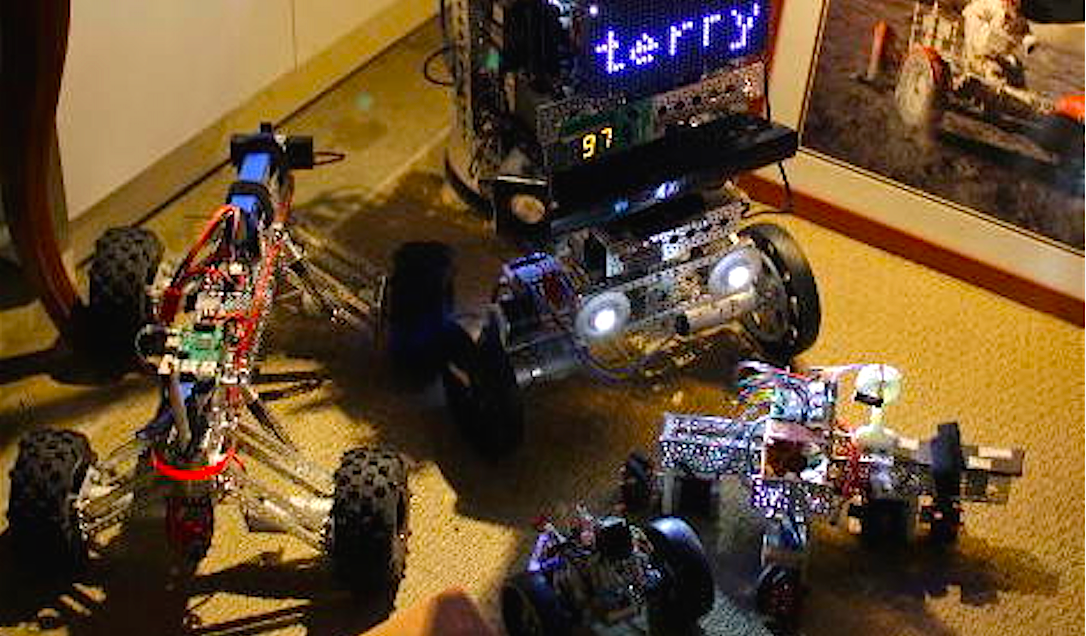
ROS provides support for a publish and subscribe message model using a namespace like a filesystem. A program can register one or more ROS nodes and these nodes can publish and subscribe to topics that are interesting to them. For example, you might have a ROS node that reads a USB camera and publishes the images to the “/camera” topic for the rest of your robot to enjoy. A small Arduino might subscribe to messages on “/clawpincer” and adjust the position of your robot claw based on messages that are sent to it. This separation of processing into nodes which send and receive messages on topics allows you to connect together specialized nodes to form an entire robot. The message passing helps to keep your nodes separate. A node might just display information on an LED screen without needing to know anything about the rest of your robot (Figure 1).
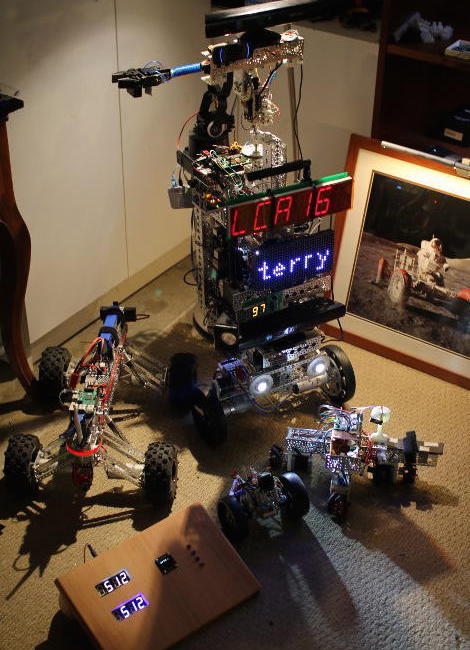
Figure 1: A node can display information on an LED screen.

Messages sent to topics can use basic types like integers, floating point numbers, times, durations, strings, and multidimensional arrays as well as some robotics specific types for example setting the desired drive speeds(s) and direction(s). You can also define your own custom message types.

A complex robot is likely to run many nodes, and starting things up in the right order can be a complex task in itself. ROS uses launch XML files to describe how and what needs to be started. A launch file can also include other launch files, so you can create a single command that will start your motor controller, cameras, navigation and mapping stack, displays, custom radio control software, etc.

The ROS MoveIt! software lets your robot use one or more arms to manipulate objects. MoveIt! integrates with ROS, detecting objects which might be temporarily blocking the most direct path that an arm might have otherwise taken to move to a given location.

A ROS node can be written in either C++ or Python. A partial example of publishing a message to a topic in ROS is shown below. The NodeHandle can be reused to send multiple messages; in this case, we are sending a single string to a topic that is specified using the template parameter to advertise(). Instead of passing a std::string to publish(), the ROS std::msgs type is passed.

ros::NodeHandle n;
ros::Publisher chatter_pub = n.advertise("chatter", 1000);
...
std_msgs::String msg;
msg.data = "hello world";
chatter_pub.publish(msg);

Part of a Python program that listens on the chatter topic is shown below. As you can see, the basic type is accessed through the “.data” element much as in the C++ publisher shown above.

def callback(data):
   rospy.loginfo(rospy.get_caller_id() + "I heard %s", data.data)
   
def listener():
   rospy.init_node('listener', anonymous=True)
   rospy.Subscriber("chatter", String, callback)

It is very useful for your robot to present a web interface offering both information and remote control. By starting the rosbridge_websocket package, you can send and receive ROS messages from JavaScript in the browser.

The following fragments set up a “ros” object for communication and, when a bootstrap form is completed, will send a message to the “/screen/textbig” topic so that the robot shows a given string to you. Although this example is simply showing text on the robot, you can also use sliders to alter the position of your robot arm or set waypoints in the web interface to have the robot move around.

var ros = new ROSLIB.Ros({
  url : 'ws://192.168.2.3:9090'
});

var topic_screen_text_big = new ROSLIB.Topic({
   ros  : ros,
   name : '/screen/textbig',
   messageType : 'std_msgs/String'
});
var screen_showBigText = function() {
   var txt = $('#screen-textbig').val();
   topic_screen_text_big.publish( new ROSLIB.Message({ data: txt }) );
}
// ...
<form class="form-inline" onsubmit="screen_showBigText()" action="#">
 <div class="row">
     <div class="col-md-2"><label>BIG Text</label></div>
     <div class="col-md-4"><input  type="text"   class="form-control"
          placeholder="" id="screen-textbig" /></div>
     <div class="col-md-1"><button type="submit" class="btn btn-default">Submit</button></div>
 </div>
</form>

When starting out in robotics, it might be tempting to dismiss robot simulators. Simulators are great for folks who don’t have the real robot; but if you have the robot, why would you bother simulating it? Some things might be seen as a cross-over between simulation and reality. For example, when building a map, you are taking data from a camera or lidar device telling you how far things are away from your real robot in the real world. You can then mark that in your map and move your real robot around a bit and take another reading of how far things are away in the real world. You might think of the map that you are building as a model or “simulation” of the real world, which is affected by data that is acquired from the real world (your camera or lidar). Another example might be that you want to see how an arm movement will look on screen before performing it in the real world. So, the line between robotic simulation and the real robot can become a grey area.

ROS has support for simulation using Gazebo and a robot visualization tool called rviz, which lets to see your robot, its map, where the robot thinks it is located, and other data that is sent around through ROS topics.

You will often want to know exactly where something on your robot is relative to the real world. Is the camera located at ground level or 2 feet above the ground? You’ll need to know if the arm is at the front or the back of the robot to work out how far you extend the arm to pick something up. ROS provides the TF framework so you can describe in XML the layout of your robot and then easily find out where things are located without having to perform complex calculations in your own code.

Moving a robot is done by publishing a Twist message to the “/cmd_vel” topic. The Twist message is rather generic and allows a speed and heading to be given for up to three axes. For a robot that operates by turning two wheels, you will only need to set a single speed and a single angle or heading. To provide feedback about movement, a robot base will publish Odometry information, which contains information about the current twist the robot is following and the pose of the robot. The pose allows a robot to show what direction it is facing as it is moving — handy for robots that can move sideways as well as backward and forward. It is also very useful to know if the robot is facing the door or has just entered through it.

Driving with no hands

For a robot to move to a desired destination by itself, many things are likely to be needed. A map of the walls and obstacles in the environment are needed, for example. Other requirements include knowledge of where the robot is on that map, some method to detect objects that block the path but that are not always on the map, a way to generate a plan to get to the destination from the current location, and a means to monitor exactly where the robot is as it moves towards the goal position. Being able to send messages to the robot base telling it what speed and heading to follow and then to monitor the odometry information as the robot moves allows control of the robot to be abstracted from how motion is achieved.

One fairly affordable method to build maps is using an “RGBD” camera, such as the Kinect, which offers both color and depth information in each image. Another way to work out depth information is by using two cameras that are a known distance apart, such as with a PlayStation camera or creating a similar setup using two normal web cameras in a fixed location. The Kinect is designed for indoor use in gaming and does not work well outside where there is a lot of background infrared light. Using two cameras can work both inside and outside but also requires light in order to see objects.

ROS has support for depth information from both the Kinect and PS4 eye cameras. For the latter, you will also need to resolder the PS4 eye cable to obtain a USB3 connection to it. Although I have seen successful modifications like this, you should be prepared to possibly damage or destroy some of your hardware if you undertake them.

Although cameras can provide information about how far objects are away in three dimensions, you might like to start navigating around by converting the information from the camera into a 2D representation. This is much less computationally intense, and ROS has good support for converting information from a Kinect to a “laser scan,” where the depth information is converted into a 2Dl representation of how far away objects are from the robot. The laser scan is then used by the gmapping package to generate a map of the environment. The Adaptive Monte Carlo Localization (AMCL) package can use the current laser scan and a rough idea of where the robot started to determine where the robot currently is located on a map. As the robot moves around a little bit, the initial location estimate is improved because more depth information from the real world helps work out the position of the robot relative to the map.

Final words

ROS is a very powerful robotics platform. That said, it does have a fairly steep learning curve. Some key tutorials would help ease new users into creating fully functional robots. For example, detailed instructions for the creation of an extremely cheap robot arm complete with a ROS package to drive it would provide a great base for customization for the robot arm you might have on your desk. It is often much simpler to customize the arm segment lengths in your robot arm model from an existing software package than to start from scratch.

On the other hand, ROS does allow a determined hobbyist to create a robot with mapping and navigation and be able to talk from JavaScript through to Arduino code running on one of many specific hardware controller boards on a robot.

 

Versions All the Way Down: Versioning Commits and Patches with Git-Series by Josh Triplett, Intel

https://www.youtube.com/watch?v=68XsuXlWiWU

Josh Triplett describes a new tool, git-series, to track both a patch series and its evolution within the same git repository. git-series works entirely with existing git features, pushes and pulls to any git repository, and tracks a cover letter to accompany the series.

Legends of Linux Part 1: Linus Torvalds

BERLIN: AS PART of our visit to LinuxCon this week we’re going to ask five key players in the Linux story the same 10 questions to get an idea of where Linux has been, where it is and where it’s going.

And who better to start with than Linus Torvalds, the often outspoken creator of Linux itself. Torvalds isn’t actually attending the celebrations this year, but was kind enough to chat to the INQUIRER by email.

What’s your first memory of Linux?
It’s really hard to say, mainly because it’s hard to pinpoint when the project became ‘Linux’. Trying to just figure out how the boot sequence worked took me ages. OK, realistically several weeks.

Read more at Inquirer

Kubernetes 1.4 Improves Container Security

The latest release of the open-source container orchestration technology adds new security features, including TLS bootstrap.

The open-source Kubernetes 1.4 release, which debuted Sept. 26, provides users with a host of enhanced security capabilities for container deployment and orchestration.

Kubernetes originated at Google and is now part of the Cloud Native Computing Foundation, benefiting from the contributions of multiple vendors.

Among the new features in Kubernetes 1.4 is TLS bootstrap, which is designed to improve the use of encryption for data in motion across a cluster. TLS (Transport Layer Security) is widely used on the internet today for encryption.

Read more at eWeek


Reinforcement Learning in R: An Introduction to Dynamic Programming

Reinforcement Learning is an approach to learning that attempts to maximize a cumulative reward based on a set of actions and states. The techniques are very popular within operations research and control theory. It does not fall under the traditional paradigms of supervised or unsupervised learning because correct inputs/outputs are never provided. The algorithm is instead presented with some notion of doing well or poorly at each step.

There are several different methods for optimizing a reinforcement learning problem; I will be focusing on Dynamic Programming. Dynamic programming (or DP) is a powerful optimization technique that consists of breaking a problem down into smaller sub-problems, where the sub-problems are not independent . This is useful both in mathematics (especially fields like economics and operations research) and computer science …

Read more at 126Kr.com

Linux Kernel 4.8 Officially Released, Merge Window for Kernel 4.9 Now Open

Today, October 2, 2016, Linus Torvalds proudly announced the release and availability for download of the Linux 4.8 kernel branch, which is now the latest stable and most advanced one.

Linux kernel 4.8 has been in development for the past two months, during which it received no less than eight Release Candidate (RC) testing versions that early adopters were able to compile and install on their GNU/Linux operating system to test various hardware components or simply report bugs. That’s right, the Linux 4.8 kernel series was one of those special ones that received that eighth Release Candidate.

A lot of things have been fixes since last week’s RC8 milestone, among which we can mention lots of updated drivers, in particular for GPU, networking, and Non-Volatile Dual In-line Memory Module (NVDIMM),…

Read more at Softpedia


Systemd Bug Allows Ordinary User to Crash Linux Systems

The systemd project is yet to release a fix for a bug that was disclosed on 28 September but at least one GNU/Linux distribution has patched the same.

The bug, allowing a user to crash a system by using a short command as an ordinary user, was disclosed by a developer named Andrew Ayer.

After running this command, according to Ayer, “You can no longer start and stop daemons. inetd-style services no longer accept connections. You cannot cleanly reboot the system. The system feels generally unstable (e.g. ssh and su hang for 30 seconds since systemd is now integrated with the login system).”

Read more at ITWire

Cloudera, Hortonworks, and Uber to Keynote at Apache Big Data and ApacheCon Europe

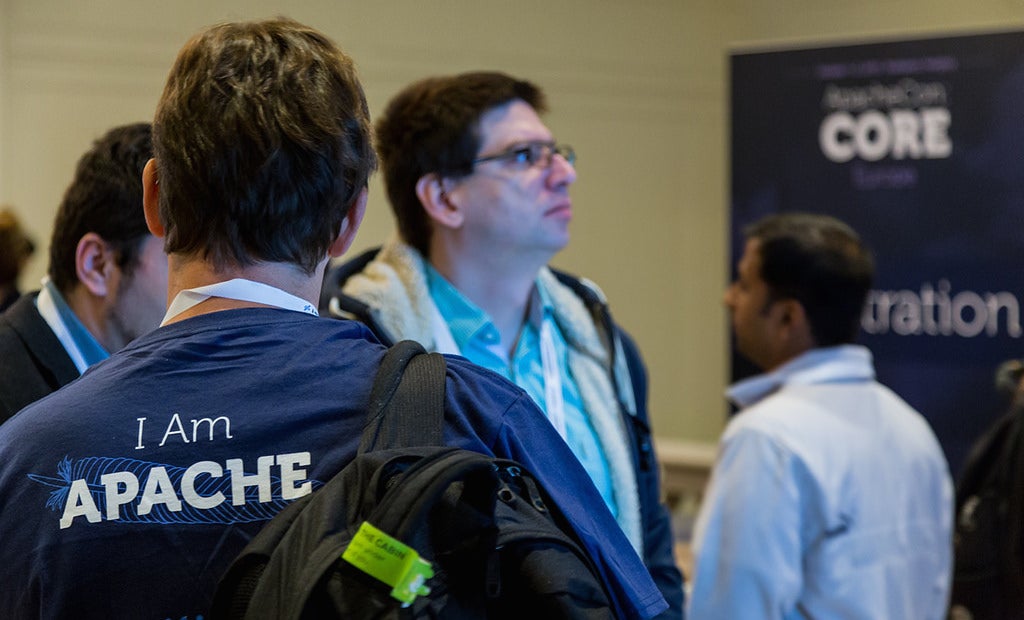
Leading open source technologists from Cloudera, Hortonworks, Uber, Red Hat, and more are set to speak at Apache: Big Data and ApacheCon Europe, taking place Nov. 14-18 in Seville, Spain. The Linux Foundation today announced keynote speakers and sessions for the co-located events.

Apache: Big Data Europe, Nov. 14-16, gathers the Apache projects, people, and technologies working in Big Data, ubiquitous computing and data engineering, and science to educate, collaborate, and connect in a completely project-neutral environment; it is the only event that brings together the full suite of Big Data open source projects including Apache Hadoop, Cassandra, CouchDB, Spark, and more.

The event will feature more than 100 sessions covering the issues, technologies, techniques, and best practices that are shaping the data ecosystem across a wide range of industries including finance, business, manufacturing, government and academia, media, energy, and retail.

Keynote speakers at Apache: Big Data include:

  • Mayank Bansal, Senior Engineer, Big Data, Uber

  • Stephan Ewan, CTO, Data Artisans

  • Alan Gates, Co-Founder, Hortonworks

  • John Mertic, Director, Program Management, ODPi

  • Sean Owen, Director of Data Science, Cloudera

View the full Apache Big Data schedule.

Registration for Apache: Big Data Europe is discounted to $499 through October 3. Register Now! Those interested in also attending ApacheCon can add that to their Apache: Big Data registration for only $399. Diversity and needs-based scholarship applications are also being accepted. Apply now for a scholarship.

ApacheCon

ApacheCon, Nov. 16-18, is the annual conference of The Apache Software Foundation and brings together the Apache and open source community to learn about and collaborate on the technologies and projects driving the future of open source, web technologies and cloud computing.

The event will contain tracks and mini-summits dedicated to specific Apache projects organized by their respective communities. In addition, ApacheCon Europe will host complimentary tracks, including Apache Incubator/Innovation, Future of Web, and Community, as well as hackathons, lightning talks, and BarCampApache.

Session highlights include:

  • Building a Container Solution on Top of Apache CloudStack – Paul Angus, VP Technology & Cloud Architect, ShapeBlue

  • Practical Trademark Law For FOSS Projects – Shane Curcuru, VP Brand Management, The Apache Software Foundation

  • Building Inclusive Communities – Jan Lehnardt, Vice President, Apache CouchDB

  • Building Apache HTTP Server; from Development to Deployment – William Rowe, Jr., Staff Engineer, Pivotal

  • If You Build It, They Won’t Come – Ruth Suehle, Community Marketing Manager, Red Hat

View the full lineup of ApacheCon sessions.

Registration for ApacheCon is discounted to $499 through Oct. 3. Register Now! Or Apply for diversity and needs-based scholarships. Those interested in also attending Apache: Big Data can add on that event for an additional $399.
 

This Week in Open Source News: Hyperledger Plays Key Role in IBM Revenue, Open Source Industry Standards Debate, & More

This week in open source and Linux news, IBM’s CEO explains the importance of blockchain at SWIFT’s Sibos conference, and more! Get up to speed with this handy, weekly digest: 

1) IBM CEO says blockchain initiatives, like The Linux Foundation’s Hyperledger Project, play a “key role” in the company’s revenue.

IBM’s Ginni Rometty Tells Bankers Not To Rest On Their Digital Laurels– Forbes

2) “The problem with open source standards aren’t that they’re boring; it’s that they’re largely the same as the proprietary standards that preceded them.” writes Matt Asay.

Open source is Not to Blame For a Lack of Industry Standards– TechRepublic

3) The Linux Foundation’s new OpenStack MOOC is offered for free via edX.

The Linux Foundation and edX Roll Out a Free OpenStack Course– OStatic

4) “The Linux Foundation’s OPNFV project claims its third platform release targets accelerating development of NFV apps and services.”

OPNFV Colorado Platform Bolsters Open Source NFV Efforts– RCRWireless

5) Linux Foundation sysadmin weighs in on why the system needs a “total rethink.”

Unsafe at Any Clock Speed: Linux Kernel Security Needs a Rethink

How to Effectively and Efficiently Edit Configuration Files in Linux

Every Linux administrator has to eventually (and manually) edit a configuration file. Whether you are setting up a web server, configuring a service to connect to a database, tweaking a bash script, or troubleshooting a network connection, you cannot avoid a dive deep into the heart of one or more configuration files. To some, the prospect of manually editing configuration files is akin to a nightmare. Wading through what seems like countless lines of options and comments can put you on the fast track for hair and sanity loss.

Which, of course, isn’t true. In fact, most Linux administrators enjoy a good debugging or configuration challenge. Sifting through the minutiae of how a server or software functions is a great way to pass time. But this process doesn’t have to be an exercise in ineffective inefficiency. In fact, tools are available to you that go a very long way to make the editing of config files much, much easier. I’m going to introduce you to a few such tools, to ease some of the burden of your Linux admin duties. I’ll first discuss the command-line tools that are invaluable to the task of making configuration more efficient.

Let’s begin.

diff

If you’ve never used the diff command, you don’t know what you’re missing. The gist of diff is simple: It compares one file against another and displays the differences. Let me explain.
Say you have two files. File1 has the contents:

<Directory “/var/www”>

     AllowOverride None

     Require all granted

</Directory>

File2 has the contents:

<Directory “/var/www/html”>

     AllowOverride None

    Require all granted

</Directory>

If that’s all those two files contained, it would really simple to open them up and see the diff. But what if those lines of code were buried within thousands of other lines and interspersed with comments and other options? All of a sudden, that task becomes a bit more daunting.

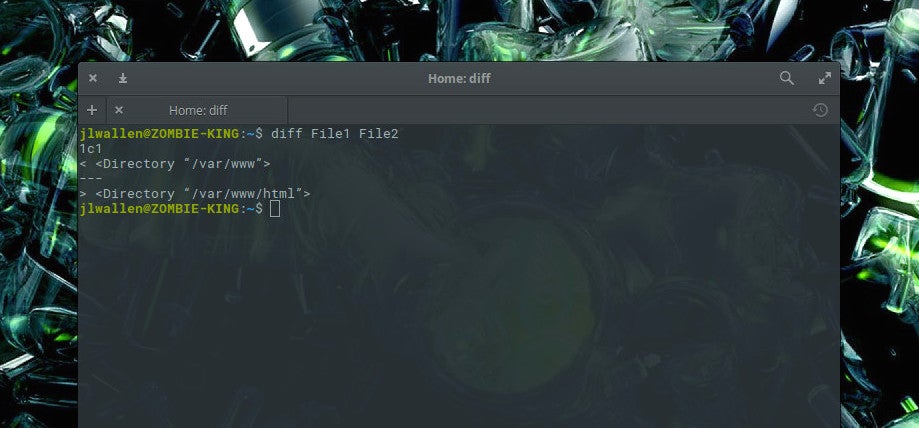
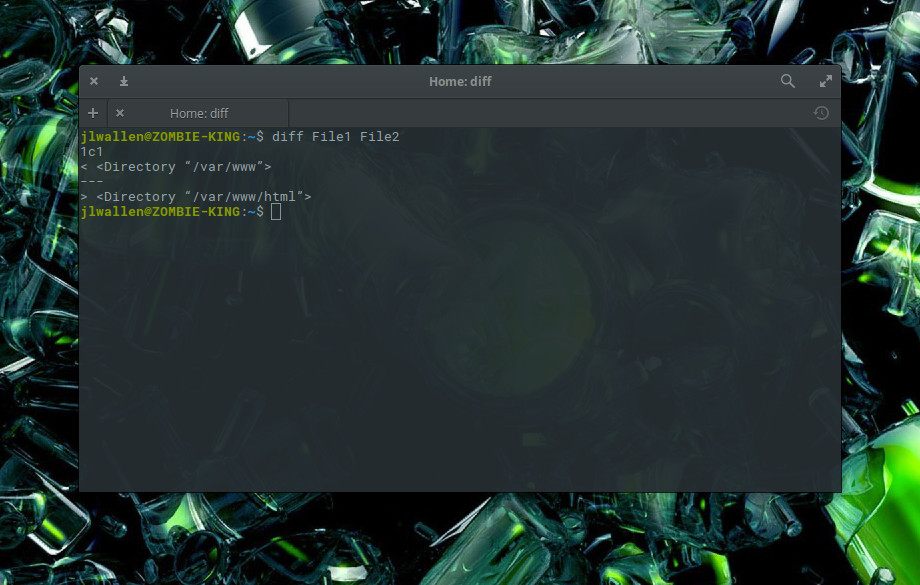
Thanks to diff, we can find these differences easily. If we open up a terminal and issue the command diff File1 File2, we’ll see the output clearly displaying the differences (Figure 1).

Figure 1: The diff command outputting the variances between File1 and File2.

What you want to look for are the letters a, c, and d, where:

  • a means something was added

  • c means something was changed

  • d means something was deleted

In this example, you see 1c1, which means line 1 was changed in the second file.

The diff output is a bit cumbersome because it was actually intended to be read by the system, not humans. The intention of diff is to show what would need to be done to the files to put them in sync with one another. What is important in the output, however, is that it will only output the lines which are different. In our example, everything in the file is identical except for the first lines, where you have /var/www in one and /var/www/html in the other. Using diff makes it incredibly easy to find out the differences between two configuration files. Of course, diff is much more complex than that, but understanding this very fundamental usage of the tool will help you tremendously when comparing two files.

If we change File2 to reflect:

<Directory “/var/www/html”>
    AllowOverride all
</Directory>

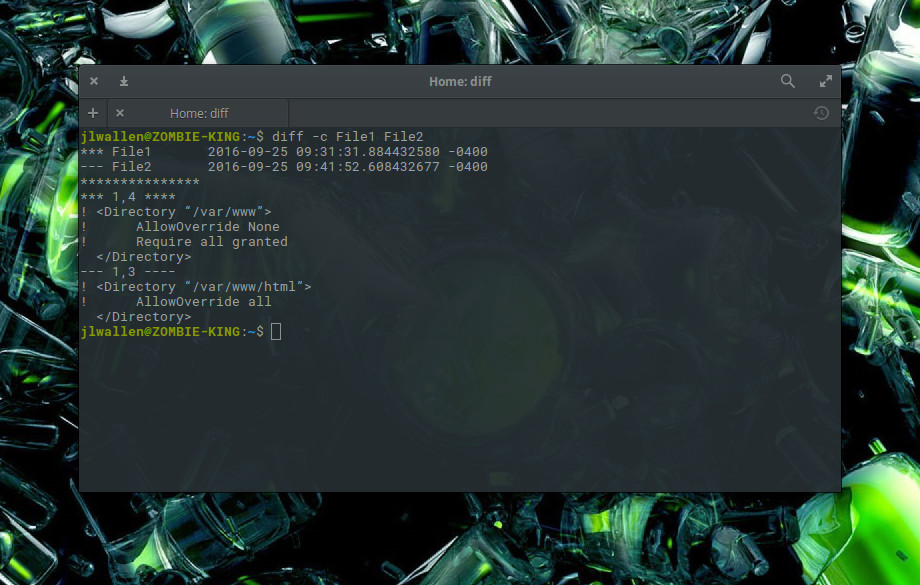
The output of diff would then a bit more complex. For that, we might want to run diff -c File1 File2. The c option prints the output in context format, which makes it much easier to read (Figure 2).

Figure 2: More complex diff output which has been made easier to understand with the c option.

Here we see diff reporting that lines 1 and 4 in File1 and lines 1 and 3 in File2 do not match. You can now make those changes.

grep

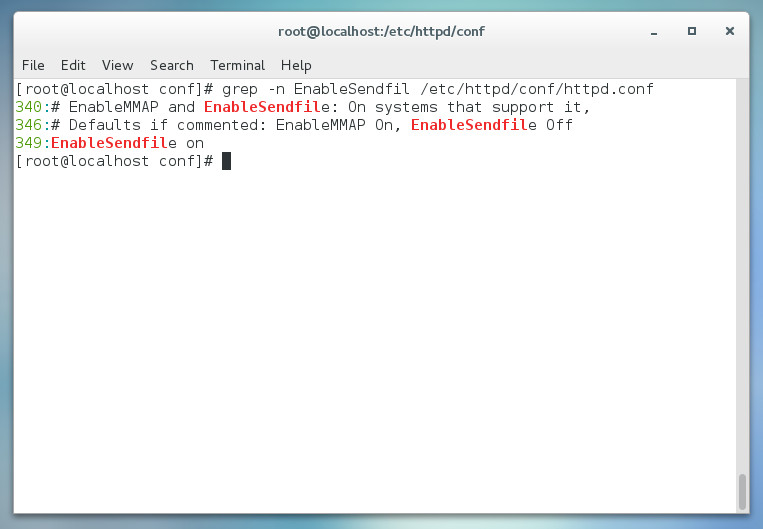
The grep command should be one of the first tools you learn as a Linux administrator. Without it, you will find yourself searching for the proverbial needle in a haystack, especially when digging around more extensive configuration files. Say, for instance, you want to disable the EnableSendfile in your CentOS Apache configuration. You could open up the /etc/httpd/httpd.conf and then scroll through until you see the entry, or you could issue the command grep -n EnableSendfile /etc/httpd/conf/httpd.conf.

What grep does is print lines matching a pattern. It’s that simple. However, if you add the -n option, grep will also print the line number for which the pattern can be found. In our example, grep outputs that EnableSendfile is found on lines 340, 346, and 349 (Figure 3).

Figure 3: Using grep to locate an option in a configuration file.


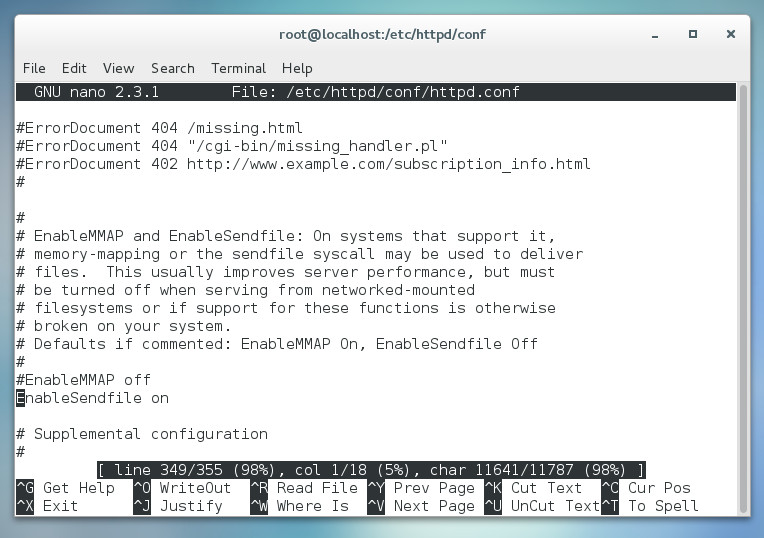
If you happen to use a text editor, such as nano, you can open up the /etc/httpd/conf/httpd.conf file, scroll down a bit and hit Ctrl-c to report what line number the cursor is on. Keep scrolling until you find the line you need to edit. You can also open up the file with nano, using the -c option, to display the current line number (without having to hit the key combination — Figure 4).

Figure 4: Nano displaying the line number.

The grep command is incredibly powerful. Make sure to view the man page (man grep) to learn everything you can about this helpful tool.

Find a good GUI

Some people would rather spend their time with a GUI tool than the command line. Although I highly recommend you fully understand how to work with the command line, there are instances where a GUI can go a long way to make this process easier. Take, for instance, the Gedit text editor. With this GNOME-friendly editor, you can set syntax highlighting on the fly to easily suit the configuration file you’re working with.

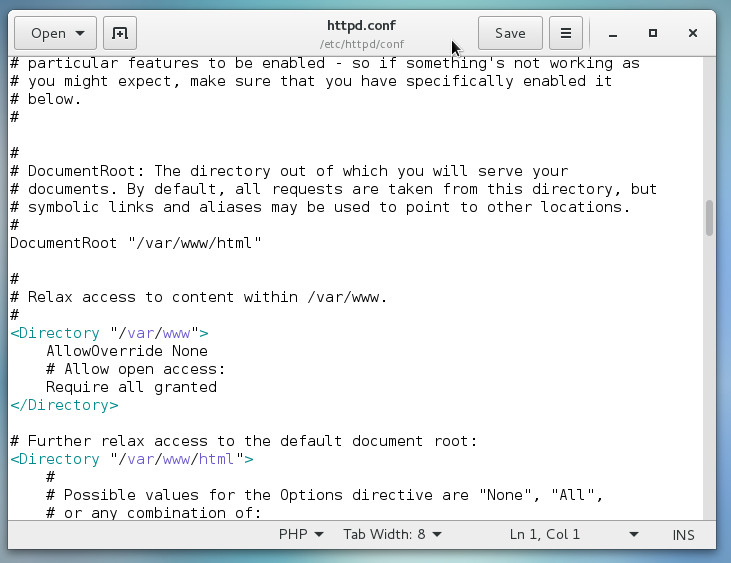
Suppose you open up /etc/httpd/conf/httpd.conf in Gedit. Because this particular file is just a basic text file, Gedit will open it set on Plain Text (in other words, no syntax highlighting). You can switch that from the drop-down in the bottom toolbar and select the type of syntax highlighting you want. If you switch it to PHP, anything that could be viewed as a PHP element will be highlighted (Figure 5).

Figure 5: Adding syntax highlighting for easier configuration.

There are plenty of solid editors out there that will aid you in making cumbersome configurations a bit easier. Start with the tool included with your desktop and see if it will do the trick. If not, open up your package manager and see if you can find one that might fit your needs (such as Sublime Text, Geany, or Leafpad).

Don’t let it overwhelm you

With just a few simple tools, you can make the process of editing Linux configuration files quite easy. Start out with these three tools and build from there. Eventually you’ll have a toolkit so powerful, you’ll be editing config files like a pro. And don’t forget to RTFM!

Want to learn more about managing your configuration files? Check out the Essentials of System Administration course from The Linux Foundation.