Home Blog Page 710

Defining The Common Core Of Cybersecurity: Certifications + Practical Experience

Security certifications are necessary credentials, but alone won’t solve the industry’s critical talent gap.

There’s an adage in the legal community that passing the bar exam does not make you a good lawyer. But does obtaining a certification make you a good cybersecurity professional? The answer, similarly, is no. But it’s a step in the right direction.

Given the rapidly increasing cybersecurity threats facing businesses today, the need for more qualified cybersecurity professionals has never been more urgent. Recent estimates from Cisco peg the current shortfall of cybersecurity professionals at one million, and Symantec estimates that number will rise to 1.5 million by 2019. And yet, despite the rapid growth of the field over the last 10 years, cybersecurity is still very much a wild west when it comes to talent.

Read more at Dark Reading

VMware Is Getting Serious About Telcos & NFV

VMware is amassing its telco-knowledgeable talent in an effort to boost its profile in network functions virtualization (NFV).

VMware also hopes to contribute to open source efforts. The company plans to demonstrate some extensions toOpen Source MANO (OSM) at that group’s October meeting in Santa Clara, California. This work has proceeded with help from Telefonica, whose NFV management and orchestration (MANO) code is at the foundation of OSM. Finishing touches to the code were being applied last week.

The idea is to offer some of VMware’s virtualization expertise to the project. OSM is a new initiative, and some of its specifications display the least common denominator effect; they’re too general, Di Piazza says. VMware hopes to give the project a little more punch. VMware also plans to join the Open Orchestrator Project (Open-O), the MANO effort being shepherded by the Linux Foundation.

Read more at SDx Central

The CORD Project: Unforeseen Efficiencies – A Truly Unified Access Architecture

The CORD Project, according to ON.Lab, is a vision, an architecture and a reference implementation.  It’s also “a concept car” according to Tom Anschutz, distinguished member of tech staff at AT&T.  What you see today is only the beginning of a fundamental evolution of the legacy telecommunication central office (CO).  

The Central Office Re-architected as a Datacenter (CORD) initiative is the most significant innovation in the access network since the introduction of ADSL in the 1990’s.  At the recent inaugural CORD Summit, hosted by Google in Sunnyvale, thought leaders at Google, AT&T, and China Unicom stressed the magnitude of the opportunity CORD provides. CO’s aren’t going away.  They are strategically located in nearly every city’s center and “are critical assets for future services,” according to Alan Blackburn, vice president, architecture and planning at AT&T, who spoke at the event.

Service providers often deal with numerous disparate and proprietary solutions. This includes one architecture/infrastructure for each service multiplied by two vendors. The end result is a dozen unique, redundant and closed management and operational systems. CORD is able to solve this primary operational challenge, making it a powerful solution that could lead to an operational expenditures (OPEX) reduction approaching 75 percent from today’s levels.  

Economics of the data center

Today, central offices are comprised of multiple disparate architectures, each purpose built, proprietary and inflexible.  At a high level there are separate fixed and mobile architectures.  Within the fixed area there are separate architectures for each access topology (e.g., xDSL, GPON, Ethernet, XGS-PON etc.) and for wireless there’s legacy 2G/3G and 4G/LTE.  

Each of these infrastructures is separate and proprietary, from the CPE devices to the big CO rack-mounted chassis to the OSS/BSS backend management systems.    Each of these requires a specialized, trained workforce and unique methods and procedures (M&Ps).  This all leads to tremendous redundant and wasteful operational expenses and makes it nearly impossible to add new services without deploying yet another infrastructure.

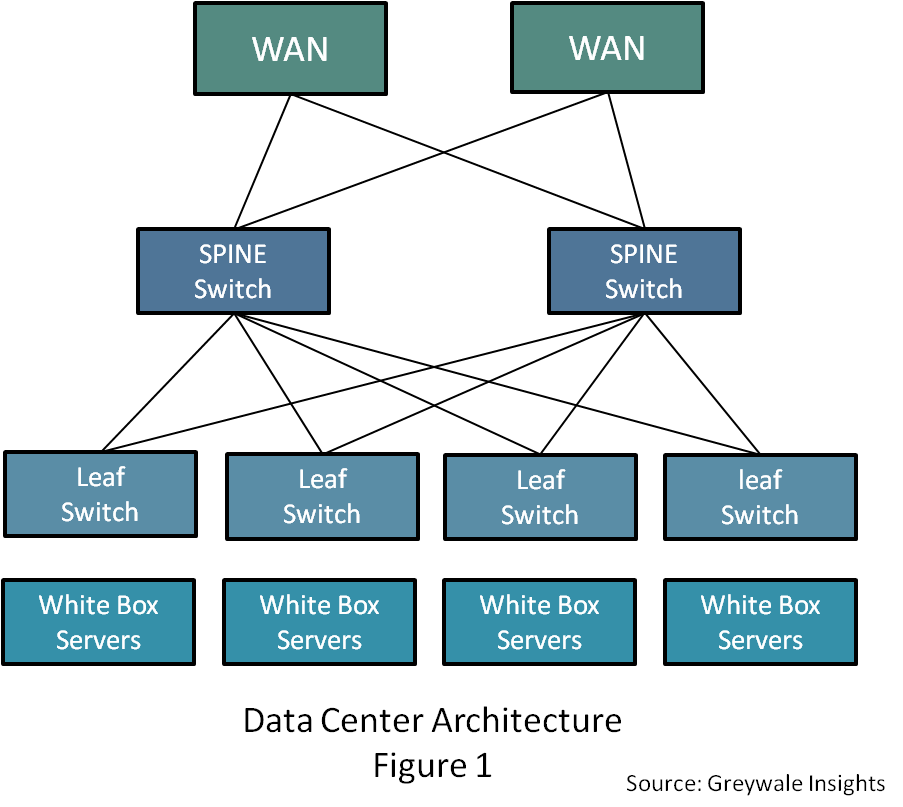
The CORD Project promises the “Economics of the Data Center” with the “Agility of the Cloud.”  To achieve this, a primary component of CORD is the Leaf-Spine switch fabric.  (See Figure 1)

The Leaf-Spine Architecture

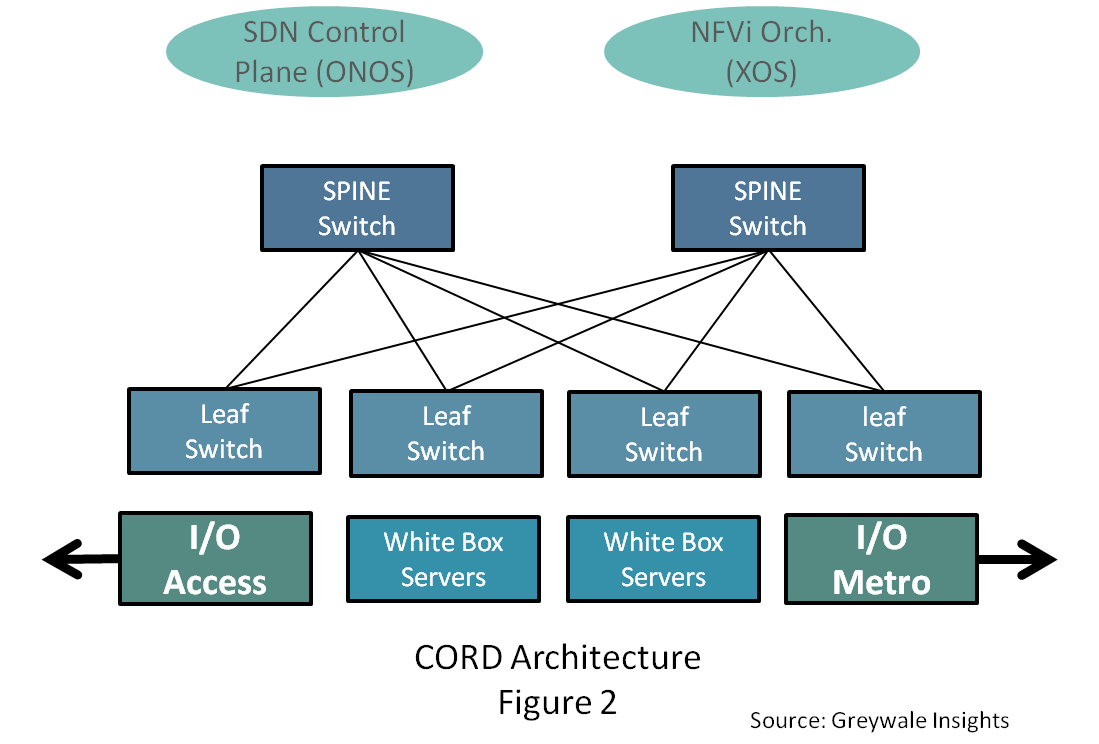
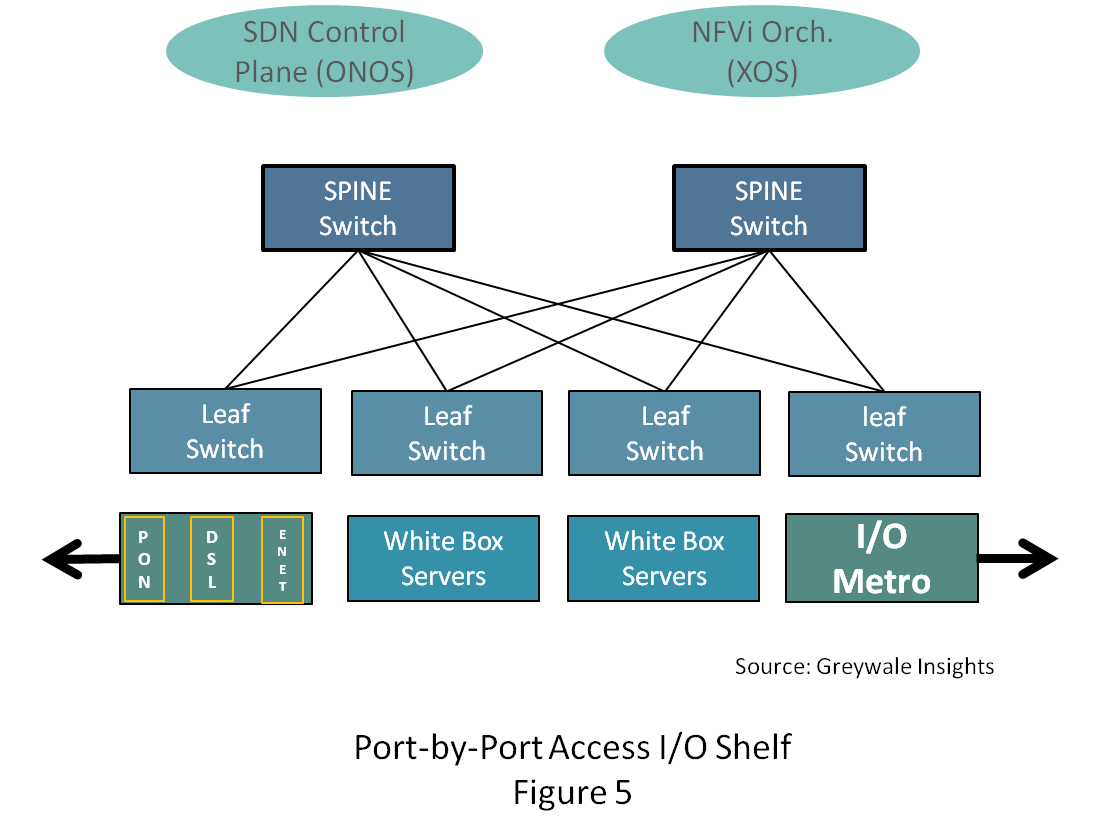
Connected to the leaf switches are racks of “white box” servers.  What’s unique and innovative in CORD are the I/O shelves.  Instead of the traditional data center with two redundant WAN ports connecting it to the rest of the world, in CORD there are two “sides” of I/O.  One, shown on the right in Figure 2, is the Metro Transport (I/O Metro), connecting each Central Office to the larger regional or large city CO.  On the left in the figure is the access network (I/O Access).  

To address the access networks of large carriers, CORD has three use cases:

  • R-CORD, or residential CORD, defines the architecture for residential broadband.

  • M-CORD, or mobile CORD, defines the architecture of the RAN and EPC of LTE/5G networks.  

  • E-CORD, or Enterprise CORD, defines the architecture of Enterprise services such as E-Line and other Ethernet business services.

There’s also an A-CORD, for Analytics that addresses all three use cases and provides a common analytics framework for a variety of network management and marketing purposes.

Achieving Unified Services

The CORD Project is a vision of the future central office and one can make the leap that a single CORD deployment (racks and bays) could support residential broadband, enterprise services and mobile services.   This is the vision.   Currently regulatory barriers and the global organizational structure of service providers may hinder this unification, yet the goal is worth considering.  One of the keys to each CORD use case, as well as the unified use case, is that of “disaggregation.”  Disaggregation takes monolithic chassis-based systems and distributes the functionality throughout the CORD architecture.

Let’s look at R-CORD and the disaggregation of an OLT (Optical Line Terminal), which is a large chassis system installed in CO’s to deploy G-PON.  G-PON (Passive Optical Network) is widely deployed for residential broadband and triple play services.  It delivers 2 .5 Gbps Downstream, 1.5 Gbps Upstream shared among 32 or 64 homes.  This disaggregated OLT is a key component of R-CORD.  The disaggregation of other systems is analogous.

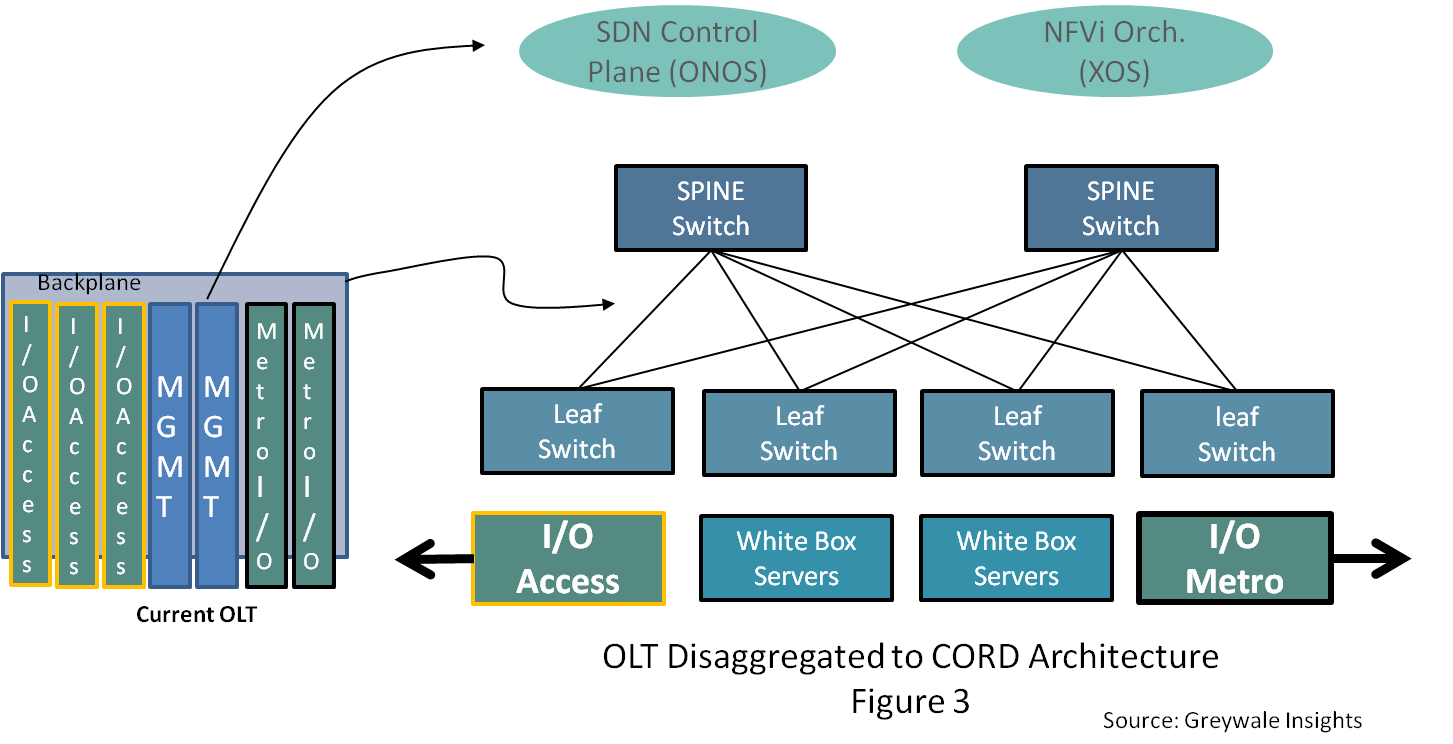
To simplify, an OLT is a chassis that has the power supplies, fans and a backplane.  The latter is the interconnect technology to send bits and bytes from one card or “blade” to another.   The OLT includes two management blades (for 1+1 redundancy), two or more “uplink” blades (Metro I/O) and the rest of the slots filled up with “line cards” (Access I/O).   In GPON the line cards have multiple GPON Access ports each supporting 32 or 64 homes.  Thus, a single OLT with 1:32 splits can support upwards of 10,000 homes depending on port density (number of ports per blade times the number of blades times 32 homes per port).

Disaggregation maps the physical OLT to the CORD platform.  The backplane is replaced by the leaf-spine switch fabric. This fabric “interconnects” the disaggregated blades.  The management functions move to ONOS and XOS in the CORD model.   The new Metro I/O and Access I/O blades become an integral part of the innovated CORD architecture as they become the I/O shelves of the CORD platform. 

This Access I/O blade is also referred to as the GPON OLT MAC and can support 1,536 homes with a 1:32 split (48 ports times 32 homes/port).   In addition to the 48 ports of access I/O they support 6 or more 40 Gbps Ethernet ports for connections to the leaf switches.

This is only the beginning and by itself has a strong value proposition for CORD within the service providers.  For example, if you have 1,540 homes “all” you have to do is install a 1 U (Rack Unit) shelf.  No longer do you have to install another large chassis traditional OLT that supports 10,000 homes.

The New Access I/O Shelf

The access network is by definition a local network and localities vary greatly across regions and in many cases on a neighborhood-by-neighborhood basis.  Thus, it’s common for an access network or broadband network operator to have multiple access network architectures.  Most ILECs leveraged their telephone era twisted pair copper cables that connected practically every building in their operating area to offer some form of DSL service.  Located nearby (maybe) in the CO from the OLT are the racks and bays of DSLAMs/Access Concentrators and FTTx chassis (Fiber to the: curb, pedestal, building, remote, etc).  Keep in mind that each of the DSL equipment has its unique management systems, spares, Method & Procedures (M&P) et al.  

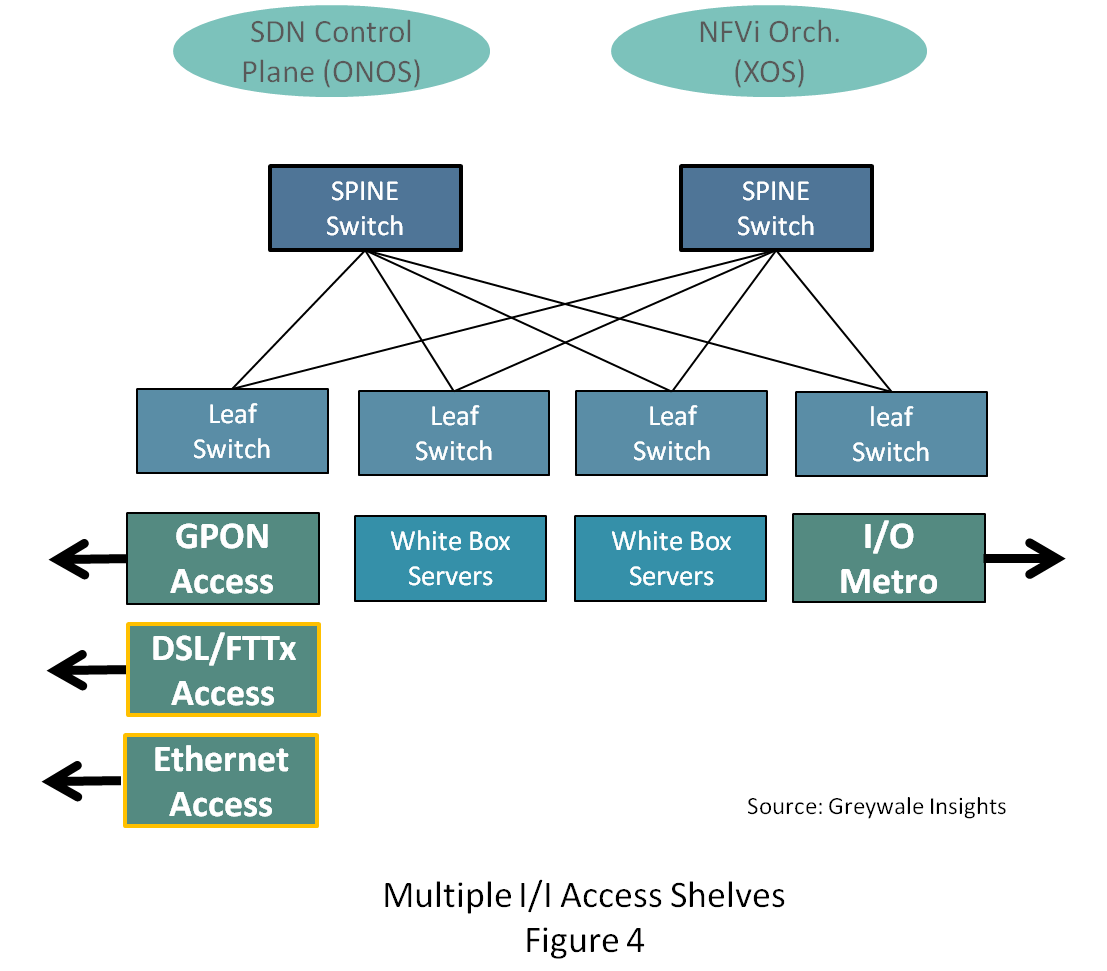
With the CORD architecture to support DSL-based services, one only has to develop a new I/O shelf.  The rest of the system is the same.  Now, both your GPON infrastructure and DSL/FTTx infrastructures “look” like a single system from a management perspective.   You can offer the same service bundles (with obvious limits) to your entire footprint.  After the packets from the home leave the I/O shelf they are “packets” and can leverage the unified  VNF’s and backend infrastructures.  

At the inaugural CORD SUMMIT, (July 29, 2016, in Sunnyvale, CA) the R-CORD working group added G.Fast, EPON, XG & XGS PON and DOCSIS.  (NG PON 2 is supported with Optical inside plant).  Each of these access technologies represents an Access I/O shelf in the CORD architecture.  The rest of the system is the same!

Since CORD is a “concept car,” one can envision even finer granularity.  Driven by Moore’s Law and focused R&D investments, it’s plausible that each of the 48 ports on the I/O shelf could be defined simply by downloading software and connecting the specific Small Form-factor pluggable (SFP) optical transceiver.  This is big.  If an SP wanted to upgrade a port servicing 32 homes from GPON to XGS PON (10 Gbps symmetrical) they could literally download new software and change the SFP and go.  Ideally as well, they could ship a consumer self-installable CPE device and upgrade their services in minutes.  Without a truck roll!

Think of the alternative:  Qualify the XGS-PON OLTs and CPE, Lab Test, Field Test, create new M&P’s and train the workforce and engineer the backend integration which could include yet another isolated management system.   With CORD, you qualify the software/SFP and CPE, the rest of your infrastructure and operations are the same!

This port-by-port granularity also benefits smaller CO’s and smaller SPs.    In large metropolitan CO’s a shelf-by-shelf partitioning (One shelf for GPON, One shelf of xDSL, etc) may be acceptable.  However, for these smaller CO’s and smaller service providers this port-by-port granularity will reduce both CAPEX and OPEX by enabling them to grow capacity to better match growing demand.

CORD can truly change the economics of the central office.  Here, we looked at one aspect of the architecture namely the Access I/O shelf.   With the simplification of both deployment and ongoing operations combined with the rest of the CORD architecture the 75 percent reduction in OPEX is a viable goal for service providers of all sizes.   

Testing the Right Things with Docker

Fast and efficient software testing is easy with Docker, says Laura Frank of Codeship, who will be presenting a talk called “Building Efficient Parallel Testing Platforms with Docker” at LinuxCon + ContainerCon Europe next month.

In her talk, Frank will explain how containers can be used to maintain parity across development, testing, and production environments as well as to reduce testing time. We spoke with Frank to get a preview of her talk along with some real-world testing advice.

Laura Frank, Senior Software Engineer, Codeship
Linux.com: How does containerization accelerate the testing process?

Laura Frank: Containers generally have a much lower overhead than traditional VMs, meaning they start a lot faster and use less resources. Instead of waiting a minute for your testing environment to fire up, you could have the same environment up and running in maybe 10 seconds if the services are running inside containers. Multiplied over a workday and across an engineering team, that’s a huge productivity boost.

Aside from the actual time of booting up a testing environment, using Docker can allow you to process testing workloads across containers in a distributed environment. Containerization enables lots of interesting architecture patterns, like creating a parallel testing platform, that can have a lot of performance benefits.

Linux.com: What tools does Docker specifically provide to help with testing?

Laura: Docker Compose, Docker Registry, and Docker for Mac and Windows are the tools that individual developers will interact most with when it comes to testing. Compose allows you to create an application template, so you can start all of the services in your application in containers with just one command. From there, the Registry allows for easy distribution of application images, which makes moving code from dev to test to prod pretty simple. And since Docker for Mac and Windows is now publicly available, non-Linux users can benefit from all of the Docker tools without having to ssh into a remote box, or even use VirtualBox on their local system. The last year has been full of tooling improvements for the individual developer.

Linux.com: How does Docker help maintain parity?  

Laura: The simplest way to maintain parity is by ensuring all components and dependencies are identical in each environment. With Docker, you have an image and can start a container from that image. It’s going to be the same no matter where it’s running, whether it’s on your local machine or on a AWS instance.

Linux.com: Can you describe a real-world scenario?

Laura: Lots of companies use Docker, and you might have an application running in production that runs in Docker containers, whether it’s a small web app or something complex using Kubernetes. In the best case, your local development environment is an exact replica of what’s running in production. But it wasn’t always the case that engineers used Docker in their everyday development workflow, though it’s becoming easier now because of the developer tools that Docker created, like Docker Compose.

What’s more uncommon is that the testing or QA step is also using Docker. Maybe the developer doesn’t run tests inside a container during local development, and maybe the CI or build system doesn’t support Docker. This leads to a mismatch between environments, and no guarantee that if it builds in CI, it will work as expected in production.

Linux.com: What are some potential pitfalls to look out for? And what advice do you have for testers?

Laura: Testing is a great way to tell if your code is broken, but it doesn’t guarantee that your code is working as intended. The absence of test failures doesn’t mean that everything is perfect, because that metric is dependent on the quality of your tests. Don’t get a false sense of security by a green build. You really have to invest time making sure you’re testing the right things, and testing the things right.

You won’t want to miss the stellar lineup of keynotes, 185+ sessions and plenty of extracurricular events for networking at LinuxCon + ContainerCon Europe in Berlin. Secure your spot before it’s too late! Register now

Dig Into DNS: Part 1

There’s little debate that one of the absolutely fundamental services critical to the functionality of the Internet is the Domain Name System (DNS). Akin to the Simple Mail Transfer Protocol (SMTP), which is the grounding for all things email, and the Network Time Protocol (NTP), which keeps the Internet ticking, DNS has unquestionably played a key part in both the Internet’s inception and somewhat surprisingly its continued growth — a testament to its architects.

During the course of administering online systems effectively, sysadmins need to run name servers, which include the likes of BIND and djbdns (also called TinyDNS) to answer the questions asked about the domain names for which they’re responsible. And, they use various tools to query other domain name settings hosted remotely.

Several DNS lookup tools are available in Linux. Some are bundled with operating systems in one form or another, and others are installed optionally as packages on top. If you’re like me, you tend to get used to one package in particular, which you then either explore thoroughly or use to a smaller degree alongside other packages. My long-time favorite DNS lookup tool has been the “host” command; however, there have been occasions when it didn’t quite cut the mustard and provide the level of detail required to complete a task.

In these situations, my tool of choice has been the dig command, which is a successor to the nslookup and host commands and which is bundled with the BIND name server. Of course, it’s possible the host command did in fact have some have of the features I needed, but perhaps there weren’t enough examples readily available on the Internet when I looked or they weren’t as intuitively constructed, which meant they were easily forgotten.

In this series of articles, I will explore the powerful dig utility. For those who haven’t used the command before, these articles will give a useful overview of its features and uses. And, for those that have utilized dig in the past, the articles should serve as a reminder of the tool’s versatility and extensive functionality.

Apparently, dig stands for Domain Information Groper, and who am I to suggest that its naming might have involved a backronym? For all intents and purposes, the functionality of DNS is simply the act of converting an IP address to a domain name and the reverse, converting a domain name to an IP address. I use the words “domain name” advisedly and, more accurately, I really mean a hostname (e.g., “mail.chrisbinnie.tld” or “www.chrisbinnie.tld”).

Wherefore Art Thou?

Incidentally, if you can’t get a response from typing dig on your command line then you might not be lucky enough to have it installed. On Debian and Ubuntu, you can install the dnsutils package by typing:

# apt-get install dnsutils

On Red Hat and CentOS systems, you can install it with the following command:

# yum install bind-tools

For future reference, if you are unsure which package an already installed file belongs to on Red Hat-based systems, then you might want to try this command:

# rpm - qf /usr/bin/dig

On Debian-based systems, the same can be accomplished using the faithful dpkg package manager as follows:

# dpkg --search /usr/bin/dig

However, without the packages installed already, the following commands may do the trick if you need to look for a file. Be warned that, depending on software versions, your mileage may indeed vary:

# yum whatprovides '*bin/dig'

# apt-cache search dig dns

Baby Steps

Let’s take a moment now to explore the basics of dig using a few of the more straightforward command-line options.

Note that on most Unix-like systems, the lookup order of which name servers to query can be found inside the file /etc/resolv.conf, which might have contents similar to this:

nameserver 8.8.8.8

nameserver 208.67.222.222

The other options, instead of just using “nameserver” within that file, are using short names relative to the local domain for that server. Therefore, another option for /etc/resolv.conf might simply be:

domain chrisbinnie.tld

Using that “domain” option, should we simply look up mail — without the full domain name appended to it — then our query would automatically resolve to mail.chrisbinnie.tld. In other words, this is the system’s local domain name.

Another option is the search parameter, which you can also use for resolving shortened hostnames. If, for example, you use two domain names frequently, then adding the following entries will check each in the same way as the “domain” option allows. An example might be:

search chrisbinnie.tld binnie-linux.tld 

Heads Up

Now that you can see how the operating system performs its DNS lookups, let’s look at some of dig’s features as promised.

The host command typically responds to time-honored syntax as follows to look up MX records for a Domain Name:

# host -t mx chrisbinnie.tld

The DNS tool nslookup, however, can drop you down into what might be described as its own command-line interface having executed its name from your own command line, although it does let you enter commands directly into the command line, too.

You might use the nslookup command directly, as shown in following example. This functionality can also be achieved with the same syntax using the host command. You can directly query a specific name server for its response (instead of relying on other DNS lookups to get you to that server in the first place) to get a definitive answer with a command such as:

# nslookup mail.chrisbinnie.tld 8.8.4.4

Conversely, you might perform a reverse DNS lookup using the following in order to convert an IP address to a domain name:

# nslookup 192.168.0.1 8.8.4.4

In both cases, “8.8.4.4” is the IP address of a popular DNS resolver that will ask other name servers for the answer should it not be armed with it.

I mention the syntax of other DNS tools because the mighty dig utility, in its wisdom, does things slightly differently. A typical query might look something like this:

# dig @8.8.4.4 chrisbinnie.tld mx

Appended to the @ sign is the name of the server that we wish to directly query. Then, the “chrisbinnie.tld” element is the resource that we are asking that name server about. Finally, the last entry on the command line is the type of query, which might be any, mx, or a records, for example.

This Vehicle Is Reversing

If we use the easy-to-remember -x switch, then it’s possible to always force a reverse DNS lookup where you convert an IP address to a hostname. This command shows an intentionally abbreviated output for clarity:

# dig -x 193.0.6.139

139.6.0.193.in-addr.arpa. 21600    IN PTR www.ripe.net.

Next time, I’ll look more closely at the dig syntax, which, again, is a little different from other DNS lookup packages, and I’ll explain more of its many features.  

Read Part 2 of this series.

Chris Binnie is a Technical Consultant with 20 years of Linux experience and a writer for Linux Magazine and Admin Magazine. His new book Linux Server Security: Hack and Defend teaches you how to launch sophisticated attacks, make your servers invisible and crack complex passwords.

Advance your career in Linux System Administration! Check out the Essentials of System Administration course from The Linux Foundation.

The Critical Role of Systems Thinking in Software Development

Software applications exist to serve practical human needs, but they inevitably accumulate undefined and defective behaviors as well.

Because software flaws are often left undiscovered until some specific failure forces them to the surface, every software project ships with some degree of unquantified risk. This is true even when software is built by highly skilled developers, and is an essential characteristic of any complex system.

When you really think about it, a software system is little more than a formal mathematical model with incomplete, informally specified inputs, outputs, and side effects, run blindly by machines at incomprehensibly high speeds. And because of that, it’s no surprise that our field is a bit of a mess.

Read more at O’Reilly Radar

How Blockchain Will Disrupt Your Business

Like mobile and cloud, blockchain — first implemented in the original source code of bitcoin in 2009 — stands poised to profoundly disrupt business. If it lives up to its promise, it won’t just be financial institutions that are disrupted.

“If you can transfer money or something of value through the internet just like another form of data, what else can you do with it? It provides a way to establish trust in the digital world,” says Angus Champion de Crespigny, Financial Services Blockchain and Distributed Infrastructure Strategy Leader, Ernst & Young. “How do you ensure something is the original copy of something on the internet? Prior to blockchain technology, you couldn’t.”

Read more at CIO.com

Git 2.10 Version Control System Is a Massive Release with over 150 Changes

A new major release of the popular Git open-source and cross-platform distributed version control system has been announced.

…Git 2.10 includes hundreds of changes, ranging from improvements to basic commands and the implementation of new options, to fixes for some of the most annoying bugs reported by users since Git 2.9 or the 2.9.3 milestone. It will be impractical for us to list here all these changes, so we’ve attached the full changelog below if you’re curious to know what exactly has been changed in this major update.

Read more at Softpedia

Why Security Performance Will be Key in NFV

There is growing evidence that the data center is driving toward a more software-centric security model that will be core to network functions virtualization (NFV) and software-defined networking (SDN) technology. This new model means that security performance in NFV will be key.

The cloud has shifted the focus of IT to the data center, where a zero-trust stateful security can provide enhancedsecurity for east-west traffic within the data center. Why do we know this? The three largest cloud providers (Amazon,Google, Microsoft) now account for as much as 35% of all data center equipment purchases, according to Dell Oro Group research. The threats are inside the cloud now, no longer outside. The largest cloud data centers are now focusing on intra-data center security, rather than perimeter security.

Read more at SDx Central

Why I Love These Markup Languages

Around this time last year, I wrote a brief introduction to various markup languagesfor this column. The topic of language selection has come up several times recently, so I thought it might be time to revisit the subject with my biases more overt. I’m here to explain why I prefer the languages I do, not to prescribe anything for you. After all, I’m no doc-tor.

A colleague asked my opinion of a post comparing reStructuredText and Markdownfor technical documentation. My company’s docs are written in reStucturedText rendered with Sphinx, but I’ve made noise from time to time about moving to something like DocBook XML. …

Read more at OpenSource.com