Home Blog Page 765

Let Attic Deduplicate and Store your Backups

Data loss is one of those things we never want to worry about. To that end we go to great lengths to find new techniques and software packages to ensure those precious bits of data are safely backed up to various local and remote media.

Backups come in many forms, each with their benefits. One such form is deduplication. If you’re unsure what this is, let me explain. Data deduplication is a specialized technique — used for data compression — to eliminate the duplication of data. This technique is used to improve storage utilization and lessen the amount of data transmitted over a network. In a nutshell, deduplication works like this:

  1. Data is analyzed

  2. During the analysis, byte patterns are identified and stored

  3. When a duplicate byte pattern is found, a small reference point is put in place of the redundancy

What this process effectively does is save space. In some instances, where byte patterns can show up frequently, the amount of space a deduplicated backup saves can be considerable.

Naturally, Linux has plenty of backup solutions that will do deduplication. If you’re looking for one of the easiest, look no further than Attic. Attic is open source, written in Python, and can even encrypt your deduplicated backup for security. Attic is also a command-line only backup solution. Fear not, however…it’s incredibly easy to use.

I will walk you through the process of using Attic. Once you have a handle on the basics, you can take this solution and, with a bit of creativity, make it do exactly what you want.

Installation

I’ll be demonstrating the use of Attic on Ubuntu GNOME 16.04. Attic can be found in the standard repositories, so installation can be taken care of with a single command:

sudo apt-get install attic

That’s it. Once Attic is installed, you have only a couple of tasks to take care of before kicking off your first backup.

Initializing a repository

Before you can fire off a backup, you must first have a location to store a repository, and then you must create a repository. That repository will serve as a filesystem directory to house the deduplicated data from the archives. To initialize a repository, you will use the attic command with the init argument, like so:

attic init /PATH/my-repository.attic

where /PATH is the complete path to where the repository will be housed. You can also create a repository on a remote location by using the attic command:

attic init user@host:my-repository.attic

where user@host is your username and the host where the repository will be housed. For example, I have a Linux box set up at IP address 192.168.1.55 with a user jack. For that, the command would look like:

attic init jack@192.168.1.55:my-repository.attic

Attic also allows you to encrypt your repositories at initialization. For this, you use the command:

attic init --encryption=passphrase /PATH/my-repository.attic

For the encryption, you can use none, passphrase, or keyfile. Attic will, by default, go with none. When you use the passphrase option, you will be prompted to enter the passphrase to be used for encryption (Figure 1).
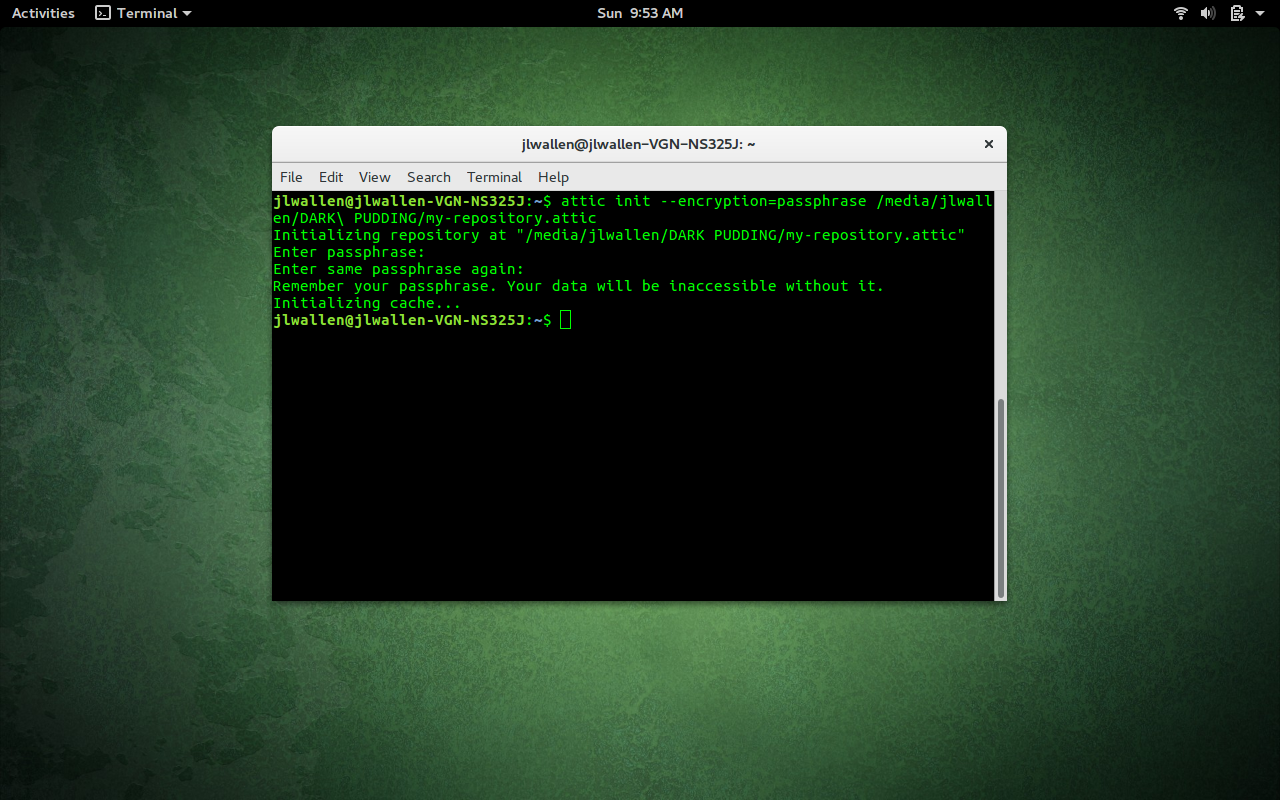
Figure 1: Adding passphrase encryption to your Attic repository.
By adding encryption, you will be prompted for the repository passphrase every time you act on that repository.

You can also use encryption when initializing a remote repository, like so:

attic init --encryption=passphrase jack@192.168.1.55:my-repository.attic

That’s the gist of creating a repository for housing your deduplicated backup.

Creating a backup

Let’s create a simple backup of the ~/Documents directory. This will use the my-repository.attic repository we just created. The command to create this backup is simple:

attic create /PATH/my-repository.attic::my-documents ~/Documents 

where PATH is the direct path to the my-repository.attic repository.

If you’ve encrypted the repository, you will be prompted for the encryption passphrase before the backup will run. That’s pretty nondescript. What if you plan on using Attic to create daily backups of the ~/Documents folder? Easy:

attic create /PATH/my-repository.attic::MONDAY-my-documents ~/Documents

You can then run that same command, daily, replacing MONDAY with TUESDAY, WEDNESDAY, THURSDAY, etc. You could also use a variable to create a specific date and time like so:

attic create /PATCH/my-repository.attic::$(date +%Y-%m-%d-%H:%M:%S) ~/Documents

The above command would use the current date and time as the archive name.

Each attic command will always traverse the folder directory and backup any child directories within.

Attic also isn’t limited to backing up only one directory, however. Say, for instance, you want to backup both ~/Documents and ~/Pictures. That command would look like:

attic create /PATH/my-repository.attic::SUNDAY ~/Documents ~/Pictures

If you want Attic to output the statistics of the backup, you can add the –stats option. That command would look like:

attic create --stats /PATH/my-repository.attic::SUNDAY ~/Documents ~/Pictures

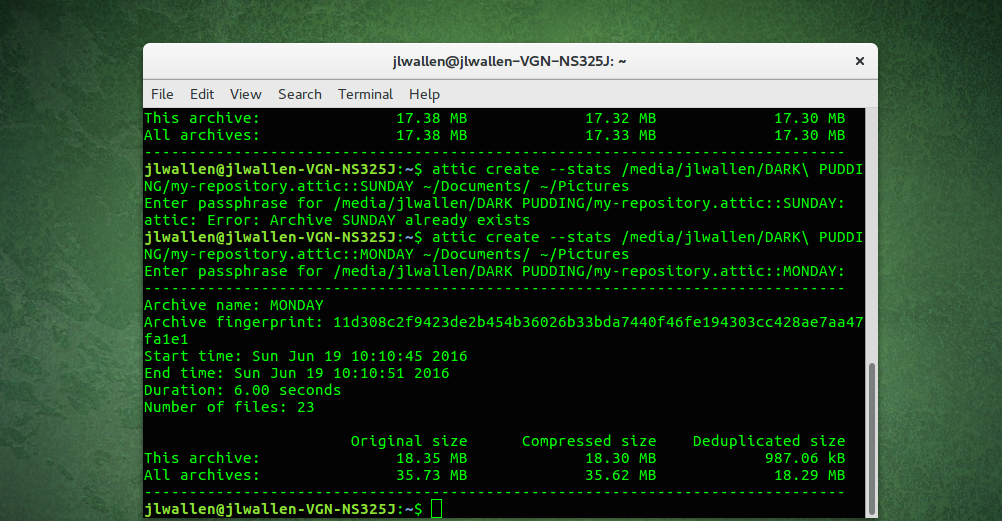
The output of the command would show when it was run, how long it took, and information on archive size (Figure 2).
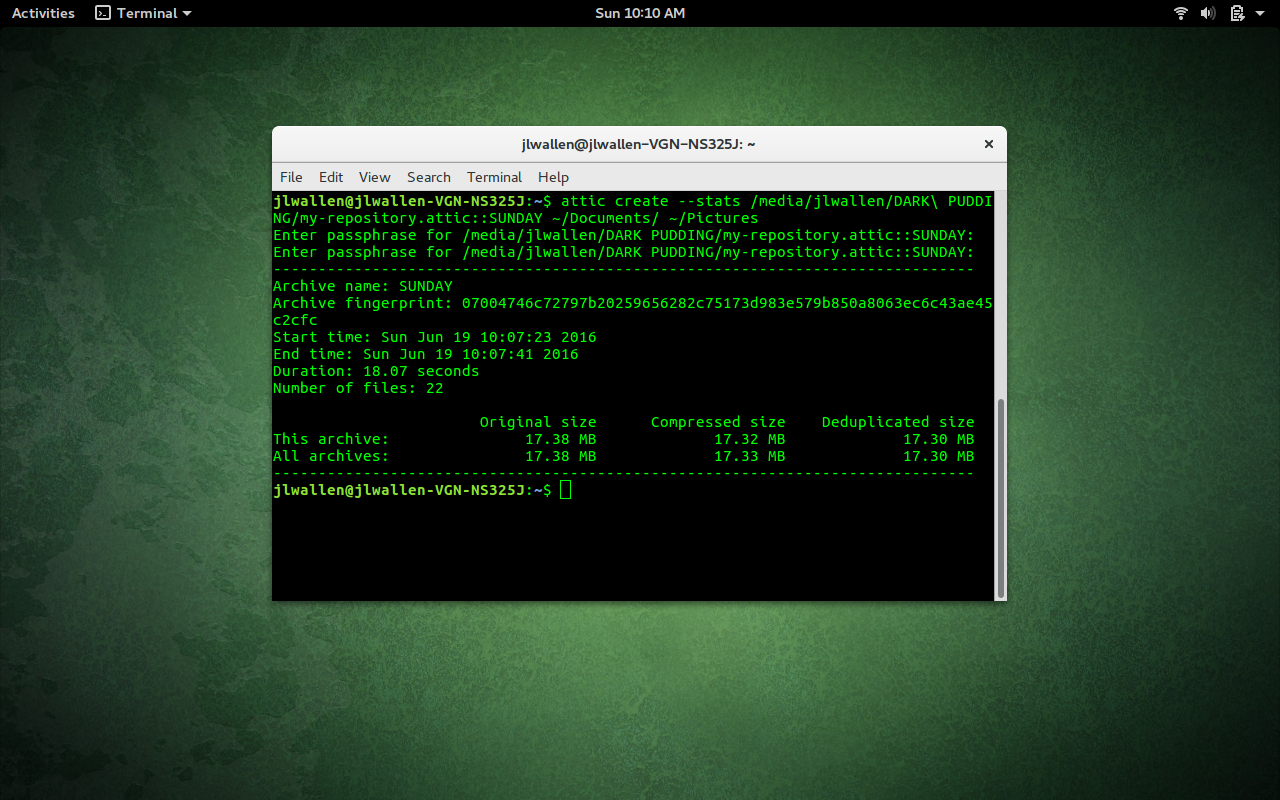
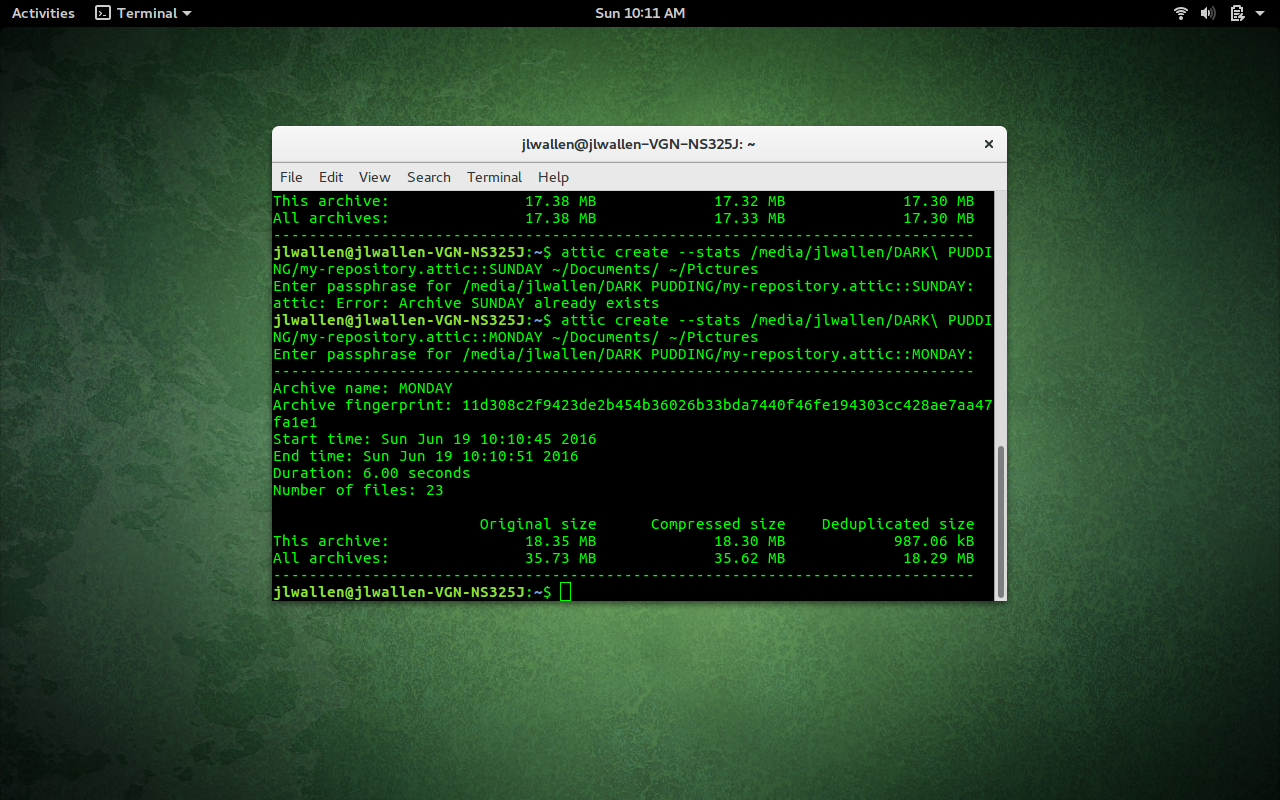
Figure 2: Statistics shown for the attic create command.
As you add more archives to the repository, the statistics will obviously change. One important bit of information you will see is the amount of the archive just created vs. the full archive (Figure 3).

Figure 3: Only 987.6 KB was added to the archive on the last run.
If you want to see a listing of the archives within the repository (Figure 4), you can issue the command:

attic list /PATH/my-repository.attic

where PATH is the direct path to the repository.
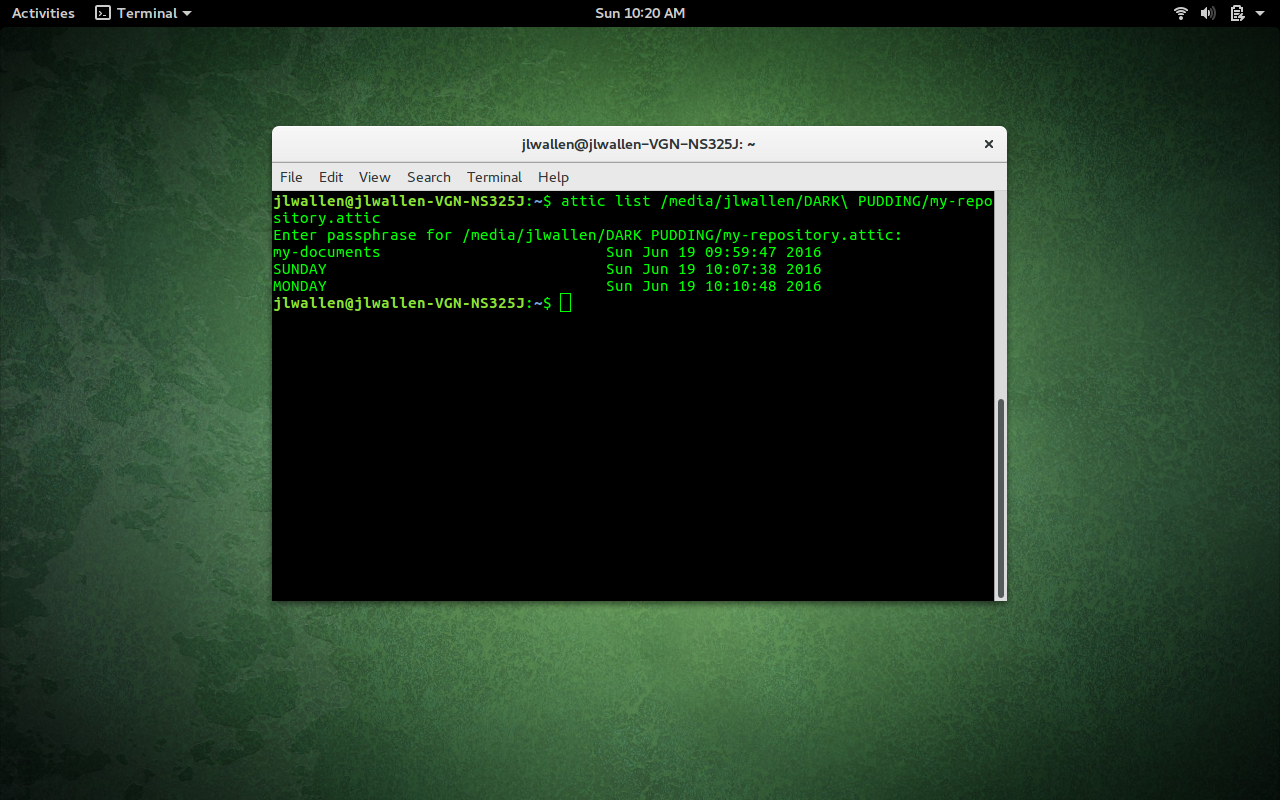
Figure 4: Listing the archives in an Attic repository.
If you want to list the contents of the SUNDAY archive, you can issue the command:

attic list /PATH/my-repository.attic::SUNDAY

This command will output all files within the SUNDAY archive.

Extracting data from an archive

There may come a time when you have to extract data from an archive. This task is just as easy as creating the archive. Let’s say you need to extract the contents of the ~/Pictures directory from the SUNDAY archive. To do this, you will employ the extract argument, like so:

attic extract /PATH/my-repository::SUNDAY Pictures

where PATH is the direct path to the repository. Should any of the files be missing from the Pictures directory, they’ll be returned, thanks to Attic. The one caveat is that I have seen, in a couple of instances, when files aren’t extracted back to their original path. For example, after removing all files from the ~/Pictures directory, I ran Attic with the extract argument only to see the files extracted to ~/home/Pictures. The difference should be obvious. When you run the extract command, you do not want the leading /. Otherwise, it will create it for you. So, running it with ~/Pictures, will create a new direct path to the folder. Instead of extracting to /home/jack/Pictures, extracting with the leading ~/ will extract to /home/jack/home/jack/Pictures.

This and so much more

There are plenty of other tricks to be done with Attic (pruning, checking, and more). And because Attic is a command-line tool, you can easily work it into shell scripts to create automated deduplicated backups that can even work with encryption. For even more helpful information, check out the Attic Users Guide.

The Rise of New Operations

It has been 6 years since I wrote a blog post titled The Rise of Devops. Many things have changed during this time and I realized a re-evaluation could be interesting.

Today, in 2016, here is where I think we are.

1. Operations main focus is now scalability

In the past, our primary purpose in life was to build and babysit production. Today operations teams focus on scale. For some it could be traffic related (number of concurrent sessions, number of users, size of the dataset). For others it could be ability to move between states safely and at high pace (for example, fintech where high stakes make consumer web approaches to operations too risky).

Read more at Somic

​Red Hat Ceph Storage 2 Unveiled

Red Hat’Ceph is a popular software-defined object and file cloud storage stack. Now Red Hat is moving forward with its latest release: Red Hat Ceph Storage 2.

This product is based on the Ceph Jewel release. This edition comes with several new capabilities to enhance object storage workloads storage and promote greater ease of use. These include support for CephFS. This is a POSIX-compliant file-system that uses a Ceph Storage Cluster to store data.

Read more at ZDNet

9 Best Practices for DevOps

It appears that DevOps best practices are more important than ever. Thanks in part to the growth of mobility and the Internet of Things (IoT), enterprise development teams are under increasing pressure to deliver more apps, faster. In December 2015, Gartner predicted that “market demand for mobile app development services will grow at least five times faster than internal IT organizations’ capacity to deliver them, by the end of 2017.”

As a result of this mismatch between needs and capabilities, organizations are looking for ways to increase the speed of development. And increasingly, one of the things they are trying is DevOps. According to Gartner, organizations spent $2.3 billion on DevOps tools in 2015, and it forecasts, “By 2016, DevOps will evolve from a niche strategy employed by large cloud providers to a mainstream strategy employed by 25 percent of Global 2000 organizations.”

Read more at Datamation

Video: Announcing Intel HPC Orchestrator

“Intel HPC Orchestrator simplifies the installation, management and ongoing maintenance of a high-performance computing system by reducing the amount of integration and validation effort required for the HPC system software stack. Intel HPC Orchestrator can help accelerate your time to results and value in your HPC initiatives. With Intel HPC Orchestrator, based on the OpenHPC system software stack, you can take advantage of the innovation driven by the open source community – while also getting peace of mind from Intel support across the stack.”

Read more at insideHPC

Q&A with Tracy Hinds: Improving Education and Diversity at Node.js

To increase developer support and diversity in the Node.js open source community, the Node.js Foundation earlier this year brought in Tracy Hinds to be its Education Community Manager. She is charged with creating a certification program for Node.js, increasing diversity, and improving project documentation, among other things.

“We are recognizing the very wide range of users the Node.js space has and trying to make sure they are all taken care of when it comes to learning Node.js,” Tracy says.

Tracy Hinds, Education Community Manager at Node.js
Tracy has been involved in the community from early on and was a major player in helping to grow the Node.js community in Portland, Oregon, through meetups, an early NodeSchool, and NodeBots. She has organized or founded three conferences annually (CascadiaFest, EmpireJS, and EmpireNode) and is the founder and president of GatherScript, a non-profit that provides educational and financial advisement support for technical events.

“This is a really exciting time to get to support and grow all of the communities that have been contributing to Node.js all these years,” she says.

Here, Tracy tells us more about how she got started as a developer and with Node.js, her goals for the year as the new Node.js education community manager, and the best ways for new contributors to get involved in the project.

Linux.com: Tell us a little bit about your background, how did you get introduced to development, then Node.js and then education?

Tracy Hinds: My prior work was in healthcare administration. It was a purpose-filled field, but that didn’t reduce how colleagues and I were constantly frustrated by all the technology challenges that came with the vertical. I was in the field when the industry was adopting electronic medical records. I found myself spending far too much of my day trying to teach my really savvy coworkers how to use really poorly designed software.

I decided that I wanted to start solving these problems instead of banging my head up against them, so I learned how to code. I was mainly self-taught and was first introduced to Python. At the time, I was living in Portland, OR and through connections that I made in the community learning Python, I got my first job programming professionally at Urban Airship.

I was hired as a junior engineer under the condition that I would learn JavaScript. Of course, like in many cases, JavaScript introduced me to Node.js. There was a small, but very enthusiastic Node.js community in Portland, OR, and I went to several of their meetups, spoke at a my first conference (NodePDX), and got involved with organizing various events and helping to build the community through seeing all these opportunities to help.

Linux.com: As a developer that really learned on your own, what advice would you give others to get started with this?

​Tracy: Be patient.​ You’ll be exposed to so much information early on and you’ll be excited to be good at it. It’s so much information to take in and apply. Much of it takes time and experience to learn, not just theoretical readings.

There will be times where you’re feeling like you’re up against a brick wall. That’s okay! As a programmer, you’ll be paid to solve problems you very likely don’t know the answer to yet. You’ve been hired because you know how to approach the journey of finding a solution.

Find a community of people who encourage and support you, and you’ll be setting yourself up for success. No programmer is an island. OSS relies on a lot of wonderful people collaborating to make things work!

Linux.com: How about landing that first job, what are some things that people should be aware of in trying to get a job as a developer that you wish you would have known or that you found really helpful?

Tracy: I’d had friends who were programmers and had insisted I’d make a great one time after time. With the help of so many communities, friends, and mentors, I learned how to program in Python and some basic web engineering. I was unbelievably fortunate through my networking to find a job that was willing to hire me as a junior and asked that I deep-dive into JavaScript as a primary language.  

It’s really important to introduce yourself to people, go to these meetups to try to learn more, but also show that you are open and persistent enough to never stop learning. Developers are problem solvers, so if you show that early on and have the added skill of being able to communicate well (and therefore collaborate), the better. Making those connections, showing that I could keep an open mind while also being a bit stubborn, and being willing to really immerse myself in the world of programming helped keep me on track from a big career switch.

Linux.com: Let’s get back to Node.js, tell us a little bit about what you are doing for the Node.js Foundation?

Tracy: I was hired to be the education community manager at the Node.js Foundation. Essentially what I’m trying to do is create materials that will help introduce developers to Node.js (new developers and those that have been in the field for a long time), help ensure that education is embedded in the process of learning Node.js through documentation, and promote diversity in the community through education.

Linux.com: What are your other goals in creating education opportunities for the Node.js community at large?

Tracy: I have three major goals this year, the first is how to create and provide a certification program for Node.js.

The second is to help build out the diversity of the Node.js community and I believe that education is the best way to do that. I’ve been trying to take a look at what workshops and in-person events exist that help create a supportive, inclusive learning environment so that I can assess how the Node Foundation can support future work. People getting to learn together form bonds and lets down barriers a little, enough so that they are open to making friends through the challenges they are facing. It’s easier to build camaraderie when you’re struggling with the same problem in a NodeSchool workshop or fixing a broken route in a NodeTogether class with a little help. These events draw much more diverse groups underrepresented communities, career transitioners, other language users because they create spaces that are hellbent on being forgiving, friendly places to learn.  

My third is to improve the documentation in Node.js to help facilitate learning. Currently, that means lots of discussions with different types of Node.js users on what it means to improve documentation. I wanted to encourage API docs improvements because they felt sparse. However, the more conversations I’ve had about docs in Node.js, the more I’m finding that our lack of other spoken languages being supported is a huge barrier for folks to level up or even step into Node.js. I can’t begin to imagine how difficult it must be having to translate the essential documentation I would need into the language I speak in order to write code. It’s an incredible barrier. There’s good work being done in our working groups for this, but there aren’t enough folks to support such a big challenge. We need to be smart about how we’d approach this.

Linux.com: What are some interesting things you are finding in creating this certification program, why is it important?

Tracy: Certifications are extremely important to developers that have previous coding experience and are employed by companies who require it for hiring or promotions. When you look at some older technology languages, like Java, they have fairly deep certifications process and plans. Those that have experience with these languages have expectations to have something similar when they convert to newer platforms/languages like Node.js.

Certifications can also be useful for what we see often in the Node.js ecosystem smaller companies and consultancies. It could be an interesting space when a group of engineers can show that they have their certifications and establishes them as competent and potentially more competitive than another group that isn’t quite there yet.

We are having our first meetings with the newly formed Education Advisory Group, which will allow a good representation of perspectives from Node Core, Foundation members, NodeSchool, and the ecosystem to help form the scope of the certification. We’ll move forward with what we establish as tasks a competent Node.js engineer could complete. It’s definitely a work in progress and will take about 9 months to accomplish. We’re partnering with the Linux Foundation to build this out as an in-browser, 3rd-party proctored remote test.

Linux.com: Any sources currently that you would recommend to those that are interested in getting started with Node.js or that might need to brush up their skills?

Tracy: First, Ashley Williams has created a really great opportunity to introduce folks to Node.js and development in general that do not have experience in this space at all. The series is called NodeTogether and for the most part they are held wherever we are having our Node.js Live events. She is looking for those that want to participate and mentors, so definitely worth checking out.

Jon Kuperman released nodecasts.io, which is awesome for folks who like video learning. There’s about 6 courses that add up to a pretty great, free intro to Node.js.

Finally, NodeSchool is filled to the brim with free workshoppers that cover such an incredible variety of essential skills in Node.js. I recommend checking out one of the local events in your area where mentors will help you run through many of these modules, and the website has support for 20 different spoken languages! The NodeSchool community events are so warm and friendly, and the online repo with active organizers is very encouraging and helpful.

Linux.com: You joined the Foundation a few months ago, what are some of the major roadblocks you’ve been able to overcome or key initiatives that you’ve been able to launch or are going to launch (fairly soon)?

Tracy: We are making strides towards unearthing a lot of the really incredible activity that’s been happening in different corners of the world in Node.js and making plans on how the Node.js Foundation can elevate those communities. My strength is in seeing good people doing awesome work and removing their roadblocks by helping with processes that might be standing in their way.

The certification planning is moving forward. The Education Advisory Group is meeting and will have big ideas for years to come. We are recognizing the very wide range of users the Node.js space has and trying to make sure they are all taken care of when it comes to learning Node.js, be it through turning over rocks to find out which problems we can rally to in Documentation or elevating programs that help build out inclusivity and diversity of perspectives in our language. This is a really exciting time to get to support and grow all of the communities that have been contributing to Node.js all these years.


A Seamless Monitoring System for Apache Mesos Clusters

https://www.youtube.com/watch?v=8OahXeQhNPY?list=PLGeM09tlguZQVL7ZsfNMffX9h1rGNVqnC

Drew Gassaway explains how Bloomberg Vault used Mesos to build a scalable system to aggregate and manage petabytes of data and provide custom analytics — without asking the customer to change anything.

All Marathons Need a Runner. Introducing Pheidippides

https://www.youtube.com/watch?v=XBEvamRP3KU?list=PLGeM09tlguZQVL7ZsfNMffX9h1rGNVqnC

Activision Publishing, a computer games publisher, uses a Mesos-based platform to manage vast quantities of data collected from players to automate much of the gameplay behavior. To address a critical configuration management problem, James Humphrey and John Dennison built a rather elegant solution that puts all configurations in a single place, and named it Pheidippides.

Top 10 Best Open-Spec Hacker SBCs

Two years ago, the Raspberry Pi seemed as if it might be eclipsed by a growing number of open-spec single board computer projects with faster processors, Android support, and more extensive features. But then the Raspberry Pi reestablished its lead in two major great leaps forward.

In early 2015, the Raspberry Pi Foundation  released a quad-core, Cortex-A7 based Raspberry Pi 2, and then followed up a year later with a 64-bit, quad-core Cortex-A53 Raspberry Pi 3 with onboard wireless. The project wisely made these great leaps forward without messing much with the basic form-factor, port layouts, expansion connector, or software, all while keeping the same $35 price.

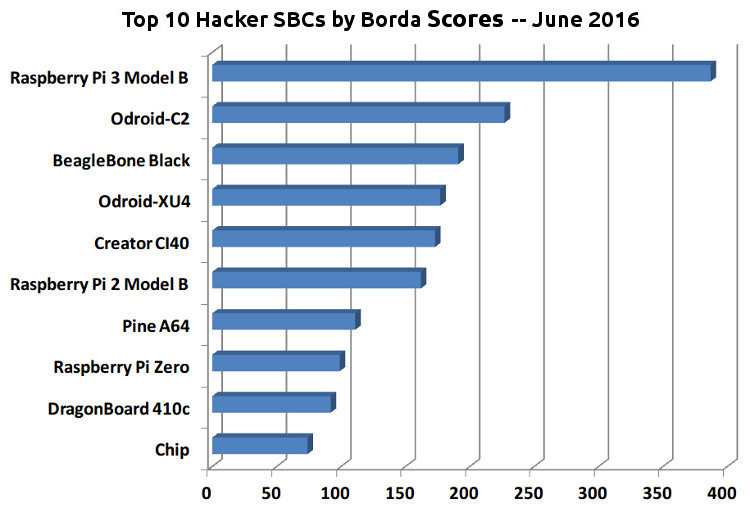
That dominance was reflected in the newly published results from a survey of community-backed board preferences taken earlier this month by HackerBoards.com. The survey asked readers to choose their favorite three Linux- or Android-based open-spec SBCs from a list of 81. Just as the Raspberry Pi 2 won last year’s 53-board survey, the Raspberry Pi 3 similarly blew away the competition in 2016.

Once again, an Odroid board and the BeagleBone Black filled the next two slots, although this time it was the Odroid-C2 in second and the BeagleBone third. Otherwise, the top 10 list looked considerably different from last year’s results. For example, only three of the top 10 most popular SBCs were around a year ago: the BeagleBone, RPi 2, and DragonBoard 410c, and only the BeagleBone was on our 2014 top 10 list. Four of this year’s top-10 contenders were new, 64-bit ARMv8 boards.

The following list shows the top 10 out of 81 boards, which were all ranked using Borda Count scoring in which second and third favorite choices were also factored in. To make the list, the SBCs had to run Linux or Android, cost less than $200, and ship no later than June 2016. They also needed to meet some basic requirements for open source compliance and community support.

The top 10 boards, all ranked using Borda Count scoring.

Open source support, low price influence buyers

Low priced boards with Raspberry Pi interfaces dominate the top half of the 81-board list. The 40-pin expansion interface has significantly broadened the Raspberry Pi community, even while reducing the necessity of owning a Raspberry Pi in order to gain access to that ecosystem. Among Linux/Android hacker boards, it has become more popular than an Arduino shield compatible interface, although those are in abundance as well. SeeedStudio Grove and MikroElektronika MikroBus Click interfaces are also found on many of these boards.

One of the Pi-compatible SBCs is Hardkernel’s $40 second-place Odroid-C2, which arrived around the same time as the $35 Raspberry Pi 3, and with similar features such as quad-core, 64-bit processors. The Odroid-C2 has the faster chip, but the cheaper RPi 3 also throws in WiFi and Bluetooth. Here, the Raspberry Pi is staying ahead of a general trend toward onboard, rather than, optional wireless.

Although low pricing was clearly popular here, with the $15 Pine A64, $9-and-up Chip, and $5-and-up Raspberry Pi Zero all making the top 10 list, some relatively pricey boards such as the Creator Ci40, Odroid-XU4, and DragonBoard 410c made the list too. When survey takers were asked to rank buying criteria, low price dropped in rank compared to last year. Other responses to questions about buying criteria remained largely consistent from last year, with home automation, for example, continuing to lead the list of intended applications.

It would appear that many potential buyers don’t see much difference between, say $20 and $35, especially when shipping is taken into account. The real impact for products such as the dirt-cheap Raspberry Pi Zero is likely going to be felt in more commercial products sold in small runs, or in hobbyist/maker projects in which CPU clusters and numerous IoT sensor boards are required. If you’re a weekend hobbyist looking to automate your sprinkler system with a single SBC, other issues are likely more important.

There seems to be growing resistance to irresistibly priced SBCs from certain Shenzhen-based projects. The $10 Orange Pi One and $12 Orange Pi Lite, both sporting the quad-core Allwinner H3, were ranked 28th and 31st, respectively. Of the five FriendlyARM NanoPi boards, several of which had similar cut-rate pricing, the highest ranked model was the $35, 64-bit NanoPi-M3, which came in 41st.

Buyers seem to be looking more closely at open source software support, which once again was the leading buying criteria in the survey. With so many cheap, capable SBCs to choose from, people can afford to be picky and choose the projects that offer timely firmware updates and solid community resources. How else to explain the surprising popularity of the 19th ranked Wandboard, an aging, fairly high-priced SBC with strong software support.

Another example where community and software support makes up for fairly low price/performance is the venerable, third-place BeagleBone Black. If you combined its score with the currently available clones — the BeagleBone Green, BeagleBone Green Wireless, and MarsBoard AM335x — this $48, Cortex-A8 based SBC would be neck and neck with the Odroid-C2. And more BeagleBone clones are on their way.

Of course, if you combined the Raspberry Pi 3 with the very similar RPi 2, now in 6th place, and the less similar, $5-and-up RPi Zero, now in 8th, you’d get an even more impressive total. It’s hard to imagine that a Raspberry Pi model won’t be the people’s choice in 2017, as well. Then again, judging from the amazing price/performance improvements that have occurred in the SBC market in 2016, a lot can happen in a year.


​Apache Libcloud: The Open-Source Cloud Library to Link All Clouds Together

Apache Libcloud, the leading cloud service interoperability library used by Amazon Web Services, Apache CloudStack, Google Cloud Platform, Microsoft Azure, OpenStack, and VMware, has finally reached 1.0 status.

One of the great problems with cloud has always been interoperability. The Apache Software Foundation (ASF) addresses this problem with the release of Apache Libcloud v1.0, the cloud service interoperability library.