Most people think of network disaggregation as separating hardware from software, but the story goes deeper than that. While hardware and software separation are a big part of the SDN concept, there is also disaggregation of network switch ASICs. There are five switch ASIC manufacturers in the market and each product has different strengths and weaknesses. These ASICs represent the final “black box” that must be opened before we can truly achieve disaggregation.
The concept of software-defined networking is often described as based on open, interoperable systems that can be customized for each application, and that deliver services through policy-driven architecture. With a policy-driven network, for example, service providers can implement self-service customer portals where customers can dial up the desired amount of bandwidth.
One way to implement SDN is by unlocking several “black boxes” that previously limited networking to a one-size-fits-all approach obtained from vendors like Arista, Cisco and Juniper. Opening each “black box” results in giving customers more choice about how they tune the network for their specific applications.
The first “black box” was the hardware. Once available only from big-name hardware vendors, servers and switches became available directly from the same original design manufacturers (ODMs) who supplied the big vendors. Suddenly vendors like Accton, Agema, and Quanta began offering “white box” servers and switches with lower prices.
Editor’s Note: This article is paid for by IBM as a Diamond-level sponsor of ApacheCon North America, and written by Linux.com.
Connectors make all our lives easier. In the case of the Spark-Cloudant connector, using Spark analytics on data stored in Cloudant is simplified with the easy-to-use syntax of the connector. With the large Spark ecosystem, one can now conduct federated analytics across Cloudant and other disparate data sources. And we all know that the days of analyzing just your own company data are long gone. Piping in more data is essential these days.
Mike Breslin, offering manager at IBM Cloud Data Services, focuses on IBM Cloudant.
We talked with Mike Breslin, offering manager at IBM Cloud Data Services, who focuses on IBM Cloudant, to explore details on the Spark-Cloudant connector. And, to discover a few tips on using it too.
Linux.com: What’s the one thing you want practitioners to know about the Cloudant-Spark connector? What advantages does it bring in real-world practice?
Mike Breslin: It’s an open source connector built by the IBM Cloudant team. It consists of easy-to-use APIs so you can leverage Spark analytics on your Cloudant data.
Linux.com: Where can we find the connector and how can it be used?
Breslin: The spark-cloudant connector is pre-loaded into the Apache Spark-aaS offering on IBM Bluemix or can be used in stand-alone Spark instances. Download it from the Spark Packages site or Github if you want to use it as a standalone and include it in the environment variables. It’s available for anyone’s use under the Apache 2.0 license. As is common in most things Spark, it’s available for Python and Scala applications.
The connector just takes a few seconds to download; it isn’t a very big piece of software. Powerful, but not big.
Linux.com: What’s the quickest way to start analyzing your Cloudant data in Spark?
Breslin: The best way to get started is to just jump right in. But you might want to check out the tutorials and walk-throughs first.
Linux.com: The connector offers several helpful capabilities. Which do you find the most useful yourself and why?
Breslin: The integration means leveraging fast Spark analytics on your Cloudant data for ad hoc querying and advanced analytics. You can load whole databases into a Spark cluster for analysis.
Spark has federated analytics so you can use disparate data sources and one of those sources can be Cloudant. Because Spark has a variety of connection capabilities, you can use it to conduct federated analytics over Cloudant, dashDB data warehouse and Object Storage and other disparate data sources.
You can also transform the data and then write it back to Cloudant to store it there.
Linux.com: As you know, time is of the essence in this type of work. Got any tips to share on making the work or outputs faster or better?
Breslin: If you’re not using Spark already, you’ll likely find it faster and easier to use Spark-as-a-Service. If you’re new to Spark, I recommend checking out the Spark Fundamentals classes on Big Data University and the tutorials on IBM developerWorks.
As for familiarizing yourself with the connector, I’d suggest you check out the README on GitHub and the video tutorials on our Learning Center showing how to use the connector in both a Scala and Python notebook.
The California Independent System Operator announced it is using Dispersive Technologies for software defined networking (SDN) to control the flow of electricity on its power grid.
The non-profit California ISO manages the flow of electricity across the high-voltage, long-distance power lines that make up 80 percent of California’s (and a small part of Nevada’s) power grid. The power comes from electric utilities, such as Southern California Edison and Pacific Gas & Electric.
But increasingly, power also comes onto the grid from renewable resources such as wind and solar. The California legislature has mandated that by 2020, 30 percent of electricity in the state must come from renewables. Often this distributed generation comes from single-family homes that install solar panels.
Dispersive Technologies’ network virtualization software provides an overlay over different types of communication connections to manage the energy. “Effectively, we’re a distributed switch across the Internet,” says Dispersive’s CEO Robert Twitchell. “Cal-ISO uses MPLS plus a VPN to control the grid. We are now a second company to be approved for the grid.”
Embracing open source has seen Comcast transform from a cable company to a networking company and now to a software company, highlighted Nagesh Nandiraju, Director of Next Gen Network Architecture, Comcast in his plenary talk at Open Networking Summit 2016.
“Underlying all of this requires a big cultural shift, which is not easy when the network is software driven.” Nandiraju said about the transformation as a software company. “We are undergoing some of these transformations in our company in terms of realizing the power of software from the networking perspective.”
Nandiraju presented Comcast’s vision on application of SDN and NFV, important use cases and concerns as a service provider consumer of open source networking technologies.
He started with an overview of key transitions experienced by service providers:
Customer trends: The three key customer trends are single gateway devices in customers’ homes becoming network within homes as a result of increasing devices; evolution of service mobility from cellular mobility to service availability on any device on the go and imminent proliferation of devices with Internet of Things.
Service Provider trends: As a service provider definition of service is continuously evolving and it is important to adapt and provide services that cater to customer trends as well as enable growth applications. The challenge is in decoupling these services from the underlying network without a minimal impact on the network.
Access Technologies and Architecture: Comcast has a substantial amount of access network primarily driven by DOCSIS technology equivalent to broadband network gateway similar to the telco world. There are different parallel technologies doing the same thing, but they exist as vertically integrated boxes and the goal is to leverage synergies across these technologies.
Then Nandiraju shared how Comcast’s vision for application of SDN:
Overlay Networks: Comcast’s approach is to apply SDN on an overlay network building L2/L3 VPNs for end customers and leverage service chaining to enable services and introduce network elements in a dynamic way and grow them elastically.
Network Automation: The goal is getting to an end state where the network is programmable and smart while requiring minimal human touch.
Merchant Silicon: Simplify core and edge network by leveraging merchant silicon with focus on segment routing while transitioning away from MPLS.
Telemetry & Analytics: Applying big data and machine learning principles to software-defined networks and enable a smart network.
“We are investigating and exploring all the different functions that can be virtualized and what makes more sense, because there is a reason why they were purpose built. And how and when and what applications have to be migrated.” said Nandiraju as he briefly discussed two key use cases Software Defined L3 VPN service as well as Uniform Services over Multiple Access Networks.
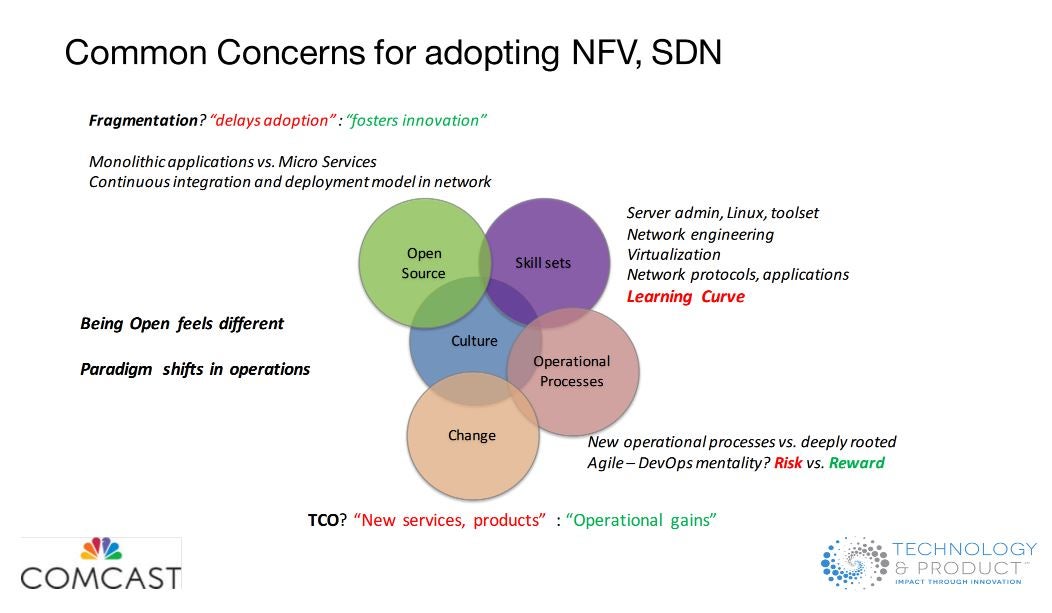
Finally Nandiraju outlined the common concerns in NFV / SDN adoption as a service provider including too many options, diverse skill set needed for integration, virtualization and its impact on service chain, new operational processes and tools and business challenge of balancing new products and services with operational efficiencies.
Watch the full talk, ‘NFV & SDN – A Comcast Perspective’ below.
The Linux Networking and Administration (LFS211) course gives students access to 40-50 hours of coursework, and more than 50 hands-on labs — practical experience that translates to real-world situations. Students who complete the course will come away with the knowledge and skills necessary to succeed as a senior Linux sysadmin and pass the LFCE exam, which is included in the cost of the course.
The LFCE exam builds on the domains and competencies tested in the Linux Foundation Certified System Administrator (LFCS) exam. Sysadmins who pass the LFCE exam have a wider range and greater depth of skill than the LFCS. Linux Foundation Certified Engineers are responsible for the design and implementation of system architecture and serve as subject matter experts and mentors for the next generation of system administration professionals.
Advance your career
With the tremendous growth in open source adoption across technology sectors, it is more important than ever for IT professionals to be proficient in Linux. Every major cloud platform, including OpenStack and Microsoft Azure, is now based on or runs on Linux. The type of training provided in this new course confers the knowledge and skills necessary to manage these systems.
Certification also carries an opportunity for career advancement, as more recruiters and employers seek certified job candidates and often verify job candidates’ skills with certification exams.
The 2016 Open Source Jobs Report, produced by The Linux Foundation and Dice, finds that 51 percent of hiring managers say hiring certified professionals is a priority for them, and 47 percent of open source professionals plan to take at least once certification exam this year.
Certifications are increasingly becoming the best way for professionals to differentiate from other job candidates and to demonstrate their ability to perform critical technical functions.
“More individuals and more employers are seeing the tremendous value in certifications, but it can be time-consuming and cost-prohibitive to prepare for them,” said Clyde Seepersad, Linux Foundation General Manager for Training. “The Linux Foundation strives to increase accessibility to quality training and certification for anyone, and offering advanced system administration training and certification that can be accessed anytime, anywhere, for a lower price than the industry standard helps to achieve that.”
Register now for LFS211 at the introductory price of $349, includes one year of course access and a voucher to take the LFCE certification exam with one free re-take. For more information on Linux Foundation training and certification programs, visit http://training.linuxfoundation.org.
The Docker platform and surrounding ecosystem contain many tools to manage the lifecycle of a container. Just one example, Docker Command Line Interface (CLI) supports the following container activities:
Pulling a repository from the registry.
Running the container and optionally attaching a terminal to it.
Committing the container to a new image.
Uploading the image to the registry.
Terminating a running container.
While the CLI meets the needs of managing one container on one host, it falls short when it comes to managing multiple containers deployed on multiple hosts. To go beyond the management of individual containers, we must turn to orchestration tools.
Linux has become a dominant OS for application back ends and micro-services in the cloud. Usage limits (akaulimits) are a critical Linux application performance tuning tool. Docker is now the leading mechanism for application deployment and distribution and AWS ECS is one of the top Docker container services. It’s more important than ever for developers to understand ulimitsand how to use them in Linux, Docker and a service like AWS ECS.
The purpose of ulimits is to limit a program’s resource utilization to prevent a run-away bug or security breach from bringing the whole system down. It is easy for modern applications to exceed default open file limits very quickly.
Ubuntu 16.04 was released in April, and it’s a great release. Ubuntu is generally known as an extremely user-friendly distribution, so it’s easy to get up and running quickly. That said, there are a few things to do — depending on your needs — to get most out of your system.
First Things First: Update Your System
I am one of those people who tend to keep their system updated. I don’t wait for a whole month for a long list of packages to be updated. That’s where a lot of things tend to go wrong, because you are making way too many changes to the system at the same time. Incremental updates are safer; they are better So, I recommend running updates on a daily or weekly basis.
To do this, open the terminal and refresh repos:
sudo apt-get update
Then, run system updates:
sudo apt-get upgradesudo apt-get dist-upgrade
Your system is now up to date.
Customize Ubuntu
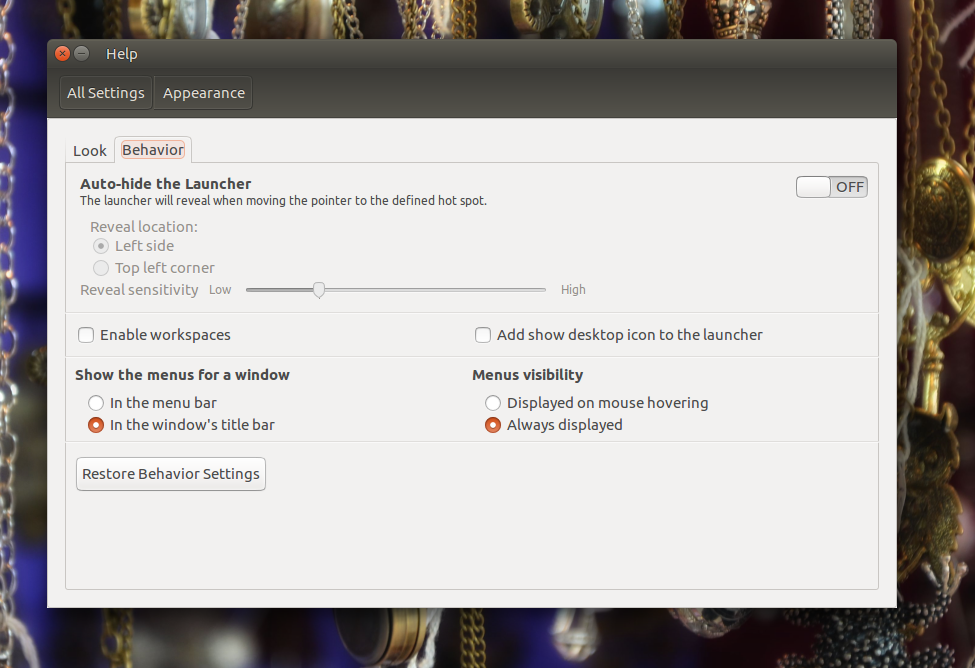
Unity is not known for customization options, but with 16.04, there are some new choices. For example, you can now choose where you want to display the menu — in the top bar or in app windows. In addition to that, you can also disable menu items from auto-hiding.
To gain some control over menus on your Ubuntu machine, open System Settings > Appearanceand go to the Behavior tab. There, you can control menu visibility (Figure 1).
Figure 1: You can control menu visibility.
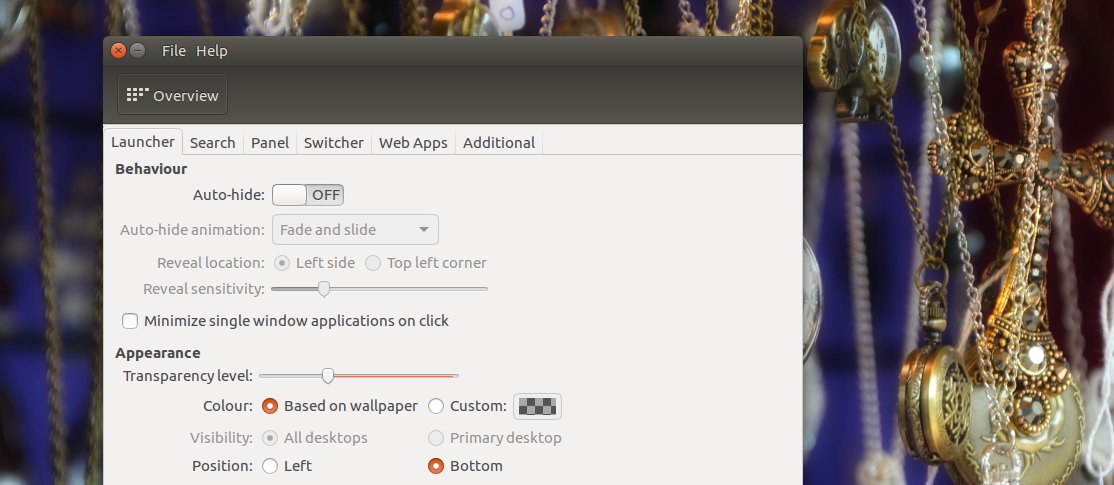
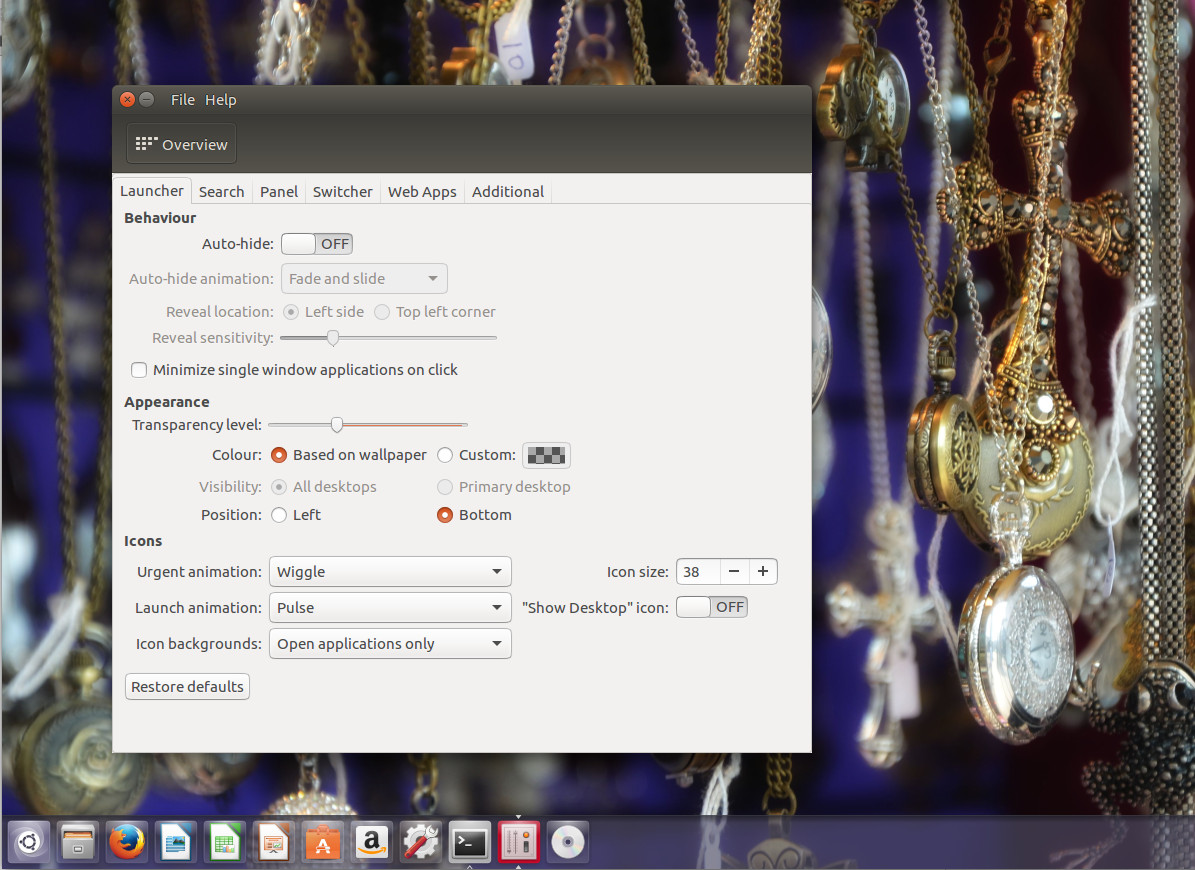
Once it’s installed, open the application and go to settings for Launcher and change the location. The tool allows two locations: Left and Bottom (Figure 2). Figure 2: Unity Tweak Tool lets you move the launcher.
Install Proprietary Drivers
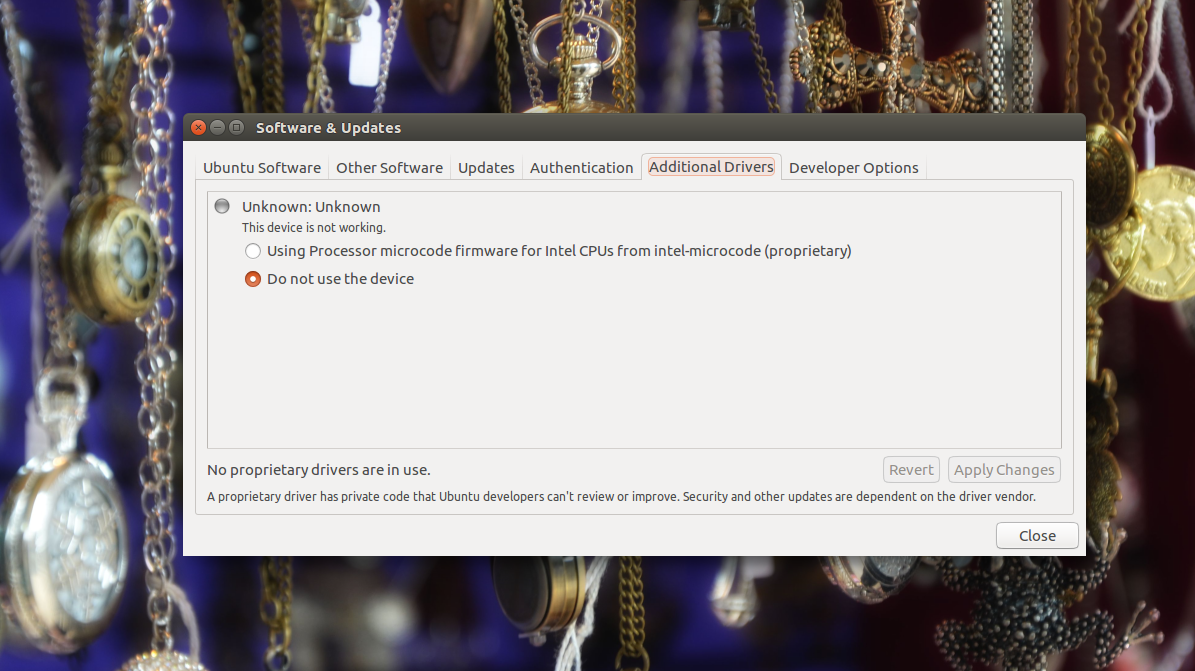
Ubuntu has done an incredible job at making it easy to install non-free drivers or firmware. If you are using Bluetooth chips or graphics drivers on your system, then you can easily install drivers for those. Just search for “additional drivers” in Dash; alternatively, you can open Software & Updates and go to the Additional Drivers tab (Figure 3). The utility will scan the system and, if it finds any proprietary drives for the hardware, it will offer to install those drivers. Easy peasy.Figure 3: Install additional drivers.
Install VLC and Media Codecs
If you want — and who wouldn’t — to be able to play movies on Ubuntu, you need to install media codecs. Or you can simply install VLC, which is more or less an all-purpose tool for media playback. Once you install VLC, you will be able to play virtually all media formats out there:
sudo apt-get install vlc
That said, you may still need codecs to play mp3 and other stuff on your system. You can do this with the following command:
Ubuntu 16.04 comes with a decent set of applications preinstalled, so you can get started as soon as you boot into the system. But there are always more. Here are a few applications that suit my needs the best. I use VLC for media playback. Clementine is a great music player that has more features than the default music player. I also prefer Sublime Text over Gedit for text editing. I also install Chrome browser, because it allows me to play HTML5 videos, Netflix, Amazon Prime, and many other such services that need DRM. I also install Handbrake to convert videos for my mobile devices.
One application that I do not recommend is Adobe Flash Player. This is one of the most insecure applications out there, so please don’t even install it. That’s pretty much all you need to do to complete your setup after installing Ubuntu 16.04.
But, what if you are running an older version of Ubuntu, how do you upgrade to 16.04?
How to Upgrade to the Latest Release
It’s always recommended — and in most cases required — that you do incremental upgrades from one point release to the next. This means, if you are running Ubuntu 15.04, you should upgrade to 15.10 and then upgrade it to 16.04. The good news is that none of this is manual; there is a great tool to help you to do that. We will talk about it in a bit.
If you are running Ubuntu 14.04 LTS, you can skip the regular releases and upgrade to the next LTS. However, upgrades between LTS releases are disabled by default and will be enabled in 16.04.1. So, if you are running 14.04 and want to use 16.04, the safest best bet is to do a fresh upgrade — or wait for the next three months; there is a way out that I will mention later. If you are running 15.10, you can easily move to 16.04.
Before you proceed with a system upgrade, make a backup of your files. Now, open the terminal and refresh repositories:
sudo apt-get update
Then, run a system update:
sudo apt-get upgrade && dist-upgrade
And then run dist-upgrade, which will take care of any updates that were not made by the previous command:
sudo apt-get dist-upgrade
Once all upgrades are done, you can install the release upgrade tool:
sudo apt-get install update-manager-core
This tool handles a lot of tasks for you, such as changing the source.list so that you don’t have to edit it manually to point to the latest repositories. Next, run the following command:
sudo do-release-upgrade
If everything goes well, you will be able upgrade. If, however, it says “no new release found,” then you can force upgrade using:
sudo do-release-upgrade –d
Those who are currently using 14.04 on their desktop can also use the ‘-d’ option to force upgrade. I do not recommend this on production machines.
One occasionally runs into a company trying to build an open source project out of an existing product. This is a nuanced problem. This is not a company that owns a project published under an open source license trying to also ship a product of the same name (e.g. Docker, MySQL), but the situation shares many of the same problems. Neither is this a company building products out of open source projects to which they contribute but don’t control (e.g. Red Hat’s RHEL). This is a company with an existing product revenue stream trying to create a project out of the product.
I’ve been writing software for many years. And I’ve realized lately that the more I engaged with (wrote in, integrated with, etc.) open source technologies, the better the code I write gets. Which got me wondering: correlation or causation?
Reading Code Makes You Better
I learned early on in my programming career that the more code I read, the better my code became. I learned that when I had to maintain other people’s code, simple and clean almost always beat fancy or complex code – even if there were comments. On the other hand, when I took enough time to understand the complex code, I usually learned new tricks. Either way, I improved. This led me to push for code reviews in shops where we weren’t doing them.