Alexa is mostly restricted to the US, but Amazon has posted a step-by-step guide on how to build your own companion anywhere in the world.
Amazon has released a step-by-step guide on how to turn the $35 Raspberry Pi into a voice-controlled assistant. The instructions demonstrate how to set up the single board computer to use Amazon’s Alexa Voice Service to create a low-cost alternative to the Echo, Amazon’s $180 smart speaker.
Like other online assistants, Amazon’s Alexa responds to voice commands and can set reminders, play music and answer simple questions.
While OpenShot 2.0 is long overdue, things are finally looking up for this open-source non-linear video editor with going into beta this past January and today marking the release of the fourth beta.
The announcement says: “As you will see, lots of great progress has been made since the previous beta. Improved stability, especially for OS X and Windows, better performance, new features, and critical improvements to the OpenShot infrastructure…”
Laser beam intrusion detection systems, iris scanners and customized access cards are just some of the controls that Google uses to protect its data centers.
Other measures include dual authentication systems, vehicle-access barriers, high-resolution cameras, metal detectors, perimeter fencing and so-called circle-lock portals to prevent tailgaters from entering protected areas by following too closely behind someone with a valid access card. Access to the actual data center floors itself is often only possible through a security corridor featuring multifactor authentication systems.
At the Google GCP Next conference last week in San Francisco, the company demonstrated how it was possible with Kubernetes to update a heavily used distributed application while keeping that app running.
For a Kubernetes 1.2 on-stage demo, Greg DeMichillie, director of program management for Google Cloud Platform spun up a service and then used load testing software to dispatch 20,000 requests-per-second to the service. “Now if I did this demo 18 months ago, this would have been considered an amazing thing — who would have had the ability to run services at this scale? Now, it’s my ‘Hello World,’” DeMichillie said.
The exercise was set to show off the latest capability of Kubernetes — to show how the software could update a service with zero downtime.
Canonical, through Tom Callway, announced just a few moments ago, March 29, 2016, the immediate availability for download of the Ubuntu 16.04 LTS (Xenial Xerus) Beta operating system for IBM LinuxONE.
Many businesses and enterprises around the world are praising IBM’s System z and LinuxONE product line for their unrivaled reliability and security, and Ubuntu Linux is being recognized as one of the most popular free operating systems, the perfect OS for running scale-out workloads in the cloud. And today, Canonical is proud to announce the availability of a Technology Preview (TP) Beta of their upcoming Ubuntu 16.04 LTS operating system for clouds…
All web browsers have vulnerabilities, but one piece of Chinese software might be eligible for the title of most insecure browser ever. Likely unbeknown to its users, QQ Browser has been transmitting identifying information—including web histories, search queries, and nearby WiFi networks—with poorly implemented or no cryptographic protection.
In a report published on Monday, researchers from Citizen Lab detailed a slew of vulnerabilities in the Android and Windows versions of the browser (QQ is also available on iOS and OSX, but they did not analyse these versions). The report notes that in 2013, QQ was the eighth most installed application in China for iOS and Android devices, and as of 2012, the app had some 16 million non-Chinese users.
MySQL is a popular database management system used for my web applications. How do I install MySQL server version 5.6 on Ubuntu Linux 16.04 LTS ( Xenial Xerus )?
This tutorial will introduce how to install, configure and manage MySQL on a Ubuntu Linux 16.04 LTS (Xenial Xerus). The latest version of MySQL database server is 5.6 and can be installed using the apt-get command or apt command.
Due to its syntactic simplicity and flexibility, JSON (JavaScript Object Notation) has become pretty much the de-facto standard data exchange format in many web applications. As JSON becomes widely used to represent structured data with a great degree of flexibility, the need arises for being able to “validate” a JSON representation. Then there came something […] Continue reading…
Keynote: Scaling the S in SDN – Albert Greenberg, Director Azure Networking and Distinguished Engineer, Microsoft Get the latest on SDN & NFV. Access more than 175 recorded sessions from Open Networking Summit 2016: http://bit.ly/21Dx79V
*****
In the past several years, the cloud network was transformed and rebuilt in software using SDN – Microsoft Azure has been built on these technologies, enabling greater flexibility and programmability than ever before. Our focus today is on scale, density, and utilization of the programmable network, pushing our infrastructure to meet the demands of today’s massive cloud environments with millions of servers, and new cloud-based workloads.
We introduce the Virtual Filtering Platform, Azure’s programmable dataplane, in which we’ve scaled up the match action table model to support modern high density servers with more than 40Gbps of bandwidth, while providing the programmability for our many controllers and SDN applications to create new virtual networking functions. We are announcing that VFP, which has been key to scaling our infrastructure, will be made available to the public with Windows Server 2016 to support high density private cloud environments using Azure Stack on premises.
As an example of how new workloads push us to scale further, much of the industry is moving to containerized workloads and microservice architectures. To support this, we have built native integration to extend Azure virtual networking features directly to containers, across Linux and Windows, using our flexible SDN stack. We announce and demo several of these new networking features, as part of the Azure Container Service, allowing customers to deploy and manage containers using several popular open source container orchestrators.

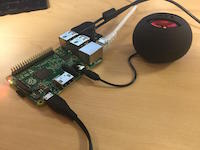 Alexa is mostly restricted to the US, but Amazon has posted a step-by-step guide on how to build your own companion anywhere in the world.
 Laser beam intrusion detection systems, iris scanners and customized access cards are just some of the controls that Google uses to protect its data centers.