Home Blog Page 841

3 Challenges Facing Open Networking, and More from Open Networking Summit

This is the year of open source in networking, The Linux Foundation Executive Director Jim Zemlin told a packed room at Open Networking Summit (ONS) in Santa Clara earlier this month. The industry is gaining momentum, as more network players such as China Mobile profess to adopting SDN, and use open source software to meet their needs.

“2016 is really the confluence of projects up and down the stack,” Zemlin said. “What we’re seeing now is open source projects covering the gamut of technology that’s required to run modern service provider networks and enterprise datacenter networks.”

Nowhere was this breadth of technology more evident than ONS, which featured more than 175 talks covering every aspect of open networking for developers, technologists, operators, service providers and executives. Managers and practitioners alike came together at the event to listen, present, and interact — all with the aim to accelerate development and transform the networking industry.

We’ve collected some of the first day’s keynote highlights, below. Videos are available of more than 20 keynote and plenary sessions from ONS 2016 — watch them now.

3 Challenges Facing Open Networking

Guru Parulkar co-founded Open Networking Summit with Nick McKeown and Dan Pitt in 2011 to highlight the latest developments in software defined networking (SDN), and to accelerate SDN adoption by network operators and service providers.

Parulkar, Executive Director at ON.Lab, said that over the past few years the industry has made amazing progress, overcoming many technological and business barriers. Now we can safely say that a new era of networking is here. According to him this era of networking is defined by three things: disaggregation, software and virtualization, and open source.

He said that open source communities have made much progress in creating technologies that are being adopted by the industry. However, they cannot quite claim success because they have also created new problems and many vendors still use proprietary solutions.

“We are at point where we started with closed and proprietary and we are at risk of ending up with closed and proprietary solutions unless we are careful,” Parulkar said. “We are at risk of winning the battles and losing the wars. and that is what we don’t want as a community after working so hard for it.”

He pointed out three challenges facing the networking industry:  

1) In addition to a disaggregated disaggregated and open source platform that brings lot of value, we have to build and support integrated open source solutions for scalability, high availability and ease of deployment for service providers. If open source solutions don’t bring these to service providers, then the industry will continue to be dominated by closed and proprietary solutions.

2) As we build an open source integrated solution, as well as end-to-end solutions for service providers and network operators, we do need standards — in protocols, at a minimum. We need to guarantee interoperability and prevent vendor lock-in.

3) Business leaders often view open source as a strategic weapon to gain competitive advantage. Companies that focus on this approach will often open source one piece of their solution or enlist a lot of contributors to an open source project in order to steer the outcome to their own advantage. This behavior should be discouraged. Focusing entirely on competitive advantage can be counter-productive to the overall project goals and inhibit progress and innovation.

Finally, Parulkar, pointed out the need for increasing candid dialogue to avoid undue corporate influence in open source.


AT&T Becomes a Software Company

John Donovan, chief strategy officer and group president at AT&T Technology and Operations talked about new data challenges facing operators and service providers.  As more and more data intensive services and apps grow in popularity companies have to change their approach.

“The traditional hardware approach is too slow. The only way to stay ahead of that kind of demand curve is software. We are all-in in virtualizing our network,” he said.

AT&T plans to virtualize 75 percent of its network by 2020, Donovan said, “We committed last year here to 5 percent in 2015 which is the hardest 5 percent, laying the foundation, and we beat that. We did 5.7 percent,” he said. “We are accelerating tremendously to 30 percent by 2016. We have 14 million wireless customers today on our fully virtualized mobile packet core, with millions more being migrated in 2016.”

He announced that AT&T is releasing a white paper on the work it has done internally; he called it ECOMP: Enhanced Control Orchestration Management and policy. It’s the foundation of AT&T’s SDN work.

“We are opening the hood of our network and showing you the engine,” said Donovan.

The ECOMP white paper is available for download and AT&T is seeking feedback on it. Based on the interest around the work AT&T has done internally the company will decide whether to release that work as open source or not.

The company aims to maintain a balance between open sourcing everything and keeping some secrets, he said. “We should retain some secret sauce but it shouldn’t be in a bucket, it should be like tabasco sauce. in a very small vial and be very potent and powerful.”

He said that AT&T is already a heavy user and contributor to open source projects including OpenStack, OPNFV, OpenDaylight, OpenContrail, ON.Lab, the Open Container Initiative, Cloud Native Computing Foundation and the Open Compute Project, among others.

“We doubled our usage of open source software in just the last year going from 5 to 10 percent and that number will continue to grow,” he said

He also addressed one question from the audience how software companies like Google, Facebook, or Amazon are becoming competitors to telcos such as AT&T. Donovan said that software lowers the barrier of entry to the industry and the only thing companies like AT&T can do to control their fate is to make this transition to SDN as fast as they can.

“The foundations of that have been laid out today. The cultural change that we will make as a company is as important as investments we are making technology wise,” he said.

He added that he was moving closer and closer to explaining AT&T’s software transformation in past tense and telling people that “AT&T has become a software company.”


Keynote Panel

The keynote panel “All Together Now: Integrating Networking Open Source Projects,” moderated by Zemlin, included Jonathan Bryce, OpenStack; Neela Jacques, OpenDaylight; Heather Kirksey, OPNFV; Guru Parulkar, ONOS.

The panel dealt with issues like how open source drives innovation, disrupts old business models and create new ones; how standards and open source work together; and how governance provides a level of trust and also ensures that one party won’t dominate a project.

“Historically, whenever there is a really solid open source option, whether it’s Linux or MySQL or the Apache Web server, what you see is an incredible amount of innovation that gets driven when the fundamental building blocks are open,” Bryce said “When someone can work on standard foundation pieces it frees everyone to go to the next level to do amazing things.”

Project Updates

Keynotes were followed by plenary sessions where Changhoon Kim, Barefoot Networks; Chris Price, Ericsson; Neela Jacques, OpenDaylight Project; and Thomas Vachuska, ON.Lab gave project updates on OpenDaylight, OPNFV, ONOS and P4.

Later Ayush Sharma of Huawei talked about “The New ICT Software Stack – A Collaborative platform for Business and Technology Innovation.” He mentioned how wireless carriers are using open source technologies and joked that “open source is in the air.”

The last plenary session of the day gave an overview of the Open CORD Project. The panel was joined by Tom Anschutz, AT&T; Xiongyan Tang, China Unicom; Zsolt Haraszti, PhD, Ciena; Larry Peterson, ON.Lab; Bryan Sadowski, Radisys; Kang-Won Lee, SK Telecom; and Gagan Puranik, Verizon.

Watch all the keynote and plenary sessions from ONS 2016, now available online.
Here’s What’s New in KDE Plasma 5.6

KDE Plasma 5.6 the latest version of KDE Desktop environment has been officially released and announcement by KDE development team. This release offering support for color schemes to the Breeze theme, an improved task manager with support for displaying the progress of tasks, multiple KRunner improvements for a smoother look, the implementation of the Folderview in the Panel and more..


DevOps Networking Forum Kickoff – John Willis & Brent Salisbury, Docker


https://www.youtube.com/watch?v=DZ5gwC1M0Tg

John Willis & Brent Salisbury, Docker
Access all 13 recorded sessions from DevOps Networking Forum: http://bit.ly/1UKWDJV

*****

DevOps 4 Networks founders John Willis and Brent Salisbury kick off the day with opening remarks and a Tech Talk from Ken Mugrage, Technology Evangelist at ThoughtWorks.

This Week in Linux News: R Consortium Prepping New Projects to Advance R, Google Issues Android Vulnerability Patch, & More.

r consortium-100594113-primary.idgeThis week in Linux news: The Linux Foundation’s R Consortium is prepping several new projects to advance the R language, Google issues an emergency Android vulnerability patch, and more! Catch up on this week’s Linux headlines with our weekly digest below:

1) With $200,000 in grant money, the Linux Foundation launches several projects to develop math-and-stats R language.

Money Talks: Linux Foundation Pours Funds Into R Language– InfoWorld

2) Google issues emergency patch for an Android vulnerability while a “Stagefright” exploit is also causing concern.

Google Updates Android for Linux Kernel Flaw– eWeek

3) At Open Networking Summit, AT&T Labs VP explains how telecom vendors and operators are rethinking strategy as focus and adoption of open source software increases.

Open Source Software Altering Telecom Operator, Vendor Space– RCRWireless News

4) Google has found that users on Windows, Mac, and Linux prefer to launch their apps from within Chrome, plans to scrap Chrome app launcher.

Google will kill its Chrome app launcher for Windows, Mac, and Linux in July– VentureBeat

5) 26.2% of developers use Apple’s Mac operating system, while Linux distros having a combined 21.7% usage share.

OS X and Linux Threaten Windows’ Dominance in Developer Market– betanews

How to Hurdle Community Management Obstacles

This is Part 3 in a series of articles on community management best practices…

Although supporting a community offers many benefits to an organization, to imply that there are no risks to the organization or community manager would be disingenuous. When handled poorly, engaging with a community can lead to major growing pains, raging headaches, and total meltdowns. In this article, I’ll discuss how to prevent the headaches before they happen.

If your organization decides to invest in and grow a community, not knowing whyyou are supporting a community and what results you expect is a huge problem. Humans—some more than others—are social creatures, so the appeal of being part of a community can be strong. However, that does not excuse your organization from responsible business practices. Undertaking any sort of large initiative without understanding the business reasons for doing so, or criteria and metrics for success, is irresponsible and not sustainable.

Read more at OpenSource.com

Toonz Software Used by Studio Ghibli Is Now Free and Open Source

Kaguya1Animators aspiring to be the next Hayao Miyazaki are now one step closer to their dreams, as the animation software used by Studio Ghibli is now free and open source.
Toonz is a software package created by Italian studio Digital Video. Designed to aid in the creation of traditional 2D animation, it has been acquired by Japanese telecommunications and media company Dwango, which is planning on releasing it to open distribution. From 26 March, anyone will be able to download Toonz Studio Ghibli Version, which includes features the famed animation house has helped develop. 

Read more at Wired.co.uk

CitusDB Releases An Open-Source PostgreSQL Tool That Promises Better Database Performance

CitusDB, a database analytics startupthat is hoping to take on big boys like Oracle, today announced the release of CSTORE, a columnar store extension for PostgreSQL. The open-source tool, which the company says is the first for PostgreSQL, is available for a free download starting today.

“Columnar stores bring notable benefits for analytic workloads where data is loaded in batches,†said the company in a blog post. That means that companies using this tool could get much better database performance. How much better? CitusDB claims a 2x increase in query times and a data read reduction time of 10x. What’s more, company CEO Umur Cubukcu said in an email that faster analytics queries through advanced optimizations and ~3x compression could drive down storage costs.

Read more at TechCrunch

Kernel Interrupt Overview

What is an interrupt?

An interrupt is an event external to the currently executing program on the CPU e.g. a keyboard input or arrival of a network packet. When these events happen CPU is executing some random program which may be completely unrelated to the event. The hardware device associated with the event like keyboard or network device informs the processor so that it can be processed. This mechanism of informing processor about an event is called interrupt. As the name suggests it interrupts the processor from its current execution to inform the processor about pending event.

How does a device interrupt a processor?

In legacy systems like 8259 there are some fixed lines a device could assert that would let the processor know that an event has taken place. There are 8 supported interrupt lines on 8259. The interrupt line asserted would let the processor know what kind of interrupt is being asserted. A good source of more information about 8259 controller is PIC 8259 Wiki.

What is sharing of interrupts?

As there are only fixed number of interrupt lines what happens if there are more devices that need to be supported? One possible solution is that some interrupt line has to be shared by more than one device. When interrupt line is shared then different devices that are sharing the interrupt line has to provide some unique information to the processor to enable processor to determine which device has asserted the interrupt line. It is unnecessary to provide this information if interrupt line is not shared. 

What the processor does?

When a processor gets interrupted it is executing some program. The processor needs to save the context of the currently executing program before it can respond to the event that generated the interrupt. After saving the program context it calls the interrupt handler for the event that generated the interrupt.

How does the processor know which interrupt handler to run?

When the system is booting up the interrupts are disabled. There are interrupt gates that are set up at boot up time by the kernel. This point to the interrupt handler that needs to be called. The exact process is processor specific. When an interrupt happens, the processor disables the interrupts and depending upon the Interrupt Descriptor Table executes the corresponding interrupt handler for the interrupt. 

What does an interrupt handler do?

When an interrupt occurs, a common interrupt handler code is executed. The common interrupt handler first saves the context of the running process. This includes instruction pointer (IP), stack pointer and other registers needed to resume the process again. This context is usually saved on the stack. Then the context is changed to interrupt stack. The common interrupt handler uses this interrupt stack for its processing and parameter passing. For information about the kernel stack Please see Kernel stack for x86.

 The common interrupt handler code changes the interrupt level to disable all low priority interrupts than the interrupt currently being handled. Only a high priority interrupt could interrupt the interrupt handler. This could result in nested interrupts. The common interrupt handler then calls the specific interrupt handler specific to the current interrupt like keyboard interrupt or network interrupt. So for example e1000_intr is called for e1000e device. The tasks performed by this handler is device specific but there are few generic tasks that are performed like determining the cause of interrupt. The one important task for an interrupt handler is to re-enable the interrupts as soon as possible. The interrupt handler generally defers as much as functionality as possible to be handled later by bottom half. The bottom halves are executed with interrupt enabled. This allows better system response and less latency. In order to inform the bottom halves about the pending interrupts, the interrupt handler raises softirq. This basically adds a poll to a queue and the polling method is called from bottom half. Softirqs are disabled during the execution of bottom half unless nesting is allowed. Some interrupts may be shared. Under certain situations a special kernel thread is invoked to handle the softirqs.

How to Use Your Android Device as a Trackpad on Linux

If you long to have a trackpad on your Linux machine but don’t want to shell out the cash for one, what do you do? If you happen to have an Android device handy, you already have most of what you need to make this happen.

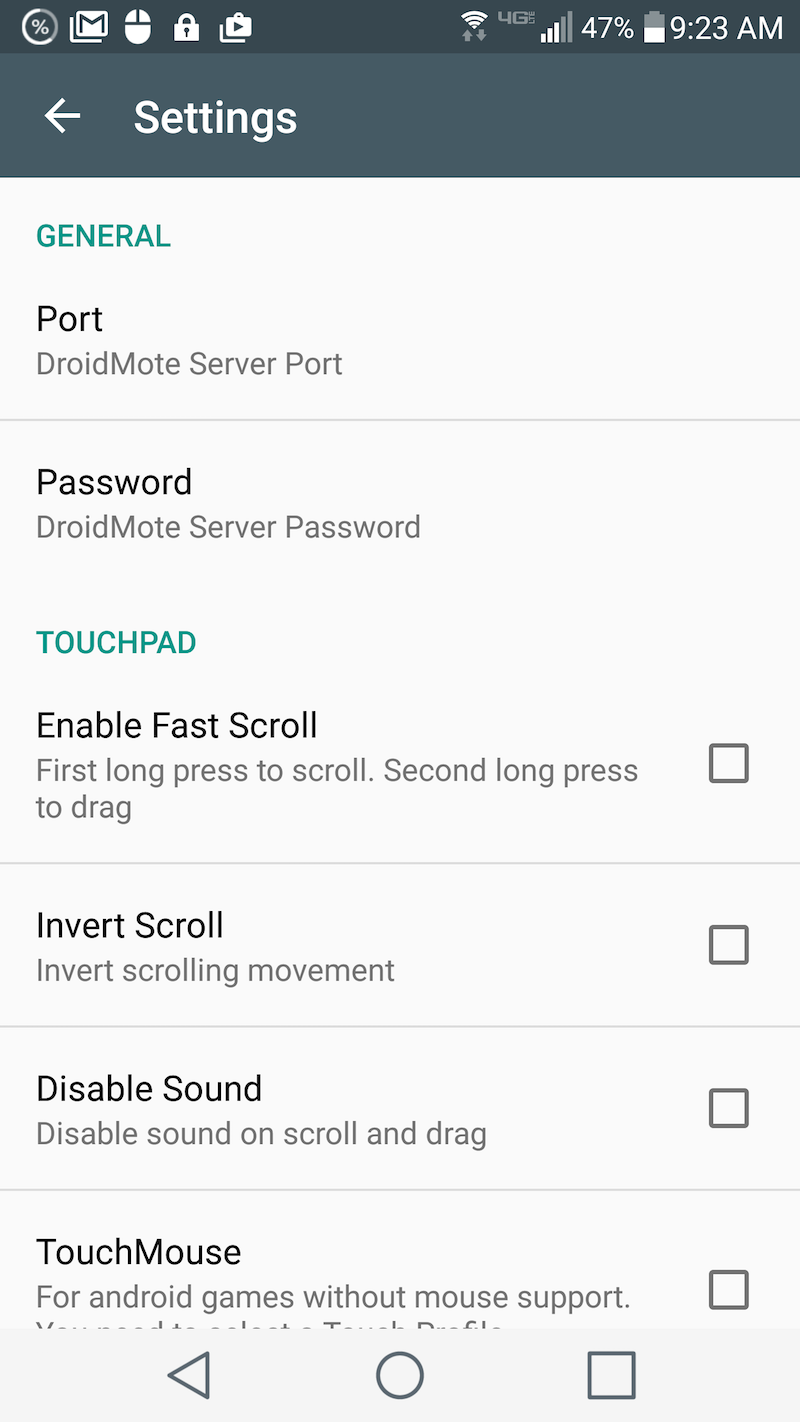
Figure 1: Setting the password for DroidMote.

That’s right, you can turn your Android smartphone or tablet into a sleek trackpad for Linux. For free! What’s best about this solution is you’d be hard-pressed to find a better feeling and responding trackpad than that Android device display. It’s smooth as silk and works better than any trackpad I’ve used.

I’ll walk through the process of setting this up, so you can enjoy the feel of a sweet trackpad on your Linux machine.

What You’ll Need

Most likely, you already have an Android smartphone. The app we’ll be using, DroidMote, requires Android 2.1 or newer. You will also need admin rights on the desktop machine (so the ability to run an app with sudo is perfect). Also, you’ll need the ability to open up port 2302 on your machine/network. I’ll be demonstrating DroidMote on a System76 Leopard Extreme running elementary OS Freya and using a Verizon-branded LG G3 as my trackpad. Finally, you’ll need the DroidMote server. You can download the server for either 32-bit or 64-bit Linux here.

Installing the App

First, you’ll need to install the app on Android. Here are the steps:

  1. Open up the Google Play Store on your device

  2. Search for droidmote

  3. Locate and tap the entry by Videomap

  4. Tap Install

  5. Read the permissions listing

  6. If the permissions listing is acceptable, tap Accept

  7. Allow the installation to complete

Before you open up DroidMote, you’ll need to get the server up and running on your Linux machine.

“Installing” the Server

There is very little to be done on this end, because the downloaded .tar file includes a self-contained server. Here’s what you need to do (I’ll assume you downloaded the file to ~/Downloads):

  1. Open up a terminal window

  2. Change into the ~/Downloads directory

  3. Unpack the file with the command tar xvf droidmote-server-linux-XXX.YYY.tar Where XXX is the system architecture and YYY is the release number)

  4. Give the newly extracted server file executable permissions with the command chmod 777 droidmote

You’re now ready for testing.

Connecting the App to the Server

The first thing to do is start up the server. From within the ~/Downloads directory (this is temporary), issue the command sudo ./droidmote 2302 password (Where password is an actual password to be used). You should then see output like:

Waiting for incoming connections on ip:
192.168.1.145 on port 2302
Client connected with thread 139891787163392

The IP address given is the IP address of the client machine running the server.

Now, head over to the Android device and fire up the app. When the app starts, the first thing you’ll want to do is tap the settings button (three vertical dots in the upper right corner) and then tap Password (Figure 1 above).

Figure 2: The DroidMote main window, ready for action.
Enter the password you used when running the server on the client and tap OK. You can also go through the various settings and tweak them to fit your needs.

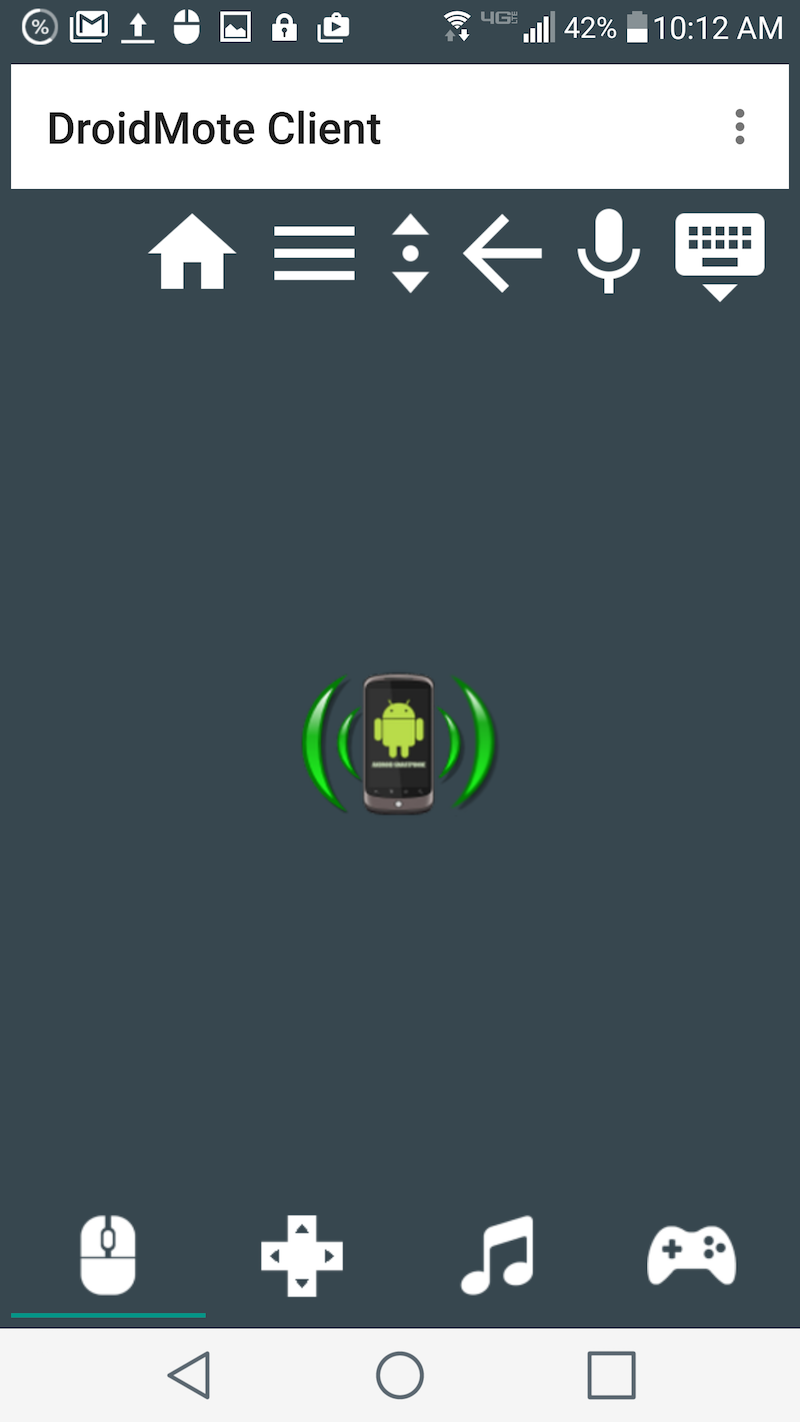
Go back to the DroidMote main window (Figure 2) and tap the droid icon in the center.

When you tap the DroidMote icon in the main window, a listing of IPs will appear (each of which is running the DroidMote server). Tap the address you want to connect to, and you will automatically be connected to the server.

You can now use your Android device as your desktop trackpad. You can also tap the keyboard icon and use the Android keypad as your desktop keyboard. If you have an app set up for voice input, you can tap the mic icon and then use speech to text on your desktop (It shouldn’t surprise you to know that this feature works surprisingly well with Google Docs).

You will also notice an icon with an up and down arrow. If you tap that icon, you can then scroll with the device with one finger. By default, the DroidMote app/server does recognize two-finger input as up and down scroll, but using the scroll icon does make for a much more smooth scrolling experience.

Setting the Server Up to Run Automatically

For the server script to run automatically, you have work through a few steps. How you do this will depend upon your distribution. I’ll walk you through the process of doing this using the Elementary OS Freya Startup GUI. Here’s what you need to do:

  1. With admin permissions, copy the droidmote server to /usr/bin

  2. Make sure the /usr/bin/droidmote has the correct permissions with the command sudo chmod 777 /usr/bin/droidmote

  3. Create a shell script, named startdm.sh (contents below) and save it to /usr/local/bin

  4. Issue the command sudo chmod +x /usr/local/bin/startdm.sh

  5. Open the Elementary OS Settings window

  6. Click on Applications > Startup

  7. Click on the + button

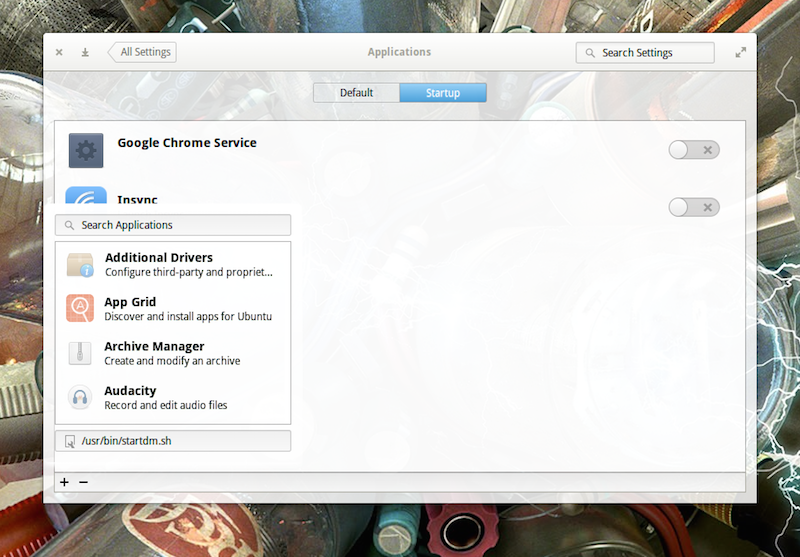
  8. In the text area enter /usr/bin/startdm.sh (Figure 3) and hit the Enter key

  9. You should now see an enabled custom command for DroidMote

  10. Log out of Elementary OS and lot back in

Figure 3: Setting the startup script to run automatically in Elementary OS Freya.

Contents of startdm.sh
#!/bin/sh
droidmote 2302 password &

Where password is the actual password you’ll use.

You should now be able to connect to the DroidMote server. As I mentioned above, how you set DroidMote up to run automatically will depend upon your distribution of choice. However, most desktop distributions offer a Startup app configuration tool.

If you’re looking for a way to make use of your Android device as a trackpad for your Linux box, DroidMote is the simplest, most reliable way to do so. Give this free app and server a try and see if it doesn’t make for one of the smoothest trackpad experiences you’ve ever had with Linux. If you run into trouble, check out the DroidMote FAQ for answers to common questions.

Google to Take on Nuance with Speech Recognition API

google-speechAMGoogle’s “Cloud Speech API” enters limited preview in 80 languages. If you want to build a product with speech recognition capabilities, Nuance has been the default choice for some time. The company’s technology powers Apple’s Siri and Samsung’s S-Voice as well as car computing interfaces from BMW, Chrysler, Ford, and many other automakers.

Google has had its own voice recognition service for some time, but previously it was only used in Google-branded products like the Google app, Google keyboard, or Google.com. Now that voice recognition technology is being opened up to developers. At its NEXT cloud platform conference, Google announced the Cloud Speech API.  

[Video]

Read more at Ars Technica